XPGui
A simple fabric mod: can store player experience
zh_cn:
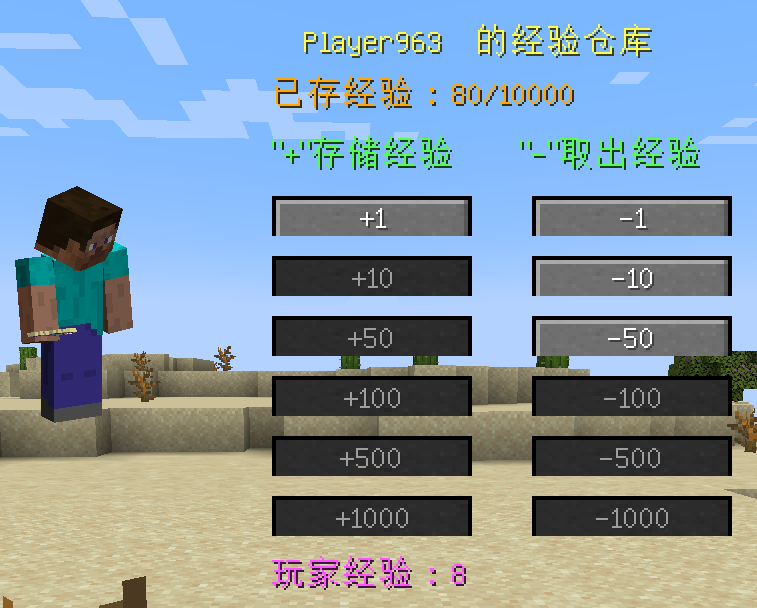
打开背包,点击角色旁边的“体验瓶”按钮,打开储存体验的屏幕。
点击“+”或“-”存储玩家的经验。
即使玩家死亡,仓库中的经验也可以保存。
en_us:
Open the Player Inventory and click the “Experience Bottle” button next to the character to open the screen for storing experiences.
Click “+” or “-” to store the player’s experience.
Experience in the warehouse can be saved even if the player dies.
The Modpack DangerousWorld.
XpGet
# XpGet
A plugin that allows you to convert your experience into experience bottles when you have empty glass bottles.
Supports both fixed amounts and automatic maximum calculation.
Features a GUI interface for more convenient conversion.
# 📸 Screenshots

## ⚙️ Command
| Command | Description |
|——————————|———————————————————————–|
| `/xpget` | Open GUI menu for experience conversion |
| `/xpget [amount | max]` | Converts the specified amount of experience or the maximum possible |
| `/xpget reload` | Reloads the configuration |
### Examples:
– `/xpget 10` — create 10 experience bottles (if enough experience and bottles)
– `/xpget max` — create the maximum possible number of bottles
## 🧾 Permissions
| Permission | Default | Description |
|—————-|—————|—————————————————–|
| `xpget.use` | ✅ true | Allows usage of the `/xpget` command |
| `xpget.reload` | op | Allows usage of the `/xpget reload` command |
## ⚙️ Configuration
“`yaml
# XPGet Configuration
exp-per-bottle: 7 # How much experience is needed to fill one bottle
# You can add your own items, available actions: [close], [cmd]
gui:
size: 27
title: “Experience Conversion”
divider:
enabled: true
material: “GRAY_STAINED_GLASS_PANE”
name: “”
close:
slot: 22
material: “BARRIER”
name: “Close”
actions:
– “[close]”
# main-menu:
# slot: 0
# material: “STONE”
# name: “Main Menu”
# lore:
# – “Click to go to main menu”
# actions:
# – “[close]”
# – “[cmd] menu”
items:
one:
slot: 11
material: “EXPERIENCE_BOTTLE”
amount: 1
name: “1 Experience Bottle”
lore:
– “Click to convert”
– “”
– “Required:”
– “• {exp} experience”
– “• 1 empty bottle”
stack:
slot: 13
material: “EXPERIENCE_BOTTLE”
amount: 64
name: “64 Experience Bottles”
lore:
– “Click to convert”
– “”
– “Required:”
– “• {exp} experience”
– “• 64 empty bottles”
max:
slot: 15
material: “ENCHANTED_BOOK”
amount: 1
name: “Maximum”
lore:
– “Click to convert”
– “to the maximum possible number of bottles”
– “”
– “Will be spent:”
– “• {exp} experience”
– “• {max_bottles} empty bottles”
messages:
player-only: “This command is for players only!”
no-permission: “You don’t have permission to use this command!”
usage: |
Usage:
/xpget [amount|max]
Examples:
/xpget 10 – convert experience into 10 bottles
/xpget max – convert the maximum possible amount
Note: You can convert any number of bottles
config-reloaded: “Configuration successfully reloaded!”
invalid-amount: “Invalid amount! Use a number or ‘max'”
not-enough-exp: “Not enough experience! Needed: {required} experience, you have: {current}”
not-enough-empty: “Not enough empty bottles! Needed: {needed}, you have: {current}”
not-enough-space: “Not enough inventory space! Space available for: {available} bottles”
no-empty-bottles: “You have no empty bottles!”
not-enough-exp-for-one: “You don’t have enough experience to create even one bottle!”
not-enough-space-even: “Not enough inventory space even considering bottle replacement!”
success-specific: “Successfully converted {amount} experience bottles!”
success-max: “Successfully converted {actual} experience bottles!”
“`
## 📦 Installation
1. Download the **latest release**
2. Place it in the /plugins folder
3. Restart the server
4. Configure `config.yml` if needed and use `/xpget reload`
5. You’re ready to use it: use `/xpget` in-game
XpBottle


—
– 🧪 **XP Bottle Creation**: Convert XP into bottles using the `/xpbottle` command.
– 💰 **Tax System**: Configurable tax on XP conversion to prevent abuse.
– ⏳ **Cooldown System**: Prevent command spamming with configurable cooldowns.
– 🔐 **Protected Bottles**: Bottles can be protected from dropping on death.
– 🎨 **Customizable Bottles**: Customize bottle appearance, including material, name, lore, and glow effect.
– 🔒 **Permission-Based Limits**: Different XP limits based on permissions.
– 🔊 **Sound Effects**: Play sounds on bottle creation and redemption.
– 🔧 **ItemsAdder Integration**: Support for custom items via ItemsAdder.
– 👑 **Admin Commands**: Admins can give bottles to players and reload config.
– 🌍 **Multi-Language Support**: Configurable messages.
—

| Command | Description | Permission |
| —————————————————- | ——————————————————– | ———- |
| `/xpbottle ` | Create bottles with a specified amount and XP per bottle | None |
| `/xpbottle help` | Display the help message | None |
| `/xpbottle admin reload` | Reload the configuration and messages | `xp.admin` |
| `/xpbottle admin give ` | Give a bottle to a player | `xp.admin` |
| `/xpbottle admin help` | Display the admin help message | `xp.admin` |
Aliases: `/xp`
—

| Permission | Description | Default |
| ————- | —————————— | ——- |
| `xp.default` | Allows basic use of XP bottles | true |
| `xp.resident` | Allows higher XP limits | op |
| `xp.admin` | Allows admin commands | op |
—

In bottle lore and messages:
| Placeholder | Description |
| ———– | —————————————– |
| `%exp%` | Amount of XP in the bottle |
| `%signer%` | Name of the player who created the bottle |
| `%xp%` | Player’s current XP |
| `%cost%` | Cost in XP for the action |
| `%amount%` | Number of bottles |
| `%time%` | Remaining cooldown time |
| `%player%` | Target player name |
—

The plugin uses `config.yml` for configuration:
## Preview
“`yaml
max-bottle-amount: 1000000 # Maximum bottles per command
min-bottle-amount: 50 # Minimum XP per bottle
conversion-tax: 0.05 # Tax percentage (5%)
cooldown-seconds: 10 # Cooldown in seconds
bottle:
use-itemsadder: false # Use ItemsAdder for custom items
itemsadder-id: “exp_bottle”
material: EXPERIENCE_BOTTLE
name: “#F2EC27&lʙᴏᴛᴛʟᴇ ᴅ’ᴇxᴘᴇʀɪᴇɴᴄᴇ”
lore:
– “”
– “&7xᴘ : &f%exp%”
– “&7ᴘʀᴏᴘʀɪᴇᴛᴀɪʀᴇ : &f%signer%”
– “”
– “#F2EC27ᴄʟɪᴄᴋ ᴅʀᴏɪᴛ &7| &7utiliser la bouteille”
glow: false
reject-crafting: true
reject-villager-trading: true
withdraw-sound:
sound: “ENTITY_COW_DEATH”
enabled: false
redeem-sound:
sound: “ENTITY_PLAYER_LEVELUP”
enabled: true
drop-bottle:
enabled: false
protected-bottles: true
use-perm-based-exp: false
permission:
default:
max-bottle-amount: 1000
min-bottle-amount: 50
resident:
max-bottle-amount: 5000
min-bottle-amount: 50
“`

– **ItemsAdder**: Enable custom bottle items using ItemsAdder.
– **Permissions Plugins**: Supports permission-based XP limits.
XP Tome
### Functionality
This mod adds a single item – the XP Tome. With the XP Tome you can store and retrieve XP. It can store up to 1395 XP by default (can be configured), which equals to having 30 levels on the XP bar.
### Usage
– Sneak + right-click to store XP
– Right-click to retrieve XP
### Recipe

### Config/Item Components
Note: For item components, “true” means the component is on the item, and “false” means it isn’t.
Note: If you want to change the default item components of the XP Tome you can still use the config file, however that comes with caveats explained therein. Consider creating a Data Pack and override the XP Tome’s recipe with the components set as you wish. Here’s an example recipe. More info about data packs and recipes on the wiki!
– *max_xp* – The maximum amount of XP points that the XP Tome can hold. The default value (1395) represents having 30 levels on the XP bar.
– *retrieval_percentage* – The percentage of XP that the book will give back, as a sort of cost of using it. Example: If this config value is set to 0.75, and an XP Tome has 100 XP stored, attempting to retrieve these 100 XP will give back 75 XP. Note: This will not be 100% accurate, as Minecraft’s XP does not use decimals.
– *retrieve_until_next_level* – Setting this to true will remove only as much XP from the book at a time as is needed for the player to reach their next level.
– *retrieve_xp_orbs* – Setting this to true will remove XP from the book in XP orb form. This is useful if you want to use XP from the book for tools enchanted with Mending.
– *store_until_previous_level* – Setting this to true will store only as much XP from the player’s XP bar until reaching the previous level, meaning only one level at maximum will be added to the book’s storage at a time.
The configuration file for Minecraft versions 1.14.4-1.20.1 can be found in the serverconfig folder of your world.
### Further Info
This mod was created by me, following a request by Shivaxi. It is based off of XP Book and was recreated due to a duplication bug in the original mod, as well as a bug which causes the enchanting table to reset each time the book is used. As this mod uses the same modid and item id as the original, the two mods can not be installed at the same time and switching between them will not lose you any items. I did not take any code or assets from the original mod.
You are allowed to use this mod in any modpack.
XP-Sender
# XPTransfer
**XPTransfer** is a lightweight and powerful Minecraft plugin for Paper/Spigot that allows players to transfer their experience points to others seamlessly.
## Features
– **Easy XP Sharing**: Send your XP points to any online player with a simple command.
– **Precise Calculation**: Unlike many other plugins, XPTransfer uses a custom calculation logic to ensure XP levels and bars are updated accurately without vanilla glitches.
– **Multi-language Support**: Fully customizable messages. Comes with English (`en_us`) and Japanese (`ja_jp`) pre-configured.
– **Customizable Permissions**: Define which players or groups can use the transfer feature via `config.yml`.
– **User Friendly**: Includes Tab-Completion for player names to make sending XP faster and error-free.
– **Color Support**: Visual feedback with vibrant colors in chat messages.
## Commands
– `/sendxp ` – Sends the specified amount of XP points to the target player.
– `/sendxp reload` – Reloads the configuration files (Requires OP).
## Permissions
– Default Command: `group.default` (Configurable in `config.yml`)
– Reload Command: Requires OP permissions.
## Configuration
The plugin generates a `config.yml` and a `message/` folder. You can easily switch languages or change the required permission there.
—
# XPTransfer (日本語説明)
**XPTransfer** は、プレイヤー間で経験値をスムーズに譲渡できるようにする、軽量で強力なPaper/Spigot用プラグインです。
## 主な機能
– **簡単エクスペリエンス共有**: シンプルなコマンドで、自分の経験値をオンラインの他プレイヤーに送ることができます。
– **正確な計算ロジック**: バニラの経験値計算の不具合を回避し、レベルと経験値バーが正確に更新されるカスタムロジックを搭載しています。
– **多言語対応**: すべてのメッセージを自由にカスタマイズ可能。標準で英語 (`en_us`) と日本語 (`ja_jp`) に対応しています。
– **権限設定**: `config.yml` から、どのプレイヤーやグループが経験値を送れるかを自由に変更できます。
– **ユーザーフレンドリー**: プレイヤー名のタブ補完に対応しており、入力ミスを防ぎ素早く操作できます。
– **カラーメッセージ**: チャットメッセージに色を付け、視覚的に分かりやすいフィードバックを提供します。
## コマンド
– `/sendxp <プレイヤー名> <数値>` – 指定した経験値ポイントを対象のプレイヤーに送ります。
– `/sendxp reload` – 設定ファイルを再読み込みします(OP権限が必要です)。
## 権限
– 通常コマンド: `group.default` (`config.yml` で変更可能)
– 再読み込み: OP権限が必要です。
## 設定方法
プラグイン導入時に生成される `config.yml` と `message/` フォルダ内のファイルで、使用言語や権限、メッセージ内容を簡単にカスタマイズできます。
XP-like HUD
# **About  XP-like HUD**
**XP-like HUD** (or wixewsky’s XP-like HUD) will change in-game HUD (health, food, armor, etc) to use colored experience-like bars, being very vanilla-friendly.

Originally I made this HUD for Better than Adventure! and published it on Planet Minecraft, but came up porting this to vanilla Minecraft with some improvements and publishing here, on Modrinth.
You can download XP-like HUD for BTA! here!
## Mod Support
This Resource Pack supports 182 mods in total! ≈143 with custom assets and ≈39 tested out*. Currently supported mods:
Expand to see
– AppleSkin by squeek502.
– Amarite by AmyMialee.
– Armor Toughness Bar by pbone64.
– Armor Toughness Bar, Again by paypur.
– Armor Chroma for Fabric by A5b84.
– Armor Chroma by jobicade.
– Farmer’s Delight by vectorwing.
– Brewin’ And Chewin’ by Torty.
– More Heart Types by Oth3r.
– Heartache by spzla.
– Detail Armor Bar by RedLime.
– Detail Armor Bar Reconstructed by Coredex.
– Pick Your Poison by Ladysnake.
– Raised by yurisuika.*
– Colorful Hearts by Terrails.
– Nostalgic Tweaks by rjxkenshin.
– Heart Effects by Doublea06_.
– Victus by glisco.
– Stamina by Insane96.
– PartialHearts by DialingSpoon527.*
– ArmorSkin by IzzyDotExe.
– Extra Armor Info by mrmelon54.
– Insane’s Survival Overhaul (aka IguanaTweaks Reborn) by Insane96.
– Thirst Was Taken by ghen-git and mlus.
– Thirst Bar by 3geE.
– It’s Thirst by capybaro.
– Tough As Nails by Adubbz and Forstride.
– Survive by Stereowalker.
– Simple Hydration by Boid.
– uku’s Armor HUD by uku.*
– Auto HUD by Crendgrim.*
– Homeostatic by wendall911.
– Energy Bar Indicator by Diesse.
– Dehydration by Globox1997.
– Bewitchment by MoriyaShiine and cybercat5555.
– Upgrade Aquatic by Team Abnormals.
– The Aether by The Aether Team.
– Njol’s HUD by Njol.
– Fancy Health Bar by efekos.*
– Armor Hud by SaolGhra.
– SpiffyHUD by Keksuccino.*
– Melancholic Hunger & HUD by antigers.
– Mediumcore by AlexModGuy.
– NutritionZ by xR4YM0ND and Globox1997.
– Health Indicators by AdyTech99.
– Dietary Statistics by Rikka-Kitani.
– Quark by Vazkii.
– Water Source 2 by Koiro.
– Mantle by KnightMiner.
– BedrockIfy by juancarloscp52.*
– Bedrock Hotbar by BizCub.*
– Malum by SammySemicolon.
– Energizer by Gauraaaaaaaa.
– Arthritis by ProstStuff and Bloxedzero.
– Hydration by Exzotic.
– Hydration by BlackVault.
– Armor Points ++ by Cheos and SopsyHallow.
– ParCool! by alRex_U.
– Scaling Health by SilentChaos512.
– Legacy4J by Kyubion Studios.
– Feathers by Elenai.
– Verticality by KrLite.*
– HUDTweaks by burgerindividual.*
– Crim’s Party GUI by Crim and Favouriteless.*
– Hunger Remover by SmushyTaco.*
– Overflowing Bars by Fuzs.
– Mindful Eating by camcam_burger.
– Botania by Vazkii.
– Cracker’s Wither Storm Mod by nonamecrackers2.
– Frostbyte’s Improved Inventory by FrostbyteGames.
– Totem Bar by Yomna.
– I ❤ TFC (I Heart TFC) by alekiponi.
– Leave My Bars Alone by Fuzs.*
– Colorful ui by pustoykishka.*
– Overloaded Armor Bar by Tfarcenim.*
– Crumbling Hearts by KreaDex.*
– Scorchful by TheDeathlyCow.
– Frostiful by TheDeathlyCow.
– Mana Attributes by TheRedBrain.
– Life Fruits by super_okina.
– ArmorHUD by kyh148.
– Vampirism by maxanier and cheaterpaul.
– Would you Rather by EightSidedSquare.
– Chococraft by clienthax and Mrbysco.
– Hudless by ZipeStudio.*
– Withered Hearts by Ramixin.*
– Extended Hotbar by DenWav and unilock.*
– Double Hotbar by sidezbros.*
– RemoveHUD by IzzyDotExe.*
– Better GUI Scaling by yeahimrose.*
– Granular Hunger by Tetro48.
– Blue Skies by Modding Legacy.
– Extra RPG Attributes by cleannrooster.
– RunicLib by Yirmiri and BackupCup.
– Cold Sweat by Mikul.
– Dungeon’s Delight by Yirmiri and Betwixer.
– Additional Saturation by wet_noodles90.
– Advanced UI Scaling by qendolin.*
– Head-down Display Continuation by The_Computerizer.*
– Vehicle Hunger Bar by CrownSheep.*
– Hexed by BackupCup.
– Better Bubbles by IllagerCaptain.
– Vampire’s Delight by GridExpert.
– Meulti’s Backrooms by Meulti and hacone.
– Extended Armor Bars by RebelKeithy.
– Elytra Bar HUD by Fotatata.
– Advanced Armor Bar by Sygikal.
– Saturative by emilahmaboy.*
– More Offhand Slots by TkkynaA.*
– Giacomo’s HUD Overlays Configurator by zacomat.*
– Cyra by Le_Keko.
– Ametrine by nickfluffingfox and Buff_sheep.
– LemonSkin by myxazaur.
– Haema by will_bl.
– Spells & Shields by CAS_ual_TY.
– Oreganized by TeamGalena.
– Fantazia by ArkadiyHimself.
– Secrets of the Void by the_destiny.
– Horseman by mortuusars.*
– Offhand Hotbar by ThePotatoArchivist.*
– Bountiful Fares by Hecco.
– FireHud by LordEnder_Kitty.
– WinWeapons by Lumineade and TheTrueYak.
– Etherology by Faradey and Feytox.
– Fright’s Delight by ChefMooon.
– Metabolism by lilypuree.
– Just Another Witchery Remake by mrsterner and anatevka.
– Toxony by MrFrostyDev.
– SmartHUDReheated by deflatedpickle.*
– CustomHealthHUD by POHH.*
– Ecological Replenishment Station by niannianan and mlus.
– Eternal Starlight by LeoMinecraftModding.
– Eidolon:Repraised by Alexthw46.
– Stellarity by kohara.
– Trailier Tales by FrozenBlock.
– Sweet Calamity by Valent and Valend.
– Better Flight by ArkVeil and rejahtavi.
– Illager Revolution by SangreBK and AstianBK.
– Unusual End by Sweetygamer2 and SashaKYotoz.
– BITE by KevReTV.
– Stamina Attributes by TheRedBrain.
– ExtendedHotbarRebared by deflatedpickle.*
– Eleron by Sindercube.
– Aileron by Lodestar.
– Overhauled Damage by TheRedBrain.
– Combat Roll by ZsoltMolnarrr.
– ArmorWeight by ptayur.
– Goety – The Dark Arts by Polarice3.
– Chai’s Better HUD by Chai.*
– Axiom by Moulberry.*
– Rats by AlexModGuy and GizmoTheMoonPig.
– The Undergarden by quek and GizmoTheMoonPig.
– Galosphere by Orcinus, Ninni and lunarbunten.
– Aylyth by cybercat5555.
– Burnt by pxlbnk.
– JCRAFT: Eyes of Ender by Arna and more.
– L_Ender’s Cataclysm by mcl_ender.
– Unusual Prehistory by peeko322131 and crydigo.
– WitherUtils by klangzwang.
– Sanity: Descent Into Madness by croissantnova.
– StaminaZ by Globox1997.*
– Sprint O’ Meter by PaperScorpio.*
– Goblins & Dungeons by superlord9362 and Weastiann.
– Exotelcraft by TKD_Kedis.
– Euphorics by TalonMinecraft and EightSidedSquare.
– Enigmatic Legacy by Aizistral.
– Legendary Survival Overhaul by krampus_there, armkath and Alex_Hashtag.
– Hardcore Survival by AFrozenRain.
– Nycto by MoriyaShiine and cybercat5555.
– TerraFirmaCraft by eerussianguy, Therighthon, dries007 and alcatrazEscapee.
– Enlightend by lixir and hhumanoid.
– Jaden’s Nether Expansion by ThatJadenXgamer.
– GD656MotionHUD by Minecraft_GD656.*
– Inventorio by RubixDev and LizardOfOz.
– Supplementaries by MehVahdJukaar and Plantkillable.
– Mutant More by AlexandersFunAndGames.
– Confluence: Otherworld by Magic_Team.Jvav.
– Embers Rekindled by RCXcrafter.
– Obscure API by Obscuria.
– Frozify by XZX.
– Defile by RAT and more.
– Slotted Armor HUD by poqbox.*
| * — _mods that already work but were tested for some issues_.
**This count will grow with updates.** If you want to see your favorite mod in this list, DM me on Discord or Telegram (read Contact). Some mods not included in this list can work without issues, but it is not guaranteed. Forks of included mods must work fine, if textures and texture structuring was not affected by the fork. I recommend use mod versions that were released before XP-like HUD’s update since some mods may add more content in the HUD or change it with updates.
Due to the rounded corners, some mods, like hunger removal or HUD flipping mods, may cause some visual problems. You can download sharp or circular corner variant to fix these compatibility issues. Just download additional (supplementary) file by selecting it on download page, since it is not the main version of this Resource Pack. Also you can find an addon for flipped armor bar inside .zip file.
## Variants and Addons
This Resource Pack comes in three variants:
– **Rounded**: The main variant, rounds only the left or right side of bars, depending on its position.
– **Sharp**: No corners of the bars are rounded.
– **Circular**: Every corner of the bars is rounded.
This Resource Pack includes four optional addons inside .zip file:
– **Pre-hunger Addon**. Flips armor and oxygen bars for better experience with hunger removal mods.
– **Numbered Hotbar Addon**. Adds numbers on hotbar for better accessibility.
– **Alpha and Beta Addon**. Extends XP-like HUD’s support to every single Minecraft version.
– **Armor Chroma Addon**. Adds full compatibility for Armor Chroma and Armor Chroma for Fabric.
Due to some limitations with assets count, some XP-like HUD versions on Minecraft 1.20.3 and below can crash your game because it has too much folders inside assets. Delete useless mods, update your game, use version with less content, or use older Resource Pack versions, there is nothing I can do (except stop adding more and more mod support) (Minecraft 1.20.X and below worked fine on my end while I was testing mods ever since I added “CRASH FIX” and “Vanilla” versions inside main .zip btw).
You can leave a comment on Planet Minecraft!
## Contact
If you want contact me, ask a question, help with development, suggest a mod to support, or report a bug, DM me on Discord **@wixewsky** or Telegram **@wixewsky**.
License and Legal
You are **NOT allowed** to:
– Publish this Resource Pack or its modifications on third-party websites and platforms without permission AND original Modrinth link.
– Steal or modify this Resource Pack unless it is for personal use or help with develepment.
– Port and publish this Resource Pack to the Bedrock Edition or BE’s Marketplace.
– Sell this Resource Pack.
– Share this Resource Pack as a file on your media, like Telegram channels.
You are allowed to do anything not included in this list, like including this Resource Pack to your modpacks or use it in your videos or livestreams.
If you are not sure what you are allowed or disallowed to do, feel free to DM me on Discord or Telegram.
This Resource Pack officially published **ONLY** on Modrinth and Planet Minecraft, if you downloaded it from somewhere else, you have been scammed and you shouldn’t use these websites ever again. **They deprive authors of revenue, overtake traffic and adding virues in their reuploads**.
This list can be changed at any moment. LICENSE.txt can be different from this section.
A stable and bug-free experience is not guaranteed, especially with old Minecraft versions or a modded client. **In my experience**, vanilla and modded Minecraft 1.20.1, 1.21.1 and 1.21.8 worked perfectly fine. Modded Minecraft 1.21.8 with a few supported mods worked fine as well.
XP = LIFE
✨ SoulXP
SoulXP is a plugin that transforms your life force (XP) into a livelihood, serving as the core of the server’s economy.
💰 The Living Economy
Instead of gold or coins, Raw XP is your primary currency.
Utility: Use it for trading with players or stocking Vault-compatible shops.
The Flat Curve: After Level 40, the XP curve flattens. Leveling from 140 to 141 is just as easy as leveling from 45 to 46.
Soul Shards: Use /soul withdraw to create physical items. These can be traded, sold, or right-clicked to absorb the XP back.
⏳ Survival & The “Soul Take”
You are a living battery, and the server is constantly draining your energy.
The Drain: Every minute, the “Soul Take” consumes 200 Raw XP.
The Floor: You will never drop below Level 20 via the drain. This is also your starting and respawn level.
Death Penalty: Dying removes 100 levels. If your level is already low, you simply reset to the Level 20 floor.
🎭 Status & Power Tiers
Your current XP level directly dictates your physical strength and status:
🌑 Hollow (0 XP): Severe penalties, smoke particles, and a grayed-out name.
🏚️ Weakened (< Lv. 20): Inflicts Slowness, Weakness, and Mining Fatigue.
⚡ Ascended (> Lv. 60): Grants permanent Strength and Speed.
👑 Elite (> Lv. 150): Scaling buffs that cap at Strength III and +10 Bonus Hearts.
🛠️ Commands & Tools
Player Commands
/soul balance: Check your current XP wealth.
/soul pay : Transfer raw XP to another player.
/soul top: View the leaderboard of the strongest souls.
Admin Commands
/soul admin : Manage the economy.
/soul admin reload: Refresh the plugin configuration.
🧩 PlaceholderAPI Support
Display soul data in menus and scoreboards using:
%soul_balance%, %soul_raw_xp%, %soul_is_hollow%, and %soul_next_drain%.
XP Level = World Border
## Description
This datapack makes the world border grow with your experience level, resulting in a unique and challenging experience.
You can configure how large the border will be at the start and how much it grows with gained levels. When used in multiplayer, the experience of all online players gets added up.
## Configuration
### Menu
Use “`/trigger levelborder“` to open the configuration menu.
### Start Size
To configure how large the border should be at the start, use “`/trigger borderStartSize set “` (replace value with the size is blocks).
### Multiplier
Change how much the border will grow for each level gained, by using “`/trigger borderMultiplier set “` (replace value with the growth in blocks/level).
XP extract
# XP Extract
A Minecraft datapack that allows players to extract their experience levels and convert them into experience bottles for storage or trading.
## Features
– Extract 1, 5, 10, or all experience levels at once
– Converts levels into experience bottles based on accurate XP calculations
– Uses Minecraft’s official experience formulas for precise conversion
– Simple trigger commands – no complex setup required
– Compatible with Minecraft 1.21.6+
## Commands
Use these trigger commands to extract your experience:
– `/trigger extrct-1-lvl` – Extract 1 experience level
– `/trigger extrct-5-lvl` – Extract 5 experience levels
– `/trigger extrct-10-lvl` – Extract 10 experience levels
– `/trigger extrct-all-lvl` – Extract all experience levels
XP Crystals
# XP Crystals
Ever wished you could bank your hardearned **XP** without the risk of dying and losing it all? With **XP Crystals**, you can **store** and **retrieve** your experience safely, using items that are fully compatible with **survival** gameplay.
_Available as **mod** or **datapack**._

## Features
– Store XP in craftable crystals
– Crystals come in multiple tiers, each with a different capacity:
– Tier I: 3 levels
– Tier II: 10 levels
– Tier III: 30 levels
– Tier IV: 50 levels
– Tier V: Infinite XP storage
– Survival oriented, with balanced crafting recipes.
– Multiple Advancements
– Easy to use: right click to deposit or withdraw XP
– Settings menu for both admins and normal players
– Serverside (resource pack required for clients)
### Settings
admins may use /trigger xp_crystals.globalsettings
players may use /trigger xp_crystals.settings
Player Settings
Sound Effects [Turns on or off soundeffects per player]
Global Settings
– Strict Mode: Enables accurate XP point calculation instead of using XP levels only (Enabled by default)
– Toggle global sound effects on or off.
– Hardcore Mode: Automatically awards an achievement that can only be obtained by dying.
– Uninstall Function: Removes all data left over from the datapack/mod~~~~.
### installation
**Mod Version:**
– Singleplayer: Add the mod into the mods folder. Done
– Multiplayer: Server requires mod, Clients only need resource pack
**Datapack Version:**
– Singleplayer: add datapack into the worlds datapack folder, add the resource pack to your resource pack folder.
– Multiplayer: Server requires datapack, Clients only need resource pack
## Need Help? Want to offer feedback?
join the Discord