# 
### This modpack is meant to supply content creators with the _**bare minimum**_ yet _**must have**_ mods to get started recording videos. Available for NeoForge and Fabric. Please check which version you are downloading.
## Features
### Performance
This modpack contains mods like Sodium, Dynamic FPS, Clumps and more to improve performance while playing and creating videos!
### Cinematics
Mods like Flashback or Replay Mod are not available for NeoForge. However, mods like CMDCam, Zume, and Motion Capture give us the opportunity to create some great cinematic shots while using NeoForge.
### Quality of Life
This modpack has a couple of mods to make life a bit easier while playing like sorting chests with Inventory Profiles Next or seeing your location with Coordinates Display!
### Better Visuals
Included in this modpack is four optional shader packs for Iris. Anti-Aliasing provides some upgraded Vanilla visuals. BSL Shaders and Complementary Shaders (Reimagined and Unbound) are some of the most downloaded modpacks available for great reason!
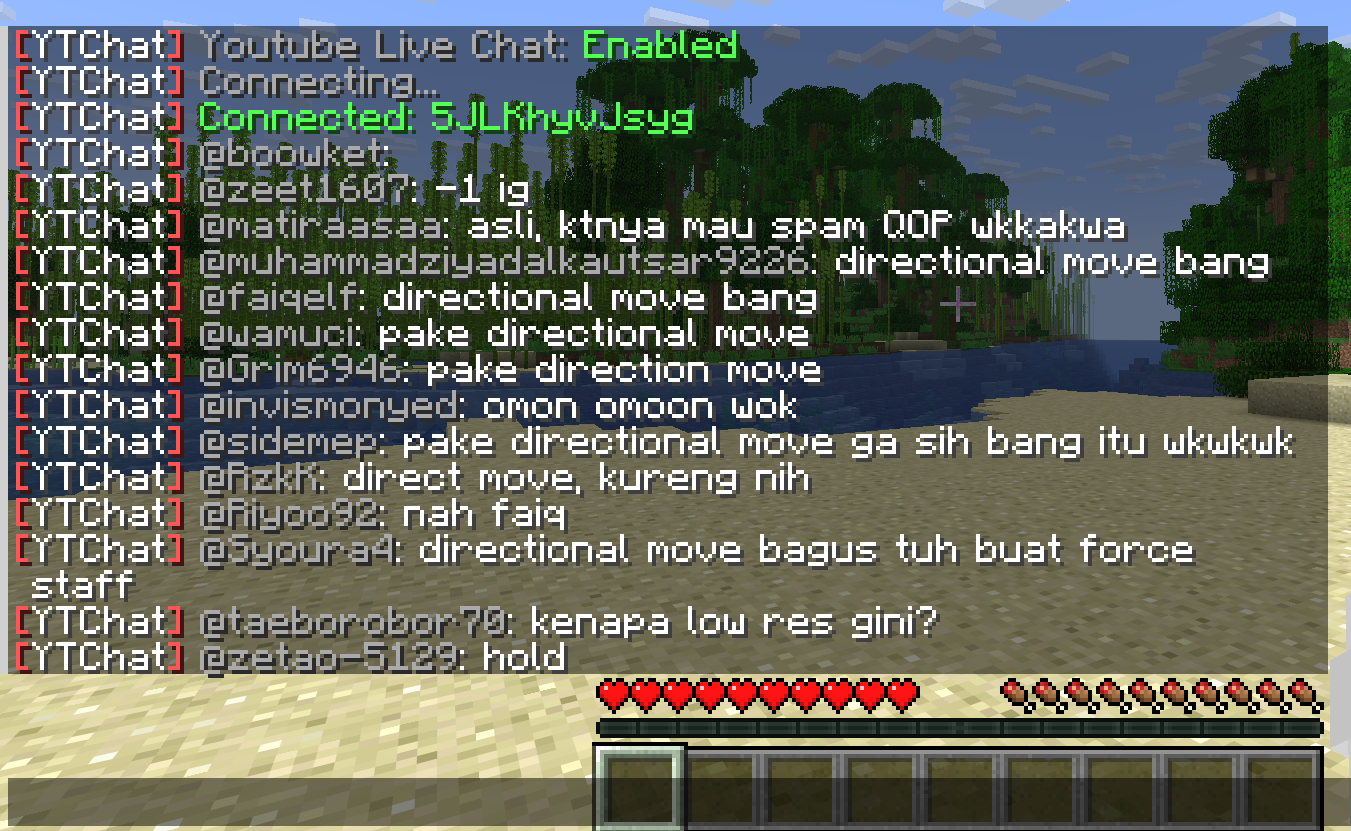
A Minecraft plugin for Spigot/Paper servers that seamlessly integrates YouTube Live Chat into your server. Messages sent during a live stream are displayed in real-time directly in the in-game chat, allowing players to interact with live audiences effortlessly.
### ✨ Features
– Real-time YouTube Live Chat integration
– Displays live stream messages in Minecraft chat
– Easy configuration and setup
### 🎮 Use Cases
Perfect for streamers who want to connect their in-game players with their YouTube audience, creating a more interactive and engaging experience.
### ⚙️ Compatibility
– Bukkit / Purpur / Paper / Spigot servers
– Modern Minecraft versions
Have you ever wanted to be an inspiring Content Creator? But you have no idea what Mods and Shader Packs your Favorite Creators are using? Well.. This Modpack is just for you!
Being a Content Creator has never been this simple!
### Disclaimer [IMPORTANT]:
I’m new to making Modpacks. So make sure you backup your Worlds, Configs, and other Files related to your Saves/Servers BEFORE updating to the newer versions of this Modpack.
### Key Features:
🎥 Flashback – Take your Storytelling to the next level. By creating amazing Cinematics or Timelapses for your videos.
🔍 WI Zoom – Using Zoomify you can Zoom In/Out to capture the funniest moments or zooming into your characters face for Storytelling. – Also using your Scroll Wheel you can change your Zoom Distance to enhance that specific moment.
📷 Fabrishot – Using Fabrishot you can take High-Quality Screenshots for Thumbnails or Posting them to Social Media.
⛏️ Litematica – Litematica allows you to make Schematics or Download Custom Schematics of Farms, Builds, Redstone Contraptions and many more!
🌐 Performance – While Recording your FPS and entire gameplay might slow down if you don’t have a good enough PC. But with this Modpack, we’ve added some Performance Tweaks to help your content creation go from BAD to AMAZING!
This Resource Pack Ads Piano Covers from Yo-Kai Watch. And Some Paintings Which are also Yo-Kai Watchj Themed. So if You Want a Resource Pack with Yo-Kai Watch Stuff, This Is Your way to go. Thank You :3
Your PC Mine
# YPM — Your PC Mine
A Fabric mod that lets you mess with your friends directly from a Minecraft server. Built for ARGs, horror maps, or just chaotic fun — you type a command, and something happens on their screen. Or their desktop. Or their PC.
> ⚠️ **Must be installed on both server and client.** Players without the mod will be kicked on join.
—
## ✨ What you can do
### `/ypm error “Title” “Text” [freeze]`
Pops a fake Windows error dialog on their screen. Add a freeze time to lock up their game first, then show it. Use `|` for line breaks.
### `/ypm freeze
### `/ypm windowshake
### `/ypm image
### `/ypm wallpaper `
Changes their **actual desktop wallpaper**. Yes, for real.
### `/ypm web `
Opens a URL in their **browser**. While they’re playing.
### `/ypm txt “filename” “text”`
Creates and opens a `.txt` file in Notepad with whatever you want it to say. Use `|` for line breaks.
### `/ypm minimize `
Minimizes their Minecraft window. Poof.
### `/ypm shutdown `
Shuts down their PC.
### `/ypm reboot `
Reboots their PC.
### `/ypm chat “text” [–send] [–perspective]`
Opens their chat and types text as if it’s them. Flags:
– `–send` — sends the message automatically
– `–perspective` — switches their camera view while typing
### `/ypm perspective `
Switches their camera between first and third person.
—
## 🛡️ Player protection — `/ypmconfig`
Players can restrict what the operator is allowed to do on their machine:
### `/ypmconfig canopenweb `
Block the operator from opening URLs. When blocked, a **fake browser window** appears inside the game instead of actually opening the browser.
### `/ypmconfig canshutdown `
Block shutdown and reboot commands. When blocked, a **fake shutdown/reboot screen** appears inside the game — the PC is not touched.
### `/ypmconfig enablesafemode `
Enable **Safe Mode** — the most complete protection. All out-of-game actions (browser, Notepad, wallpaper, shutdown) are fully simulated inside Minecraft. Nothing reaches the real OS. Each fake action queues up properly so multiple commands don’t stack or conflict.
—
## 📡 Operator feedback
When you run any `/ypm` command, the server tells you the mode each player is in:
“`
[YPM] Error sent to 3 player(s) | Normal: 2, SafeMode: 1
“`
So if you’re running an ARG with a group, you always know who will get the real effect and who is in safe mode.
—
> 🎭 Made for ARGs, horror maps, and pranks between friends on private servers. Please don’t be evil.
—
# На русском
Fabric-мод, который позволяет троллить друзей прямо из Minecraft. Создан для ARG, хоррор-карт и просто хаоса — ты пишешь команду, и у них что-то происходит. На экране, на рабочем столе или вообще с компьютером.
> ⚠️ **Нужен и на сервере, и у клиента.** Без мода игрок не зайдёт — его кикнет при подключении.
—
## ✨ Что можно сделать
### `/ypm error <игрок> “Заголовок” “Текст” [заморозка]`
Показывает фейковое окно ошибки Windows. Можно сначала подвесить игру, а потом показать. Символ `|` — перенос строки.
### `/ypm freeze <игрок> <время>`
Полностью вешает игру на заданное время (например `10s`, `2m`). Ничего не работает — ни мышь, ни клавиши.
### `/ypm windowshake <игрок> <время> <сила 1-10> [–noise] [–fullwindowed] [–restore]`
Трясёт окно Minecraft. Сила от 1 до 10. Флаги:
– `–noise` — хаотичная тряска вместо плавной
– `–fullwindowed` — растягивает на весь экран перед тряской
– `–restore` — возвращает окно на место после
### `/ypm image <игрок> <время> [fadeout]`
Показывает картинку по ссылке на весь экран поверх игры. Поддерживает плавное исчезновение.
### `/ypm web <игрок> `
Открывает ссылку в их **браузере**. Прямо во время игры.
### `/ypm txt <игрок> “имяфайла” “текст”`
Создаёт и открывает `.txt` в Блокноте с твоим текстом. Символ `|` — перенос строки.
### `/ypm minimize <игрок>`
Сворачивает окно Minecraft. Просто так.
### `/ypm shutdown <игрок>`
Выключает их компьютер.
### `/ypm reboot <игрок>`
Перезагружает их компьютер.
### `/ypm chat <игрок> “текст” [–send] [–perspective]`
Открывает чат и печатает текст, как будто это они сами пишут. Флаги:
– `–send` — отправляет сообщение автоматически
– `–perspective` — переключает камеру во время набора
### `/ypm perspective <игрок>`
Переключает камеру между первым и третьим лицом.
—
## 🛡️ Защита игрока — `/ypmconfig`
Игроки могут ограничить то, что оператор может делать с их компьютером:
### `/ypmconfig canopenweb `
Блокирует открытие ссылок оператором. При блокировке вместо реального браузера открывается **фейковый браузер внутри игры**.
### `/ypmconfig canshutdown `
Блокирует команды выключения и перезагрузки. При блокировке показывается **фейковый экран выключения** — ПК не затрагивается.
### `/ypmconfig enablesafemode `
Включает **Safe Mode** — максимальная защита. Все действия вне игры (браузер, блокнот, обои, выключение) полностью имитируются внутри Minecraft. До реальной ОС ничего не доходит. Несколько команд подряд корректно выстраиваются в очередь — никаких конфликтов.
—
## 📡 Обратная связь для оператора
При любой команде `/ypm` сервер показывает режим каждого игрока:
This mod is part of The Vanilla Experience modpack and Serilum’s Quality of Life Bundle mod. Your Items Are Safe is a mod which can function as an alternative to the existing gravestone mods, by using only vanilla blocks. When a player dies, it will keep their items from despawning. It does this by creating an armor stand with equiped gear and a chest with the items from the inventory. A sign will be placed on the chest with the player’s name. If the inventory does not fit into one chest, another one above it is generated. The armor stand stands above the chest. All features can be turned on/off via the config. If a player dies in the void, the chest will be placed above the death coordinates.
To keep it balanced the chests and armor stand can only be created if the player has enough wood in its inventory. A chest requires either 2 logs, 8 planks or an actual chest. The armor stand requires 1 log or 3 planks. The mod searches for logs first, then planks, then chests. If it can’t find the raw material needed, the chest and armor stand is not generated. If you’d like to always generate them, even without raw materials, this can be set in the config file as well.
The mod also contains the functionality to generate a player head and put it on the armor stand. This makes it easier to identify which player has died where. If the player had a helmet equiped, it is placed inside the chest. Enabled by default. But again, this can be disabled in the config.
Configurable:( how do I configure? ) mustHaveItemsInInventoryForCreation (default = true): When enabled and a player dies without any items in their inventory, no chest or armor stand is generated. addPlayerHeadToArmorStand (default = true): If a player head should be added to the armor stand. If a helmet is worn, this will be placed into the chest. createArmorStand (default = true): Whether an armor stand should be created on death. If disabled, the player’s gear will be placed inside the chest. createSignWithPlayerName (default = true): Whether a sign should be placed on the chest with the name of the player who died there.
needChestMaterials (default = true): Whether materials are needed for the chest which spawns on death. This can be the actual chest or the costs in raw materials. needArmorStandMaterials (default = true): Whether materials are needed for the armor stand to spawn on death. This can be the actual armor stand or the costs in raw materials. needSignMaterials (default = false): Whether materials are needed for the creation of the sign when ‘createSignWithPlayerName’ is enabled. ignoreStoneMaterialNeed (default = true): Only relevant if ‘needChestAndArmorStandMaterials’ is enabled. An armor stand needs 1 stone slab to be created, but I think it’s alright to ignore that requirement. If enabled, no stone is needed in the inventory on death.
createChestAboveVoid (default = true): If a chest should be placed right above the minimum build height when a player dies in the void. createVoidPlatform (default = true): If a 3×3 platform should be created below the chest above the void. ‘createChestAboveVoid’ must be enabled.
sendMessageOnCreationFailure (default = true): If a message should be sent if the chest or armor stand can’t be created due to missing materials. sendMessageOnCreationSuccess (default = true): If a message should be sent on successful creation of the chest(s) and armor stand. sendDeathCoordinatesInChat (default = true): If the player’s death coordinates should be sent in the chat below the ‘sendMessageOnCreationFailure’/’sendMessageOnCreationSuccess’ message.
creationFailureMessage (default = “Your items are not safe due to having insufficient materials. Missing: %plankamount% planks.”): The message sent on creation failure with ‘sendMessageOnCreationFailure’ enabled. Possible replacement values: %plankamount%, %stoneamount%. creationSuccessMessage (default = “Your items are safe at your death location.”): The message sent on creation success with ‘sendMessageOnCreationSuccess’ enabled.
Some examples: An armor stand and chest generated after death:
Two chests generated after death, because the inventory didn’t fit in a single one:
One chest and an armor stand created after death:
Show Spoiler
The previous death results in the following:
Show Spoiler
Here the player has no wood in its inventory. The chest/armor stand is not generated:
Show Spoiler
The player does have some planks in its inventory, but not enough. This is shown in the chat via a message:
Show Spoiler
The inventory is completely full, so 2 chests are needed to store everything. Luckily the player has more than 19 planks:
Show Spoiler
When a player dies in the void, the chest is placed on the initial position above it with a cobblestone platform.
Death coordinates are sent in the chat. Can be disabled in the config.
——————
You may freely use this mod in any modpack, as long as the download remains hosted within the Modrinth ecosystem.
Serilum.com contains an overview and more information on all mods available.
Comments are disabled as I’m unable to keep track of all the separate pages on each mod. For issues, ideas, suggestions or anything else there is the Github repo. Thanks!
YouCantHaveThat
Prevents obtaining/breaking any item of your choice.
Great for protecting your server or spicing up survival.
## Features
– Prevents obtaining / breaking / placing.
– Scans inventory/containers when opened.(Can be toggled off for survival fun now.)
– Detects offhand.
– Lightweight. Operates completely through player actions.
Multiplayer servers that like to keep a Vanilla gameplay feel disallow Litematica specifically because of the EasyPlaceMode feature. This feature allows players to, with a single click, load into their hand and place any Litematica schematic block anywhere in game – even in the air. YouArch removes or modifies this and other Litematica features so that these servers can allow Litematica’s schematic functionality without the block placing functionality.
Specific features addressed in this mod:
– EasyPlace. This option has been removed from the HotKeys menu and the code disabled.
– PickBlockLast and PickBlockFirst have been modified such that “Cancel Further Processing” is always TRUE. This prevents the player from mapping the PickBlock hotkey to Minecraft’s place block key allowing the player to both load a schematic block into their hand and place it in game in one click. It is a lot like EasyPlace but without the ability to place blocks in the air.
**This mod is NOT affiliated with Litematica or supported by the Litematica developers.**
YouArch? Though this is 99.5% Litematica, to ensure there is no confusion we chose a completely unrelated name. YouArch is a double meaning – You Architect and uArch (a term used in the microprocessor industry that refers to the architectural design of the chip).
You Think I’m Bread?!?!
this mod makes the bread look like grian
Version 1.6.1-1.10.2:
tested on 1.6.1, 1.7.10, 1.8.9, 1.9, and 1.10.2
Version 1.11-1.12.2:
tested on 1.11 and 1.12.2
says it’s meant for a newer version but its not
Version 1.13-1.14.4:
tested on 1.13-1.14.4
Version 1.15-1.21.5:
tested on 1.15, 1.16.3, 1.18.2, 1.20.1, 1.21.1, and 1.21.5
this will likely work for future versions as well
update: tested on 1.21.11 as well
notes: older versions have the new-looking texture
oftentimes, it will say it is meant for an older or newer version of minecraft, but this can generally be ignored
You Received a Crit from the Arrow│你受到了箭矢的暴擊
# Function│功能
Arrows fired by AI mobs with bows or crossbows will now be crit arrows.│現在AI生物透過弓或弩所射出的箭矢都會是暴擊箭矢。


