sword texture pack
This is a sword pvp texture pack + axe and border ores which enhance your minecraft playing experience you should try it atleast one time this increases sword looks and axe.
IMP
It also have border ores which highlights the ore from far which help you to get ores more easily
Zenless Radio
# Zenless Radio 📻
The go-to resource pack for Zenless Zone Zero Music! Inspired by [Puff Radio](https://modrinth.com/project/YLcccJCk).
This resource pack is meant to replace all Minecraft music with music from Zenless Zone Zero. Made by ZZZ fans for ZZZ fans! All music is especially curated to fit the proper environments in game for seamless immersion!
This resource pack is support mainly on 1.21.x & 1.20.x as of writing but you may find success on older (and future) versions as well.
All music is sourced from https://downloads.khinsider.com/
# LighterWise Pack 🧡🔦
If you’re a fan of ZZZ and LighterWise, consider checking out [LighterWise Pack](https://modrinth.com/project/t06gpLHc)
🏳️🌈
ZenithVoid
🌀 ZenithVoid: Ultimate Core Progression
ZenithVoid is a lightweight but powerful progression plugin that introduces the legendary Zenith Cores. Tired of losing your potion buffs when you die? ZenithVoid allows you to craft and “consume” powerful cores that grant permanent, tiered status effects that stay with you forever.
🌟 Key Features
Permanent Soul-Binding: Once you right-click a Zenith Core, the power is bound to your UUID forever.
Tiered Progression: Start with basic survival buffs and work your way up to becoming a demi-god.
No Lag & No Particles: Optimized event handling ensures zero server lag and no annoying potion swirls on your screen.
🛠️ The Three Tiers of Power
Each tier requires a specific “base” block in the crafting grid to determine the level of power.
Tier I
Permanent Effects:
⚡ Speed I
⚔️ Strength I
Tier II
Permanent Effects:
⚡ Speed I
⚔️ Strength I
🔥 Fire Resistance I
Tier III
Permanent Effects:
⚡ Speed II
⚔️ Strength II
🔥 Fire Resistance I
🛡️ Resistance I
🧪 How to Use
Crafting: Arrange the ingredients in a crafting table.
Top Row: Enchanted Apple | Nether Star | Enchanted Apple
Middle Row: Diamond Block | Netherite Block | Diamond Block
Bottom Row: Enchanted Apple | Wither Rose | Enchanted Apple
Activation: Hold the Core in your hand and Right-Click.
Ascension: You will hear a chime and see a flame burst—your powers are now active forever!
💬 Support & Community
Join our community to report bugs, suggest Tier IV features, or get help with the plugin!
Discord Server: https://discord.gg/vk6VBpZXEk
ZenithUI
# Preview
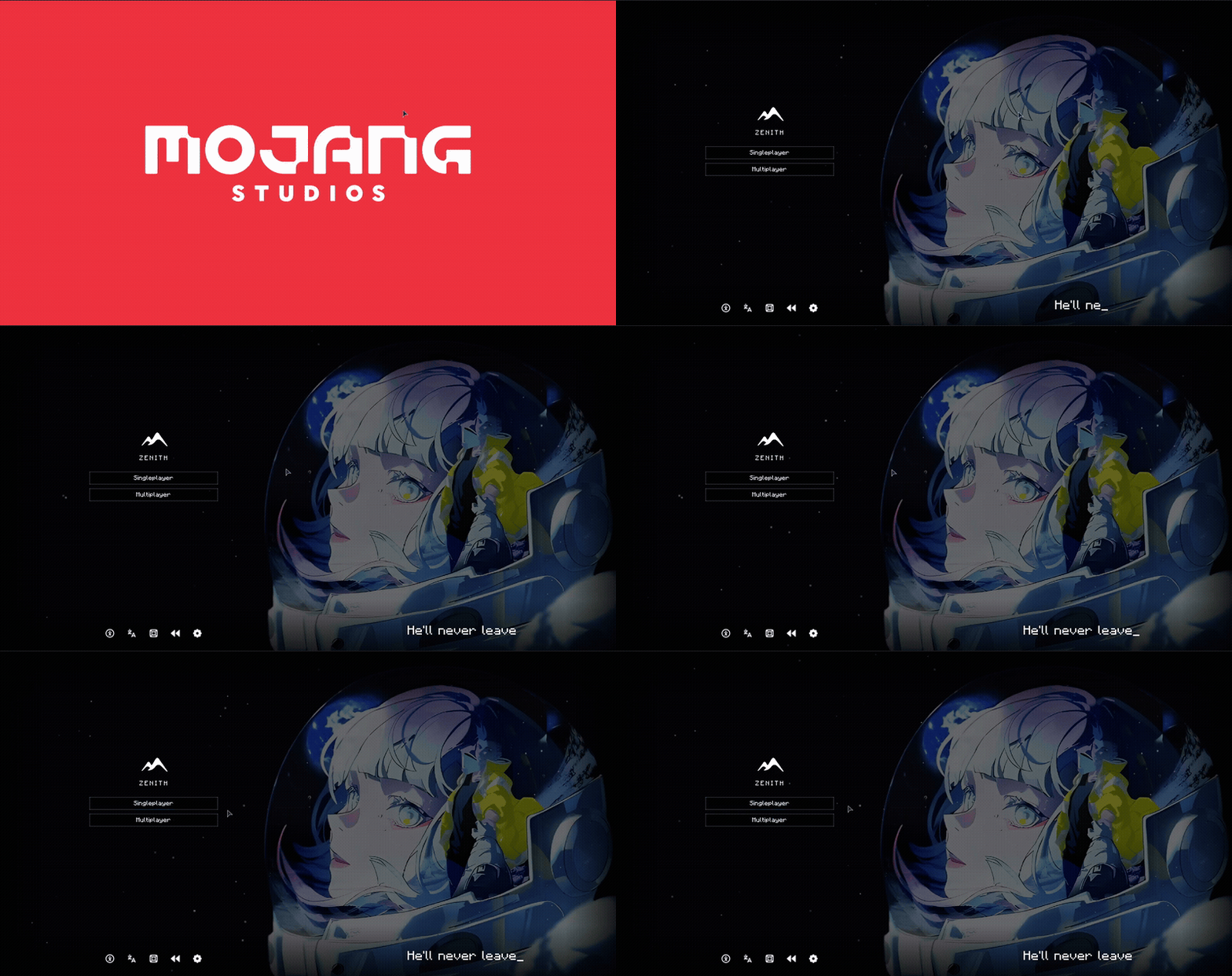
Zenith is a client-side Fabric mod that completely replaces Minecraft’s default title screen with a custom-designed interface.
# Loading-screen replacement.
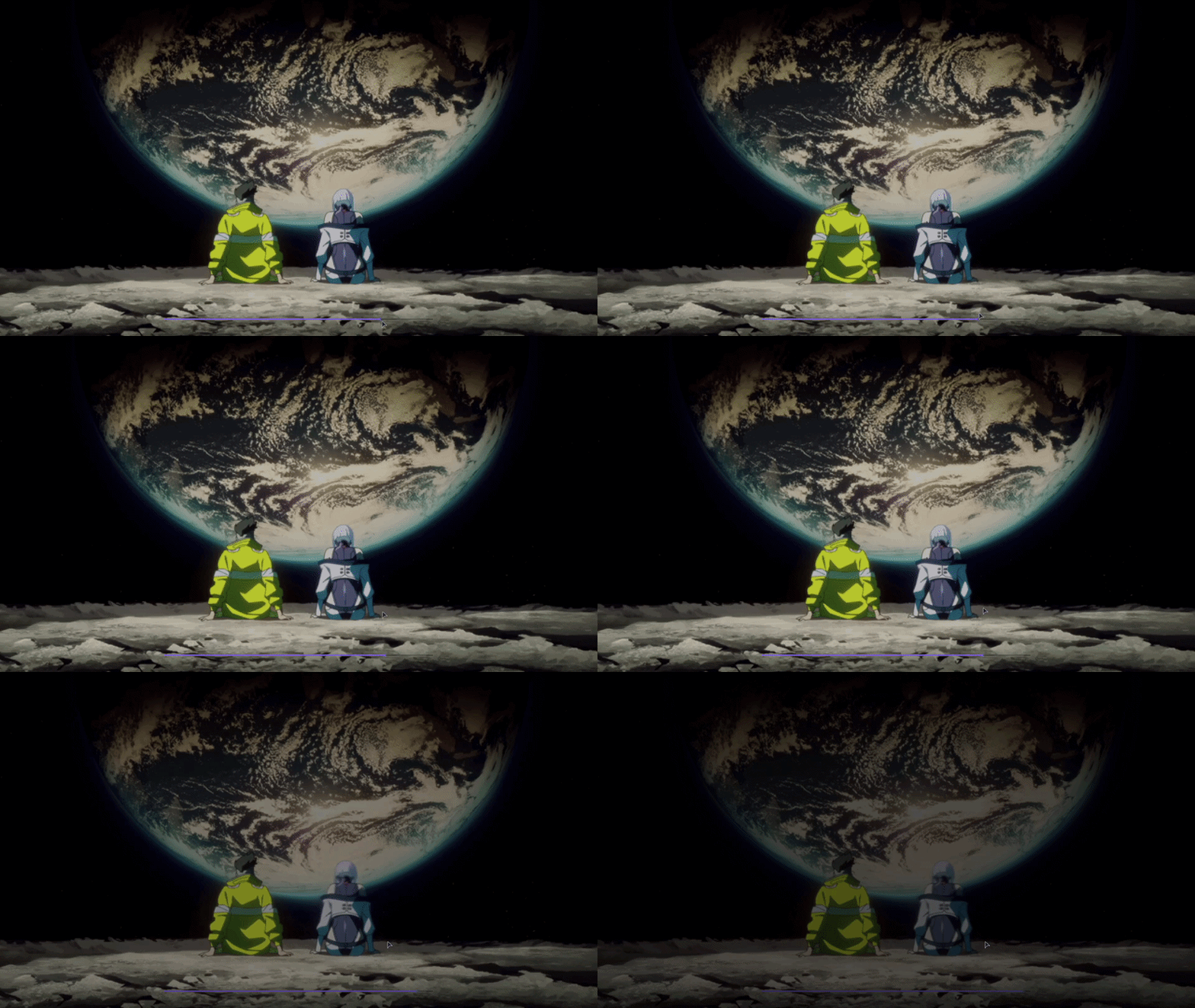
Features
– Custom background image with an animated starfield overlay and vignette effect
– Animated typing text on the title screen
– Custom-styled buttons with a translucent dark theme and light blue hover glow
– Icon bar with quick access to Accessibility, Language, Settings, and optionally Mods (via ModMenu) and Replays (via ReplayMod)
– Consistent custom background applied across all menu screens
ZenithHome
# 🏠 ZenithHome v1.0 — Initial Release
## ✨ Features
– Set, delete & teleport to personal homes
– Interactive GUI to view all homes (`/homes`)
– Fully configurable messages with & color codes
– Unlimited custom rank support via config.yml
– Per-player YAML storage (no database needed)
– In-memory caching for zero-lag performance
### 📋 Commands
– `/sethome ` — Save a home
– `/delhome ` — Delete a home
– `/home ` — Teleport to a home
– `/homes` — Open the homes GUI
## 🔐 Permissions
– `zenithhome.limit.` — Custom rank-based home limits
– Default: 2 homes, fully configurable
### 📌 Requirements
– Java 17+
– Spigot / Paper 1.20+
#
Zenith Skys
# 🌌 Zenith Skys | Remake Edition
**Zenith Skys** is a premium visual overhaul designed to transform your Minecraft horizon. This Remake version focuses on high-fidelity textures and atmospheric depth, providing a “cool” and immersive look for day and night.
—
### ✨ Features
* **Dynamic Day & Night:** Textures for both day and night cycles.
* **Skyboxify Support:** Fully optimized for the **Skyboxify mod** to ensure seamless sky rendering.
* **Competitive Ready:** Specifically tuned for **Bedwars** and **Skyblock** designed to look stunning without distracting you during intense PvP or building sessions.
* **Clean Remake:** Upgraded to be compatible with new Minecraft versions compared to the original version.
### 🛠️ Compatibility
To see the custom sky, you **must** use the following:
**Skyboxify Mod** – [Download here](https://modrinth.com/mod/skyboxify)
—
ZENITH PVP ESSENTIALS
**A Texture Pack made for CPVP and revamps all the pvp items in a smooth black/grey style and gives them a brand new look the Pack contains Following things: **
respawn anchor
glowstone
obsidian
ender pearl
golden apple
animated totem
low fire
deepslate
small shield
no explosion particles
better particles
small totem pop
old glint
invis grass & dead bushes
invis ores for clean game
ZenGUI
ZenGUI is a custom red-themed GUI texture pack made to give Minecraft a cleaner and more modern feel. Every menu, button, and interface element is designed with a smooth red style that looks great while still feeling simple and comfortable to use.
This pack is perfect for players who like minimal yet stylish visuals for PvP, survival, or everyday gameplay. The dark and red color combination gives Minecraft a fresh look without changing the original vibe too much.
Made with attention to detail by Zensiyoo.
Zenex PVP pack
A PvP texture/resource pack to help you get better at pvp. Some of the features are listed below.
– Low Fire
– Smaller Particles
– Smaller shield
– And other stuff for PvP
This is done so you can get better in pvp.
You may not:
– Modify or redistribute this pack without permission
– Use any assets in other packs
– Use this pack for commercial purposes
Credit must be given to the original creator Foxi.
Zenex PvP Pack © 2026 by Foxi is licensed under CC BY-NC-ND 4.0. To view a copy of this license, visit https://creativecommons.org/licenses/by-nc-nd/4.0/
Zelda Door Mechanics
## Features of the door
– No resource pack required
– Has sounds
– Has collision when closed
– Get open when getting close
– Will be placed facing north/south by default, you can rotate to 90°
– Possibility to lock door and to get a key
– Peebles animation on the ground when the door is closing
– Model for locked door
– Once a locked door is unlocked, the key from the player inventory get deleted
– Animation inspired from Zelda: Twilight Princess when a locked door is unlocked
**If you don’t want to read all this, just do /function door:help in-game and read the step-by-step documentation in-game!**
### How to place & remove a door
**To place a door (you need OP), follow those 2 easy steps carefully:**
– Go where you wanna place the door, and check for your position (X,Y,Z). Then, go in spectator mode and do /teleport [your coordinates, but **add** .5 after each number] (example: if your coordinates are x 12, y 64 and z -100, run /teleport 12.5 64.5 -99.5
– Run /function door:_/create
– **It’s done!**
– To remove a door, stand on it and run /function door:remove_current_door
### How to lock & unlock a door
**To lock a door:**
– Go where you wanna place the door, and check for your position (X,Y,Z). Then, go in spectator mode and do /teleport [your coordinates, but **add** .5 after each number] (example: if your coordinates are x 12, y 64 and z -100, run /teleport 12.5 64.5 -99.5 do the teleport
– Run /function door:lock_door whilst standing on the door
– To unlock it, get a key with /function door:give_key
### How to rotate a door
**To rotate a door:**
– Stand at the door position and check for the coordinates, then run /gamemode spectator and /teleport x.5 y.5 z.5 as for the other steps
– If you want to rotate a locked door, lock it before the next step (see above)
– Run /function door:rotate_door_90
**For in-game help and additional commands, run /function door:help**
**This datapack has a known issue:**
– Collisions don’t work for rotated locked door (currently, it’s better to only locks doors facing north/south, but you can create non-locked doors facing east/west if you want)