# Presence-Footsteps Lite


_…An Overly Complicated Sound Mod Made Slightly Less Complicated…_
This is a Fork of Sollace’s Fork of Huricaaan (Ha3)’s original mod that **removes technical debt**, this fork should be **far easier to maintain, and faster to update (sometimes by several weeks)** to the latest versions of the game, while being more flexible.
Removed Dependencies:
– kirin Fabric GUI library: used for the configuration menu, replaced with YetAnotherConfigLib as kirin usually lags behind the latest minecraft versions.
– Mine Little Pony Fabric mod: compatibility for the Mine Little Pony mod that turns players and mobs into Ponies, the compatibility is dropped as it is not a widely used feature
> Removing these dependencies should not affect the functionality of the mod for most people, while having them forces support for newer minecraft versions to come with significant delay, **sometimes by up to several weeks**.
Removing these dependencies enables us to maintain this mod way easier and faster in the future, and potentially enable support for Forge and other mod loaders.
## Original README:
—
This is the continuation of Huricaaan (Ha3)’s original mod, maintained and updated to the latest version of Minecraft. All previous features have been restored and some new ones added, with new development promised for the future on the opensource github profile!
—
Expect to see a more rich and immersive Minecraft world, one where Presence Footsteps adds new and more dynamic sounds for every block the player walks on. Every block has its own material assigned to it, and can make their own, customized sounds to better match what they’re made of.
—
– Wooden chests are creaky and old.
– Stone is dusty and rough.
– Piston heads sound like wood, whilst their bodies are stone,
– Cake sounds like you might destroy it if you step in the frosting!
– Tall grass and bristles make a dry, rustling sound as you step through them.
– Magma sounds like it’s literally cooking your soles!
—
Not only that, but the latest version includes step sounds for certain non-block entities:
—
Shulkers make the same creaky box noises as Shulker boxes, boats sound like wood, and armour stands creak and produce a stone stepping sound as you walk on their stone slab base.
—
## Sound Packs
Presence Footsteps is **fully customisable** with resource packs. The mod by default includes a pack with its own sounds
and material mappings for the vanilla blocks, however if you don’t like those sounds or want to use your own, this pack can be turned off
or used together with packs from the community.
Note that you need **at least one** sounds pack enabled for the mod to function.
Presence Footsteps will attempt to figure out the sounds of modded blocks by looking at the vanilla material/sound types they use.
If your mod is using very unique sounds though, you can add mappings to your mod to directly control what sounds presence footsteps uses for your block by
following the guide on our wiki
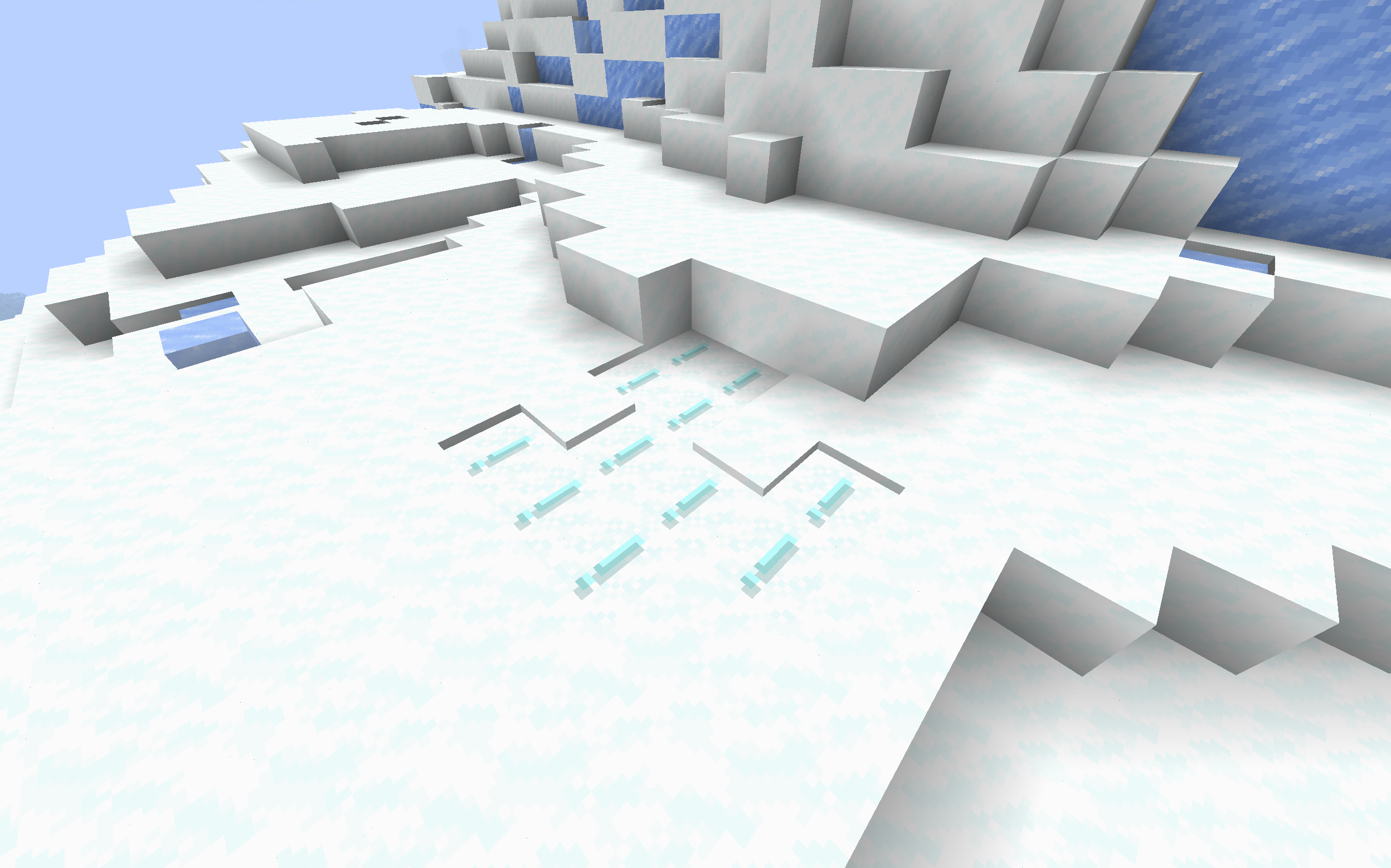
Powder Snow Alerts
# Powder Snow Alerts
Makes powdered snow have an exclamation mark.
Thats it.
### Example
## FAQ
### Not Updated to version x:
The pack should work on all versions of the game, but if not, open an issue
### Usage in projects/modpacks:
I dont care if you use it in a project, however please credit me.
Potato Craft-8x
⭐ PotatoCraft 8x – Ultra FPS Boost Texture Pack ⭐
Do you want smooth FPS and a potato-friendly Minecraft? 🍟
PotatoCraft 8x is a lightweight, simplified resource pack designed for Minecraft Java Edition.
🔥 8×8 textures (down from the default 16×16)
⚡ Huge FPS boost on low-end devices
🎮 Perfect for PvP and survival gameplay
🌍 Works on all the latest Minecraft Java versions
💻 Tested on both mobile and PC
Whether you’re on a low-end phone, old laptop, or a beast PC, this pack makes the game feel faster, cleaner, and smoother.
💡 Why PotatoCraft?
Because even the weakest potato deserves to play Minecraft without lag! 🥔
📥 Download now and turn your Minecraft into a lag-free experience!
Polysit
# Polysit
A polymer-based server-side sit mod for Fabric & Quilt!
## Installation
Requirements:
– Minecraft 1.19.3 through 1.21.4
– [Polymer]
– [Polysit]
– Pick a mod loader:
– Quilt + QSL
– Fabric + Fabric API
Install Minecraft, [Polymer], [Polysit] and your mod loader of choice.
You only need to install it on the server, but there’s a client-sided enhancement if one prefers.
You also have the option of using it in singleplayer or with friends over LAN.
## Using
You can right-click/use any slab, stair and bed to sit on it.
There’s also `/sit`, which allows you to sit practically anywhere, even on cacti… if you’re immune to thorns.
For clients with the mod, there’s also a keybind named `Sit`, which defaults to `G`.
It’ll similarly let you sit anywhere, if the server is running Polysit.
> ### Note:
> Servers using other mods or plugins that happen to also include `/sit` as a command,
> or using an older version of Polysit, may not use the same checks or be as seamless as the latest version.
>
> If the server does not support or blocks `/sit`, this keybind may be unavailable and cannot be used.
>
> Unfortunately, this is unavoidable as the only method Polysit uses on the client is the `/sit` command.
## Compatibility
It is compatible with any mod that implements standard slabs, stairs and beds.
It’s even compatible with the scale attribute, and other scaling mods such as Pehkui.
> ### Note:
> 1.20.1 and older has poorer support for Pehkui.
> Bugs in relation to scaling while sitting will occur.
> There are still [mitigations](#changes-to-vanilla-logic) for Polysit’s other behaviours.
If for any reason, there’s a slab, stair, bed, or any other seat-like block that doesn’t work,
feel free to submit a bug report.
## Changes to Vanilla Logic
Polysit does try to fix bugs that were found in development, or directly caused by its functionality.
– Moving the player out of blocks when getting up.
– Forcing the player to take a smaller pose to avoid suffocating when getting off a seat.
– This applies generically to any seat, not just Polysit’s.
– Forcefully sending relevant packets for bugs caused by Mojang’s fixes or changes.
– Beds during the day can be right-clicked to sit on it.
All help to ensure that Polysit provides the best UX it possibly can while also maintaining vanilla-esk logic.
[Polymer]: https://modrinth.com/mod/polymer
[Polysit]: https://modrinth.com/mod/polysit
Polydex
# Polydex
Polydex is a mod allowing you to see player-friendly information about
blocks and items on servers. It designed for survival-like, vanilla client
compatible servers using Polymer mods
or PolyMC, through it can be used
in modded or vanilla-content setting!
It can display tooltip (as a bossbar or sidebar) with basic information
about targeted block or entity similarly to mods like WTHIT/HWYLA/WAILA.
It also adds simple way of checking recipes of items with chest gui interface
inspired by mods like Roughly Enough Items / Just Enough Items.
It’s configurable and bundles some api, so other mods can be compatible with it.
To use it, use modrinth maven™.
## Video
## Addons:
– Polydex Bridge – Did you want to use polydex-compatible mods, but you would prefer using EMI to view them? Then you will like this mod! Polydex Bridge bridges Polydexes recipe viewing with EMI, allowing for best client side experience. You need to install it on both side through, as otherwise it won’t work!
PolyDecorations
# PolyDecorations
Wanted to decorate your world bit more? Add some sign posts directing through the world,
some benches in the park to sit on or shelves in your house to put items on?
PolyDecorations is Fabric (and Quilt) server side modification powered by
Polymer which multiple decorative blocks such as wooden benches,
shelves, sign posts and braziers! It’s ideal to add to server you play with your friends,
that don’t want to install mods on the client.
This mod was heavily inspired by Aurora’s Decorations mod,
which you should try out/use instead if you aren’t looking for server side mod!
## Extra mods you might want to use!
### Polymer AutoHost
Simplest way to handle automatic resource pack generation for your server!
While bundled by main distribution of Polymer, you need to enable it by hand
as it will be otherwise disabled. But it is quick and simple!
### Armor Stand Editor
The best™ server side pose editor for Armor Stand (and by extension, Statues!). Highly suggested for better customizability!
Checkout Modrinth page for more information!
### PolyFactory
The first of my mods in this style! But instead being purely decorative, it adds some functional stuff, new crafting stations
and automation. Checkout Modrinth page for more information!
Pixelated Square Entity Shadows
Makes the Shadows under Entities Pixelated Squares.
– Welcome to my first project, my name Harrry.
– This project is the custom resource pack for Minecraft
– It change texture of the spear into phong lon (boar spear in **VietNam**)
– It doesn’t change any thing (expect the spear)
Phantasmic Flight
# Phantasmic Flight
A rework of phantoms, giving them an actual use instead of being a nuisance.
Insomnia is removed. Instead, phantoms have a chance of spawning if you go to sleep under the sky and wake up without passing the night. When a phantom bites you, it will pick you up and carry you off. When you kill the phantom carrying you, its dead body acts like an elytra until you land, allowing early game flight (at the cost of some health). Be careful though, because doing this too much will attract more and stronger phantoms…
## Details
– Insomnia (phantoms spawning after 3 days of not sleeping) is disabled by default
– Phantoms have a chance of spawning when a player goes to sleep in a location with sky access and wakes up without passing the night
– The number and sizes of phantoms spawned increases depending on how many times you’ve done this before
– Phantoms spawn between sizes 1-4 (compared to 0 in vanilla)
– This count can be reset by sleeping through the night properly
– There is a 60 second cooldown on spawning phantoms in this manner (configurable)
– Larger phantoms have higher stats
– Health: `4 * size + 16`
– Attack damage: `size + 2`
– When a phantom attacks a player it will pick up the player and carry them into the sky
– …unless the player is already picked up or is wearing an elytra (should work with most modded elytras)
– The shift key does not dismount the phantom
– If the player would normally kill the phantom carrying them, the phantom will instead become a pair of wings the player can glide with until they land, upon which the phantom will fall off and die properly
– By default the player is set to third person mode until they land, but this can be disabled in the config
– Firework rockets cannot be used to boost phantom wings
– Sleeping in a bed with Bad Omen will turn it into Insomnia Omen
– You can sleep with monsters nearby and in any dimension without beds exploding, but you cannot pass the night or set your spawn at a bed
– Gurantees phantoms spawn upon waking up, assuming other conditions pass
– This allows you to, for example, use phantoms to traverse the End
Configuration
Install McQoy for Mod Menu support.
### Client
– **Change Perspective** (true/false): If the player should automatically be set to third person when gliding with phantom wings, returning to the previous perspective upon landing similar to Auto Third Person. Default: true
### Server
– **Max Phantom Size** (integer): The largest phantom size that can spawn naturally. Default: 4
– **Base Spawn Chance** (0.0-1.0): The chance of phantoms spawning when a player has spawned 0 phantoms previously. Default: 0.5
– **Spawn Chance Increase** (0.0-1.0): How much the spawn chance should increase per previously spawned phantom. Default: 0.05
– **Max Spawn Score** (integer): The cap for the “spawning score” used to determine the count and sizes of a phantom group spawn. Default: 8
– **Respawn cooldown** (integer): The cooldown in seconds for a player spawning phantoms by sleeping. Default: 60
## Notes
– Requires Fabric API and optionally McQoy for a config gui
– Inspired by this reddit post.
– The mod makes the `doInsomnia` gamerule default to `false`. If you are adding the mod to an existing world, you must disable it manually using `/gamerule doInsomnia false`.
– Compatible with Comforts, which is recommended if you want to be able to use phantoms to fly without changing your spawn point.
– Has a bug when used on sinytra connector with the neoforge version of comforts where sleeping in a sleeping bag will not spawn phantoms. This can be worked around by installing the fabric version.
– The mod is **not** designed to be played with my other phantom rework, Phantom Tweaks. I will not support playing both mods at once, both technically and in terms of balance.