Vanilla Shader
## Hello everyone!
I’m excited to share my **Vanilla Shader Project** with you all. I’m still a beginner in the world of programming, but it’s been an incredible journey learning how this works and seeing the results of many hours spent in front of the screen.

I’ve just released **Version 2 (V2)**. While it was technically “ready,” I felt it needed some extra polishing (and it still does!). Please keep in mind that there are still plenty of bugs, but I’m committed to fixing them as I learn.
> **Note:** Currently, it does not support Sodium, but I’m working hard to make that happen soon!
### 🟢 What’s New in V2
* **Toon/Retro Lighting:** Light sources now feature silhouettes for a stylized, classic game aesthetic.
* **Bouncing & Indirect Light:** New mechanics for light accumulation and bounce.
* **True Darkness:** Nights are now significantly darker and more atmospheric.
—
### 1) What this shader does
* **Enhanced Lighting:** Change global illumination and light.
* **Diferrent Visuals:** Tweaks colors and contrast.
* **Performance is not bad:** Designed to run on mid-range hardware.
### 2) Why you should try it
* **New Feel:** provide a “moody” atmosphere.
* **Plug & Play:** No complex installations—it’s a standard resource pack.
### 3) Critical Info & Compatibility
* **Visual Only:** This is a purely aesthetic pack; it does not change gameplay mechanics or add any “cheats.”
*
* **Feedback Welcome:** Since I’m learning, your feedback is incredibly valuable! Feel free to report bugs or share your thoughts.
Vanilla+ TPS
**Vanilla+ TPS** — это простой и удобный мод, разработанный для просмотра данных сервера в реальном времени. С его помощью игроки могут легко отслеживать производительность сервера, используя удобные команды и интерфейс.
### Основные функции:
– **Команды для просмотра данных:**
– **/vtps bossbar** — отображает информацию о TPS (количество тиков в секунду) в виде босс-бара, что делает мониторинг производительности ещё более наглядным.
– **/tps** — предоставляет краткую информацию о TPS и задержке (ping) в чате.
– **/vtps actionbar** — выводит данные о TPS и задержке в строке действий (action bar) для удобного мониторинга в реальном времени.
### Особенности:
– **Простота использования:** Мод не требует сложной настройки — достаточно установить и начать использовать команды.
– **Информативность:** Получайте важные данные о производительности сервера в удобном формате, включая наглядный босс-бар для TPS.
– **Гибкость:** Выбирайте, как именно отображать информацию — в чате, босс-баре или строке действий.
– **Лёгкий в установке:** Мод не требует дополнительных зависимостей и легко интегрируется в ваш игровой процесс.
– **Быстрое обновление:** Мы активно поддерживаем мод и быстро выпускаем обновления для новых версий Minecraft, чтобы вы всегда могли использовать последние функции.
### Статус мода:
– **Текущий статус:** Мод находится в **бета-версии**, что означает, что он стабилен и готов к использованию, но пока что не поддерживает настройку прав доступа для команд.
– **Будущие обновления:** В ближайших обновлениях планируется добавить систему прав доступа, что позволит ограничить использование команд **/vtps bossbar**, **/tps** и **/vtps actionbar** только для администраторов или других указанных групп игроков. После этого мод будет считаться **полноценным релизом**.
**Vanilla+ TPS** идеально подходит как для администраторов серверов, так и для обычных игроков, которые хотят лучше понять, как работает их сервер. Установите мод и наслаждайтесь прозрачностью и контролем над игровой средой!
**Vanilla+ TPS** is a simple and convenient mod designed to view server data in real time. With its help, players can easily monitor server performance using convenient commands and an interface.
### Key features:
– **Commands for viewing data:**
– **/vtps bossbar** – displays TPS (ticks per second) information in the form of a boss bar, which makes performance monitoring even more visual.
– **/tps** – provides brief information about TPS and latency (ping) in the chat.
– **/vtps actionbar** – displays TPS and latency data in the action bar for convenient monitoring in real time.
### Features:
– **Ease of use:** The mod does not require complex configuration – just install and start using commands.
– **Informative:** Get important server performance data in a convenient format, including a visual boss bar for TPS.
– **Flexibility:** Choose how you want to display information – in the chat, boss bar, or action bar.
– **Easy to install:** the mod does not require additional dependencies and easily integrates into your gameplay.
– **Fast update:** we actively support the mod and quickly release updates for new versions of Minecraft, so you always have the latest features.
### Mod status:
– **Current status:** the mod is in **beta**, which means that it is stable and ready for use, but does not yet support setting access rights for commands.
– **Future updates:** in future updates, we plan to add a permissions system that will limit the use of the **/vtps bossbar**, **/tps** and **/vtps actionbar** commands to admins or other specified groups of players. After that, the mod will be considered a **full release**.
**Vanilla+ TPS** is great for both server admins and casual players who want to better understand how their server works. Install the mod and enjoy transparency and control over your gaming environment!
Void’s Weapon Enchantment Overlay
Shows melee weapon enchantments on the item:
Spears:
Blue – Knockback 1
Cyan – Knockback 2
Orange – Fire Aspect
Breeze Rod – Lunge

Maces:
White – Wind Burst (scales with level)
Cyan – Density
Purple – Breach
Blaze Rod – Fire Aspect

Sword:
Blue – Knockback 1
Cyan – Knockback 2
Orange – Fire Aspect

Why these enchantments?
Breach & Density – Mutually exclusive
Fire Aspect – Damage ticks from fire block knockback; burning zombies can ignite the player
Knockback – Extra knockback isn’t always good
Wind Burst & Lunge – Involuntary movement on all attacks
All other enchants are straight upgrades
Slightly changes spears:

Makes maces smaller: (gallery)
Feedback and support: discord – name:”silvrvr”
Void Fog
This is an update and port/rewrite of Tamaized’s Void Fog for Fabric and Minecraft 1.14 (and beyond).
Just like the original, this mod brings back the void fog of versions prior to Minecraft 1.8, but with some added improvements to make it just that much more fun.
Changes in 1.14
– Slightly smoothed the fogs encroach/retreat animation
– The fog will be pushed off when standing in brightly-lit areas (like around torches)
– Added a secret big boi mode (are you a big boi?)
– Added an option to configure particle density
Vixmoyy’s No Particles
A simple resource pack that removes all particles from the game using core shaders, _even modded ones!_
—
### • How?
> Instead of overwriting particle textures, this pack simply tells the game not to render them at all. This results in better performance and a true no particle experience.
### • Sodium?
> You can use this resource pack with Sodium if you have the [Sodium Core Shader Support](https://modrinth.com/project/G8yJPRdl) mod installed; it may display a warning stating that it may be incompatible, although it should work just fine.
### • >1.17?
> No, it is not possible to port this to pre 1.17 versions because core shaders could not be modified through resource packs before that.
—
particle.fsh & particle.vsh
### particle.fsh
“`
#version 330
void main()
{
discard;
}
“`
### particle.vsh
“`
#version 330
void main()
{
gl_Position = vec4(0.0, 0.0, 0.0, 0.0);
}
“`
##### You may not redistribute this resource pack anywhere without proper permission, the only official download page for this resource pack is on modrinth.
vMessage
# vMessage
    
> 🆕 Hey, I’m SzymON/OFF! If you found **vMessage** useful please don’t hesitate to also try [vHubs](https://modrinth.com/plugin/vhubs)! It allows you to create multiple hub servers accesible with player commands (e.g. `/hub`, `/lobby`, `/survival`).
**vMessage** is the best Velocity plugin for synchronizing chat and player events across your entire proxy network! It is designed for server administrators who want seamless, reliable, and configurable message syncing without unnecessary complexity.
## Features
– **Global Chat Sync:** Instantly syncs chat messages across all servers connected to your Velocity proxy.
– **Join/Leave/Change-Server Broadcasts:** Notifies all players network-wide when someone joins, leaves, or switches servers.
– **Silent Permissions:** Players with a special silent permission can prevent their join, leave, and server change messages from being announced.
– **Powerful Configuration:** Comes with a robust, easy-to-use config file so you can tailor the plugin to your network’s needs.
– **Lightweight & Fast:** No unnecessary features or bloat—just efficient, reliable message syncing.
## Installing
1. Place `vMessage.jar` into your Velocity `plugins` folder.
2. Install the appropriate versions of [SignedVelocity](https://modrinth.com/plugin/signedvelocity) on your proxy AND backends.
3. Start or restart your Velocity proxy.
4. Edit the generated configuration file (`plugins/vMessage/config.yml`) to suit your preferences.
Once installed and configured, vMessage will automatically:
– Sync chat messages across all servers
– Broadcast join, leave, and server switch events to all players (unless the player has the silent permission)
No commands or permissions are required for basic functionality.
## Updating
To update vMessage, replace the existing `vMessage.jar` in your `plugins` folder with the latest version and restart your Velocity proxy.
If new configuration options are introduced, your config.yml will be migrated automatically.
## Commands
vMessage provides several administrative commands for advanced usage and configuration:
– `/vmessage say `
Sends a message as the specified player across the network.
**Permission:** `vmessage.command.say`
– `/vmessage fake [player] [old-server]`
Sends a fake join, leave, or server change message as if the specified player performed that action.
**Permission:** `vmessage.command.fake`, `vmessage.command.fake.join`, `[…].leave`, `[…].change`
– `/vmessage reload`
Reloads the plugin configuration without restarting the proxy.
**Permission:** `vmessage.command.reload`
– `/vmessage help`
Displays the help message with available commands.
**Permission:** `vmessage.command.help`
– `/broadcast `
Broadcasts a custom message on the network.
**Permission:** `vmessage.command.broadcast`
**Aliases:** `/bc`, `/bcast`, `/shout`
– `/message `
Sends a private message to a specific player across the network.
**Permission:** `vmessage.command.message`
**Aliases:** `/msg`, `/tell`, `/whisper`, `/w`
– `/reply `
Replies to the last player who sent you a private message.
**Permission:** `vmessage.command.reply`
**Aliases:** `/r`
You can also use `/vmsg` or `/vm` as an alias for `/vmessage` for convenience.
Make sure to assign the appropriate permissions to your staff or admin roles in your Velocity configuration.
For `/broadcast`, `/message`, and `/reply`, you can set `allow-by-default` to `true` in the config file to let all players use these commands without needing explicit permissions.
## Configuration
vMessage provides a powerful and easy-to-use configuration file. You can customize message formats, toggle features, and more. Look at the wiki for detailed configuration options: [vMessage Wiki](https://github.com/szymon-off/vMessage/wiki/Configuration-(config.yml))
## Why vMessage?
– **Purpose-built for Velocity:** Designed specifically for Velocity, making it the most reliable and feature-rich solution for network-wide messaging.
– **Simple Setup:** Drop it in, configure, and go. No complicated dependencies or setup steps.
– **Actively Maintained:** Built with modern best practices and open to community feedback.
## Contributing
Contributions are welcome! Please open issues or submit pull requests for improvements or bug fixes.
## Building from Source
If you want to build vMessage yourself:
– Prerequisites: Java 17 or higher
– Clone the repository and build:
“`bash
git clone https://github.com/szymon-off/vMessage.git
cd vMessage
./gradlew build
“`
– The built jar file will be in the `build/libs/vMessage-0.0.0-UNKNOWN.jar`.
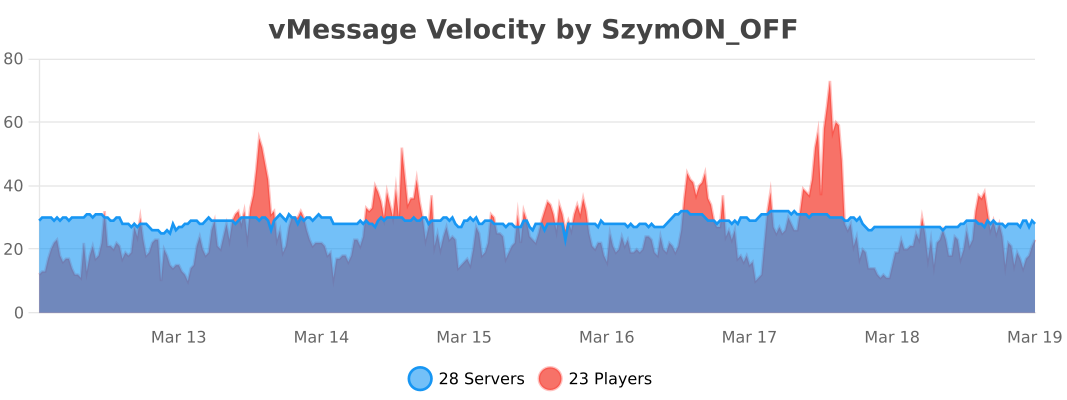
## Usage Statistics
## License
– Versions **≤ 1.6.1** are licensed under the **MIT License**.
– Versions **≥ 1.7.0** are licensed under the **GNU General Public License v3.0** (GPL-3.0).
You can find the full text of each license in the corresponding release archive, or in the repository under the `LICENSE` file for that version.
Visually Waterlogged
# Visually Waterlogged!
### About
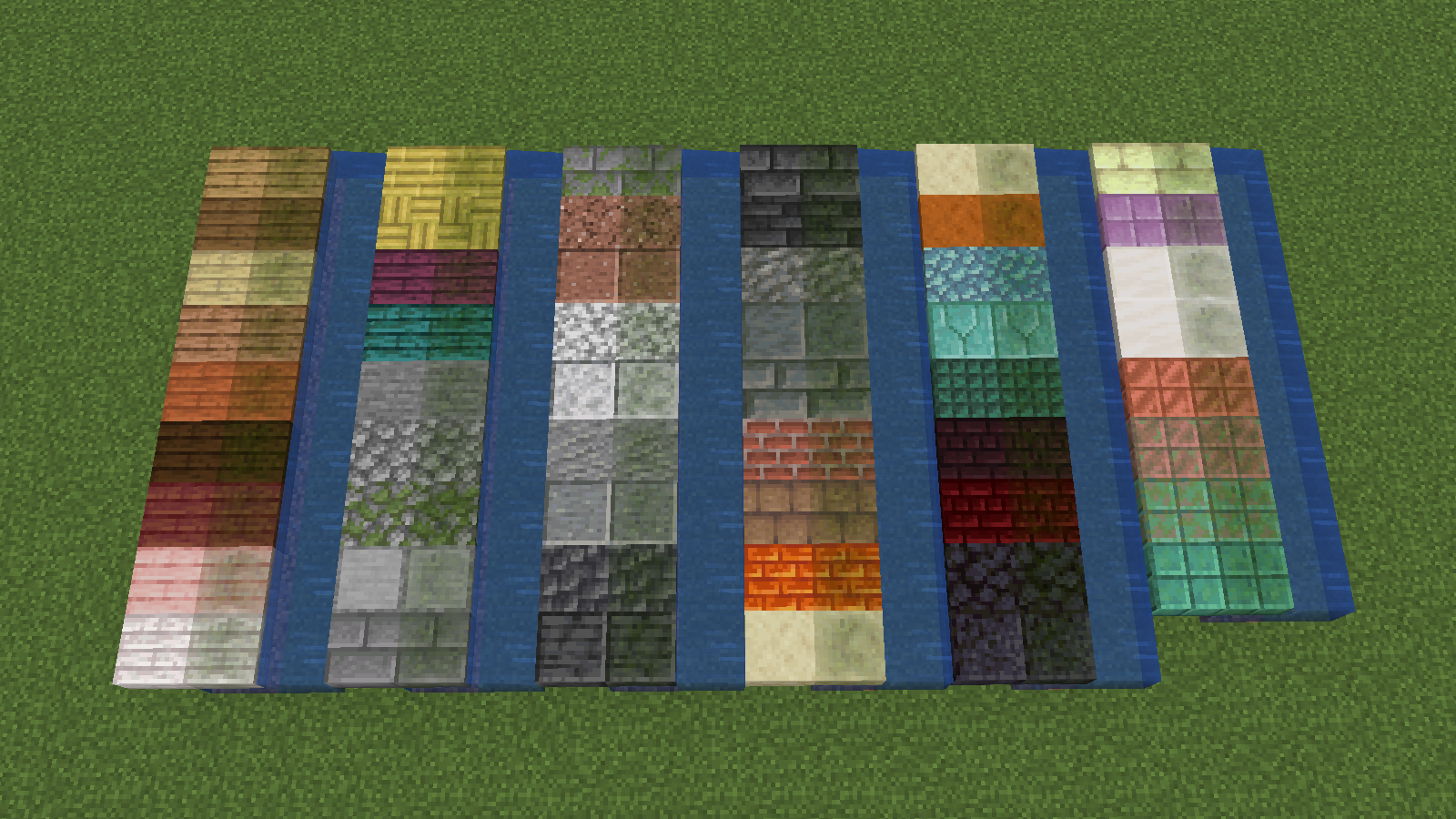
This pack adds a green algae layer on waterlogged blocks!
Can be useful when using top slabs as a floor or something
🚨 1.21.2+ REQUIRED 🚨
### Currently supported blocks:
– Slabs
– Stairs
– Fences
– Walls
### Notice
Unfortunately the overlay doesn’t work with custom textures
I tried but I couldn’t figure it out so every block has to have its own wet texture :/
### Showcase
Visible Particles
### What does this do?
This resource pack retextures potion particles to be visible. This is especially useful for finding invisible entities.
### How does it work?
It changes the the texture of the effect particle to 1 large pixel.
### What versions does this support?
This resource pack works for versions 1.14 (19w06a) and up.
Vincent Van Gogh The Starry Night Style Paintings Pixel Art

Bring timeless art into your game with the Vincent Van Gogh The Starry Night Style Paintings Pixel Art Mod. Inspired by Van Gogh’s world-famous masterpiece The Starry Night, this mod transforms classic paintings into beautiful pixel art that perfectly blends with retro-style gameplay.
—
### How many paintings does it have?
**1.0**: 19 paintings

—
With this mod, you can decorate your world with pixel art recreations of Van Gogh’s paintings, giving every space a unique artistic touch. Whether you’re building a cozy house, a creative gallery, or just want to add a bit of culture to your world, these pixel-perfect artworks will make your creations shine.

The Starry Night pixel art paintings are carefully designed to maintain the essence of Van Gogh’s brushstrokes while adapting them to a pixelated aesthetic. This makes the mod not only visually stunning but also lightweight and compatible with many builds.
Perfect for art lovers, pixel art fans, and players who enjoy customization, this mod combines history, creativity, and style. Experience Van Gogh’s art like never before and transform your world into a living gallery of pixel art masterpieces.
Villager Rebalanced
# Villager Rebalanced
Free and open-source datapack for Minecraft 1.21 and higher that modifies and adds new exchanges with villagers.
## Features
This datapack modifies the trades of the armorer, the weaponsmith and the toolsmith as well as those of the wandering trader in order to mix the current trades with those of the trade rebalanced.
Only the changes to the librarian have not been implemented, although the price of the name tag has been reduced from 20 to 10 emeralds.
This datapack requires the installation of the [Villager Config](https://modrinth.com/mod/villagerconfig) mod.