Sodium 日本語訳
# 「Sodium」設定画面日本語化パック
このリソースパックは、軽量化MOD「Sodium」と「Sodium Extra」の設定画面を日本語に翻訳します。パフォーマンスを向上させるための詳細な設定項目が、すべて日本語で理解できるようになります。
# 「Sodium」設定画面日本語化パック
このリソースパックは、軽量化MOD「Sodium」と「Sodium Extra」の設定画面を日本語に翻訳します。パフォーマンスを向上させるための詳細な設定項目が、すべて日本語で理解できるようになります。
**hello!
this is a crystal and modern and mace pvp resource pack (with some survival features)**
🖼️Vanilla Minecraft textures like blocks and items have a width and height of 16 pixelsbut Some textures make the resolution of textures smaller than the default, such as 8x, and some bigger, such as 32x.
# 🌟main features
– 3d crystal item
– pvp crosshair
– glassed boats bottems
– BrewingStand Guide
– smaller totem and shield and mace
– very low fire effect
– Transparent GUI
– custom texture for items with some enchants
– show loading level of bow
– smal totem pop
– no explosion particle
– smoth water
– numbered redstone dusts
– A11 totem! (SobhanA11 logo)
– rounded edge hotbar gui
– smal foods
– unrandom textures
# 💠 Why Use This Pack?
Whether you are dueling in Crystal PvP, trying out the new mace mechanics, or just enjoying a survival world, this pack gives you:
– Better visibility during fights
– Cleaner UI & particles
– A mix of performance-friendly textures and modern style
🙌 Thanks for using my pack! Hope you enjoy it.

**So No Head?** is a minimalist resource pack that **hides only the helmet model**, allowing player faces and hairstyles to be fully visible while still keeping helmets equipped. Perfect for **skin showcases**, **roleplay**, or **immersive storytelling** without sacrificing protection!
### Features
– **Helmet-only removal** – All other armor remains visible.
– **Unobstructed faces** – Great for creators, social servers, or cinematic use.
– **Lightweight and simple** – Purely visual.
### Compatibility Note
Due to how **armor textures are handled in Minecraft**, this pack will **not work correctly alongside other resource packs that modify armor models or textures**.
### Mod Support
Want support for a specific mod or armor set? Drop a suggestion on **GitHub** or reach out directly!
### Want full invisibility?
Download **🛡️ Hide Armor** to remove all armor visuals, not just helmets.

### Looking for more customization?
Check out **Show Me Your Skin! by enjarai** for advanced personalization options.
This mod allows you to customize individual armor pieces and player appearances, with full server-side support.

👤 So No Head? is © NotToBlame. You are permitted to:
– ✅ Use in modpacks **if downloaded from official sources** (Modrinth, CurseForge)
– ✅ Create and publish **addon packs** (as long as no original files are included)
– ✅ Make **personal edits** (not for redistribution)
You may **not**:
– ❌ Reupload or redistribute this pack or its assets
– ❌ Include original files in your own uploads or forks
– ❌ Use the pack commercially without explicit permission
Read the full license →
❄️ Snowball Recipe Datapack
Craft throwable chill—no shovel spam required!
This datapack introduces a custom recipe for Snowballs, letting players convert Snow Blocks into projectile-ready ammo or decorative snow piles.
✨ Features
✅ Shapeless recipe using 1 Snow Block
🧩 Lore-friendly integration with snow biome mechanics and redstone snowball launchers
🔁 Modular JSON structure for easy editing and expansion
🛠️ Compatible with Minecraft 1.13+
A resource pack that removes every sniffer sound, except for it’s death.
### Version support
– Every version after 1.20 is supported. As the sniffer was released that version.
**If you have any issues, please contact me through Discord.**
@zemewtf
# SnapshotXBR
Automatic upscales of the latest textures using xBRZ, designed for use under VanillaXBR.
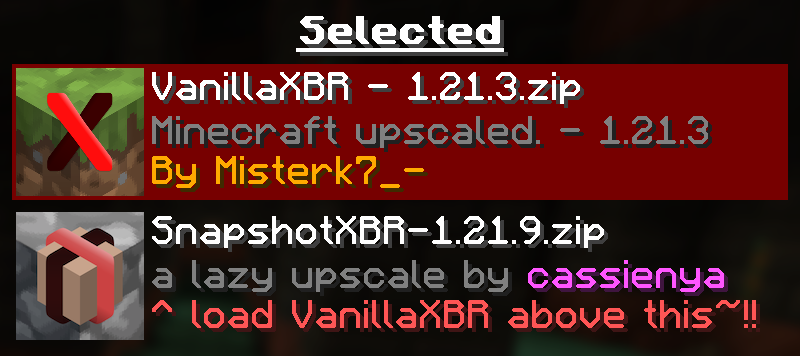
Ensure VanillaXBR is loaded above SnapshotXBR for the best experience
## Why?
Misterk7_- is busy and VanillaXBR doesnt get updates very quickly, so this is designed to be a sort of bleeding edge build that people can use day 1 as a fallback for textures not yet given Misterk7_-‘s touch
### You will notice…
– Gaps in-between block models (ex. missing corners of torches)
– Unnatural pixel blending (ex. the eyes of mobs may morph into the rest of the body)
– Clipped textures in the user interface (ex. the dimming is broken in the world menu)
These are issues that come with a ‘lazy upscale’ of the Minecraft textures, and so will not be fixed as a part of this pack. To fix them, read the recommended usage guidelines below.
### Recommended usage
– Use the latest version of VanillaXBR.
– Enable VanillaXBR above SnapshotXBR in the resource pack menu (as seen above).
– Create and/or improve automatically scaled versions of the textures yourself
## What if I want xBR versions of textures from [insert mod or resource pack]
PackXBR is the easiest way to make your own textures fit with VanillaXBR.


—
Snapshot pack is a modpack cointaining **client-side only** mods to add **performance** and **quality of life** to every minecraft snapshot. Its small as it only uses mods that have shown to update every snapshot, but hopefully the pack will grow in the future.

—
The pack will get **as soon as a new snapshot comes out**, maybe a couple hours after at most (very rarely even a day, usually on the first snapshot of the new drop).
This means that the latest version of the pack will display the **wrong** version, this is cause modrinth’s API only updates a couple of days later. But don’t worry, **EVERY** update lines up with a new snapshot, so just keep the latest version and you won’t be left behind.
# SmoothTextureFix
With the addition of Anisotropic Filtering and RGSS in Minecraft 1.21.11 (Mounts of Mayhem), the visuals of the game have changed. There is a noticeable amount of blur on block textures. Margins between blocks still have the old harsh cutoff which is very noticeable. This mod sets the texture filtering back to Nearest/Point like it always should be. <3
Can be toggled on/off with the config file (`config/smoothtexturefix.json`) or the client-side command `/smoothtexturefix`.
# Comparison
Left is Vanilla, right is SmoothTextureFix.


Makes the Shadows under Entities Smooth. The closest you can get without shaders and optifine!

VS Vanilla:

add biome blending to moss block, donesnt work with moss carpet unfortunatly.
/! NEEDS either continuity OR optifine to work as it use theyre CTM feature /!
smoothing also need continuity or optiphine as it was not intentional at firs, i will have to remake the texture in the plain for everyone one day but for now, everything in this pack need continuity or optifine