zSupportExtender
## 🚀 zSupportExtender
**zSupportExtender** is a lightweight compatibility layer designed for Paper servers, enabling plugins to run smoothly across multiple Minecraft versions without requiring updates or modifications.
—
### 🛒 Buy Here
**zSupportExtender+++** https://discord.gg/4xZB53Bwd4
—
### ✨ What it does
zSupportExtender helps bridge differences between Minecraft versions by providing a stable runtime environment for plugins. It reduces version-related issues and improves compatibility from **Paper 1.19 up to 26.1.2**.
—
### ⚙️ Features
* Cross-version compatibility support (1.19 → 1.21.1)
* No external dependencies required
* Lightweight and optimized for performance
* Safe fallback handling for API differences
* Clean startup with no warnings or unnecessary logs
—
### 📦 Supported Platforms
* ✔ Paper 1.19
* ✔ Paper 1.20 / 1.20.x
* ✔ Paper 1.21 / 1.21.1
* ✔ Paper 26.1.2
—
### 🛠 Use Case
This plugin is ideal for server owners who want to:
* Run older plugins on newer versions
* Maintain compatibility without constant updates
* Reduce breakage caused by API changes
—
### ⚠️ Important Notes
* This plugin does not modify other plugins directly
* Compatibility depends on how plugins are built ( some may still break (well it?) )
* Designed to improve compatibility, not guarantee it in all cases
—
### 📄 Installation
1. Download the latest version
2. Place the `.jar` file into your `/plugins` folder
3. Restart your server
—
### 👨💻 Developer Info
* Built using stable Paper APIs
* Designed with forward compatibility in mind
* No configuration required (plug & play)
—
**zSupportExtender** focuses on simplicity, performance, and practical compatibility for modern Paper servers.
ZStaffChatPro Bridge (Addon)
# ZStaffChatPro Bridge
Server-side addon for [ZStaffChatPro](https://modrinth.com/plugin/zstaffchatpro) that connects your Spigot/Paper/Folia backends to the proxy.
## What it does
– **Vanish Sync** — Syncs PremiumVanish/SuperVanish status to BungeeCord/Velocity so vanished players are hidden from /stafflist across the network
– **AFK Detection** — Sends player movement data (throttled to 30s per player) to the proxy for accurate AFK tracking
– **Activity Bridging** — Enables proxy-side features like in-game activity log and /staffafk to work with real player data
## Setup
1. Install ZStaffChatPro on your BungeeCord/Velocity proxy
2. Install this Bridge addon on each Spigot/Paper/Folia backend
3. No configuration needed — it connects automatically via plugin messaging
## Requirements
– ZStaffChatPro on the proxy (BungeeCord or Velocity)
– Spigot, Paper, or Folia 1.16+
– Optional: PremiumVanish or SuperVanish for vanish sync
ZStaffChatPro

—
*The most advanced staff communication plugin for Minecraft networks.*
**[Wiki & Documentation](https://docs.zenyxdev.org)** | **[Bridge Addon](https://modrinth.com/plugin/zstaffchatpro-bridge-(addon))** | **[Discord](https://discord.com/invite/ZGd6Mvacuf)**
—
## What is ZStaffChatPro?
ZStaffChatPro is a powerful and lightweight staff chat plugin designed for Minecraft server networks. It allows your staff team to communicate privately across multiple servers using fully customizable chat channels.
Whether you run a small survival server or a large network with dozens of backends, ZStaffChatPro provides everything your staff needs — private channels, playtime tracking, AFK detection, Discord integration, and much more.
The plugin works on **Spigot**, **Paper**, **Folia**, **BungeeCord**, and **Velocity**, supporting Minecraft **1.8.x — 1.21.x** and **26.1.1**.
—
## Features
### Unlimited Custom Channels
Create as many staff chat channels as you need — Staff, Admin, Builder, Helper, or anything you can think of. Each channel is fully independent with its own:
– Display name and color prefix
– Permission node
– Command and aliases (e.g. `/sc`, `/ac`, `/bchat`)
– Chat prefix shortcut (e.g. type `!hello` in chat to send “hello” to the Staff channel)
– Message format with full placeholder support
– Priority system for staff list ordering
Want just one channel? Keep only “staff” in the config and you’re done.
### Cross-Network Support
Full BungeeCord and Velocity proxy support. Staff can chat across all backend servers seamlessly.
– See which server each staff member is on
– Track server switches in the activity log
– Disable staff chat on specific servers (e.g. lobby, minigames)
– Custom server display names via aliases (e.g. `hub-01` shows as `Hub`)
– Bridge addon for accurate AFK detection and signed chat support on backends
### Discord Integration
Connect your staff chat to Discord with two available modes:
**Webhook Mode** — Simple one-way setup (Minecraft -> Discord). Just paste a webhook URL and you’re done. Each channel can have its own Discord channel. Supports rich embeds with customizable colors, authors, and footers.
**Bot Mode** — Full two-way integration (Minecraft <-> Discord). Staff can send messages from Discord directly into the in-game staff chat. Supports role-based permissions, custom bot status, and rich embeds.
Both modes include an **Activity Log** that sends staff joins, leaves, server switches, vanish, and AFK events to Discord — with per-event embed colors.
### Staff List
View all online staff members with `/stafflist`. Three display modes available:
**Default** — Compact, one line per channel:
“`
Staff (2): player1, player2
“`
**Grouped** — One player per line:
“`
Staff (2)
player1
player2
“`
**Server** — Grouped by backend server (proxy only):
“`
Staff (3)
Hub (1)
player1
Survival (2)
player2
player3
“`
Player format is fully customizable — show LuckPerms prefix, server name, or any combination.
### Staff Management
**Playtime Tracking** — Track how long each staff member spends online. View daily, weekly, and total playtime with AFK breakdown using `/stafftime`.
**AFK Detection** — Automatically marks inactive staff as AFK after a configurable timeout. AFK status is shown in the staff list and reported in the activity log. Staff can also manually toggle AFK with `/staffafk`.
**Spy Mode** — Allows authorized staff to see messages from all channels, even ones they don’t have permission for. Toggle with `/staffspy`.
**Toggle Mode** — Use `/sc` without a message to toggle auto-redirect. When enabled, all your regular chat messages are automatically sent to that staff channel.
**Activity Log** — Track staff activity directly in the staff chat channel:
– Player joins and leaves
– Server switches (with previous and current server)
– Vanish on/off
– AFK on/off
No extra permission needed — works for any player with access to a channel.
### Integrations
**LuckPerms** — Automatic support for prefix, suffix, group, and rank placeholders. Use `{luckperms_prefix}`, `{luckperms_rank}`, etc. in any message format. Full hex color support including `&#RRGGBB` format.
**PremiumVanish / SuperVanish** — Vanished players are shown with a [Vanished] tag in the staff list and vanish events are tracked in the activity log. Cross-server sync via Bridge addon.
**Chat Filter** — Built-in word filter with two modes: censor (replace with obfuscated text or custom string) or block (prevent the message entirely). Supports word lists and regex patterns.
### Customization
Everything is configurable. Clean config files with detailed comments for every option.
– Full hex color support (`{#FF5555}text`)
– Gradient support (`{#FF0000>>#0000FF}text{/}`)
– 20+ placeholders across all formats
– Multi-line message support
– Customizable help, about, and staff list output
– Auto-backup and regeneration when config version changes
—
## Quick Start
1. Drop the plugin JAR into your server’s `plugins/` folder
2. For proxy setups: install on the proxy + [Bridge addon](https://modrinth.com/plugin/zstaffchatpro-bridge-(addon)) on each backend server
3. Start the server — default channels work out of the box
4. Customize channels, formats, and features in `config.yml`
For detailed setup guides, all configuration options, and troubleshooting visit the **[Wiki](https://docs.zenyxdev.org)**.
—
## Commands
| Command | Description |
|———|————-|
| `/sc ` | Send a message to the Staff channel |
| `/ac ` | Send a message to the Admin channel |
| `/stafflist` | View all online staff members |
| `/staffspy` | Toggle spy mode (see all channels) |
| `/stafftime [player]` | View playtime statistics |
| `/staffafk` | Toggle AFK status |
| `/zscp reload` | Reload all configuration files |
| `/zscp about` | Show plugin info and status |
Full command list, permissions, and placeholders available on the [Wiki](https://docs.zenyxdev.org).
—
## Supported Platforms
| Platform | Versions |
|———-|———-|
| Spigot / Paper | 1.8.x — 1.21.x and 26.1.1 |
| Folia | 1.19.4+ |
| BungeeCord / Waterfall | All versions |
| Velocity | 3.0+ |
—
Need help? Visit the **[Wiki](https://docs.zenyxdev.org)** or join our **[Discord](https://discord.com/invite/ZGd6Mvacuf)**.
Zs Red Wings

The Red Wings Elytra texture pack redesigns the Elytra with bold red wings, giving flight a powerful and striking visual style. The wings feature clean detailing and smooth shading, making them stand out while remaining clear and balanced during gameplay.
Designed to fit seamlessly with Minecraft’s vanilla aesthetic, this Elytra texture enhances exploration, PvP movement, and creative builds without affecting performance. Perfect for players who want a stylish, eye-catching look while flying.
Features
Custom red-wing Elytra design
Clean textures with smooth shading
Highly visible and stylish during flight
Vanilla-friendly and immersive look
Performance-friendly and lightweight
Suitable for survival, PvP, and multiplayer servers
zQuests
[](https://minestrator.com/a/GROUPEZ)
**Attention, this is a free version of zQuests, you can use it but you must buy the paid version to get help!**
—
# **Features**
## ✅ 30 quest types
* **[BLOCK_BREAK](https://zquests.groupez.dev/configurations/quests#block_break)**
* **[BLOCK_PLACE](https://zquests.groupez.dev/configurations/quests#block_place)**
* **[ENTITY_KILL](https://zquests.groupez.dev/configurations/quests#entity_kill)**
* **[FARMING](https://zquests.groupez.dev/configurations/quests#farming)**
* **[FISHING](https://zquests.groupez.dev/configurations/quests#fishing)**
* **[TAME](https://zquests.groupez.dev/configurations/quests#tame)**
* **[ENCHANT](https://zquests.groupez.dev/configurations/quests#enchant)**
* **[BREW](https://zquests.groupez.dev/configurations/quests#brew)**
* **[SMELT](https://zquests.groupez.dev/configurations/quests#smelt)**
* **[CRAFT](https://zquests.groupez.dev/configurations/quests#craft)**
* **[VOTE](https://zquests.groupez.dev/configurations/quests#vote)**
* **[SELL](https://zquests.groupez.dev/configurations/quests#sell)** *(requires [zShop](https://www.spigotmc.org/resources/zshop-advanced-shop-plugin.74073/))*
* **[PURCHASE](https://zquests.groupez.dev/configurations/quests#purchase)** *(requires [zShop](https://www.spigotmc.org/resources/zshop-advanced-shop-plugin.74073/))*
* **[ENTITY_DAMAGE](https://zquests.groupez.dev/configurations/quests#entity_damage)**
* **[EXPERIENCE_GAIN](https://zquests.groupez.dev/configurations/quests#experience_gain)**
* **[HATCHING](https://zquests.groupez.dev/configurations/quests#hatching)**
* **[ITEM_CONSUME](https://zquests.groupez.dev/configurations/quests#item_consume)**
* **[ITEM_BREAK](https://zquests.groupez.dev/configurations/quests#item_break)**
* **[ITEM_MENDING](https://zquests.groupez.dev/configurations/quests#item_mending)**
* **[RESURRECT](https://zquests.groupez.dev/configurations/quests#resurrect)**
* **[JOB_LEVEL](https://zquests.groupez.dev/configurations/quests#job_level)** *(requires [zJobs](https://zjobs.groupez.dev/))*
* **[JOB_PRESTIGE](https://zquests.groupez.dev/configurations/quests#job_prestige)** *(requires [zJobs](https://zjobs.groupez.dev/))*
* **[SMITHING](https://zquests.groupez.dev/configurations/quests#smithing)**
* **[ISLAND](https://zquests.groupez.dev/configurations/quests#island)** *(requires [SuperiorSkyBlock](https://www.spigotmc.org/resources/87411/))*
* **[COMMAND](https://zquests.groupez.dev/configurations/quests#command)**
* **[CUBOID](https://zquests.groupez.dev/configurations/quests#cuboid)**
* **[CUSTOM](https://zquests.groupez.dev/configurations/quests#custom)**
* **[INVENTORY_OPEN](https://zquests.groupez.dev/configurations/quests#inventory_open)**
* **[INVENTORY_CONTENT](https://zquests.groupez.dev/configurations/quests#inventory_content)**
* **[SHEAR](https://zquests.groupez.dev/configurations/quests#shear)**
* **[LOOK_AT_BLOCK](https://zquests.groupez.dev/configurations/quests#look_at_block)**
* **[LOOK_AT_ENTITY](https://zquests.groupez.dev/configurations/quests#look_at_entity)**
—
## ✅ Integrations & extras
* **Holograms support** *(via [zEssentials](https://www.spigotmc.org/resources/zessentials-best-essentials-cmi-sunlight-alternative.118014/))*
* **Scoreboard support** *(via zEssentials)*
* **WayPoints support (1.21.8+)** *(via zEssentials)*
* **Toast messages**
* **Endless customization** – every detail is configurable
* **Optimized inventories** powered by [zMenu](https://www.spigotmc.org/resources/zmenu-ultra-complete-menu-plugin.110402/)
* **Texture-pack–friendly inventories**
* **16+ powerful [placeholders](https://zquests.groupez.dev/configurations/placeholders)**
* **Favorites & display options for players**
* **Fully configurable rewards**
* **100% open source**
* **Try before you buy** via our [Discord](http://discord.groupez.dev/)
* **Complete [documentation](https://zquests.groupez.dev/)**
* **Powerful API** to create custom quests
* **Dozens of admin & player [commands](https://zquests.groupez.dev/configurations/commands-and-permissions)**
—
# **How to install zQuests**
## Requirements
* **Java**: 21+
* **Minecraft**: 1.20.4 → 1.21.8+
* **Server software**: Spigot, Paper, Folia (and Paper forks)
* **Required plugin**: [zMenu](https://www.spigotmc.org/resources/zmenu-ultra-complete-menu-plugin.110402/)
* **Optional**: [PlaceholderAPI](https://www.spigotmc.org/resources/placeholderapi.6245/) (Folia-compatible version available)
> ⚠️ Modded server software is **not supported**.
## Installation steps
1. Download **zQuests** and required plugins
2. Place the `.jar` files in the `plugins/` folder
3. Start or restart the server
4. Configure the plugin
5. Restart again – **zQuests is ready!**
—
# **Example**
This showcase demonstrates a full **zQuests** configuration with a custom texture pack.
* First video: the beginning of the **[FairySky](https://www.fairysky.fr/)** tutorial
* Second video: custom inventories powered by **zQuests + zMenu**
FairySky is a **Skyblock 1.21.8** server, fully developed and configured by myself, featuring most of my plugins.
ZPlus+ Optimize
A simple Minecraft modpack focusing on performance and graphics enhancements.
**ZPlus+ Optimize** is the best optimization modpack to optimize and boost your Minecraft experience with better performance and amazing visuals. Improve FPS, reduce lag, enjoy smooth gameplay with this lightweight and powerful modpack. Perfect for all Minecraft players.
# ⚠️ Attention Content Creators⚠️
If you’re a content creator making a video about the More Optimized, please make sure to:
1. Provide the Official Link: Share the official Modrinth link in your video description.
2. Give Proper Credits: Mention the modpack name and give credits in your video to support its creators. Your support helps the community grow and keeps modders motivated to create amazing content!
## Key Features:
– Performance Boost: Powered by Sodium, Lithium, and ImmediatelyFast, this modpack drastically improves frame rates, reduces lag, and optimizes chunk loading for a buttery-smooth experience.
– Visual Enhancements: With Iris Shaders, enjoy breathtaking lighting effects, realistic shadows, and enhanced textures for a visually captivating world.
– Improved Efficiency: Mods like More Culling, Dynamic FPS, and Entity Culling ensure your system runs efficiently by minimizing unnecessary rendering and resource usage.
– Stability & Fixes: Say goodbye to memory leaks and lag spikes with Memory Leak Fix and ModernFix, ensuring a stable and crash-free gameplay experience.
– User-Friendly Configuration: Easily tweak your settings with the intuitive YetAnotherConfigLib (YACL) and Cloth Config API.
– Additional Enhancements: Enjoy faster chunk management with Concurrent Chunk Management Engine, better mob rendering with Enhanced Block Entities, and smoother animations with 3D Skin Layers.
– Included Dependencies: The modpack comes preloaded with carefully selected mods to deliver peak performance and visual excellence
## Included Dependencies:
**The modpack comes preloaded with carefully selected mods to deliver peak performance and visual excellence:**
1. Krypton to optimize server and client networking.
2. Sodium Extra and Reese’s Sodium Options for advanced performance settings.
3. FerriteCore and LazyDFU for reduced memory usage.
4. Model Gap Fix for enhanced block model rendering.
5. Clumps for simplified experience orb collection.
##
zOverlay
# A clean Overlay designed to increase overall visibility.
## Features
**Item Models**
– Small Food
– Small Totem
– Small Shield
**Block Textures**
– Low Fire
– Clear Water
**Environment Textures**
– Clean Sun/Moon
– Clear Snow/Rain
**Misc Textures**
– White Enchanting Glint
– No Nauseablur
– No Pumpkinblur
– No Vignette
**Particles Textures**
– No Enchanted Hit Particle
– No Sweep Hit Particle
– No Explosion Particle
– No Damage Particle
****
Join my [**Discord**](https://discord.gg/4GKytn9RRb) for Updates and Feedback!
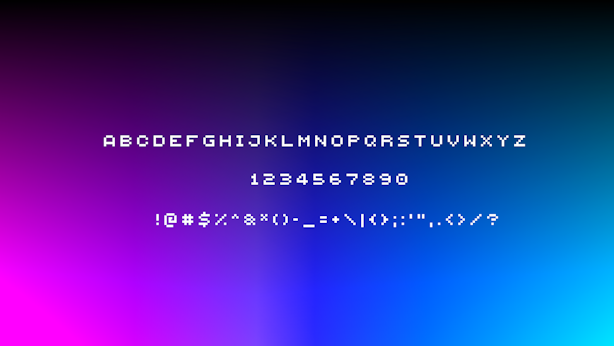
Small Caps Font
This simple texture pack replaces Minecraft’s default font with the Minecraft Five font, giving your game a clean, modern look. The Minecraft Five font is widely used across many modded servers and community projects, making your in-game text feel familiar and polished while keeping the overall vanilla style intact.
This pack is also inspired by [qrafty’s capitalized font](https://modrinth.com/resourcepack/qraftys-capitalized-font)
Fancy Hearts
**Fancy Hearts** is a texture pack that replaces the default hearts with cleaner, more detailed versions that look a lot fancier without ruining the original style. Along with the hearts, the pack also updates parts of the HUD and even tweaks the jumping bar you see when you’re riding a horse or any other mount. It’s a small visual change overall, but it makes everything feel cleaner and more polished while still fitting right into the game.

> _Zoro_
zOres
# Emissive Ores in the style of Programmer Art.
Requires [**Continuity**](https://modrinth.com/mod/continuity) or [**OptiFine**](https://optifine.net/home) to function properly.
## Ores
**Non-Emissive**
– Coal
**Emissive**
– Copper
– Diamond
– Emerald
– Gold
– Iron
– Lapis
– Redstone
– Nether Gold
– Nether Quartz
****
Join my [**Discord**](https://discord.gg/4GKytn9RRb) for Updates and Feedback!