zyrajobs
# ⚒ ZyraJobs
> **A fully custom Jobs plugin with beautiful GUI menus, progressive unlocks, and a deep leveling system — built for Spigot 1.21.**
—
## ✨ Overview
**ZyraJobs** lets your players choose a profession and level it up by doing what they love — mining, farming, hunting, or brewing. Every action earns XP, every level unlocks something new, and every milestone rewards the grind.
No bloat. No dependencies. Just a clean, immersive jobs experience with handcrafted GUI menus that look great out of the box.
—
## 🧭 The 4 Jobs
| Job | How to level up | Unlocks |
|—–|—————-|———|
| ⛏ **Miner** | Break ores underground | Coal → Iron → Gold → Diamond → Ancient Debris |
| 🌾 **Farmer** | Harvest fully grown crops | Wheat (Lv.1) → Carrots (Lv.5) → Chorus Plant (Lv.30) |
| 🏹 **Hunter** | Kill mobs & animals | Chickens → Creepers → Endermen → Warden (Lv.40) |
| ⚗ **Alchemist** | Brew potions at a stand | Basic potions (Lv.1) → Strength (Lv.8) → Turtle Master (Lv.25) |
Each job goes from **level 1 to 50**, with an XP formula that scales naturally: `100 × level^1.5`.
—
## 🖥️ Custom GUI Menus
ZyraJobs is built around **beautiful, interactive inventory menus**:
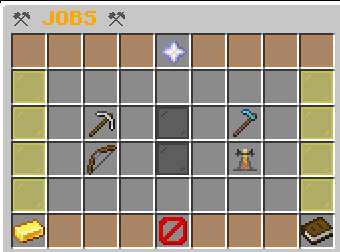
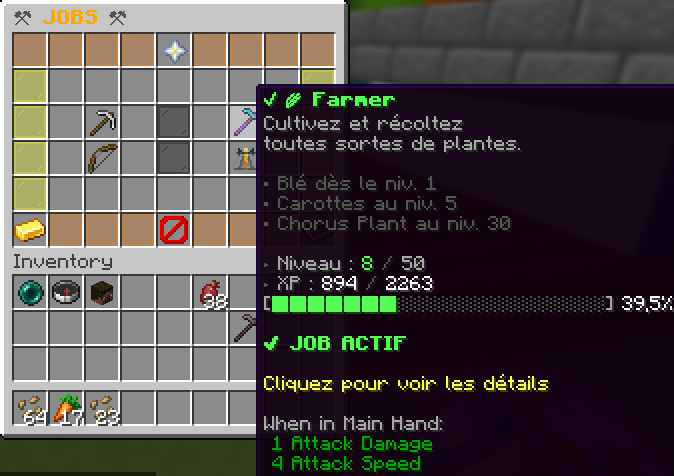
– **Main Menu** — displays all 4 jobs with your current level, XP bar, and active job highlighted with an enchantment glow
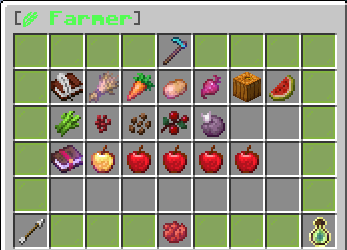
– **Job Detail Menu** — color-coded per job (gray / green / red / purple), shows every unlockable action, required level, XP reward, and all level bonuses
– Everything is **click-to-navigate**: open job details, join, leave, all without typing a command
—
## 📈 Progressive Unlocks
Crops, ores, mobs and potions are **gated by level** — you earn the right to work with better materials as you progress.

**Example for Farmer:**
– Lv. 1 → Wheat `+8 XP`
– Lv. 5 → Carrots & Potatoes `+15 XP` *(unlocked!)*
– Lv. 8 → Beetroots `+12 XP`
– Lv. 10 → Pumpkins & Melons `+20 XP`
– Lv. 30 → Chorus Plant `+45 XP`
Every unlock sends the player a chat notification the moment they reach the required level.
—
## 🎖️ Level-Up System
When a player levels up, they get:
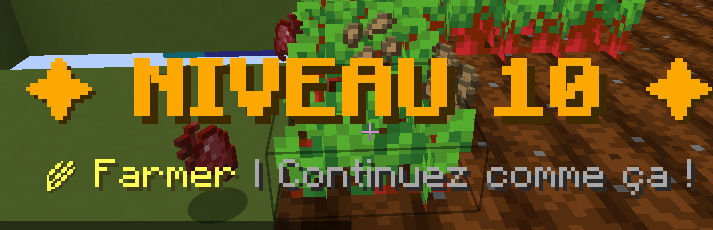

– 🔔 A **rich chat message** with a formatted XP progress bar
– 📺 A full **screen title** announcing the new level
– 🔊 A **level-up sound** effect
– 📣 A notification if a **new action is unlocked** at that level
—
## ⚡ Job Bonuses (every 10 levels)
Each job grants passive bonuses at milestone levels:
**⛏ Miner**
– Lv. 10 — 15% chance to double coal drops
– Lv. 20 — 10% chance to double iron/gold drops
– Lv. 40 — 2% chance to find a diamond while mining deepslate
– Lv. 50 — **PRESTIGE**: Triple XP on all ores
**🌾 Farmer**
– Lv. 5 — 50% chance to auto-replant harvested crops
– Lv. 15 — 10% chance to double wheat/carrot yield
– Lv. 25 — Auto-replant guaranteed at 100%
– Lv. 50 — **PRESTIGE**: Instant harvest without breaking
**🏹 Hunter**
– Lv. 15 — 2% chance to drop monster heads on kill
– Lv. 25 — Double XP against bosses (Ravager, Elder Guardian, Evoker…)
– Lv. 35 — Regeneration effect after each kill
– Lv. 50 — **PRESTIGE**: Random potion drop on every kill
**⚗ Alchemist**
– Lv. 15 — 8% chance to brew a duplicate potion
– Lv. 25 — Brewed potions last 25% longer
– Lv. 35 — 5% chance to auto-upgrade potion to level II
– Lv. 50 — **PRESTIGE**: All your potions are automatically level II
—
## 🛠️ Commands
| Command | Description |
|———|————-|
| `/jobs` | Open the Jobs GUI |
| `/jadmin reload` | Reload the config |
| `/jadmin setlevel ` | Set a player’s job level |
| `/jadmin addxp ` | Add XP to a player |
| `/jadmin reset ` | Reset all job data for a player |
| `/jadmin info ` | View a player’s job stats |
—
## 🔑 Permissions
| Permission | Default | Description |
|———–|———|————-|
| `zyrajobs.use` | Everyone | Access to `/jobs` |
| `zyrajobs.admin` | OP | Access to `/jadmin` |
—
## ⚙️ Configuration
Everything is configurable in `config.yml`:
– Max level (default: 50)
– XP formula base and exponent
– Multi-job mode (allow multiple jobs at once)
– Per-action XP rewards and minimum level requirements
– Level-up titles & sounds on/off
– All chat messages with color code support
—
## 📦 Requirements
– **Minecraft**: 1.21.x
– **Server software**: Spigot or Paper 1.21+
– **Java**: 21+
– **No dependencies** required
—
## 👤 Credits
Made by **sti_moi** — *zyraplug’s group*
zyrahomes
# 🏠 ZyraHome
**GUI-based home management with teams & VIP support — by sti_moi**



—
## ◈ Overview
ZyraHome is a lightweight yet feature-rich home plugin for Paper 1.21.x servers. Unlike traditional command-based home plugins, everything is handled through a clean 27-slot GUI — no memorizing commands, no typing coordinates. Just open the menu, click, and teleport.
The plugin supports personal homes, VIP premium homes with instant teleportation, and a full team system with a shared team home managed by the team leader.
—
## ◈ Features
– 🖱️ **GUI-only home management** — Set, teleport to, and delete homes entirely through an intuitive chest-style menu.
– ⏱️ **Teleport delay system** — Normal homes have a 3-second countdown. Moving during the delay cancels the teleport.
– ⭐ **VIP / premium homes** — 2 extra home slots with instant teleportation for players with the `zyrahome.vip` permission.
– 👥 **Team system** — Create teams, invite members, and share a common team home. The leader manages the team home via the GUI.
– 💾 **Persistent data** — All homes and team data are saved to `homes.yml` and `teams.yml` — no database required.
– ⚙️ **Configurable** — Teleport delays, home counts, cancel-on-move and all messages are fully editable in `config.yml`.
—
## ◈ GUI Explained
The menu is a 27-slot chest split into two rows: **beds on top** (visual status), **dye buttons on the bottom** (actions).
| Item | Meaning |
|——|———|
| Gray wool | Team home slot, not yet defined |
| White bed | Normal home, undefined |
| Red bed | VIP home — requires `zyrahome.vip` |
| Green bed | Home is defined and ready |
| Gray dye | Click to set / define this home |
| Green dye | Left-click to teleport · Right-click to delete |
> **Note:** VIP homes display as red beds until `zyrahome.vip` is granted. Once unlocked, they behave identically to normal homes but teleport instantly.
—
## ◈ Commands
| Command | Description |
|———|————-|
| `/home` | Open the home GUI menu |
| `/teamhome` | Teleport to your team’s home |
| `/team create ` | Create a new team |
| `/team invite ` | Invite a player to your team *(leader only)* |
| `/team accept` | Accept a pending team invitation |
| `/team leave` | Leave your current team |
| `/team kick ` | Kick a member from your team *(leader only)* |
| `/team disband` | Dissolve the team *(leader only)* |
| `/team info` | Display team info and member list |
—
## ◈ Permissions
| Node | Description | Default |
|——|————-|———|
| `zyrahome.home` | Access the home GUI and use homes | everyone |
| `zyrahome.vip` | Unlock VIP home slots + instant teleportation | op |
| `zyrahome.team` | Use team commands and team home | everyone |
| `zyrahome.admin` | Administrative commands | op |
—
## ◈ Installation
1. Drop the `.jar` into your server’s `plugins/` folder.
2. Restart the server — no dependencies required.
3. Configuration files (`config.yml`, `homes.yml`, `teams.yml`) are generated automatically inside `plugins/ZyraHome/`.
Works out of the box on any **Paper 1.21.x** server running **Java 21+**.
—
*Created by **sti_moi** · ZyraHome v1.0.0 · Paper 1.21.x*
Zyphorix Red
Get ready to PvP with Zyphorix Red! A Recolor of Zyphorix, a PvP texturepack that overhauls all PvP related items while keeping the loved vanilla-like feeling.
Zyphorix Red retextures:
– Swords and Tools of any material
– Iron, Gold, Diamond and Netherite Armor
– Water and Lava Bucket (also empty one of course)
– Mace, Bow and Arrows
– Golden Apples and Totem of Undying
– HUD (Crosshair, Hotbar, etc)
Zyphorix Pink
Get ready to PvP with Zyphorix Pink! A Recolor of Zyphorix, a PvP texturepack that overhauls all PvP related items while keeping the loved vanilla-like feeling.
Zyphorix Pink retextures:
– Swords and Tools of any material
– Iron, Gold, Diamond and Netherite Armor
– Water and Lava Bucket (also empty one of course)
– Mace, Bow and Arrows
– Golden Apples and Totem of Undying
– HUD (Crosshair, Hotbar, etc)
Zyphorix Blue
Get ready to PvP with Zyphorix Blue! A Recolor of Zyphorix, a PvP texturepack that overhauls all PvP related items while keeping the loved vanilla-like feeling.
Zyphorix Blue retextures:
– Swords and Tools of any material
– Iron, Gold, Diamond and Netherite Armor
– Water and Lava Bucket (also empty one of course)
– Mace, Bow and Arrows
– Golden Apples and Totem of Undying
– HUD (Crosshair, Hotbar, etc)
zy optimised pack
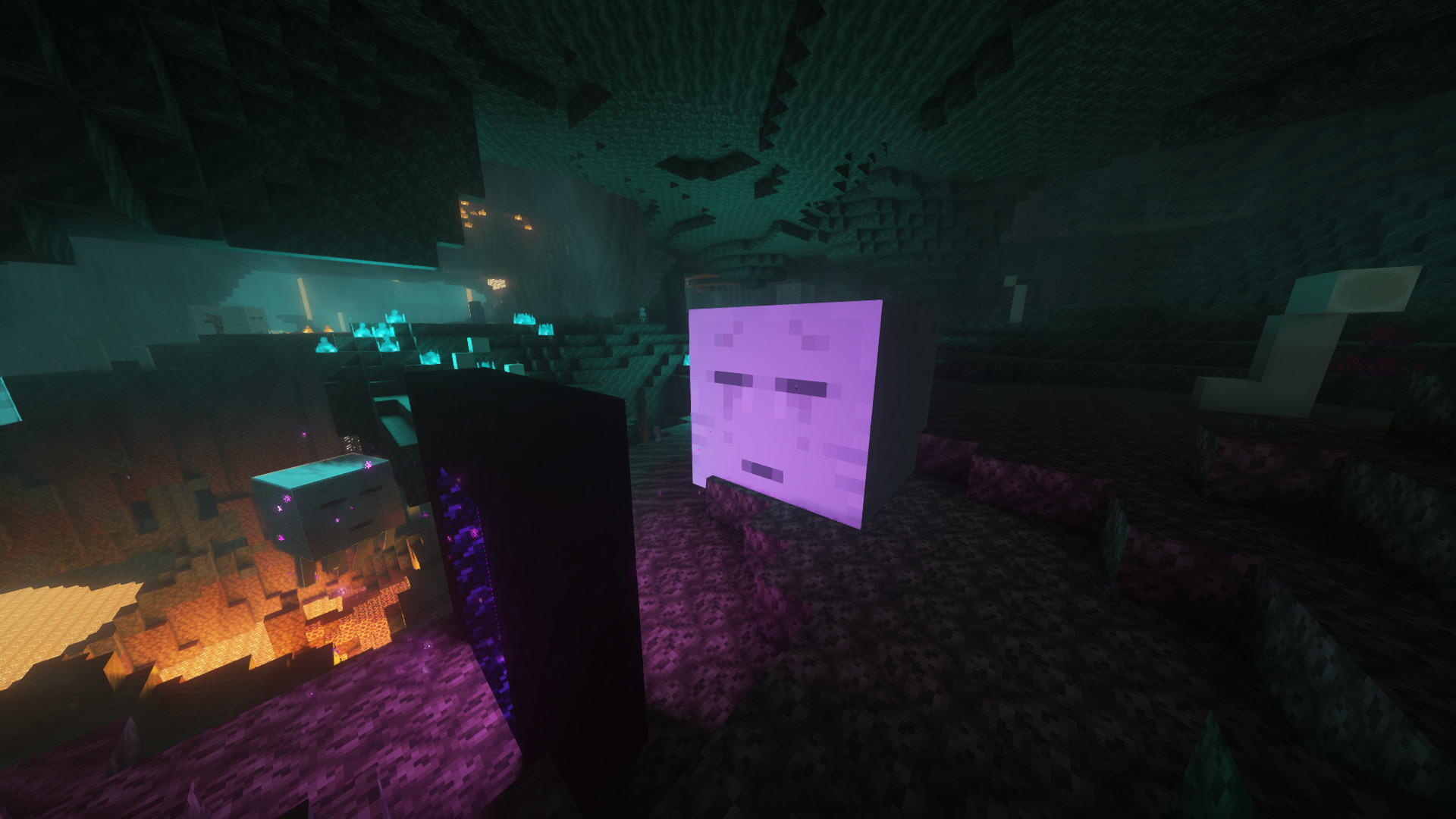
zy optimised pack is modpack with a focus on optimisation and quality of life features. The performance of the game is improved with mods such as [Sodium](https://modrinth.com/mod/sodium) and [Lithum](https://modrinth.com/mod/lithium), with QoL mods such as [Bobby](https://modrinth.com/mod/bobby), [WI Zoom](https://modrinth.com/mod/wi-zoom), [Shulker Box Tooltip](https://modrinth.com/mod/shulkerboxtooltip) and [WI Zoom](https://modrinth.com/mod/wi-zoom) being included.
Various resource packs and shaders are included, making configuration easily accessible upon startup. This modpack aims to enable good performance across various devices and keep the experience as close to vanilla as possible, whilst improving the game in unobtrusive ways.
[PrismLauncher](https://prismlauncher.org/) is recommended to manage different Minecraft versions.
## How to Install
[PrismLauncher](https://prismlauncher.org/download/) is recommended to manage instances and download mods. With PrismLauncher open, click the `Add Instance` button, select the `Modrinth` tab and search for this modpack (either by name or by using the link).
Alternatively, you can use the `Import` tab to select the `.mrpack` that can be downloaded to import the pack into PrismLauncher.
You will need Java (version 21) installed on your device. PrismLauncher can download Java for you when you open it for the first time.
Additionally, you can also download Java here: [adoptium.net](https://adoptium.net/en-GB/temurin/releases/?version=21&os=any&arch=any).
> **Note: On Macs with Intel processors, you need to install the x64 version of Java, on Macs with Arm 64 (Apple silicon) processors, you need to install the Arm 64 (aarch64) version of Java.**
## When Updating
To keep your settings, make sure to copy over `options.txt` to the new instance’s folder, from your old folder. Also, if you want, copy over `servers.dat` (your server list), `hotbar.nbt` (your saved creative hotbars), `saves/` (your worlds) and `screenshots/`, along with `.bobby/` (only made if you have the bobby mod).
## Included Resource Packs and Shaders
**Resource Packs**
> – [Bare Bones](https://modrinth.com/resourcepack/bare-bones)
> – [C418 Songs Only](https://modrinth.com/resourcepack/c418-songs-only)
> – [Default Dark Mode](https://modrinth.com/resourcepack/default-dark-mode)
> – [Enchantment Glows](https://modrinth.com/resourcepack/enchantment-glows)
> – [Even Better Enchants](https://modrinth.com/resourcepack/even-better-enchants)
> – [No Mob Variants](https://modrinth.com/resourcepack/even-better-enchants)
> – [No Wolf Skin Variants](https://modrinth.com/resourcepack/no-wolf-skin-variants)
> – [Redstone Tweaks](https://modrinth.com/resourcepack/redstone-tweaks)
> – [Vanilla Tweaks](https://vanillatweaks.net/picker/resource-packs/)
**Shaders**
> – [BSL Shaders](https://modrinth.com/shader/bsl-shaders)
> – [Complementary Reimagined](https://modrinth.com/shader/complementary-reimagined)
> – [Complementary Reimagined](https://modrinth.com/shader/complementary-reimagined) [+ Euphoria Patches](https://modrinth.com/mod/euphoria-patches)
> – [Rethinking Voxels](https://modrinth.com/shader/rethinking-voxels/versions)
ZyloLotto
# ZyloLotto – GUI-Based Lottery System for Minecraft 1.21
**Note:** This version supports **multiple languages**. Currently, **German (`de_DE`)** and **English (`en_US`)** are available.
Set your preferred language in `config.yml`. Additional languages will be added in future updates.
ZyloLotto brings a complete, easy-to-use lottery system to your server.
Players can buy tickets, watch live drawings, and enjoy massive winnings.
Everything is fully GUI-based – no complicated commands required.
—
## Features
### Ticket System
– Players buy tickets directly through a GUI – each ticket is a randomly generated 5-digit code.
– All tickets are saved automatically and increase the jackpot.
### Jackpot & Economy System
– Fully Vault-compatible, including automatic payout handling.
– The jackpot grows with every ticket purchased or via optional autofill.
### Animated Drawing
– Winning numbers are displayed through a multi-stage animation with sound effects.
### Intelligent Winner Detection
– Automatically detects 2 to 5 correct numbers in the correct positions.
– Winnings are distributed based on configurable percentage values.
### Drawing & Winner History
– Clean GUIs show past draws, winners, dates, and payout amounts.
– All data is stored permanently.
### Player Ticket Overview
– Players can browse their tickets in a paginated GUI.
– Admins can view or delete tickets directly.
### Admin Menu
– Complete lottery management through a dedicated admin menu.
– Change jackpot, ticket price, delete winners or draws, modify autofill, enable/disable rollback, and more.
### Automatic Drawing
– Optional auto-draw that starts a drawing at regular intervals.
– Interval can be set live via chat.
### Test Drawing
– Admins can run a test draw with any 5-digit number.
– Perfect for testing or events.
### SQLite Database
– No setup required – `lotto.db` is created automatically.
– The plugin handles saving tickets, drawings, winners, and jackpot values on its own.
—
## Commands
| Command | Description |
|——————|———————————————-|
| `/lotto` | Opens the main lottery GUI |
| `/lottodraw` | Starts a regular lottery drawing |
| `/lottotest <12345>` | Starts a test drawing with fixed numbers |
—
## LuckPerms Permissions
| Permission | Description | Default |
|———————|—————————————————————|———|
| `zylolotto.admin` | Access to the full admin menu and all admin functions | `op` |
| `zylolotto.draw` | Allows executing the official lottery draw (`/lottodraw`) | `op` |
| `zylolotto.test` | Allows executing test drawings (`/lottotest`) | `op` |
| *(no permission)* | Opens the lottery menu via `/lotto` | `everyone` |
—
## Required Plugins
– **Vault (1.7.3)** – For economy integration
*(SpigotMC: Vault Plugin)*
– **LuckPerms** – For permissions management
*(Modrinth: LuckPerms)*
ZxMenus
🧩 ZxMenus – Simple & Powerful GUI Menu Plugin
ZxMenus is a lightweight, all-in-one inventory GUI menu plugin inspired by DeluxeMenus, built to be powerful, fast, and easy to configure.
Create fully customizable GUI menus that open with commands and perform player-specific actions such as running commands, opening other menus, or executing console commands. ZxMenus focuses on simplicity without sacrificing flexibility.
—
✨ Features
Create unlimited GUI menus using simple YAML configuration
Open menus using custom commands
Execute player or console commands from menu items
Open menus for other players
Permission-based access for menus and items
Full PlaceholderAPI support
Lightweight and optimized for performance
Compatible with modern Spigot / Paper servers
Designed as an easier alternative to DeluxeMenus
—
📌 Commands
/zxmenu open
ZxArena
# ZXArena
**ZXArena** is a powerful and flexible **Spigot arena management plugin** that enables server owners to create, store, and instantly reset arenas across multiple Minecraft versions.
Perfect for **PvP**, **minigames**, and **event-based servers**.
—
## Key Highlights
### Arena Creation & Restoration
* Select any region and save it as a reusable arena
* Reset arenas back to their original state at any time
### Reset Performance Modes
* **Normal Mode** – Balanced reset speed (~3–5 seconds)
* **Extreme Mode** – High-speed reset in about 1 second
### Selection Tool
* Use a **golden axe** to define arena boundaries
* Left-click and right-click to set region corners
### Arena Statistics
* Track last reset time
* View how long each reset took
### Version Compatibility
* Works seamlessly on **Minecraft 1.20.1 – 1.21.4**
### Advanced Formatting
* Supports standard Minecraft colors and **hex color codes**
### Smart Command Completion
* Full tab-completion for all commands and arguments
### PlaceholderAPI Integration
* Access arena data anywhere using placeholders
—
## Commands & Permissions
| Command | Purpose | Permission |
| —————————— | ——————————– | —————— |
| `/zxarena pos1` | Set first selection point | `zxarenaset.admin` |
| `/zxarena pos2` | Set second selection point | `zxarenaset.admin` |
| `/zxarena save ` | Save selected region as an arena | `zxarenaset.admin` |
| `/zxarena reset [mode]` | Reset arena (normal / extreme) | `zxarenaset.use` |
| `/zxarena delete ` | Remove an arena | `zxarenaset.admin` |
| `/zxarena list` | Show all arenas and stats | `zxarenaset.use` |
| `/zxarena setspawn ` | Set arena spawn point | `zxarenaset.admin` |
| `/zxarena givewand` | Receive the selection wand | `zxarenaset.admin` |
| `/zxarena reload` | Reload configuration files | `zxarenaset.admin` |
| `/zxarena help` | View command help | All players |
| `/zxarena version` | Show plugin version | All players |
—
## Permission Nodes
* **`zxarenaset.admin`** – Complete administrative access
* **`zxarenaset.use`** – Basic usage (reset, list, view info)
—
## Installation Guide
1. Download **`xArenaReset.jar`**
2. Move the file to your server’s `/plugins` directory
3. Restart or reload the server
4. Configuration files will generate automatically
—
## Configuration Settings
All options can be customized via the configuration file, including:
* Reset delays
* Custom messages & color formats
* Automatic reset intervals
* Global broadcast messages
—
## PlaceholderAPI Placeholders
### General
| Placeholder | Output |
| —————– | ———————– |
| `%zxarena_count%` | Total number of arenas |
| `%zxarena_list%` | List of all arena names |
### Arena-Specific
| Placeholder | Description |
| ——————————————- | ——————— |
| `%zxarena_info__name%` | Arena name |
| `%zxarena_info__world%` | World name |
| `%zxarena_info__blocks%` | Block count |
| `%zxarena_info__mode%` | Last reset mode |
| `%zxarena_info__last_reset%` | Time since last reset |
| `%zxarena_info__reset_duration%` | Reset duration |
| `%zxarena_info__spawn%` | Spawn coordinates |
| `%zxarena_info__region%` | Region boundaries |
| `%zxarena_info__autoreset%` | Auto-reset status |
| `%zxarena_info__autoreset_interval%` | Interval (seconds) |
### Raw Data
| Placeholder | Description |
| ——————————————- | ——————– |
| `%zxarena_info__raw_reset_duration%` | Reset time (ms) |
| `%zxarena_info__raw_last_reset%` | Last reset timestamp |
—
## Color Formatting
* Supports standard Minecraft color codes (`&a`, `&c`, etc.)
* Full **HEX color** support for modern servers
—
Zume
# IMPORTANT LICENSE NOTICE
By using this project in any form, you hereby give your “express assent” for the terms of the license of this project (see [LICENSE](https://github.com/Nolij/Zume/raw/master/LICENSE)), and acknowledge that I (the author of this project) have fulfilled my obligation under the license to “make a reasonable effort under the circumstances to obtain the express assent of recipients to the terms of this License”.
# Zume
An ~~over-engineered~~ simple zoom mod.
This mod adds a keybind which zooms in your FOV while it’s held down, allowing you to see further away, and keybinds
for increasing and decreasing the zoom level.
# FAQ
#### Q: Where is the config?
A: You’ll find the config at `.minecraft/global/zume.json5` (note that this is the default `.minecraft` folder, not
the instance `.minecraft`). You can modify the file while the game is running, and the config will be automatically
reloaded. On platforms which have mod menus (such as Forge, and Fabric with [Mod Menu](https://modrinth.com/mod/modmenu)
installed), the config button for Zume will open this file in your system text editor.
#### Q: discord where
A: https://discord.gg/6ZjX4mvCMR
#### Q: What version is this for?
A: Zume supports the following platforms:
– Fabric: Any version supported by Fabric Keybinding API v1 (currently 14.4+)
– NeoForge: 20.4+ (requires NeoForge 20.4.195+)
– LexForge: 14.4 – 20.5 (requires MixinBootstrap before 16.1) (there are currently no plans to support 20.6+)
– Legacy Fabric: Any version supported by Legacy Fabric Keybinding API v1 (currently 7.10 – 12.2)
– Babric (Fabric for Minecraft Beta): Any version supported by Station API (currently b7.3)
– Vintage Forge: 8.9 – 12.2 (requires MixinBooter or UniMixins)
– Archaic Forge: 7.10 (requires UniMixins)
#### Q: Can you add support for ?
A: Every platform I intend to add support for myself is already supported. PRs are welcome for other platforms **if
the following conditions are met**:
– Must not break single-jar compatibility with any already supported platform (obviously).
– Must not be for a platform that has a 1st-party compatibility layer for an already supported platform – explicit
Quilt support will not be accepted so long as Quilt maintains a Fabric compatibility layer; it’d be a waste of CI
time. [Sinytra Connector](https://github.com/Sinytra/Connector) is a 3rd-party compatibility layer, so explicit
Forge support will be provided.
– Must not manually maintain overridden game options; implementations that look like
[Mooz’s](https://github.com/embeddedt/Mooz/blob/92570f7449a7e71c1c0b988788027b10c00f1346/src/main/java/org/embeddedt/mooz/ClientProxy.java#L35-L56)
will not be accepted – no offense [embeddedt](https://github.com/embeddedt). Direct ASM is fine as long as functionality is similar enough.
– Must make a reasonable effort to be maximize compatibility with existing mods on target platforms – see use of
Neo/LexForge API over mixins in Neo/LexForge implementations, and use of `@WrapWithCondition` and
`@ModifyExpressionValue` and such from MixinExtras over `@Redirect` in most implementations.
– Must follow existing format – add a Unimined subproject for each newly supported platform.
– Must not have exclusive features without significant justification – if you’re adding a feature, add it to every
version.
#### Q: What kind of weird license is this?
A: OSL-3.0 is the closest equivalent to a LAGPL I could find. AGPL and GPL are incompatible with Minecraft, and LGPL
doesn’t protect network use. OSL-3.0 protects network use and is compatible with Minecraft.
#### Q: Why though? It’s so strict!!!!
A: This is, and will remain, free, copyleft software. Any requests to change the license other than to make it even
stronger will be denied immediately (unfortunately GPL and AGPL aren’t compatible with Minecraft due to linking
restrictions, as much as I’d like to use them). Even in situations where I use parts of other projects with more
“permissive” licenses, I will treat them as copyleft, free software.
## License
This project is licensed under OSL-3.0. For more information, see [LICENSE](https://github.com/Nolij/Zume/raw/master/LICENSE).
## Need a Minecraft server? Consider CreeperHost!
