ZickZack V4
### Ein Texture Pack im Stil von BastiGHG und ZickZack V4
Es enthält Hotbar, Custom Sky, Overlay, Totem of Undying, Paintings, angepasste Models und mehr.
Dieses Texture Pack wird ständig angepasst und verbessert. Solltet ihr Fehler finden oder Fragen/anliegen haben, öffnet gerne ein Ticket auf dem verlinkten Discord Server.
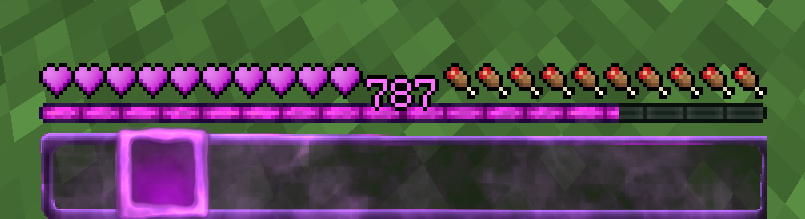
Der Custom Sky ist ohne Probleme mit OptiFine und Badlion kompatibel. Sodium unterstützt keine Custom Skies und erfordert die Installation von [Optiboxes](https://modrinth.com/mod/optiboxes). Durch Core Shader wird auch die Farbe der XP Zahl in der Hotbar passend lila gefärbt.
Dieses Texture Pack ist nicht von BastiGHG, Badlion oder ZickZack Cosmetics genehmigt oder mit ihnen verbunden. Es handelt sich um eine eigene, abgeänderte Version/Parodie des originalen Packs.
English Description
### A texture pack in the style of BastiGHG and ZickZackV4
It contains Hotbar, Custom Sky, Overlay, Totem of Undying, Paintings, customised models and more.
This texture pack is constantly being adapted and improved. If you find any bugs or have questions/concerns, feel free to open a ticket on the linked Discord server.
The Custom Sky is compatible with OptiFine and Badlion without any problems. Sodium does not support custom skies and requires the installation of [Optiboxes](https://modrinth.com/mod/optiboxes). Core shaders also change the colour of the XP number in the hotbar to purple.
This texture pack is not approved by or associated with BastiGHG, Badlion or ZickZack Cosmetics. It is a customised version/parody of the original pack.
ZickZack ORI Red 🌹
# BastiGHG ORI Red

This is a resourcepack that mimics the texturepack used by BastiGHG on the CraftAttack 13 server. The pack comes with custom skyboxes, updated hud & hotbar, Kugelschreiber Bow Model, red arrows and more!
### Contributors
– **@inowtp** was a huge help with the pack, he contributed the correct skyboxes for the pack and helped with further tweaks and enhancements, thanks a lot for helping me out!
### ORI Suitcase
If you want to get the mysterious suitcase in-game, please checkout the great project by **davidpel**: [https://modrinth.com/project/kH6OD1Z9](https://modrinth.com/project/kH6OD1Z9)
### ORI Kugelschreiber / Pen & Tracker
This texturepack includes the pen & tracker models, which show up when you rename a bow to either ‘Kugelschreiber’ or ‘Pen’ and a compass to ‘Tracker’. There are further details in the gallery!


## Texture changes
– GUI hearts and armour are red
– Apples as food bar
– Optifine/Optiboxes Custom Sky (Red night sky, blue day sky (double sun & artifacts fixed)
– Arrows are Red
– Added alternative model (Kugelschreiber/pen) for the bow
– Added alternative model (Tracker) for the compass
> **NOTE about the Tracker:** The Tracker may appear glitchy when moving, because animation frame time is reset when the compass changes direction, this is a limitation by minecraft which can (sadly) not be fixed.
> **NOTE about custom SkyBoxes:** You need to install a mod in order to make the custom skyboxes work, I recommend Optiboxes for this. If you are using Optifine or if you’re playing on BadLion, the pack should just work fine!
___
### Resourcepack Support
For any questions or problems with the resource pack, please contact me on Discord!
**PLEASE** do not ask for support in the BastiGHG Discord or in his Twitch Chat!
[](https://discord.gg/CE3rzSnzzw)
___
## **DISCLAIMER:**
> I am not BastiGHG, this is a community made resourcepack! This resourcepack is not approved by or associated with BastiGHG in any way! Some textures are not available to me, so I can’t include them!
ZickZack ORI Edition
> **THIS IS NOT AN OFFICIAL PACK FROM BASTIGHG IN ANY WAY.** Its Fanmade!
# BastiGHG CraftAttack 13 – ORI Pack
### Custom HUD, Sky and much more!
The weird green stars are not intended, its a client side bug. Credits to [L3_N0X](https://modrinth.com/resourcepack/zickzack-ori-red) (I used his creation as a base for many HUD elements. you are the goat Lenox)

—————————————————————————–
### How to get the New BastiGHG ORI Suitcase?
Put a normal totem of undying in an anvil and rename it to “????”

### The old “Fake” ORI Suitcase?
Rename a Totem of Undying to “???”

—————————————————————————–
### The special Weapen
a regular pen? No, put youre Bow in an anvil and rename it to “Kugelschreiber” or “Pen” to get BastiGHG´s special pen.

—————————————————————————–
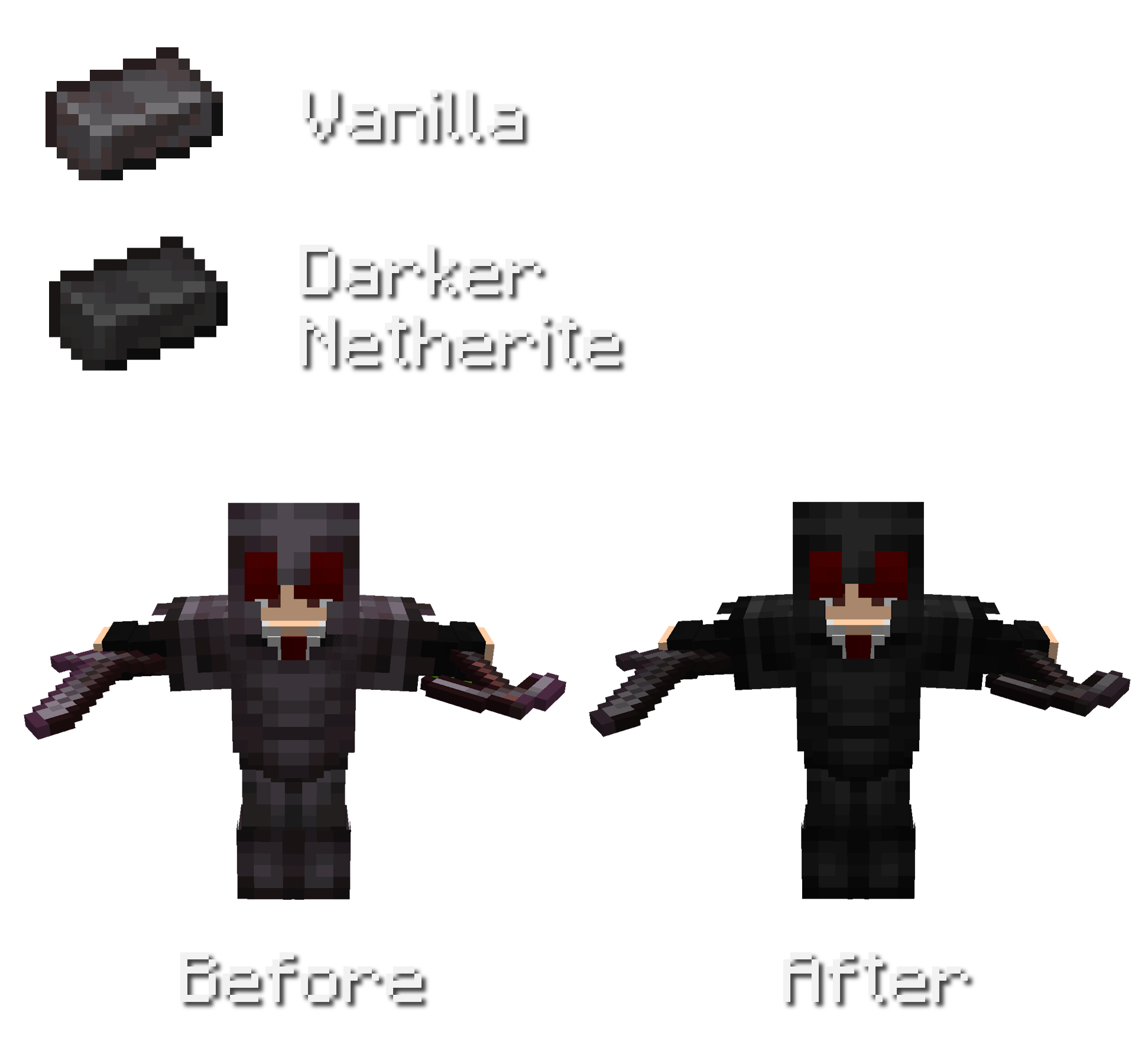
### Darker Netherite
Overall less saturated and darker netherite.
Also changed colors for netherite trim´s on netherite armor.
Other Features
No Pumpkin Blur
Less Rain/Snow Texture
ZickZack Light Blue
# ZickZack Light Blue


This is a resourcepack that mimics the texturepack used by BastiGHG in early 2026. The pack comes with custom skyboxes, updated hud & hotbar, custom XP Level color [Requires [Polytone](https://modrinth.com/mod/polytone)] and everything is made configurable using [ResPackOpts](https://modrinth.com/mod/respackopts)
## Texture changes
– GUI hearts and armour are light blue
– Golden carrots as food bar
– Optifine/Skyboxify Custom Sky (light blue night sky, blue day sky (double sun & artifacts fixed)
> **NOTE about custom SkyBoxes:** You need to install a mod in order to make the custom skyboxes work, I recommend [Skyboxify](https://modrinth.com/mod/skyboxify) for this. If you are using Optifine, the pack should just also work fine!
> **NOTE about the configuration Screen:** You need to install a mod in order to make configuration screen work, the mod is called [ResPackOpts](https://modrinth.com/mod/respackopts)!
___
### Resourcepack Support
For any questions or problems with the resource pack, please contact me on Discord!
**PLEASE** do not ask for support in the BastiGHG Discord or in his Twitch Chat!
[](https://discord.gg/CE3rzSnzzw)
___
## **DISCLAIMER:**
> I am not BastiGHG, this is a community made resourcepack! This resourcepack is not approved by or associated with BastiGHG in any way! Some textures are not available to me, so I can’t include them!
Zhu Yuan Totem
This resource pack replaces the traditional Totem of Undying texture with a custom design inspired by **Zhu Yuan from Zenless Zone Zero**. Instead of the default Minecraft totem, players will see Zhu Yuan represented in a clean, stylized texture that fits seamlessly within the game’s art style. This pack is purely cosmetic and does not alter gameplay mechanics, making it perfect for fans of Zenless Zone Zero who want to add a touch of personality and character flair to their Minecraft experience.
zHomes







zHomes is a modern, fast and fully-configurable homes plugin for Spigot/Paper/Purpur/PufferFish servers. It focuses on simplicity, speed and customization so server owners can give players a familiar — but powerful — teleportation experience.
Some features:
– Create, delete and list homes
– Admin tools for managing and converting homes
– PlaceholderAPI support for message placeholders
– MiniPlaceholders support for minimessage placeholders
– Vault support for economy/command-costs
– GriefPrevention and WorldGuard integration for region checks
– Teleport warmup and safe-teleport checks
– Configurable commands, messages and permissions
– 100% configurable menus
– Uses SQL (H2/SQLite/MariaDB/MySQL) for storage (no local data/ directory)
Maintained by [yL3oft](https://github.com/yL3oft). This project is free and open-source.
—

Requirements
– Java 17+ (check release notes for exact JDK requirement)
– Paper, Spigot or a compatible fork
Installation
1. Download the latest JAR from Releases / Modrinth / Hangar / Spigot.
2. Place the JAR in your server’s `plugins/` folder.
3. Start the server once to generate config files (src/main/resources/config.yml defaults).
4. You’re done!
Quick test
– As a player: `/sethome home1` then `/home home1`
– As an admin: `/zhomes reload`
—

Admin
– `/zhomes info` — Shows plugin info and stats.
– `/zhomes reload` — Reloads plugin configuration and messages.
– `/zhomes version ` — Checks the plugin version and updates if `` is specified.
– `/zhomes nearhomes [radius] <-u -h >` — Check for homes near a location (your location by default). Admins can specify a user and home to check near that home.
– `/zhomes parse ` – Parse a string with Plugin Placeholders & PlaceholderAPI placeholders for a specific player.
– `/zhomes export` — Export all homes to a .json.gz file in the plugin folder.
– `/zhomes import ` — Import homes from a .json.gz file exported by `/zhomes export`.
– `/zhomes converter ` — Inline converter tool to import homes from other plugins (example: `/zhomes converter ultimatehomes`). See detailed converter docs: https://docs.yleoft.me/zhomes/commands-and-permissions/zhomes-converter-less-than-type-greater-than
Player / Home commands
– `/sethome [name]` — Create a home (default name if omitted).
– `/delhome [name]` — Delete a home. Admins can use `/delhome `.
– `/home [name]` — Teleport to a home. Admins can use `/home `.
– `/homes [player]` — List homes. Admins can use `/homes `.
– `/home rename [oldName] [newName]` — Rename a home
Notes
– Command costs and vault integration require Vault to be installed.
– Some commands have admin-only variants (see Permissions below).
Full command list and usage: https://docs.yleoft.me/zhomes/commands-and-permissions
—

Below are the permission nodes and their default intent as defined in the plugin configuration (zHomes/config.yml). Use your permissions plugin to grant or deny these.
Command permissions
– zhomes.command.main — Main command (True by default)
– zhomes.command.main.help — Help SubCommand (Only OP by default)
– zhomes.command.main.version — Version SubCommand (True by default)
– zhomes.command.main.info — Info SubCommand (Only OP by default)
– zhomes.command.main.reload — Reload SubCommand (Only OP by default)
– zhomes.command.main.nearhomes – Nearhomes SubCommand (Only OP by default)
– zhomes.command.main.parse — Parse SubCommand (Only OP by default)
– zhomes.command.main.converter — Converter SubCommand (Only OP by default)
– zhomes.command.main.importexport — Import & Export SubCommand (Only OP by default)
– zhomes.command.sethome — `/sethome` (True by default)
– zhomes.command.delhome — `/delhome` (True by default)
– zhomes.command.delhome.others — `/delhome ` (Only OP by default)
– zhomes.command.homes — `/homes` (True by default)
– zhomes.command.homes.others — `/homes ` (Only OP by default)
– zhomes.command.home — `/home` (True by default)
– zhomes.command.home.others — `/home ` (Only OP by default)
– zhomes.command.home.rename — `/home rename` (True by default)
Bypass / misc permissions (as defined in config.yml)
– zhomes.bypass.limit — Bypass home limits (Only OP by default)
– zhomes.bypass.dimensionalteleportation — Bypass dimension restriction (Only OP by default)
– zhomes.bypass.safeteleport — Bypass safe-teleport checking (False by default)
– zhomes.bypass.warmup — Bypass teleport warmup (Only OP by default)
– %command_permission%.bypass.command-cost — Bypass command-cost (Only OP by default). Command-specific bypass permission is generated from the command permission string (see config.yml)
– %command_permission%.bypass.command-cooldown — Bypass commands cooldown (Only OP by default). Command-specific bypass permission is generated from the command permission string (see config.yml)
If you want to see the authoritative defaults and change them, open src/main/resources/config.yml in the repo or check the live docs: https://docs.yleoft.me/zhomes/commands-and-permissions
—

zHomes contains an inline converter to import homes from well-known plugins. The converter runs in-chat (not a GUI). See full converter details here: https://docs.yleoft.me/zhomes/commands-and-permissions/zhomes-converter-less-than-type-greater-than
—

Supported integrations:
– PlaceholderAPI — Message placeholders supported & custom [placeholders provided by zHomes](https://docs.yleoft.me/zhomes/hooks/placeholderapi).
– MiniPlaceholders – MiniMessage placeholders supported for advanced message formatting & custom [placeholders provided by zHomes](https://docs.yleoft.me/zhomes/hooks/miniplaceholders).
– Vault — for economy-based command-costs.
– GriefPrevention — region checks integration.
– WorldGuard — region and flag checks.
– MiniMessage — advanced message formatting.
– bStats — anonymous metrics (configurable).
Enable or disable integrations from config and ensure the third-party plugins are installed on the server when you expect integration behavior.
—

If you find zHomes helpful or need assistance:
– Discord: https://discord.gg/yCdhVDgn4K
– Issues: https://github.com/yL3oft/zHomes/issues
– Docs: https://docs.yleoft.me/zhomes
Support the project by starring the repo and joining the Discord!
—
ZhaoZizhengs Subway
This MOD added some track. There are Car plant track,platform track,Speed-changing track…
Then,we have the lift:ladder and vertical lift
How to use them?,please visit https://b23.tv/ctk9RGd to watch the tutorial video.
Next one.
It’s a route map.
right click to open it(It like a paper),there are some route,but if u don’t creat a new route,please,creat a route.
How to creat a new?
find a Route editor (His icon is like an excel spreadsheet)(:
right click
Now u opened a UI
1. find “edit”or”creat”
2. click it
3. Enter the name,Station,and the coulor(Hex)
Then you can watch the video to get more info
萌猫语
Do u know the LOLCAT language? i made a Chinese version!
Causing many words to have spelling errors and pinyin
Taking Waxed Exposed Cut Copper Stairs as an example:
斑驳的涂蜡切制铜楼梯→班bo的涂辣切制铜楼梯
It can run normally in many versions so I’m too lazy to make any changes ‘-‘
(You still need to make changes on the language selection interface)
只是中文版的萌猫语
实际上它在1.18x~1.21x(好像)都能正常运行,但是我懒得改了0-o
加载了后还需在语言界面更改!
Fast Noise
[Keep Android Open | Contact Regulators to stop Google’s lockdown of Android](https://keepandroidopen.org/)
Fast Noise is a modern optimization mod to improve world generation times. I regularly update the mod to latest minecraft versions, bring improvements to the mod, and provide stable releases.
**Does the mod change world generation?** The mod maintains **vanilla parity**, including with any datapacks. Do keep in mind, [Vanilla non-determinism](https://bugs.mojang.com/browse/MC-55596).
**Can I use custom worldgen mods with this?** Yes, I try my best to maintain mod compatibility, and only modify safe code. Specific optimizations that may affect mod compatibility are disabled by default.
**Forge / Neoforge?** Versions for minecraft 1.19.x – 1.21.8 are compatible with sinytra connector.
[](https://codeberg.org/ZenXArch/FastNoise) [](https://www.curseforge.com/minecraft/mc-mods/zfastnoise) [](https://modrinth.com/mod/zfastnoise) [](https://ko-fi.com/I2I31KW58I)
## How does this mod work?
Fast noise optimizes storing block and biome data into chunks for the duration of worldgen.
Technical Details
Fast noise replaces populateNoise,populateBiomes in NoiseChunkGenerator and surfaceBuilder in SurfaceBuilder.
Fast noise optimizes world generation by making several strong assumptions about how world generation works. By replacing vanilla’s generic and debug code for world storage with faster, more packed calculations, fast noise achieves faster throughput.
Some key methods used to achieve that are, **reducing allocations**, **avoiding palette resizing**, **delaying/packing block counting**, **precalculating data**,
**caching block state information** and more.
## How fast is it?
About 10-18% improvement to overall worldgen in overworld in 1.21.11 on latest versions.
Much higher improvement in nether, end
Here is a [Jmh Benchmark Software](https://codeberg.org/ZenXArch/FastNoise/src/branch/performance/perf/src/main/java/org/codeberg/zenxarch/fastnoise/PerfTest.java).
Chunky benchmark
12 threads w/ mod
“`
[12:39:32] [Server thread/INFO]: [Chunky] Task finished for minecraft:overworld. Processed: 16641 chunks (100.00%), Total time: 0:01:37
“`
W/o mod
“`
[12:43:08] [Server thread/INFO]: [Chunky] Task finished for minecraft:overworld. Processed: 16641 chunks (100.00%), Total time: 0:01:47
“`
4 threads w/ mod
“`
[12:56:23] [Server thread/INFO]: [Chunky] Task finished for minecraft:overworld. Processed: 9409 chunks (100.00%), Total time: 0:01:10
“`
W/o mod
“`
[13:01:11] [Server thread/INFO]: [Chunky] Task finished for minecraft:overworld. Processed: 9409 chunks (100.00%), Total time: 0:01:23
“`
With higher distance
W/o mod
“`
[13:11:01] [Server thread/INFO]: [Chunky] Task finished for minecraft:overworld. Processed: 19881 chunks (100.00%), Total time: 0:02:43
“`
W/ mod
“`
[13:16:03] [Server thread/INFO]: [Chunky] Task finished for minecraft:overworld. Processed: 19881 chunks (100.00%), Total time: 0:02:21
“`
Jmh Benchmark
“`
Mods used: Fast Noise 1.0.15+26.1 on 26.1 snapshot-6
ChunkPos: -16,-16 -> 16,16
End ChunkPos: 112,112 -> 144,144
Chunks: 1089
Mods used: (c2me)
With mod:
Benchmark (worldName) Mode Cnt Score Error Units
BiomesBenchmark.biomegen end avgt 5 11.786 ± 0.168 ms/op
BiomesBenchmark.biomegen nether avgt 5 174.833 ± 1.166 ms/op
BiomesBenchmark.biomegen overworld avgt 5 2401.797 ± 31.629 ms/op
NoiseBenchmark.noisegen end avgt 5 3052.242 ± 12.358 ms/op
NoiseBenchmark.noisegen nether avgt 5 1039.086 ± 6.467 ms/op
NoiseBenchmark.noisegen overworld avgt 5 8441.811 ± 41.396 ms/op
With only c2me:
Benchmark (worldName) Mode Cnt Score Error Units
BiomesBenchmark.biomegen end avgt 5 26.058 ± 0.245 ms/op
BiomesBenchmark.biomegen nether avgt 5 185.957 ± 2.203 ms/op
BiomesBenchmark.biomegen overworld avgt 5 2464.937 ± 29.007 ms/op
NoiseBenchmark.noisegen end avgt 5 3925.059 ± 14.292 ms/op
NoiseBenchmark.noisegen nether avgt 5 1920.705 ± 9.864 ms/op
NoiseBenchmark.noisegen overworld avgt 5 11552.674 ± 54.112 ms/op
Vanilla:
Benchmark (worldName) Mode Cnt Score Error Units
BiomesBenchmark.biomegen end avgt 5 27.051 ± 0.118 ms/op
BiomesBenchmark.biomegen nether avgt 5 239.634 ± 1.702 ms/op
BiomesBenchmark.biomegen overworld avgt 5 4589.322 ± 80.331 ms/op
NoiseBenchmark.noisegen end avgt 5 4477.113 ± 36.133 ms/op
NoiseBenchmark.noisegen nether avgt 5 1951.438 ± 5.748 ms/op
NoiseBenchmark.noisegen overworld avgt 5 14249.612 ± 57.388 ms/op
Vanilla:
Benchmark (worldName) Mode Cnt Score Error Units
SurfaceBenchmark.surface overworld avgt 5 5982.828 ± 17.992 ms/op
SurfaceBenchmark.surface nether avgt 5 2677.115 ± 9.293 ms/op
SurfaceBenchmark.surface end avgt 5 924.604 ± 5.376 ms/op
With Mod:
Benchmark (worldName) Mode Cnt Score Error Units
SurfaceBenchmark.surface overworld avgt 5 4820.672 ± 24.669 ms/op
SurfaceBenchmark.surface nether avgt 5 1914.289 ± 644.099 ms/op
SurfaceBenchmark.surface end avgt 5 0.014 ± 0.003 ms/op
Speedup
Overworld: Biome: 1.026x Noise: 1.368x Surface: 1.241x
Nether: Biome: 1.063x Noise: 1.847x Surface: 1.398x
End: Biome: 2.21x Noise: 1.285x Surface: 66357x
“`
The benchmarks may have some inaccuracies.
## Socials
[](https://discord.gg/RFSmd7debX) [](https://mastodon.social/@ZenXArch) [](https://matrix.to/#/#zenxarchs-modding-server:gitter.im)
## FAQ and Help
Q- What Minecraft versions will the mod be supporting?
A- I’ll try to support the latest minecraft version.
Q- Are backports planned?
A- No backports are planned, current backports were a one time thing.
Q- What other mods/dependencies do I need?
A- No dependencies are required.
Q- Will there be a neoforge version?
A- Yes, a NeoForge variant is planned post 26.1.
Versions for 1.19.x,1.20.x,1.21 – 1.21.8 works with sinytra connector

Q- XYZ mod crashes, or generates incorrectly with Fast Noise?
A- Report the issue on codeberg or my socials.
## Incompatible mods
Moonrise is incompatible, as It changes minecraft internals drastically
Noisium is incompatible, as Fast Noise is intended as a replacement for noisium.
Anti-Xray is incompatible for now, as it needs to put extra data in minecraft block storage, which breaks fastnoise
## Credits
– Stevenplays, for developing noisium mod, I started developing fast noise while trying to port noisium to latest minecraft.
– Ishland, for helping with mod, and modern-yarn and neo-loom
Zexade
Modpack cool