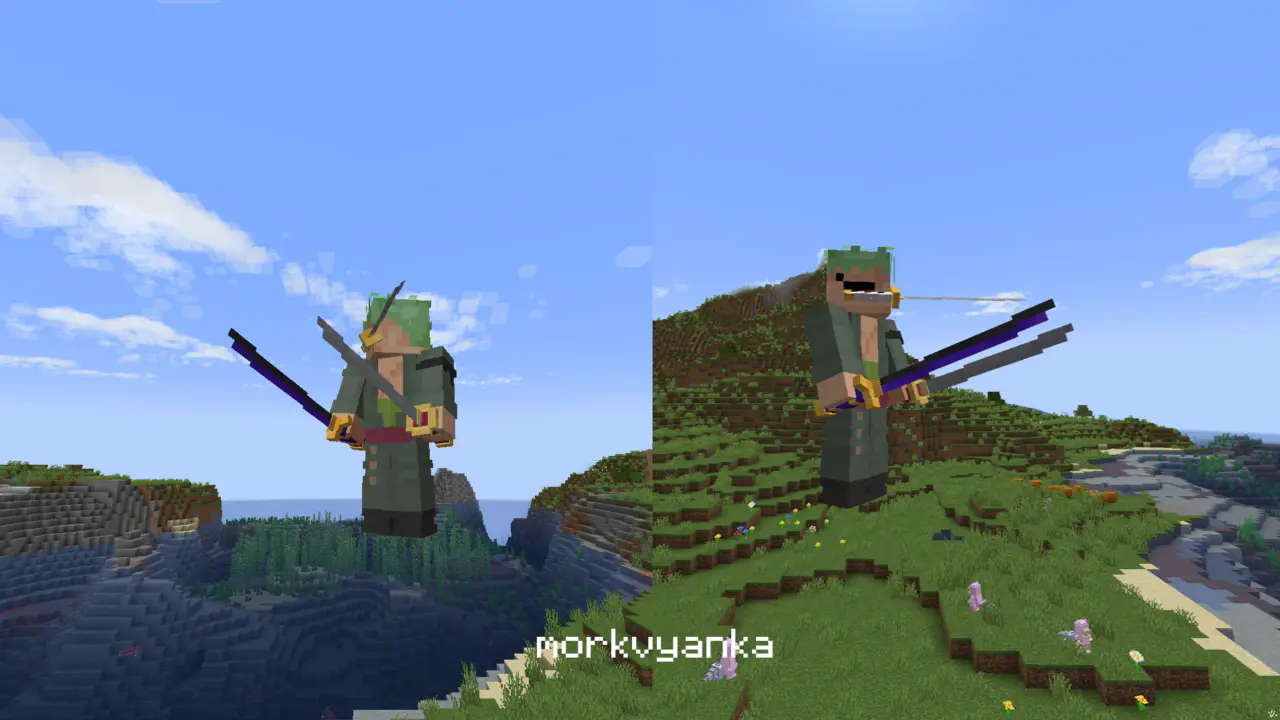
Zoro katanas
**In this resource pack I changed model of netherite sword, netherite axe and carwed pumpkin to Zoro katanas.**
[my linktree](https://linktr.ee/morkvyanka)
Fancy Hearts
**Fancy Hearts** is a texture pack that replaces the default hearts with cleaner, more detailed versions that look a lot fancier without ruining the original style. Along with the hearts, the pack also updates parts of the HUD and even tweaks the jumping bar you see when you’re riding a horse or any other mount. It’s a small visual change overall, but it makes everything feel cleaner and more polished while still fitting right into the game.

> _Zoro_
zOres
# Emissive Ores in the style of Programmer Art.
Requires [**Continuity**](https://modrinth.com/mod/continuity) or [**OptiFine**](https://optifine.net/home) to function properly.
## Ores
**Non-Emissive**
– Coal
**Emissive**
– Copper
– Diamond
– Emerald
– Gold
– Iron
– Lapis
– Redstone
– Nether Gold
– Nether Quartz
****
Join my [**Discord**](https://discord.gg/4GKytn9RRb) for Updates and Feedback!
ZoomX Smooth
# ZoomX Smooth – Smooth Zoom for Minecraft
**ZoomX Smooth** is an enhanced version of ZoomX, designed for players who want a more cinematic and customizable zoom experience. It keeps everything lightweight and performance-friendly, while adding adjustable smoothness and zoom speed controls.
Built for **Fabric**, and fully compatible with **vanilla**, **Sodium**, and other performance mods, ZoomX Smooth gives you complete control over how your zoom feels.
—
## What Makes ZoomX Smooth Different?
Unlike the standard ZoomX, this version allows you to customize:
– **Zoom Smoothness (ms)**
– **Zoom Speed (multiplier)**
You can fine-tune the zoom transition exactly how you like it. whether you want instant zoom or a slow, cinematic camera effect.
—
## Adjustable Settings
By using keybinds (default B), you can configure:
### Smoothness (ms)
Control how smoothly the zoom transitions in and out.
– Lower values = faster transition
– Higher values = slower, more cinematic effect
### Zoom Speed (x)
Adjust how fast the zoom effect is.
– Lower multiplier = slower zoom
– Higher multiplier = faster zoom
All settings are easy to modify using simple sliders inside the menu.
—
## Features
– 🔍 Smooth adjustable zoom
– 🎚 Customizable transition timing
– 🎯 Adjustable zoom strength
– ⚡ Lightweight & optimized
– 🧩 Built for Fabric
– 🟩 Fully compatible with Sodium
– 🎮 Clean and simple UI
– 🚀 No FPS drops
ZoomX
# ZoomX – A Simple & Lightweight Zoom Mod
**ZoomX** is a simple, lightweight, and performance-friendly zoom mod for **Minecraft Fabric**. It adds a zoom feature to the game without changing the vanilla feel. The mod works perfectly with **vanilla Minecraft**, **Sodium**, and other popular Fabric optimization mods.
If you are looking for a clean zoom experience without heavy features or FPS drops, ZoomX is the perfect choice.
### Want Smooth Zoom? Try ZoomX Smooth 👇
[](https://modrinth.com/mod/zoomx-smooth)
—
## What is ZoomX?
ZoomX allows players to zoom in and out while playing Minecraft. It is designed to be minimal and efficient, focusing only on zoom functionality. There are no unnecessary settings or complex menus—just install and use.
—
## Features
### ⚡ Lightweight & High Performance
ZoomX is extremely lightweight and has minimal impact on FPS, even on low-end systems.
### 🧩 Fabric Based
Built specifically for the Fabric mod loader, ensuring fast load times and modern mod compatibility. (Will add more compatible loaders in future)
### 🟩 Vanilla & Sodium Compatible
– Works with vanilla-style gameplay
– Fully compatible with Sodium
– Safe to use with other Fabric performance mods
### 🎮 Easy to Use
No complicated configuration. Install the mod and start zooming instantly.
—
Got issues? Join [Discord](https://discord.com/invite/spunky-insaan-851780887271571456)
ZoomLens
🔍 Zoomify – The Ultimate Zoom Mod for Minecraft! 🔍
Previously known as Zoomify!
🌍Experience distant structures, mesmerizing landscapes, and stunning views with exceptional clarity! Whether you’re a traveler, a creator, or a scenery enthusiast, Zoomify’s adjustable zoom feature enhances every moment!🌍
—
🖱️ Easy to Use:
Hold C + scroll the middle mouse button to adjust the zoom level.
—
🎥 Video Showcase:
—
Zoomi
Enhance your exploration and observation capabilities in Minecraft with the Zoomi Mod! This handy modification introduces a simple yet powerful zoom feature that allows you to get a closer look at distant objects and landscapes without compromising your gameplay experience.
## Features
**Easy Zoom Controls:** Activate the zoom feature effortlessly with a configurable keybind. Zoom in and out seamlessly to adjust your view as needed. (Default Keybind ‘C’)
**Scroll Zoom:** Fine-tune your zoom level with ease using your mouse scroll wheel. This feature provides more control and flexibility over your viewing experience.
## Compatibility
**Minecraft:** Works smoothly for Minecraft 1.21 and Fabric API.
**Mod Loader:** Fabric
## Requirements
**Fabric API:** Ensure you have the Fabric API installed for the Zoomi Mod to function properly.
**owo Lib**
Have fun!
Zoomglass
A Fabric mod that quickly puts a spyglass into your hand with a press of a button.
Made for people who prefer roleplaying aspects of a spyglass but don’t want to miss out on convenience!
Additionally, you can use a fake spyglass while in Spectator gamemode, or in Creative when you don’t have
it in your inventory.
The default keybind is `z`, and you can find it under the “Inventory” section in keybinding settings.
Requires Fabric API
Zombie Nightmare Expansions – Undead Horror Monsters

**Welcome to Zombie Nightmare Expansions, a new horror mod centred on adding new undead monsters with unique nightmarish mechanics.**
Discord server https://discord.gg/arphex
These mobs appear rarely in any overworld biomes and their spawn rates can be configured individually (including disabling specific mobs if required). All modpack inclusions welcome. More mobs planned in future!
Current mobs:
DISEMBOWELER

Large, monstrous zombie with entrails hanging out, seeking blood and vengeance. Lumbers around looking for players and cows to consume, with attacks packing a heavy punch. Drops “corrupted heart” items on death.
TORMENTED STEVE

A hideous monstrosity disguising itself as a regular player (eight player skin variants). When stationary, it resembles the normal skin, but as soon as it moves, the true nightmarish form comes out. Sometimes found hanging from ceilings ready to drop on your head. A very strong and vicious opponent, dropping enchanted golden apples on death.
BLOOD EAGLE

A huge demon/dragon-like zombie with appendages made entirely from stretched out flesh, and sporting a set of razor-sharp teeth. Capable of both flying and walking, sometimes attacking from the air with spit projectiles or from the ground with melee – Eats pigs. Very strong, plus tameable and rideable (tamed with 10 corrupted hearts, configurable to disable taming).
BRUTALISER

MINIBOSS. A huge, strong zombie that can smash the ground to create block shockwaves dealing devastating damage and knockback on impact. You can jump over shockwaves or evade them – whenever you move close to attack, be sure to evade quickly before it gets the chance to strike! Attacks sheep and drops a “Deathly Onyx” on death, used for crafting a special staff item that lets you repulse nearby undead mobs (right click hold) and even summon crawling minions (ground left click ability, charges up to 5 stored summons by killing undead while it is in your inventory).
SKIN CRAWLER

The weakest enemy in the mod, but more relentless than any other. Capable of camouflaging itself by changing colour to match the blocks around it, and breaking through stone, deepslate, tuff, granite, diorite, andesite, and netherrack to get to you (this can be disabled in config). Moreover, it can climb walls and crawl through tight spaces, making it hard to avoid fully. Also attacks chickens.
SPINE WRENCHER

A tall, thin entity with tendril-like arms and a related appearance to the blood eagle, perhaps coming from a similar origin. This entity has to be close to spot you, unless you look directly at it. If you do so, then it will notice and come running towards your location. Given how thin it is, it has become fragile, so if you block its attacks with a shield, it will take damage whenever it tries to attack, providing a strong way of countering it. It is more than two blocks tall, but can crouch down to get through smaller gaps. Drops “Distorted Vertebrae” on death, used for crafting a powerful whip item.
Staff of the Undead crafting recipe includes both the Deathly Onyx and two Deathly Heart items, along with some vanilla components:

Whiplasher – crafting recipe includes a netherite ingot surrounded by eight “distorted vertebrae” dropped by Spine Wrencher mobs.

Zones
# Zones
This plugin allows server administrators and players to create and manage protected regions within their Minecraft
world. It provides a flexible system for defining areas, setting permissions, and controlling interactions within those
areas.
## Features
* **Region Creation:** Create regions using in-game selection or manual coordinates.
* **Sub-Regions:** Create sub-regions within existing regions for more granular control.
* **Permission Management:** Set detailed permissions for players within regions, controlling actions like breaking,
placing, interacting, and more.
* **Member Management:** Add and remove members from regions with specific permissions.
* **Region Overlap Control:** Configure whether regions can overlap.
* **Bypass Permissions:** Allow specific players to bypass region restrictions.
* **Configuration:** Customize messages and region settings through configuration files.
* **Beacon Visualization:** Visualize selected regions using temporary beacons.
## Commands
The plugin provides the following commands:
* `/zone create`: Creates a new region using the currently selected locations.
* Usage: `/zone create`
* Requires two locations to be selected using left and right click, starts selection if not present.
* Prevents creation if the new region would overlap an existing region, unless the `zones.create.overlap`
permission is set.
* `/zone subcreate`: Creates a new sub-region within an existing region using the currently selected
locations.
* Usage: `/zone subcreate [regionKey]`
* `regionKey` is optional, if not provided, the region at the player’s location will be used.
* Requires two locations to be selected using left and right click, starts selection if not present.
* Player needs to be considered an admin in the region, or have the `zones.subcreate.other` permission
* `/zone delete`: Deletes an existing region.
* Usage: `/zone delete `
* Requires the `regionKey` of the region to be deleted.
* Player needs to be the owner of the region, or have the `zones.delete.other` permission
* `/zone expand`: Expands an existing region by a specified amount.
* Usage: `/zone expand [overlap]`
* Player needs to be an admin of the region, or have the `zones.expand.other` permission
* If `overlap` is set to `true` and the player has the `zones.expand.overlap` permission,
* the region will be expanded even if it overlaps with other regions.
* `/zone info`: Displays information about a region.
* Usage: `/zone info [regionKey]`
* If `regionKey` is not provided, the region at the player’s location will be used.
* To show region members, the player needs to be an admin of the region, or have the `zones.info.other` permission
* `/zone list`: Lists all regions the player is a member of.
* Usage: `/zone list`
* Only shows regions the player is a member of, unless the player has the `zones.list.other` permission
* `/zone cancel`: Cancels the current region selection.
* Usage: `/zone cancel`
* `/zone set`: Sets a permission for a member of a region.
* Usage: `/zone set `
* `` is the key of the region.
* `` who to set the permission for.
* e.g., `Player1` – to create or modify a group, use `+group-GROUPNAME`, where GROUPNAME can be any name.
* `` is the permission to set (e.g., `role`, `break`, `place`, `interact`).
* `` is the value to set for the permission (
* e.g., `owner`, `true`, `false`, `*`, `!*`, `GRASS_BLOCK`, `!GRASS_BLOCK`).
* `/zone rename`: Renames a region.
* Usage: `/zone rename `
* `` is the key of the region, `` is the new name of the region.
* Player needs to be an admin of the region, or have the `zones.rename.other` permission
* `/zone select`: Selects a region.
* Usage: `/zone select [regionKey]`
* If `regionKey` is not provided, the region at the player’s location will be used.
* Visually highlights the region in the world using particles.
* Player needs to be a member of the region, or have the `zones.select.other` permission
* `/zone mode`: Changes the selection mode.
* Usage: `/zone mode `
* `` is the new mode to set the player to.
* e.g., `3d` for 3D selection mode, `2d` for 2D selection mode.
* `/zone save`: Manually saves all regions to file.
* Usage: `/zone save`
* Admin only, requires the `zones.save` permission (not given by default)
* `/zone load`: Manually loads all regions from file.
* Usage: `/zone load`
* Admin only, requires the `zones.load` permission (not given by default)
* `/zone import`: Imports regions from another plugin.
* Usage: `/zone import `
* Currently only supports WorldGuard.
* Admin only, requires the `zones.import` permission (not given by default)
## Usage
### Creating a Region
1. Use the `/zone create` command to start the creation process.
2. Use left-click on a block to set the first corner of the region. A green beacon will appear.
3. Use right-click on a block to set the second corner of the region. A red beacon will appear.
4. Use the `/zone create` command to create the region.
### Creating a Sub-Region
1. Use the `/zone subcreate` command to start the creation process.
2. Select the two corners of the sub-region as described above.
3. Use the `/zone subcreate` command to create the sub-region within the region you are standing in or
use `/zone subcreate ` to create a sub-region within the specified region.
### Setting Permissions
1. Use the `/zone set ` command to set permissions for a member of a region.
* Example: `/zone set Player1 break true` allows “Player1” to break blocks in the specified region.
* Example: `/zone set Player2 break GRASS_BLOCK` allows “Player2” to break only `GRASS_BLOCK` blocks
in the specified region.
* Example: `/zone set Player3 interact !OAK_DOOR` denies “Player3” to interact with `OAK_DOOR`in
the specified region.
* Example: `/zone set Player4 place *` allows “Player4” to place all blocks in the specified region.
* Example: `/zone set Player5 break !*` denies “Player5” to break all blocks in the specified region.
* Groups:
* To assign a group, set the value of the permission `group` to the group name.
* e.g.: Create a group and assign permission: `/zone set +group-some-group-name break true`
* e.g. `/zone set ExamplePlayer group some-group-name`
* ExamplePlayer now inherits the permission `break` from the group `some-group-name`
### Viewing Region Information
1. Use the `/zone info` command to view information about the region you are standing in.
2. Use the `/zone info ` command to view information about a specific region.
## Integrations
### WorldGuard
Zones supports importing WorldGuard regions via the `/zone import WorldGuard` command. To use this feature,
you must have WorldGuard installed and enabled. Zones will automatically import all Cuboid regions, including
their members.
### WorldEdit
WorldEdit can only be used to modify blocks in a region if the executing player would be allowed to manually
modify the region.
### PlaceholderAPI
Zones provides multiple placeholders for use with the PlaceholderAPI plugin, displaying region information for the
region the player is standing in. It currently supports the following placeholders:
* `%zones_get_name%`
* `%zones_get_key%`
* `%zones_get_members%`
* `%zones_get_owner%`
* `%zones_get_min%`
* `%zones_get_min_x%`
* `%zones_get_min_y%`
* `%zones_get_min_z%`
* `%zones_get_max%`
* `%zones_get_max_x%`
* `%zones_get_max_y%`
* `%zones_get_max_z%`
* `%zones_is_member%`
* `%zones_can_place_hand%`
* `%zones_can_break_target%`
* `%zones_can__%`
## Design Choices
* **YAML Configuration:** The plugin uses YAML files for configuration and storage, making it easy to read and modify.
Additional storage options are planned for future releases.
* **Permission System:** The permission system is designed to be flexible and granular, allowing for fine-grained
control over player interactions.
* **Event-Driven:** The plugin uses Bukkit’s event system to handle player interactions, making it efficient and
responsive.
* **Caching:** The plugin uses a caching system to improve performance when checking permissions.
## Contributing
Contributions to the plugin are welcome! If you have any ideas for new features, bug fixes, or improvements, please feel
free to submit a pull request or open an issue.
## License
This plugin is distributed under the MIT License.