ZPython
# 🐍 ZPython
**ZPython** is a combination of a **Minecraft plugin** (Paper/Spigot 1.20.1) and a **web panel** for managing Python projects on your Minecraft server.
🧩 The plugin handles **starting and stopping scripts**.
🌐 The panel provides **easy management of projects, files, logs, and access controls**.
—
[](https://zpython.zdev.website/)
[](https://discord.gg/53HpgxpzrX)
—
## ✨ Key Features of the Plugin
– 🚀 **Start and stop projects**
Launch Python scripts from the web panel with unified logic.
– ⌨️ **Management commands:**
/zpython projects — list projects
/zpython create — create a project
/zpython run — start a project
/zpython stop — stop the current project
/zpython status [] — get project status
– 🌍 **Localization:** RU/EN (set in `config.yml`)
– ⚡ **Server optimization:** the `optimizeMode` disables unnecessary game features and can restrict player access.
– 🤫 **Silent synchronization:** update files and projects without cluttering the console.
– 🛠 **Compatibility:** Paper 1.20.1
—
## 🖥 Web Panel Features
– 📦 **Project management**
Create/delete, upload files, configure dependencies, start/stop projects.
– 📊 **Real-time status**
– 🔑 **Discord authorization**
– 🌐 **Bilingual panel:** RU/EN + translated tooltips.
—
## 💡 Why use ZPython?
– ⚙ **Fast deployment of Python projects**.
– 💤 **Minimal load** and “silent” mode.
– 🌏 **Multilingual support**.
ZPvPToggle
# ZPvPToggle
A lightweight Minecraft plugin that allows players to toggle their PvP status on and off. Players can only engage in PvP when both parties have PvP enabled.



## Features
– **Toggle PvP**: Players can enable or disable their PvP status
– **Visual Indicators**: Customizable particle rings show which players have PvP enabled
– **Cooldowns:** Configurable cooldown for toggling PvP after a player enters PvP combat.
– **Custom Indicators:** Players can choose their own indicators. Access to indicators is permission-based.
– **Admin Controls**: Staff can toggle PvP for other players
– **Fully Customizable**: All messages and particle effects can be configured
– **Folia Support**: Works with Folia server software
– **Permissions-Based**: Granular permission system for different commands
## Commands
| Command | Description | Permission |
|———|————-|————|
| `/pvp` | Toggle your PvP status | zpvptoggle.user |
| `/pvp toggle` | Toggle your PvP status | zpvptoggle.user |
| `/pvp on` | Enable your PvP status | zpvptoggle.user |
| `/pvp off` | Disable your PvP status | zpvptoggle.user |
| `/pvp hide` | Hide PvP particle indicators | zpvptoggle.user |
| `/pvp show` | Show PvP particle indicators | zpvptoggle.user |
| `/pvp indicator ` | Change your PvP indicator | zpvptoggle.indicator. |
| `/pvp help` | Display the help message | zpvptoggle.user |
| `/pvp reload` | Reload plugin configuration | zpvptoggle.admin |
| `/pvp ` | Toggle PvP for another player | zpvptoggle.admin |
| `/pvp bypass ` | Toggle PvP Bypass status for you or another player | zpvptoggle.admin |
## Permissions
| Permission | Description | Default |
|————|————-|———|
| `zpvptoggle.user` | Allows players to toggle their own PvP status | true |
| `zpvptoggle.indicator.` | Give access to specific indicators. | multiple |
| `zpvptoggle.admin` | Allows staff to toggle PvP status for other players | op |
## Configuration
### config.yml
“`yaml
# Whether to disable PvP when a player dies
disable-pvp-on-death: true
# Whether to show a warning message when a player first toggles PvP
warning-message-enabled: true
# Whether to apply pvp-toggle protections to pets of players too
protect-pets: true
# Duration of the cooldown for players toggling pvp or since their last pvp interaction
pvp-cooldown: 10.0
particle-indicator:
# Interval in ticks to show the ring of particles. 20 ticks = 1 second.
interval-ticks: 60
# Maximum distance (in blocks) at which players can see PvP indicators.
max-view-distance: 32
# The default indicator to use (must match one of the keys in the indicators section)
default-indicator: default
# Define multiple particle ring indicators
indicators:
# Default ring – red circle around feet
default:
type: REDSTONE
points: 32
random-particle-positions: false
radius: 0.8
y-offset: 0.1
interval: 5
random-offset-vertical: 0.0
random-offset-horizontal: 0.0
speed: 0.01
color: RED
dust-size: 1.0
“`
## Compatibility
– Paper 1.21+
– Folia-compatible
– Java 21+
## Dependencies
– [MCKotlin](https://modrinth.com/plugin/mckotlin)
## Installation
1. Download the latest version of ZPvPToggle from [Modrinth](https://modrinth.com/plugin/zpvptoggle/versions).
2. Download MCKotlin from [Modrinth](https://modrinth.com/plugin/mckotlin)
3. Place the downloaded `.jar` files into your server’s `plugins/` folder.
4. Restart your server.
5. Configure the plugin to your liking by editing the `.yml` files in the `plugins/ZPvPtoggle/` folder.
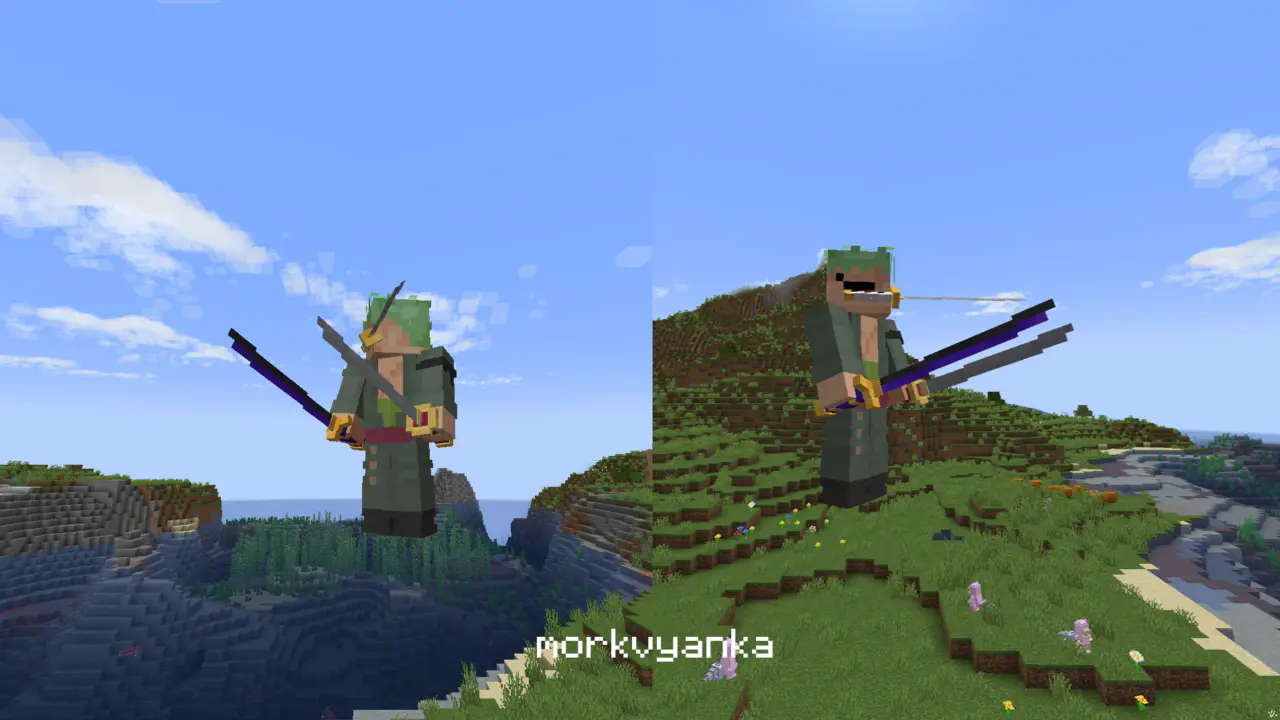
Zoro katanas
**In this resource pack I changed model of netherite sword, netherite axe and carwed pumpkin to Zoro katanas.**
[my linktree](https://linktr.ee/morkvyanka)
ZoomLens
🔍 Zoomify – The Ultimate Zoom Mod for Minecraft! 🔍
Previously known as Zoomify!
🌍Experience distant structures, mesmerizing landscapes, and stunning views with exceptional clarity! Whether you’re a traveler, a creator, or a scenery enthusiast, Zoomify’s adjustable zoom feature enhances every moment!🌍
—
🖱️ Easy to Use:
Hold C + scroll the middle mouse button to adjust the zoom level.
—
🎥 Video Showcase:
—
Zoomglass
A Fabric mod that quickly puts a spyglass into your hand with a press of a button.
Made for people who prefer roleplaying aspects of a spyglass but don’t want to miss out on convenience!
Additionally, you can use a fake spyglass while in Spectator gamemode, or in Creative when you don’t have
it in your inventory.
The default keybind is `z`, and you can find it under the “Inventory” section in keybinding settings.
Requires Fabric API
ZoomerLibrary
# ZoomerLibrary
LibZoomer **unofficial architectury port**.
A library that allows other mods to create zooms and custom spyglasses easily.
## Usage
**WARNING:** This API is still not finished and breaking changes may happen until a 1.0.0 release happens!
ZoomerLibrary provides zooming through zoom instances, which contains three sub-instances: transition modes, mouse modifiers and zoom overlays. A zoom instance can be created with different subinstances, which can be either provided by the library or implemented by the mod itself. In order to a zoom instance to be functional, it must be registered by the ZoomRegistry. In order to make the instance zoom in, the instance’s zoom state must be set to true, which can be done using the `setZoom` method, the vice-versa can be done by setting it to false.
Zoom-o-Matic

A simple, but customizable multi-button zoom tool for Minecraft.
It allows for up to 3 keybinds with customizable zoom and on / off smooth camera.
_This mod is for learning most of all, feel free to use it, but its biggest purpose is learning and teaching to mod fabric._
# Documentation for Learning Fabric
While we are certaintly not experts on fabric, we would like to share our journey and in a hope that it can help others get started with learning fabric modding and Java.
As such, we are currently working (in progress) on a detailed commentary of the code. In the future we may work towards a tutorial either written or video based on feedback.
[Find the code commentary here.](https://github.com/NicoIsLost/Zoom-o-Matic/blob/main/docs/COMMENTARY.md)
# Usage
## To install
After fabric mod loader has been installed for the correct version place the latest Zoom-o-matic release with compatible dependencies in the .minecraft/mods folder.
## Dependencies
Fabric Mod Loader (Install to use)
https://fabricmc.net/use/installer/
Fabric API (Place in mod folder)
https://github.com/FabricMC/fabric
owo-lib (Place in mod folder)
https://github.com/wisp-forest/owo-lib
## Using the Mod
**The default Zoom 1 Keybind is “c” which is already bound, so you need to unbind “Save Hotbar Activator” or bind zoom1 to another key to make the mod work.**
### Mod Menu
The mod is registered in mod menu, so you can adjust settings through that GUI if you desire, otherwise you can use commands.
### Keybinds
Are found in the Zoom-o-Matic section of the normal minecraft keybind menu.
Options -> Controls -> Keybinds
### Scroll Zoom
When zooming you can scroll in or out with your mousewheel to zoom more or less.
### Zoom Amount
Adjusts the amount of zooming, with
`/ZoomO ZoomAmount Zoom_X YY`
– **X** = Zoom Keybind #, (1, 2, or 3.)
– **YY** is the % zoom, (1 – 99)
### Smooth Camera Toggle
Toggles whether smooth_camera should be active when zooming, which slows down movement.
`/ZoomO SmoothCamera Zoom_X YY`
– **X** = Zoom Keybind #, (1, 2, or 3.)
– **YY** true/false
### Scroll Zoom Text Toggle
Toggles whether you have the % zoom displayed in text when using the scroll wheel.
`/ZoomO ActionBarWriting XX`
– **XX** = true/false
# About This Mod & Plans
This mod is meant to be a place to learn how to mod fabric mods for minecraft. This our first mod, so we know it’s not 100% perfect, but that’s not the point.
The goal is to optimize it, make it better, and improve the features in order to help learn more about modding.
## Here is a list of improvements we would like to make, in order of want:
– Remove owo dependency – i.e. Create a world-independent data saving system.
– ~~Add scrolling zoom~~ (done)
– Add a custom, customizable smoother,
– Add a custom GUI
– Add more keybinds (including more keybinds, via GUI)
– Add animations
– Presets like easing.
– Add customizable animations
# Credit
**@Fej1Dev** has been hand and hand in this entire process, coding large portions himself, and helping me when I get stuck with my portions!
**@LogcialGeekBoy** & [Logical Zoom](https://github.com/LogicalGeekBoy/logical_zoom) – Some of the code used in this mod (mainly the mixin) was from Logical Zoom, but more importantly was that his mod inspired us to make our own.
Zoom
# Zoom
This datapack allows players in a server or singleplayer-world to zoom in by sneaking after activating the “Zoom Mode” with a “`/trigger zoom“` command.
## Datapack Video:
With a lot of Settings you can customize how the players from your server can zoom in:
_____________________________________________________
Use: “`/function zoom:config“` to open this menu:
### –Config–
###
### Scroll Zoom: [True] [False]
### Zoom Strength: [25%] [50%] [75%] [100%]
### Appearance Mode: [Header] [Middle] [Bottom] [Off]
### Notification: [True] [False]
______________________________________________________
## Copy Rules:
_You are allowed to download and modify this datapack,
You are NOT allowed to upload it anywhere except for the link to this page!_
Zookeeper Origin
# Zookeeper (Impact 1)
You have dedicated your life to the preservation and protection of all species of creature.
Pro
– Treatment: Heal your tamed creature when you hit them (Damage is not dealt)
Cons
– Vegetarian: You throw up any meat you consume.
– Pacifist: -2 hearts, 0.8x attack damage
Abilities
– [Primary] Relocate: Teleport tagged entities to a point within range, while nearby a respawn anchor.
– [Right click] Bag n’ Tag- Tag a non-player/undead entity to bind them for teleportation.
– [Secondary] Nuturing Gaze: Tame the creature you are looking at.
Zoni’s Apotheosis Curios Lang
This is a simple resource pack to fix the naming when using my data pack for [Apothic Curios](https://www.curseforge.com/minecraft/mc-mods/apothic-curios).
Requirements
You need both my data pack and the previously mentioned Apothic Curios, otherwise you won’t notice any changes.
If you want to get updates on the pack development, report bugs or suggest new stuff or just contact me join my discord server:
https://discord.com/invite/KWGakdBVwG