Red Shield
# Red Shield
This resource pack replaces the default shield with a custom 3D model.
The design uses a red theme.
No OptiFine required. Vanilla compatible.
## More Shield Themes
– [Black](https://modrinth.com/project/noire-shield)
– [Blue](https://modrinth.com/project/blue-shield)
– [Creeper](https://modrinth.com/project/creeper-shield)
– [Dark Red](https://modrinth.com/project/dark-red-shield)
– [Mirror](https://modrinth.com/project/mirror-shield)
– [Navy Blue](https://modrinth.com/project/navy-blue-shield)
– [Rabbit](https://modrinth.com/project/rabbit-shield)
Red Iron Golem Flowers
This resourcepack recolors the **flowers on the iron golem** so that they have the **same red colors as poppies** do.
It is inspired by the **[Vanilla Tweaks](https://vanillatweaks.net/picker/resource-packs/)** resourcepack “Red Iron Golem Flowers”, although the flowers in this pack are **slightly darker**.
Works with [Fresh Animations](https://modrinth.com/resourcepack/fresh-animations).
Check out the
(https://modrinth.com/project/red-irongolem-flowers/gallery) to see what it looks like.
Red Creepers
Are you tired of not seeing a creeper in the middle of a grass field? Just use this pack for more contrast between the creeper and the blocks around it.
– This [version](https://modrinth.com/resourcepack/red-creepers/version/1.0.0) is for [Fresh Animations](https://modrinth.com/project/50dA9Sha) and is not suitable for Vanilla Minecraft.
– This [version](https://modrinth.com/resourcepack/red-creepers/version/1.0.1) is for Vanilla Minecraft and is not suitable for [Fresh Animations](https://modrinth.com/project/50dA9Sha).
Recycling
# Descontinued
Now You Can Only Download The Mod(**[Click Here](https://modrinth.com/mod/recycling_mod)**) All The Versions In This Page are Outdated.
Feel Free To Copy, Distribute, Personal Use And Commercial use.
## But If I Want To Download The Datapack
You Can But You’ll Are Not Able To Download A Datapack With The Content Of The Latest Version.
## Compatbility
See The Table Below To See If You Can Download The Datapack Or You Have To Download The Mod
| Version | Datapack Support | Mod Support |
| :—: | :—: | :—: |
| 0.0.1-alpha | ✅ | ✅ |
| 0.0.2-alpha | ✅ | ✅ |
| 0.0.3-alpha | ✅ | ✅ |
| 0.0.4-alpha | ✅ | ✅ |
| 0.0.5-alpha | ✅ | ✅ |
| 0.0.6-alpha | ❌ | ✅ |
| 0.0.7-alpha | ❌ | ✅ |
This Version Is Only Going To Receive A Few Updates And/or Previews
# Recycling
A Datapack That Adds Some Recipes To Recycle
This Data Pack Was Made To Avoid Waste
With This Data Pack You Can Transform Objects That Are No Longer Used In An Item Or Craft An Item That You Will Not Use You Can Uncraft Them And Craft The Needed Item
Example: I Have An Oak Boat But I Don’t Need It anymore So, I Transform Them In Five Oak Planks
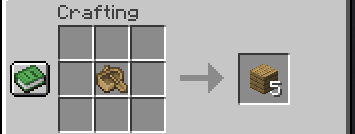
**Looking For The Latest Mod Version? [Click Here](https://modrinth.com/mod/recycling_mod)**
# Support
To Get Support Join Our DIscord Server(**[Click Here](https://discord.gg/d37HptpeeZ)**)
**DO NOT Send Direct Menssages For Me(@arthurarakaki)!!!**
# Important:
**By Downloading The Mod In version 0.0.5-alpha Your World Can Be Corrupt!**
# Links
[Discord](https://discord.gg/d37HptpeeZ)
[Wiki](https://github.com/DEMnetwork/Recycling/wiki)
Recipes Galore
July 2, 2024: For now I have archived this project because I haven’t been playing Minecraft at all for the past few months plus I still need to fix it for 1.20.5 and above.
July 31, 2023: I have re-branded to Recipes Galore
The purpose of this datapack is to restore or add recpes to the game and making Minecraft have a bit more of quality of life. So far there are over 29+ recipes (unless you consider the woodcutter and others that I have merged than it’s way over 100+)
Click me to see all the recipes!
God Powers
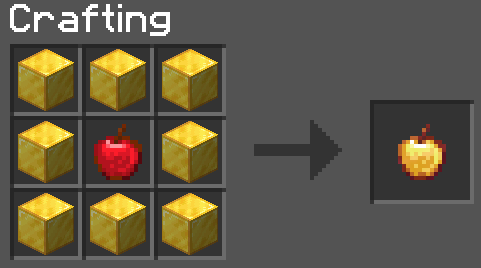
Enchanted Golden Apple
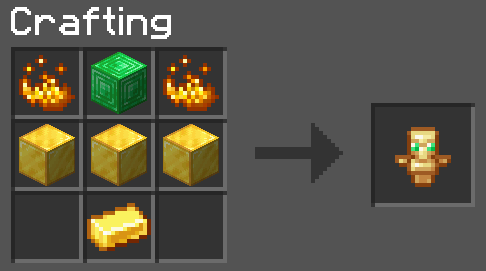
Totem of Undying
Uncategorized Recipes
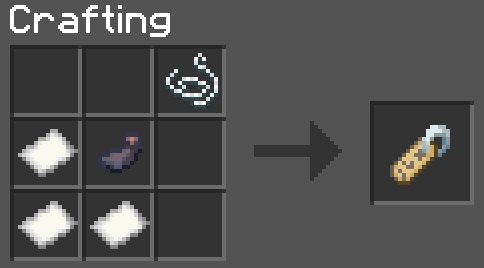
Nametag
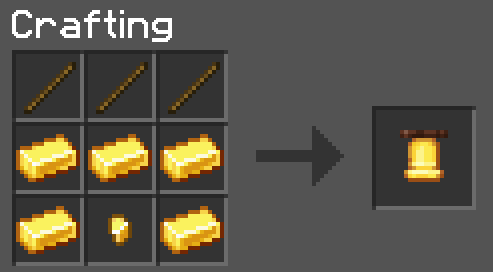
Bell
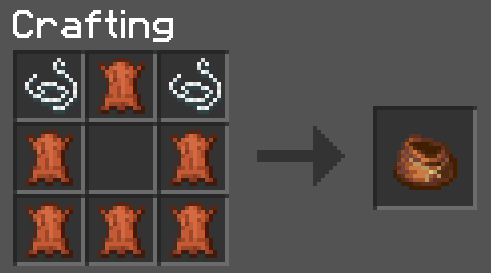
Bundles (rabbit hide is the same setup)
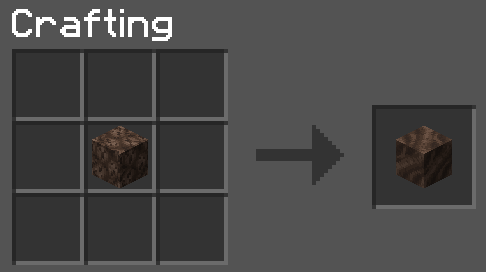
Soul sand to soil (and vice versa)
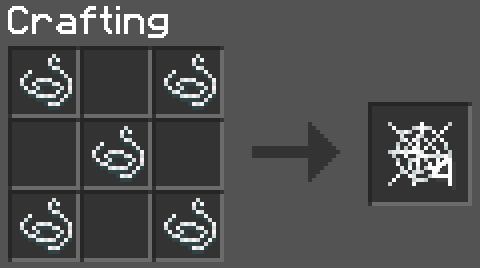
Cobwebs
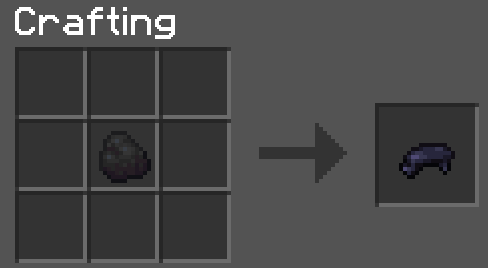
Coal/Charcoal to black dye
Armour and Horse Stuff
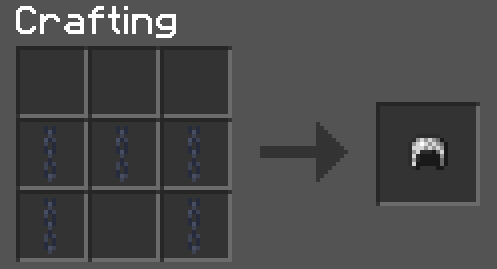
Chainmail Armour (you know the rest)
Saddle #1
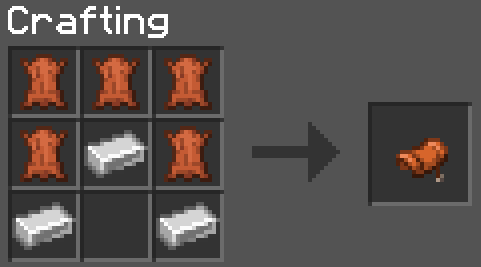
Saddle #2
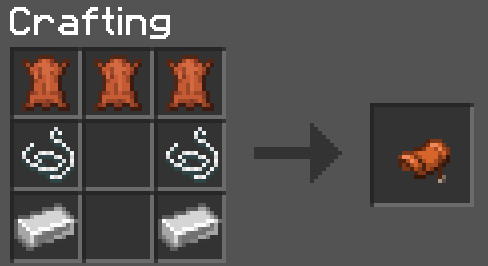
Horse Armour (gold and iron have the same setup)
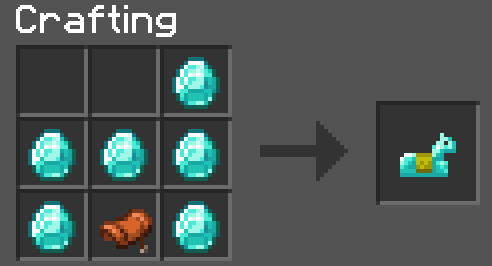
Unpackables
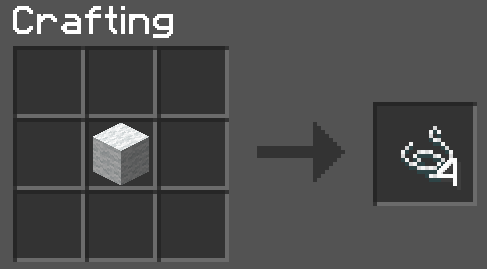
Wool to String (works with every wool variant)
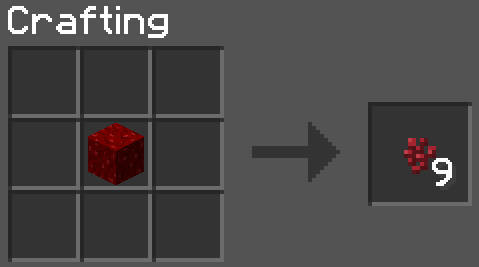
Wart block to wart
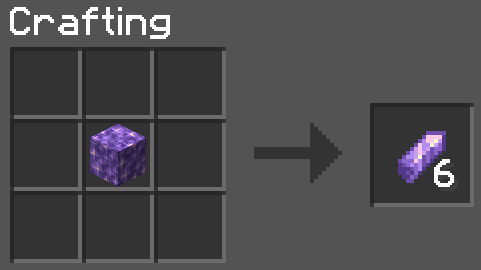
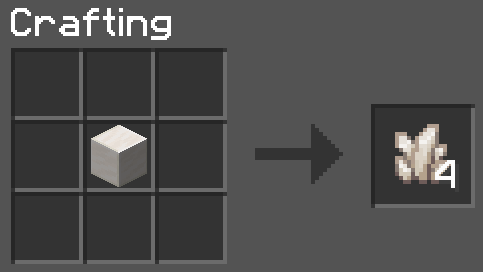
Amethyst block to shards
Quartz block to quartz
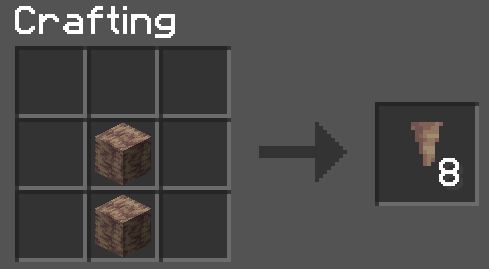
Dripstone block to pointed dripstone
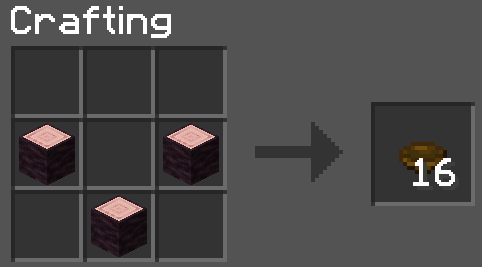
Bulk Crafting
Bulk bowls
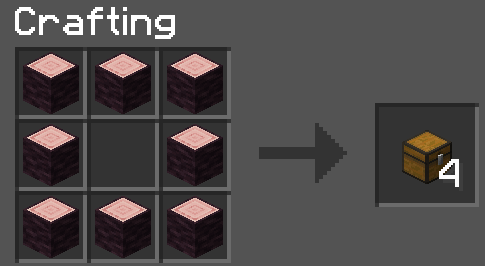
Bulk chests
Cheaper Items
Templates
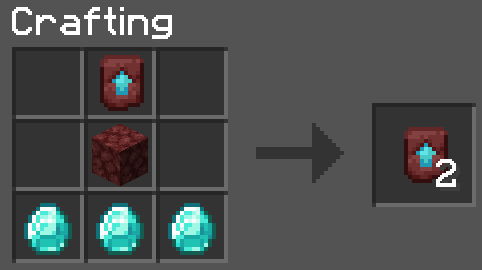
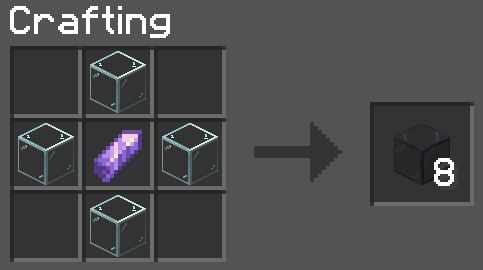
Tinted Glass
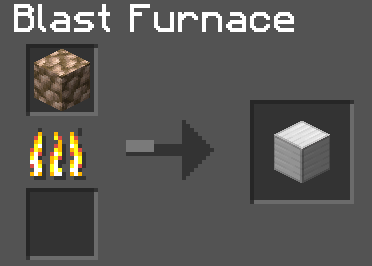
Smelting
Raw blocks to block of X (smelting time takes the exact same as if you were smelting 1 raw ore and also gives exact experience if you were to smelt 9 raw ore)
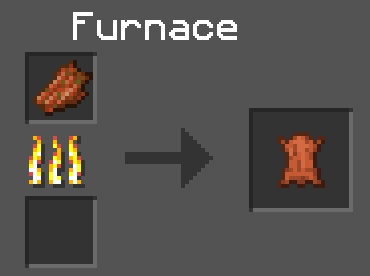
Rotten flesh to leather
Shapeless Crafting
Shulker #1
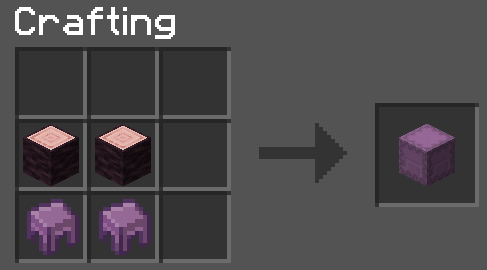
Shulker #2
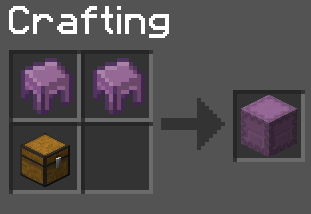
Bread
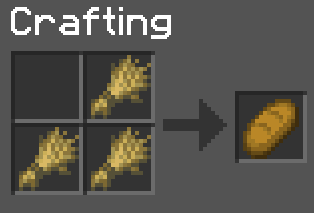
Paper
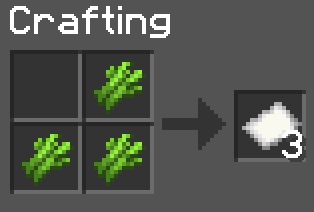
Woodcutter
Woodcutter #1
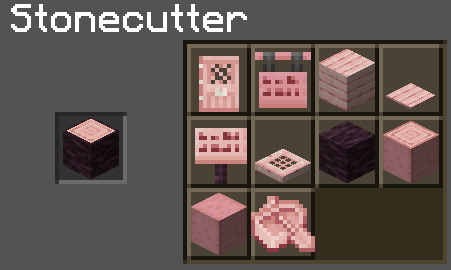
Woodcutter #2
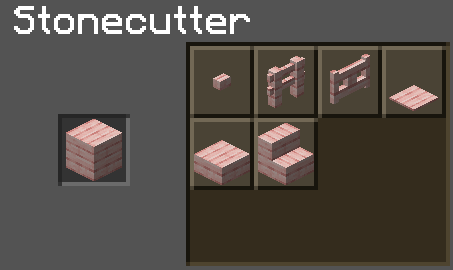
**Note: I mainly focus on 1.20.x for now. I might revisit previous Minecraft versions in the future**
Future:
1) More bulk craftables
2) More faster crafting
3) Glowberries → Glowstone dust
4) Craftable budding amethyst
5) Craftable reinforced deepslate
6) Craftable shroomlight
7) Craftable elytra
8) Craftable eggs (dragon, sniffer, turtle)
Rebalanced Music
# Rebalanced Music
Tweaked version of [Balanced Music](https://modrinth.com/resourcepack/balanced-music). Older tracks now have an equal chance of playing compared to newer tracks (where applicable).
Yeets the non-menu music from the menu, and evens out the weight of newer music. The new music is great, but it plays instead of the old tracks far too often. Seriously, why does Rubedo have a weight of 6?
### Important:
If you have other resource packs that change music or sounds, put them above this. This pack uses the `replace` option to remove music, and will remove any music added if placed above that pack.
Changes
Entries in **bold** are subject to change.
Entries in _italics_ are not applicable as of the latest Minecraft: Java Edition snapshot.
Entries in ~~strikethrough~~ are not applicable as of the latest stable Minecraft: Java Edition version.
Menu Music: Menu Music + Update Music -> Menu Music (1.18+)
Basalt Deltas: So Below weight 7 -> 1 (1.16+)
Crimson Forests: Chrysopoeia weight 7 -> 1 (1.16+)
Nether Wastes: Rubedo weight 6 -> 1 (1.16+)
Soul Sand Valley: So Below weight 7 -> 1 (1.16+)
Badlands: Crescent Dunes weight 2 -> 1 (1.20+)
Bamboo Jungle: Bromeliad weight 2 -> 1 (1.20+)
Cherry Grove:
* Below and Above weight 2 -> 1 (1.21.6+)
* ~~_Bromeliad weight 3 -> 1 (1.20-1.21.5)_~~
* ~~_Echo in the Wind weight 3 -> 1 (1.20-1.21.5)_~~
* ~~_Featherfall 3 -> 1 (1.21-1.21.5)_~~
Desert:
* ~~_Crescent Dunes weight 3 -> 1 (1.20-1.21.5)_~~
* Fireflies weight 2 -> 1 (1.21.6+)
Dripstone Caves:
* Eld Unknown weight 2 -> 1 (1.21+)
* Endless weight 2 -> 1 (1.21+)
* pokopoko weight 2 -> 1 (1.21+)
* Wending weight 2 -> 1 (1.18+)
Flower Forest: Featherfall weight 2 -> 1 (1.21+)
Forest: Broken Clocks weight 2 -> 1 (1.21.6+)
Frozen Peaks: Stand Tall weight 2 -> 1 (1.18+)
Grove: Lilypad weight 2 -> 1 (1.21.6+)
Lush Caves:
* ~~_Aerie weight 1 -> 2 (1.19-1.21.5)_~~
* ~~_Firebugs weight 1 -> 2 (1.19-1.21.5)_~~
* ~~_Labyrinthine weight 1 -> 2 (1.19-1.21.5)_~~
* ~~_Left To Bloom weight 2 -> 1 (1.18-1.18.2)_~~
* ~~_Left To Bloom weight 4 -> 2 (1.19-1.21.5)_~~
* O’s Piano weight 2 -> 1 (1.21.6+)
Jungle: Bromeliad weight 3 -> 1 (1.20+)
Meadow: One More Day weight 2 -> 1 (1.18+)
Old Growth Taiga:
* Aerie weight 1 -> 3 (1.19+)
* Firebugs weight 1 -> 3 (1.19+)
* Labyrinthine weight 1 -> 3 (1.19+)
Sparse Jungle: Bromeliad weight 2 -> 1 (1.20+)
Stony Peaks:
* Eld Unknown weight 2 -> 1 (1.21+)
* Stand Tall weight 2 -> 1 (1.18+)
Versioning scheme
The version name consists of the minimum supported stable Minecraft: Java Edition version followed by the iteration of the resource pack for that version of Minecraft: Java Edition. If there is no supported stable Minecraft: Java Edition version, then the minimum supported Minecraft: Java Edition version is used instead.
For example, version 1.16.2 v1 means that it is the first iteration of the resource pack to support at least Minecraft: Java Edition version 1.16.2. Meanwhile, version 21w39a v2 means that it is the second iteration of the resource pack to support at least Minecraft: Java Edition version 21w39a.
The maximum supported Minecraft: Java Edition version is specified in the changelog of the respective version of the resource pack.
Raw Blocks | Smeltery and Blasting
# Description
“Raw Blocks | Smeltery and Blasting” or for short “Smeltery” is a light weight datapack with a simple goal, to make smelting raw iron in to iron a whole lot faster, with the edition of Raw Blocks Smelting!
Raised
*Take control of the position of your GUI and fix the broken hotbar selection texture!*
### Move around the GUI!
Raised lets you move around both vanilla and modded GUI layers (that are supported)!
Want the hotbar closer to the middle of the screen? Raised has got your back! Take control of a layer and move it where you please! Control them individually or sync them to make the entire in-game GUI move together!
### Working with mods!
Raised allows mods to register layer entries for their own GUI overlays for you to configure their movement. However, Raised can also natively work with mods in several ways that do not require their support!
Any mod that registers their (Neo)Forge overlay via the respective registry is automatically captured and added to Raised’s layer registry. This allows you to individually control the layers of many mods without any special support!
Any mod that renders its overlay solely via a (Neo)Forge render event for one of the vanilla layers that Raised supports will be moved along with that vanilla layer. Much the same on Fabric, any mod that injects its overlay render within the scope of Raised’s targets in the code will also be moved!
### Set it up however you like!
You can edit the layer configurations directly from the config, from a suite of commands, or from the options screen (openable via `~` by default or from the (Neo)Forge mods screen). Please note that the options screen limits the amount that a layer may be displaced to accommodate the use of slider controls. For unlimited displacement, use commands or directly edit the config!
### Get the goods!
You can find releases of Raised on both *[Modrinth]* and *[CurseForge]* and also access development builds on *[GitHub]*!
Raised supports Fabric 1.16+, Forge 1.16+, and NeoForge 1.20.2+.
### Figure it all out!
You can delve into the *[wiki]* for details or submit a *[bug report]* if something isn’t quite right!
Still need something? Head on over to the *[discussions]* forum for support, to read announcements, or discuss anything about the mod!
[Modrinth]: https://modrinth.com/mod/raised
[CurseForge]: https://www.curseforge.com/minecraft/mc-mods/raised
[GitHub]: https://github.com/yurisuika/raised
[wiki]: https://github.com/yurisuika/raised/wiki
[bug report]: https://github.com/yurisuika/raised/issues
[discussions]: https://github.com/yurisuika/raised/discussions
[Discord]: https://discord.gg/0zdNEkQle7Qg9C1H
Rail Recipe Rebalance

## Are you for re-ail?
You know what really steams my engine? **Rails**. Specifically, how _expensive_ they are.
Rails are not a bad method of transportation, especially early-game. They’re pretty fast, and can even be automated using redstone, making them an immersive choice!
There’s just one problem: accessibility. During the period of a world that they would be useful (pre-elytra), most people don’t have a surplus of ingots to spend on tracks. I mean, just for regular, unpowered rails, it costs roughly 1 ingot for 3 blocks of track.

That’s what this recipe change aims to fix. By making rails more affordable, it’s now a more realistic goal to make a train between your friend’s base!
## Available wherever the tracks take you!
**Rail Recipe Rebalance** is available all the way from version **1.15** to **26.1**, and will continue to be updated for newer versions! You can install it as a datapack, or as a mod for your favorite modloader!
Additionally, RRR aims to add compatibility with mods, and currently adds new recipes for the following mods:
> – **[Copper Rails](https://modrinth.com/mod/copperrails)**
> – **[Create](https://modrinth.com/mod/create)**
*If you would like to request a mod to be supported, DM me at* **palm1**!
## Try these couplings!
Rails get even better with these amazing projects, and they are highly recommended for use with this pack!
### Server
> – **[Linkart](https://modrinth.com/mod/linkart-refabricated)** – Link your minecarts together!
> – **[Fast Minecart](https://modrinth.com/mod/fast-minecart)** – Double the speed of minecarts!
### Client and Server
> – **[Copper Rails](https://modrinth.com/mod/copperrails)** – Adds two new rail types in the vanilla style!
> – **[Create](https://modrinth.com/mod/create)** – Allows you to couple minecarts, control rail speed, and create custom multi-block trains!
## You May Also Like
[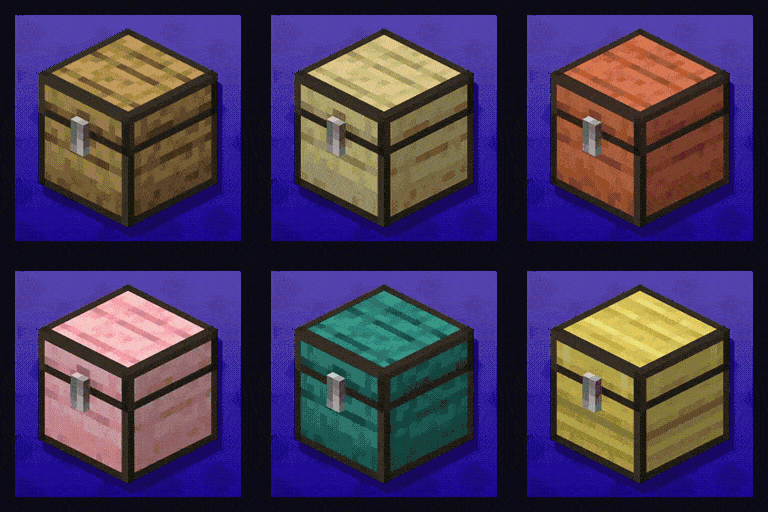 ](https://modrinth.com/datapack/planked-chests)
[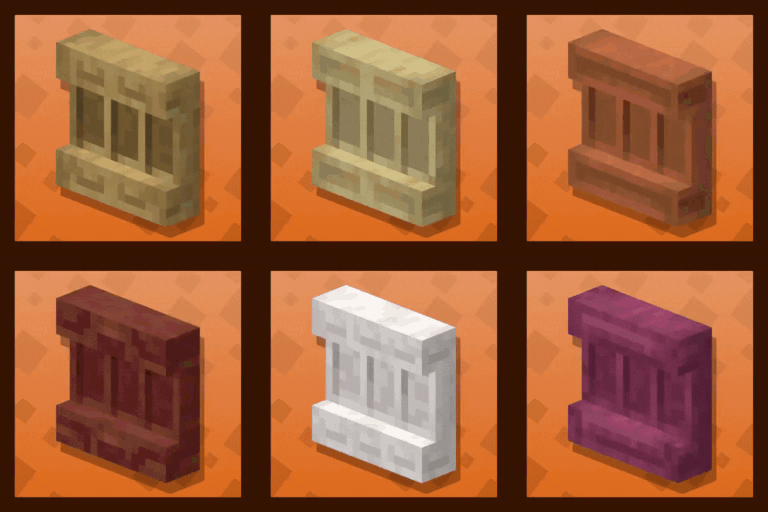 ](https://modrinth.com/datapack/backported-shelves)
Rabbit Shield
# Rabbit Shield
This resource pack replaces the default shield with a custom 3D model.
The design uses a rabbit theme.
No OptiFine required. Vanilla compatible.
## More Shield Themes
– [Black](https://modrinth.com/project/noire-shield)
– [Blue](https://modrinth.com/project/blue-shield)
– [Creeper](https://modrinth.com/project/creeper-shield)
– [Dark Red](https://modrinth.com/project/dark-red-shield)
– [Mirror](https://modrinth.com/project/mirror-shield)
– [Navy Blue](https://modrinth.com/project/navy-blue-shield)
– [Red](https://modrinth.com/project/red-shield)
