Black Shield
# Black Shield
This resource pack replaces the default shield with a custom 3D model.
The design uses a black theme.
No OptiFine required. Vanilla compatible.
## More Shield Themes
– [Blue](https://modrinth.com/project/blue-shield)
– [Creeper](https://modrinth.com/project/creeper-shield)
– [Dark Red](https://modrinth.com/project/dark-red-shield)
– [Mirror](https://modrinth.com/project/mirror-shield)
– [Navy Blue](https://modrinth.com/project/navy-blue-shield)
– [Rabbit](https://modrinth.com/project/rabbit-shield)
– [Red](https://modrinth.com/project/red-shield)
No Hotbar
No Hotbar, Pretty Straight forward. Idk what this can be useful for tbh. Maybe clear hotbar? Just use idk.
Q&A:
Can I put this in my modpack?
Sure but add the credit. Or just paste the text below
No Hotbar
By Zacgamingpro1234
https://modrinth.com/resourcepack/nohotbar
If you want to redistribute to other websites just tell me and I’ll try.
You can use it in your modpack.
You can use it for personal use.
If you want to modify this resource you must ask me.
No GUI
No GUI,
A texture pack made for fun and as a challenge. Can you beat it? If you want you can record ur self beating it and I will put you below as a verified winner! (you should dm me on discord for notice)
Also the GUI isn’t black its invisible so you can see stuff under your current tab or something.
Q&A:
Can I put this in my modpack?
Sure but add the credit. Or just paste the text below
No GUI
By Zacgamingpro1234
https://modrinth.com/resourcepack/nogui
You can redistribute this resource but you may not monetize from it.
You can use it for personal use.
No Worldborder
**The first version of the No Worldborder resource pack, which of course removes the worldborder texture so that it is invisible. Useful for taking screenshots of, for example, builds that have a border.**
## Support
If you have any problems, ideas, or other feedback about this project, please contact me via discord or email. You can contact me on Discord by sending a friend request, so you can send me a message.
Discord: tibodp
Mail: [email protected]
## 🌟 My other projects:
– [Torchcraft Lobby Panorama](https://modrinth.com/resourcepack/torchcraft-lobby-panorama)
– [The Ultimate Creator](https://modrinth.com/modpack/the-ultimate-creator)
– [Chromakey Blocks](https://modrinth.com/modpack/the-ultimate-creator)
– [No Worldborder](https://modrinth.com/modpack/the-ultimate-creator)
– [Vuurwerkshow Modpack](https://modrinth.com/modpack/the-ultimate-creator)
– [Vuurwerkshow Panorama](https://modrinth.com/modpack/the-ultimate-creator)
– [Vuurwerkshow Paintings](https://modrinth.com/resourcepack/vuurwerkshow-paintings)
No TNT Minecarts
Whenever a player has a TNT minecart in their inventory, the player gets refunded 1 TNT and 1 minecart. Only works with vanilla TNT minecarts.
Friend and DM me on discord (@Cootshk#0001) for help.
No Sleeping
Update to 1.21.11 coming soon!
# No Sleeping!
This is a simple data pack(and mod- see “versions”) that makes it so that beds will explode when you try to sleep in them in the overworld, just like they do in the nether and the end.
Do NOT use `Version 1.0.0 [release]`, it won’t work. `Version 0.3.0 [release cadidate]` is the same feature-wise.
> DATAPACK: Note that there are different versions for pre-1.21 and 1.21-and-onwards use, make sure you get the correct one!
> MOD: Unfortunently I have not been able to test the latest (1.21.x) versions of the mod. They should work just fine but due to not having a ton of free time I cannot fully support them. So therefore, it is up to YOU to make sure you use it correctly (taking backups, etc.).
>
> Make sure to use Fabric API. In my testing, it didn’t seem to need the Fabric API (or Quilted Fabric API – QFAPI) when running on Quilt, but that could have changed since.
## Respawn Anchor?!
Each version (after `Version 1.3.0 [release]`) will, in it’s version number, let you know whether respawn anchors can allow players to set their spawn point in the overworld or not.
x.x.x+NoRespawnAnchorInOverworld – Respawn anchors have their vanilla behavior, and will explode in the overworld if you try to set your spawn on one.
x.x.x+RespawnAnchorInOverworld – Respawn anchors will NOT explode in the overworld if you try to set your spawn on one. They allow you to **set your spawn in the overworld**.
I plan to maintain both versions of this datapack/mod, as I see why some people may want either version.
If you’d like to make suggestions/report issues, you can do so on my [discord](https://discord.gg/TkFb7V8Bya)!
## Important
When loading a world with this data pack installed, it will tell you that “This world uses experimental settings that could stop working at any time. We cannot guarantee it will load or work. Here be dragons!”
I believe this is because this data pack uses some (fairly) new world generation files in its files. I take no responsibility for any issues this could cause. It’s up to you to keep the world safe (backups are highly reccomended).
The files are `overworld.json` and `overworld_caves.json` if you were wondering. They’re in the `dimension_type` folder.
## Join My Discord
– Make suggestions, report issues, etc.
– View my to-do list with all planned future updates and new packs
– Might get early access to new packs in future
https://discord.gg/TkFb7V8Bya
## Potential Future Updates
– Creating versions for older minecraft versions
No Rocket Usage
# No Rocket Usage
Rocket flying is annoying! (and unfair, too.)
## Highlights
It prevents firework usage by breaking the equipped elytra upon usage, simple as that.
## Installation
### Datapack
– Make a new world, click on **Datapacks** and put the `.zip` file inside of the `datapacks` folder.
– For existing worlds, put the datapack inside of the `datapacks` folder of that world.
### Mod
– Move the `.jar` file into the `mods` folder.
– Alternatively, you can go to the Mods page and click on **Add File** when using MultiMC or Prism Launcher.
## Extras
This project was made as an experiment to make a functional GitHub repository. Nonetheless, this project will be maintained and updated from time to time on breaking changes.
## License
No Rocket Usage is unlicensed.
No emeralds?
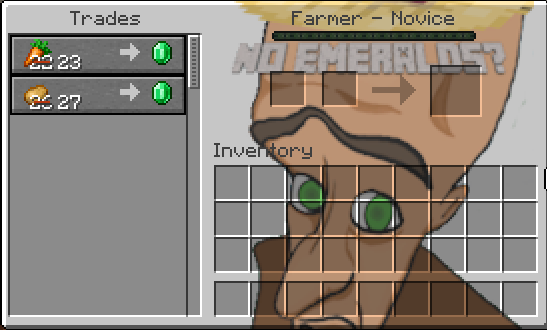
# A tiny resource pack that adds the “No emeralds?” meme into your game GUI
### No emeralds?
## Features
– Replaces only the villagers trade interface,
– Compatible with other GUI resourcespacks (should be at the top of the list),
– Compatible with 1.14 and above,
– _NO EMERALDS?_.
## Notes
– This pack is purely visual and does **not affect gameplay**,
– Safe to use on servers,
– Perfect for meme lovers or lighthearted modpacks.
## For Modpack Creators
– I allow this resource pack to be used in modpacks.
No F3/Debug Screen
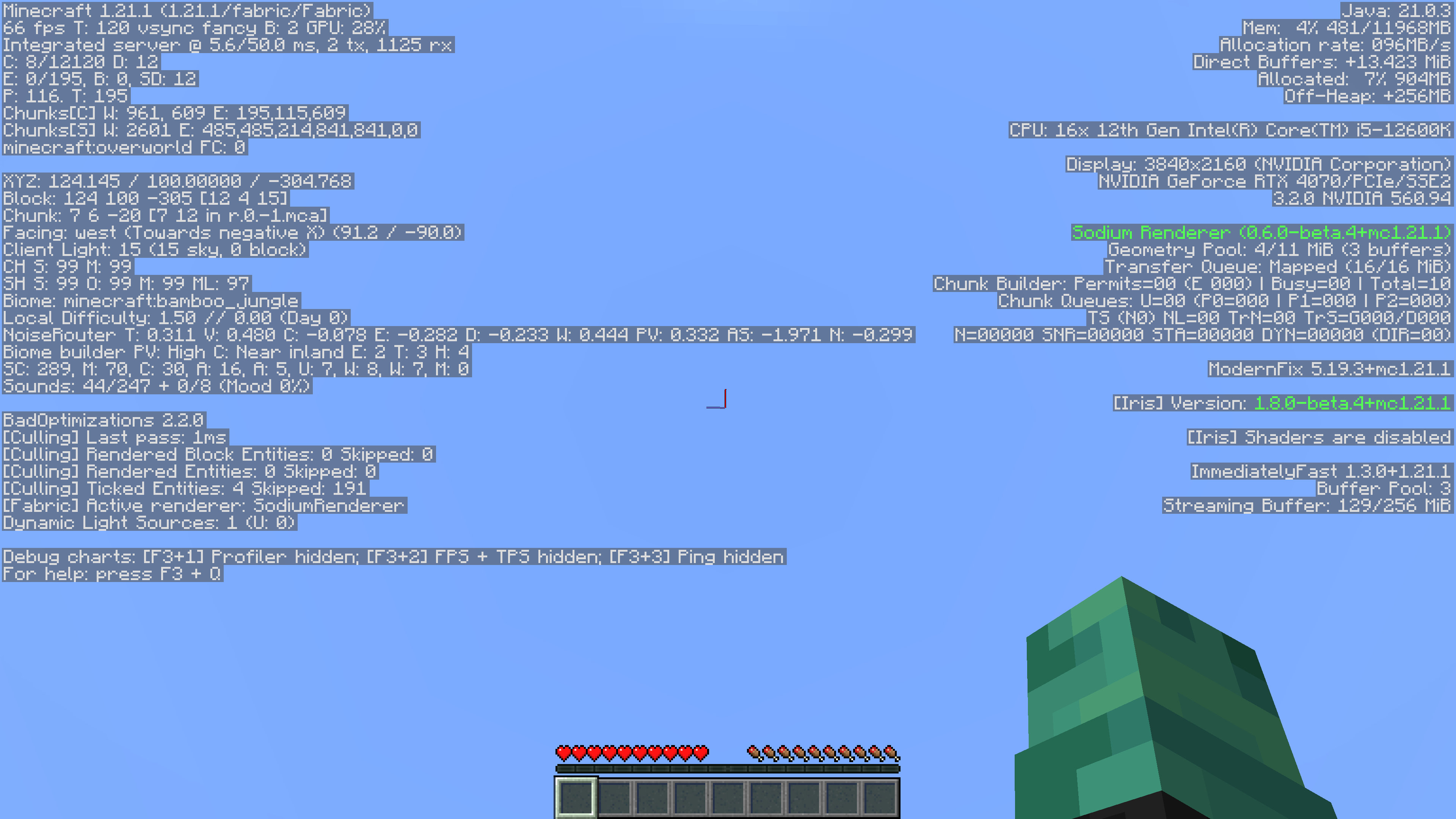
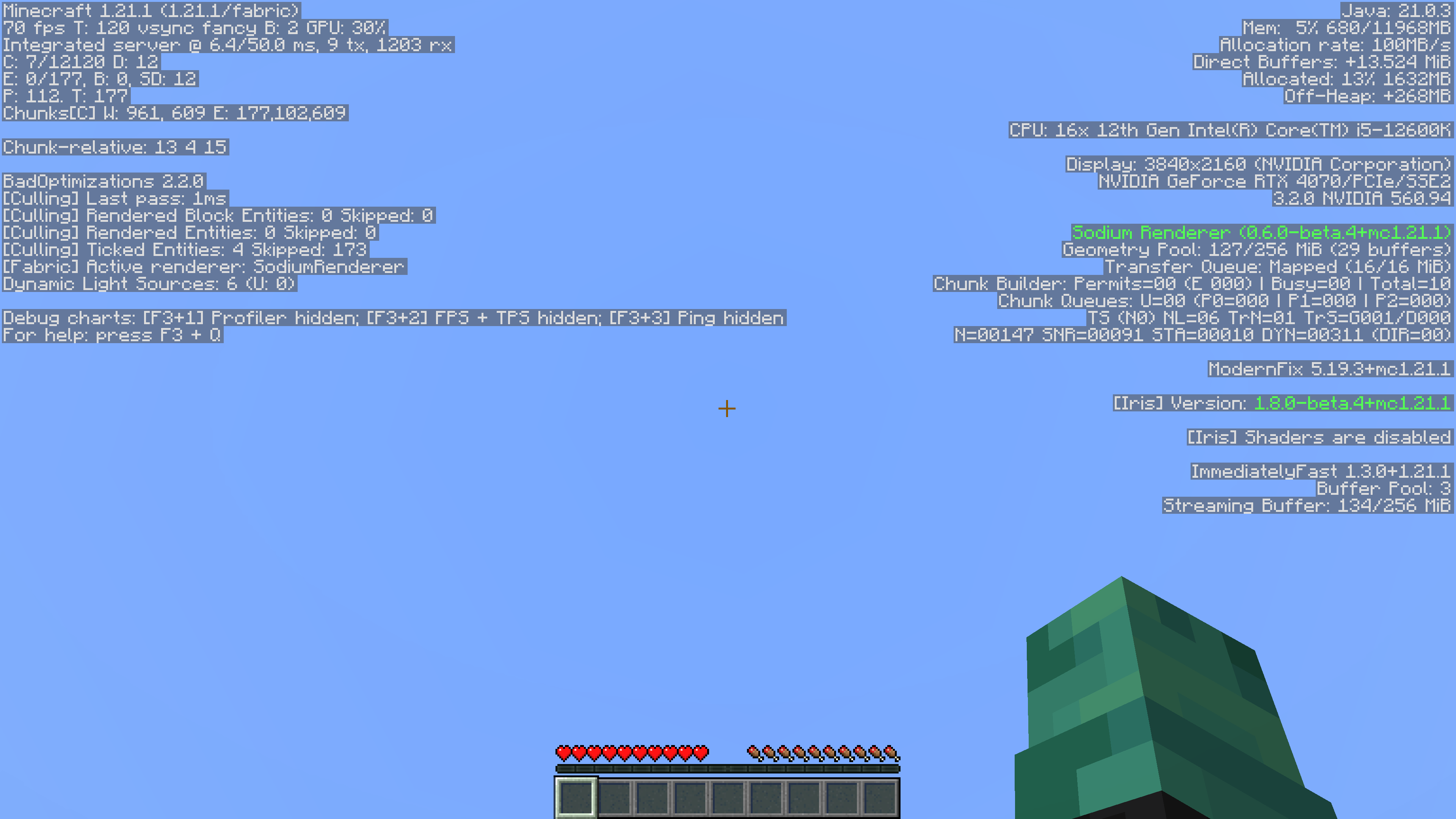
This simple mod removes game-related information from the Debug Menu. Since its also a datapack, its server side so players don’t have to install it!
It also supports playing in single player.
Reasoning
I’ve always felt that the Debug menu was unnecessary. It took away from actual features in the game, like maps and compasses with coordinates, rendering them useless. Things like the pie chart and the ability to randomly find buried treasure by going to 9,9 in a chunk on a beach were too much for me, so I removed it.
Without Mod:
With Mod:
No Armour Armor HUD Hotbar
Removes the Armor Icons from the HUD, for a cleaner GUI. Protection still works!
v1.20.2 (latest) and above is compatible with every other resourcepack.
Just select and put this resourcepack above others in order to work.