Mod Remapping API
# Mod Remapping API
Remaps non-Fabric mods made for a different environment (by default obfuscated) to the current runtime mappings.
Provides hooks to expand the remapping process from other mods.
This mod doesn’t depend on a specific Minecraft version and should work on any version that Fabric Loader can launch.
### Mods depending on this API:
– Fabricated Legacy Forge
– Apron
– Fabricated-Rift
## Credits
### Most of the original code of the mod remapper
– paulevsGitch’s mod BetaLoader
Mod Loading Screen
# Mod Loading Screen
An advanced loading screen with the loading progress of mods. It works on all Minecraft versions, as it doesn’t even require Minecraft. Its only requirement is Fabric Loader 0.12.0 or later or Quilt Loader (specific versions of Quilt support are unknown). Do note that if you run this mod on a game other than Minecraft, the loading screen may not close itself.
## Agent
Mod Loading Screen provides a Java agent, which allows opening the loading screen before even the mod loader itself loads. This feature is primarily targeted at modpack developers who want to make a seamless loading experience. The agent can be used by passing `-javaagent:mod-loading-screen-1.0.4.jar` as a JVM argument. If the agent is used, the loading screen should *not* be installed as a mod.
## API
To depend on the API, use the Modrinth Maven. The API should be JiJed, and doing so will not include Mod Loading Screen inside your mod (it will only include the API, which is only a few kilobytes). The API is designed to have both forwards and backwards binary compatibility with future Mod Loading Screen versions. An API is provided for checking which API calls will return stubs and which ones are real.
“`gradle
repositories {
exclusiveContent {
forRepository {
maven {
name = “Modrinth”
url = “https://api.modrinth.com/maven”
}
}
filter {
includeGroup(“maven.modrinth”)
}
}
}
dependencies {
// implementation, not modImplementation!
include(implementation(“maven.modrinth:mod-loading-screen:1.0.4:api”))
}
“`
The API has two top-level classes: `LoadingScreenApi` and `AvailableFeatures`. Full javadocs are available for both classes.
Mob Reskin
This resource pack will reskin mobs of the game!
This resource pack will be supported with versions above 1.18
This resource pack reskins mobs.
————————————————————————————–
HOW TO INSTALL:
First, Extract the resource pack and cut or copy it
Second, Open Minecraft Java Edition
Third, Go to settings and press resource pack
Lastly, Open pack folder and paste the file
—————————————————————————————
I am planning on making this resource pack keep the vanilla like aspect but with a little bit more detail to the mobs.
This resource pack does not work with Better Animation Collection
Credit to Ewan Howell to use his Minecraft Title Generator! https://www.blockbench.net/plugins/minecraft_title_generator
Mo Glass
# Mo Glass
A Minecraft mod that adds glass stairs and glass slabs to the game, including stained and tinted glass variants, while maintaining all of the seamless transparency and translucency that makes vanilla Minecraft’s glass blocks look so great.

## Features
– Glass Slabs!
– Glass Stairs!
– Stained Glass Slabs! (since v1.3)
– Stained Glass Stairs! (since v1.3)
– Tinted Glass Slabs! (since v1.6)
– Tinted Glass Stairs! (since v1.6)
– Working Transparency! (see below)
– Working Translucency! (for tinted glass)
– Compatible with the Translucent Glass mod! (since Mo Glass v1.10, Translucent Glass v0.2)
## Seamless Transparency
Both the stairs and the slabs are see-through in the same way as vanilla glass blocks. You can place multiple stairs, slabs and full blocks next to each other and they will look like a single piece of glass.

## Working Translucency
Slabs and stairs made from tinted glass will block light if you place them without any air gaps, or let the light through if there is a gap.

## Why aren’t these blocks part of vanilla Minecraft?
Before I started making this mod, I always thought that Mojang just forgot about these blocks, or that they were too lazy to add them. But now that I’ve added these blocks myself and spent many hours to get the transparency to work, I think I finally understand why Mojang didn’t bother. Minecraft’s stairs are surprisingly complex blocks and they were never meant to be made transparent. Slabs might be easy enough, but I think if Mojang added those then people wouldn’t stop asking for the stairs. And glass stairs are an absolute nightmare to make.
Stairs can be placed facing North, East, South or West, they can be upside-down or right-side-up, they can be straight or curved in one of four different ways and they have six faces that may or may not be transparent, depending on what block is next to them. But here’s the catch: On each of those six faces, there could be another block of glass stairs that can also be placed facing North, East, South or West, upside-down or right-side-up and either straight or curved in one of four different ways. And then of course, on each of the six faces there could also be a non-transparent block, a regular glass block or a glass slab that is either placed on the bottom half, top half, or is a double slab.
In the end, there are 10800 possible scenarios that need to be accounted for just to calculate transparency of glass stairs. But then you also have to calculate the transparency of glass slabs (810 possible scenarios) and adjust the transparency calculation of regular glass blocks (270 possible scenarios, or 258 more than before).*
That’s a lot of effort just to add two new blocks to the game – and a lot of opportunities for new bugs to sneak in. That, I think, is why Mojang didn’t bother.
*Here’s how I got those numbers: (click to expand)
possible variations of stairs:
pvStairs = 4 * 2 * 5 = 40
possible variations of slabs:
pvSlabs = 3
possible variations of glass blocks:
pvGlass = 1
possible variations of non-transparent blocks:
pvBlocks = 1 (because any variations would be ignored when calculating transparency)
possible combinations combined:
pvAll = pvStairs + pvSlabs + pvGlass + pvBlocks = 40 + 3 + 1 + 1 = 45
possibly transparent faces of a block (including stairs, even though they have more faces):
f = 6
possible scenarios for transparency of stairs:
psStairs = pvAll * f * pvStairs = 45 * 6 * 40 = 10800
possible scenarios for transparency of slabs:
psSlabs = pvAll * f * pvSlabs = 45 * 6 * 3 = 810
possible scenarios for transparency of glass blocks:
psGlass = pvAll * f * pvGlass = 45 * 6 * 1 = 270
possible scenarios for transparency of glass blocks if glass stairs and slabs don’t exist:
psGlassVanilla = (pvGlass + pvBlocks) * f * pvGlass = (1 + 1) * 6 * 1 = 12
## What about connected textures mods?
~~So far, all connected textures mods that I’ve seen only seem to work on full blocks. They don’t generate connected textures for stairs or slabs, which makes using them with Mo Glass impossible.~~
~~It’s not that Mo Glass doesn’t have support for connected textures, it’s that connected textures mods don’t have support for Mo Glass (or any other mod that adds stairs/slabs).~~
~~This might change one day as people make new mods all the time, so do let me know if there is a connected texture mod that supports stairs now. I’d be happy to add the extra texture files needed (if any) to make that work with Mo Glass.~~
This has changed and support for connected textures is currently being worked on. Please be patient.
## Crafting Recipes
Glass Slab: (click to expand)


Glass Stairs: (click to expand)


## Supported Languages
– Chinese (Simplified) (since v1.2)
– Chinese (Traditional) (since v1.2)
– English (US) (since v1.0)
– French (France) (since v1.6)
– German (Germany) (since v1.2)
– Italian (Italy) (since v1.6)
– Japanese (Japan) (since v1.7)
– Oshiwambo (Oshindonga) (since v1.5)
– Oshiwambo (Oshikwanyama) (since v1.5)
– Portuguese (Brazil) (since v1.7)
– Russian (Russia) (since v1.5)
– Spanish (Argentina) (since v1.4)
– Spanish (Chile) (since v1.4)
– Spanish (Ecuador) (since v1.4)
– Spanish (Spain) (since v1.4)
– Spanish (Mexico) (since v1.4)
– Spanish (Uruguay) (since v1.4)
– Spanish (Venezuela) (since v1.4)
Miyabi ZZZ Title Screen Background
Replaces the default Minecraft main menu background with Miyabi from Zenless Zone Zero.
This resource pack replaces the vanilla panorama with a high-resolution Miyabi background, giving the main menu a cleaner and more modern look while keeping the original UI fully intact and readable.
It’s a simple visual-only change, ideal for players who want a different start screen without affecting gameplay or interface elements.
Includes:
* Custom main menu panorama background
* High-resolution Miyabi artwork
* Seamless integration with the default UI
* Works as a standard resource pack (no mods required)
No other textures or features are modified.
Mishang Urban Construction
# Mishang Urban Construction
Mishang Urban Construction is a mod related to building and decorations, which provides an array of useful blocks, including:
– Road blocks: can be painted lines to appear realistic, and standing on road blocks can accelerate; The road lines have various combinations, and can be automatically generated in some situations.
– Road marks: road marks that can be placed on the road, such as guide arrows; can also be placed on road slabs.
– Light: have various shapes, and have different colors: white, yellow, orange, cyan, green, and pink. There are full light blocks, as well as decorations that can be placed on wall, floor, or the ceiling.
– Sign blocks: have different styles, and compared to vanilla signs, signs in this mod can flexibly adjust parameters such as color, size and position.
– Handrail blocks: have various textures, outlook and connecting method, and can be placed on stairs.
– Blocks with customizable colors.
Moreover, the mod contains a series of useful tools, such as:
– Fast building tool: can quickly place multiple blocks on a plane.
– Force placing tool: places block ignoring placing restrictions and block updates.
– Tp tool: teleport to any place as you want.
– ID checking tool, block state tool, data tag tool: query properties or NBT of a block or entity or query the current biome.
– Explosion tool: click to create an explosion.
– Rotating or mirroring tool: click on a block to rotate or flip it.
– ……
Detailed information of this mod can be seen in GitHub or MC模组百科.
This mod **depends on Fabric API**, and since mod version 1.4.0, **no longer** depends on BRRP (Better Runtime Resource Pack) mod.
Only Fabric version. There’s no Forge version of this mod.
Please also refer to [the update log](UpdateLog-en.md).
This mod is published under the LGPLv3 license, which you must follow when propagating this mod.
Welcome to join Tencent QQ group **587928350** to communicate. You can also report issues in GitHub.
Mirror Shield
# Mirror Shield
This resource pack replaces the default shield with a custom 3D model.
The design uses a mirror theme.
No OptiFine required. Vanilla compatible.
## More Shield Themes
– Black
– Blue
– Creeper
– Dark Red
– Navy Blue
– Rabbit
– Red
MiniPlaceholders
# MiniPlaceholders




MiniMessage Component-based Placeholders API for Minecraft Platforms
## Compatibility
– Paper 1.21+
– Velocity 3.4.0+
– Fabric 1.21.4+
– Sponge API 12+

## User Usage
Check our user usage wiki
## API
Check the available Javadocs
Or check the Developer Wiki
### Java
“`java
class Main {
public static void registerExpansion() {
final Expansion expansion = Expansion.builder(“my-expansion”)
.audiencePlaceholder(Player.class, “name”, (player, ctx, queue) -> {
return Tag.selfClosingInserting(player.getName());
})
.globalPlaceholder(“tps”, (ctx, queue) ->
Tag.selfClosingInserting(Component.text(Bukkit.getTps()[0]))
).build;
expansion.register();
Player player;
final TagResolver playerResolver = MiniPlaceholders.audiencePlaceholders();
player.sendMessage(miniMessage().deserialize(“Player Name: “, player, playerResolver));
}
}
“`
### Kotlin
“`kotlin
fun register() {
val expansion = expansion(“my-expansion”) {
audience(“name”) { aud, _, _ -> aud.getName().asClosingTag() }
global(“tps”) { _, _ -> Component.text(Bukkit.getTps()[0]).asInsertingTag() }
}
expansion.register()
val player: Player
val playerResolver = MiniPlaceholders.audiencePlaceholders()
player.sendMessage(miniMessage().deserialize(“Player Name: “, player, playerResolver))
}
“`
Mining Looks Like a Spiral
Mining looks like a spiral.
Ever get tired of the same old boring mining animation? This resource pack replaces the default block-breaking animation with a smooth spiral effect, giving every block you mine a satisfying twist.🌀
Compatible with most resource packs.
My Minimal Armor
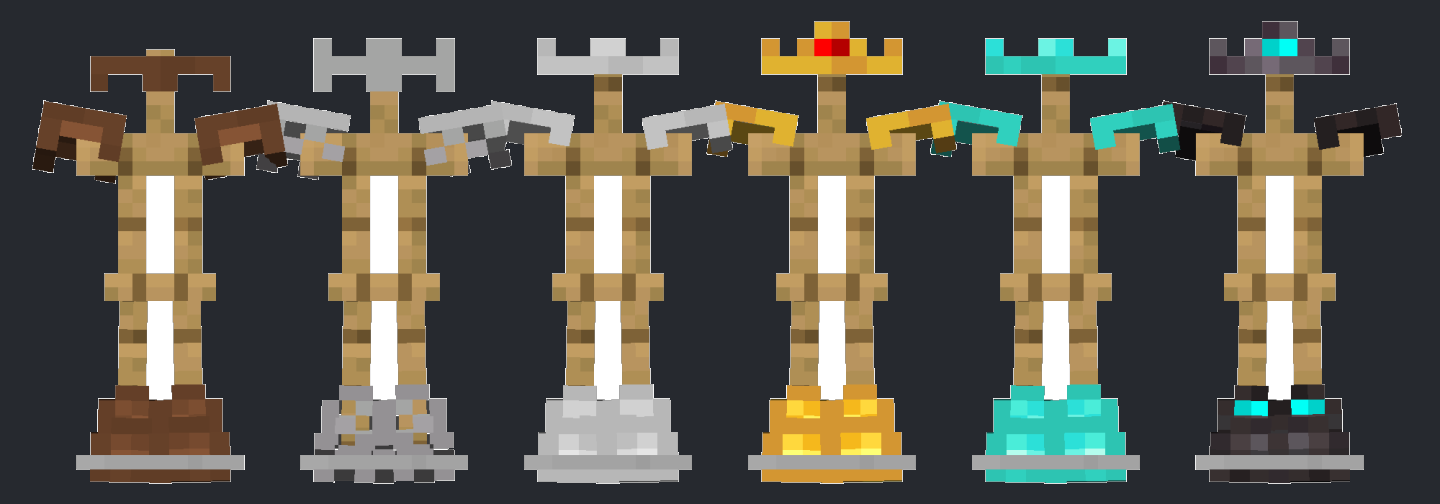
# **See skins under the player’s armor while still seeing the armor**
CurseForge Listing