ZPython
# 🐍 ZPython
**ZPython** is a combination of a **Minecraft plugin** (Paper/Spigot 1.20.1) and a **web panel** for managing Python projects on your Minecraft server.
🧩 The plugin handles **starting and stopping scripts**.
🌐 The panel provides **easy management of projects, files, logs, and access controls**.
—
[](https://zpython.zdev.website/)
[](https://discord.gg/53HpgxpzrX)
—
## ✨ Key Features of the Plugin
– 🚀 **Start and stop projects**
Launch Python scripts from the web panel with unified logic.
– ⌨️ **Management commands:**
/zpython projects — list projects
/zpython create — create a project
/zpython run — start a project
/zpython stop — stop the current project
/zpython status [] — get project status
– 🌍 **Localization:** RU/EN (set in `config.yml`)
– ⚡ **Server optimization:** the `optimizeMode` disables unnecessary game features and can restrict player access.
– 🤫 **Silent synchronization:** update files and projects without cluttering the console.
– 🛠 **Compatibility:** Paper 1.20.1
—
## 🖥 Web Panel Features
– 📦 **Project management**
Create/delete, upload files, configure dependencies, start/stop projects.
– 📊 **Real-time status**
– 🔑 **Discord authorization**
– 🌐 **Bilingual panel:** RU/EN + translated tooltips.
—
## 💡 Why use ZPython?
– ⚙ **Fast deployment of Python projects**.
– 💤 **Minimal load** and “silent” mode.
– 🌏 **Multilingual support**.
ZPvPToggle
# ZPvPToggle
A lightweight Minecraft plugin that allows players to toggle their PvP status on and off. Players can only engage in PvP when both parties have PvP enabled.



## Features
– **Toggle PvP**: Players can enable or disable their PvP status
– **Visual Indicators**: Customizable particle rings show which players have PvP enabled
– **Cooldowns:** Configurable cooldown for toggling PvP after a player enters PvP combat.
– **Custom Indicators:** Players can choose their own indicators. Access to indicators is permission-based.
– **Admin Controls**: Staff can toggle PvP for other players
– **Fully Customizable**: All messages and particle effects can be configured
– **Folia Support**: Works with Folia server software
– **Permissions-Based**: Granular permission system for different commands
## Commands
| Command | Description | Permission |
|———|————-|————|
| `/pvp` | Toggle your PvP status | zpvptoggle.user |
| `/pvp toggle` | Toggle your PvP status | zpvptoggle.user |
| `/pvp on` | Enable your PvP status | zpvptoggle.user |
| `/pvp off` | Disable your PvP status | zpvptoggle.user |
| `/pvp hide` | Hide PvP particle indicators | zpvptoggle.user |
| `/pvp show` | Show PvP particle indicators | zpvptoggle.user |
| `/pvp indicator ` | Change your PvP indicator | zpvptoggle.indicator. |
| `/pvp help` | Display the help message | zpvptoggle.user |
| `/pvp reload` | Reload plugin configuration | zpvptoggle.admin |
| `/pvp ` | Toggle PvP for another player | zpvptoggle.admin |
| `/pvp bypass ` | Toggle PvP Bypass status for you or another player | zpvptoggle.admin |
## Permissions
| Permission | Description | Default |
|————|————-|———|
| `zpvptoggle.user` | Allows players to toggle their own PvP status | true |
| `zpvptoggle.indicator.` | Give access to specific indicators. | multiple |
| `zpvptoggle.admin` | Allows staff to toggle PvP status for other players | op |
## Configuration
### config.yml
“`yaml
# Whether to disable PvP when a player dies
disable-pvp-on-death: true
# Whether to show a warning message when a player first toggles PvP
warning-message-enabled: true
# Whether to apply pvp-toggle protections to pets of players too
protect-pets: true
# Duration of the cooldown for players toggling pvp or since their last pvp interaction
pvp-cooldown: 10.0
particle-indicator:
# Interval in ticks to show the ring of particles. 20 ticks = 1 second.
interval-ticks: 60
# Maximum distance (in blocks) at which players can see PvP indicators.
max-view-distance: 32
# The default indicator to use (must match one of the keys in the indicators section)
default-indicator: default
# Define multiple particle ring indicators
indicators:
# Default ring – red circle around feet
default:
type: REDSTONE
points: 32
random-particle-positions: false
radius: 0.8
y-offset: 0.1
interval: 5
random-offset-vertical: 0.0
random-offset-horizontal: 0.0
speed: 0.01
color: RED
dust-size: 1.0
“`
## Compatibility
– Paper 1.21+
– Folia-compatible
– Java 21+
## Dependencies
– [MCKotlin](https://modrinth.com/plugin/mckotlin)
## Installation
1. Download the latest version of ZPvPToggle from [Modrinth](https://modrinth.com/plugin/zpvptoggle/versions).
2. Download MCKotlin from [Modrinth](https://modrinth.com/plugin/mckotlin)
3. Place the downloaded `.jar` files into your server’s `plugins/` folder.
4. Restart your server.
5. Configure the plugin to your liking by editing the `.yml` files in the `plugins/ZPvPtoggle/` folder.
Zorro Luciérnaga
## Mod Loaders


## Content
EN: As of right now, the mod adds a new melee weapon in the form of the katana. This new weapon is available in all Vanilla tool tiers, aswell as the ones added by [TLOTD](https://modrinth.com/mod/tlotd).
ES: A partir de ahora, el mod añade una nueva arma cuerpo a cuerpo en forma de katana. Esta nueva arma está disponible en todos los niveles de herramientas de Vanilla, así como en los añadidos por [TLOTD](https://modrinth.com/mod/tlotd).
## Creative Menu
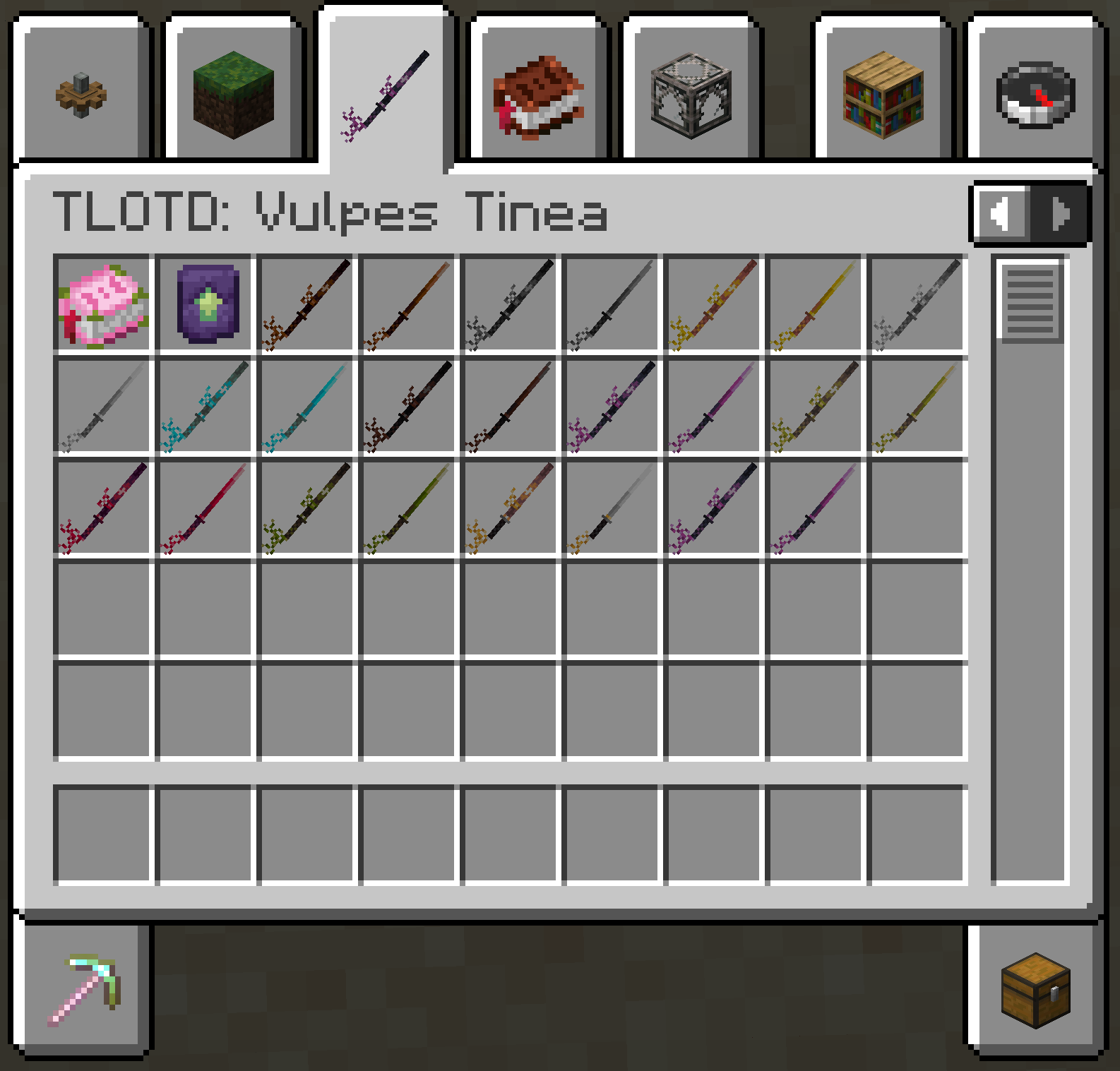
Zoro katanas
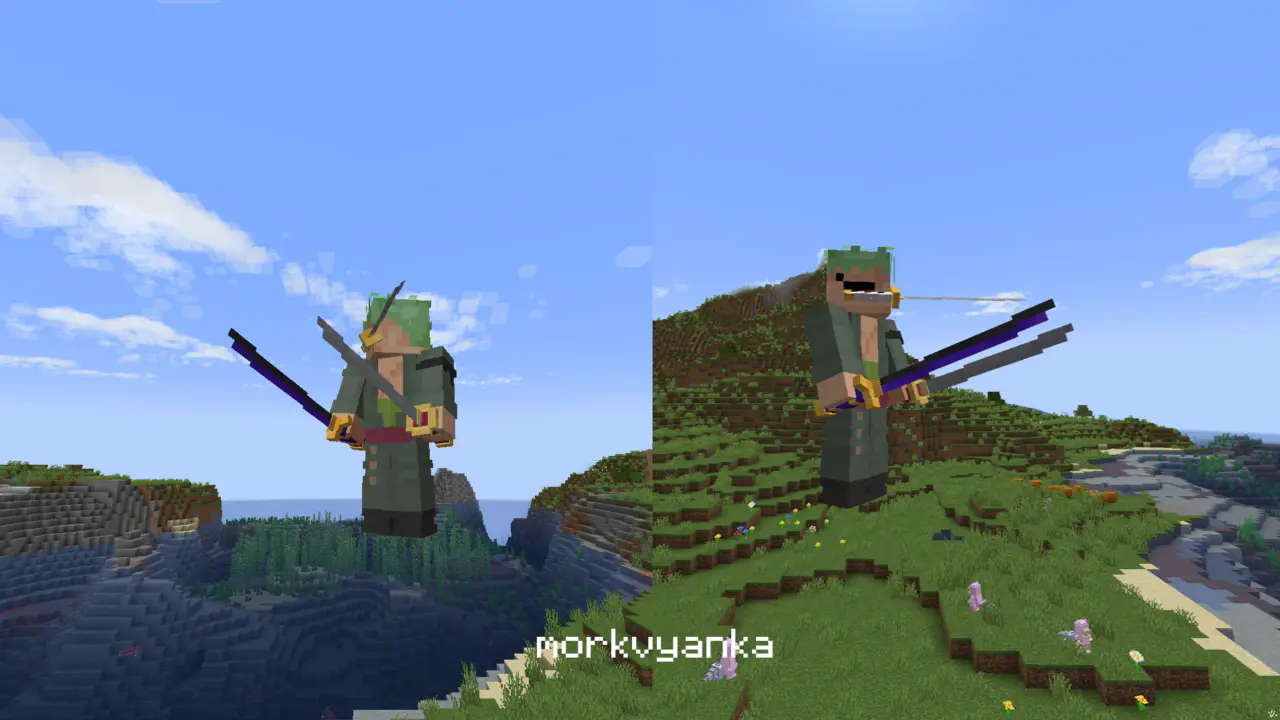
**In this resource pack I changed model of netherite sword, netherite axe and carwed pumpkin to Zoro katanas.**
[my linktree](https://linktr.ee/morkvyanka)
ZoomLens
🔍 Zoomify – The Ultimate Zoom Mod for Minecraft! 🔍
Previously known as Zoomify!
🌍Experience distant structures, mesmerizing landscapes, and stunning views with exceptional clarity! Whether you’re a traveler, a creator, or a scenery enthusiast, Zoomify’s adjustable zoom feature enhances every moment!🌍
—
🖱️ Easy to Use:
Hold C + scroll the middle mouse button to adjust the zoom level.
—
🎥 Video Showcase:
—
Zoomglass
A Fabric mod that quickly puts a spyglass into your hand with a press of a button.
Made for people who prefer roleplaying aspects of a spyglass but don’t want to miss out on convenience!
Additionally, you can use a fake spyglass while in Spectator gamemode, or in Creative when you don’t have
it in your inventory.
The default keybind is `z`, and you can find it under the “Inventory” section in keybinding settings.
Requires Fabric API
Zoomer Bows
# What is Zoomer Bows:
Zoomer bows is a mod that ads a few new bows, inspired from our Zoomcraft V4 progression.
This mod is going to be used to provide more bows in our modpack, having them scale based on the player’s combat level
## Should you use this mod:
Usage of this mod, in a new minecraft instance is discouraged at the moment, as it lacks any recipes & extra functionality, which are currently present only on Zoompack V4.
## Permissions:
You can freely use Zoomer bows for all intent & purposes in modpack development, though we do not recommend adding it without having the tools necessary to scale these bows.
ZonePractice Pro Duels
# ZonePractice Pro The Ultimate Minecraft PvP Duels Plugin
Elevate your Minecraft server with ZonePractice Pro, the most advanced practice / duels and matchmaking plugin available. Designed for high performance and total customizability, ZonePractice Pro delivers a next generation PvP experience. Players can unlock custom armor trims, shield patterns, and unique death effects. Navigate lobbies in style using wind charges, tridents, elytras, or spears.
## Key Features of ZonePractice Pro
### ⚔️ Modern PvP Ladder Types
+ TnT Sumo, MLGRush, Crystals, Cart, BedWars, Bridges, SkyWars, Fireball Fight, BattleRush
+ Sumo, Boxing, PearlFight, Spleef, Build, Basic
### ⚡ Asynchronous Arena System
+ High performance asynchronous arena copying for build modes
+ Highly configurable basic and build type arenas
+ Player hiding functionality for non build arenas
+ Unlimited concurrent matches in non build arenas
### 🛡️ Custom Player Kit System
+ Create custom kits inspired by popular PvP servers
+ Up to 4 personalized kits per player with extra items
+ Intuitive GUI for players to create and manage loadouts
### 🏆 Automated Server Events
+ Host engaging events easily including Brackets, Juggernaut, LMS, OITC, Splegg, Sumo, and TNT Tag
### ⚖️ Advanced Matchmaking and Queues
+ Unranked queues based on player divisions
+ Ranked queues powered by accurate ELO matchmaking
+ Clean two category page queue selector GUI
### 📊 Player Statistics and Divisions
+ Track Experience points, Wins, Kills, Deaths, and Streaks
+ Set minimum division requirements for ranked play
+ Beautiful GUI and Hologram leaderboards
### 👥 FFA and Party System
+ Dedicated FFA arenas featuring multiple ladders and independent stats
+ Robust Party System offering 6 distinct settings
+ Support for FFA, Split party games, and Party versus Party matches
### ⚙️ Premium Match Features
+ Fully customizable sidebar and below name health bars for every ladder
+ Exp bar cooldowns for Ender pearls, Arrows, and Golden Apples
+ Built in staff mode and advanced spectator mode
+ Duel rematch items, Nametag systems, and Round selectors
### 🚀 Unmatched Performance and Customizability
+ Incredible server performance with simple installation
+ Complete customizability utilizing version controlled config files
+ Comprehensive setup GUI for server administrators
+ Developer API included for custom integrations
+ MiniMessage chat formatting and PlaceholderAPI support
+ Custom death messages and sound effects
+ Seamless multiple world support to run alongside other minigames
+ Custom inventory items for a unique feel
## Important Installation Requirement
To guarantee high performance packet handling, ZonePractice Pro requires the PacketEvents API. Please ensure you install the latest release on your server before starting.
[Download PacketEvents Here](https://github.com/retrooper/packetevents/releases)
## Community and Support
[Join our Discord Community](https://discord.gg/xZy34zbnxe)
## Plugin Screenshots
ZombPlayer
# Introduction
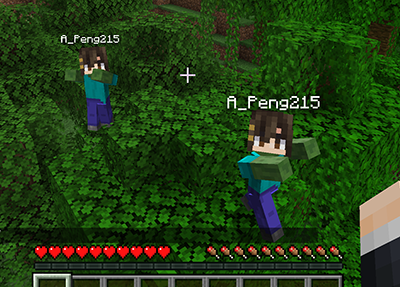
This mod will spawn a zombified player when a player is killed by zombified creature.
## Features
– When a player is killed by zombified creature (including husks, drowneds etc.), a zombie will be spawned in the place.
– The zombie will inherit player’s equipment and inventory. Players need to kill the zombie to retrieve them. _This feature won’t work when the gamerule `keepInventory` is set to true._
– The head of the zombie is same as the player’s, and will drop if killed by a __charged creeper__.
– The zombie will convert to the drowned when drowned like normal zombies.
– The zombie won’t burn in sunlight.
– Type command `/gamerule doPlayerInfected [false/true]` to switch the mod. (Default true)
## Gallery
## Feedback
Anyone can [create an issue](https://github.com/APeng215/ZombPlayer-forge/issues/new) to report bugs, provide suggestions, or share feedback.
Zombify
## Zombify
**Prevents villagers from dying when converting to zombie villagers on any difficulty**
Normally, on easy or normal difficulty, villagers may die when converting to zombie villagers, Zombify makes it so your villagers will never die during conversion!
### Chance of villager successfully converting to a zombie villager
| Difficulty | Chance (without the mod) | Chance (with the mod) |
|————|————————–|————————–|
| Easy | 0% | 100% |
| Normal | 50% | 100% |
| Hard | 100% | 100% |


