Pixel Twemoji 9x
# Pixel perfect Twemoji (9×9 version)
This resource pack adds **all** of Twemoji, redrawn by hand as pixel art
at 9×9 pixels, to the default font in Minecraft: Java Edition
version 1.16 or later. Twemoji is the emoji set used by Discord and Twitter.
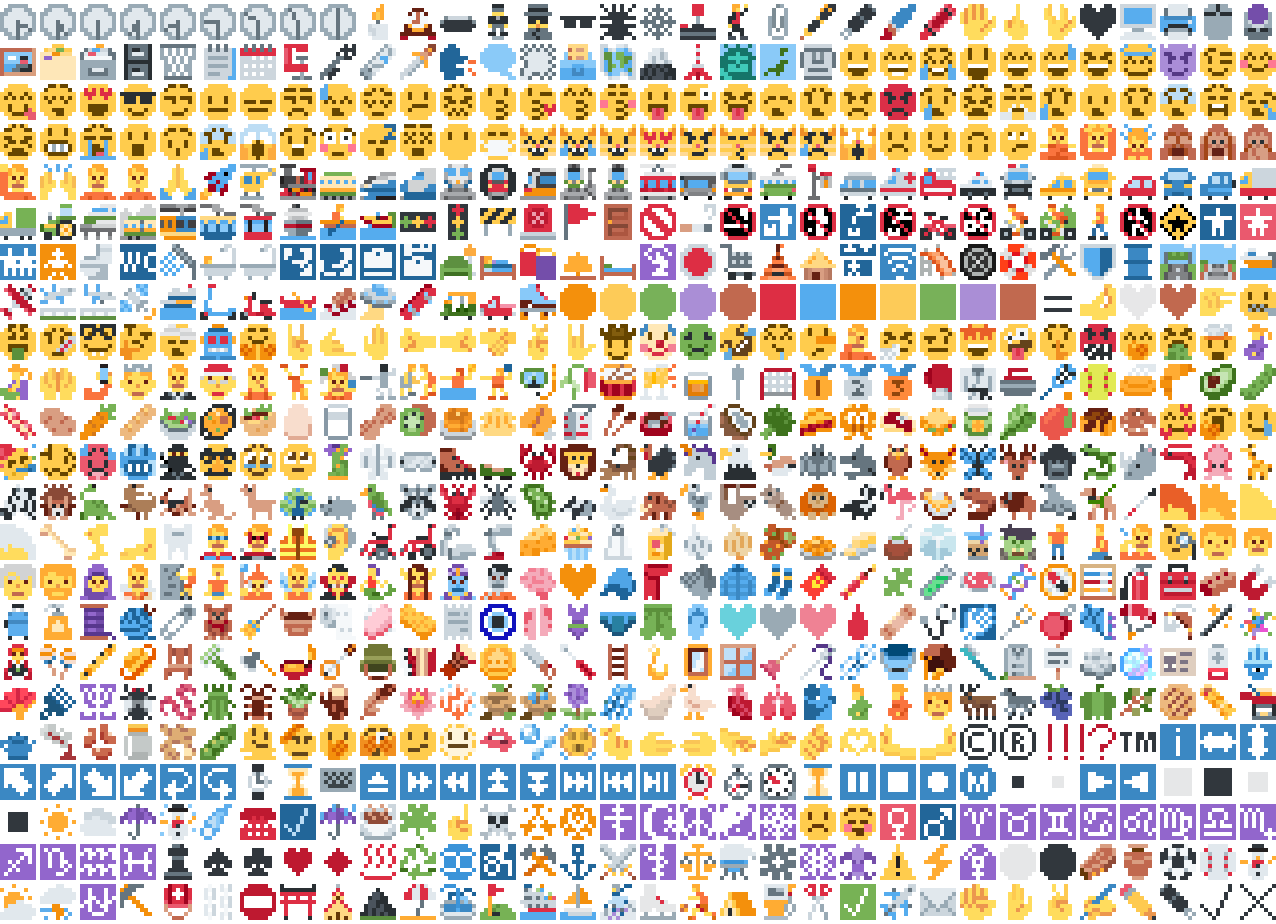
*Just some of the emoji in the pack*
## Installation
Please download the .zip file from the Versions section, put it in your
resource packs folder and select it for use in-game.
You can also embed this pack into another pack,
for use on a server or custom world for example.
Please remember to credit the project as it is
one of the requirements of the project license.
## Basic usage
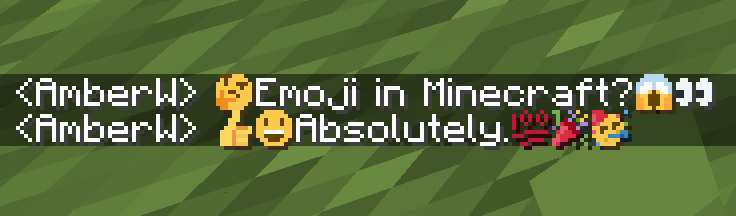
Most standard emoji characters will just work if you copy and paste them in or
use some kind of emoji input. For example, try copying emoji from
this site or using the Windows emoji picker (Win+.).
However, emoji that consist of sequences of multiple character are not supported
by vanilla and will show up as multiple, separate characters. Sorry.
See below for ways to develop around this.
Sample of Emoji to Copy-Paste
© ® ‼ ⁉ ™ ℹ ↔ ↕ ↖ ↗ ↘ ↙ ↩ ↪ ⌚ ⌛ ⌨ ⏏ ⏩ ⏪ ⏫ ⏬ ⏭ ⏮ ⏯ ⏰ ⏱ ⏲ ⏳ ⏸ ⏹ ⏺ Ⓜ ▪ ▫ ▶ ◀ ◻ ◼ ◽ ◾ ☀ ☁ ☂ ☃ ☄ ☎ ☑ ☔ ☕ ☘ ☝ ☠ ☢ ☣ ☦ ☪ ☮ ☯ ☸ ☹ ☺ ♀ ♂ ♈ ♉ ♊ ♋ ♌ ♍ ♎ ♏ ♐ ♑ ♒ ♓ ♟ ♠ ♣ ♥ ♦ ♨ ♻ ♾ ♿ ⚒ ⚓ ⚔ ⚕ ⚖ ⚗ ⚙ ⚛ ⚜ ⚠ ⚡ ⚧ ⚪ ⚫ ⚰ ⚱ ⚽ ⚾ ⛄ ⛅ ⛈ ⛎ ⛏ ⛑ ⛓ ⛔ ⛩ ⛪ ⛰ ⛱ ⛲ ⛳ ⛴ ⛵ ⛷ ⛸ ⛹ ⛺ ⛽ ✂ ✅ ✈ ✉ ✊ ✋ ✌ ✍ ✏ ✒ ✔ ✖ ✝ ✡ ✨ ✳ ✴ ❄ ❇ ❌ ❎ ❓ ❔ ❕ ❗ ❣ ❤ ➕ ➖ ➗ ➡ ➰ ➿ ⤴ ⤵ ⬅ ⬆ ⬇ ⬛ ⬜ ⭐ ⭕ 〰 〽 ㊗ ㊙ 🀄 🃏 🅰 🅱 🅾 🅿 🆎 🆑 🆒 🆓 🆔 🆕 🆖 🆗 🆘 🆙 🆚 🇦 🇧 🇨 🇩 🇪 🇫 🇬 🇭 🇮 🇯 🇰 🇱 🇲 🇳 🇴 🇵 🇶 🇷 🇸 🇹 🇺 🇻 🇼 🇽 🇾 🇿 🈁 🈂 🈚 🈯 🈲 🈳 🈴 🈵 🈶 🈷 🈸 🈹 🈺 🉐 🉑 🌀 🌁 🌂 🌃 🌄 🌅 🌆 🌇 🌈 🌉 🌊 🌋 🌌 🌍 🌎 🌏 🌐 🌑 🌒 🌓 🌔 🌕 🌖 🌗 🌘 🌙 🌚 🌛 🌜 🌝 🌞 🌟 🌠 🌡 🌤 🌥 🌦 🌧 🌨 🌩 🌪 🌫 🌬 🌭 🌮 🌯 🌰 🌱 🌲 🌳 🌴 🌵 🌶 🌷 🌸 🌹 🌺 🌻 🌼 🌽 🌾 🌿 🍀 🍁 🍂 🍃 🍄 🍅 🍆 🍇 🍈 🍉 🍊 🍋 🍌 🍍 🍎 🍏 🍐 🍑 🍒 🍓 🍔 🍕 🍖 🍗 🍘 🍙 🍚 🍛 🍜 🍝 🍞 🍟 🍠 🍡 🍢 🍣 🍤 🍥 🍦 🍧 🍨 🍩 🍪 🍫 🍬 🍭 🍮 🍯 🍰 🍱 🍲 🍳 🍴 🍵 🍶 🍷 🍸 🍹 🍺 🍻 🍼 🍽 🍾 🍿 🎀 🎁 🎂 🎃 🎄 🎅 🎆 🎇 🎈 🎉 🎊 🎋 🎌 🎍 🎎 🎏 🎐 🎑 🎒 🎓 🎖 🎗 🎙 🎚 🎛 🎞 🎟 🎠 🎡 🎢 🎣 🎤 🎥 🎦 🎧 🎨 🎩 🎪 🎫 🎬 🎭 🎮 🎯 🎰 🎱 🎲 🎳 🎴 🎵 🎶 🎷 🎸 🎹 🎺 🎻 🎼 🎽 🎾 🎿 🏀 🏁 🏂 🏃 🏄 🏅 🏆 🏇 🏈 🏉 🏊 🏋 🏌 🏍 🏎 🏏 🏐 🏑 🏒 🏓 🏔 🏕 🏖 🏗 🏘 🏙 🏚 🏛 🏜 🏝 🏞 🏟 🏠 🏡 🏢 🏣 🏤 🏥 🏦 🏧 🏨 🏩 🏪 🏫 🏬 🏭 🏮 🏯 🏰 🏳 🏴 🏵 🏷 🏸 🏹 🏺 🏻 🏼 🏽 🏾 🏿 🐀 🐁 🐂 🐃 🐄 🐅 🐆 🐇 🐈 🐉 🐊 🐋 🐌 🐍 🐎 🐏 🐐 🐑 🐒 🐓 🐔 🐕 🐖 🐗 🐘 🐙 🐚 🐛 🐜 🐝 🐞 🐟 🐠 🐡 🐢 🐣 🐤 🐥 🐦 🐧 🐨 🐩 🐪 🐫 🐬 🐭 🐮 🐯 🐰 🐱 🐲 🐳 🐴 🐵 🐶 🐷 🐸 🐹 🐺 🐻 🐼 🐽 🐾 🐿 👀 👁 👂 👃 👄 👅 👆 👇 👈 👉 👊 👋 👌 👍 👎 👏 👐 👑 👒 👓 👔 👕 👖 👗 👘 👙 👚 👛 👜 👝 👞 👟 👠 👡 👢 👣 👤 👥 👦 👧 👨 👩 👪 👫 👬 👭 👮 👯 👰 👱 👲 👳 👴 👵 👶 👷 👸 👹 👺 👻 👼 👽 👾 👿 💀 💁 💂 💃 💄 💅 💆 💇 💈 💉 💊 💋 💌 💍 💎 💏 💐 💑 💒 💓 💔 💕 💖 💗 💘 💙 💚 💛 💜 💝 💞 💟 💠 💡 💢 💣 💤 💥 💦 💧 💨 💩 💪 💫 💬 💭 💮 💯 💰 💱 💲 💳 💴 💵 💶 💷 💸 💹 💺 💻 💼 💽 💾 💿 📀 📁 📂 📃 📄 📅 📆 📇 📈 📉 📊 📋 📌 📍 📎 📏 📐 📑 📒 📓 📔 📕 📖 📗 📘 📙 📚 📛 📜 📝 📞 📟 📠 📡 📢 📣 📤 📥 📦 📧 📨 📩 📪 📫 📬 📭 📮 📯 📰 📱 📲 📳 📴 📵 📶 📷 📸 📹 📺 📻 📼 📽 📿 🔀 🔁 🔂 🔃 🔄 🔅 🔆 🔇 🔈 🔉 🔊 🔋 🔌 🔍 🔎 🔏 🔐 🔑 🔒 🔓 🔔 🔕 🔖 🔗 🔘 🔙 🔚 🔛 🔜 🔝 🔞 🔟 🔠 🔡 🔢 🔣 🔤 🔥 🔦 🔧 🔨 🔩 🔪 🔫 🔬 🔭 🔮 🔯 🔰 🔱 🔲 🔳 🔴 🔵 🔶 🔷 🔸 🔹 🔺 🔻 🔼 🔽 🕉 🕊 🕋 🕌 🕍 🕎 🕐 🕑 🕒 🕓 🕔 🕕 🕖 🕗 🕘 🕙 🕚 🕛 🕜 🕝 🕞 🕟 🕠 🕡 🕢 🕣 🕤 🕥 🕦 🕧 🕯 🕰 🕳 🕴 🕵 🕶 🕷 🕸 🕹 🕺 🖇 🖊 🖋 🖌 🖍 🖐 🖕 🖖 🖤 🖥 🖨 🖱 🖲 🖼 🗂 🗃 🗄 🗑 🗒 🗓 🗜 🗝 🗞 🗡 🗣 🗨 🗯 🗳 🗺 🗻 🗼 🗽 🗾 🗿 😀 😁 😂 😃 😄 😅 😆 😇 😈 😉 😊 😋 😌 😍 😎 😏 😐 😑 😒 😓 😔 😕 😖 😗 😘 😙 😚 😛 😜 😝 😞 😟 😠 😡 😢 😣 😤 😥 😦 😧 😨 😩 😪 😫 😬 😭 😮 😯 😰 😱 😲 😳 😴 😵 😶 😷 😸 😹 😺 😻 😼 😽 😾 😿 🙀 🙁 🙂 🙃 🙄 🙅 🙆 🙇 🙈 🙉 🙊 🙋 🙌 🙍 🙎 🙏 🚀 🚁 🚂 🚃 🚄 🚅 🚆 🚇 🚈 🚉 🚊 🚋 🚌 🚍 🚎 🚏 🚐 🚑 🚒 🚓 🚔 🚕 🚖 🚗 🚘 🚙 🚚 🚛 🚜 🚝 🚞 🚟 🚠 🚡 🚢 🚣 🚤 🚥 🚦 🚧 🚨 🚩 🚪 🚫 🚬 🚭 🚮 🚯 🚰 🚱 🚲 🚳 🚴 🚵 🚶 🚷 🚸 🚹 🚺 🚻 🚼 🚽 🚾 🚿 🛀 🛁 🛂 🛃 🛄 🛅 🛋 🛌 🛍 🛎 🛏 🛐 🛑 🛒 🛕 🛖 🛗 🛜 🛝 🛞 🛟 🛠 🛡 🛢 🛣 🛤 🛥 🛩 🛫 🛬 🛰 🛳 🛴 🛵 🛶 🛷 🛸 🛹 🛺 🛻 🛼 🟠 🟡 🟢 🟣 🟤 🟥 🟦 🟧 🟨 🟩 🟪 🟫 🟰 🤌 🤍 🤎 🤏 🤐 🤑 🤒 🤓 🤔 🤕 🤖 🤗 🤘 🤙 🤚 🤛 🤜 🤝 🤞 🤟 🤠 🤡 🤢 🤣 🤤 🤥 🤦 🤧 🤨 🤩 🤪 🤫 🤬 🤭 🤮 🤯 🤰 🤱 🤲 🤳 🤴 🤵 🤶 🤷 🤸 🤹 🤺 🤼 🤽 🤾 🤿 🥀 🥁 🥂 🥃 🥄 🥅 🥇 🥈 🥉 🥊 🥋 🥌 🥍 🥎 🥏 🥐 🥑 🥒 🥓 🥔 🥕 🥖 🥗 🥘 🥙 🥚 🥛 🥜 🥝 🥞 🥟 🥠 🥡 🥢 🥣 🥤 🥥 🥦 🥧 🥨 🥩 🥪 🥫 🥬 🥭 🥮 🥯 🥰 🥱 🥲 🥳 🥴 🥵 🥶 🥷 🥸 🥹 🥺 🥻 🥼 🥽 🥾 🥿 🦀 🦁 🦂 🦃 🦄 🦅 🦆 🦇 🦈 🦉 🦊 🦋 🦌 🦍 🦎 🦏 🦐 🦑 🦒 🦓 🦔 🦕 🦖 🦗 🦘 🦙 🦚 🦛 🦜 🦝 🦞 🦟 🦠 🦡 🦢 🦣 🦤 🦥 🦦 🦧 🦨 🦩 🦪 🦫 🦬 🦭 🦮 🦯 🦰 🦱 🦲 🦳 🦴 🦵 🦶 🦷 🦸 🦹 🦺 🦻 🦼 🦽 🦾 🦿 🧀 🧁 🧂 🧃 🧄 🧅 🧆 🧇 🧈 🧉 🧊 🧋 🧌 🧍 🧎 🧏 🧐 🧑 🧒 🧓 🧔 🧕 🧖 🧗 🧘 🧙 🧚 🧛 🧜 🧝 🧞 🧟 🧠 🧡 🧢 🧣 🧤 🧥 🧦 🧧 🧨 🧩 🧪 🧫 🧬 🧭 🧮 🧯 🧰 🧱 🧲 🧳 🧴 🧵 🧶 🧷 🧸 🧹 🧺 🧻 🧼 🧽 🧾 🧿 🩰 🩱 🩲 🩳 🩴 🩵 🩶 🩷 🩸 🩹 🩺 🩻 🩼 🪀 🪁 🪂 🪃 🪄 🪅 🪆 🪇 🪈 🪐 🪑 🪒 🪓 🪔 🪕 🪖 🪗 🪘 🪙 🪚 🪛 🪜 🪝 🪞 🪟 🪠 🪡 🪢 🪣 🪤 🪥 🪦 🪧 🪨 🪩 🪪 🪫 🪬 🪭 🪮 🪯 🪰 🪱 🪲 🪳 🪴 🪵 🪶 🪷 🪸 🪹 🪺 🪻 🪼 🪽 🪿 🫀 🫁 🫂 🫃 🫄 🫅 🫎 🫏 🫐 🫑 🫒 🫓 🫔 🫕 🫖 🫗 🫘 🫙 🫚 🫛 🫠 🫡 🫢 🫣 🫤 🫥 🫦 🫧 🫨 🫰 🫱 🫲 🫳 🫴 🫵 🫶 🫷 🫸
Also, check out the 18x version with more detail!
## Supported mods
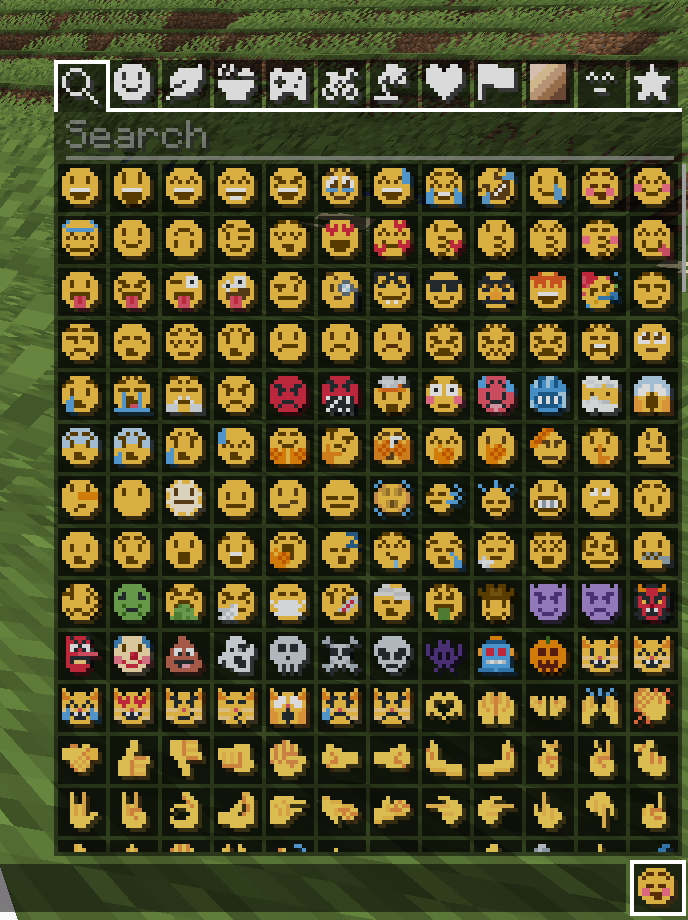
### Symbol Chat
Easy to use emoji and symbol picker
## Remapped characters (for developers)
In order to have any support for emoji consisting of sequences they have been
remapped to unused single characters. An index of these can be found in
/assets/emoji_remappings/lang/en_us.json.
For example, `ud83dudc69u200dud83dudd2c` (👩+🔬=👩🔬)
is mapped to `udb80udf30` using this translation snippet:
“`json
“ud83dudc69u200dud83dudd2c”: “udb80udf30”
“`
**Please note that vanilla has no mechanism to
automatically convert to the remapped form.**
A custom emoji picker or some kind of mod/plugin is
required to make using these a smooth experience.
Because the index acts as a language file, a server side chat listener
could detect emoji sequences and turn them into translations like this one:
“`json
{“translate”: “ud83dudc69u200dud83dudd2c”}
“`
Any client with the pack installed can then perform the remapping for the server.
If the pack is not installed or the sequence is not found then it will just
fall back to displaying the sequence. This means that the server doesn’t need a
complete list of emoji sequences, just a way to detect potential ones.
(The Unicode website
contains data files describing what is an emoji.)
## Shortcodes (for developers)
Shortcodes are a popular way to insert emoji by name. An index of shortcodes
can be found in /assets/emoji_shortcodes/lang/en_us.json.
For example, `:thinking:` is mapped to `ud83eudd14` (🤔):
“`json
“thinking”: “ud83eudd14”
“`
Emoji that need remapping already map to the remapped version.
**Please note that vanilla has no mechanism to
automatically convert shortcodes into emoji.**
Some kind of mod/plugin is required.
Because the index acts as a language file, a server side chat listener could
detect shortcodes and turn them into translations like this one:
“`json
{“translate”: “:thinking:”}
“`
Any client with the pack installed can then convert it for the server. If the
pack is not installed or the shortcode is not found then it will just fall back
to displaying the shortcode. This means that the server doesn’t need a complete
list of shortcodes, just a way to detect potential ones by finding substrings
beginning and ending with a colon `:`.
### Custom emoji?
Custom emoji could be created in a similar way by adding them to unused code
points of the default font and adding a translation with a shortcode.
For example, this translation snippet adds the shortcode `:pog:` for the
character `uE502`:
“`json
“:pog:”: “uE502”
“`
## Reverse shortcodes (for developers)
Maybe you want to display a name for each emoji, in some hover text for example.
That is where reverse shortcodes come in. An index of these can be found in
/assets/emoji_shortcodes_reverse/lang/en_us.json.
For example, `u200cud83eudd14` (`` + 🤔) is mapped to `:thinking:` using
this translation snippet:
“`json
“u200cud83eudd14”: “:thinking:”
“`
`u200c` is added to each entry to allow the index to be used as a language file
without conflicting with the other indexes. If the pack is not installed or the
emoji is not found then it will just fall back to displaying the characters,
including the invisible `u200c`.
A server side chat listener could detect shortcodes and
turn them into emoji with tooltips like this one:
“`json
{“translate”: “:thinking:”, “hoverEvent”: {“action”: “show_text”, “contents”: “:thinking:”}}
“`
With reverse shortcodes, it could also detect emoji and
emoji sequences and also give them tooltips like this one:
“`json
{“translate”:”ud83eudd14″,”hoverEvent”:{“action”:”show_text”,”contents”:{“translate”:”u200cud83eudd14″}}}
“`
## License
Graphics based on Twemoji Copyright (c) 2018 Twitter, Inc and other contributors, licensed under Creative Commons Attribution 4.0 International
Pixel art and resource pack adaptation Copyright (c) 2020 AmberW, licensed under Creative Commons Attribution 4.0 International
Pixel Twemoji 18x
# Pixel perfect Twemoji (18×18 version)
This resource pack adds **all** of Twemoji, redrawn by hand as pixel art
at 18×18 pixels, to the default font in Minecraft: Java Edition
version 1.16 or later. Twemoji is the emoji set used by Discord and Twitter.
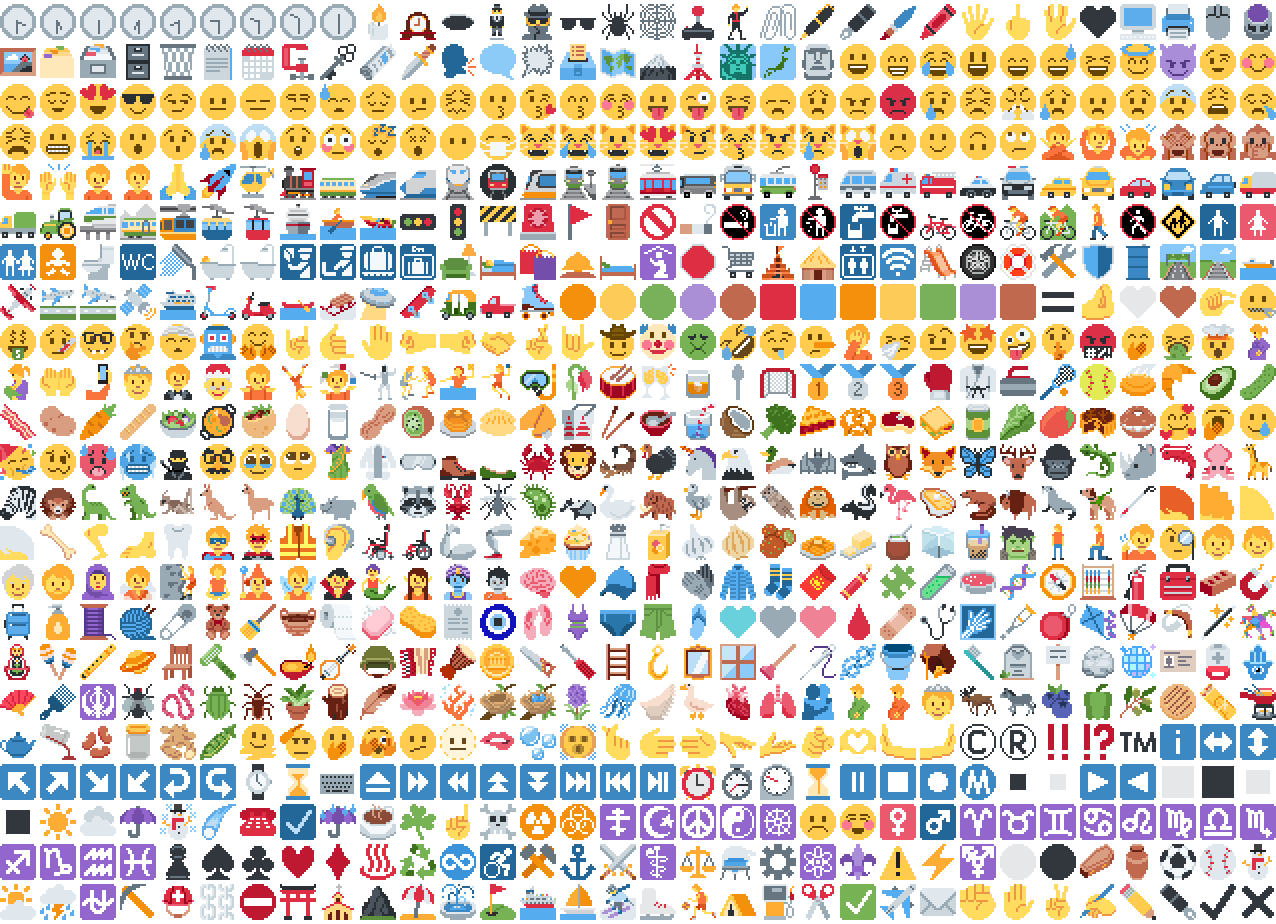
*Just some of the emoji in the pack*
## Installation
Please download the .zip file from the Versions section, put it in your
resource packs folder and select it for use in-game.
You can also embed this pack into another pack,
for use on a server or custom world for example.
Please remember to credit the project as it is
one of the requirements of the project license.
## Basic usage
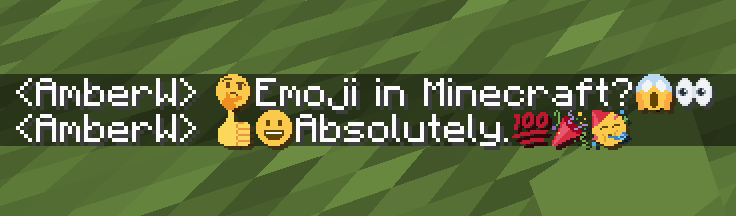
Most standard emoji characters will just work if you copy and paste them in or
use some kind of emoji input. For example, try copying emoji from
this site or using the Windows emoji picker (Win+.).
However, emoji that consist of sequences of multiple character are not supported
by vanilla and will show up as multiple, separate characters. Sorry.
See below for ways to develop around this.
Sample of Emoji to Copy-Paste
© ® ‼ ⁉ ™ ℹ ↔ ↕ ↖ ↗ ↘ ↙ ↩ ↪ ⌚ ⌛ ⌨ ⏏ ⏩ ⏪ ⏫ ⏬ ⏭ ⏮ ⏯ ⏰ ⏱ ⏲ ⏳ ⏸ ⏹ ⏺ Ⓜ ▪ ▫ ▶ ◀ ◻ ◼ ◽ ◾ ☀ ☁ ☂ ☃ ☄ ☎ ☑ ☔ ☕ ☘ ☝ ☠ ☢ ☣ ☦ ☪ ☮ ☯ ☸ ☹ ☺ ♀ ♂ ♈ ♉ ♊ ♋ ♌ ♍ ♎ ♏ ♐ ♑ ♒ ♓ ♟ ♠ ♣ ♥ ♦ ♨ ♻ ♾ ♿ ⚒ ⚓ ⚔ ⚕ ⚖ ⚗ ⚙ ⚛ ⚜ ⚠ ⚡ ⚧ ⚪ ⚫ ⚰ ⚱ ⚽ ⚾ ⛄ ⛅ ⛈ ⛎ ⛏ ⛑ ⛓ ⛔ ⛩ ⛪ ⛰ ⛱ ⛲ ⛳ ⛴ ⛵ ⛷ ⛸ ⛹ ⛺ ⛽ ✂ ✅ ✈ ✉ ✊ ✋ ✌ ✍ ✏ ✒ ✔ ✖ ✝ ✡ ✨ ✳ ✴ ❄ ❇ ❌ ❎ ❓ ❔ ❕ ❗ ❣ ❤ ➕ ➖ ➗ ➡ ➰ ➿ ⤴ ⤵ ⬅ ⬆ ⬇ ⬛ ⬜ ⭐ ⭕ 〰 〽 ㊗ ㊙ 🀄 🃏 🅰 🅱 🅾 🅿 🆎 🆑 🆒 🆓 🆔 🆕 🆖 🆗 🆘 🆙 🆚 🇦 🇧 🇨 🇩 🇪 🇫 🇬 🇭 🇮 🇯 🇰 🇱 🇲 🇳 🇴 🇵 🇶 🇷 🇸 🇹 🇺 🇻 🇼 🇽 🇾 🇿 🈁 🈂 🈚 🈯 🈲 🈳 🈴 🈵 🈶 🈷 🈸 🈹 🈺 🉐 🉑 🌀 🌁 🌂 🌃 🌄 🌅 🌆 🌇 🌈 🌉 🌊 🌋 🌌 🌍 🌎 🌏 🌐 🌑 🌒 🌓 🌔 🌕 🌖 🌗 🌘 🌙 🌚 🌛 🌜 🌝 🌞 🌟 🌠 🌡 🌤 🌥 🌦 🌧 🌨 🌩 🌪 🌫 🌬 🌭 🌮 🌯 🌰 🌱 🌲 🌳 🌴 🌵 🌶 🌷 🌸 🌹 🌺 🌻 🌼 🌽 🌾 🌿 🍀 🍁 🍂 🍃 🍄 🍅 🍆 🍇 🍈 🍉 🍊 🍋 🍌 🍍 🍎 🍏 🍐 🍑 🍒 🍓 🍔 🍕 🍖 🍗 🍘 🍙 🍚 🍛 🍜 🍝 🍞 🍟 🍠 🍡 🍢 🍣 🍤 🍥 🍦 🍧 🍨 🍩 🍪 🍫 🍬 🍭 🍮 🍯 🍰 🍱 🍲 🍳 🍴 🍵 🍶 🍷 🍸 🍹 🍺 🍻 🍼 🍽 🍾 🍿 🎀 🎁 🎂 🎃 🎄 🎅 🎆 🎇 🎈 🎉 🎊 🎋 🎌 🎍 🎎 🎏 🎐 🎑 🎒 🎓 🎖 🎗 🎙 🎚 🎛 🎞 🎟 🎠 🎡 🎢 🎣 🎤 🎥 🎦 🎧 🎨 🎩 🎪 🎫 🎬 🎭 🎮 🎯 🎰 🎱 🎲 🎳 🎴 🎵 🎶 🎷 🎸 🎹 🎺 🎻 🎼 🎽 🎾 🎿 🏀 🏁 🏂 🏃 🏄 🏅 🏆 🏇 🏈 🏉 🏊 🏋 🏌 🏍 🏎 🏏 🏐 🏑 🏒 🏓 🏔 🏕 🏖 🏗 🏘 🏙 🏚 🏛 🏜 🏝 🏞 🏟 🏠 🏡 🏢 🏣 🏤 🏥 🏦 🏧 🏨 🏩 🏪 🏫 🏬 🏭 🏮 🏯 🏰 🏳 🏴 🏵 🏷 🏸 🏹 🏺 🏻 🏼 🏽 🏾 🏿 🐀 🐁 🐂 🐃 🐄 🐅 🐆 🐇 🐈 🐉 🐊 🐋 🐌 🐍 🐎 🐏 🐐 🐑 🐒 🐓 🐔 🐕 🐖 🐗 🐘 🐙 🐚 🐛 🐜 🐝 🐞 🐟 🐠 🐡 🐢 🐣 🐤 🐥 🐦 🐧 🐨 🐩 🐪 🐫 🐬 🐭 🐮 🐯 🐰 🐱 🐲 🐳 🐴 🐵 🐶 🐷 🐸 🐹 🐺 🐻 🐼 🐽 🐾 🐿 👀 👁 👂 👃 👄 👅 👆 👇 👈 👉 👊 👋 👌 👍 👎 👏 👐 👑 👒 👓 👔 👕 👖 👗 👘 👙 👚 👛 👜 👝 👞 👟 👠 👡 👢 👣 👤 👥 👦 👧 👨 👩 👪 👫 👬 👭 👮 👯 👰 👱 👲 👳 👴 👵 👶 👷 👸 👹 👺 👻 👼 👽 👾 👿 💀 💁 💂 💃 💄 💅 💆 💇 💈 💉 💊 💋 💌 💍 💎 💏 💐 💑 💒 💓 💔 💕 💖 💗 💘 💙 💚 💛 💜 💝 💞 💟 💠 💡 💢 💣 💤 💥 💦 💧 💨 💩 💪 💫 💬 💭 💮 💯 💰 💱 💲 💳 💴 💵 💶 💷 💸 💹 💺 💻 💼 💽 💾 💿 📀 📁 📂 📃 📄 📅 📆 📇 📈 📉 📊 📋 📌 📍 📎 📏 📐 📑 📒 📓 📔 📕 📖 📗 📘 📙 📚 📛 📜 📝 📞 📟 📠 📡 📢 📣 📤 📥 📦 📧 📨 📩 📪 📫 📬 📭 📮 📯 📰 📱 📲 📳 📴 📵 📶 📷 📸 📹 📺 📻 📼 📽 📿 🔀 🔁 🔂 🔃 🔄 🔅 🔆 🔇 🔈 🔉 🔊 🔋 🔌 🔍 🔎 🔏 🔐 🔑 🔒 🔓 🔔 🔕 🔖 🔗 🔘 🔙 🔚 🔛 🔜 🔝 🔞 🔟 🔠 🔡 🔢 🔣 🔤 🔥 🔦 🔧 🔨 🔩 🔪 🔫 🔬 🔭 🔮 🔯 🔰 🔱 🔲 🔳 🔴 🔵 🔶 🔷 🔸 🔹 🔺 🔻 🔼 🔽 🕉 🕊 🕋 🕌 🕍 🕎 🕐 🕑 🕒 🕓 🕔 🕕 🕖 🕗 🕘 🕙 🕚 🕛 🕜 🕝 🕞 🕟 🕠 🕡 🕢 🕣 🕤 🕥 🕦 🕧 🕯 🕰 🕳 🕴 🕵 🕶 🕷 🕸 🕹 🕺 🖇 🖊 🖋 🖌 🖍 🖐 🖕 🖖 🖤 🖥 🖨 🖱 🖲 🖼 🗂 🗃 🗄 🗑 🗒 🗓 🗜 🗝 🗞 🗡 🗣 🗨 🗯 🗳 🗺 🗻 🗼 🗽 🗾 🗿 😀 😁 😂 😃 😄 😅 😆 😇 😈 😉 😊 😋 😌 😍 😎 😏 😐 😑 😒 😓 😔 😕 😖 😗 😘 😙 😚 😛 😜 😝 😞 😟 😠 😡 😢 😣 😤 😥 😦 😧 😨 😩 😪 😫 😬 😭 😮 😯 😰 😱 😲 😳 😴 😵 😶 😷 😸 😹 😺 😻 😼 😽 😾 😿 🙀 🙁 🙂 🙃 🙄 🙅 🙆 🙇 🙈 🙉 🙊 🙋 🙌 🙍 🙎 🙏 🚀 🚁 🚂 🚃 🚄 🚅 🚆 🚇 🚈 🚉 🚊 🚋 🚌 🚍 🚎 🚏 🚐 🚑 🚒 🚓 🚔 🚕 🚖 🚗 🚘 🚙 🚚 🚛 🚜 🚝 🚞 🚟 🚠 🚡 🚢 🚣 🚤 🚥 🚦 🚧 🚨 🚩 🚪 🚫 🚬 🚭 🚮 🚯 🚰 🚱 🚲 🚳 🚴 🚵 🚶 🚷 🚸 🚹 🚺 🚻 🚼 🚽 🚾 🚿 🛀 🛁 🛂 🛃 🛄 🛅 🛋 🛌 🛍 🛎 🛏 🛐 🛑 🛒 🛕 🛖 🛗 🛜 🛝 🛞 🛟 🛠 🛡 🛢 🛣 🛤 🛥 🛩 🛫 🛬 🛰 🛳 🛴 🛵 🛶 🛷 🛸 🛹 🛺 🛻 🛼 🟠 🟡 🟢 🟣 🟤 🟥 🟦 🟧 🟨 🟩 🟪 🟫 🟰 🤌 🤍 🤎 🤏 🤐 🤑 🤒 🤓 🤔 🤕 🤖 🤗 🤘 🤙 🤚 🤛 🤜 🤝 🤞 🤟 🤠 🤡 🤢 🤣 🤤 🤥 🤦 🤧 🤨 🤩 🤪 🤫 🤬 🤭 🤮 🤯 🤰 🤱 🤲 🤳 🤴 🤵 🤶 🤷 🤸 🤹 🤺 🤼 🤽 🤾 🤿 🥀 🥁 🥂 🥃 🥄 🥅 🥇 🥈 🥉 🥊 🥋 🥌 🥍 🥎 🥏 🥐 🥑 🥒 🥓 🥔 🥕 🥖 🥗 🥘 🥙 🥚 🥛 🥜 🥝 🥞 🥟 🥠 🥡 🥢 🥣 🥤 🥥 🥦 🥧 🥨 🥩 🥪 🥫 🥬 🥭 🥮 🥯 🥰 🥱 🥲 🥳 🥴 🥵 🥶 🥷 🥸 🥹 🥺 🥻 🥼 🥽 🥾 🥿 🦀 🦁 🦂 🦃 🦄 🦅 🦆 🦇 🦈 🦉 🦊 🦋 🦌 🦍 🦎 🦏 🦐 🦑 🦒 🦓 🦔 🦕 🦖 🦗 🦘 🦙 🦚 🦛 🦜 🦝 🦞 🦟 🦠 🦡 🦢 🦣 🦤 🦥 🦦 🦧 🦨 🦩 🦪 🦫 🦬 🦭 🦮 🦯 🦰 🦱 🦲 🦳 🦴 🦵 🦶 🦷 🦸 🦹 🦺 🦻 🦼 🦽 🦾 🦿 🧀 🧁 🧂 🧃 🧄 🧅 🧆 🧇 🧈 🧉 🧊 🧋 🧌 🧍 🧎 🧏 🧐 🧑 🧒 🧓 🧔 🧕 🧖 🧗 🧘 🧙 🧚 🧛 🧜 🧝 🧞 🧟 🧠 🧡 🧢 🧣 🧤 🧥 🧦 🧧 🧨 🧩 🧪 🧫 🧬 🧭 🧮 🧯 🧰 🧱 🧲 🧳 🧴 🧵 🧶 🧷 🧸 🧹 🧺 🧻 🧼 🧽 🧾 🧿 🩰 🩱 🩲 🩳 🩴 🩵 🩶 🩷 🩸 🩹 🩺 🩻 🩼 🪀 🪁 🪂 🪃 🪄 🪅 🪆 🪇 🪈 🪐 🪑 🪒 🪓 🪔 🪕 🪖 🪗 🪘 🪙 🪚 🪛 🪜 🪝 🪞 🪟 🪠 🪡 🪢 🪣 🪤 🪥 🪦 🪧 🪨 🪩 🪪 🪫 🪬 🪭 🪮 🪯 🪰 🪱 🪲 🪳 🪴 🪵 🪶 🪷 🪸 🪹 🪺 🪻 🪼 🪽 🪿 🫀 🫁 🫂 🫃 🫄 🫅 🫎 🫏 🫐 🫑 🫒 🫓 🫔 🫕 🫖 🫗 🫘 🫙 🫚 🫛 🫠 🫡 🫢 🫣 🫤 🫥 🫦 🫧 🫨 🫰 🫱 🫲 🫳 🫴 🫵 🫶 🫷 🫸
Also, check out the 9x version that blends right into the default font!
## Supported mods
### Symbol Chat
Easy to use emoji and symbol picker
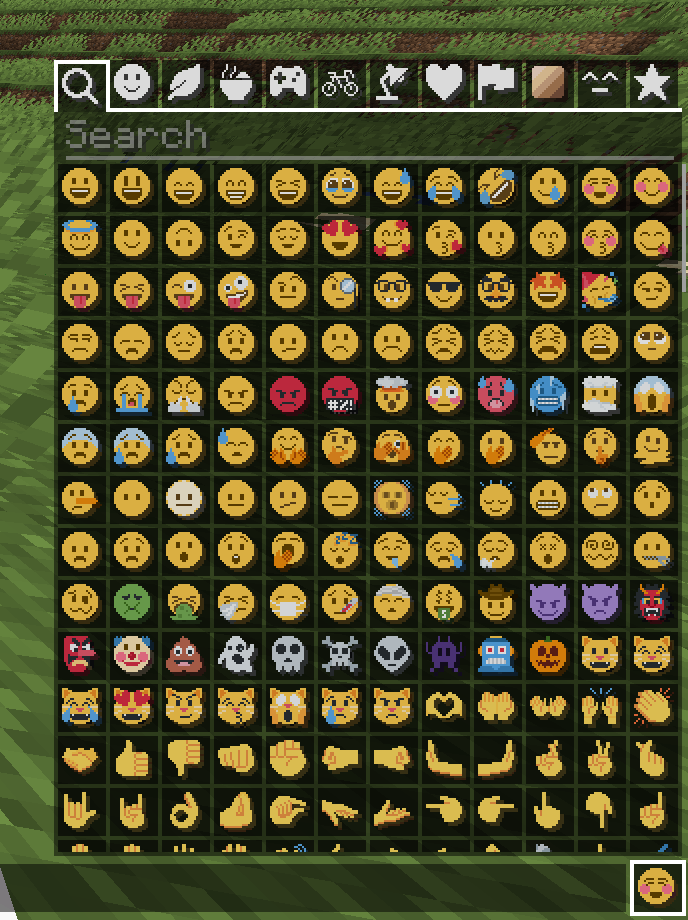
## Remapped characters (for developers)
In order to have any support for emoji consisting of sequences they have been
remapped to unused single characters. An index of these can be found in
/assets/emoji_remappings/lang/en_us.json.
For example, `ud83dudc69u200dud83dudd2c` (👩+🔬=👩🔬)
is mapped to `udb80udf30` using this translation snippet:
“`json
“ud83dudc69u200dud83dudd2c”: “udb80udf30”
“`
**Please note that vanilla has no mechanism to
automatically convert to the remapped form.**
A custom emoji picker or some kind of mod/plugin is
required to make using these a smooth experience.
Because the index acts as a language file, a server side chat listener
could detect emoji sequences and turn them into translations like this one:
“`json
{“translate”: “ud83dudc69u200dud83dudd2c”}
“`
Any client with the pack installed can then perform the remapping for the server.
If the pack is not installed or the sequence is not found then it will just
fall back to displaying the sequence. This means that the server doesn’t need a
complete list of emoji sequences, just a way to detect potential ones.
(The Unicode website
contains data files describing what is an emoji.)
## Shortcodes (for developers)
Shortcodes are a popular way to insert emoji by name. An index of shortcodes
can be found in /assets/emoji_shortcodes/lang/en_us.json.
For example, `:thinking:` is mapped to `ud83eudd14` (🤔):
“`json
“thinking”: “ud83eudd14”
“`
Emoji that need remapping already map to the remapped version.
**Please note that vanilla has no mechanism to
automatically convert shortcodes into emoji.**
Some kind of mod/plugin is required.
Because the index acts as a language file, a server side chat listener could
detect shortcodes and turn them into translations like this one:
“`json
{“translate”: “:thinking:”}
“`
Any client with the pack installed can then convert it for the server. If the
pack is not installed or the shortcode is not found then it will just fall back
to displaying the shortcode. This means that the server doesn’t need a complete
list of shortcodes, just a way to detect potential ones by finding substrings
beginning and ending with a colon `:`.
### Custom emoji?
Custom emoji could be created in a similar way by adding them to unused code
points of the default font and adding a translation with a shortcode.
For example, this translation snippet adds the shortcode `:pog:` for the
character `uE502`:
“`json
“:pog:”: “uE502”
“`
## Reverse shortcodes (for developers)
Maybe you want to display a name for each emoji, in some hover text for example.
That is where reverse shortcodes come in. An index of these can be found in
/assets/emoji_shortcodes_reverse/lang/en_us.json.
For example, `u200cud83eudd14` (`` + 🤔) is mapped to `:thinking:` using
this translation snippet:
“`json
“u200cud83eudd14”: “:thinking:”
“`
`u200c` is added to each entry to allow the index to be used as a language file
without conflicting with the other indexes. If the pack is not installed or the
emoji is not found then it will just fall back to displaying the characters,
including the invisible `u200c`.
A server side chat listener could detect shortcodes and
turn them into emoji with tooltips like this one:
“`json
{“translate”: “:thinking:”, “hoverEvent”: {“action”: “show_text”, “contents”: “:thinking:”}}
“`
With reverse shortcodes, it could also detect emoji and
emoji sequences and also give them tooltips like this one:
“`json
{“translate”:”ud83eudd14″,”hoverEvent”:{“action”:”show_text”,”contents”:{“translate”:”u200cud83eudd14″}}}
“`
## License
Graphics based on Twemoji Copyright (c) 2018 Twitter, Inc and other contributors, licensed under Creative Commons Attribution 4.0 International
Pixel art and resource pack adaptation Copyright (c) 2020 AmberW, licensed under Creative Commons Attribution 4.0 International
perfect Clear Glass
this resource pack uses continuity/optifine contiuous texture feature for glass.
but removes extra dots in the glass texture and makes it compeletly clear.
Peace Of Mind Music Disc
This texture pack replaces the music disc “13” and replaces it with the song “Purity” by A$AP Rocky ft. Frank Ocean. This makes it so that the name of the music disc is changed, and the music from that song is played. This music is from the album “Testing,” featuring many different artists, but for Purity, it features Frank Ocean.
Patrix Background New
ENGLISH
## !!!ATTENTION!!!
### !!!There are no panoramas in “Addons”!!!
### Only titles for panoramas!
The author of Patrix Background is the author of Patrix Background New.
Patrix Background – not an official texture pack for Patrix changing the background, logo and loading screen!
РУССКИЙ
## !!!ВНИМАНИЕ!!!
### !!!В “Addons” нету панорам!!!
### Только титулы для панорам!
Автор Patrix Background является автором Patrix Background New.
Patrix Background – не официальный текстур пак для Patrix изменяющий фон, логотип и экран загрузки!
Version: **1.4**
For Minecraft:
1.1 – 1.19.4 rc3-1.20.2
**1.2-1.4 – 1.19.4 rc3-26.1 snapshot 7+**
Addons:
1. **Halloween**
2. **Christhmas**
3. **Realistic**
4. **Halloween Remake**
5. **Simple**
6. **Neon**
### PlanetMinecraft page (Full HD Gallery): https://www.planetminecraft.com/texture-pack/patrix-background/
### Old Modrinth page: https://modrinth.com/resourcepack/patrix-background-no-official
Painting Selector
Place a painting in the Stonecutter and choose from all of vanilla Minecraft’s paintings!
I recommend using the resource pack too, as it will visualise the paintings, but it’s not required.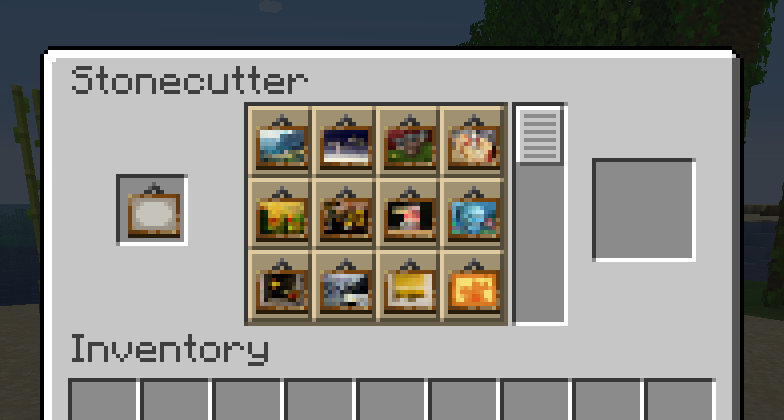
Overgrown Flowery GUI

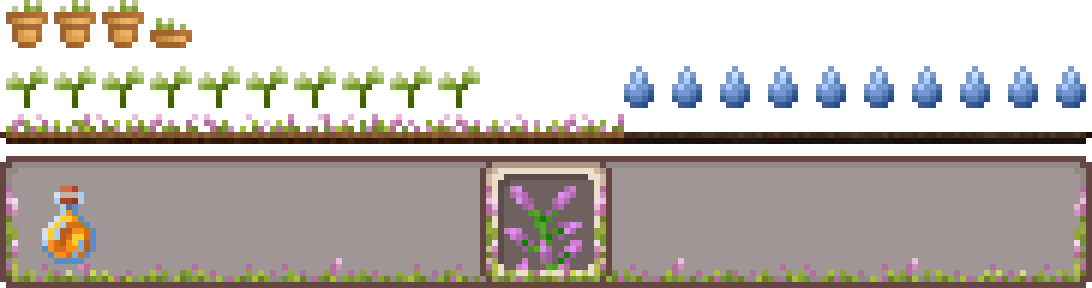
__Become a bit closer to living out your cottagecore dreams using this GUI overhaul!__
This resource pack changes your crafting inventories, armor, health, food bar, menus and more to be filled with vines and flowers. Watch flowers grow from the ground as you get exp and collect flowerpots as you gain armor!
As a fan of the Overgrown Flowery Interface mod for Stardew Valley I wanted to capture that feeling with a Minecraft Resource Pack, thus Overgrown Flowery GUI was born!
As of version 1.2+ we support integration with an ever-growing list of client side and content mods!
Supported Mods
– Advancement Plaques
– AppleSkin
– Backpacked
– Better Anvil
– Colorful Hearts
– Compact Storage
– Cosmetic Armor Reworked
– Crafting Tweaks
– Curios Api
– DynamicPack
– Emi
– Fabric
– Farmer’s Delight
– Forge
– Inventory Profiles next
– Inventory Sorting
– Iron Chests
– Jade
– Just Enough Items
– Just Enough Professions
– Just Enough Resources
– [[Let’s Do] Vinery](https://modrinth.com/project/1DWmBJVA)
– LibGui
– LibIPN
– Litematica
– MaLiLib
– Mod Menu
– NeoForged
– No Chat Reports
– Roughly Enough Items
– RP Renames
– Shipping Bin
– Stardew Fishing
– Tool Belt
– TrashSlot
– Trinkets
– Waystones
– Xaero’s Minimap
– Xaero’s World Map
– Zenith Attributes
Additional Support from Sunshine Hunger
Install the Sunshine Hunger addon for support with even more mods!
– Thirst Was Taken
Note that some of the Mods above like Malilib and LibGui are libraries used by multiple developers, any mods that rely on these libraries should also be supported but not specifically listed.
Keep in mind that any dependent mods may lose support if a breaking change is made in an update.
Want more of Overgrown Flowery GUI? Make sure to check out our modernized addon: Extra Flowery GUI!
If you’re only here for the hotbar, try Overgrown Flowery Hotbar.


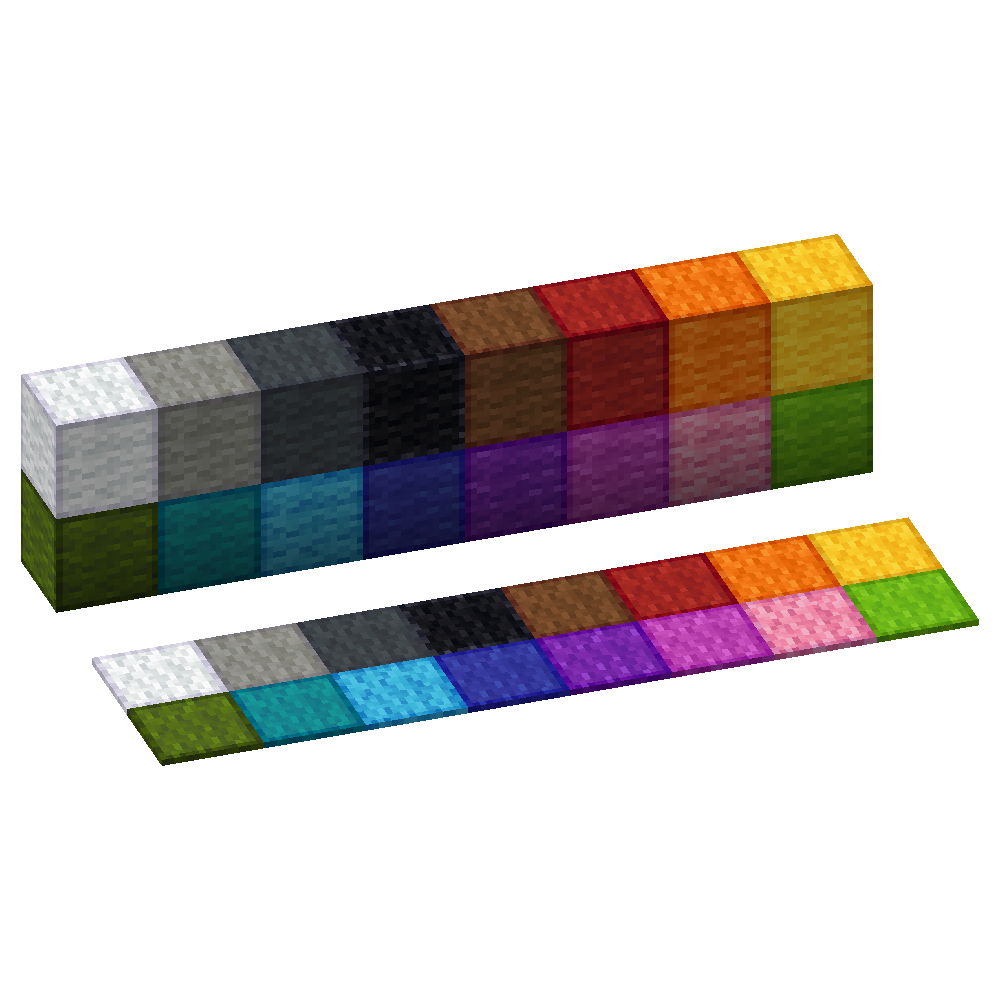
Outlined Wool
Simple and clean resource pack to add outlines to Wool blocks making them easier to see when building with wool
Ore Vein Miner





# Ore Vein Miner
It automatically mines connected ore blocks when you break one with a pickaxe while crouching.
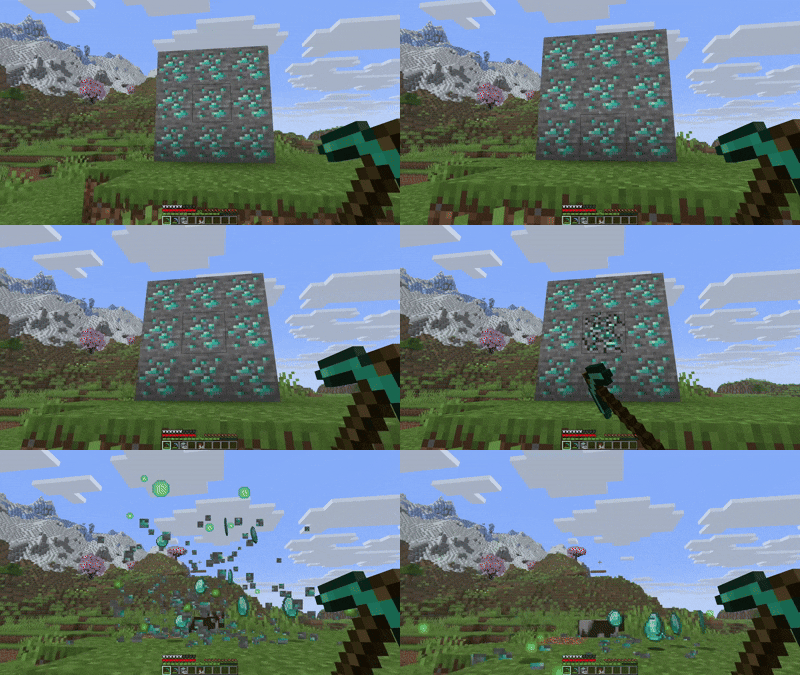

## How It Works
– Crouch (Sneak) and mine any ore block with a pickaxe. The entire connected vein will be mined automatically (**Silk Touch Compatible**)
## Notes
– Automatically disables vein mining when **Fortune** enchantment is detected
[ORB] OresRBack
## What does this mod/ datapack do?
This simple mod/ datapack makes it possible to mine ores like in versions before 1.17 again. That means that ores drop ores again and not raw ores. Read more here.
## But whyy??
My friends and I noticed after playing the newer versions of Minecraft that the new ore logic is a bit overpowered and makes it much easier to get resources (especially Copper Ore)
## More Minecraft Versions???
I will support more Minecraft versions if it is requested. So if someone opens an issue on GitHub, or send me an mail to [this address](mailto:[email protected]), that they want another version of Minecraft for this mod/ datapack, I will create it!
## Create Extension
I’ve also created a mod for Create’s zinc ore, see: ORBC
## BYG Extension
As well for Oh the biomes you’ll go! See: ORBB
## Disclaimer
This is not an official Minecraft product. Not approved by or associated with Mojang or Microsoft.