ZPvPToggle
# ZPvPToggle
A lightweight Minecraft plugin that allows players to toggle their PvP status on and off. Players can only engage in PvP when both parties have PvP enabled.



## Features
– **Toggle PvP**: Players can enable or disable their PvP status
– **Visual Indicators**: Customizable particle rings show which players have PvP enabled
– **Cooldowns:** Configurable cooldown for toggling PvP after a player enters PvP combat.
– **Custom Indicators:** Players can choose their own indicators. Access to indicators is permission-based.
– **Admin Controls**: Staff can toggle PvP for other players
– **Fully Customizable**: All messages and particle effects can be configured
– **Folia Support**: Works with Folia server software
– **Permissions-Based**: Granular permission system for different commands
## Commands
| Command | Description | Permission |
|———|————-|————|
| `/pvp` | Toggle your PvP status | zpvptoggle.user |
| `/pvp toggle` | Toggle your PvP status | zpvptoggle.user |
| `/pvp on` | Enable your PvP status | zpvptoggle.user |
| `/pvp off` | Disable your PvP status | zpvptoggle.user |
| `/pvp hide` | Hide PvP particle indicators | zpvptoggle.user |
| `/pvp show` | Show PvP particle indicators | zpvptoggle.user |
| `/pvp indicator ` | Change your PvP indicator | zpvptoggle.indicator. |
| `/pvp help` | Display the help message | zpvptoggle.user |
| `/pvp reload` | Reload plugin configuration | zpvptoggle.admin |
| `/pvp ` | Toggle PvP for another player | zpvptoggle.admin |
| `/pvp bypass ` | Toggle PvP Bypass status for you or another player | zpvptoggle.admin |
## Permissions
| Permission | Description | Default |
|————|————-|———|
| `zpvptoggle.user` | Allows players to toggle their own PvP status | true |
| `zpvptoggle.indicator.` | Give access to specific indicators. | multiple |
| `zpvptoggle.admin` | Allows staff to toggle PvP status for other players | op |
## Configuration
### config.yml
“`yaml
# Whether to disable PvP when a player dies
disable-pvp-on-death: true
# Whether to show a warning message when a player first toggles PvP
warning-message-enabled: true
# Whether to apply pvp-toggle protections to pets of players too
protect-pets: true
# Duration of the cooldown for players toggling pvp or since their last pvp interaction
pvp-cooldown: 10.0
particle-indicator:
# Interval in ticks to show the ring of particles. 20 ticks = 1 second.
interval-ticks: 60
# Maximum distance (in blocks) at which players can see PvP indicators.
max-view-distance: 32
# The default indicator to use (must match one of the keys in the indicators section)
default-indicator: default
# Define multiple particle ring indicators
indicators:
# Default ring – red circle around feet
default:
type: REDSTONE
points: 32
random-particle-positions: false
radius: 0.8
y-offset: 0.1
interval: 5
random-offset-vertical: 0.0
random-offset-horizontal: 0.0
speed: 0.01
color: RED
dust-size: 1.0
“`
## Compatibility
– Paper 1.21+
– Folia-compatible
– Java 21+
## Dependencies
– [MCKotlin](https://modrinth.com/plugin/mckotlin)
## Installation
1. Download the latest version of ZPvPToggle from [Modrinth](https://modrinth.com/plugin/zpvptoggle/versions).
2. Download MCKotlin from [Modrinth](https://modrinth.com/plugin/mckotlin)
3. Place the downloaded `.jar` files into your server’s `plugins/` folder.
4. Restart your server.
5. Configure the plugin to your liking by editing the `.yml` files in the `plugins/ZPvPtoggle/` folder.
Zorro Luciérnaga
## Mod Loaders


## Content
EN: As of right now, the mod adds a new melee weapon in the form of the katana. This new weapon is available in all Vanilla tool tiers, aswell as the ones added by [TLOTD](https://modrinth.com/mod/tlotd).
ES: A partir de ahora, el mod añade una nueva arma cuerpo a cuerpo en forma de katana. Esta nueva arma está disponible en todos los niveles de herramientas de Vanilla, así como en los añadidos por [TLOTD](https://modrinth.com/mod/tlotd).
## Creative Menu
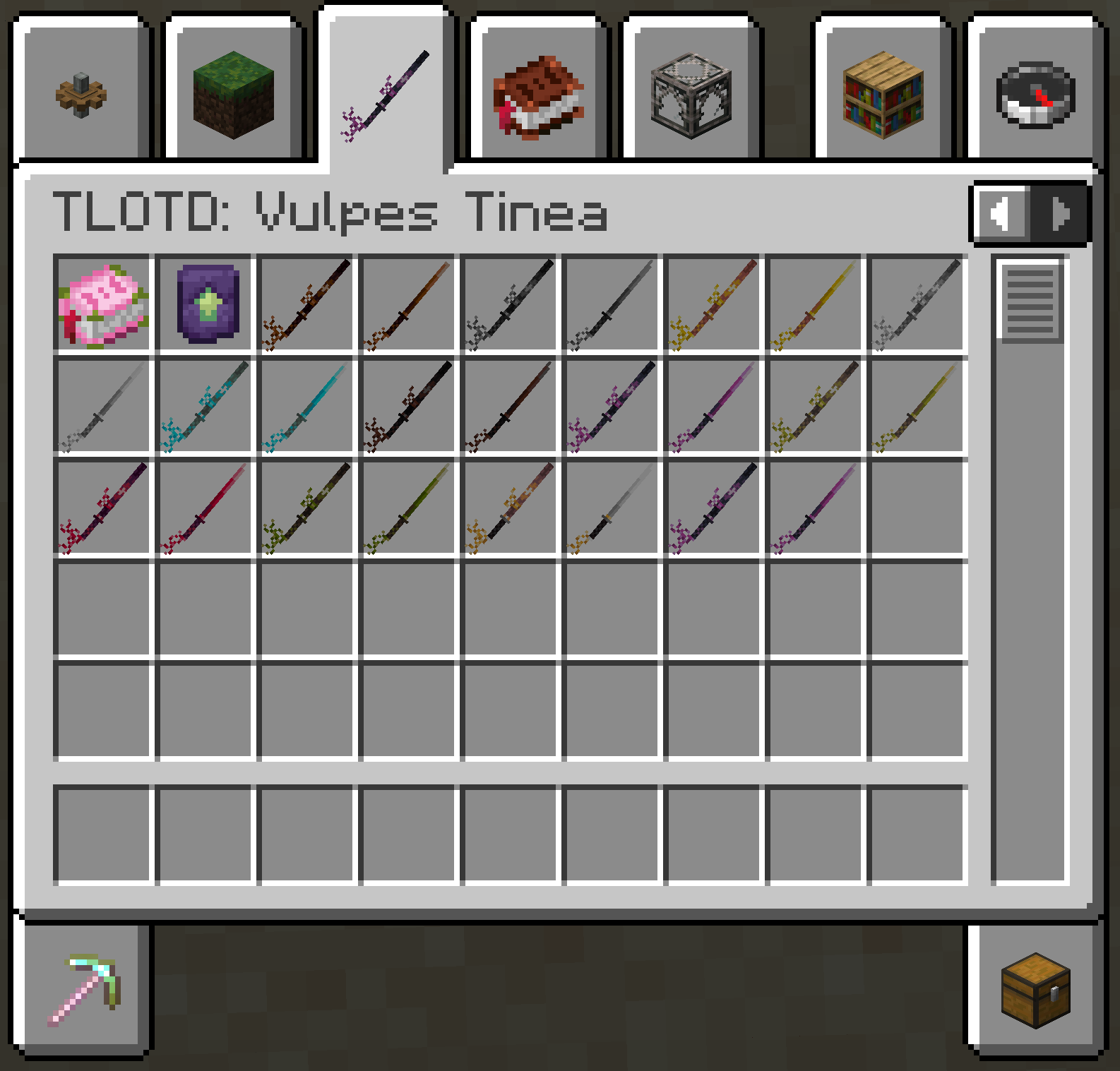
Zoro katanas
**In this resource pack I changed model of netherite sword, netherite axe and carwed pumpkin to Zoro katanas.**
[my linktree](https://linktr.ee/morkvyanka)

ZoomLens
🔍 Zoomify – The Ultimate Zoom Mod for Minecraft! 🔍
Previously known as Zoomify!
🌍Experience distant structures, mesmerizing landscapes, and stunning views with exceptional clarity! Whether you’re a traveler, a creator, or a scenery enthusiast, Zoomify’s adjustable zoom feature enhances every moment!🌍
—
🖱️ Easy to Use:
Hold C + scroll the middle mouse button to adjust the zoom level.
—
🎥 Video Showcase:
—
Zoomglass
A Fabric mod that quickly puts a spyglass into your hand with a press of a button.
Made for people who prefer roleplaying aspects of a spyglass but don’t want to miss out on convenience!
Additionally, you can use a fake spyglass while in Spectator gamemode, or in Creative when you don’t have
it in your inventory.
The default keybind is `z`, and you can find it under the “Inventory” section in keybinding settings.
Requires Fabric API
Zoomer Bows
# What is Zoomer Bows:
Zoomer bows is a mod that ads a few new bows, inspired from our Zoomcraft V4 progression.
This mod is going to be used to provide more bows in our modpack, having them scale based on the player’s combat level
## Should you use this mod:
Usage of this mod, in a new minecraft instance is discouraged at the moment, as it lacks any recipes & extra functionality, which are currently present only on Zoompack V4.
## Permissions:
You can freely use Zoomer bows for all intent & purposes in modpack development, though we do not recommend adding it without having the tools necessary to scale these bows.
Zombify
## Zombify
**Prevents villagers from dying when converting to zombie villagers on any difficulty**
Normally, on easy or normal difficulty, villagers may die when converting to zombie villagers, Zombify makes it so your villagers will never die during conversion!
### Chance of villager successfully converting to a zombie villager
| Difficulty | Chance (without the mod) | Chance (with the mod) |
|————|————————–|————————–|
| Easy | 0% | 100% |
| Normal | 50% | 100% |
| Hard | 100% | 100% |
Zombified

Tired of searching for items? Now you’ll have to die… AGAIN!
# What this mod do ?
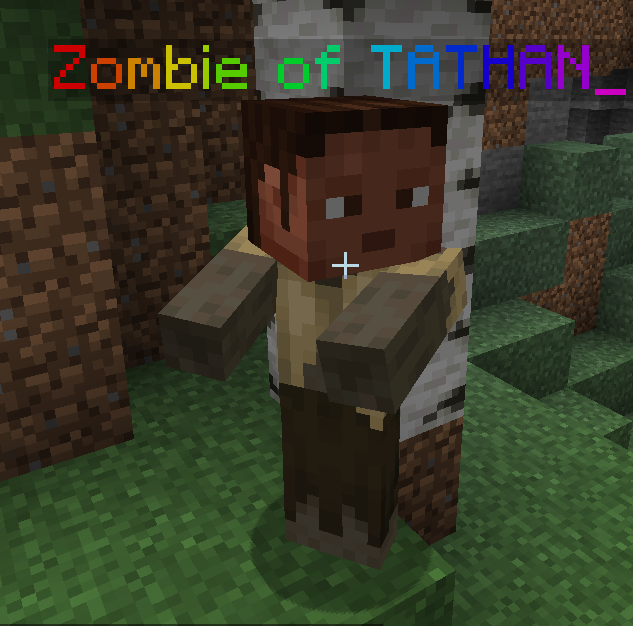
When a player die, he usually loose all his stuff. With this plugin, when a player die, a entity will be summon and the player will need to kill this entity to get his stuff back !
Config
“`yml
# ————————————————–
#
# _____ _ _ __ _ _
# |__ /___ _ __ ___ | |__ (_)/ _(_) ___ __| |
# / // _ | ‘_ ` _ | ‘_ | | |_| |/ _ / _` |
# / /| (_) | | | | | | |_) | | _| | __/ (_| |
# /_______/|_| |_| |_|_.__/|_|_| |_|___|__,_|
#
# ————————————————–
config:
entity: “ZOMBIE”
# What should the zombie be named? You can use the Minimessage format.
zombie-name: “Zombie of %player%”
# Should the player inventory is saved in the zombie, and he needs to kill the zombie to have his inventory ?
save-inventory: true
# Should the player head is set on the zombie Head?
add-player-head: true
“`
Zombification
This mod contains 1 new potion that changes mobs into their zombie counterparts. These are the conversions that are currently possible.
Villager -> Zombie Villager
Horse -> Zombie Horse
Piglin -> Zombified Piglin
Hoglin -> Zoglin
This potion can be brewed by using a rotten flesh and potion of Poison.
ZombiesInfection
# ZombiesInfection
The plugin adds an infection to your server, if a player is attacked by a zombie, then after a while the player receives the effects that are specified in the config.
## Commands
– `/zombiesinfection reload` – Reload the plugin
## Permissions
– `zombiesinfection.reload` – Gives the player the right to reload your plugin. (default: op)
– `zombiesinfection.effect` – If you want the player not to receive any effects, then remove this permission from him. (default: true)
`n * 20` – means that the entered number will be multiplied by 20.
– The list of sounds can be viewed [here](https://hub.spigotmc.org/javadocs/bukkit/org/bukkit/Sound.html) (latest version)
– The list of effects can be viewed [here](https://hub.spigotmc.org/javadocs/bukkit/org/bukkit/potion/PotionEffectType.html) (latest version)
## **Important clarification, the effects are given 1 time!!**
config.yml
“`yaml
config_version: 2
# Enable debug mode (output additional messages to the console)
debug: false
# Settings for messages and sounds when a player is infected
if-player-infected:
# Enable displaying the infection message
message: false
# Enable playing the sound when infected
play-sound: false
# Update the timer when infected
update-timer: true
# Number of times the effect will be applied
effect-will-applied-after: 5
# Delay in server ticks before executing the first repeat (n * 20)
delay: 5
# Period in server ticks for task repetition (n * 20)
period: 5
# Enable a random time range for effect application
random_time_from_range:
# Enable a random time range
enable: true
# Lower limit of the time range in seconds
range_from: 5
# Upper limit of the time range in seconds
range_to: 10
# Settings for potions that will be given
potion-gived:
# Settings for poison potion
POISON:
# Potion duration in seconds (n * 20 ticks)
potion-duration: 60
# Settings for blindness potion
BLINDNESS:
# Potion duration in seconds (n * 20 ticks)
potion-duration: 5
# Settings for hunger potion
HUNGER:
# Potion duration in seconds (n * 20 ticks)
potion-duration: 30
# Settings for sounds that will be played
sound-played:
# Enable the sound when attacked
sound-in-attack:
# Enable the attack sound
enable: true
# Sound name from Minecraft resources
sound: “AMBIENT_CAVE”
# Sound volume (from 0 to 100)
volume: 100.0
# Sound pitch (from 0 to 2)
pitch: 1.0
# Enable the sound when the effect is given
sound-in-effect-gived:
# Enable the effect sound
enable: true
# Sound name from Minecraft resources
sound: “ENTITY_ENDERMEN_DEATH”
# Sound volume (from 0 to 100)
volume: 100.0
# Sound pitch (from 0 to 2)
pitch: 1.0
# Messages for different events
messages:
# Plugin reload success message
plugin_reload: “§2Plugin successfully reloaded”
# Insufficient permissions message
no_permission: “§cYou do not have permission”
# Missing subcommand message
no_command_args: “§cUsage: /%s ”
# Invalid command message
no_found_command: “§cThe command was not found”
# Infection message
you_infected: “§4§lYOU ARE INFECTED!!”
# Effect applied message
effect-gived: “§c§lTHE INFECTION IS SPREADING”
“`