Xenocontendi Revived x Fresh Animations: Player Extension
Fresh Animations: Player Extension by FreshLX working with Xenocontendi Revived x16.
This resource pack fix the default leggings texture when using FA+Player
You have to place it above Fresh Animations: Player Extension in the resource pack list:
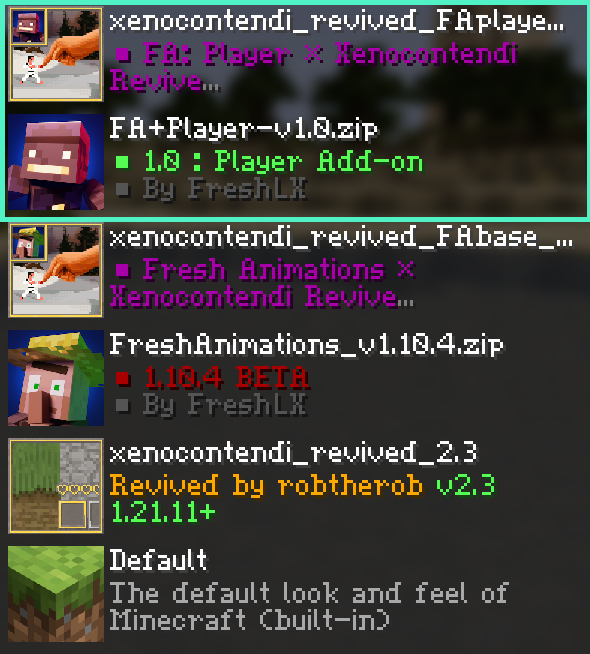
**Also check out the Xenocontendi Revived x Fresh Animations add-on pack too!**
Xenocontendi Revived X Fresh Animations
Fresh Animations by FreshLX working with Xenocontendi Revived x16.
This resource pack allows Xenocontendi Revived mobs to work with FA.
You have to place it above Fresh Animations in the resource pack list:
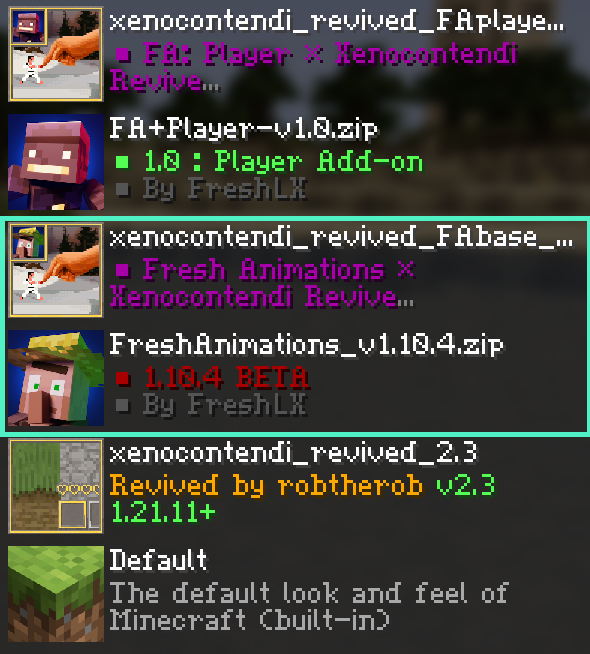
**Also check out the Xenocontendi Revived x FA: Player Extensions add-on pack too!**
Squareful
SquarePattern: More square texture. Remove the ambiguity of a large number of arc pixels in the vanilla version.Including GUI no longer has rounded corners.
Texture of automatic combination but no mods are required, neither need optfine.A large number of texture combination can be achieved in the vanilla version.Almost all double slabs have unique textures.
Energy display for redstone wire. The orientation and type of these blocks can be seen on any side: dropper, dispenser, hopper, piston and sticky piston.On any surface it can be seen whether the furnace is burning or not. Note block instruments and pitch display.
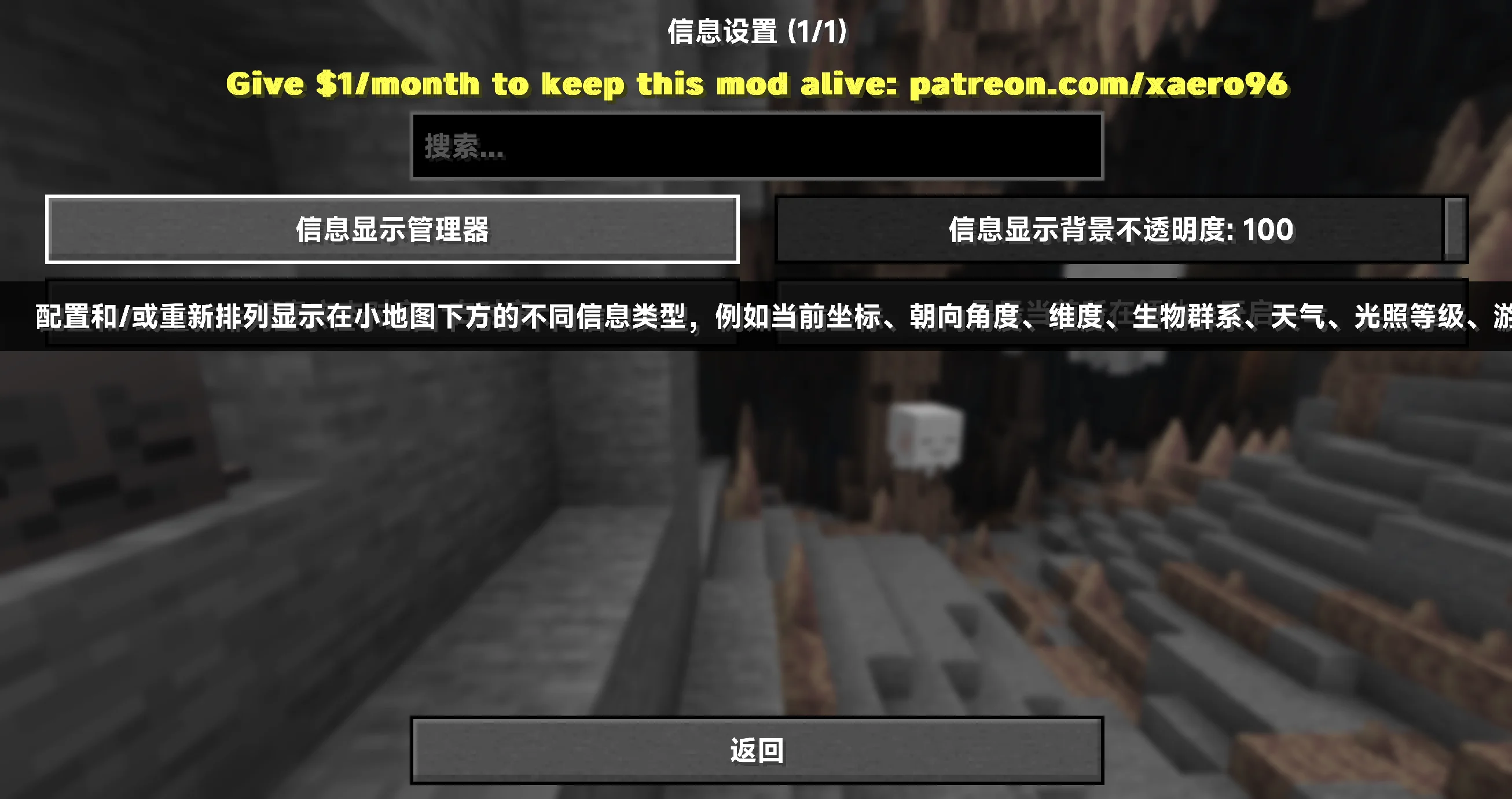
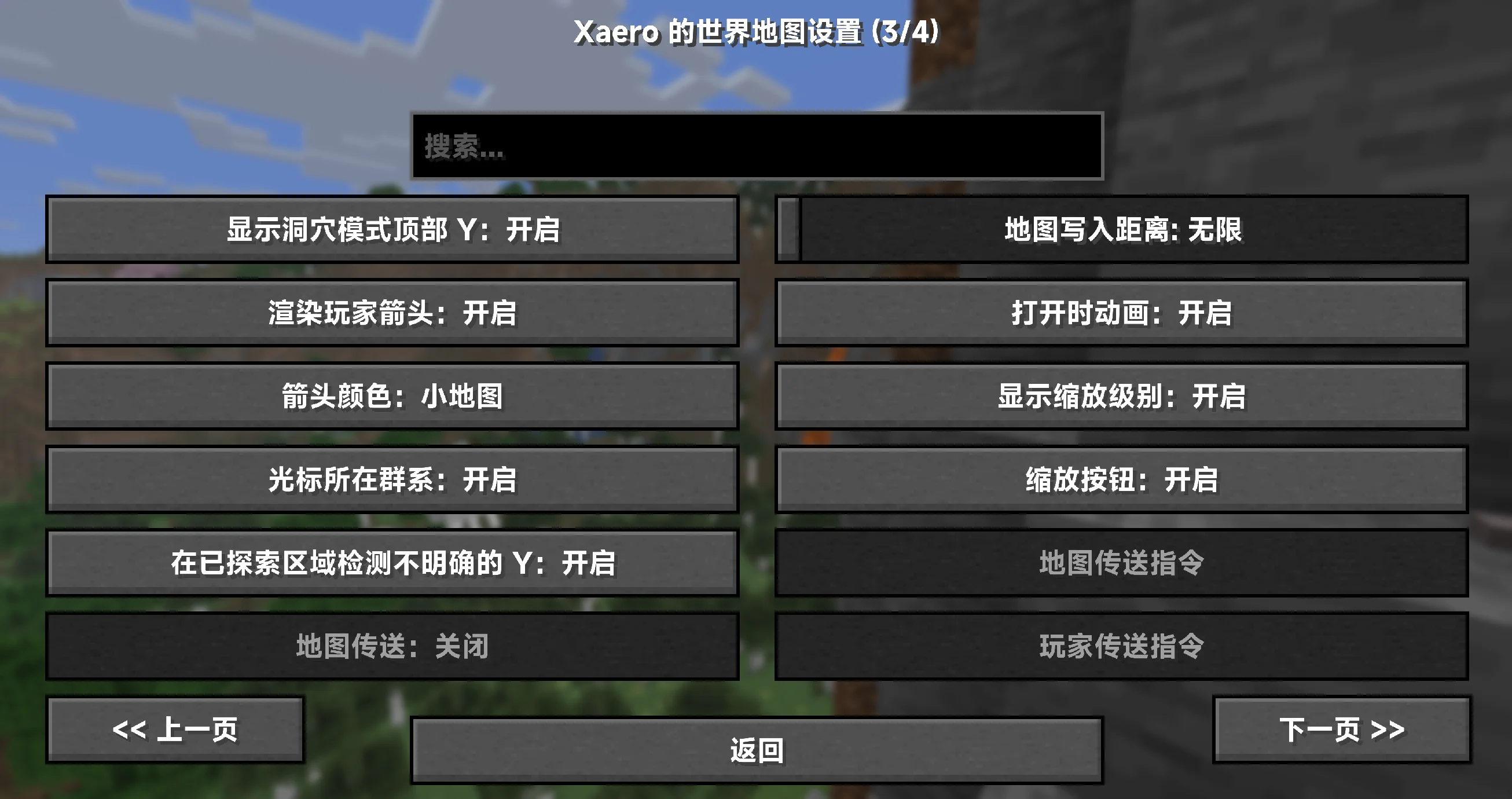
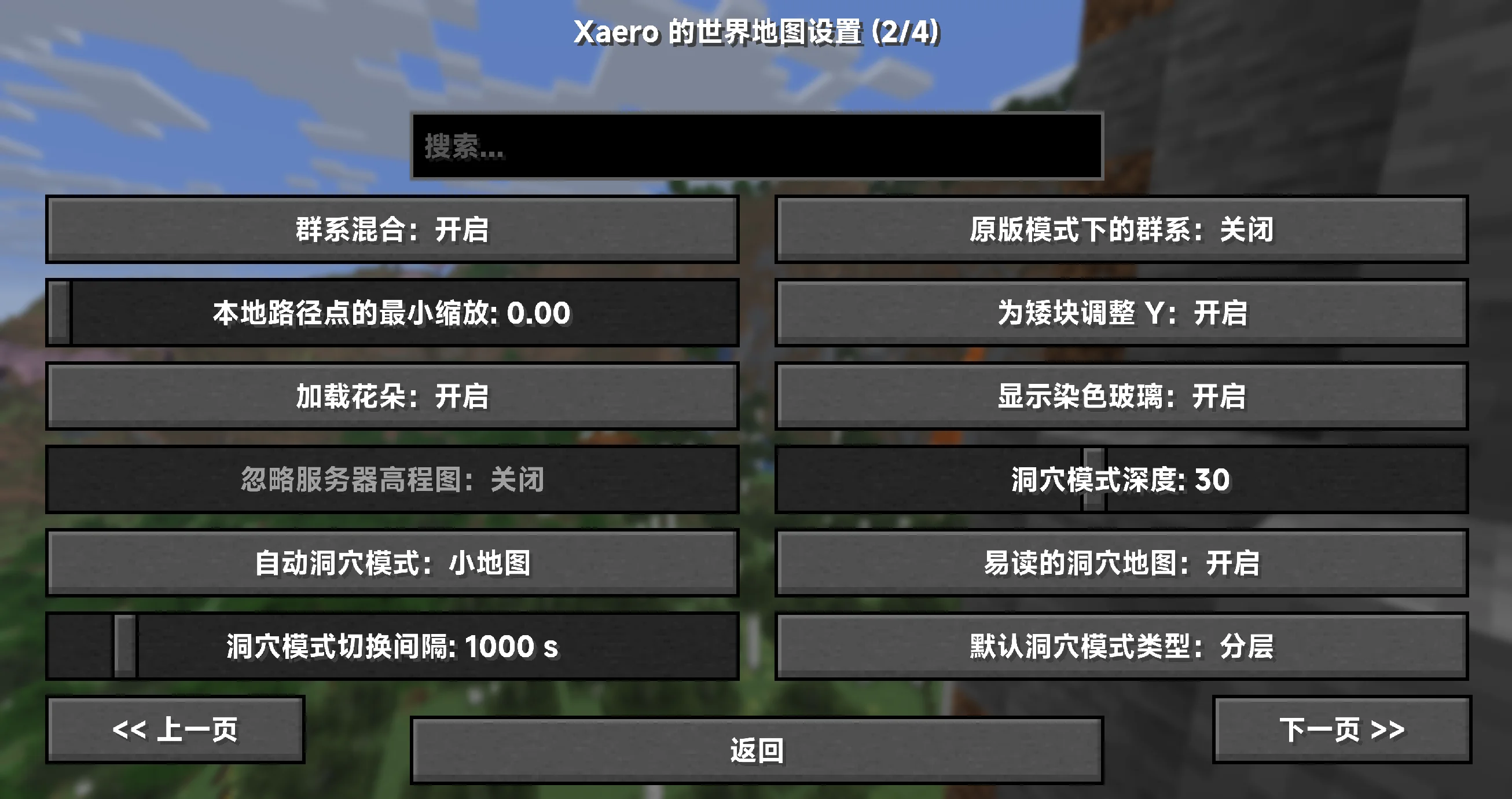
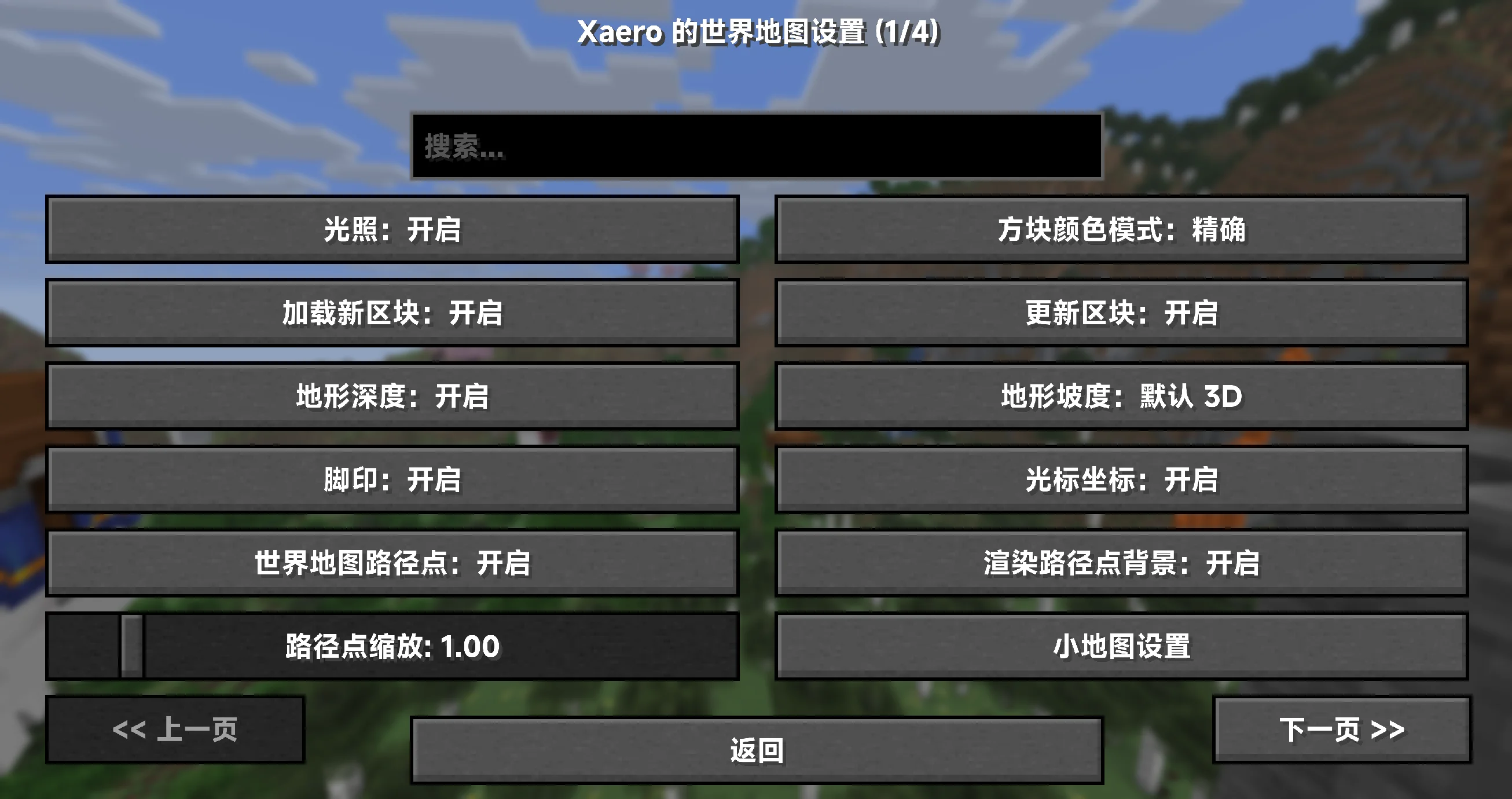
Xearo地图汉化(MiniMap+WorldMap+PVP)
Xearo 地图汉化(MiniMap + WorldMap + PVP)🇨🇳
## 概览 🚀
– 100% 覆盖小地图、世界地图与 PVP 地图相关的设置项、提示与界面文本(以已知键为准)✅
– 资源包形态,装上即用;无需任何前置或修改模组文件 🎒
– 持续更新,紧跟上游版本变动,确保术语统一与说明准确 🔄
– 仅客户端生效,不影响服务器与性能(只替换文本,不改动逻辑)🧘
## 适配范围与前提 ⚙️
– 目标模组版本:所有版本适配(以官方发布版本为基准维护)
– 覆盖对象:小地图(Minimap)、世界地图(World Map)、PVP 地图(Better PVP 系功能)
– 语言代码:zh_cn(简体中文)
## 覆盖内容 📝
– 设置类目与条目名称、详细说明与工具提示
– 键位绑定与界面按钮、浮层/叠加层说明(Overlay)
– 错误/警告/兼容性提示、状态信息与对话框
– 术语统一(示例,实际以包内为准):
– Waypoint → 路径点
– Deathpoint → 死亡点
– Chunk Grid → 区块网格
– Entity Radar → 实体雷达
– Biome → 生物群系
– Slime Chunks → 史莱姆区块
– Zoom / Zoom Steps → 缩放 / 缩放步进
– Dimension → 执行维度(主世界/下界/末地等)
– Overlay → 叠加层
## 安装与使用 📦
1. 下载本汉化资源包,将压缩包放入游戏目录的 resourcepacks 文件夹。
2. 启动游戏 → 选项 → 资源包,启用本资源包,并将其移动到更高优先级(置顶以覆盖其他语言包)。
3. 语言设置切换为 简体中文(zh_cn)。
4. 如未立即生效,请使用 F3+T 刷新资源或重启游戏。
小贴士:建议与优质平滑字体资源包搭配使用,获得更清晰的地图与界面文本显示 👓
## 常见问题(FAQ) 💬
– Q:为什么还有少量英文?
A:可能是上游新版本新增/更名的键位,或极少数硬编码字符串。请等待下一次更新,或提交反馈协助定位。
– Q:是否会影响服务器或性能?
A:不会。仅客户端文本资源,不参与渲染或网络处理。
– Q:需要装在服务器上吗?
A:不需要。把资源包放在客户端即可,在任意服务器里都能生效。
– Q:路径点命名/导入导出与我语言有关吗?
A:汉化不改变存档/配置结构,仅影响界面文本;你的航点数据与原版兼容。
## 许可证与授权 📜
– 汉化文本与打包:CC BY-SA 4.0(署名-相同方式共享)
– 说明:本汉化仅包含文本与相关配置,不包含任何原模组代码或美术资源。
允许随整合包分发与二次分发,但需保留署名与相同许可。感谢理解与支持!🤝
## 非官方声明与致谢 🙏
– 本项目为非官方汉化,与原作者及其团队无从属关系。
– 致谢:感谢原作者提供功能强大的地图与 PVP 拓展!
– 原模组主页(供玩家参考):
– Xaero’s Minimap
– Xaero’s World Map
XD’s Utils
## Description
XD’s Utils is a plugin and mod that provides a custom web interface that you can monitor the whole server, create backups to restore points of your server with a simple script to restore to a backup, an API to get and modify data of the server and plugin through sending web requests, and more!
## Features
| Feature | Implementation |
|——————-|—————-|
| Invsee | ✅ |
| AFK Detector | ✅ |
| Bounties | ✅ |
| Custom Shops | ✅ |
| Economy | ✅ |
| Chat Muting | ✅ |
| Chat Censoring | ✅ |
| Disabled Commands | ✅ |
| Disabled Items | ✅ |
| Custom Messages | ✅ |
| Backups | ✅ |
| Web Interface | ✅ |
| Commands | ✅ |
> ✅ : Implemented
>
> 🚧 : Work in Progress
>
> ❌ : Not implemented
## Config
Config Example
“`yml
# /$$ /$$ /$$$$$$$ /$$
# | $$ / $$| $$__ $$| $/
# | $$/ $$/| $$ $$|_//$$$$$$$
# $$$$/ | $$ | $$ /$$_____/
# >$$ $$ | $$ | $$ | $$$$$$
# /$$/ $$| $$ | $$ ____ $$
# | $$ $$| $$$$$$$/ /$$$$$$$/
# |__/ |__/|_______/ |_______/
# /$$ /$$ /$$ /$$ /$$
# | $$ | $$ | $$ |__/| $$
# | $$ | $$ /$$$$$$ /$$| $$ /$$$$$$$
# | $$ | $$|_ $$_/ | $$| $$ /$$_____/
# | $$ | $$ | $$ | $$| $$| $$$$$$
# | $$ | $$ | $$ /$$| $$| $$ ____ $$
# | $$$$$$/ | $$$$/| $$| $$ /$$$$$$$/
# ______/ ___/ |__/|__/|_______/
# ============================ #
# WEB #
# ============================ #
# Enabled (true/false)
enable_web: true
# Hosted Port (1000-99999)
port: 8080
# ============================ #
# BACKUPS #
# ============================ #
# Enabled (true/false)
enable_backups: true
# Folders to back up & Backup interval (Folder Names: Minutes)
folders:
– world: 120
– world_nether: 240
– world_the_end: 240
– plugins/XDs-Utils: 300
# Max folder size (MB) (-1/0 for unlimited)
max_size: 1024
# Max backups (Int) (-1/0 for unlimited)
max_backups: 10
# Compression level (0-9)
compression_level: 7
# ============================ #
# MESSAGES #
# ============================ #
# Message to send when a player joins for the first time (true/false)
enable_first_join_message: true
# %player% – Player’s name
# %message% – Message to send
first_join_message: “%yellow%Welcome %gray%%player% %yellow%to the server!”
# Message to send when a player joins (true/false)
enable_custom_join_message: true
# %player% – Player’s name
# %message% – Message to send
join_message: “%green%+ %gray%%player%”
# Message to send when a player leaves (true/false)
enable_custom_leave_message: true
# %player% – Player’s name
# %message% – Message to send
leave_message: “%red%- %gray%%player%”
# Custom player messages (true/false)
enable_custom_message_format: true
# %player% – Player’s name
# %message% – Message to send
custom_message_format: “%gray%%player% %dark_gray%» %gray%%message%”
# ============================ #
# DISABLED ITEMS #
# ============================ #
# Items to disable (Item IDs)
disabled_items:
# – minecraft:item_1
# – minecraft:item_2
# – minecraft:item_3
# Method to disable items
# 1 – Removes Recipe
# 2 – Removes Recipe & Clears Item
disable_method: 1
# ============================ #
# DISABLED COMMANDS #
# ============================ #
disabled_commands:
# – “/command_1”
# – “/command_2”
# – “/command_3”
# ============================ #
# CHAT CENSORING #
# ============================ #
# Words to censor
censored_words:
# – “censored_word1”
# – “censored_word2”
# – “censored_word3”
# Regex patterns to censor
censor_regex_patterns:
# – “censored_regex_pattern1”
# – “censored_regex_pattern2”
# – “censored_regex_pattern3”
# Method to censor words
# 0 – Do nothing (Only logs)
# 1 – Replaces Words with ‘*’
# 2 – Removes Words from message
# 3 – Do not send message
censor_method: 1
# ============================ #
# ECONOMY #
# ============================ #
# Enable the shop (true/false)
enable_shop: true
# Allow anyone to create shops (true/false)
anyone_create_shops: true
# Enable bounties (true/false)
enable_bounties: true
# Bounty you gain when you kill a player (Int/Float/Double)
kill_reward: 100.00
# Amount of money to give to players when join the next day (Int/Float/Double)
daily_balance: 100.00
# Items in the default shop (Item ID: Cost, Amount, Slot)
shop_items:
– minecraft:elytra:
cost: 50000
amount: 1
slot: 0
– minecraft:netherite_ingot:
cost: 25000
amount: 1
slot: 1
– minecraft:diamond:
cost: 2500
amount: 1
slot: 2
– minecraft:emerald:
cost: 2500
amount: 1
slot: 3
– minecraft:gold_ingot:
cost: 50
amount: 1
slot: 4
– minecraft:iron_ingot:
cost: 50
amount: 1
slot: 5
“`
XD’s Library
### XD’s Library
#### XDPXI’s library for numerous tasks.
—
### Features
> Please view the Documentation for the correct features for your version
—
### Building from Source
#### To build the mod from source follow the steps below:
– Clone the Git repository
– Run `gradlew build` or `build.ps1` in your terminal in the cloned repository
#### The compiled mod will be in `build/libs`
XDiscordUltimate
# XDiscordUltimate
The most comprehensive Discord integration plugin for Minecraft servers. Features modern slash commands, chat bridge, verification system, tickets, moderation, and much more.





## Features
– **Chat Bridge** – Seamless chat sync between Minecraft and Discord
– **Verification System** – Secure account linking with verification codes
– **Support Tickets** – Full ticket system with Discord integration
– **Player Stats** – Track and display player statistics
– **Server Status** – Auto-updating status embed in Discord
– **Moderation** – Ban sync, chat filtering, and report system
– **Admin Console** – Execute server commands from Discord
– **Announcements** – Broadcast to both Discord and Minecraft
– **Booster Perks** – Reward Discord server boosters
– **Admin Alerts** – Server health monitoring
– **Server Logging** – Log all events to Discord
## Quick Start
1. Download the latest release
2. Place in your `plugins` folder
3. Start server to generate config
4. Configure `config.yml` with your bot token and guild ID
5. Restart server
“`yaml
discord:
bot-token: “YOUR_BOT_TOKEN”
guild-id: “YOUR_GUILD_ID”
channels:
chat: “CHANNEL_ID”
logs: “CHANNEL_ID”
“`
## Documentation
### Getting Started
**New to XDiscordUltimate?** Start here:
| Guide | Description |
|——-|————-|
| [**Getting Started Guide**](docs/GETTING-STARTED.md) | Step-by-step setup from scratch |
| [Installation Guide](docs/INSTALLATION.md) | Quick installation reference |
### Core Documentation
| Document | Description |
|———-|————-|
| [Installation Guide](docs/INSTALLATION.md) | Complete setup instructions |
| [Configuration Guide](docs/CONFIGURATION.md) | All configuration options |
| [Commands Reference](docs/COMMANDS.md) | All commands and permissions |
| [Features Guide](docs/FEATURES.md) | Detailed feature explanations |
| [Permissions Reference](docs/PERMISSIONS.md) | All permission nodes |
| [Troubleshooting](docs/TROUBLESHOOTING.md) | Common issues and solutions |
| [Messages Configuration](docs/MESSAGES.md) | Customize all messages |
| [Developer API](docs/API.md) | API for developers |
| [Database Reference](docs/DATABASE.md) | Database schema and configuration |
### Module Documentation
| Module | Description |
|——–|————-|
| [Chat Bridge](docs/modules/CHAT-BRIDGE.md) | Minecraft-Discord chat sync |
| [Verification](docs/modules/VERIFICATION.md) | Account linking system |
| [Server Logging](docs/modules/SERVER-LOGGING.md) | Event logging to Discord |
| [Admin Alerts](docs/modules/ADMIN-ALERTS.md) | Server health monitoring |
| [Tickets](docs/modules/TICKETS.md) | Support ticket system |
| [Moderation](docs/modules/MODERATION.md) | Ban sync, filter, reports |
| [Server Control](docs/modules/SERVER-CONTROL.md) | Remote server management |
| [Player Stats](docs/modules/PLAYER-STATS.md) | Statistics tracking |
| [Server Status](docs/modules/SERVER-STATUS.md) | Auto-updating status embed |
| [Booster Perks](docs/modules/BOOSTER-PERKS.md) | Discord booster rewards |
| [Bot Console](docs/modules/BOT-CONSOLE.md) | Discord console access |
| [Announcements](docs/modules/ANNOUNCEMENTS.md) | Cross-platform broadcasts |
| [Module Manager](docs/modules/MODULE-MANAGER.md) | Managing modules |
## Commands
### Player Commands
| Command | Description |
|———|————-|
| `/verify ` | Link your Discord account |
| `/support ` | Create a support ticket |
| `/report ` | Report a player |
| `/stats [player]` | View player statistics |
| `/help` | Open help menu |
### Admin Commands
| Command | Description |
|---------|-------------|
| `/xdiscord reload` | Reload configuration |
| `/xdiscord status` | Show plugin status |
| `/xdiscord modules` | List all modules |
| `/announce ` | Make an announcement |
### Discord Slash Commands
| Command | Description |
|---------|-------------|
| `/verify` | Get verification code |
| `/status` | Show server status |
| `/players` | List online players |
| `/stats [player]` | View player statistics |
| `/console ` | Execute server command |
## Permissions
| Permission | Description | Default |
|------------|-------------|---------|
| `xdiscord.verify` | Use verification | true |
| `xdiscord.support` | Create tickets | true |
| `xdiscord.report` | Report players | true |
| `xdiscord.admin` | Admin commands | op |
| `xdiscord.console` | Console access | false |
| `xdiscord.announce` | Make announcements | op |
| `xdiscord.bypass.verification` | Bypass verification | false |
| `xdiscord.bypass.filter` | Bypass chat filter | false |
## Requirements
- **Minecraft Server**: Spigot/Paper 1.16.5+
- **Java**: 17 or higher
- **Discord Bot**: With MESSAGE_CONTENT intent enabled
### Optional Dependencies
- LuckPerms - For permission groups
- PlaceholderAPI - For placeholders
- Vault - For economy (future)
## Configuration Example
```yaml
# Admin Discord IDs
adminIDs:
- "123456789012345678"
# Enable features
features:
chat-bridge:
enabled: true
chat-channel-id: "1234567890"
minecraft-to-discord: true
discord-to-minecraft: true
verification:
enabled: true
verified-role: "Verified"
code-expiry-minutes: 5
server-logging:
enabled: true
logs-channel-id: "1234567890"
log-join-leave: true
log-commands: true
tickets:
enabled: true
auto-close-hours: 48
save-transcript: true
player-stats:
enabled: true
server-status:
enabled: true
channel-id: "1234567890"
update-interval: 60
moderation:
enabled: true
sync-bans: true
auto-moderate: true
admin-alerts:
enabled: true
tps-threshold: 15.0
ram-threshold: 90
booster-perks:
enabled: true
permission-group: "booster"
# Discord settings
discord:
bot-token: "YOUR_TOKEN"
guild-id: "YOUR_GUILD_ID"
channels:
chat: ""
logs: ""
tickets: ""
moderation: ""
# Database
database:
type: "sqlite"
```
## Support
- **Issues**: GitHub Issues
- **Discord**: Join our Discord
## License
This project is licensed under the MIT License - see the [LICENSE](LICENSE) file for details.
---
Made with ❤️ by XreatLabs
Glint
Replaces vanilla enchantment glow with periodic orange pulses inspired by TF2 Specialized Killstreak Kits
xDay
Total
## xDay Time & Weather Control per World
Summary (Short Description)
Independently control the time and weather of each world. Set worlds to always be day, always night, rain-free, and customize all messages with full HEX color support!
Body (Full Description)
Tired of unpredictable weather in your lobby? Want to create a mining world that’s perpetually dark and storm-free? xDay is the definitive solution. This extremely lightweight and efficient plugin gives you absolute control over the day-night cycle and the weather, all on a per-world basis.
Its intuitive configuration and total message customization make it an essential tool for any server type, from Survival to minigames.
✨ Key Features
✅ Total Per-World Control: The main event! Assign a fixed time and weather to specific worlds (world, world_nether, lobby, etc.) and let the rest run normally.
⚙️ Simple & Intuitive Configuration: Everything is managed from a very easy-to-understand config.yml file. No complex in-game commands needed!
🎨 100% Customizable Messages: Edit every plugin message from messages.yml. Full support for classic Minecraft color codes (&a) and HEX color codes (<#FF5733>) for unique color palettes!
📖 Dynamic Help Menu: Add or remove lines from the help menu directly in the messages.yml file. Tailor the help message to your server!
🚀 Lightweight & High-Performance: Designed to be as efficient as possible, with no impact on your server’s performance.
🤝 Developer API: Includes a simple API for other plugins to hook into xDay and get a world’s configuration.
⌨️ Command Tab-Completion: The /xday help and /xday reload commands have tab completion for faster use.
🔧 Configuration
The plugin generates two configuration files in the /plugins/xDay/ folder.
config.yml
“`yaml
# _________ _____.__
# _ ___ ____ _____/ ______| ____
# / / / _ / __| |/ ___
# ___( <_> ) | | | / /_/ >
# ______ /____/|___| /__| |_____ /
# / / /_____/
# Hecho con amor por 777 Studios – xPlugins
# Configuración por defecto para mundos que no estén en la lista de abajo.
default-settings:
lock-weather: ‘disabled’ # Opciones: ‘clear’, ‘rain’, ‘disabled’
set-time: ‘disabled’ # Opciones: ‘day’, ‘noon’, ‘night’, ‘disabled’, o un número (0-24000)
# Configuración para mundos específicos.
worlds:
# Mundo principal normal
world:
lock-weather: ‘clear’
set-time: ‘day’
# Mundo del Nether
world_nether:
lock-weather: ‘disabled’
set-time: ‘disabled’
# Mundo del End
world_the_end:
lock-weather: ‘disabled’
set-time: ‘disabled’
# Ejemplo para un mundo de minería donde siempre es de noche:
# minas:
# lock-weather: ‘clear’
# set-time: ‘night’
“`
Messanges:
“`yaml
# _____ ____ ____ ___________ |__| ____ ______
# / _/ __ / / ___/__ | |/ __ / ___/
# | Y Y ___/| | \___ / __ _ | ___/ ___
# |__|_| /___ >___| /____ >(____ /__| |___ >____ >
# Hecho con amor por 777 Studios – xPlugins
# Usa colores HEX (<#RRGGBB>) o de Minecraft (&a, &b, etc.)
prefix: “<#FFB347> [xDay] ”
reload: “<#77DD77>¡La configuración y los mensajes han sido recargados!”
no-permission: “<#FF6961>No tienes permiso para ejecutar este comando.”
help-message:
– “&7—————–&f Ayuda de <#FFB347>xDay &7——————–”
– ”
– “<#AEC6CF> /xday help <#878787>➛&f Muestra este mensaje de ayuda.”
– “<#AEC6CF> /xday reload <#878787>➛&f Recarga la configuración del plugin.”
– “”
– “<#C3B1E1>💕 Plugin creado por WillfryDev. 💕”
– ”
– “&7—————————————”
“`
💻 Commands & Permissions
/xday help (Alias: /xd)
Description: Displays the configurable help menu.
Permission: xday.help (granted to all by default).
/xday reload
Description: Reloads the config.yml and messages.yml files without a server restart.
Permission: xday.reload (granted to OPs by)

📘 For Developers (API)
“`
xDay includes a static API to make integration with other plugins easy.
1. Add softdepend to your plugin.yml:
YAML
softdepend: [xDay]
2. Access the API in your code:
Java
// Check if xDay is on the server
if (getServer().getPluginManager().getPlugin(“xDay”) != null) {
// Get the API instance
jn.willfrydev.xday.api.xDayAPI api = jn.willfrydev.xday.xDay.getApi();
// Example Usage
World lobbyWorld = Bukkit.getWorld(“lobby”);
if (lobbyWorld != null) {
String weather = api.getLockedWeather(lobbyWorld); // Returns “clear”, “rain”, or “disabled”
String time = api.getLockedTime(lobbyWorld); // Returns “day”, “night”, etc.
System.out.println(“The weather in the lobby is locked to: ” + weather);
// You can also force an update
api.forceUpdate(lobbyWorld);
}
}
Download xDay and take absolute control over your worlds’ atmosphere!
XDailyVoucher
# XDailyVoucher
A feature-rich daily rewards and voucher system for your Minecraft server!
## 📚 Overview
XDailyVoucher brings an engaging rewards system to your server, encouraging player retention through daily login rewards and a flexible voucher system.
### ✨ Features
**Daily Rewards:**
– Progressive rewards with streak bonuses
– Custom rewards for each day
– Special weekly rewards
– Visual GUI interface
– Persistent streak tracking
**Voucher System:**
– Create custom vouchers
– Multiple rewards per voucher
– Support for both command and item rewards
– Visual GUI for editing voucher contents
– Flexible command execution
– Admin distribution controls
– Player redemption system with limits
## 🎮 Usage
### Player Commands:
– `/xdv daily` – Open daily rewards GUI
– `/xdv redeem ` – Redeem available vouchers
### Admin Commands:
– `/xdv reload` – Reload configuration
– `/xdv voucher ` – Create vouchers
– `/xdv vgui ` – Edit voucher items through GUI
– `/xdv give [amount]` – Distribute vouchers
– `/xdv dailyitem ` – Set rewards
– `/xdv active ` – Enable redemption
– `/xdv deactive ` – Disable redemption
– `/xdv vlist` – List all vouchers
## 📋 Requirements
– Paper 1.17+
– Vault
## ⚙️ Configuration
Easily customize through `config.yml`:
– Base reward amounts
– Streak multipliers
– All messages and notifications
## 🔒 Permissions
– `xdv.admin` – Administrative access
– `xdv.use` – Basic player access (default: true)
## 🔧 Installation
1. Download the plugin
2. Place in plugins folder
3. Restart server
4. Configure settings
## 🤝 Support
Need help? Found a bug? Have a suggestion?
– Create an issue on our GitHub
## 📝 License
Released under the GNU License