2. 快速刷神装
3. 配置效果
4. 创建私人世界
/world create 我的世界
/world config gamemode creative
/world config cheats true
/world tp
感谢使用 CoreTweaker127’s-Mod!
让我们一起创造更好的Minecraft体验! 🌈⚔️
CoreTweaker127’s-Mod
A comprehensive Minecraft mod featuring 150 Chinese Hero Achievements, Rainbow Divine Sword, 26 TNT variants, Super Minecarts, Universal Totems, and more!
📖 Mod Introduction
CoreTweaker127’s-Mod is a feature-rich Minecraft Fabric mod that brings revolutionary changes to your gameplay experience! Whether you’re a builder, adventurer, or redstone engineer, this mod provides powerful and fun tools for you.
✨ Core Features
🗡️ Rainbow Divine Sword System – Super weapon with AoE attacks and slam strikes
🏆 150 Chinese Hero Achievements – A unique achievement system paying tribute to Chinese heroes
💣 26 TNT Variants – From tracking TNT to super explosives, everything you need
🚂 Special Minecart System – High-speed minecarts, flying minecarts, teleporting minecarts
🛡️ Universal Totem System – Even stone and wood can serve as Totems of Undying!
🌍 Multi-Dimension System – Create private worlds, skyblock adventures
🎨 Rich Functional Blocks – Auto furnace, infinite water source, teleportation pad, and more
⚙️ Highly Configurable – All features can be customized through config files
🎮 Main Features
⚔️ Rainbow Divine Sword System
Base Attributes
– Damage: 5,000 base damage
– AoE Attack: Hits all entities within 10 blocks
– Slam System: +100 damage for every block of fall height
– Dropping from 100 blocks = 15,000 damage!
– Infinite Durability: Never breaks
– Bedrock Breaking: The only weapon that can break bedrock
– Instant Obsidian Mining: Mines obsidian instantly
Special Abilities
**Auto Totem of Undying**
– Automatically triggers upon receiving lethal damage
– Restores to 1 health point
– Grants Regeneration II, Absorption II, Fire Resistance I
– No cooldown, unlimited triggers
**Divine Gear Drop System**
*Mining Stone Drops (30% chance):*
– 5%: Full Netherite armor set with Level 255 enchantments
– 10%: Totem of Undying (1–3)
– 15%: End Portal Frames, Eyes of Ender, Dragon Eggs, and other rare items
– 70%: Random enchanted gear (Levels 1–15)
*Damage Drops (20% chance):*
– End Portal Frames, Eyes of Ender, Obsidian
– Flight Duration 3 Firework Rockets, Enchanted Golden Apples
– Enchanted gear with no curses (guaranteed no Binding/Vanishing)
– Nether Stars (ultra rare!)
**Mob Last Words**
– 46 unique last words displayed when killing mobs
– Adds fun and immersion to the game
Hotkey Functions
| Key | Function | Description |
|—–|———-|————-|
| C | Effects Config GUI | Customize 8 potion effects, Levels 1–255 |
| F | Creative Mode | 3 seconds of Creative Mode, 60-second cooldown |
| L | Ore Detection | Detects all ores within 50 blocks |
| – | Tracking TNT | Spawns TNT that auto-tracks enemies |
🛡️ Universal Totem System
Trigger Priority:
1. Vanilla Totem of Undying — Highest priority
2. Infinity-Enchanted Totem — Enchant with “Infinity” so the totem is never consumed
3. Substitute Totems — When no totem is available, other items can save your life!
Available Substitutes (by priority):
– Stone
– Deepslate
– Diorite
– Sand
– Sticks
– Various Planks (Oak, Birch, Spruce, etc.)
– Various Logs
Excluded Items: Tools, weapons, minerals, and ore blocks cannot be used as substitutes.
Configuration Options:
“`json
{
“enableUniversalTotem”: true, // Universal Totem
“enableTotemEnchanting”: true // Totem Enchanting
}
“`
💣 26 TNT Variants
Special TNT Types:
– Tracking TNT — Auto-tracks the nearest hostile mob
– Friendly TNT — Only destroys blocks, does not harm entities
– Super TNT — Massive explosion radius
– Mining TNT — Only destroys ores, perfect for mining
– Teleport TNT — Teleports you to a designated location after explosion
– …plus 21 more variants!
TNT Properties:
– Configurable explosion power
– Configurable fuse time
– Configurable special effects
– Instant detonation on hit
🚂 Super Minecart System
Minecart Types:
– High-Speed Minecart — 500% speed boost
– Flying Minecart — Can fly through the air
– Teleport Minecart — Instant teleportation to destination
– Storage Minecart — Extra-large storage capacity
– Combat Minecart — Auto-attacks hostile mobs
Rail Enhancements:
– High-Speed Rail — Increases minecart speed
– Teleport Rail — Direct teleportation
– Auto-Correction Rail — Prevents derailment
– Launch Pad — Launches minecarts into the air
🏆 150 Chinese Hero Achievements
Pay tribute to Chinese historical heroes and learn history through gameplay!
Achievement Categories:
– Ancient Heroes — Yue Fei, Wen Tianxiang, Qi Jiguang…
– Modern-Era Heroes — Lin Zexu, Deng Shichang, Yang Jingyu…
– Contemporary Heroes — Qian Xuesen, Yuan Longping, Tu Youyou…
– Mythological Figures — Hou Yi, Da Yu, Nüwa…
– Literary Heroes — Three Kingdoms characters, Water Margin heroes…
Unlock Methods:
– Complete specific tasks
– Defeat specific mobs
– Collect specific items
– Explore specific areas
🌍 Multi-Dimension / World System
Create a Private World:
– `/world create [world name]` — Create your private world
– `/world tp` — Teleport to your world
– `/world back` — Return to the overworld
– `/world config ` — Configure world parameters
– `/world info` — View world information
Configurable Parameters:
– `seed` — World seed
– `gamemode` — Game mode (survival/creative/adventure/spectator)
– `difficulty` — Difficulty (peaceful/easy/normal/hard)
– `type` — World type (normal/flat/amplified/large_biomes)
– `flat` — Superflat preset
– `cheats` — Allow cheats (true/false)
– `pvp` — PVP toggle (true/false)
Permission Management:
– `/worldpp turn` — Invite a player to visit
– `/worldpp flash` — Revoke access
– `/worldpp visit ` — Visit another player’s world
Skyblock Dimensions:
– Enter various skyblock dimensions via commands
– Normal spawn in the overworld; skyblock requires commands to enter
– Various special terrains await your exploration
🎨 Functional Blocks
Automation Blocks:
– Auto Furnace — Smelts automatically without fuel
– Auto Crafting Table — Automatically crafts items
– Auto Planter — Automatically plants and harvests
– Auto Breeder — Automatically breeds animals
Special Blocks:
– Infinite Water Source — Provides unlimited water
– Infinite Lava Source — Provides unlimited lava
– Teleportation Pad — Set teleport points for quick travel
– Peace Lantern — Prevents mob spawning
– Remote Redstone — Long-range redstone signal transmission
– Elevator Block — Quick vertical movement
Utility Blocks:
– Disassembly Table — Breaks items down into raw materials
– Sorter — Automatically organizes chests
– Jump Pad — Super-high jumps
– Speed Track — Extreme running speed
🛠️ Utility Items
Tool Items:
– Item Destroyer — Quickly destroy unwanted items
– Right-click to open the interface
– Left-click an item
– All identical items in your inventory are destroyed
– Protects important items from accidental deletion
– Sorter — Automatically organizes inventory and chests
– Super Peachwood Sword — A wooden sword with special attributes
– Magic Cocktail — Random potion effects
Special Items:
– Compressed Sticks — Crafted from 9 sticks
– Rainbow Sword — The ultimate weapon
– Totem of Undying — Supports enchanting
⚙️ Configuration System
Main config file: `config/xztx127.json`
“`json
{
“enableUniversalTotem”: true, // Universal Totem
“enableTotemEnchanting”: true, // Totem Enchanting
“enableRainbowSwordParticles”: false, // Rainbow Sword particle effects
“enableSuperRainbowSwordParticles”: true, // Super Rainbow Sword particles
“enableZombieGodGearDrops”: false, // Zombie divine gear drops ⭐
“enableRandomSpeedModification”: false // Random speed modification ⭐
}
“`
New Feature Configuration:
**Zombie Divine Gear Drops (New in v1.3.3)**
– Disabled by default; must be enabled in config
– Zombies have a chance to drop high-tier gear on death
– Customizable drop rates and items
**Random Speed Modification (New in v1.3.3)**
– Disabled by default; must be enabled in config
– Player movement speed changes randomly
– Adds fun and challenge to the game
📥 Installation
Prerequisites:
– Minecraft: 1.20.1
– Fabric Loader: 0.14.21 or higher
– Fabric API: 0.87.0+1.20.1 or higher
– Java: 17 or higher
Installation Steps:
1. **Install Fabric Loader**
– Download the installer from the Fabric website
– Run the installer and select Minecraft 1.20.1
2. **Download Fabric API**
– Download from Modrinth or CurseForge
– Make sure the version is 0.87.0+1.20.1
3. **Install the Mod**
– Place `coretweaker127-mod-1.3.3.jar` into the `.minecraft/mods` folder
– Also place the Fabric API jar file in the same folder
4. **Launch the Game**
– Start Minecraft 1.20.1 using the Fabric profile
– The config file will be auto-generated on first launch
🎯 Quick Start
**Getting the Rainbow Sword**
Crafting Recipe:
“`
Netherite Block
Diamond Block
Emerald Block
Diamond Block
Stick
“`
Usage Tips:
– **Slam Strike**
Build a tall tower, jump down and attack mobs. The higher you fall, the more damage you deal! Dropping from 100 blocks = 15,000 damage!
– **Quick Divine Gear Farming**
Mine lots of stone (30% drop chance). Let mobs hit you (20% drop chance). Combine both methods for maximum efficiency.
– **Configure Effects**
Hold the sword and press C to open the config GUI. Adjust 8 effect levels (1–255). Changes take effect immediately — no restart needed.
– **Create a Private World**
“`
/world create MyWorld
/world config gamemode creative
/world config cheats true
/world tp
“`
🔧 FAQ
**Q: What if the Totem of Undying doesn’t work?**
A: This was fixed in v1.3.3! Both vanilla and modded totems now work correctly. Make sure `enableUniversalTotem` is set to `true` in the config.
**Q: Are new features enabled by default?**
A: Zombie Divine Gear Drops and Random Speed Modification are disabled by default. You need to manually enable them in `config/xztx127.json`.
**Q: How do I enter the skyblock dimension?**
A: Use the `/world create` command to create a world, or use teleport commands to enter special dimensions. You spawn normally in the overworld.
**Q: Is this mod compatible with other mods?**
A: In most cases, yes. If you encounter conflicts, check the logs and report the issue.
**Q: Config changes aren’t taking effect?**
A: You need to fully close the game and relaunch for changes to take effect.
📊 Technical Information
Mod Architecture:
– Mixins: Non-invasive vanilla code modification
– Networking: Full client-server synchronization
– GUI System: Custom configuration interface
– Entity System: 26 custom TNT entities
– Multithreading: Asynchronous task processing
Code Statistics:
– Java Classes: 100+
– Lines of Code: 10,000+
– Comment Coverage: 80%+
– Config System: JSON format
– Localization: Full Chinese and English support
Performance Optimization:
– Optimized particle effects
– Asynchronous task processing
– Caching system
– Configurable feature toggles
📝 Changelog
**v1.3.3 (2026-02-07) — Major Update**
✅ Mod Renamed: xztx127’s mods → CoreTweaker127’s-Mod
✅ Fixed Totem of Undying Issue: Holding a totem no longer causes instant death
✅ New Config Options: Zombie divine gear drops, random speed modification
Bug Fixes:
– Fixed Totem of Undying priority issue
– Fixed Universal Totem System interfering with vanilla mechanics
– Lowered UniversalTotemMixin priority
– Improved totem trigger logic
New Features:
– Zombie Divine Gear Drop system (disabled by default)
– Random Speed Modification system (disabled by default)
– Improved configuration system
See full changelog: [CHANGELOG-v1.3.3.md](CHANGELOG-v1.3.3.md)
🤝 Contributing
Contributions, bug reports, and suggestions are welcome!
How to Contribute:
1. Fork this repository
2. Create your feature branch (`git checkout -b feature/AmazingFeature`)
3. Commit your changes (`git commit -m ‘Add some AmazingFeature’`)
4. Push to the branch (`git push origin feature/AmazingFeature`)
5. Open a Pull Request
Reporting Issues:
– Provide a detailed description of the problem
– Include your Minecraft version and mod version
– Attach crash logs (if applicable)
– Describe the steps to reproduce
📜 License
This project is licensed under the MIT License — see the [LICENSE](LICENSE) file for details.
👥 Authors
– **CoreTweaker127** — Lead Developer
– **RainbowSword Team** — Development Team
🌟 Special Thanks
– **Fabric Team** — For providing an excellent mod loader
– **Minecraft Community** — For continuous support and feedback
– **All Contributors** — For making this mod even better
📞 Contact
– GitHub: Submit an Issue
– Discord: Join our server
– Email: [email protected]
🎉 Support the Project
If you enjoy this mod:
– ⭐ Give us a star on GitHub
– 📢 Share it with your friends
– 💬 Provide feedback and suggestions
– 🐛 Report bugs to help us improve
XYZ: Backrooms






Bringing the Backrooms to Minecraft

– All packs that do not overwrite the vanilla textures
| Item / Block | Description |
|——————————–|———————-|
| **Info** | |
| Shader compatible | ✔️ |
| Custom models | ✔️ |
| Pre-build map included | ✔️ |
| 10+ levels | ✔️ |
| Completely free | ✔️ |
| Backrooms themed textures | ✔️ |
| **Wallpapers** | |
| Andesite | Green Wallpaper |
| Blackstone | Cloud Wallpaper |
| Oak Log | Yellow Wallpaper |
| **Tiles** | |
| Granite | Red Tiles |
| Prismarine | Blue Tiles |
| Quartz (all forms) | White Tiles |
| **Carpets** | |
| Oak Planks (Top Texture) | Carpet |
| **Lights** | |
| Glowstone | White Light |
| Emerald Block | Yellow Light |
| Lapis Block | Red Light |
| Polished Deepslate | Dark Blue Light |
Misc
– VHS overlay (Carved pumpkin)
### Game footage

_By **ceruleanblue**, **devvyyxyz** and **roystbit** Huge thanks to **Teamchar1ie** for the basic poolroom tiles, without him i probably would not have started this project. Check out his pack “Charlie’s Backrooms” Huge thanks also to **Valentin Ibarren**, and his game **Dreamcore**: most of the poolrooms textures are inspired from his fantastic game Dreamcore! Check it out on steam! here Check out our discord too, where we post updates and things related to the pack here_
XXL Packets
****
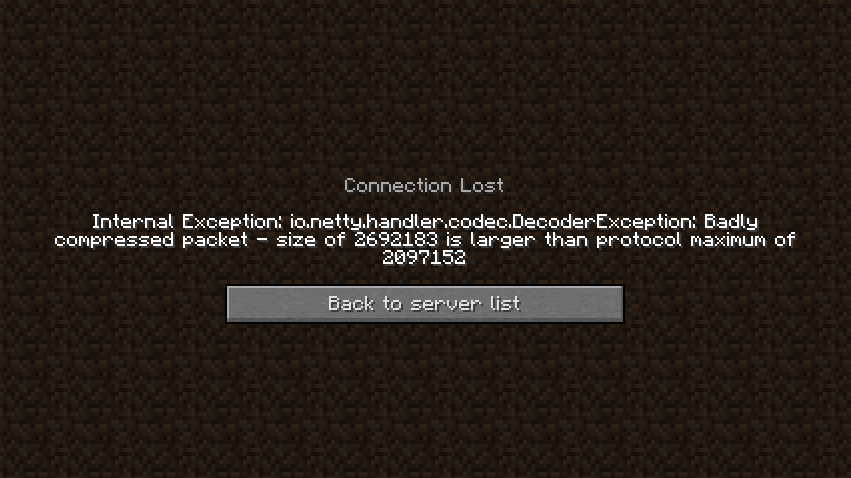
DISCLAIMER: This is a fork of the original XL Packets mod, This fork extends the packet limit to the Java Integer limit
Fixes https://bugs.mojang.com/browse/MC-185901 by raising the packet size limit from 2MB to 2.14GB (2147483647), so that servers with large datapacks, packets, etc don’t kick the client.
This mod is needed clientside for any connecting clients.
**. “)**
xWorldBlocker
# 🛡️ xWorldBlocker | Total Control Over Your World Access!
> **The ultimate lightweight solution to secure your server’s exclusive areas.**
Have you ever needed to restrict access to a specific world? Whether it’s for a **VIP zone**, a **temporary event**, or a **staff-only area**, **xWorldBlocker** is your solution.
This powerful plugin allows you to block entry to any world on your server, granting access only to players with the specific permissions you define. No complicated setups—just total control.
—
> ## 🚀 Key Features
* **🛡️ Secure World Blocking:** Easily define a list of worlds that remain locked to the public.
* **🔑 Granular Permission System:** * Access a specific world: `xworldblocker.bypass.`
* Access ALL worlds: `xworldblocker.bypass.*`
* **🎨 Full RGB Support:** Custom messages with **HEX colors** (`&#RRGGBB`) and standard Minecraft codes (`&a`, `&l`).
* **⚡ Ultra Lightweight:** Designed for performance. Zero impact on your server’s TPS.
* **⚙️ Instant Reload:** Apply changes instantly with `/xwb reload`—no restart required.
—
> ## 🎮 Commands & Permissions
| Command | Description | Permission Node |
| :— | :— | :— |
| **/xwb help** | Displays the help menu. | None (Public) |
| **/xwb reload** | Reloads the configuration file. | `xworldblocker.admin` |
### Access Permissions
| Permission | Description |
| :— | :— |
| `xworldblocker.bypass.` | Allows entry to a specific locked world. |
| `xworldblocker.bypass.*` | Grants access to **all** blocked worlds. |
—
> ## 🔧 Configuration (`config.yml`)
“`yaml
# __ __ _ _ ___ _ _
# __ __/ / / ___ _ __| | __| | / __ | ___ ___| | _____ _ __
# / / / / / _ | ‘__| |/ _` |/__// |/ _ / __| |/ / _ ‘__|
# > < / / (_) | | | | (_| / / | (_) | (__| < __/ |
# /_/_ / / ___/|_| |_|__,______/_|___/ ___|_|____|_|
# xPlugins - WillfryDev - 777 Studios
# List of worlds to block.
# Permission required: xworldblocker.bypass.
blocked-worlds:
– “events”
– “staff_zone”
– “world_vip”
# Messages support HEX (&#RRGGBB) and & codes.
messages:
reload: “&#A2E4B8 ✔ Done! &#C1FFD7The xWorldBlocker configuration has been reloaded.”
no-permission-entry: “&#FFB6C1 ✘ Error! &#FFDDC1You do not have permission to enter this world.”
no-permission-command: “&#FFB6C1 ✘ Error! &#FFDDC1You do not have permission to use this command.”
help:
– “”
– “&#A2E4B8/xwb reload WCEEB- Reload the plugin settings.”
– “&#A2E4B8/xwb help WCEEB- Display this help message.”
– “”
“`
> ### 📥 Installation
1. Download the “.jar“ file.
2. Drop it into your “/plugins/“ folder.
3. Restart your server.
Configure your worlds in “config.yml“ and run “/xwb reload.“
Developed with ❤️ by xPlugins
If you like this plugin, consider leaving a 5-star review!

