Yoo Announce
# YooAnnounce
**YooAnnounce** – Minecraft plugin for automatic chat announcements.
## Commands
| Command | Alias | Description |
| — | — | — |
| `/yoo-announce help` | `/ya help` | Displays the help menu and plugin information. |
| `/yoo-announce reload` | `/ya reload` | Reloads the configuration and restarts the announcement task. |
## Permissions
| Permission | Description
| — | —
| `yoonai.announce.command.help` | Allows use of the `/ya help` command.
| `yoonai.announce.command.reload` | Allows use of the `/ya reload` command.
## Configuration
* All configuration files are located in the plugin folder.
* `config.yml` – main plugin settings (messages, intervals, etc.)
## Reporting Bugs
* If you encounter issues or have suggestions, please create an [Issue](https://github.com/yoonaipro/Yoo-Announce/issues).
* Provide as much detail as possible (Minecraft version, plugin version, error messages).
YonKaGor of Undying
# YonKaGor of Undying
This resourcepack adds YonKaGor Totems (SeaDrive and Tetra).
Simply rename any Totem of Undying to **”SeaDrive”** or **”Tetra”**.
**Requires CIT Resewn (on 1.21.4 and earlier). Also works(should) on OptFine.**
## Credits
Resources for this resourcepack is taken from [YonKaGor YouTube](https://www.youtube.com/@YonKaGor).
[](https://modrinth.com/mod/cit-resewn)
[](https://modrinth.com/project/yonkagor-of-undying/gallery)
Yitalith
# Yitalith
你说的对,但伊塔丽斯是由YWYunyi制作的一款128X原版PBR材质包,它的目标很简单:让你熟悉的原版世界,变得无比真实和生动。
Yitalith, crafted by YWYunyi, is a 128x resource pack that fundamentally enhances Minecraft’s visuals while strictly preserving its vanilla identity.
它没有改变任何方块的“样子”,你一眼看去还是那个经典的Minecraft。但它改变了方块的“灵魂”,让它们学会了与光线和环境互动。
It doesn’t alter the “appearance” of any block—at a glance, it’s the classic Minecraft you know. Instead, it changes the “soul” of the blocks, teaching them to interact with light and the environment.
– **PBR**:是PBR!我加入了PBR!阳光下的铁块会反射出刺眼的金属光泽,羊毛是柔和哑光的。冰块不再是单纯的蓝色方块,它现在能清晰地倒映出周围的景物,如同玻璃一般。
**PBR**:Metals are authentically shiny, wool is naturally matte, and ice feature mirror-like reflections.
– **法线和视差**:是的,我添加了法线和视差。圆石的表面凹凸不平,这不再是平平的贴图,而是拥有真实深度和细节的表面。
**Normal & Parallax Mapping**:Surfaces gain real depth and a tangible 3D structure, moving beyond flat textures.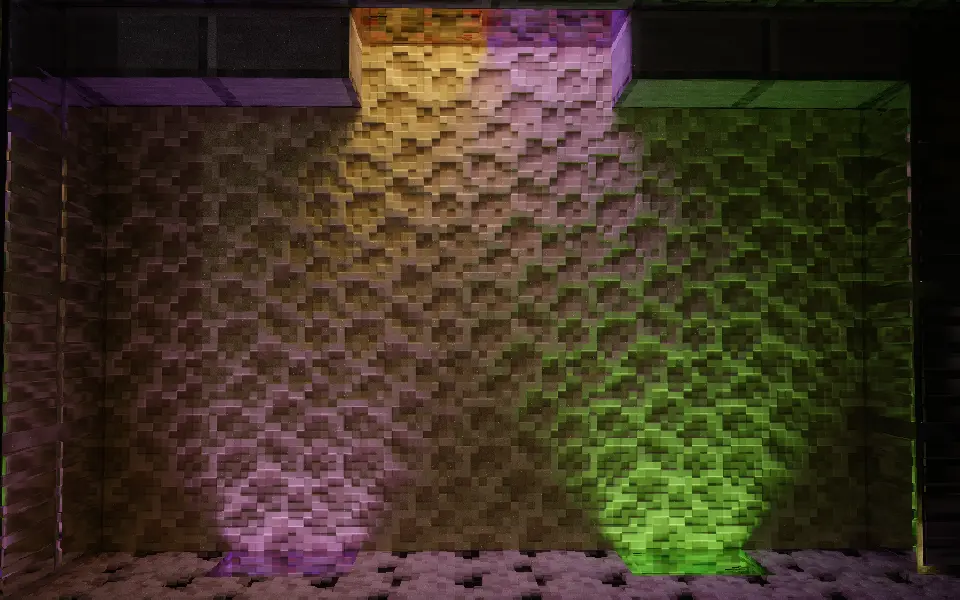
– **孔隙率**:下雨或淋水后,木板会被浸湿,颜色变深;石英和金属则会让水留在表面,形成水坑。每种材料都有了符合现实的表现。
**Porosity**:Materials react intelligently to moisture—wood darkens as it absorbs water, while metal and stone form surface puddles.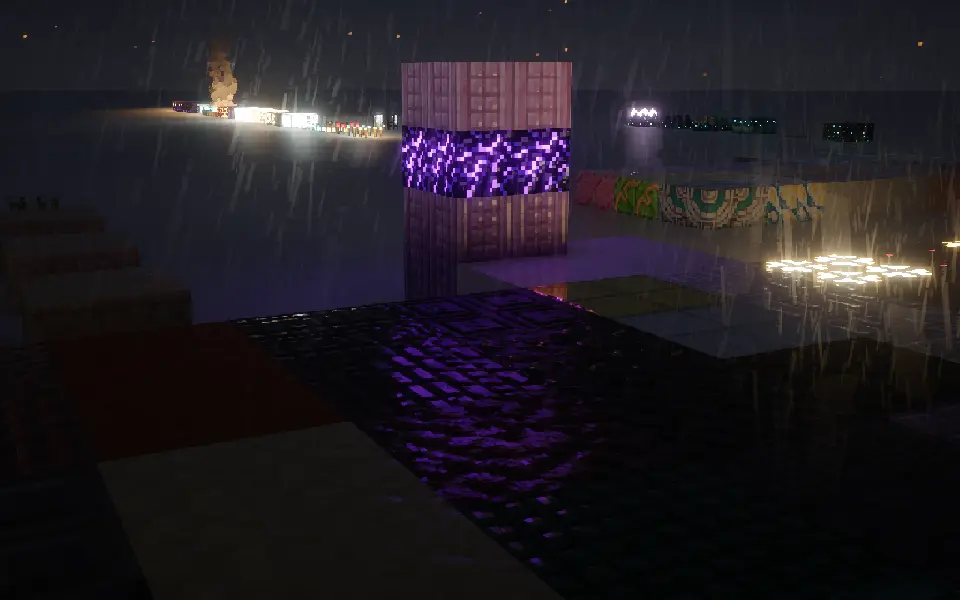
– **次表面散射**:它让树脂、雪块在背光时,能像真实世界一样透出柔和的光线。
–
**Subsurface Scattering**:Light softly glows through translucent blocks like resin and snow, simulating realistic light penetration.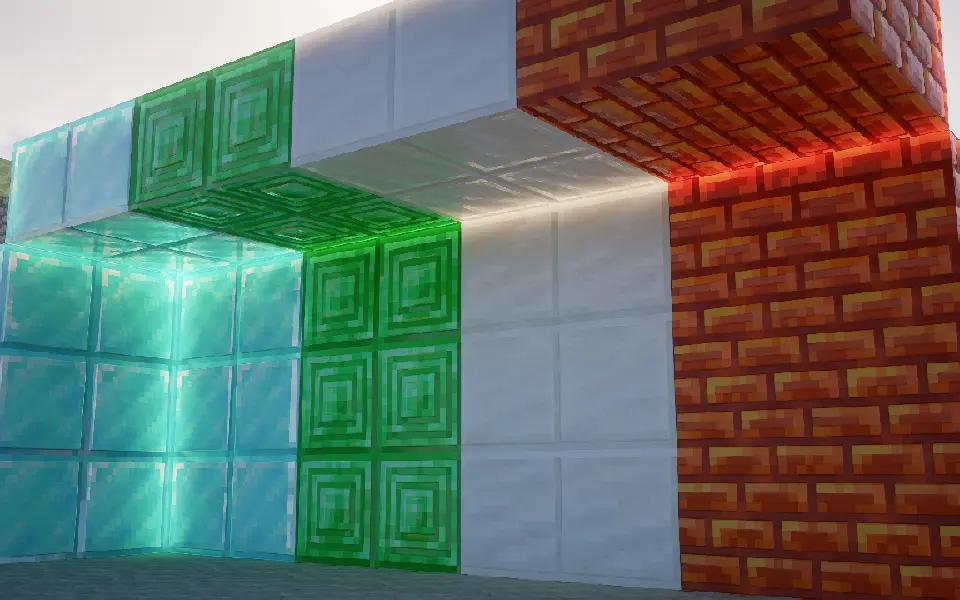
## 为什么我的效果没有上面的截图好?
## Why doesn’t my game look as good as the screenshots?
首先,检查你的光影是否支持**视差**和**labPBR**
First, check if your shader pack supports **Parallax** and **labPBR**.
其次,确保光影的视差和labPBR是开着的
Next, make sure these features are actually enabled in your shader settings.
然后,如果你的光影有以下功能,请按照下面设置:
Finally, if your shaders have the following options, please configure them accordingly:
– 将PBR格式改为**labPBR**
– Change the PBR format to **labPBR**.
– 关闭所有光影里关于**硬编码**的设置
– Disable all **Hardcoding** options within the shaders.
– 关闭**由视差生成法线**
– Disable **Normals by Parallax**.
– 打开**次表面散射**
– Enable **Subsurface Scattering**.
– 打开**平滑视差**
– Enable **Smooth Parallax**.
– 打开**孔隙率**
– Enable **Porosity**.
– 打开**屏幕空间追踪**或是**全局光线追踪**
– Enable **Screen Space Reflections** or **Global Illumination / Ray Tracing**.
– 打开**labPBR自发光**
– Enable **labPBR Emissive Textures**.
**我推的光影:**
**Shader recommendations:**
1. iterationRP
2. Sundial
3. Kappa
4. Nostalgia
5. PTGI GFME
6. Bliss
7. Astralex
8. Complementary
应该不会有多少人看到,我要偷偷贴一个QQ交流群:1009785936
Yippee Silverfish
Changes the Silverfish ambient sounds to be the YIPPEE! meme.
##
### MintRefresh:
[YouTube](https://www.youtube.com/@MintRefresh) | [Planet Minecraft](https://www.planetminecraft.com/member/mintrefresh/) | [Modrinth](https://modrinth.com/user/MintRefresh)
[TikTok](https://www.tiktok.com/@mintrefresh_mc) | [Twitter](https://x.com/MintRefresh_MC) | [Bluesky](https://bsky.app/profile/mintrefresh.bsky.social) | [Reddit](https://www.reddit.com/user/MintRefresh_MC/)
Join my Discord server [here](https://discord.gg/WYdD5xUamd)!
Yippee Fox
# Overview
Foxes will ocasionally go “YIPPEE” when it’s idle.
# Discord
[Discord](https://discord.com/invite/eYaAp3SqPA)
Yggdrasil Proxy
# YggdrasilProxy
When starting the game, the proxy in the device is automatically read to speed up Yggdrasil verification.
It extends Vanilla’s behavior and is more automated.
## Specific implementation
There is a setting in Windows, and its path is: “settings-> network-> proxy-> manual settings”.
YggdrasilProxy automatically reads them from the registry and verifies it, if it works, then use it immediately.
It basically works with network tools like Clash, you don’t need to proxy all traffic across the entire network card, you can easily connect to Yggdrasil Server through the proxy.
When registry data is not read, or is a non-Windows operating system, then YggdrasilProxy falls back to read environment variables (it does not need to be set in the JVM startup parameters, because they are annoying enough), it reads the following environment variables in the system and selects a valid variable to set to Proxy:
– http_proxy
– https_proxy
– no_proxy
## Defect
When the proxy server/tool is shut down, you may need to restart Minecraft.
Looking for a solution if I have time…
## Compatibility
Basically compatible with all operating systems.
Specially optimized for Windows.
## Which ModLoaders are supported?
– Fabric (Support, 1.18+)
– Quilt (Built with Fabric, 1.18+)
– Forge (Support, 1.19+)
– NeoForge (Support, 1.21.4+)
YggdrasilProxy is designed to be available for both Server and Client and is compatible with the most ModLoader and Minecraft versions.
If there is no compatibility, then I have not done it yet. If you’re in a hurry, join my DC server and send your ModLoader as well as Minecraft versions, I’ll be there soon.
## I want to use it in Plugin Server
Unfortunately, plugin servers are usually not compatible with mods, and I’m reluctant to use the Mixin framework to write them on the plugin server.
If you have relevant needs, please use two patches I made specifically for this, you only need to comply with GPL 3.0.
– [Patch 1](https://github.com/404Setup/Sewlia/blob/dev/1.21.4/sewlia-server/minecraft-patches/features/0005-Merge-YggdrasilProxy.patch)
– [Patch 2](https://github.com/404Setup/Sewlia/blob/dev/1.21.4/sewlia-server/paper-patches/features/0006-Merge-YggdrasilProxy.patch)
## For Modpack
If you comply with the license, you can use it freely for Modpack.
Modpacks that redistribute Minecraft game body (i.e. packages that package the entire Minecraft game including Mod files, Config, ShaderPacks, ResourcePacks, Library and launcher into a whole zip file) are not allowed to use this mod.
## License
This work has a restrictive license in addition to the original license to prevent some unexpected behavior,
see [404Setup Public License](https://github.com/404Setup/404Setup/blob/main/LICENSE.md)
YGenerators
[](https://discord.gg/kZJhKZ48j8)
# YGenerators
Custom generators with custom durability, recipe, item and more.
# Features
### Generators with customizable:
– durability (can be infinite)
– items with lore and display name
– chances for generated blocks
– cooldown of block generation
– recipe of generator item
– interactions for picking up and information checking
### Double drop:
– a timed event that multiplies chances for better blocks
– slows down the wear of generator’s durability
– with custom multiplayer
– can be enabled / disabled per generator
– time set / add / remove with a command
### Other:
– option to change blocks that are generated by vanilla generators
– option to enable 1.16 ores drop instead of 1.17 raw ores
– fully customizable messages with a lang file, supporting [PlaceholderAPI](https://github.com/PlaceholderAPI/PlaceholderAPI) and [MiniMessage](https://docs.advntr.dev/minimessage/index.html)
– commands with tab completions
– [API](https://github.com/Ynfuien/YGenerators/wiki/4.-Developer-API) for developers
# Documentation
You can read about plugin’s [permissions](https://github.com/Ynfuien/YGenerators/wiki/2.-Permissions), [placeholders](https://github.com/Ynfuien/YGenerators/wiki/3.-Placeholders) etc. on the [wiki](https://github.com/Ynfuien/YGenerators/wiki) page.
# Media – Example generators
#### Items


#### Crafting


#### Checking durability

#### Picking up generator

#### Example infinite generator with 0 tick cooldown

# Integrity with other plugins
I make these plugins for me, according to my needs, meaning, I don’t search for every possible plugin that I don’t care about, that could be somehow better integrated with mine. But, if you care about better integration between this plugin and some other, then just let me know through [Discord](https://discord.gg/kZJhKZ48j8) or [GitHub](https://github.com/Ynfuien/YGenerators) and I will see what I can do.
Same goes for any features that you think may be missing. If something isn’t outside the scope of the plugin, then I’ll probably do it.
# License
This project uses [GNU GPLv3](https://github.com/Ynfuien/YGenerators/blob/main/LICENSE) license.
YFs – Snow & Rain
The texture pack removes the load on the PC by reducing rain and snow.
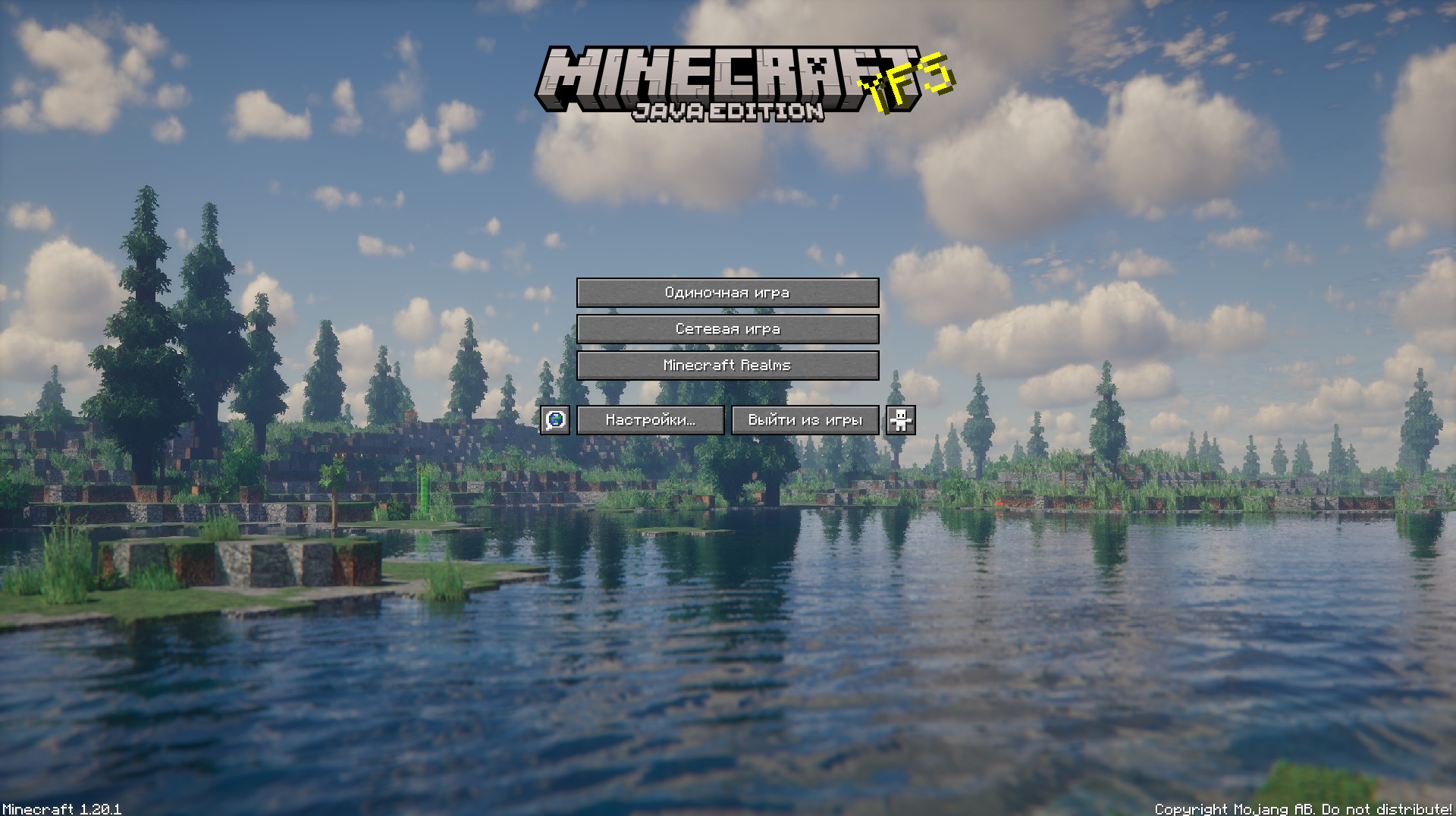
YFs – Better menu background
Hallo!
This texture pack improves your Minecraft by changing the background
YETIsUtils
(Note check github for most up to date version, updates will be posted here just not as soon as github)
# YETIsUtils
## Features
– **Admin Mode Inventory Switch**: Toggle between your regular player inventory and a separate admin inventory.
– **Player Warnings**: Issue warnings to players, store and view warnings, and clear specific warnings.
– **Player Reports**: Players can report issues, which are stored and viewable by admins in a GUI.
– **Configuration Reload**: Reload the plugin’s configuration without restarting the server.
– **Auto IP Ban**: Automatically ban a player’s IP after a configurable number of warnings.
– **Permissions**: Configurable permissions for commands to ensure only authorized users can perform certain actions.
– **Discord Integration**: Notifications about new reports and warnings are sent to specified Discord channels.
## Commands
– `/adminmode` – Toggle between player inventory and admin inventory.
– `/warn ` – Issue a warning to a player.
– `/warnings ` – View the number of warnings a player has.
– `/warnmenu` – Open a GUI to view all player warnings.
– `/warnclear ` – Clear a specific warning from a player.
– `/mywarns` – View your own warnings (if enabled in config).
– `/report ` – Report an issue to the admins.
– `/reportmenu` – Open a GUI to view all player reports.
– `/yetisutils reload` – Reload the plugin’s configuration.
## Permissions
– `yetisutils.adminmode` – Permission to toggle admin mode.
– `yetisutils.warn` – Permission to issue warnings.
– `yetisutils.warnings` – Permission to view player warnings.
– `yetisutils.warnmenu` – Permission to open the warnings GUI.
– `yetisutils.warnclear` – Permission to clear player warnings.
– `yetisutils.mywarns` – Permission for players to view their own warnings.
– `yetisutils.report` – Permission to report issues.
– `yetisutils.reportmenu` – Permission to open the reports GUI.
– `yetisutils.reload` – Permission to reload the plugin configuration.
# License
This project is licensed under the MIT License. See the LICENSE file for details.
# Contact
For support or inquiries, please open an issue on the GitHub repository.