# 🎯 yTrain – Train Against Custom Zombies with Ease
## 📖 Description
A lightweight Bukkit/Spigot plugin designed to enhance PvE training by allowing players to spawn customizable zombies. Features a user-friendly GUI for managing zombie armor and totem counts, with full admin control over configurations.
—
## ⚙️ Features
– ✅ **Customizable zombie spawning** with adjustable health, absorption, and enchantments
– ✅ **GUI for toggling armor** and setting totem counts
– ✅ **Totem auto-equip** for zombies (simulated in 1.12, native in 1.16+)
– ✅ **Configurable zombie settings** (name, visibility, glowing, etc.)
– ✅ **Cooldown system** for spawning zombies
– ✅ **Blacklisted worlds support**
– ✅ **Admin configuration reload command**
—
## 🔨 Commands
📜 Command List
– **`/train`** – Open the training GUI to spawn a zombie
– **`/yTrain reload`** – Reload the plugin configuration (admin only)
—
## 🔑 Permissions
🔐 Permissions List
– **`ytrain.train`** – Use `/train` to open the GUI and spawn zombies
– **`ytrain.reload`** – Use `/yTrain reload` to reload the configuration
—
## 📦 Dependencies
**None**
—
## 🌐 Join Our Discord!
[)](https://discord.gg/HxHcyBWU3V)
### 🔗 [Click Here to Join!](https://discord.gg/HxHcyBWU3V)
YTGWPAL Resource Pack
# the ytgwpal resource pack
>the dlc isn’t included due to copyrighted content not allowed on modrinth, download it from [here](https://github.com/YTGWPAL/ytgwpal-resource-pack/releases)
>NOTE: as of 1.21, custom music discs are now handled through datapacks. i have no plans on creating a datapack to fix the discs, so instead you should install the [Jukebox Custom Disc Fix](https://modrinth.com/mod/jukebox-custom-disc-fix) mod. this mod originally fixed [MC-260346](https://bugs.mojang.com/browse/MC-260346) (present in 1.19.4-1.20.6) but is now still needed for custom music in resource packs to work 1.21+ in without a datapack.
>
>this mod is only for 1.20.1 and 1.20.4+, meaning the following versions won’t work with the custom discs:
>- 1.19.4
>- 1.20
>- 1.20.2
>- 1.20.3
## wtf is this
funny resource pack made by some people in a friend group
## what wacky stuff is in it?????
– seizure ore
– sans
– steve harvey
– randa
– cups
– cans
– pilk
– chicken nuggets
– frybred
– cheez on da stick
– bear gay
– spo
– funny bunnies
– fart with extra reverb
– new music
– entire kanye west late registration album (DLC only)
– **AND MORE!**
## yooo this sounds cool how do i download it
go [here](https://modrinth.com/resourcepack/ytgwpal-resource-pack/version/latest) and click `YTGWPAL.Resource.Pack.zip` to download the pack, then put it in your resourcepacks folder
## music credits
[Bear – frybred](https://youtu.be/r0E4yBxnK3o)
[Bear – Cheez on da stick](https://youtu.be/J-mlIUTMziE)
[Darian – Triangular Garden / Hot Again](https://youtu.be/GHdnXEA1t8s)
[Kanye West – Late Registration](https://youtube.com/playlist?list=OLAK5uy_mS2sPIJinRK2fIXN9Ce756lZFRX2KT21o) (DLC only)
[Leonz – Among Us Trap Remix](https://youtu.be/grd-K33tOSM)
[Tyler, the Creator – Call Me If You Get Lost: The Estate Sale](https://www.youtube.com/playlist?list=OLAK5uy_k4n6ZtIK5tVGcq1aexNjVN8CMP1MbM8ew) (DLC only)
[Weezer – Weezer](https://youtube.com/playlist?list=OLAK5uy_kbgBewntTJ9MVzxPA3RZKgI_CVs8tgQ3k) (DLC only)
YTech
# YTech
brings you to Stone Age, increasing difficulty on early game by forcing you to use primitive technology for progression.
Also, vanilla mobs like cows, pigs, sheep and chickens are replaced by their wild ancestors.
Vanilla recipes for early game items are modified, forcing tools on some blocks and adding new tools, items and blocks to help you with progression.
Currently mod covers
– Stone age
– Bronze age
– Beginning of iron age (crafting iron ingot is final step right now)
## Compatibility
These dependencies are optional, but highly recommended:
– The One Probe – Provides more information about in-world blocks and entities
– Just Enough Items – You can see all changed recipes
– Curios API – Needed for jewelry effects, otherwise items are useless
– KubeJS – Easy way to add/modify/remove YTech recipes (API described on [wiki](https://github.com/yanny7/YTech/wiki))
– EMI – You can browse all recipes
– Jade – Provides more information about in-world blocks and entities
All bugs report on [GitHub](https://github.com/yanny7/ytech).
Ideas for expanding implemented ages or for next ages can be shared on [discord](https://discord.gg/HauMDpbkNN).
**For more information check [wiki](https://github.com/yanny7/YTech/wiki)**
## Hints
> – You can’t mine wood and dirt without correct tool
> – Your first goal is to find flint and hit stone with it
> – Grass fibers can be obtained by breaking grass with sharp flint
> – Look for deer, you need it for your first pickaxe
> – Only deer with antlers drops correct item
> – Primitive Smelter and Primitive Alloy Smelter needs chimneys for increasing temperature
> – Each type of chimney can be up to 4 blocks high, otherwise it collapse
> – Using reinforced chimney you can increase height up to 8 blocks, with 4 of each chimney
> – Lead and Cassiterite can be gathered using Strainer
> – It’s recommended to use JEI
> – You have to breed wild animals to get their domesticated versions
> – Aurochs -> Cow
> – Mouflon -> Sheep
> – Fowl -> Chicken
> – Wild Boar -> Pig
Yazn’s Resource Pack (YRP)
##
## This resource pack contains blood. Viewer discretion is advised.
***
##
# About this Pack
This resource pack changes everything to blood, fixes the crosshair, and makes it PvP style.
Everything may not be finished yet, im too lazy
Yreb’s Sugarcane 512x
This resource pack replaces Minecraft’s default multi-stalk sugarcane with a single, clean cane.
Vanilla sugarcane stacks several noisy sprites into one block, which turns big farms into a wall of visual static. This pack cuts that down massively, while still keeping the plant from looking flat or boring.
Youtubers Essentials
This Modpack Requires Fabric to run. it includes **Optimization** mods and **utility** mods as well also a great **Alternative To Optifine** adding a lot of features like connected glass, custom textures loader, custom gui loader etc. This Modpack Was Made By [mcwarriorxd](https://modrinth.com/user/mcwarriorxd)
(Mods That Give Unfair Advantage Isnt Available e.g: xaero’sminimap,freecam etc)
This Is A Must Have ModPack For **Youtubers**
YouTuber Swords
Youtuber Swords
The YouTuber Swords datapack adds a bunch of new unique, crazy, and OP swords themed around your favorite YouTubers. Unlike my other datapacks, this one is meant to be overpowered and fun to mess around with, while not needing to fit perfectly into an SMP. This pack requires my Moar Swords datapack to be installed in order to use this datapack.
You can craft them in the Vanilla Crafting Table. All recipes can all be found HERE, or in-game in the Recipe Guide
On Hit: Spawns a burning cow that explodes after a few seconds.
Right Click: Shoots a random Moar Wand ability (if Moar Wands is installed).
Passive: Has a red particle trail.
Dream Sword:
On Hit: Makes blaze drop more blaze rods.
Right Click: Makes all nearby mobs/players glow for 1 second..
Passive: 15% speed boost, auto water clutch, and auto lava boat clutch.
Techno-Blade:
On Hit: Makes mobs drop potatoes and porkchops.
Right Click: Shoots arrows..
Passive: No attack cooldown.
Logdotzip Sword:
On Hit: Makes mobs drop Steak.
Right Click: Summons his development team to shoot explosive lasers..
Passive: Spawns a chicken named Drumstick. Doesn’t have a loot table.
Craftee Sword:
On Hit: Makes mobs drop rarely drop diamonds.
Right Click: Throw a random TNT..
Passive: Leave a trail of fake gold that turns mobs that walk over it into gold.
MrBeast Sword:
On Hit: Puts the target in a circle. If they leave it, they die.
Right Click: Throw damaging money..
Passive: Get a load of useful buffs.
Grian Sword:
On Hit: Summons TNT on the target.
Right Click: Throw eggs… (Grian isn’t the chicken man though).
Passive: While flying with an Elytra, slowly get firework rockets.
Mumbo Jumbo Sword:
On Hit: Sometimes drops redstone components.
Right Click: Shoots a redstone laser that explodes on contact with mobs..
Passive: Leave a trail of charged redstone that zaps mobs that walk over it with lightning.
Element Animation Sword:
On Hit: Drop an anvil of cubic villagers on the target.
Right Click: Throw damaging villagers at mobs..
Passive: Gives all mobs that can wear hats villager noses.
Sigils Sword:
On Hit: Sends the target flying high into the sky.
Right Click: Cause mobs you are looking at to get stunned in place due to their weak knees..
Passive: Green Particle Trail.
Patron Exclusive Totems ($1+)
xNestorio Sword:
On Hit: Turns the mob into a walking AI that mines rapidly in front of them. This mob has armor that looks like a suit.
Right Click: Launches a giant arrow where you aim that destroys blocks or deals a ton of damage to mobs..
Passive: Gives a random positive potion effect every 30 seconds.
Henwy Sword:
On Hit: Rarely turns mobs into gold.
Right Click: Throws damaging feet where you aim..
Passive: Provides some armor.
Jelly Sword:
On Hit: Bounces the mob into the air.
Right Click: Throw a damaging game controller where you aim..
Passive: Slide down the sides of blocks.
Captainsparklez Sword:
On Hit: Summons a creeper on the target that explodes after a second. AWW MAN.
Right Click: Set your spawnpoint..
Passive: Speed + Jump Boost.
JeromeASF Sword:
On Hit: Rips zombies arms off, like Chewbacca.
Right Click: Throws damaging diamond axes where you aim..
Passive: Grants strength 2.
Ssundee Sword:
On Hit: Slows the hit mob a bit.
Right Click: Throws a fireball where you aim..
Passive: Jumping does a TNT jump with no fall damage.
Purpled Sword:
On Hit: Sends the target flying high into the sky.
Right Click: Cause mobs you are looking at to get stunned in place due to their weak knees..
Passive: Green Particle Trail.
YouTube Chat
## 📺 YouTube Live Chat Integration
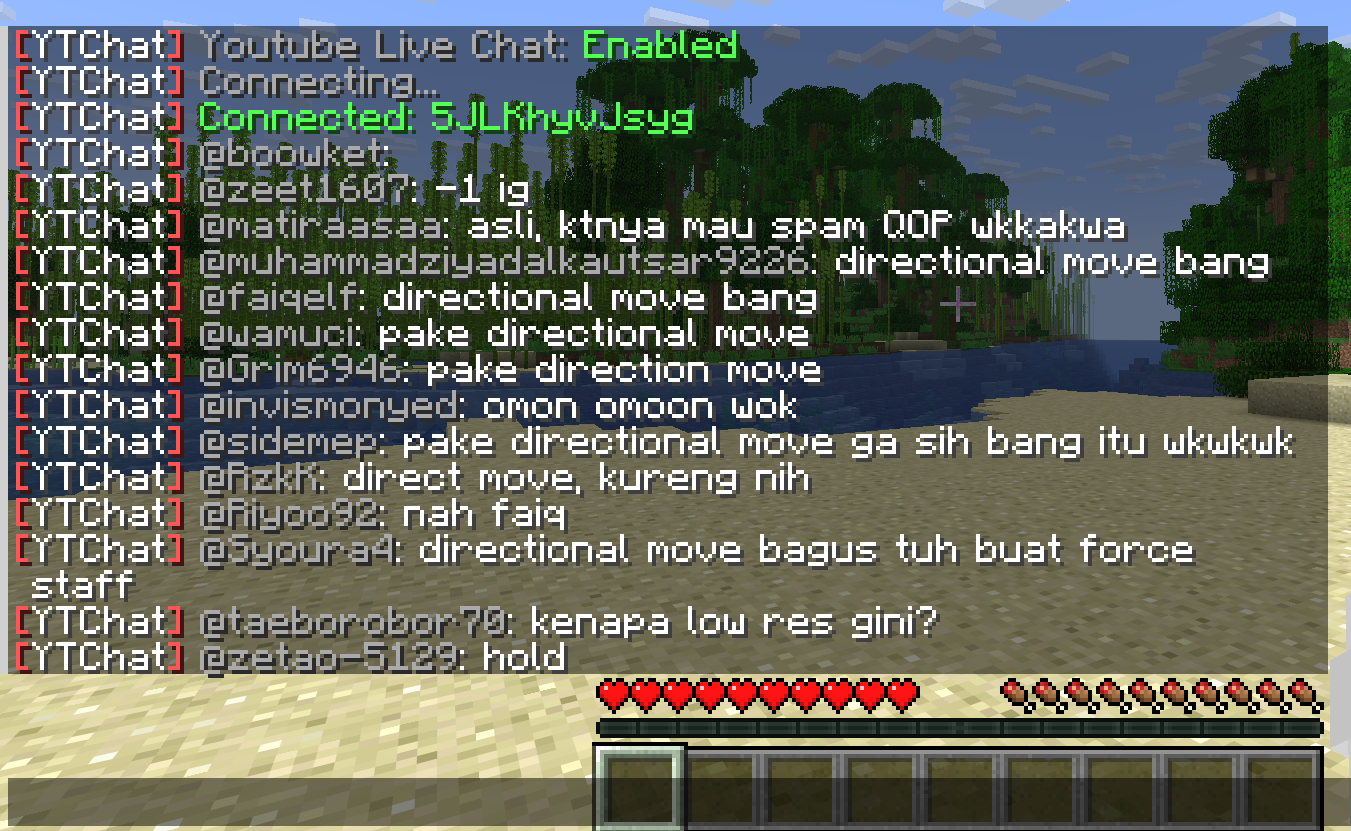
A Minecraft plugin for Spigot/Paper servers that seamlessly integrates YouTube Live Chat into your server. Messages sent during a live stream are displayed in real-time directly in the in-game chat, allowing players to interact with live audiences effortlessly.
### ✨ Features
– Real-time YouTube Live Chat integration
– Displays live stream messages in Minecraft chat
– Easy configuration and setup
### 🎮 Use Cases
Perfect for streamers who want to connect their in-game players with their YouTube audience, creating a more interactive and engaging experience.
### ⚙️ Compatibility
– Bukkit / Purpur / Paper / Spigot servers
– Modern Minecraft versions
Your_Time
# Your_Time
[](https://modrinth.com/mod/your_time)
[](https://modrinth.com/mod/fabric-api)
[](https://modrinth.com/mod/Nixienaut)
[](https://github.com/rotgruengelb/Your_Time/issues/new?assignees=rotgruengelb&labels=version-port&projects=&template=version_port_request.yml&title=%5BVERSION%5D+____+Version+Port+Request)
This mod adds a Timer displaying your in-game/session time in the in-game HUD. Look at the Gallery if you want to know how it looks in-game.
## How to Configure
Use Mod Menu to access the Configuration Screen of the Mod.
### Formatting the Timer Text
There is a Guide on the syntax for the formatting settings:
“`
%s% Seconds (to next minute)
%m% Minutes (to next hour)
%h% Hours (to next day)
%d% Days
%tS% Total Seconds
%tM% Total Minutes
%tH% Total Hours
– Insert “n” for a line break.
– Put “%%” to insert a normal “%”.
“`
& You should install [Mod Menu](https://modrinth.com/mod/modmenu) to get access to the config Screen.
—
### Recommended Mods
– [Jump_Connect](https://modrinth.com/mod/jump_connect): Quickly join a configurable server by holding Alt/Ctrl/Shift Key whilst clicking on the Multiplayer Button in the Main Menu.
Your totem is your skin
# What the goal of this pack?
I think have your skin as a totem is pretty, then I created this pack.
You can found a tutorial in the pack (its name is tutoral.txt)
# How I can set the pack in my Resource packs?
Go in your .minecraft, resourcepacks, and drag and drop the pack.
# I can’t modify the pack
Just unzip the pack with right click, and select “Extract All…”
# How to setup the pack?
TUTORIAL
1. Grab your own skin
go on https://namemc.com
search your pseudo
click on your profile
under your skin preview, there is all your skins and click on your latest
click on the download button
2. Put the skin in the Resource Pack
Go in your downloads, click on your skin and press Ctrl + X
Go in the resource pack : assets, minecraft, textures, item and press Ctrl + V
Rename your skin “totem” (verify the extension : it’s normally png)
There it is!
If you have questions, ask me on my discord : https://dsc.gg/somroti (it’s a french server but you can use Google Translate)
Here’s my discord for suggest ideas or report an issue : https://discord.gg/7yXRx6yVVy