MacOS Input Fixes
Fixes MC-122296
Fixes MC-121772
Fixes MC-59810
Fixes MC-22882
Fixes control + tab and control + escape not being detected
Specific fixes:
– Correctly detects left click while control is pressed
– Make trackpad scrolling not scroll a ridiculous number of items at once
– It also fixes momentum scrolling (which changes the number of scroll events based on how quickly you did it, even by like x5-10, meaning you couldn’t easily scroll to the correct item)
– On the trackpad it also only considers scrolling while fingers are on the trackpad (and the same for any fancy mice that support the relevant api e.g. probably apple’s fancy mice/trackpad thing)
– It also fixes scrolling being broken when shift is down on some older mice.
– When dropping an item, Minecraft checks for command + the key, since the default key is Q, this doesn’t make sense, so this mod allows both control + key and command + key to work
– Fixes control + tab and control + escape not being detected
Menu Options (under Mouse Settings Screen):
– Option for trackpad scrolling sensitivity (macOS only)
– Option to enable momentum scrolling on hotbar (macOS only)
– Option to disable workaround for smooth scrolling in interfaces (macOS only)
– Option to reverse scrolling of the whole game
– Option to reverse scrolling of the hotbar
– Option to disable the fix for the ctrl + left click becomes right click bug (macOS only)
On platforms other than macOS, the mod does nothing (except the aformentioned menu options), so it can be safely included in any modpack.
Requires Fabric Loader 0.18.5+
Requires Minecraft 1.14+
NOTE!
If you get an error like the following, you need to update Fabric Launcher to the version specified above. Some launchers may require you to update fabric launcher, remove macos input fixes mod fully, and then re-add macos input fixes mod. See https://github.com/hamarb123/MCMacOSInputFixes/issues/60 for the original issue. Note that the “More details” section is very misleading, and parts around it about my mod should be ignored (try disabling it, after the steps before for re-installing, if you are still getting errors to confirm that it is actually an issue with this mod).

Github repository: https://github.com/hamarb123/MCMacOSInputFixes.
And yes, I know I need a better icon 😉
### DISCLAIMER
As required to mention prominently according to Mojang – THIS IS NOT AN OFFICIAL MINECRAFT PRODUCT. NOT APPROVED BY OR ASSOCIATED WITH MOJANG OR MICROSOFT.
View the license for the disclaimer of the actual mod.
Luminance

## About
Luminance is a library mod that is primarily designed to help other mods with shaders.
**As a user, you should only need to install this if a mod requires it.**
# Features
– **Adds Dynamic Shader Uniforms**
– These let post-processing shaders have more information about what’s happening in-game.
– Luminance comes with a bunch of these by default, but you can add your own too!
– **Adds shaders that have been used in previous minecraft versions.**
– _Requires Perspective or Souper Secret Settings._
– Luminance takes care of rendering shaders, so you don’t have to!
– You can check if Iris Shaders are enabled using Luminance.
– This means you don’t have to have Iris added to your development environment!
– You can replace your ModMenu icon using Luminance!
– Make your mod icon change depending on the time of year, or via a config option, anything’s possible!
## Dependencies
– Fabric API or Quilted Fabric API (QFAPI)
– `fabric-resource-loader-v0`
– `fabric-key-binding-api-v1`
– `fabric-lifecycle-events-v1`
– Java 21 or later.
– Built with the Microsoft build of OpenJDK 21.0.2.
## How to add Luminance to your mod:
1. Add the following lines to the repository section of your build.gradle:
“`
exclusiveContent {
forRepository {
maven {
name = “Modrinth”
url = “https://api.modrinth.com/maven”
}
}
filter {
includeGroup “maven.modrinth”
}
}
“`
2. Add the following line to the dependencies section of your build.gradle:
“`
include(modImplementation “maven.modrinth:luminance:${project.luminance}”)
“`
3. Add the following line to your gradle.properties:
1. Replace 1.0.0-rc.1+1.21.4-fabric with the latest version of Luminance!
1. This can be found on the version page on Modrinth.
“`
luminance = 1.0.0-release.1+1.21.4-fabric
#luminance = 1.0.0-release.1+1.21.4-quilt
“`
4. Reload gradle and you’re ready to use Luminance!
## Also check out
Our GitHub Page
Perspective by dannytaylor
Souper Secret Settings by Nettakrim
Luminance Mod Collection
#
Licensed under LGPL-3.0-or-later.
**This mod is not affiliated with/endorsed by Mojang Studios or Microsoft.**
Some game assets are property of Mojang Studios and fall under Minecraft EULA.
Low Fire & Side Shield
# 🔥Low Fire & Side Shield
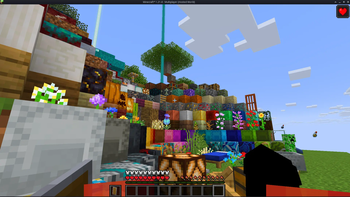
**Low Fire & Side Shield** is a **Minecraft resource pack** designed to keep your screen clear and focused.
It lowers both the **fire overlay** and the **shield position**, introducing a **minimal side shield** that lets you see more of your surroundings without losing the vanilla feel.
Whether you’re in the middle of a **PvP battle**, exploring dangerous caves, or just want a cleaner screen, this pack makes gameplay smoother and more immersive.
It’s lightweight, **FPS-friendly**, and works seamlessly with default Minecraft textures.
—
## ✨ Features
– 🔥 **Reduced fire overlay** — less visual clutter during combat.
– 🛡️ **Lowered side shield** — improved visibility without removing functionality.
– 🎮 **Vanilla-friendly look** — keeps the original Minecraft style intact.
– ⚙️ **Optimized for PvP and survival** — clear visuals, faster reactions.
– 💻 **Lightweight & compatible** — works with most other packs and versions.
—
## 📦 Perfect For
– PvP players needing better visibility
– Streamers who prefer a clean HUD
– Anyone wanting a minimal, modern look in Minecraft
—
**Tags / Keywords:**
`low fire`, `low shield`, `side shield`, `minecraft pvp`, `clear hud`, `visibility pack`, `vanilla friendly`, `clean screen`, `minimal resource pack`, `fps boost`, `combat tweaks`, `minecraft texture pack`, `darkshadowx21`
—
### 📜 License
This project is licensed under the **MIT License**.
You’re free to use, modify, and share this resource pack — just include proper credit to **Darkshadowx21**.
Lopercraft Title
# Why You’ll Love This Resource Pack:
Replaces The minecraft title with Your favourite Youtube Series
# More Infos:
This resource pack was created with a Ewan’s Blockbench plugin and can be found here: official page
# resource pack based off This modpack
LokaLib
LokaLib
LokaLib is a modern, performance-focused Minecraft datapack library built to make datapack development faster, cleaner, and easier to maintain.
It is designed as a datapack-first foundation for other projects, giving developers a structured API, a lightweight event system, scheduled timers, utility functions, debug tools, and compatibility helpers in one coherent package.
LokaLib focuses on:
high performance
low boilerplate
clean architecture
logical organization
easy reuse
developer-friendly workflows
It is made for datapack creators who want a library that feels simple to use, but still stays powerful and scalable under the hood.
What LokaLib does
LokaLib provides a reusable foundation for building datapacks without having to reinvent common systems every time.
It includes:
an event bus for registering and firing callbacks
a timer system for delayed and repeating actions
player utility functions for common checks
world utility functions for time and day logic
math utilities for common calculations
debug tools for logging and state inspection
compatibility detection for supported server environments
a clean load / tick / unload lifecycle
The goal is to keep your custom datapack logic focused on gameplay, not infrastructure.
How it works
LokaLib runs as a normal datapack and initializes on world load.
During startup, it:
creates and prepares its internal scoreboards and storage
detects supported runtime compatibility signals
initializes its event and timer registries
fires a library load event
During gameplay, LokaLib:
processes events through a central event bus
handles timers without requiring every project to build its own scheduler
exposes utility APIs for common tasks
runs periodic internal logic in a controlled and optimized way
This structure keeps the core stable and avoids unnecessary repetitive logic in user datapacks.
Main focus
LokaLib is centered around three goals:
1. Simplicity
The API is meant to be easy to understand and fast to adopt. Developers should not need to fight the framework just to use basic features.
2. Performance
The library is designed to stay lightweight, avoid excessive tick overhead, and keep work centralized instead of scattered across many datapack systems.
3. Structure
The namespace and function layout are organized so that the library remains readable, scalable, and maintainable even in larger projects.
Features
Event system
Register callbacks for named events and keep gameplay logic separated from core infrastructure.
Timer system
Create delayed or repeating timers without manually building a scheduler each time.
Utility APIs
Common helpers for:
players
world state
math
debugging
Debug tools
Useful for development, testing, and state inspection without polluting the main logic.
Compatibility helpers
LokaLib includes runtime compatibility detection and integration-oriented structure intended to work well in hosted environments such as Paper-based and Fabric-based server setups.
Example use cases
LokaLib is useful for datapacks that need:
quest systems
minigame logic
custom mechanics
player state tracking
scheduled actions
clean reusable code
shared utilities across multiple datapacks
It works especially well as a base library for projects that would otherwise repeat the same utility functions over and over again.
Developer notes
LokaLib is not meant to replace gameplay design. It is meant to remove technical friction.
Instead of building the same timer, event, and debug systems in every datapack, you can use LokaLib as a shared foundation and keep your own pack focused on actual content.
Recommended use:
keep custom gameplay logic in your own namespace
use LokaLib for utility and infrastructure
register callbacks instead of hardcoding everything into tick logic
prefer event-driven and timer-based behavior over constant polling
Compatibility notes
LokaLib is a datapack, so it runs in the datapack layer of the server.
It includes compatibility detection and structure intended to cooperate better with environments commonly associated with Paper and Fabric hosting.
However, because datapacks do not directly replace plugins or mods, any deeper integration depends on the server setup around it.
In practice:
vanilla datapack behavior is the core target
Paper support is approached through runtime compatibility awareness
Fabric support is treated as best-effort compatibility within the limits of datapacks
This keeps the library realistic and safe to use across different server environments.
Available modules
LokaLib currently includes:
core — load, tick, unload, version, and compatibility initialization
event — event registration, dispatching, and hooks
timer — delayed and repeating function scheduling
math — common numeric helpers
player — player state checks
world — world time and day utilities
debug — logging, assertions, and state inspection
compat — server environment detection helpers
Typical usage philosophy
A good LokaLib datapack should:
do as little work as possible every tick
keep logic modular
use registered events instead of scattered checks
use timers instead of manual wait loops
keep function names short and predictable
avoid unnecessary scoreboards and repeated storage reads
Summary
LokaLib is a clean, lightweight, and highly structured datapack library for developers who want to build better Minecraft datapacks with less friction.
It is built to be:
fast
organized
reusable
easy to expand
practical for real projects
If you want a datapack foundation that feels modern and disciplined, LokaLib is designed for exactly that.
LoginPhaseProxy
**LoginPhaseProxy** is a somewhat “*simple*” Velocity Plugin that allows you to proxy the LoginPluginMessagePacket from backend server to the player and LoginPluginResponsePacket from the player to the backend server. This is useful for modded backend servers that rely on Login Plugin Message communication to work, such as AutoModpack.
> Disclaimer: This plugin is in early development and may contain bugs and performance issues. Use it at your own risk.
## 🔁 When to use
| Author(s) | Mod |
|—————————————–|——————————————————————————–|
| Skidam | AutoModpack (Fabric/Forge/Neoforge) |
> You’re welcome to suggest new use cases via Issue or Pull Request!
## ❓ What does it solve (detailed)

Normal Setup ⦁ Made in Figma
On a normal Velocity setup, when a player connects to the proxy, they go through the (P ↔ V) Login Phase, exchanging packets with the Velocity until the proxy sends a Server Login Success Packet, completing the (P ↔ V) Login Phase and triggering the backend connection process. The backend server then goes through its own (V ↔ B) Login Phase, where it may send Login Plugin Message Packets to the Velocity, and they can’t be forwarded to the player, because the (P ↔ V) Login Phase is already complete, so Velocity reponds them with an empty data Login Plugin Response Packet, as it doesn’t know how to handle them. This is a problem for modded backend servers that rely on Login Plugin Message communication to work, such as AutoModpack, as they won’t be able to send the necessary data to the player during the Login Phase, and the player won’t be able to join the backend server. This plugin tries to solve this issue by proxying the Login Plugin Message communication between the player and the backend server, allowing modded backend servers to work with Velocity without any issues.
## ✨ How it works (detailed)
~~Basically black magic 🪄🔮~~. It uses Java Reflection to access the internal Velocity classes ProxyServer -> ConnectionManager[[1]](https://github.com/caiostoduto/LoginPhaseProxy/blob/main/src/main/java/com/caiostoduto/loginPhaseProxy/initializer/VelocityChannelInitializer.java) to override the serverChannelInitializer[[2]](https://github.com/caiostoduto/LoginPhaseProxy/blob/main/src/main/java/com/caiostoduto/loginPhaseProxy/initializer/FrontendChannelInitializer.java) and backendChannelInitializer[[3]](https://github.com/caiostoduto/LoginPhaseProxy/blob/main/src/main/java/com/caiostoduto/loginPhaseProxy/initializer/BackendChannelInitializer.java), so it can intercept the Velocity communication with the player (P <-> V)[[4]](https://github.com/caiostoduto/LoginPhaseProxy/blob/main/src/main/java/com/caiostoduto/loginPhaseProxy/intercept/FrontendInterceptor.java) and backend server (V <-> S)[[5]](https://github.com/caiostoduto/LoginPhaseProxy/blob/main/src/main/java/com/caiostoduto/loginPhaseProxy/intercept/BackendInterceptor.java), respectively.

Plugin Implementation ⦁ Made in Figma
With that, our plugin watches the Login Phase player connection until it sees a SetCompressionPacket(5) (optionally) and ServerLoginSuccessPacket(6), adding them to a buffer instead of sending them to the player and synthetically sends a loginAcknowledgedPacket(7) to the Velocity pipeline, tricking it into thinking the Login Phase is complete and starting the backend connection process. To make sure the Velocity doesn’t mess the packet interception and sending process, our plugin removes stealthly (so that it doesn’t trigger it’s handlerRemoved lifecycle[[6]](https://github.com/caiostoduto/LoginPhaseProxy/blob/main/src/main/java/com/caiostoduto/loginPhaseProxy/utils/StealthPipeline.java)) the handlers from the Velocity serverChannel pipeline[[4]](https://github.com/caiostoduto/LoginPhaseProxy/blob/main/src/main/java/com/caiostoduto/loginPhaseProxy/intercept/FrontendInterceptor.java) that were added after the Login Phase to Config Phase transition (MinecraftCompressorAndLengthEncoder and MinecraftCompressDecoder, others are removed naturally afterwards). Also, our plugin adds the MinecraftVarintLengthEncoder[[4]](https://github.com/caiostoduto/LoginPhaseProxy/blob/main/src/main/java/com/caiostoduto/loginPhaseProxy/intercept/FrontendInterceptor.java) back (was removed at the transition) and sets the MinecraftDecoder state to StateRegistry.LOGIN[[4]](https://github.com/caiostoduto/LoginPhaseProxy/blob/main/src/main/java/com/caiostoduto/loginPhaseProxy/intercept/FrontendInterceptor.java) so the packets are properly encoded and decoded.
If the backend server sends a LoginPluginMessagePacket(10) during its Login Phase, our plugin will intercept it and send it to the player(11), and if the player sends a LoginPluginResponsePacket(12), our plugin will intercept it and send it to the backend server(13). This way, we can effectively proxy the LoginPluginMessagePacket and LoginPluginResponsePacket between the player and the backend server, allowing modded backend servers to work with Velocity without any issues. Then, when the backend server ends the Login Phase sending the ServerLoginSuccessPacket(15), our plugin will flush the buffered packets to the player, completing the Login Phase and allowing the player to join the backend server as normal. Afterwards, if the user sends a LoginAcknowledgedPacket (clientProtocolVersion >= ProtocolVersion.MINECRAFT_1_20_2)(16) after the Login Phase is complete, our plugin will simply ignore it, as it is not expected to be sent by the player at that point. Finally, the plugin will restore the MinecraftDecoder state to its previous state (Config Phase).
So, yeah, *basically black magic* 🪄🔮. Yayyyy!
## 🙏 Acknowledgements
– Skidam, who inspired me to create this plugin!
– lucas-gcp, who supported me and helped with testing!
Let Me Despawn



LET ME DESPAWN
**Let Me Despawn** (LMD) is a Minecraft mod designed to address entity lag issues by modifying the despawn mechanics for mobs that have picked up or equipped items.
### Key Features
– Allows mobs with equipped items to despawn naturally
– Preserves dropped items when mobs despawn
– Configurable mob exclusion list
– Server-side functionality (not required on client)
—
## Functionality
In vanilla Minecraft, mobs that pick up or equip items become persistent and do not despawn naturally. This behavior can significantly contribute to entity lag, especially in modded environments with increased mob variety and spawn rates.
LMD modifies the despawn check to allow these mobs to despawn naturally, like any other mob. To prevent item loss, any picked up or equipped items are dropped when the entity despawns.
> **Note**: Mobs named with a name tag will still be prevented from despawning naturally.
—
## Configuration (Version 1.2.1 and later)
### Config File
– Location: `config/letmedespawn.json`
– Reload command: `/almanac reload`
### Commands
| Command | Description |
|———|————-|
| `/letmedespawn add ` | Add mobs to the config |
| `/letmedespawn remove ` | Remove mobs from the config |
Mobs added to the config will retain their vanilla behavior and not despawn after picking up items. All commands update the mob list in real-time, eliminating the need for game restarts or manual reloads.
—
## Installation
This is a server-side mod and is not required on the client.
—
MAKE YOUR BUILDING LIMIT UP
# MAKE YOUR BUILDING LIMIT UP
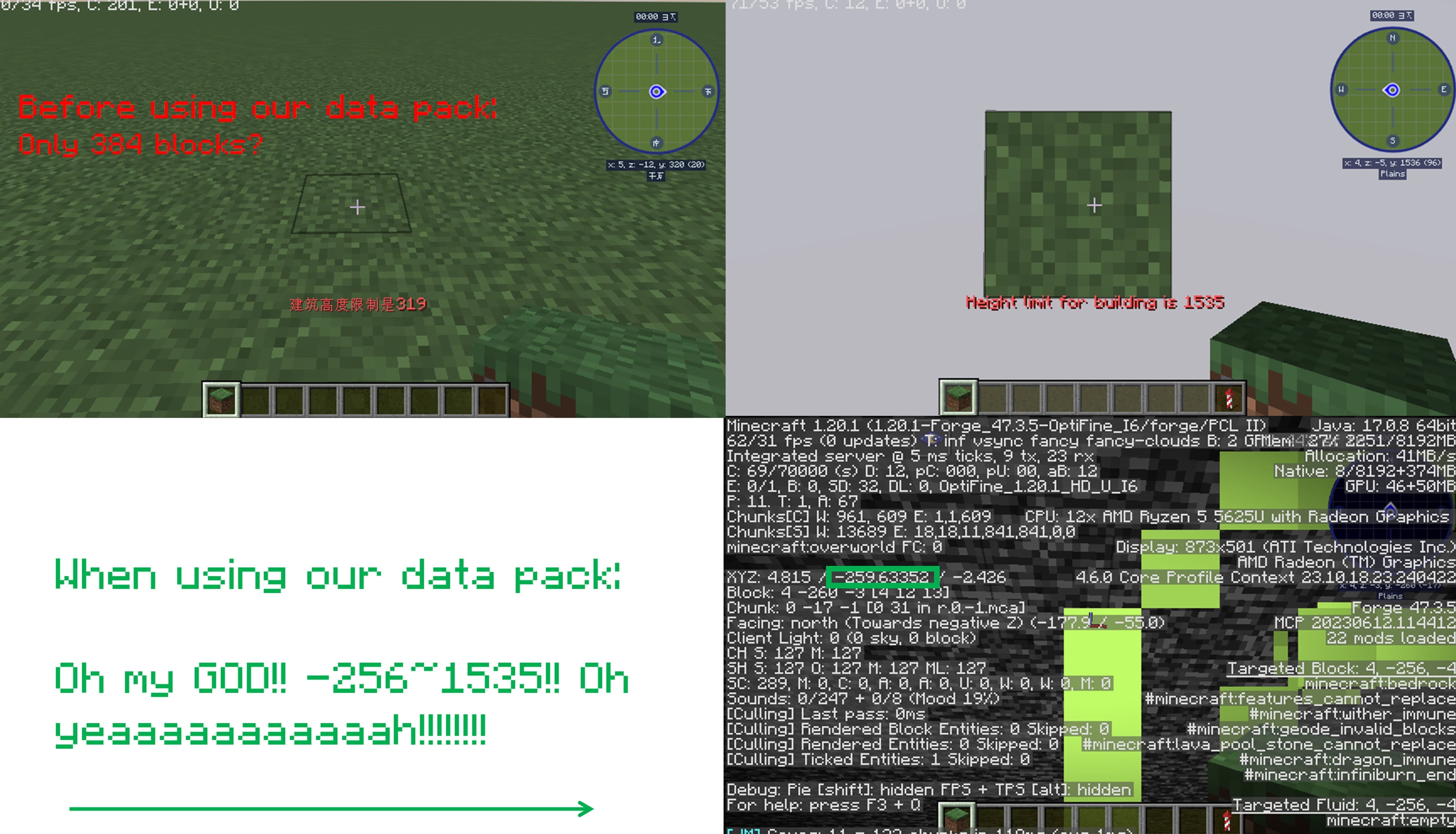
_**Think Minecraft doesn’t have enough building space? Want to build taller buildings? Try our data pack and you can increase the building limit up to 4064 blocks!!**_
## How to install it?
**You may need to create your game world before install the data pack**
1.Open your game folder(“.minecraft”)
### If you use version isolation:
2.Open your “versions” folder
3.Choose your version
4.Open your “saves” folder
5.Choose your save
6.Open your “datapacks” folder
7.Put our data pack in the folder
### If you Don’t use version isolation
2.Open your “saves” folder
3.Choose your save
4.Open your “datapacks” folder
5.Put our data pack in the folder
**PLEASE PAY ATTENTION!! This datapack may affect the normal operation of other mods**

_This is a DATAPACK! Please put it in the “datapacks” folder in your saves folder_
**NOT THE “recoursepacks” FOLDER**
Less Obstructive Better Leaves
Less Obstructive Better Leaves makes Leaves look better by making it not be as flat.
the texture pack is diffrent than other better leaves because it is not as obstructive + it is not that bad with fast textures
the pack only replace the models so you can have other packs over it.
_this texture pack can get a bit laggy because of all of the new cubes on the block_
Less Aquifers

### What is `Less Aquifers`?
Picture this: you go mining, brand new pickaxe, food and a whole inventory to fill with shiny ores. However all you can find is caves filled with water. WATER EVERYWHERE. You cannot pick any ore because they are underwater and navigating this caves is a nightmare.
This is why I created this simple Datapack: to reduce the amount of aquifers that generate in your world. This is just an adjustment, aquifers will generate, but less than in vanilla Minecraft.
### Installation
Installation is easy: download this datapack, drop it in your datapack folder (inside saves –> your world) and start playing. Make sure you are doing this with Minecraft fully closed, you will need to start the game from launcher!
### It’s me, hi!
All my social media can be found here: Danymaddox.
And if you like to add more gold to your life, follow me on Modrinth and take a look: Dark Resource Pack with gold details and tons of mod support, BINGO! Modpack ready to play and much more to come.