NyaPack 🤺 Minimal Armor

**NyaPack 🦋** is a resource pack that lets you show off your skin even more!
Armor becomes more like **accessories** or **situational outfits**, helping you customize your appearance without covering your character entirely.
✨ **Features:**
– **Emissives** and **animations** support in newer versions, all **without additional mods**
– Support for the new **copper armor**
– Versions **without emissive** and **without animations** are also available for those who prefer a simpler look
Give your skin more personality and style! 🦋
Nutlet
Nutlet is a lightweight, utility‑focused data pack designed to easyly creating Multi-block machines.
# Key Features
## 📖 Spell Book
A book with a custom Enchantment. Players write a specific Word or Phrase on its first page, then left-click a block or attack an entity to trigger a corresponding Function.
This lets creators capture Block/Entity Interactions without relying on advancements or raycasting. Just like the function of Soft Mallet in GregTech mod.
Easy registration via the `#nutlet:spells` function tag.
## ⏰ Enhanced /schedule
Extends the vanilla /schedule command by allowing you to pass NBT data to the delayed function via Command Storage.
## 🖼️ Schematic Displays
Summon Block, Item, or Text Display entities that vanish after a set time—even if the chunk is unloaded. Perfect for previewing multiblock structures or giving visual feedback. The vanish function depends on the enhanced /schedule mentioned earlier.
Can specify transformation, block properties, item components, or text JSON.
Optional validity check: if the projected block doesn’t match the intended state, a warning text display appears instead.
## 🔄 Orientation Helpers
Functions that adjust Command Execution Context based on a block’s facing direction or Command Execution Rotation.
– `nutlet:-m/facing/block`
Get Facing and Orientation of a block (furnace, piston, dispenser, crafter, etc.).
– `nutlet:-m/facing/entity`
Get the Facing Direction from Command Execution Rotation.
– `nutlet:-m/facing/block_axis_align` & `nutlet:-m/facing/entity_axis_align`
run a function after aligning Execution Angle to the faced direction, making Multi-Block Machines orientation‑agnostic.
## 🔁 UUID Conversion
Converts a UUID Array (e.g., from an entity’s UUID tag) into a hyphenated hexadecimal string that can be used directly in Target Selectors (e.g., /execute as 2ed128ed-5e7b-4a13-b3e0-a49b2749dbd7 run …).
## ☀️ Brightness
Calculates the light level at the Executing Position, taking into account adjacent blocks if the block itself is light‑blocking.
## ⚙️ In‑Game Configuration
Register configuration options that players can Modify at In-Game using the Spell Book.
Two storage backings: scoreboard (for integers) or command storage (for any NBT).
Can define a description, valid range, or a whitelist of acceptable values.
Default values are automatically injected on first load world.
Only the First Player to obtain a Spell Book can Change settings (prevents abuse).
## 🧰 Additional Utilities
– `nutlet:-m/schematic/tick`
Summon an Armor Stand that runs a Function every tick (with mutable cooldown and changable functions) for simple periodic tasks.
# For Datapack Creators
Register spells via the `#nutlet:spells` function tag.
Register configuration options via the `#nutlet:configs` function tag.
Call utility functions under the `nutlet:-m/…` namespace.
Look at these two sample Datapacks to get a more detailed understanding of how to use Nutlet:
Roost, Rock Generator
# How to install
## Datapack part
1. Open Minecraft.
2. Select the world you want to install the Datapack for, click on “Edit”, then “Open world folder”.
3. Open the folder named “datapacks”, and put the Datapack(It should like “Nutlet_V1.2.zip”) into it.
4. Relogin the world, you will see the version of Datapack on chats.
You can use Spell Book disable print version of Datapack when relogin.
## Resourcepack part, for Localization translation
1. Open Minecraft, select “Options”, then “Resource Packs”, then “Open Pack Folder”.
2. Put the Datapack(The Datapack file is both datapack and resourcepack) into it.
3. Back the Minecraft, select new one and Click “Done”.
Numbered Levels
# Numbered Levels
See more in the Gallery](https://modrinth.com/resourcepack/numbered-levels/gallery)
—
   
## Features
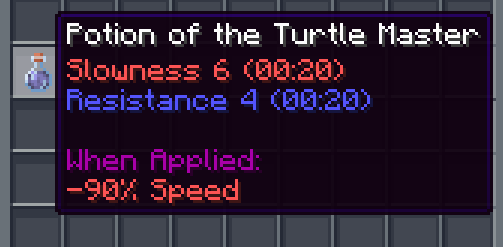
✨ Enchantment levels are displayed as numbers
🧪 Potion potencies are displayed as numbers
🛠️ Fixes “enchantment.level.255” when levels are above level 10 (or 6 for potions)
🌐 Works in all 137 of Minecraft’s supported languages (as of 1.21.8)
## Info
Examples:
– Sharpness IV → Sharpness 4
– Instant Damage II → Instant Damage 2
– Mending (unchanged)
– Unbreaking I → Unbreaking 1
– Protection enchantment.level.255 → Protection 255
– Strength potion.potency.10 → Strength 10
Feel free to modify this pack or include it in a modpack!
—
  
**💚 Make sure to follow!**
Nova UI – Dark Mode
# Nova UI
A modern-looking vanilla-like dark mode GUI pack with support for many mods. It turns the UI to dark mode and enhances the visuals of the HUD elements by drastic messures (e.g. health, armor and food bars, hotbar). It also contains an integrated, centered crosshair.
This resource pack also comes with options for Respackopts, allowing you to enable or disable the integrated centered crosshair.
It also adds support for April Fools’ joke snapshots, including the Vote Update, the Poisonous Potato Update and the Craftmine Update.
## Supported Mods
41 mods in total
|Mod|26.1|1.21|1.20|1.19|
|—|:—:|:—:|:—:|:—:|
|AppleSkin|✓|✓|✓|✓|
|Armor Hud|✓|✓|✓|✕|
|Armor Hud by Mcjunky33|✓|✓|✕|✕|
|Auth Me|✓|✓|✓|✓|
|Better Advancements|✓|✓|✓|✓|
|Bundles Beyond|✓|✓|✕|✕|
|Camera Mod|✓|✓|✓|✓|
|Camera Utils|✓|✓|✓|✓|
|Capes|✓|✓|✓|✓|
|Cherished Worlds|✓|✓|✓|✓|
|Cloth Config API|✓|✓|✓|✓|
|Corpse|✓|✓|✓|✓|
|Detail Armor Bar|✕|✓|✓|✓|
|Detail Armor Bar Reconstructed|✓|✓|✕|✕|
|Distant Horizons|✓|✓|✓|✓|
|Dynamic Crosshair|✓|✓|✓|✓|
|EMI|✕|✓|✓|✓|
|Entity Model Features|✓|✓|✓|✓|
|Entity Sound Features|✓|✓|✓|✓|
|Entity Texture Features|✓|✓|✓|✓|
|Fabric API|✓|✓|✓|✓|
|Inventory Profiles Next|✓|✓|✓|✓|
|Just Enough Items|✓|✓|✓|✓|
|Language Reload|✓|✓|✓|✓|
|LibIPN|✓|✓|✓|✓|
|Litematica|✓|✓|✓|✓|
|MaLiLib|✓|✓|✓|✓|
|MidnightLib|✓|✓|✓|✓|
|Mod Menu|✓|✓|✓|✓|
|No Chat Reports|✓|✓|✓|✓|
|Overflowing Bars|✕|✓|✓|✓|
|Packed Packs|✓|✓|✕|✕|
|Puzzle|✓|✓|✓|✓|
|Raised|✓|✓|✓|✓|
|ReplayMod|✓|✓|✓|✓|
|Respackopts|✓|✓|✓|✓|
|Shulker Box Tooltip|✓|✓|✓|✓|
|Simple Voice Chat|✓|✓|✓|✓|
|Trade Cycling|✓|✓|✓|✓|
|Trinkets|✕|✓|✓|✓|
|uku’s Armor HUD|✓|✓|✓|✕|
## Discord Server
You can give feedback, report bugs, and visit the changelogs all on my Discord server. Click on this link to join: https://discord.gg/qh7kUsWzfn
## Tools Used
– 7-Zip: Used for getting files quicker and more reliable
– Affinity: Used for the featured gallery image
– Blockbench: Used for working on every texture file and organizing them
– Minecraft Wiki: Used for checking out information about Minecraft versions
– OKLCH Color Picker & Converter: Used for changing colors more perceptionally
– Visual Studio Code: Used for working on text files
## License
This project contains assets under multiple licenses.
This license (CC-BY-NC-SA-4.0) applies ONLY to original content created by SmafisNova.
> You are free to use, modify, and share original content for non-commercial purposes under the terms of the CC-BY-NC-SA-4.0 license.
>
> If you use these assets in your work, you must give appropriate credit, include a link to the license, and indicate if changes were made.
>
> If you modify or adapt these assets, you must distribute your version under the same license (CC-BY-NC-SA-4.0).
All third-party assets, including modified versions of those assets, remain under their original licenses and are NOT covered by this license.
See the LICENSES directory for full license texts, attribution, and file-to-license mapping.
Where there is any conflict, the original license of third-party content takes precedence.
—
Copyright © 2026 SmafisNova
License for original content: CC-BY-NC-SA-4.0
https://creativecommons.org/licenses/by-nc-sa/4.0/legalcode.txt
Not So Scary Spiders

Nose Goes Definitive
Simply removes the nosepiece from player helmets. Great for those who want their face unobscured! Also fixes two pixels on the side of netherite helmets. A programmer art variant is also available here.
This mod is compatible with every version, all the way back to `1.6.1` when resource packs were added. For versions pre-`1.14`, you probably want the programmer art variant. In theory, there is no reason it should break with updates, excluding the addition of more armor types or trims.
This is an updated version of Nose Goes. However, several changes have been made over the original.
– Unique programmer art variant
– Copper helmet support
– Netherite helmet icon changed
– Wild armor trim edited, the only trim which uses the nosepiece
– An edit in the original, above the left and right of the netherite helmet’s face, was reverted
Miniature used for the gallery screenshots.
Programmer art variant. ;D
NoRollback


___
## What’s NoRollback ?
**NoRollback** is a project that removes 99% _(source : trust me)_ of rollbacks.
**You can remove this project from a world after loading a world with it. One use is enough.**
## How it works ?
### Changed the game rule `elytra_movement_check` and `player_movement_check`
Ignores the player’s speed limit & speed limit when using elytra. This removes most rollbacks but makes it easier to cheat on a server. (source : Minecraft Wiki – Gamerule)
## Complementary
If you use this project, you might be interested by ClienThings
## Compatibility
**NoRollback** work with anything and anywhere.
## Support me!
Join my Hardcore Minecraft server: `38.143.19.130:51965`
NormalBoomerang
# This Datapack adds boomerangs similar to ore!
**Works alone and with friends Online** !!
**Configurable and customizable if you want to add your own boomerang!**
## Work with Resource pack !:
https://modrinth.com/resourcepack/boomerang-pack_m1
https://modrinth.com/resourcepack/boomerang-pack_m2
———————————————————————————————–
**Other projects if you want :**
https://modrinth.com/user/Totomag0
https://modrinth.com/organization/to.company
Noleak
# NOLEAK
NoLeak is a utility resource pack designed to prevent accidental coordinate exposure in streams, videos, and screenshots.
This pack replaces specific textures with fully transparent versions to remove visual indicators that could reveal your position or location in-game. It helps protect against information leaks that can occur when gameplay is recorded or shared.
The following elements are hidden:
Bedrock (prevents depth/area identification in visuals)
Clock (removes time-based context that can hint at activity patterns)
Compass
Recovery Compass (removes directional tracking information)
By removing these visuals, NoLeak reduces the risk of viewers or other players deducing coordinates from media content such as livestreams, recordings, or images.
This pack is purely client-side and does not alter gameplay mechanics or server behavior, ensuring full compatibility with vanilla Minecraft.
Black Shield
# Black Shield
This resource pack replaces the default shield with a custom 3D model.
The design uses a black theme.
No OptiFine required. Vanilla compatible.
## More Shield Themes
– Blue
– Creeper
– Dark Red
– Mirror
– Navy Blue
– Rabbit
– Red