Pixel Twemoji 18x
# Pixel perfect Twemoji (18×18 version)
This resource pack adds **all** of Twemoji, redrawn by hand as pixel art
at 18×18 pixels, to the default font in Minecraft: Java Edition
version 1.16 or later. Twemoji is the emoji set used by Discord and Twitter.
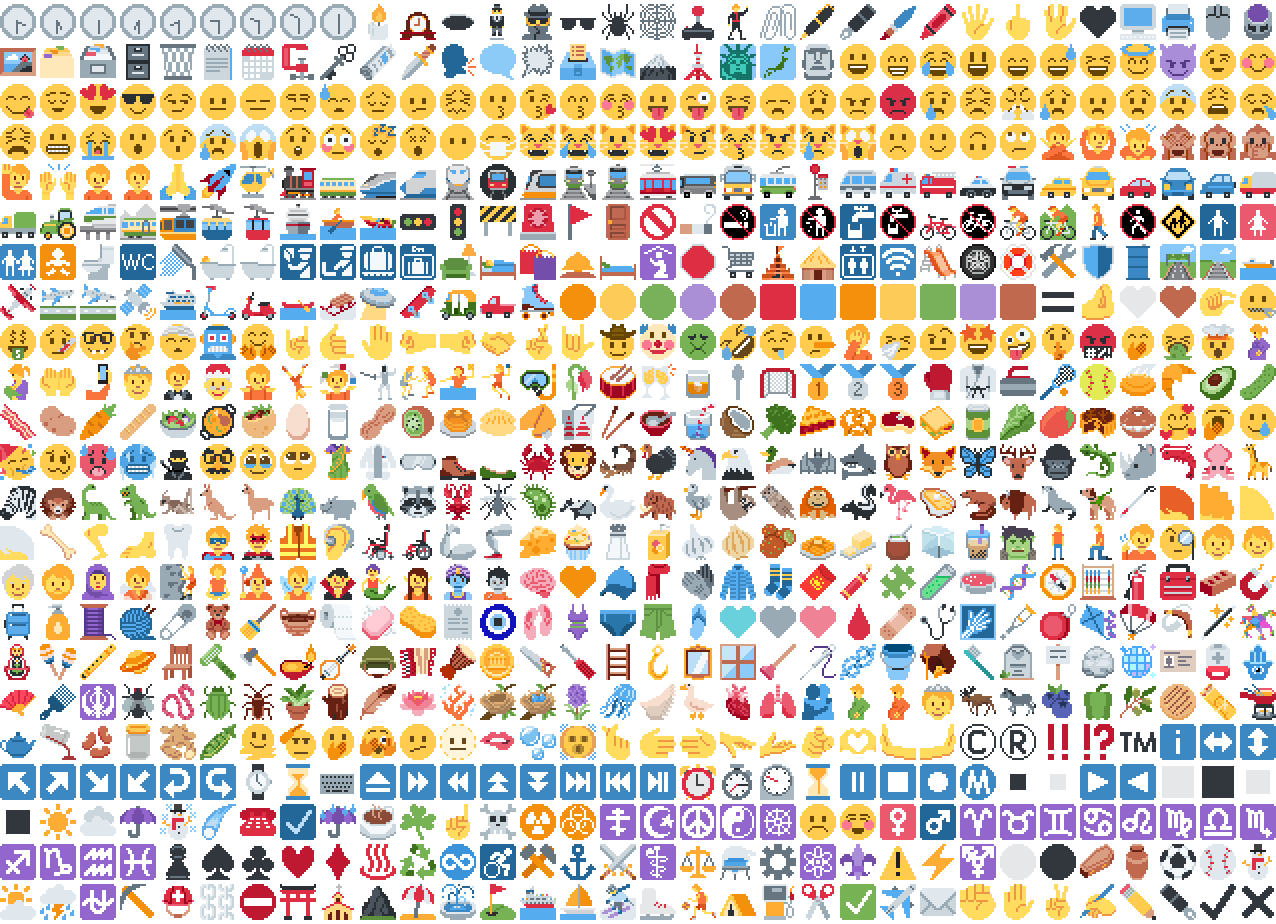
*Just some of the emoji in the pack*
## Installation
Please download the .zip file from the Versions section, put it in your
resource packs folder and select it for use in-game.
You can also embed this pack into another pack,
for use on a server or custom world for example.
Please remember to credit the project as it is
one of the requirements of the project license.
## Basic usage
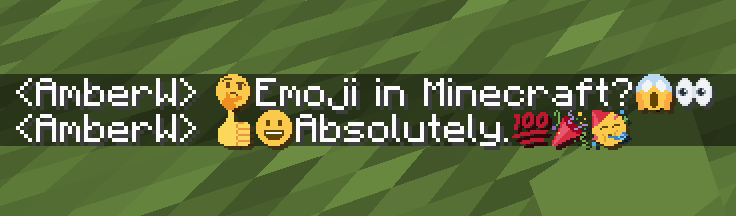
Most standard emoji characters will just work if you copy and paste them in or
use some kind of emoji input. For example, try copying emoji from
this site or using the Windows emoji picker (Win+.).
However, emoji that consist of sequences of multiple character are not supported
by vanilla and will show up as multiple, separate characters. Sorry.
See below for ways to develop around this.
Sample of Emoji to Copy-Paste
© ® ‼ ⁉ ™ ℹ ↔ ↕ ↖ ↗ ↘ ↙ ↩ ↪ ⌚ ⌛ ⌨ ⏏ ⏩ ⏪ ⏫ ⏬ ⏭ ⏮ ⏯ ⏰ ⏱ ⏲ ⏳ ⏸ ⏹ ⏺ Ⓜ ▪ ▫ ▶ ◀ ◻ ◼ ◽ ◾ ☀ ☁ ☂ ☃ ☄ ☎ ☑ ☔ ☕ ☘ ☝ ☠ ☢ ☣ ☦ ☪ ☮ ☯ ☸ ☹ ☺ ♀ ♂ ♈ ♉ ♊ ♋ ♌ ♍ ♎ ♏ ♐ ♑ ♒ ♓ ♟ ♠ ♣ ♥ ♦ ♨ ♻ ♾ ♿ ⚒ ⚓ ⚔ ⚕ ⚖ ⚗ ⚙ ⚛ ⚜ ⚠ ⚡ ⚧ ⚪ ⚫ ⚰ ⚱ ⚽ ⚾ ⛄ ⛅ ⛈ ⛎ ⛏ ⛑ ⛓ ⛔ ⛩ ⛪ ⛰ ⛱ ⛲ ⛳ ⛴ ⛵ ⛷ ⛸ ⛹ ⛺ ⛽ ✂ ✅ ✈ ✉ ✊ ✋ ✌ ✍ ✏ ✒ ✔ ✖ ✝ ✡ ✨ ✳ ✴ ❄ ❇ ❌ ❎ ❓ ❔ ❕ ❗ ❣ ❤ ➕ ➖ ➗ ➡ ➰ ➿ ⤴ ⤵ ⬅ ⬆ ⬇ ⬛ ⬜ ⭐ ⭕ 〰 〽 ㊗ ㊙ 🀄 🃏 🅰 🅱 🅾 🅿 🆎 🆑 🆒 🆓 🆔 🆕 🆖 🆗 🆘 🆙 🆚 🇦 🇧 🇨 🇩 🇪 🇫 🇬 🇭 🇮 🇯 🇰 🇱 🇲 🇳 🇴 🇵 🇶 🇷 🇸 🇹 🇺 🇻 🇼 🇽 🇾 🇿 🈁 🈂 🈚 🈯 🈲 🈳 🈴 🈵 🈶 🈷 🈸 🈹 🈺 🉐 🉑 🌀 🌁 🌂 🌃 🌄 🌅 🌆 🌇 🌈 🌉 🌊 🌋 🌌 🌍 🌎 🌏 🌐 🌑 🌒 🌓 🌔 🌕 🌖 🌗 🌘 🌙 🌚 🌛 🌜 🌝 🌞 🌟 🌠 🌡 🌤 🌥 🌦 🌧 🌨 🌩 🌪 🌫 🌬 🌭 🌮 🌯 🌰 🌱 🌲 🌳 🌴 🌵 🌶 🌷 🌸 🌹 🌺 🌻 🌼 🌽 🌾 🌿 🍀 🍁 🍂 🍃 🍄 🍅 🍆 🍇 🍈 🍉 🍊 🍋 🍌 🍍 🍎 🍏 🍐 🍑 🍒 🍓 🍔 🍕 🍖 🍗 🍘 🍙 🍚 🍛 🍜 🍝 🍞 🍟 🍠 🍡 🍢 🍣 🍤 🍥 🍦 🍧 🍨 🍩 🍪 🍫 🍬 🍭 🍮 🍯 🍰 🍱 🍲 🍳 🍴 🍵 🍶 🍷 🍸 🍹 🍺 🍻 🍼 🍽 🍾 🍿 🎀 🎁 🎂 🎃 🎄 🎅 🎆 🎇 🎈 🎉 🎊 🎋 🎌 🎍 🎎 🎏 🎐 🎑 🎒 🎓 🎖 🎗 🎙 🎚 🎛 🎞 🎟 🎠 🎡 🎢 🎣 🎤 🎥 🎦 🎧 🎨 🎩 🎪 🎫 🎬 🎭 🎮 🎯 🎰 🎱 🎲 🎳 🎴 🎵 🎶 🎷 🎸 🎹 🎺 🎻 🎼 🎽 🎾 🎿 🏀 🏁 🏂 🏃 🏄 🏅 🏆 🏇 🏈 🏉 🏊 🏋 🏌 🏍 🏎 🏏 🏐 🏑 🏒 🏓 🏔 🏕 🏖 🏗 🏘 🏙 🏚 🏛 🏜 🏝 🏞 🏟 🏠 🏡 🏢 🏣 🏤 🏥 🏦 🏧 🏨 🏩 🏪 🏫 🏬 🏭 🏮 🏯 🏰 🏳 🏴 🏵 🏷 🏸 🏹 🏺 🏻 🏼 🏽 🏾 🏿 🐀 🐁 🐂 🐃 🐄 🐅 🐆 🐇 🐈 🐉 🐊 🐋 🐌 🐍 🐎 🐏 🐐 🐑 🐒 🐓 🐔 🐕 🐖 🐗 🐘 🐙 🐚 🐛 🐜 🐝 🐞 🐟 🐠 🐡 🐢 🐣 🐤 🐥 🐦 🐧 🐨 🐩 🐪 🐫 🐬 🐭 🐮 🐯 🐰 🐱 🐲 🐳 🐴 🐵 🐶 🐷 🐸 🐹 🐺 🐻 🐼 🐽 🐾 🐿 👀 👁 👂 👃 👄 👅 👆 👇 👈 👉 👊 👋 👌 👍 👎 👏 👐 👑 👒 👓 👔 👕 👖 👗 👘 👙 👚 👛 👜 👝 👞 👟 👠 👡 👢 👣 👤 👥 👦 👧 👨 👩 👪 👫 👬 👭 👮 👯 👰 👱 👲 👳 👴 👵 👶 👷 👸 👹 👺 👻 👼 👽 👾 👿 💀 💁 💂 💃 💄 💅 💆 💇 💈 💉 💊 💋 💌 💍 💎 💏 💐 💑 💒 💓 💔 💕 💖 💗 💘 💙 💚 💛 💜 💝 💞 💟 💠 💡 💢 💣 💤 💥 💦 💧 💨 💩 💪 💫 💬 💭 💮 💯 💰 💱 💲 💳 💴 💵 💶 💷 💸 💹 💺 💻 💼 💽 💾 💿 📀 📁 📂 📃 📄 📅 📆 📇 📈 📉 📊 📋 📌 📍 📎 📏 📐 📑 📒 📓 📔 📕 📖 📗 📘 📙 📚 📛 📜 📝 📞 📟 📠 📡 📢 📣 📤 📥 📦 📧 📨 📩 📪 📫 📬 📭 📮 📯 📰 📱 📲 📳 📴 📵 📶 📷 📸 📹 📺 📻 📼 📽 📿 🔀 🔁 🔂 🔃 🔄 🔅 🔆 🔇 🔈 🔉 🔊 🔋 🔌 🔍 🔎 🔏 🔐 🔑 🔒 🔓 🔔 🔕 🔖 🔗 🔘 🔙 🔚 🔛 🔜 🔝 🔞 🔟 🔠 🔡 🔢 🔣 🔤 🔥 🔦 🔧 🔨 🔩 🔪 🔫 🔬 🔭 🔮 🔯 🔰 🔱 🔲 🔳 🔴 🔵 🔶 🔷 🔸 🔹 🔺 🔻 🔼 🔽 🕉 🕊 🕋 🕌 🕍 🕎 🕐 🕑 🕒 🕓 🕔 🕕 🕖 🕗 🕘 🕙 🕚 🕛 🕜 🕝 🕞 🕟 🕠 🕡 🕢 🕣 🕤 🕥 🕦 🕧 🕯 🕰 🕳 🕴 🕵 🕶 🕷 🕸 🕹 🕺 🖇 🖊 🖋 🖌 🖍 🖐 🖕 🖖 🖤 🖥 🖨 🖱 🖲 🖼 🗂 🗃 🗄 🗑 🗒 🗓 🗜 🗝 🗞 🗡 🗣 🗨 🗯 🗳 🗺 🗻 🗼 🗽 🗾 🗿 😀 😁 😂 😃 😄 😅 😆 😇 😈 😉 😊 😋 😌 😍 😎 😏 😐 😑 😒 😓 😔 😕 😖 😗 😘 😙 😚 😛 😜 😝 😞 😟 😠 😡 😢 😣 😤 😥 😦 😧 😨 😩 😪 😫 😬 😭 😮 😯 😰 😱 😲 😳 😴 😵 😶 😷 😸 😹 😺 😻 😼 😽 😾 😿 🙀 🙁 🙂 🙃 🙄 🙅 🙆 🙇 🙈 🙉 🙊 🙋 🙌 🙍 🙎 🙏 🚀 🚁 🚂 🚃 🚄 🚅 🚆 🚇 🚈 🚉 🚊 🚋 🚌 🚍 🚎 🚏 🚐 🚑 🚒 🚓 🚔 🚕 🚖 🚗 🚘 🚙 🚚 🚛 🚜 🚝 🚞 🚟 🚠 🚡 🚢 🚣 🚤 🚥 🚦 🚧 🚨 🚩 🚪 🚫 🚬 🚭 🚮 🚯 🚰 🚱 🚲 🚳 🚴 🚵 🚶 🚷 🚸 🚹 🚺 🚻 🚼 🚽 🚾 🚿 🛀 🛁 🛂 🛃 🛄 🛅 🛋 🛌 🛍 🛎 🛏 🛐 🛑 🛒 🛕 🛖 🛗 🛜 🛝 🛞 🛟 🛠 🛡 🛢 🛣 🛤 🛥 🛩 🛫 🛬 🛰 🛳 🛴 🛵 🛶 🛷 🛸 🛹 🛺 🛻 🛼 🟠 🟡 🟢 🟣 🟤 🟥 🟦 🟧 🟨 🟩 🟪 🟫 🟰 🤌 🤍 🤎 🤏 🤐 🤑 🤒 🤓 🤔 🤕 🤖 🤗 🤘 🤙 🤚 🤛 🤜 🤝 🤞 🤟 🤠 🤡 🤢 🤣 🤤 🤥 🤦 🤧 🤨 🤩 🤪 🤫 🤬 🤭 🤮 🤯 🤰 🤱 🤲 🤳 🤴 🤵 🤶 🤷 🤸 🤹 🤺 🤼 🤽 🤾 🤿 🥀 🥁 🥂 🥃 🥄 🥅 🥇 🥈 🥉 🥊 🥋 🥌 🥍 🥎 🥏 🥐 🥑 🥒 🥓 🥔 🥕 🥖 🥗 🥘 🥙 🥚 🥛 🥜 🥝 🥞 🥟 🥠 🥡 🥢 🥣 🥤 🥥 🥦 🥧 🥨 🥩 🥪 🥫 🥬 🥭 🥮 🥯 🥰 🥱 🥲 🥳 🥴 🥵 🥶 🥷 🥸 🥹 🥺 🥻 🥼 🥽 🥾 🥿 🦀 🦁 🦂 🦃 🦄 🦅 🦆 🦇 🦈 🦉 🦊 🦋 🦌 🦍 🦎 🦏 🦐 🦑 🦒 🦓 🦔 🦕 🦖 🦗 🦘 🦙 🦚 🦛 🦜 🦝 🦞 🦟 🦠 🦡 🦢 🦣 🦤 🦥 🦦 🦧 🦨 🦩 🦪 🦫 🦬 🦭 🦮 🦯 🦰 🦱 🦲 🦳 🦴 🦵 🦶 🦷 🦸 🦹 🦺 🦻 🦼 🦽 🦾 🦿 🧀 🧁 🧂 🧃 🧄 🧅 🧆 🧇 🧈 🧉 🧊 🧋 🧌 🧍 🧎 🧏 🧐 🧑 🧒 🧓 🧔 🧕 🧖 🧗 🧘 🧙 🧚 🧛 🧜 🧝 🧞 🧟 🧠 🧡 🧢 🧣 🧤 🧥 🧦 🧧 🧨 🧩 🧪 🧫 🧬 🧭 🧮 🧯 🧰 🧱 🧲 🧳 🧴 🧵 🧶 🧷 🧸 🧹 🧺 🧻 🧼 🧽 🧾 🧿 🩰 🩱 🩲 🩳 🩴 🩵 🩶 🩷 🩸 🩹 🩺 🩻 🩼 🪀 🪁 🪂 🪃 🪄 🪅 🪆 🪇 🪈 🪐 🪑 🪒 🪓 🪔 🪕 🪖 🪗 🪘 🪙 🪚 🪛 🪜 🪝 🪞 🪟 🪠 🪡 🪢 🪣 🪤 🪥 🪦 🪧 🪨 🪩 🪪 🪫 🪬 🪭 🪮 🪯 🪰 🪱 🪲 🪳 🪴 🪵 🪶 🪷 🪸 🪹 🪺 🪻 🪼 🪽 🪿 🫀 🫁 🫂 🫃 🫄 🫅 🫎 🫏 🫐 🫑 🫒 🫓 🫔 🫕 🫖 🫗 🫘 🫙 🫚 🫛 🫠 🫡 🫢 🫣 🫤 🫥 🫦 🫧 🫨 🫰 🫱 🫲 🫳 🫴 🫵 🫶 🫷 🫸
Also, check out the 9x version that blends right into the default font!
## Supported mods
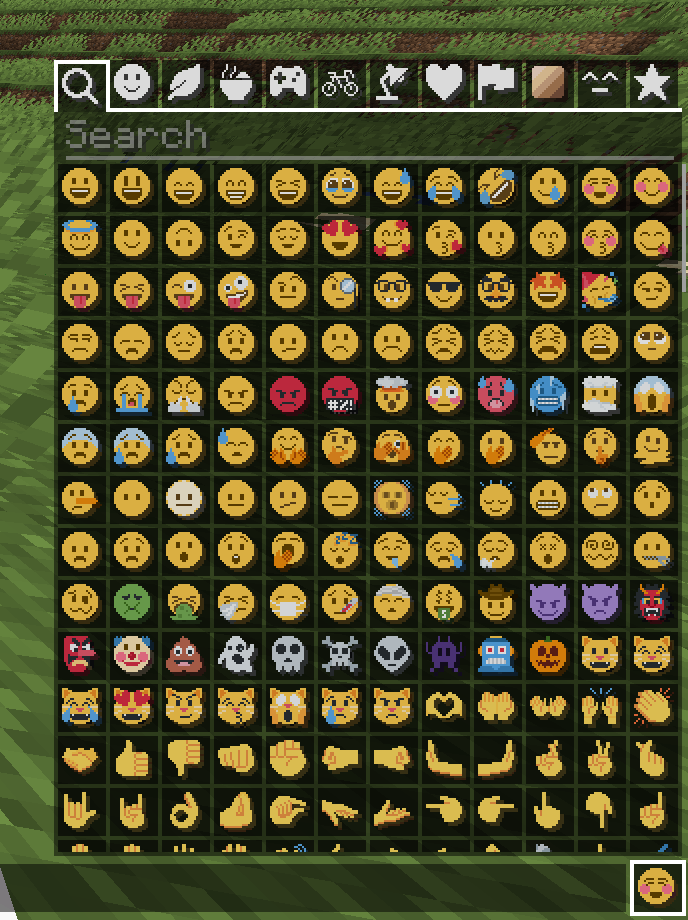
### Symbol Chat
Easy to use emoji and symbol picker
## Remapped characters (for developers)
In order to have any support for emoji consisting of sequences they have been
remapped to unused single characters. An index of these can be found in
/assets/emoji_remappings/lang/en_us.json.
For example, `ud83dudc69u200dud83dudd2c` (👩+🔬=👩🔬)
is mapped to `udb80udf30` using this translation snippet:
“`json
“ud83dudc69u200dud83dudd2c”: “udb80udf30”
“`
**Please note that vanilla has no mechanism to
automatically convert to the remapped form.**
A custom emoji picker or some kind of mod/plugin is
required to make using these a smooth experience.
Because the index acts as a language file, a server side chat listener
could detect emoji sequences and turn them into translations like this one:
“`json
{“translate”: “ud83dudc69u200dud83dudd2c”}
“`
Any client with the pack installed can then perform the remapping for the server.
If the pack is not installed or the sequence is not found then it will just
fall back to displaying the sequence. This means that the server doesn’t need a
complete list of emoji sequences, just a way to detect potential ones.
(The Unicode website
contains data files describing what is an emoji.)
## Shortcodes (for developers)
Shortcodes are a popular way to insert emoji by name. An index of shortcodes
can be found in /assets/emoji_shortcodes/lang/en_us.json.
For example, `:thinking:` is mapped to `ud83eudd14` (🤔):
“`json
“thinking”: “ud83eudd14”
“`
Emoji that need remapping already map to the remapped version.
**Please note that vanilla has no mechanism to
automatically convert shortcodes into emoji.**
Some kind of mod/plugin is required.
Because the index acts as a language file, a server side chat listener could
detect shortcodes and turn them into translations like this one:
“`json
{“translate”: “:thinking:”}
“`
Any client with the pack installed can then convert it for the server. If the
pack is not installed or the shortcode is not found then it will just fall back
to displaying the shortcode. This means that the server doesn’t need a complete
list of shortcodes, just a way to detect potential ones by finding substrings
beginning and ending with a colon `:`.
### Custom emoji?
Custom emoji could be created in a similar way by adding them to unused code
points of the default font and adding a translation with a shortcode.
For example, this translation snippet adds the shortcode `:pog:` for the
character `uE502`:
“`json
“:pog:”: “uE502”
“`
## Reverse shortcodes (for developers)
Maybe you want to display a name for each emoji, in some hover text for example.
That is where reverse shortcodes come in. An index of these can be found in
/assets/emoji_shortcodes_reverse/lang/en_us.json.
For example, `u200cud83eudd14` (`` + 🤔) is mapped to `:thinking:` using
this translation snippet:
“`json
“u200cud83eudd14”: “:thinking:”
“`
`u200c` is added to each entry to allow the index to be used as a language file
without conflicting with the other indexes. If the pack is not installed or the
emoji is not found then it will just fall back to displaying the characters,
including the invisible `u200c`.
A server side chat listener could detect shortcodes and
turn them into emoji with tooltips like this one:
“`json
{“translate”: “:thinking:”, “hoverEvent”: {“action”: “show_text”, “contents”: “:thinking:”}}
“`
With reverse shortcodes, it could also detect emoji and
emoji sequences and also give them tooltips like this one:
“`json
{“translate”:”ud83eudd14″,”hoverEvent”:{“action”:”show_text”,”contents”:{“translate”:”u200cud83eudd14″}}}
“`
## License
Graphics based on Twemoji Copyright (c) 2018 Twitter, Inc and other contributors, licensed under Creative Commons Attribution 4.0 International
Pixel art and resource pack adaptation Copyright (c) 2020 AmberW, licensed under Creative Commons Attribution 4.0 International
Pick Block Pro


# **Pick Block Pro**
Pick Block: Get the block/item of what you’re looking at in creative or switch to that block/item in survival.
This mod is an advanced version of this and adds a lot of extra features (see below)
**Important:**
This mod replaces the default Pick Block, however the ID and Tool picker use their own keybindings.
## **Features**
Most things below are configurable in the config settings using the config file or Mod Menu
– In survival the block picker will now also search through item-containers like shulkers that are inside your inventory
– Holding ALT while picking will add block-state data as NBT to the block/item
(stacks with CTRL for block-entity data)
– Holding CTRL while Entity picking will add entity data as NBT to the item:
– Copies mob data and adds it to the spawn egg
– Copies armor stands with their items and pose
– Copies item frames including the framed item
– Copies painting variants
– Pick block extra things:
– Pick fire and get a flint & steel (1.16+)
– Pick the sun or moon and get a light block (1.17+)
Cycle through the light levels by picking the sun or moon while holding the light block
– Pick a player and get the head of that player
– Pick falling blocks
– Pick fluids and get a bucket of the fluid (disabled by default)
– Or even decide yourself which item you get from a block or entity when using pick block
– Extended Pick Block range, decide how far the picker should be able to reach
– Lock inventory slots to prevent the picker from switching or replacing the item in that slot
– Use the Tool Picker and get the best available tool to break the block or kill the entity
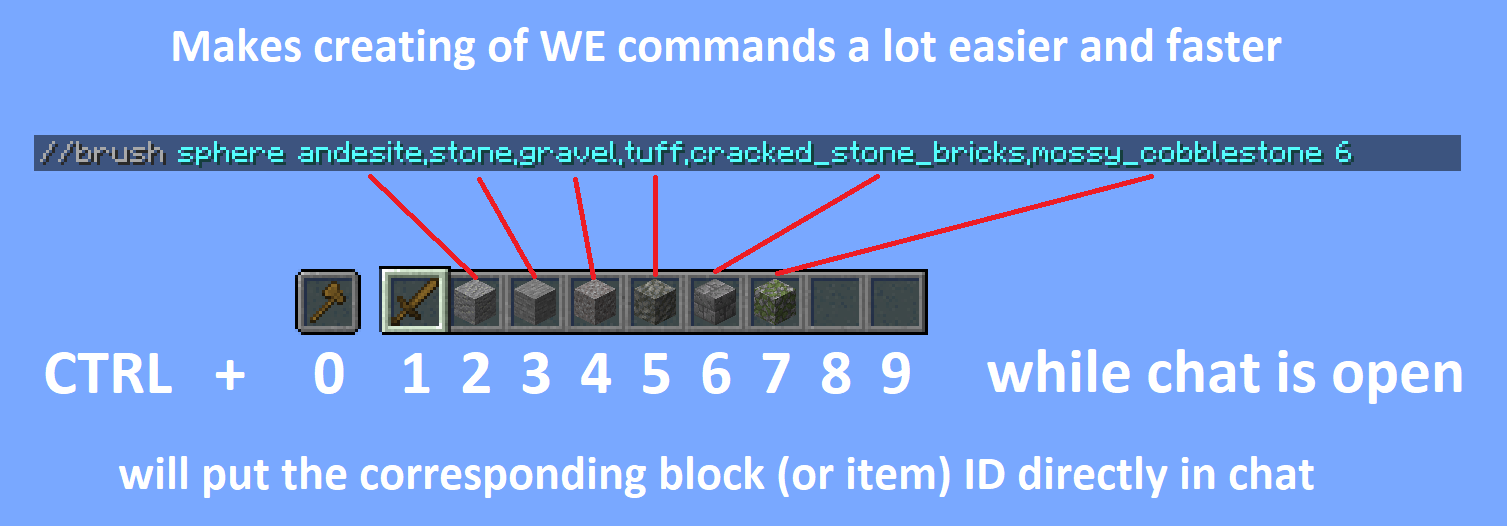
– Copy ID’s of hotbar blocks/items directly into your chat, for easy WorldEdit command creation
(Use CTRL + 0 through 9 while your chat is open, 0 is for the off hand slot)
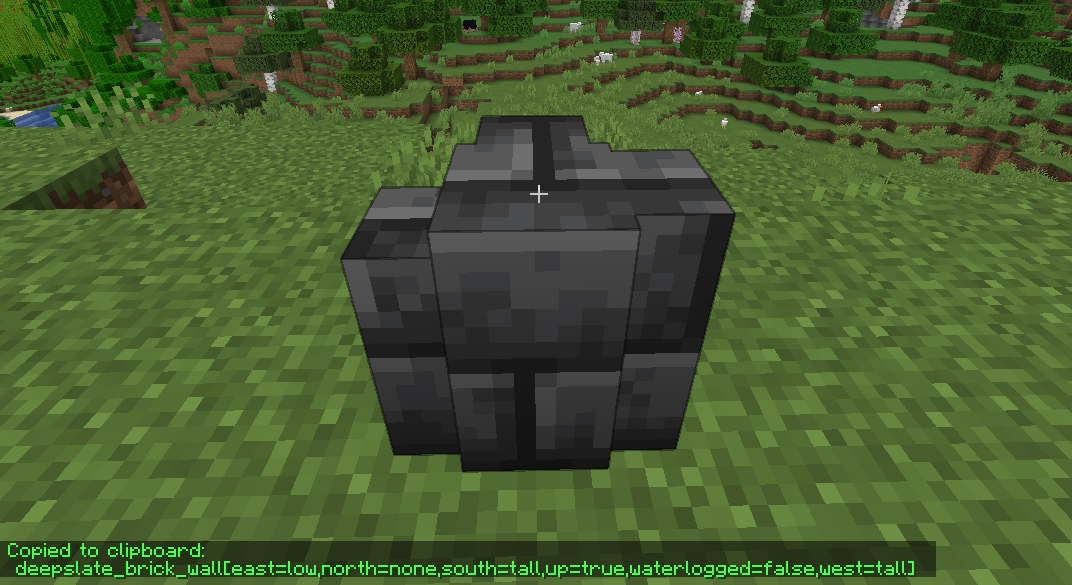
– Pick ID’s of blocks in the world with the ID Picker and copy them directly to your clipboard
## **Detailed explanations**
Block Picking with item-containers (shulkers / bundles)
When picking a block in survival the mod will first search through all the items in your inventory. If it can’t find the item, it’ll search containers like shulkers and bundles that are inside the inventory. If found, the mod will move the container with the highest amount of that item to the player’s main hand. This should work with all item-containers that work in the same way as the shulker or bundle do.
Hold ALT for block state copying
You might already know it’s possible to hold CTRL while block picking to copy block-entity data, such as player skulls and banners with patterns. This mod allows on top of that to also copy block-state data when holding ALT, this includes for example if a campfire/candle is lit or not and also the rotation of blocks like stairs. (There are many more things you can copy with this, see wiki link for the full list)
This feature was inspired by the Pick-BlockState mod by Minenash.
Hold CTRL for entity data copying
Just like how you can pick block-entity data, now you can also pick entity data. This will for example copy most data of the mob and put it inside the spawn egg as NBT data. This will also work for things like armor stands, item frames (copying what’s inside of them) and paintings (copying the exact variant of the painting).
Extended pick block range
By default Minecraft only allows to pick blocks that are within reaching distance (3 blocks). This mod however allows to pick blocks at a distance of 100 blocks away and this can even be set way higher (or lower) if so desired. No need anymore to fly all the way over to a block you’d like to pick.
Configure which item you should get from a block/entity
Pick Block Pro comes with an `overrides.json` config file. Within this file you can configure which item you should get when picking a block or entity. This also has full support for NBT data.
The file already includes some overrides for blocks and entities that didn’t have any pick stack.
The overrides can be reloaded in game with the command: `/pbp reload`
**Default overrides:**
“`json
{
“Block to ItemStack”: {
“minecraft:fire”: “minecraft:flint_and_steel”,
“minecraft:soul_fire”: “minecraft:flint_and_steel”,
“minecraft:frosted_ice”: “minecraft:ice”
},
“Entity to ItemStack”: {
“minecraft:tnt”: “minecraft:tnt”,
“minecraft:fireball”: “minecraft:fire_charge”,
“minecraft:wither”: “minecraft:wither_spawn_egg”,
“minecraft:ender_dragon”: “minecraft:ender_dragon_spawn_egg”,
“minecraft:giant”: “minecraft:zombie_spawn_egg{EntityTag:{id:giant,CustomName:”},display:{Name:'{“text”:”Giant Spawn Egg”,”color”:”light_purple”,”italic”:”false”}’}}”,
“minecraft:illusioner”: “minecraft:evoker_spawn_egg{EntityTag:{id:illusioner,CustomName:”},display:{Name:'{“text”:”Illusioner Spawn Egg”,”color”:”light_purple”,”italic”:”false”}’}}”
}
}
“`
Lock inventory slots
By default Minecraft will first fill in all empty slots in the hotbar when using pick block, however once the hotbar is completely full it’ll replace the item in your current selected slot. This item might actually be something you’d prefer to keep. This mod lets you lock any slots you’d like in the config settings. When locked, this mod will still place an item inside that slot if it’s empty. However once an item/block is located in a locked slot, this mod will skip that slot (keeping the item/block safe) and use the next available slot instead.
Tool Picking
When using the Tool Picker this mod will provide you with the best tool for the job. In creative you’ll get a fully enchanted tool (configurable), but in survival it’ll go through your inventory and search for the best tool instead. If it’s able to find a suitable tool it’ll switch it to your current selected slot.
Hotbar block/item ID copy
Copy the ID’s of blocks/items from your hotbar directly in the chat when it’s open. Making it a lot easier and faster to create WE commands. Especially great for making brushes with a lot of different blocks. Hold CTRL + 0 through 9 while your chat is open, 0 is for the off hand slot.
Pick ID’s
Ever wrote a WE command using block ID’s with a lot of properties? This mod will make that a lot easier by allowing you to pick the ID including properties of the block you’re looking at directly into your clipboard. Once picked you can then paste this ID when writing out your command.
When using the ID picker it’s also possible to copy (block)entity data to the clipboard by holding CTRL.
## **Versions & Dependencies**
1.19+
**Required**:
Fabric API
Cloth Config API (Is needed to make the config work)
**Optional:**
Mod Menu (This mod allows you to edit the configs in game)
1.16 – 1.18
**Required**:
Fabric API (0.31.0 or later)
**Optional:**
Mod Menu (This mod allows you to edit the configs in game)
**Already included/embedded:**
Cloth Config API (Is needed to make the config work)
1.14 – 1.15
**Required:**
Fabric API (0.14.0 or later)
**Optional:**
Mod Menu (This mod allows you to edit the configs in game)
**Already included/embedded:**
Auto Config Updated API (Is needed to make the config work)
Cloth Config API (Required for Auto Config)
perfect Clear Glass
this resource pack uses continuity/optifine contiuous texture feature for glass.
but removes extra dots in the glass texture and makes it compeletly clear.
Peace Of Mind Music Disc
This texture pack replaces the music disc “13” and replaces it with the song “Purity” by A$AP Rocky ft. Frank Ocean. This makes it so that the name of the music disc is changed, and the music from that song is played. This music is from the album “Testing,” featuring many different artists, but for Purity, it features Frank Ocean.
Patrix Background New
ENGLISH
## !!!ATTENTION!!!
### !!!There are no panoramas in “Addons”!!!
### Only titles for panoramas!
The author of Patrix Background is the author of Patrix Background New.
Patrix Background – not an official texture pack for Patrix changing the background, logo and loading screen!
РУССКИЙ
## !!!ВНИМАНИЕ!!!
### !!!В “Addons” нету панорам!!!
### Только титулы для панорам!
Автор Patrix Background является автором Patrix Background New.
Patrix Background – не официальный текстур пак для Patrix изменяющий фон, логотип и экран загрузки!
Version: **1.4**
For Minecraft:
1.1 – 1.19.4 rc3-1.20.2
**1.2-1.4 – 1.19.4 rc3-26.1 snapshot 7+**
Addons:
1. **Halloween**
2. **Christhmas**
3. **Realistic**
4. **Halloween Remake**
5. **Simple**
6. **Neon**
### PlanetMinecraft page (Full HD Gallery): https://www.planetminecraft.com/texture-pack/patrix-background/
### Old Modrinth page: https://modrinth.com/resourcepack/patrix-background-no-official
Patch’s Extra Eevees [Cobblemon]
# Welcome to Patch’s Extra Eevees!
This is a mod for Cobblemon that adds in 10 Eeveelutions so there is an Eeveelution for all types. There are also edits to the Eevee species file to allow for these evolutions.
### This project is both a data pack and a resource pack, and needs to be loaded into both locations!
# Features
– 10 extra evolutions for Eevee, that can either be evolved or found naturally in the world
– Movepools include support for egg moves, TMs, and move tutors
– Animations for idle, faint, sleeping, blinking, walking, and swimming/flying (if applicable)
– Normal and Shiny textures
– Cry sounds when they are sent out
– Pokedex functionality; the Eeveelutions should show up as entries 9990 to 9999 under their own regional dex entry.
– To make thematic use of all the available Evolution Stones, Umbreon and Espeon have been modified starting with version 2.0 to evolve with Moon Stones and Sun Stones respectively. If you’d prefer that Umbreon and Espeon retain their original evolution method, please download the NoEVO version.
– Minimap icons (If you use Xaeros Minimap). Note that if you also use E19 – Cobblemon Minimap Icons, this resource pack needs to be ABOVE E19 in order for the icons to show up properly.
# Mod Dependencies, Conflicts, and Integrations
– Requires whatever you need to run Cobblemon, as well as the Cobblemon mod itself
– It should work with mods that add breeding, TMs, and move tutors
– These Eeveelutions use Pokedex entries 9990 to 9999. Mods that use these entries too may cause conflicts.
– The mod was made and tested for the following versions. Use in other versions/setups at your own risk:
– 1.0 – Cobblemon 1.5.2 Fabric and Minecraft 1.20.1
– 2.0 – Cobblemon 1.6.1 Fabric and Minecraft 1.21.1
– 3.0 – Cobblemon 1.7.1 Fabric and Minecraft 1.21.1.
# Feedback
This is my first attempt at Minecraft modding. If you find any bugs or issues with the mod, please leave feedback in the corresponding support thread of the Cobblemon Discord.
# Meet the Eeveelutions!
### —–Antenneon (Bug)—–
**Pokedex**
“`
Antenneon was first documented by an insect scientist studying the Bug type.
An Eevee he was watching for a friend had been morphed by the silvery Venomoth
scales that got stuck in its thick fur.
“`
**Stats**
“`
HP: 110
Attack: 65
Defence: 60
Special Attack: 95
Special Defence: 130
Speed: 65
Ability: Shield Dust
Hidden Ability: Intimidate
“`
**Spawn Location/Evolution Method**
Spoiler
– Spawn Locations: Jungle/Forest Biomes (night only, ultra rare)
– Evolution Method: Trade Evolution (While holding Honey Bottle or Honeycomb)
### —–Battaleon (Fighting)—–
**Pokedex**
“`
Legend has it the first Battaleon was an Eevee that practiced its Double Kick constantly,
doing 100 kicks a day until it awakened its fighting spirit. Battaleon seek out places
of conflict to train.
“`
**Stats**
“`
HP: 65
Attack: 130
Defence: 95
Special Attack: 65
Special Defence: 60
Speed: 110
Ability: Vital Spirit
Hidden Ability: Defiant
“`
**Spawn Location/Evolution Method**
Spoiler
– Spawn Locations: Highlands Biomes (ultra rare), Illager Structures (rare)
– Evolution Method: Move Evolution (Use Double Kick 50 times) — _NOTE: Until they are integrated into Cobblemon, Eevee’s Learnset has been modified to learn Double Kick naturally to accomodate this evolution without needing Egg Move or Move Tutor access._
### —–Bouldeon (Rock)—–
**Pokedex**
“`
Crystal growths on its tail and head are used for defense. Eevee that venture deep
underground are sometimes changed by the latent energies of buried evolution stones,
their skin becoming hard as diamond.
“`
**Stats**
“`
HP: 110
Attack: 95
Defence: 130
Special Attack: 65
Special Defence: 60
Speed: 65
Ability: Solid Rock
Hidden Ability: Rough Skin
“`
**Spawn Location/Evolution Method**
Spoiler
– Spawn Locations: Cave and Deep Dark biomes (ultra rare, or rare if near gemstones)
– Evolution Method: Shiny Stone
### —–Duneon (Ground)—–
**Pokedex**
“`
Eevee who live in dry, desert environments will Dig into the ground during
the day to avoid the heat. The sand escaping their thick fur makes them seem
like a walking sandstorm, which they eventually evolve into.
“`
**Stats**
“`
HP: 130
Attack: 110
Defence: 95
Special Attack: 65
Special Defence: 60
Speed: 65
Ability: Levitate
Hidden Ability: Sand Spit
“`
**Spawn Location/Evolution Method**
Spoiler
– Spawn Locations: Desert, Savanna, and Sandy biomes (ultra rare, or rare at night)
– Evolution Method: Move Evolution (Use Dig 25 times) — _NOTE: Until they are integrated into Cobblemon, Eevee’s Learnset has been modified to learn Dig naturally to accomodate this evolution without needing TM or Move Tutor access._
### —–Kamileon (Normal)—–
**Pokedex**
“`
Some Eevee who reach maturity without evolving lose the ability to evolve
as their unstable DNA settles. They can still temporarily shift their type.
Rarely found in urban environments where there is little adapation.
“`
**Stats**
“`
HP: 130
Attack: 65
Defence: 60
Special Attack: 95
Special Defence: 65
Speed: 110
Ability: Color Change
Hidden Ability: Protean
“`
**Spawn Location/Evolution Method**
Spoiler
– Spawn Locations: Urban biomes (ultra rare)
– Evolution Method: Level 30
### —–Magneon (Steel)—–
**Pokedex**
“`
Eevee that live near deposits of metal can develop magnetic fields of their own,
attracting metal particles from their surroundings. Magneon then roll around in
lava to form the metal into armored skin.
“`
**Stats**
“`
HP: 95
Attack: 65
Defence: 130
Special Attack: 65
Special Defence: 110
Speed: 60
Ability: Oblivious
Hidden Ability: Analytic
“`
**Spawn Location/Evolution Method**
Spoiler
– Spawn Locations: Volcanic biomes (ultra rare, or rare near lava), Cave and Deep Dark biomes near lava (rare)
– Evolution Method: Trade Evolution (While holding Metal Coat)
### —–Mytheon (Dragon)—–
**Pokedex**
“`
Prolonged exposure to mystical scales and intense emotion has been documented
to unlock frightening power in some Eevee. Mytheon tend to make lairs in
isolated locations far from humans.
“`
**Stats**
“`
HP: 65
Attack: 130
Defence: 65
Special Attack: 110
Special Defence: 60
Speed: 95
Ability: Multiscale
Hidden Ability: Rivalry
“`
**Spawn Location/Evolution Method**
Spoiler
– Spawn Locations: Island biomes (ultra rare)
– Evolution Method: Friendship Evolution (While holding Dragon Scale)
### —–Pineon (Flying)—–
**Pokedex**
“`
Pineon cannot truly fly, but instead leap off of peaks and glide to their
destination, using their ears and tail to expertly ride the wind. The tribe
that first discovered Pineon befriended them and trained them as messengers.
“`
**Stats**
“`
HP: 65
Attack: 110
Defence: 95
Special Attack: 65
Special Defence: 60
Speed: 130
Ability: Limber
Hidden Ability: Cloud Nine
“`
**Spawn Location/Evolution Method**
Spoiler
– Spawn Locations: Peak biomes (ultra rare) and Sky Island biomes (rare)
– Evolution Method: Dawn Stone**
### —–Pompeon (Ghost)—–
**Pokedex**
“`
When saturated by the spiritual energy of Dusk Stones, Eevee is known to
evolve into a new form. They are drawn to spooky locations, their bodies a
glowing beacon in the night for wayward spirits.
“`
**Stats**
“`
HP: 95
Attack: 60
Defence: 65
Special Attack: 110
Special Defence: 65
Speed: 130
Ability: Cursed Body
Hidden Ability: Unnerve
“`
**Spawn Location/Evolution Method**
Spoiler
– Spawn Locations: Spooky biomes (ultra rare, night only)
– Evolution Method: Dusk Stone at night**
### —–Quilleon (Poison)—–
**Pokedex**
“`
Known to extract toxins from the mushrooms they eat, Quilleon will
sometimes be found around alchemists. Wild Quilleon are often aggressive,
so trainers are advised to ensure they have a strong bond before evolving.
“`
**Stats**
“`
HP: 65
Attack: 95
Defence: 110
Special Attack: 130
Special Defence: 60
Speed: 65
Ability: Toxic Debris
Hidden Ability: Anger Point
“`
**Spawn Location/Evolution Method**
Spoiler
– Spawn Locations: Swamp and Mushroom biomes (ultra rare) and Swamp Huts (rare)
– Evolution Method: Friendship Evolution (While holding a Red/Brown Mushroom or Crimson/Warped Fungus)
Painting Selector
Place a painting in the Stonecutter and choose from all of vanilla Minecraft’s paintings!
I recommend using the resource pack too, as it will visualise the paintings, but it’s not required.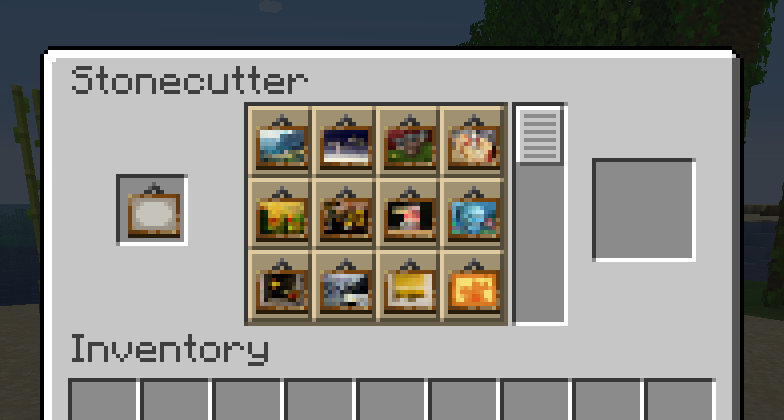
Overgrown Flowery GUI

__Become a bit closer to living out your cottagecore dreams using this GUI overhaul!__
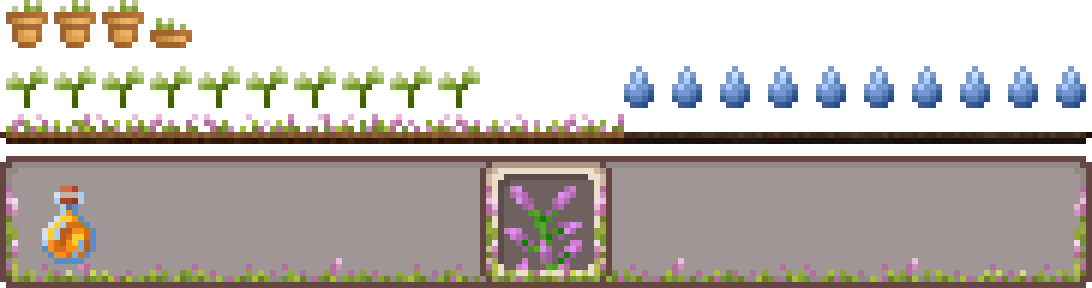
This resource pack changes your crafting inventories, armor, health, food bar, menus and more to be filled with vines and flowers. Watch flowers grow from the ground as you get exp and collect flowerpots as you gain armor!
As a fan of the Overgrown Flowery Interface mod for Stardew Valley I wanted to capture that feeling with a Minecraft Resource Pack, thus Overgrown Flowery GUI was born!
As of version 1.2+ we support integration with an ever-growing list of client side and content mods!
Supported Mods
– Advancement Plaques
– AppleSkin
– Backpacked
– Better Anvil
– Colorful Hearts
– Compact Storage
– Cosmetic Armor Reworked
– Crafting Tweaks
– Curios Api
– DynamicPack
– Emi
– Fabric
– Farmer’s Delight
– Forge
– Inventory Profiles next
– Inventory Sorting
– Iron Chests
– Jade
– Just Enough Items
– Just Enough Professions
– Just Enough Resources
– [[Let’s Do] Vinery](https://modrinth.com/project/1DWmBJVA)
– LibGui
– LibIPN
– Litematica
– MaLiLib
– Mod Menu
– NeoForged
– No Chat Reports
– Roughly Enough Items
– RP Renames
– Shipping Bin
– Stardew Fishing
– Tool Belt
– TrashSlot
– Trinkets
– Waystones
– Xaero’s Minimap
– Xaero’s World Map
– Zenith Attributes
Additional Support from Sunshine Hunger
Install the Sunshine Hunger addon for support with even more mods!
– Thirst Was Taken
Note that some of the Mods above like Malilib and LibGui are libraries used by multiple developers, any mods that rely on these libraries should also be supported but not specifically listed.
Keep in mind that any dependent mods may lose support if a breaking change is made in an update.
Want more of Overgrown Flowery GUI? Make sure to check out our modernized addon: Extra Flowery GUI!
If you’re only here for the hotbar, try Overgrown Flowery Hotbar.


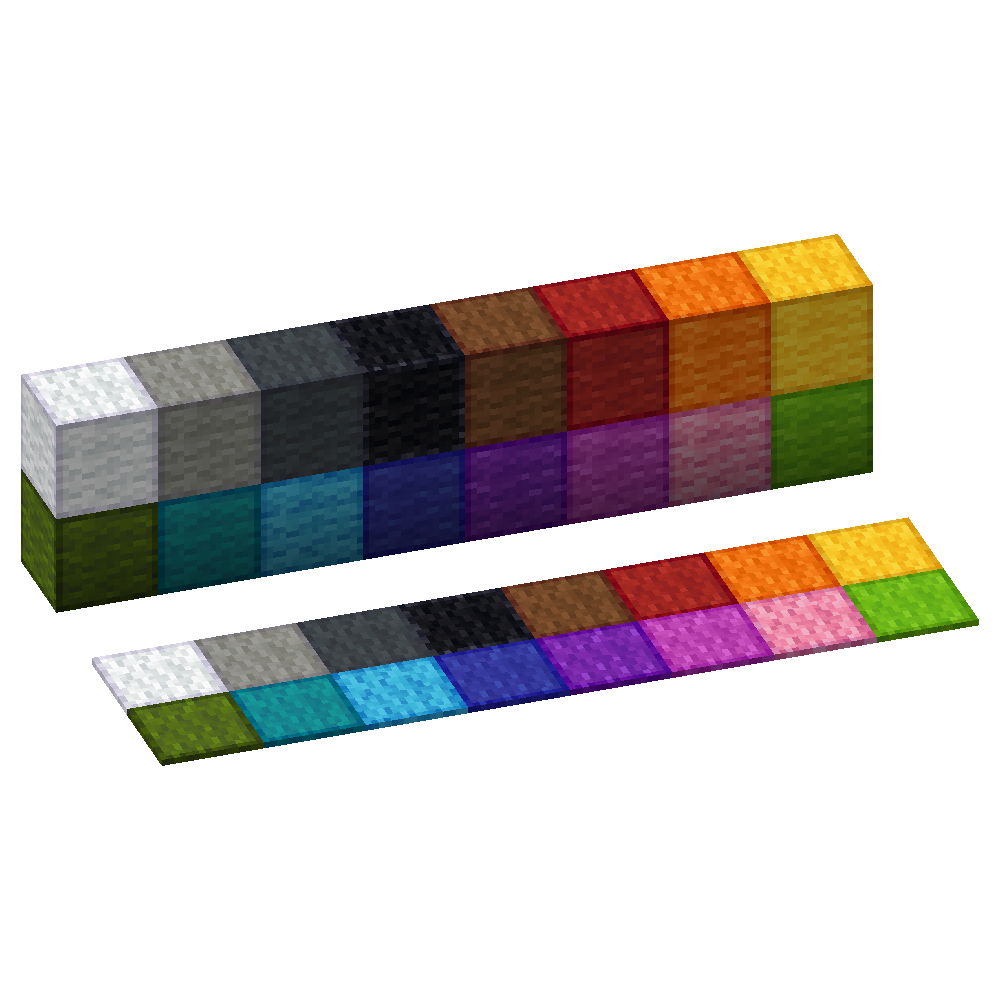
Outlined Wool
Simple and clean resource pack to add outlines to Wool blocks making them easier to see when building with wool
Ore Plus x4
🌐
English
|
中文
> **✅ Separating From [[📁 Ore Plus (Legacy)]](https://modrinth.com/datapack/ore_plus)**
>
> For organizing versions
> x2 x4 and Ultra edition, including datapack and mod version makes even more difficult to find suitable in original project.




## 📋 Overview
This datapack modifies the default ore generation in Minecraft, primarily increasing the spawn rates of certain minerals.
Created with 💗 by wen_wen
## ❇️ Features
### Efficient Resource Gathering
Less time with creepers in caves, more time for exciting things
### Native Datapack, Wide Compatibility:
Vanilla Single Play, Plungin Multiple Player Server, with or with out any Mod Loader you preferred (Forge NeoForge Fabric Quilt), this datapack works seamlessly with any type of Minecraft.
### Vanilla Feature, Clean Experience
This datapack will only affect ores in new generated chunks, keep your loaded chunks safe and untouched.
## 🖼️ Gallery
Modrinth Gallery
Compare With Other Edition

## 📖 Detail
### Rate Table
| Ore Name | Gen Rate | Gen Rates x4 | Discard Chance | Discard Chance x4 |
|———————-|———-|————–|—————-|——————–|
| Ancient Debris Large | 1 | 16 | 1 | 0.2 |
| Coal Lower | 20 | 80 | 0.5 | 0.1 |
| Coal Upper | 30 | 100 | 0 | 0 |
| Copper | 16 | 48 | 0 | 0 |
| Copper Large | 16 | 48 | 0 | 0 |
| Ancient Debris Small | 1 | 16 | 1 | 0.2 |
| Diamond | 7 | 32 | 0.5 | 0 |
| Diamond Buried | 4 | 20 | 1 | 0.4 |
| Diamond Large | 1 in 9 | 1 in 3 | 0.7 | 0 |
| Diamond Medium | 2 | 12 | 0.5 | 0 |
| Emerald | 100 | 220 | 0 | 0 |
| Gold | 4 | 20 | 0.5 | 0 |
| Nether Gold Deltas | 20 | 80 | 0 | 0 |
| Gold Extra | 50 | 200 | 0 | 0 |
| Gold Lower | [0,1] | [18,24] | 0.5 | 0 |
| Nether Gold | 10 | 40 | 0 | 0 |
| Iron Middle | 10 | 40 | 0 | 0 |
| Iron Small | 10 | 40 | 0 | 0 |
| Iron Upper | 90 | 200 | 0 | 0 |
| Lapis | 2 | 20 | 0 | 0 |
| Lapis Buried | 4 | 32 | 1 | 0.4 |
| Quartz Deltas | 32 | 100 | 0 | 0 |
| Quartz Nether | 16 | 48 | 0 | 0 |
| Redstone | 4 | 22 | 0 | 0 |
| Redstone Lower | 8 | 36 | 0 | 0 |
Gen Rates: Ore generation rates. (higher is more frequent)
Discard Chance: Discard ore generation if exposed to air. (lower is more frequent)
Refer to wiki for more details
_The names of the packs do not reflect the directly multiplied probabilities from the vanilla rates, but rather the extent to which the datapack modifies the original ore generation probabilities._
## ✅ Installation
### Download
[[⬇️ Modrinth Version List]](https://modrinth.com/datapack/ore_plus_x4/versions)
[[📁 Legacy Versions]](https://modrinth.com/datapack/ore_plus)
### Install
Strongly recommand to install at the creation of a world
How to Install Datapack
## ⚙️ Versions
### Supported
1.16.2 -26.1.2
## 📃 Contact
### Community
Discord Group
Github Discussion
### Feedback
Welcome to 📑Issue Page to submit any bugs or featuers.
## 📜 License
## 🎉 Thanks & Related Resource


I am really thanks everyone who follow or star this project,
and of course, those people who download, use and love this project are also appreciate