Zslow







# ZSlow
ZSlow is a versatile plugin designed to manage chat activity on your Minecraft server. With ZSlow, server administrators can easily control chat by enabling features such as chat pausing, slow mode, and chat logging. Whether you’re looking to maintain a more organized chat environment or implement stricter chat regulations, ZSlow provides the tools you need to manage chat activity effectively.

– **Chat Pausing:** Temporarily pause chat activity to prevent messages from being sent.
– **Slow Mode:** Limit the frequency of messages in the chat to reduce spam and maintain order.
– **Chat Logging:** Log chat messages to keep track of conversations and monitor player activity.
– **Whitelist and Blacklist:** Control who can send messages by adding players to either the whitelist or blacklist.
– **Customizable Settings:** Adjust plugin settings to suit your server’s needs and preferences.

– **/zslow enable**: Activate the chat management system.
– **/zslow disable**: Deactivate the chat management system.
– **/zslow settings**: Configure plugin settings, including chat cooldown.
– **/zslow info**: Obtain information about the plugin.
– **/zslow whitelist**:
– `/zslow whitelist add `: Add a player to the whitelist.
– `/zslow whitelist remove `: Remove a player from the whitelist.
– `/zslow whitelist list`: Display all whitelisted players.
– **/zslow blacklist**:
– `/zslow blacklist add `: Add a player to the blacklist.
– `/zslow blacklist remove `: Remove a player from the blacklist.
– `/zslow blacklist list`: Display all blacklisted players.
– **/zslow pausechat**:
– `/zslow pausechat on`: Pause the chat.
– `/zslow pausechat off`: Unpause the chat.
– **/zslow help**: Access plugin help information.
– **/zslow status**: Check the status of the chat management system.
– **/zslow reload**: Reload plugin configurations.
– **/zslow chatlogs**:
– `/zslow chatlogs on`: Enable chat logging.
– `/zslow chatlogs off`: Disable chat logging.

– `zslow.admin`: Allows access to all ZSlow commands and features.
– `zslow.whitelist`: Allows access to manage players on the whitelist.
– `zslow.blacklist`: Allows access to manage players on the blacklist.
– `zslow.info`: Allows access to view plugin information.
– `zslow.pausechat`: Allows access to pause or resume chat activity.
– `zslow.help`: Allows access to view plugin help information.
– `zslow.status`: Allows access to view the current status of chat management features.
– `zslow.reload`: Allows access to reload plugin configurations.
– `zslow.chatlogs`: Allows access to enable or disable chat logging.
– `zslow.bypass.slowmode`: Allows bypassing the slowmode restrictions in ZSlow.
– `zslow.bypass.pausechat`: Allows bypassing the pausechat restrictions in ZSlow.
– `zslow.chatlogs.exempt`: Allows bypassing the pausechat restrictions in ZSlow.
## Support
For support or assistance with the ZSlow plugin, please visit our [GitHub repository](https://github.com/zuhaz/zslow) or contact us through the SpigotMC forums or join our [Discord Server](https://discord.gg/7mhdvfgybX).
## Installation
1. Download the latest version of ZSlow from the [releases page](https://github.com/zuhaz/zslow/releases) or [SpigotMC](https://www.spigotmc.org/resources/zslow.115755/) or [Modrinth](https://modrinth.com/plugin/zslow/).
2. Place the downloaded `.jar` file in your server’s `plugins` folder.
3. Restart or reload your server.
## License
ZSlow is licensed under the MIT License. See the [LICENSE](LICENSE) file for details.
zQuests
[](https://minestrator.com/a/GROUPEZ)
**Attention, this is a free version of zQuests, you can use it but you must buy the paid version to get help!**
—
# **Features**
## ✅ 30 quest types
* **[BLOCK_BREAK](https://zquests.groupez.dev/configurations/quests#block_break)**
* **[BLOCK_PLACE](https://zquests.groupez.dev/configurations/quests#block_place)**
* **[ENTITY_KILL](https://zquests.groupez.dev/configurations/quests#entity_kill)**
* **[FARMING](https://zquests.groupez.dev/configurations/quests#farming)**
* **[FISHING](https://zquests.groupez.dev/configurations/quests#fishing)**
* **[TAME](https://zquests.groupez.dev/configurations/quests#tame)**
* **[ENCHANT](https://zquests.groupez.dev/configurations/quests#enchant)**
* **[BREW](https://zquests.groupez.dev/configurations/quests#brew)**
* **[SMELT](https://zquests.groupez.dev/configurations/quests#smelt)**
* **[CRAFT](https://zquests.groupez.dev/configurations/quests#craft)**
* **[VOTE](https://zquests.groupez.dev/configurations/quests#vote)**
* **[SELL](https://zquests.groupez.dev/configurations/quests#sell)** *(requires [zShop](https://www.spigotmc.org/resources/zshop-advanced-shop-plugin.74073/))*
* **[PURCHASE](https://zquests.groupez.dev/configurations/quests#purchase)** *(requires [zShop](https://www.spigotmc.org/resources/zshop-advanced-shop-plugin.74073/))*
* **[ENTITY_DAMAGE](https://zquests.groupez.dev/configurations/quests#entity_damage)**
* **[EXPERIENCE_GAIN](https://zquests.groupez.dev/configurations/quests#experience_gain)**
* **[HATCHING](https://zquests.groupez.dev/configurations/quests#hatching)**
* **[ITEM_CONSUME](https://zquests.groupez.dev/configurations/quests#item_consume)**
* **[ITEM_BREAK](https://zquests.groupez.dev/configurations/quests#item_break)**
* **[ITEM_MENDING](https://zquests.groupez.dev/configurations/quests#item_mending)**
* **[RESURRECT](https://zquests.groupez.dev/configurations/quests#resurrect)**
* **[JOB_LEVEL](https://zquests.groupez.dev/configurations/quests#job_level)** *(requires [zJobs](https://zjobs.groupez.dev/))*
* **[JOB_PRESTIGE](https://zquests.groupez.dev/configurations/quests#job_prestige)** *(requires [zJobs](https://zjobs.groupez.dev/))*
* **[SMITHING](https://zquests.groupez.dev/configurations/quests#smithing)**
* **[ISLAND](https://zquests.groupez.dev/configurations/quests#island)** *(requires [SuperiorSkyBlock](https://www.spigotmc.org/resources/87411/))*
* **[COMMAND](https://zquests.groupez.dev/configurations/quests#command)**
* **[CUBOID](https://zquests.groupez.dev/configurations/quests#cuboid)**
* **[CUSTOM](https://zquests.groupez.dev/configurations/quests#custom)**
* **[INVENTORY_OPEN](https://zquests.groupez.dev/configurations/quests#inventory_open)**
* **[INVENTORY_CONTENT](https://zquests.groupez.dev/configurations/quests#inventory_content)**
* **[SHEAR](https://zquests.groupez.dev/configurations/quests#shear)**
* **[LOOK_AT_BLOCK](https://zquests.groupez.dev/configurations/quests#look_at_block)**
* **[LOOK_AT_ENTITY](https://zquests.groupez.dev/configurations/quests#look_at_entity)**
—
## ✅ Integrations & extras
* **Holograms support** *(via [zEssentials](https://www.spigotmc.org/resources/zessentials-best-essentials-cmi-sunlight-alternative.118014/))*
* **Scoreboard support** *(via zEssentials)*
* **WayPoints support (1.21.8+)** *(via zEssentials)*
* **Toast messages**
* **Endless customization** – every detail is configurable
* **Optimized inventories** powered by [zMenu](https://www.spigotmc.org/resources/zmenu-ultra-complete-menu-plugin.110402/)
* **Texture-pack–friendly inventories**
* **16+ powerful [placeholders](https://zquests.groupez.dev/configurations/placeholders)**
* **Favorites & display options for players**
* **Fully configurable rewards**
* **100% open source**
* **Try before you buy** via our [Discord](http://discord.groupez.dev/)
* **Complete [documentation](https://zquests.groupez.dev/)**
* **Powerful API** to create custom quests
* **Dozens of admin & player [commands](https://zquests.groupez.dev/configurations/commands-and-permissions)**
—
# **How to install zQuests**
## Requirements
* **Java**: 21+
* **Minecraft**: 1.20.4 → 1.21.8+
* **Server software**: Spigot, Paper, Folia (and Paper forks)
* **Required plugin**: [zMenu](https://www.spigotmc.org/resources/zmenu-ultra-complete-menu-plugin.110402/)
* **Optional**: [PlaceholderAPI](https://www.spigotmc.org/resources/placeholderapi.6245/) (Folia-compatible version available)
> ⚠️ Modded server software is **not supported**.
## Installation steps
1. Download **zQuests** and required plugins
2. Place the `.jar` files in the `plugins/` folder
3. Start or restart the server
4. Configure the plugin
5. Restart again – **zQuests is ready!**
—
# **Example**
This showcase demonstrates a full **zQuests** configuration with a custom texture pack.
* First video: the beginning of the **[FairySky](https://www.fairysky.fr/)** tutorial
* Second video: custom inventories powered by **zQuests + zMenu**
FairySky is a **Skyblock 1.21.8** server, fully developed and configured by myself, featuring most of my plugins.
ZPython
# 🐍 ZPython
**ZPython** is a combination of a **Minecraft plugin** (Paper/Spigot 1.20.1) and a **web panel** for managing Python projects on your Minecraft server.
🧩 The plugin handles **starting and stopping scripts**.
🌐 The panel provides **easy management of projects, files, logs, and access controls**.
—
[](https://zpython.zdev.website/)
[](https://discord.gg/53HpgxpzrX)
—
## ✨ Key Features of the Plugin
– 🚀 **Start and stop projects**
Launch Python scripts from the web panel with unified logic.
– ⌨️ **Management commands:**
/zpython projects — list projects
/zpython create — create a project
/zpython run — start a project
/zpython stop — stop the current project
/zpython status [] — get project status
– 🌍 **Localization:** RU/EN (set in `config.yml`)
– ⚡ **Server optimization:** the `optimizeMode` disables unnecessary game features and can restrict player access.
– 🤫 **Silent synchronization:** update files and projects without cluttering the console.
– 🛠 **Compatibility:** Paper 1.20.1
—
## 🖥 Web Panel Features
– 📦 **Project management**
Create/delete, upload files, configure dependencies, start/stop projects.
– 📊 **Real-time status**
– 🔑 **Discord authorization**
– 🌐 **Bilingual panel:** RU/EN + translated tooltips.
—
## 💡 Why use ZPython?
– ⚙ **Fast deployment of Python projects**.
– 💤 **Minimal load** and “silent” mode.
– 🌏 **Multilingual support**.
ZPvPToggle
# ZPvPToggle
A lightweight Minecraft plugin that allows players to toggle their PvP status on and off. Players can only engage in PvP when both parties have PvP enabled.



## Features
– **Toggle PvP**: Players can enable or disable their PvP status
– **Visual Indicators**: Customizable particle rings show which players have PvP enabled
– **Cooldowns:** Configurable cooldown for toggling PvP after a player enters PvP combat.
– **Custom Indicators:** Players can choose their own indicators. Access to indicators is permission-based.
– **Admin Controls**: Staff can toggle PvP for other players
– **Fully Customizable**: All messages and particle effects can be configured
– **Folia Support**: Works with Folia server software
– **Permissions-Based**: Granular permission system for different commands
## Commands
| Command | Description | Permission |
|———|————-|————|
| `/pvp` | Toggle your PvP status | zpvptoggle.user |
| `/pvp toggle` | Toggle your PvP status | zpvptoggle.user |
| `/pvp on` | Enable your PvP status | zpvptoggle.user |
| `/pvp off` | Disable your PvP status | zpvptoggle.user |
| `/pvp hide` | Hide PvP particle indicators | zpvptoggle.user |
| `/pvp show` | Show PvP particle indicators | zpvptoggle.user |
| `/pvp indicator ` | Change your PvP indicator | zpvptoggle.indicator. |
| `/pvp help` | Display the help message | zpvptoggle.user |
| `/pvp reload` | Reload plugin configuration | zpvptoggle.admin |
| `/pvp ` | Toggle PvP for another player | zpvptoggle.admin |
| `/pvp bypass ` | Toggle PvP Bypass status for you or another player | zpvptoggle.admin |
## Permissions
| Permission | Description | Default |
|————|————-|———|
| `zpvptoggle.user` | Allows players to toggle their own PvP status | true |
| `zpvptoggle.indicator.` | Give access to specific indicators. | multiple |
| `zpvptoggle.admin` | Allows staff to toggle PvP status for other players | op |
## Configuration
### config.yml
“`yaml
# Whether to disable PvP when a player dies
disable-pvp-on-death: true
# Whether to show a warning message when a player first toggles PvP
warning-message-enabled: true
# Whether to apply pvp-toggle protections to pets of players too
protect-pets: true
# Duration of the cooldown for players toggling pvp or since their last pvp interaction
pvp-cooldown: 10.0
particle-indicator:
# Interval in ticks to show the ring of particles. 20 ticks = 1 second.
interval-ticks: 60
# Maximum distance (in blocks) at which players can see PvP indicators.
max-view-distance: 32
# The default indicator to use (must match one of the keys in the indicators section)
default-indicator: default
# Define multiple particle ring indicators
indicators:
# Default ring – red circle around feet
default:
type: REDSTONE
points: 32
random-particle-positions: false
radius: 0.8
y-offset: 0.1
interval: 5
random-offset-vertical: 0.0
random-offset-horizontal: 0.0
speed: 0.01
color: RED
dust-size: 1.0
“`
## Compatibility
– Paper 1.21+
– Folia-compatible
– Java 21+
## Dependencies
– [MCKotlin](https://modrinth.com/plugin/mckotlin)
## Installation
1. Download the latest version of ZPvPToggle from [Modrinth](https://modrinth.com/plugin/zpvptoggle/versions).
2. Download MCKotlin from [Modrinth](https://modrinth.com/plugin/mckotlin)
3. Place the downloaded `.jar` files into your server’s `plugins/` folder.
4. Restart your server.
5. Configure the plugin to your liking by editing the `.yml` files in the `plugins/ZPvPtoggle/` folder.
Zorro Luciérnaga
## Mod Loaders


## Content
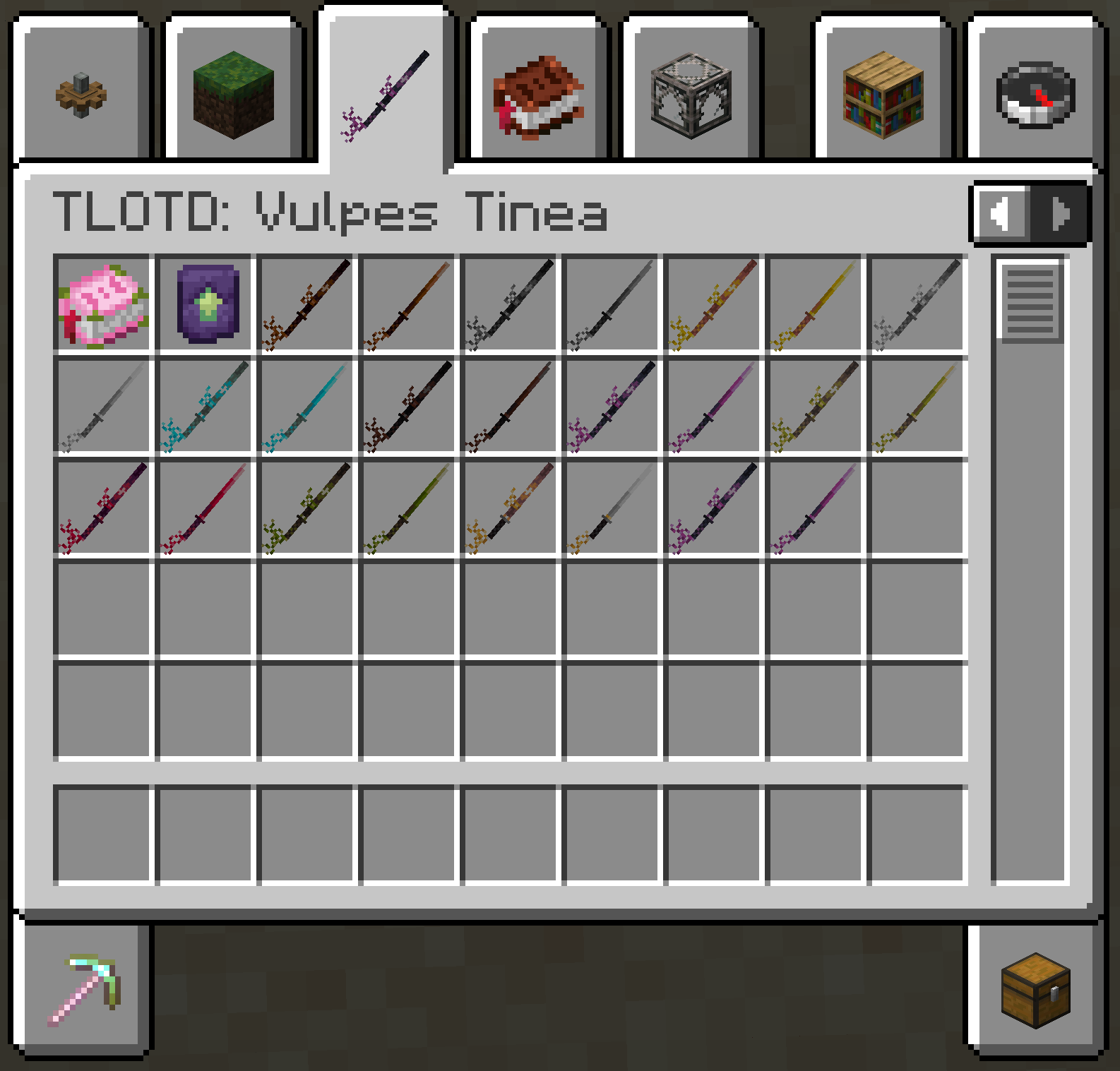
EN: As of right now, the mod adds a new melee weapon in the form of the katana. This new weapon is available in all Vanilla tool tiers, aswell as the ones added by [TLOTD](https://modrinth.com/mod/tlotd).
ES: A partir de ahora, el mod añade una nueva arma cuerpo a cuerpo en forma de katana. Esta nueva arma está disponible en todos los niveles de herramientas de Vanilla, así como en los añadidos por [TLOTD](https://modrinth.com/mod/tlotd).
## Creative Menu
Zoro katanas
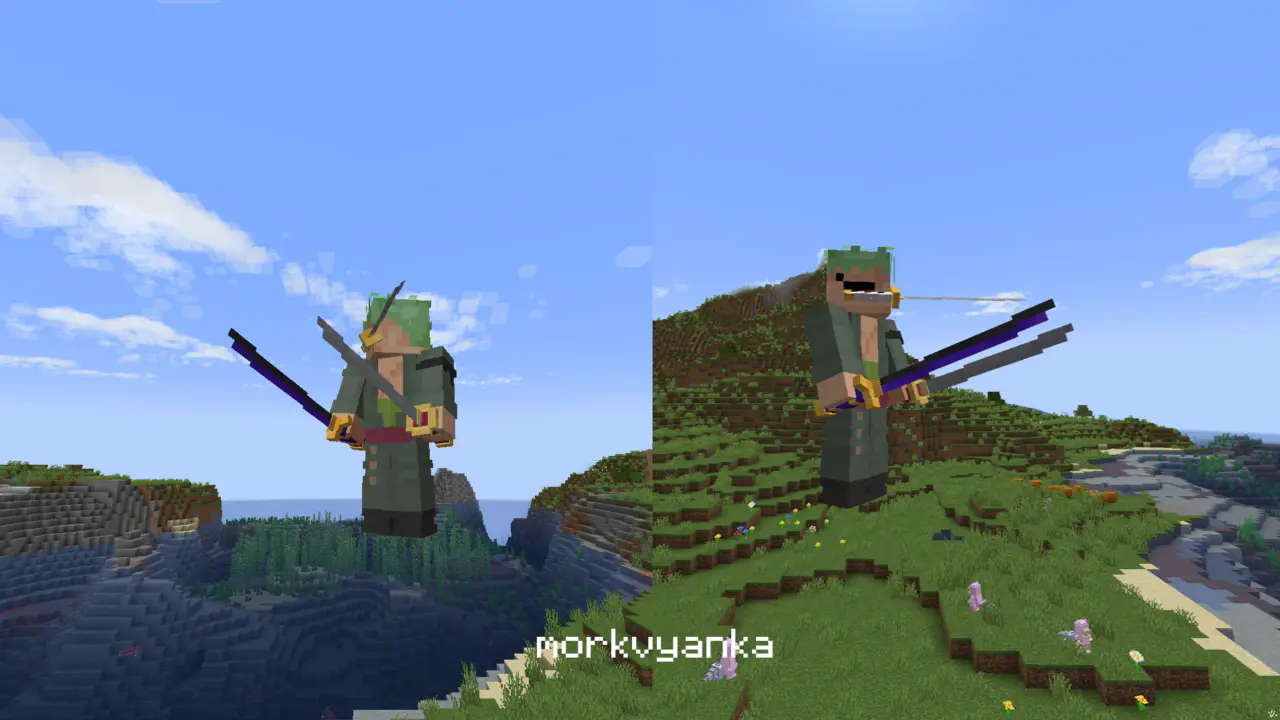
**In this resource pack I changed model of netherite sword, netherite axe and carwed pumpkin to Zoro katanas.**
[my linktree](https://linktr.ee/morkvyanka)
ZoomLens
🔍 Zoomify – The Ultimate Zoom Mod for Minecraft! 🔍
Previously known as Zoomify!
🌍Experience distant structures, mesmerizing landscapes, and stunning views with exceptional clarity! Whether you’re a traveler, a creator, or a scenery enthusiast, Zoomify’s adjustable zoom feature enhances every moment!🌍
—
🖱️ Easy to Use:
Hold C + scroll the middle mouse button to adjust the zoom level.
—
🎥 Video Showcase:
—
Zoomglass
A Fabric mod that quickly puts a spyglass into your hand with a press of a button.
Made for people who prefer roleplaying aspects of a spyglass but don’t want to miss out on convenience!
Additionally, you can use a fake spyglass while in Spectator gamemode, or in Creative when you don’t have
it in your inventory.
The default keybind is `z`, and you can find it under the “Inventory” section in keybinding settings.
Requires Fabric API
ZoomerLibrary
# ZoomerLibrary
LibZoomer **unofficial architectury port**.
A library that allows other mods to create zooms and custom spyglasses easily.
## Usage
**WARNING:** This API is still not finished and breaking changes may happen until a 1.0.0 release happens!
ZoomerLibrary provides zooming through zoom instances, which contains three sub-instances: transition modes, mouse modifiers and zoom overlays. A zoom instance can be created with different subinstances, which can be either provided by the library or implemented by the mod itself. In order to a zoom instance to be functional, it must be registered by the ZoomRegistry. In order to make the instance zoom in, the instance’s zoom state must be set to true, which can be done using the `setZoom` method, the vice-versa can be done by setting it to false.
Zoomer Bows
# What is Zoomer Bows:
Zoomer bows is a mod that ads a few new bows, inspired from our Zoomcraft V4 progression.
This mod is going to be used to provide more bows in our modpack, having them scale based on the player’s combat level
## Should you use this mod:
Usage of this mod, in a new minecraft instance is discouraged at the moment, as it lacks any recipes & extra functionality, which are currently present only on Zoompack V4.
## Permissions:
You can freely use Zoomer bows for all intent & purposes in modpack development, though we do not recommend adding it without having the tools necessary to scale these bows.