Yet Another Elf Origin
Oh, hey. You there. Looking for elf-y stuff, huh? But don’t want anything overly complicated? You’re not too practiced at the mining and crafting, but still want a fun time with friends? I’ve got you covered, kiddo. Don’t worry.
# Yet Another Elf Origin
Don’t be driven off by the name! This was a labor of love towards my fellow, newer miners and crafters. This origin is **intentionally unbalanced, in a way biased towards the Elf player.** It is designed for players who are not exactly confident in their skills, and to help them keep up with their friends of different skill levels.
## Powers
Let’s get into why you’re actually here- what makes this origin unique?
– [+] As an Elf, you are a pacifist. It’s not that you can’t *hurt* things, but killing creatures- especially innocent creatures- incurs a bit of karma. On the flip side, though, living in harmony with nature will grant you boons!
– [+] You have a slightly higher jump, which gets boosted even higher in Forest biomes.
– [+] You’ve got a permanent speed bonus.
– [+] You do not take fall damage.
– [+] Your fairy wings let you glide with ease!
– [+] When sneaking in a Forest biome, you turn fully invisible!
– [+] You deal more damage with bows.
– [+] Hitting your target with an arrow will return the arrow to your inventory. If you miss, you still need to go pick it up.
– [+] You have 50% more health than normal players.
– [-] You are vegetarian.
– [-] As stated, your pacifism incurs penalties when one kills for no reason.
– [-] Iron weapons and tools deals far more damage to you, and you cannot bear to wear iron or chainmail.
## How does the Pacifism mechanic work?
It’s quite simple- over time, you gain karma. However, upon killing a mob or player, you lose karma- and depending on what alignment the creature has, you may lose more or less karma.
As long as you have about 3/4ths of your karma, you won’t suffer any ill effects, and if you’re in the top part of your karma bar, you’ll gain regeneration.
Beyond the 3/4th point, however, you’re slowed. Beyond halfway, you’re slowed further, and you gain weakness. If you continue to kill after that, you gradually gain mining fatigue, nausea, blindness, and may even wither away.
Hostile mobs, such as zombies, skeletons, spiders and creepers incur very little penalty- you *are* defending yourself, after all.
Sentient hostiles, such as witches, pillagers, and piglin brutes incur a little more of a penalty, though not much more.
Neutral mobs, such as goats, wolves, polar bears, and zombie piglins incur a bit more of a penalty than that.
Passive mobs, such as most animals, are a bit more than *that*, then sentient neutrals such as endermen, iron golems, and piglins, then sentient passive mobs and pets… you get the idea.
The only deviations from this formula are bosses, which drain a significant amount of your karma, and other players, which drain _all_ of your karma immediately.
This datapack, alongside the optional dependencies, supports BetterAnimalsPlus right out of the box. Feel free to suggest new mods to support over on the Issue Tracker!
Yet Another Cobblestone Generator
[![Contributors][contributors-shield]][contributors-url]
[![Forks][forks-shield]][forks-url]
[![Stargazers][stars-shield]][stars-url]
[![Issues][issues-shield]][issues-url]
[![MIT License][license-shield]][license-url]
[![LinkedIn][linkedin-shield]][linkedin-url]
[![Discord][discord-shield]][discord-url]
[![Modrinth][modrinth-shield]][modrinth-url]

Yet Another Cobblestone Generator
Flexible customizable generators
Support
·
Report Bug
·
Request Feature
Table of Contents
-
About The Project
-
Usage
- Roadmap
- Contributing
- License
## About The Project
![In-Game ScreenShot][screenshot]
A cobblestone generator, a classic of any SkyBlock. However, I’m bored with classic generators that generate only 1 kind
of block. That’s why I made my own mod, with a wide range of customization options.
(back to top)
### Built With
* ![Fabric][fabric]
* ![Fabric-Language-Kotlin][fabric-language-kotlin]
* ![ModMenu Badges Lib][modmenu-badges-lib]
* ![fStats][fstats]
(back to top)
## Usage
### Gameplay
* Right-click to get info about what is already generated
* Shift + Right-click to collect all from the generator
* Shift + Right-click to put upgrade item into generator
(back to top)
### Crafts
| 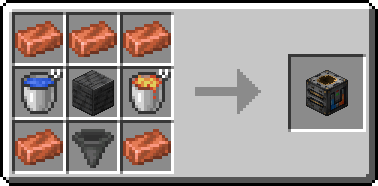 | 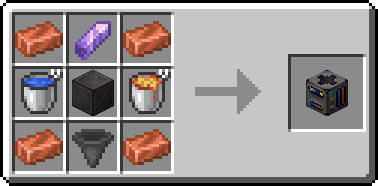 | 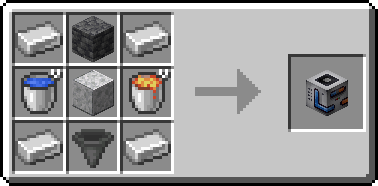 |
|————————————————————-|—————————————————-|—————————————————————-|
| 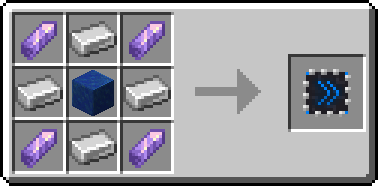 | 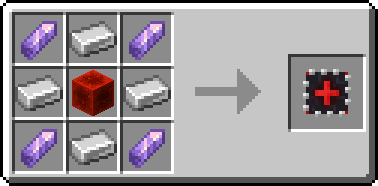 | 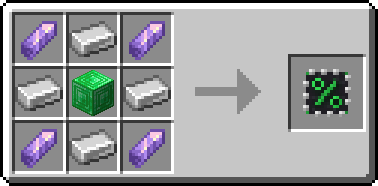 |
|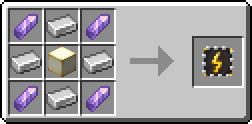|||
Events Generators
| Halloween |
|——————————————————————|
|  |
|  |
(back to top)
### Integrations
#### REI
![REI Integration ScreenShot][rei-integration]
#### EMI
![EMI Integration ScreenShot][emi-integration]
#### Jade
![Jade Integration ScreenShot][jade-integration]
(back to top)
### Config
Generators default config (Before 2024.10.1)
“`json
[
{
“type”: “cobble”,
“energyUsage”: 0,
“items”: [
{
“itemId”: “minecraft:cobblestone”,
“coefficient”: 100,
“count”: 1
},
{
“itemId”: “minecraft:cobbled_deepslate”,
“coefficient”: 30,
“count”: 1
},
{
“itemId”: “minecraft:mossy_cobblestone”,
“coefficient”: 10,
“count”: 1
}
]
},
{
“type”: “ore”,
“energyUsage”: 0,
“items”: [
{
“itemId”: “minecraft:coal_ore”,
“coefficient”: 100,
“count”: 1
},
{
“itemId”: “minecraft:copper_ore”,
“coefficient”: 70,
“count”: 1
},
{
“itemId”: “minecraft:iron_ore”,
“coefficient”: 50,
“count”: 1
},
{
“itemId”: “minecraft:gold_ore”,
“coefficient”: 30,
“count”: 1
},
{
“itemId”: “minecraft:redstone_ore”,
“coefficient”: 20,
“count”: 1
},
{
“itemId”: “minecraft:lapis_ore”,
“coefficient”: 20,
“count”: 1
},
{
“itemId”: “minecraft:diamond_ore”,
“coefficient”: 15,
“count”: 1
},
{
“itemId”: “minecraft:emerald_ore”,
“coefficient”: 10,
“count”: 1
},
{
“itemId”: “minecraft:nether_quartz_ore”,
“coefficient”: 5,
“count”: 1
}
]
},
{
“type”: “stone”,
“energyUsage”: 0,
“items”: [
{
“itemId”: “minecraft:stone”,
“coefficient”: 100,
“count”: 1
},
{
“itemId”: “minecraft:diorite”,
“coefficient”: 50,
“count”: 1
},
{
“itemId”: “minecraft:granite”,
“coefficient”: 50,
“count”: 1
},
{
“itemId”: “minecraft:andesite”,
“coefficient”: 50,
“count”: 1
},
{
“itemId”: “minecraft:calcite”,
“coefficient”: 20,
“count”: 1
},
{
“itemId”: “minecraft:dripstone_block”,
“coefficient”: 20,
“count”: 1
},
{
“itemId”: “minecraft:deepslate”,
“coefficient”: 5,
“count”: 1
}
]
}
]
“`
Generators default config (Before 2024.5.2)
“`json
{
“generators”: {
“cobble”: [
{
“itemId”: “minecraft:cobblestone”,
“coefficient”: 100,
“count”: 1
},
{
“itemId”: “minecraft:cobbled_deepslate”,
“coefficient”: 30,
“count”: 1
},
{
“itemId”: “minecraft:mossy_cobblestone”,
“coefficient”: 10,
“count”: 1
}
],
“ore”: [
{
“itemId”: “minecraft:coal_ore”,
“coefficient”: 100,
“count”: 1
},
{
“itemId”: “minecraft:copper_ore”,
“coefficient”: 70,
“count”: 1
},
{
“itemId”: “minecraft:iron_ore”,
“coefficient”: 50,
“count”: 1
},
{
“itemId”: “minecraft:gold_ore”,
“coefficient”: 30,
“count”: 1
},
{
“itemId”: “minecraft:redstone_ore”,
“coefficient”: 20,
“count”: 1
},
{
“itemId”: “minecraft:lapis_ore”,
“coefficient”: 20,
“count”: 1
},
{
“itemId”: “minecraft:diamond_ore”,
“coefficient”: 15,
“count”: 1
},
{
“itemId”: “minecraft:emerald_ore”,
“coefficient”: 10,
“count”: 1
},
{
“itemId”: “minecraft:nether_quartz_ore”,
“coefficient”: 5,
“count”: 1
}
],
“stone”: [
{
“itemId”: “minecraft:stone”,
“coefficient”: 100,
“count”: 1
},
{
“itemId”: “minecraft:diorite”,
“coefficient”: 50,
“count”: 1
},
{
“itemId”: “minecraft:granite”,
“coefficient”: 50,
“count”: 1
},
{
“itemId”: “minecraft:andesite”,
“coefficient”: 50,
“count”: 1
},
{
“itemId”: “minecraft:calcite”,
“coefficient”: 20,
“count”: 1
},
{
“itemId”: “minecraft:dripstone_block”,
“coefficient”: 20,
“count”: 1
},
{
“itemId”: “minecraft:deepslate”,
“coefficient”: 5,
“count”: 1
}
]
}
}
“`
Upgrades default config
“`json
{
“COUNT”: 2,
“COEFFICIENT”: 2,
“SPEED”: 2
}
“`
If u want to add own generator go here
(back to top)
## Roadmap
– [x] Customizable generators
– [x] Generator upgrades
– [x] EMI Integration
– [x] Jade Integration
– [x] REI Integration
See the open issues for a full list of proposed
features (and known issues).
(back to top)
## Contributing
Contributions are what make the open source community such an amazing place to learn, inspire, and create. Any
contributions you make are **greatly appreciated**.
If you have a suggestion that would make this better, please fork the repo and create a pull request. You can also
simply open an issue with the tag “enhancement”.
Don’t forget to give the project a star! Thanks again!
1. Fork the Project
2. Create your Feature Branch (`git checkout -b feature/AmazingFeature`)
3. Commit your Changes (`git commit -m ‘Add some AmazingFeature’`)
4. Push to the Branch (`git push origin feature/AmazingFeature`)
5. Open a Pull Request
(back to top)
## License
Distributed under the MIT License. See `LICENSE.txt` for more information.
(back to top)
[contributors-shield]: https://img.shields.io/github/contributors/syorito-hatsuki/yet-another-cobble-gen.svg?style=for-the-badge
[contributors-url]: https://github.com/syorito-hatsuki/yet-another-cobble-gen/graphs/contributors
[forks-shield]: https://img.shields.io/github/forks/syorito-hatsuki/yet-another-cobble-gen.svg?style=for-the-badge
[forks-url]: https://github.com/syorito-hatsuki/yet-another-cobble-gen/network/members
[stars-shield]: https://img.shields.io/github/stars/syorito-hatsuki/yet-another-cobble-gen.svg?style=for-the-badge
[stars-url]: https://github.com/syorito-hatsuki/yet-another-cobble-gen/stargazers
[issues-shield]: https://img.shields.io/github/issues/syorito-hatsuki/yet-another-cobble-gen.svg?style=for-the-badge
[issues-url]: https://github.com/syorito-hatsuki/yet-another-cobble-gen/issues
[license-shield]: https://img.shields.io/github/license/syorito-hatsuki/yet-another-cobble-gen.svg?style=for-the-badge
[license-url]: https://github.com/syorito-hatsuki/yet-another-cobble-gen/blob/master/LICENSE.txt
[linkedin-shield]: https://img.shields.io/badge/-LinkedIn-black.svg?style=for-the-badge&logo=linkedin&colorB=555
[linkedin-url]: https://linkedin.com/in/kit-lehto
[screenshot]: https://cdn-raw.modrinth.com/data/xPsKRMUF/images/047a2072ffe8fe5368479d0560eb2bbca2b1ef5f.png
[rei-integration]: https://cdn.modrinth.com/data/xPsKRMUF/images/8728ef2189b41115e4c77036d2bf997e44dea665.png
[emi-integration]: https://cdn.modrinth.com/data/xPsKRMUF/images/3a52d6a7b75930e96866daba0f51d3b52db020da.png
[jade-integration]: https://cdn.modrinth.com/data/xPsKRMUF/images/89bce38efe2b0da0e5b0805a483c2ede7706edd9.png
[fabric]: https://img.shields.io/badge/fabric%20api-DBD0B4?style=for-the-badge
[fabric-language-kotlin]: https://img.shields.io/badge/fabric%20language%20kotlin-7F52FF?style=for-the-badge&logo=kotlin&logoColor=white
[modmenu-badges-lib]: https://img.shields.io/badge/modmenu%20badges%20lib-434956?style=for-the-badge
[fstats]: https://img.shields.io/badge/fStats-111111?style=for-the-badge
[discord-shield]: https://img.shields.io/discord/1032138561618726952?logo=discord&logoColor=white&style=for-the-badge&label=Discord
[discord-url]: https://discord.gg/pbwnMwnUD6
[modrinth-shield]: https://img.shields.io/modrinth/v/yacg?label=Modrinth&style=for-the-badge
[modrinth-url]: https://modrinth.com/mod/yacg