Added GUI textures for [yyz’s backpack](https://modrinth.com/mod/yyzs-backpack) with [Cobblemon Interface](https://modrinth.com/resourcepack/cobblemon-interface) textures to better fit [Cobblemon](https://modrinth.com/mod/cobblemon) mod aesthetics. Not much else!
## ❓ Why This Backpack?
Traditional backpack mods = mobile chests requiring separate GUIs. Our solution:
1. **Seamless experience** – Access backpack items directly in **work GUIs**
2. **Native interaction** – Full support for recipe book/JEI/REI/EMI
3. **Backpack swapping** – Swap when placing backpack in backpack slot/inside
4. **Continuous expansion** – Growing mod compatibility support
## ⚠️ Current Status
### The mod is currently in a very early stage. If you find any bugs, you can report them via GitHub or Discord
❗ Found an issue or have suggestions? Report now!
– [GitHub](https://github.com/yyz729/yyzsbackpack/issues)
– [Discord](https://discord.com/invite/3NPKBgXxVU)
🔧 **In development**:
– More GUI support
– Backpack 3D models
– Expanded mod compatibility
> ✨ **Design Philosophy**: Make backpacks a natural extension of the main inventory
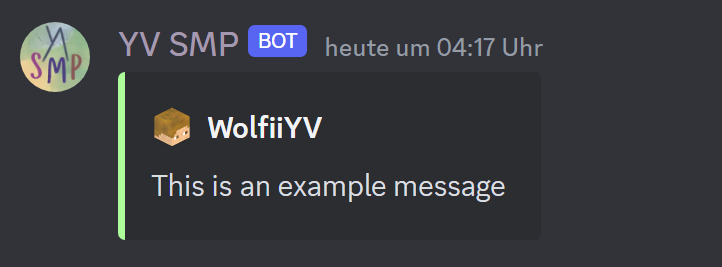
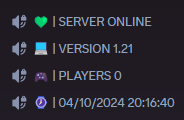
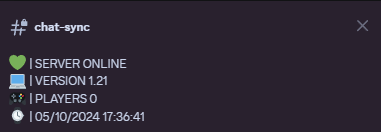
– Minecraft Server Stats
# This Plugin does **not** support Spigot or versions < 1.19
# Disclaimer
This plugin is a standalone version of the discord module from the [YVtils-SMP Plugin](https://modrinth.com/plugin/yvtils_smp)
YVanish
[](https://discord.gg/kZJhKZ48j8)
# YVanish
And at last, a vanish plugin, **the** vanish plugin! You may ask, “Wh**Y** yet another vanish?” (Hence the “Y” in the name ;p). And I come with the answer. It’s because every other plugin (*every* meaning [3 that I tested](https://github.com/Ynfuien/YVanish/wiki/6.-Plugin-comparison)), let through a few packets that revealed vanished players. Also, I wanted silent chests done correctly, not with the spectator “trick”.
**For full functionality depends on [PacketEvents](https://modrinth.com/plugin/packetevents).**
# Features
### Vanish (well, duh)
– on join
– silent join and quit messages
– invisible in a tab list (also kinda obvious)
– hidden in server status (player count, player sample)
### Silent chests
Opened chests (normal, trapped, ender), shulker boxes and barrels work just like vanish. You can see when normal players do it, but they can’t see you do it. Accomplished with virgin tears, sweat of a troll and a unicorn horn. Ah and also pinch of protocol dark magic.
### Cultural mobs
An option to stop mobs from randomly staring at a player. What’s good of being invisible if all mobs coincidentally look all in one direction? Exactly, not much.
*Doesn’t work with mobs using a different AI system like villagers, piglins, hoglins and some more.
### Other
– silent sculk sensors
– silent advancement and death messages
– disabled item and exp pickup
– hidden from monsters targeting
– action and boss bar for custom messages
– option for fake join/quit messages
– fully customizable messages with a lang file, supporting [PlaceholderAPI](https://github.com/PlaceholderAPI/PlaceholderAPI) and [MiniMessage](https://docs.advntr.dev/minimessage/index.html)
– commands with tab completions
– [API](https://github.com/Ynfuien/YVanish/wiki/4.-Developer-API) for developers
## Options
Almost every option can be changed per player with the `/vanishoptions` (`/vo`) command. Allowing for use of appropriate features in appropriate situations. Command and subcommands have associated permissions so customizability shouldn’t be a problem.
# Documentation
You can read about plugin’s [permissions](https://github.com/Ynfuien/YVanish/wiki/2.-Permissions), [placeholders](https://github.com/Ynfuien/YVanish/wiki/3.-Placeholders) etc. on the [wiki](https://github.com/Ynfuien/YVanish/wiki) page.
# Media
Vanish options

# Integrity with other plugins
I make these plugins for me, according to my needs, meaning, I don’t search for every possible plugin that I don’t care about, that could be somehow better integrated with mine. But, if you care about better integration between this plugin and some other, then just let me know through [Discord](https://discord.gg/kZJhKZ48j8) or [GitHub](https://github.com/Ynfuien/YVanish) and I will see what I can do.
Same goes for any features that you think may be missing. If something isn’t outside the scope of the plugin, then I’ll probably do it.
# License
This project uses [GNU GPLv3](https://github.com/Ynfuien/YVanish/main/blob/LICENSE) license.
Yuushya is a Minecraft resource pack makes overall changes to the appearence of almost everything in the game. If you don’t feel enough **”Realistic”** of the Vanilla Minecraft, Yuushya is a cool choice for you. With fully elaborated texture to both environment and building blocks, Yuushya is ready for you to discover through the survival and creative modes.
Some of the further texture features required **Optifine** to work.
Also here we made a bushy leaves pack [Yuushya Foliage Addon](https://www.planetminecraft.com/texture-pack/yuushya-foliage-addon/) which is better with shaders on.
Yuru Camp RM Songpack
**The [Reactive Music](https://modrinth.com/mod/reactive-music) mod is required for this resource pack to work.**
This resource pack includes music from the Yuru Camp series and it changes based on time, weather, and dimension. For Yuru Camp lovers and cozy music!
**Installation:**
1. Drag-and-drop the downloaded songpack.zip (YuruPack.zip) into the resourcepacks folder.
2. In-game, navigate to the Mods menu and search for the Reactive Music mod
3. Select the “_Configure…_” button in the top right and load the pack.
YuRTP
# YuRandomTeleport | Cross-Version · High Performance · Universal Compatibility
**Supported Versions: 1.8.x – 1.26.x**
**Compatible Server Types: Spigot / Paper / All Hybrid Forks (Mohist, Magma, Arclight, etc.)**
—
## 🎉 Promotional Text
### ✦ Escape the Crowd. Explore the Unknown. — YuRandomTeleport
Tired of overcrowded spawn points? Struggling to find untouched, pristine land?
**YuRandomTeleport** is an intelligent random teleportation plugin built for Minecraft servers, delivering a safe, smooth, and highly customizable teleport experience.
#### ✨ Why Choose YuRandomTeleport?
– **Ultimate Cross-Version Compatibility**
From 1.8 to the latest 1.26.x, it runs seamlessly on Spigot, Paper, and all hybrid server forks—one plugin for every version.
– **Smart & Safe Location Algorithm**
Automatically avoids lava, cacti, the void, fire, and other hazardous blocks. Players always land on solid ground with open sky above—safe upon arrival.
– **Granular Per‑World Configuration**
Each world can have independent radius, height limits, safety rules, and blocked material lists. Perfectly tailored for Overworld, Nether, and End dimensions.
– **Seamless Economy & Cooldown Integration**
Supports Vault economy deductions and customizable cooldowns. Granular permission nodes keep everything under control and prevent abuse.
– **Programmable Command Hooks**
Execute custom commands (including JSON titles and particle effects) before and after teleportation, taking your server’s interactivity to the next level.
– **Zero‑Fuss, Out‑of‑the‑Box**
Default configurations work immediately. No complex setup required—even novice server admins can deploy it effortlessly.
– **Active Maintenance & Community**
The plugin is under continuous development. Join our official community **1080918424** to report issues, request features, or just chat with fellow admins.
#### 🚀 Join Us
**Official Community Group: 1080918424**
Bug Reports · Update Announcements · Tech Support · Customization Inquiries
—
## 📖 User Manual
### 1. Installation Guide
1. Place `YuRandomTeleport-.jar` into your server’s `plugins` folder.
2. Restart the server or load the plugin using a plugin manager.
3. The plugin will automatically generate `config.yml` and `messages.yml` inside `plugins/YuRandomTeleport/`.
4. (Optional) Edit the configuration files as desired and apply changes with `/yurtp reload`.
### 2. Commands & Permissions
#### Player Commands
| Command | Description | Permission |
|———|————-|————|
| `/yurtp` or `/rtp` | Randomly teleports yourself within your current world. | `yurtp.use` |
| `/yurtp ` | Randomly teleports the specified player within their current world (requires permission). | `yurtp.teleport.others` |
| `/yurtp ` | Randomly teleports the specified player to the specified world (requires permission). | `yurtp.teleport.others` |
| `/yurtp help` | Displays the help menu. | None |
# Custom commands to execute (supports placeholders: {player}, {x}, {z}, etc.)
commands:
on-teleport:
– “title {player} title {“text”:”Searching for a safe location…”,”color”:”yellow”}”
on-success:
– “title {player} title {“text”:”Teleport Successful!”,”color”:”green”}”
on-fail:
– “title {player} title {“text”:”Teleport Failed”,”color”:”red”}”
“`
#### Notes on `messages.yml`
All frontend messages support color codes (`&` in place of `§`) and can be fully translated or customized. After editing, run `/yurtp reload` to apply changes.
### 4. Frequently Asked Questions
**Q: Why can’t a player teleport?**
A: Verify that the world is not listed in `world-blacklist`, the player has the `yurtp.use` permission, and cooldown/balance requirements are met.
**Q: The teleport locations aren’t ideal. How can I improve them?**
A: Adjust the `radius` range, `height` limits, or relax the `blocked-materials` rules for the specific world. Enable `debug: true` in the config to view detailed location‑search logs in the console.
**Q: Does the plugin support sounds on 1.8?**
A: Yes. A built‑in cross‑version sound compatibility layer ensures sounds work across all supported versions without errors or silence.
**Q: Is Moonrise asynchronous server supported?**
A: Moonrise is not currently supported due to conflicts between its asynchronous architecture and some core plugin logic. We will evaluate potential compatibility in future updates.
– **Documentation & Updates**
The latest version and detailed documentation are always available within the community group.
—
**YuRandomTeleport — Every journey begins with anticipation.**
YUPPEE TOTEM
The totem makes a funny sound, DOES NOT replace the texture itself, and does NOT add new particles
more detailed —> [https://www.youtube.com/watch?v=jtd-AjWVKvE](https://www.youtube.com/watch?v=jtd-AjWVKvE)
YUpdateChecker
[](https://discord.gg/kZJhKZ48j8)
# YUpdateChecker
Plugin and datapack update checker that works out of the box. No need to configure anything. Too good to be true? Well, yes. The catch is that it works only with projects downloaded from Modrinth, thanks to their awesome [API](https://docs.modrinth.com/api/).
## How it works?
It’s really simple. Plugin hashes a file (.jar or .zip), checks the hash using Modrinth API and logs the results. Yep, that’s it. Modrinth is doing the heavy lifting by hashing every single file that is uploaded and then making it available via their API. Only caveat is – you can’t change the contents of a downloaded jar or datapack. So no editing `plugin.yml` or MC functions. That’s how hashing works, different file – different hash. I mean, you can change it of course, it just won’t be picked by the plugin ¯\_(ツ)_/¯
### Additional info
– Messages are fully customizable with a lang file, supporting [PlaceholderAPI](https://github.com/PlaceholderAPI/PlaceholderAPI) and [MiniMessage](https://docs.advntr.dev/minimessage/index.html)
– Commands have tab completions
– Modrinth API is currently [rate limited](https://docs.modrinth.com/api#ratelimits) at 300 requests per minute per IP. Which means that an update check may take a little bit longer, if you have wayyy too many plugins/datapacks ~~or if you spam the check command~~. (Plugin makes 1 request per every Modrinth project that you use)
# Media
Checking updates

Looking through results

# Integrity with other plugins
I make these plugins for me, according to my needs, meaning, I don’t search for every possible plugin that I don’t care about, that could be somehow better integrated with mine. But, if you care about better integration between this plugin and some other, then just let me know through [Discord](https://discord.gg/kZJhKZ48j8) or [GitHub](https://github.com/Ynfuien/YUpdateChecker) and I will see what I can do.
Same goes for any features that you think may be missing. If something isn’t outside the scope of the plugin, then I’ll probably do it.
# License
This project uses [GNU GPLv3](https://github.com/Ynfuien/YUpdateChecker/main/blob/LICENSE) license.