Font Tweak
Changes the look of 7, 4, w, W, and H. My first resource pack. This resource pack was made for me to test how Minecraft handles custom fonts. Feel free to use this mod without any copyright or license issues.
Changes the look of 7, 4, w, W, and H. My first resource pack. This resource pack was made for me to test how Minecraft handles custom fonts. Feel free to use this mod without any copyright or license issues.
FogLock is a client-side mod that allows you to customize fog in minecraft. With the mod you can create different fog customizations depending on the world, biome or biome tag.
With the mod you can customize the distance of fog, which may or may not depend on the settings of viewing distance. In addition to the distance mod allows you to change the color of the fog, as well as the time for which the color and distance of the fog will be changed.
Setting the time for which the fog will be changed is fully compatible with datapacks that change the fog.

> ### **Fix-level is a lightweight, client-side mod that replaces Roman numeral enchantment** levels with standard numeric values.
### In vanilla Minecraft, enchantment levels are displayed using Roman numerals (I, V, X, etc.), which become hard to read at higher levels and may cause UI issues. Fix-level
### solves this by displaying enchantment levels as regular numbers, ensuring clarity and ###
### consistency even at extremely high values.
### Features
### Converts Roman numeral enchantment levels to numeric values (e.g. V → 5)
### Correctly displays very high levels (such as 255 and above)
### Improves readability and UI clarity
### Does not affect gameplay balance or mechanics
### **Lightweight and fully client-side**
Ideal for
Modpacks
Custom servers
Players using high-level enchantments
Fix-level only changes how enchantment levels are displayed and does not modify their actual behavior or strength
—
| info | Description |
| ———– | ———— |
| Level I | → 1 |
| Level II | → 2 |
| Level III | → 3 |
| Level IV | → 4 |
| Level V | → 5 |
| Level VI | → 6 |
| Level VII | → 7 |
| Level VIII | → 8 |
This little datapack allow you to throw fireballs in front of you using right-click with a custom netherite sword.
Get the sword:
“`
/function minecraft:give_sword
“`
**HIGHLY CUSTOMISABLE** (interactive pannel):
“`
/trigger settings
“`
– 1 : enable ride (True/False) False by default
– 2 : enable automatic target (True/False) False by Default
– 3 : power (personnal)
– 3 : cooldown (same for everyone)
– 4 : speed (personnal)
Have fun 🙂
If need some help dm me on discord: “Unrectified2”
# Fetchr – Bingo v5
Fetchr is a custom gamemode where you play in survival Minecraft with a 5×5 Bingo board.
Try to collect all 5 items in a line for a quick Bingo or all 25 items for a longer Blackout game as quickly as possible!
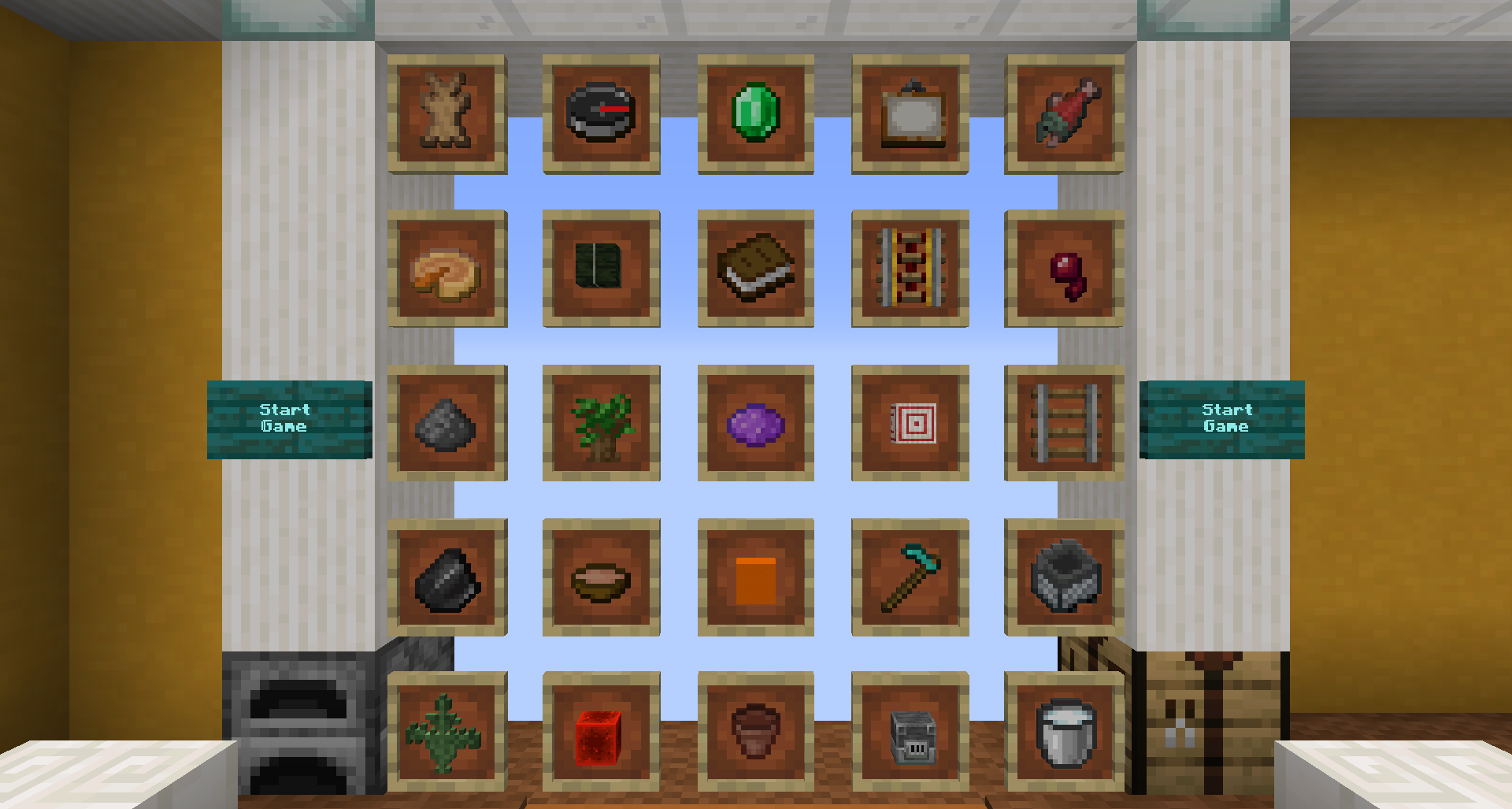
Example of a Bingo Card as shown in the Fetchr lobby:
Example of a Bingo Card as shown in the Fetchr lobby:
## General information
Fetchr / Minecraft Bingo is quite a simple concept as it builds ontop of the vanilla survival gameplay. You will start with an empty inventory at a random, unknown spawn point within the world and get an experience similar to starting a new survival world.
Your goal is to get items from the Bingo Board. There are multiple goals that are detected by the pack:
– **Bingo**: All 5 items in any of the rows, columns, or diagonals
– **Blackout**: All 25 items on the board
– **20 No Bingo**: Get 20 items while avoiding any Bingo. This is the maximum number of items that can be obtained without triggering a Bingo and requires careful planning
– **Multi Bingo**: Obtain multiple Bingos at once. This can be accomplished by obtaining items of two intersecting lines and getting the item at the intersection last, effectively unlocking a combination of 2-4 rows, columns and/or diagonals at once.
You may also play in either (or both at the same time):
– **Lockout Mode**: Only one team can obtain each item, locking other teams out from scoring it. Once a team has obtained more items than any other team still can, this team will win.
– **Blind Mode**: The card is not visible and items get revealed as any player gets them. Knowing possible items and mutual exclusivity from the category chests is expected for this mode.
The map will always detect all goals. Don’t worry when a Bingo is announced while you want to go for a blackout – just keep going, there is no automatic mechanism that ends the game before you desire to do so.
## Download and Installation
This requires a fresh world. You may also use the world version from CurseForge while Modrinth is not yet supporting worlds for an easier installation.
**!Don’t attempt to use this pack in an existing world!**
### Singleplayer
1. Start the game and select singleplayer
2. Make sure you are using the correct Minecraft Version (as indicated at the release you are downloading)
3. Select “Create New World”
4. Select “Data Packs” and drag the downloaded file into the screen
5. Enable the data pack by clicking the arrow and moving it to the right section saying “selected”.
6. Select “Done”
7. If you want to run this competitively, select “More World Options” and enter the seed `91` into the text field at the top. This will make sure you get the same spawn points for the same Fetchr seeds as anyone else using this pack.
8. Select “Create New World”
9. You will be prompted to download a resource pack. Download the pack, and enable it via Options -> Resource Packs and enable it like you did with the data pack before.
### Multiplayer
1. Create a new world on the server and stop the server afterwards.
2. Copy the downloaded file into the `datapacks` sub directory.
3. Delete the folder called `region`.
4. Make sure the `server.properties` file is set according to this file. (For beta versions please look for an updated file in the changelog section)
– Note that this file is made for the world version and assumes your world directory is called `Fetchr-5.1`. Just ignore the `level-name` setting
– If you already have a custom server.properties, make sure all the settings mentioned in that file are set correctly.
– If you don’t have a custom `server.properties` override it with that file (and set `level-name` to the name of the world folder of your server). When the server starts, all missing settings will be filled with default values
5. Start the server – everything is setup now.
## Detailed Feature Overview
### Custom HUD
While in-game you will have a bunch of custom HUD elements around your hotbar. This utilizes a custom font and does not require any mods.
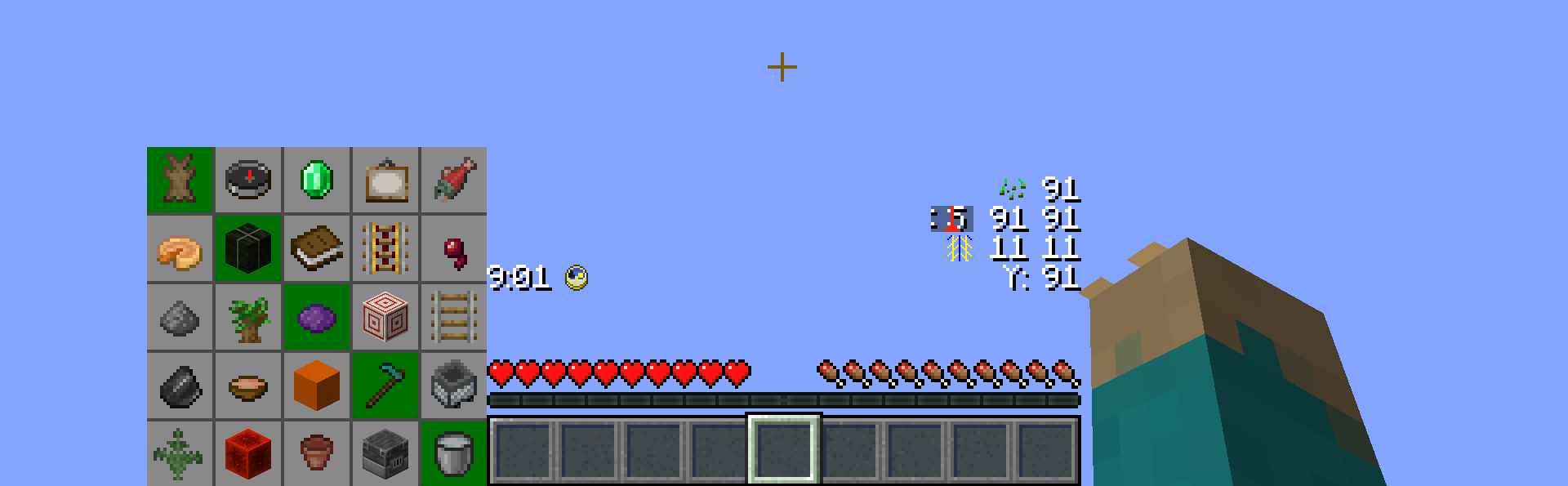
The HUD can be customized in the Lobby and elements can be moved however you prefer them to be layed out, or individual components can be removed.
#### Bingo Card
The Bingo card shows all items of the current game and a summary of which team obtained which item so far. Items your own team has already gotten appear a little bit darker. Depending on the amount of teams, this display will be adjusted to fit all teams in.
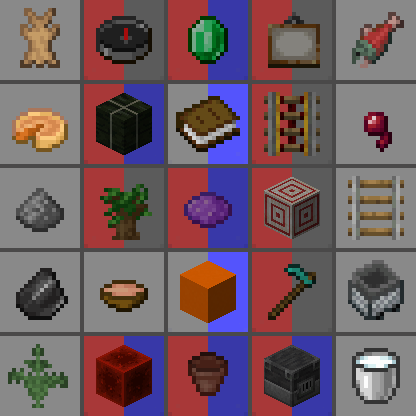
From the lobby, 10 team colors are available.
#### Timer
There is a timer that counts up. This allows you to keep track of your time without any third party software. There is no time limit imposed by the map, but you can of course set your own goal. The timer counts real time. The timer icon also represents a functional Minecraft clock, showing the time within the current day

#### Player position
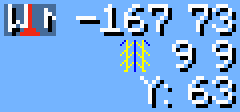
There is a player position visible which shows the coordinates relative to the spawn point. The coordinates on your F3 screen will be extremely high and hard to parse / communicate, due to the random spawn point. The icon also functions as a regular compass and can be changed to appear like the Minecraft compass icon via the preference settings.
Below the regular coordinates, there is by default also a chunk coordinate display. This is useful during certain times, for example when following a treasure map, the treasure will always be located at chunk coordinates 9 9, or to keep track of chunk boarders if you want to use the Lapis Trick
And below that, there is also a separated Y coordinate display, which is useful when digging down without requiring F3.
#### Fetchr Seed
Finally, there is a visible display for the Fetchr seed. Like a Minecraft world, where the same seed will generate the same world, the same Fetchr seed will generate the same Bingo Board and the same spawn point. When generating a card, you can choose to manually set a seed instead of generating a random card for competitive races or set-seed runs.

### Custom Worldgen
Fetchr uses custom Worldgen to make certain items more reliable in a Bingo run.
#### Compressed World
Biome sizes are decreased to make finding biome-specific items more fun and reliable, and structure frequencies are increased.
#### No Nether
Owing to technical limitations with custom worlds, the Nether is disabled.
#### No Ites
All stone variants that end in -ite have been disabled from generating. This includes diorite, andesite and granite. This was done as a qol change to reduce inventory clutter and make digging for stone consistent.
Granite may still generate as part of copper ore veins.
### Ambient lighting
There is a constant lighting factor in the overworld, similarly to the vanilla Nether. This allows seeing in caves clearly without torches.
### Game Rule changes
– Weather is always sunny
– Phantoms, wandering traders and patrol spawns (which all work on a world-global timer) are disabled
## Credits
Original idea and 1.11 implementation by Lorgon111: http://www.playminecraftbingo.com/
### Code Contributors
NeunEinser – Main / Lead developer
Kri5t0fK
UnlucksMcGee
### Translators
German by NeunEinser, gbegerow and LawrenceB
Polish by Kri5t0fK
Italian by Loweredgames
Dutch by ThomasToSpace
Portuguese (Brazil) by Draacoun
French by Aurélien
Spanish by Alvaro Orrego and HolaSoyElmo
Chinese (simplified) by 雨夢 YoMon and Sora
## Contributing
This project is open source on Github.
### Translating
Translations are hosted on Crowdin. Any contributions are appreciated.
If your language is missing, get in touch, and it can be added.
See Translation Help & Guidelines for more information.

**If any mod creators are concerned about this resource pack supporting their mods, I’m open to communication.**
🌴 **Features:**
– Transparency **removed** from modded leaves
– Supported Mods:
– Oh The Biomes We’ve Gone
– Burnt
– Chipped
– IceAndFire Community Edition
– Malum
– [[Let’s Do] Meadow](https://modrinth.com/mod/lets-do-meadow)
**! Hanging Birch Leaves have a temporary solution / fix, which will most likely change with updates.**
– Nature’s Aura
– Nature’s Spirit
– Pastel
– Project: Vibrant Journeys
– Regions Unexplored
– Roots
– Thavma
For lovers of solid foliage and mods – enjoy! 🎋

🍀 **Features:**
– Transparency **removed** from all vanilla leaves
– Dark oak leaves are **darker** for clearer visual contrast with oak leaves
– Glow lichen **no longer has a backside** – you almost never see it, so there’s no reason for it to exist
For lovers of solid foliage – enjoy using it! 🍂
Features:
Distant Horizons, Voxy, Colorwheel and other mods easily integrate with this shader!
The package includes several color schemes, the best one is VT Color, which is not available anywhere!
The fog system can be customized according to your preferences!
There are many cloud styles available!
Shadows can be created based on a light map or a shadow map!
An extensive color palette is available with the ability to adjust saturation, exposure, and balance!
Very easy to set up!
Compatibility:
At the moment, the software has been tested only for versions 1.17 and higher. Earlier versions may or may not work.
Modern Nvidia, AMD, and Intel GPUs are supported on both Windows and Linux. Macs may or may not work.
Please use the latest version of Iris. It should work with any version that supports custom uniforms. There are some bugs in Optifine, but in general it should also work.

—

**Fancy End** is a small Resource Pack that replaces the texture of every End-related item, block and mob, updating their looks to look newer and fresher, while **mantaining a Vanilla approach**.
The main palette change of the Resource Pack focuses around changing every green End-related item and block, such as Ender Pearls and Ender Eyes, to match the **purple palette** of Purpur Blocks, Shulkers and Endermites, which have also received a **new reshaded look**.

Specifically, here is a list of all the items, blocks and mobs that have been updated:
– **Ender Pearl** and **Ender Eye**, now looking shinier than ever.
– **End Portal Frame**, **End Stone** and **End Stone Bricks**.
– **Purpur Block** and **Purpur Pillar** (which now have the face of a Shulker carved on their top side ^^).
– **Ender Chest**!
– **End Crystal**, both the entity and the item textures.
– **Shulker**, **Enderman** and **Endermite**.
– **Chorus Fruit** and **Popped Chorus Fruit**.
– **Dragon’s Breath**
– **Shulker Shell** and all 17 **Shulker Boxes**.
—

The Resource Pack is fully compatible with MC 1.9-1.21.11 and 26.1, with support planned for any future versions!
—
### Support
If you like my Data Packs, Resource Packs or textures, consider **donating**, it would really mean a lot to me. If you are interested in **commissioning** any content, **contact me** on any available platform, I’ll try to reach out to you as fast as I can.
**Suggestions** for future Minecraft content are also well received. Thank you for taking a look at my content. 🙂
this datapack changes the vanilla fishing loot chances like the table below
| Loot Name | Vanilla | Fair Fishing Loot |
|———–|———|——————-|
| Fish | 85% | 60% |
| Junk | 10% | 25% |
| Treasure | 5% | 15% |
and in 1.16+ versions mojand added conditions. to catch treasure you need to fish in open waters and i removed it too.
Works from 1.13 → 1.21+ (includes both loot_tables/ and loot_table/ paths).
### Take a loot at my other projects
### Need More Structures
### No Piglin Brutes 1.16.1+
### Shield of Undying