# Git Pack Manager


## What’s this?
Git Pack Manager is a mod/plugin for dedicated servers that allows for handling resource and data packs with git.
Using git allows for easier management and collaboration.
The mod also supports automatically updating the packs as soon as modifications are made with git.
Resource packs are automatically combined based on their priorities.
See the boring showcase for Git Pack Manager video for an example of what it can do.
## Usage
Please read the documentation located here, and if you have any questions, feel free to contact me on Discord
###### This mod collects anonymous usage statistics, read more about what’s collected here. No personal data is collected. This can be disabled by modifying the config at `config/monkeylib538/telemetry.json` or by running the `/monkeylib538 telemetry set isEnabled false` command.
Gen Assets

### Join the discord to interact with me and others about Minecraft
##  OVERVIEW 
This resourcepack contains important assets for all my datapacks
Notes:
### • NOT MEANT TO BE USED AS A REGULAR RESOURCEPACK
##  FEATURES 
– *Visit the wiki for more information*
##  ALSO CHECK OUT 
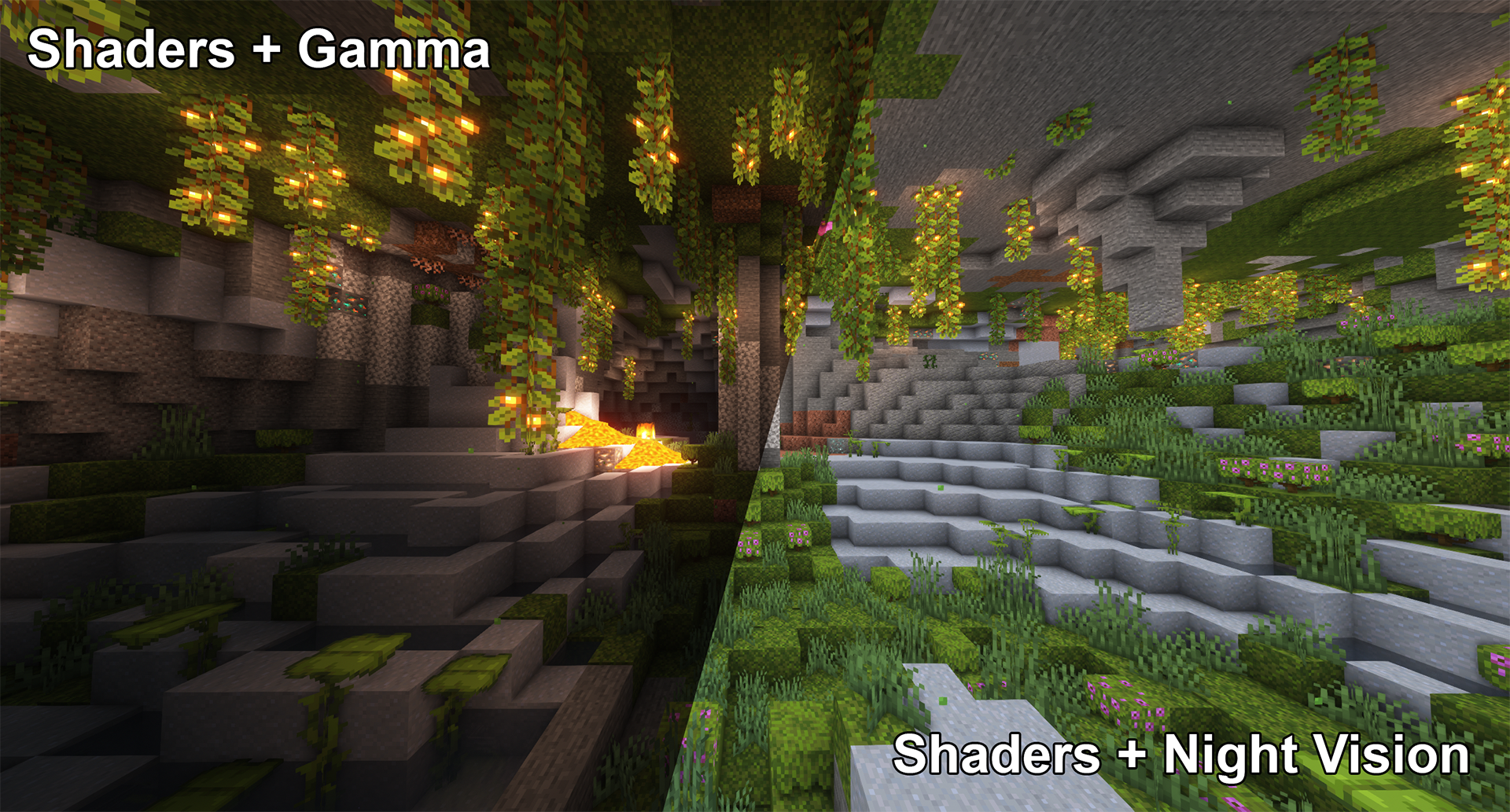
This is a fully configurable and client side gamma utility mod, making it much easier to see in the dark.
It’s a really basic mod that allows you to change the gamma value in game way higher than the in game brightness setting allows. Nights will look like day and caves will look like they’re fully lit up.
Basically Fullbright but for Fabric and NeoForge.
**Press G to toggle between 100% and 1500% gamma**
**Press H to toggle client side Night Vision on or off**
This works better in combination with shaders than gamma
## **Fully adjustable to your liking**
To see everything that can be done and adjusted open the function and configuration spoilers below.
Here are some examples of what’s possible though:
Mod overview video from BlackNinja745
**Toggle Night Vision**
High gamma won’t work in combination with shaders,
however, night vision will work with at least some shaders:
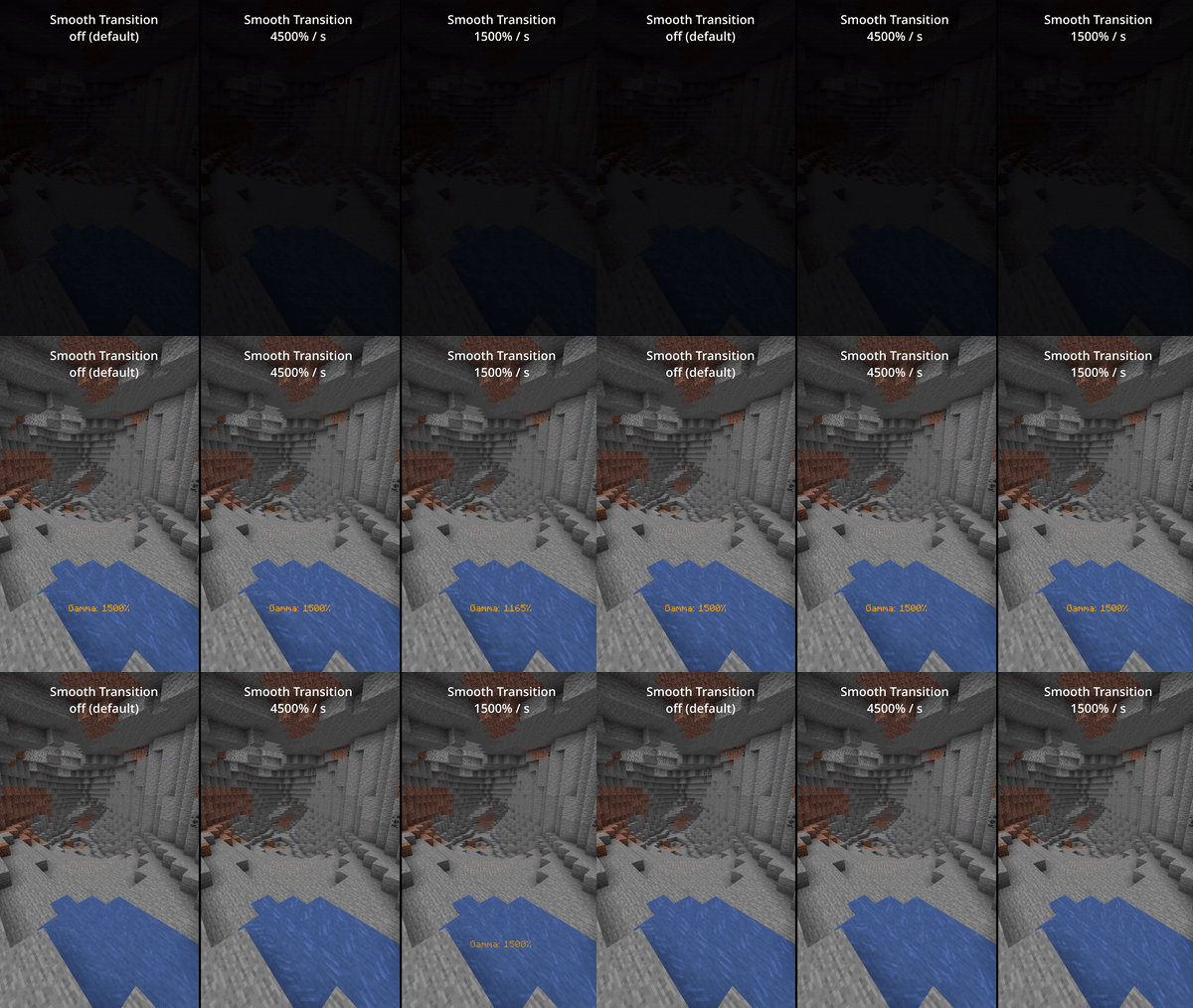
**Smooth Transition**
Enable smooth transition (off by default) for a less intense transition when toggling gamma:
**Status Effects**
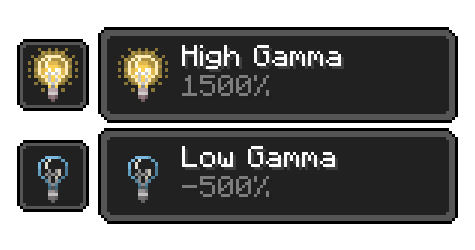
Enable fully client side status effects (off by default)
To keep you reminded that you’ve enabled gamma outside normal values:
## **All Functions**
All functions and commands
**Toggle Gamma**
*Usage: Keybind (default: G) or /gamma toggle*
Toggle between the default gamma percentage and the configured toggled percentage.
**Increase Gamma**
*Usage: Keybind (default: arrow up) or /gamma increase (value is optional)*
Increase the gamma percentage by the configured step percentage or the given value.
**Decrease Gamma**
*Usage: Keybind (default: arrow down) or /gamma decrease (value is optional)*
Decrease the gamma percentage by the configured step percentage or the given value.
**Set Gamma**
*Usage: /gamma set *
Set the gamma to a specific percentage.
**Min Gamma**
*Usage: Keybind or /gamma min*
Sets the gamma to the configured minimum limit.
**Max Gamma**
*Usage: Keybind or /gamma max*
Sets the gamma to the configured maximum limit.
**Toggle Night Vision**
*Usage: Keybind (default: H) or /gamma nightvision*
Toggle night vision on or off.
## **Configuration (File / Mod Menu)**
All configuration options
**Default Gamma Percentage**
*Default: 100%*
Gamma percentage for when the mod is toggled off.
**Toggled Gamma Percentage**
*Default: 1500%*
Gamma percentage for when the mod is toggled on.
**Update Toggle Value**
*Default: false*
Enabling this will make the toggle value remember the last non default value you’ve used.
**Smooth Transition**
*Default: false*
Make the transition when toggling gamma smoother.
**Transition Speed**
*Default: 4500*
Speed in gamma percentage per second.
**Show Status Effect**
*Default: false*
Show a client side status effect when the gamma percentage is outside normal range.
(“Low Gamma” below 0% and “High Gamma” above 100%)
**Limit Check**
*Default: true*
Should the mod enforce the minimum and maximum gamma limits.
**Minimum Gamma Limit**
*Default: -750%*
Minimum gamma percentage the mod will allow if the Limit Check is enabled.
**Maximum Gamma Limit**
*Default: 1500%*
Maximum gamma percentage the mod will allow if the Limit Check is enabled.
**Gamma Percentage Step**
*Default: 10%*
Gamma percentage change for every increase or decrease.
**Show Gamma Message**
*Default: true*
Show a message with the new gamma value.
**Reset on Close**
*Default: false*
Reset the gamma value to default when Minecraft closes.
## **Versions & Dependencies**
1.19+
**Required**:
Fabric API
Cloth Config API (Is needed to make the config work)
**Optional:**
Mod Menu (This mod allows you to edit the configs in game)
1.16 – 1.18
**Required**:
Fabric API (0.31.0 or later)
**Optional:**
Mod Menu (This mod allows you to edit the configs in game)
**Already included/embedded:**
Cloth Config API (Is needed to make the config work)
1.14 – 1.15
**Required:**
Fabric API (0.14.0 or later)
**Optional:**
Mod Menu (This mod allows you to edit the configs in game)
**Already included/embedded:**
Auto Config Updated API (Is needed to make the config work)
Cloth Config API (Required for Auto Config)
FrozenLib
# FrozenLib
A library that contains many tools for modders. May grow in the future.
This library lets you:
– Have advanced configs
– Add custom scheduledTick methods to any block
– Allow Dripstone to trigger a scheduledTick on any block
– Easily let Dripstone dry out and drip from any block
– Decrease time from item cooldowns
– Use moving looping sounds, use custom flyby sounds, and set up a custom interface to control when they should stop playing
– Disable Hopper usage on any given BlockEntity
– Use advanced math operations and noise sampling
– Set up datafixers to convert old data to newer formats
– Override entity textures
– Add screen shaking effects
– Modify gravity
– Add new mobCategories
– Use and extend a wind system
– Modify advancements on runtime
– Add MobEffects to Beacons
– And much more!
Includes a Fabric implementation of The Quilt Project’s DataFixerUpper API.

Fresh Sun
![[Sun]](https://cdn.modrinth.com/data/cached_images/70807fe14c7d28c4bb53f6770af5e827359c8900.png) Gives the Sun a fresh look. Improving the Sky! ![[Sun]](https://cdn.modrinth.com/data/cached_images/70807fe14c7d28c4bb53f6770af5e827359c8900.png)
Changes the sun texture! It’s no longer a square! It’s a big ball of light with rays!
Available for every version!


Fresh Moon Phases
Gives the Moon texture a new fresh look. Improving the Sky!
Made using real moon images.
### The Full Cycle:
New Moon, Waxing Crescent, First Quarter, Waxing Gibbous,
Full Moon, Waning Gibbous, Third Quarter, and Waning Crescent!!
This is a tiny addon for Fresh Animations that changes the look of the Iron Golem with the Iron Golem from the Minecraft Movie Event from Bedrock(Includes cracked golem visuals).
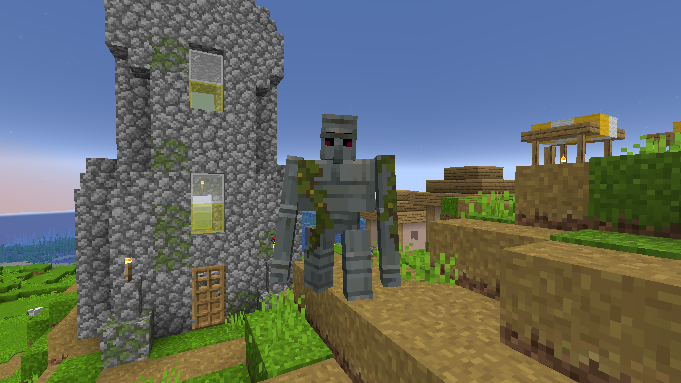
This resourcepack doesn’t change anything else in the game, it doesn’t change sounds, and doesn’t change the animation set from FA, just the textures.
Load this resourcepack ABOVE Fresh Animations.
This pack is incompatible with any other resource packs that change the texture of the Iron Golem.
Using this resourcepack without Fresh Animations will make the Iron Golem appear without eyes.
I also made a regular version for those who do not use Fresh Animations which can be found here.
Freakland Totem of Undying
– **Freakland** is a popular Minecraft server that became popular in 2025 due to the streamer 5opka (five), as well as his friends and invited guests. This resource pack replaces the Totem of Immortality with the server logo
– **Freakland** – популярный майнкрафт сервер который стал популярен в 2025 году за счет стримера 5opka (пятерка) а также его друзей и приглашенных гостей. Этот ресурспак заменяет тотем бессмертия на логотип сервера
ALL RESOURCEPACKS COLLECTION: MEMES + STREAMERS
(Neo)Forge Early Loading Screen for Fabric
# (Neo)Forge Early Loading Screen for Fabric
This mod is a direct port of earlydisplay from FML.
## Configuration
You can make the background monochrome by selecting “Monochrome Logo” in the ingame options menu.