AzTrain
# 🎮 Aᴢᴛʀᴀɪɴ – ᴘᴠᴘ ᴍᴏʙ ᴛʀᴀɪɴᴇʀ
> 📌 ᴀ ɢᴜɪ-ʙᴀꜱᴇᴅ ᴘᴠᴘ ᴍᴏʙ ᴛʀᴀɪɴᴇʀ ꜱʏꜱᴛᴇᴍ ꜰᴏʀ ᴍɪɴᴇᴄʀᴀꜰᴛ ꜱᴇʀᴠᴇʀꜱ
## 🎯 ꜰᴇᴀᴛᴜʀᴇꜱ
– 📋 ᴄᴜꜱᴛᴏᴍɪᴢᴀʙʟᴇ ᴍᴏʙ ᴘʀᴇꜱᴇᴛꜱ
– 🎨 ɪɴᴛᴜɪᴛɪᴠᴇ ɢᴜɪ ꜱʏꜱᴛᴇᴍ
– ⚔️ ᴘᴠᴘ ᴛʀᴀɪɴɪɴɢ
– 🛡️ ᴄᴜꜱᴛᴏᴍ ᴇQᴜɪᴘᴍᴇɴᴛ
– 🎭 ᴘʟᴀᴄᴇʜᴏʟᴅᴇʀᴀᴘɪ ꜱᴜᴘᴘᴏʀᴛ
## 📜 ᴄᴏᴍᴍᴀɴᴅꜱ
### 🎮 ᴘʟᴀʏᴇʀ ᴄᴏᴍᴍᴀɴᴅꜱ
“`minecraft
/train – ᴏᴘᴇɴꜱ ᴛʜᴇ ᴛʀᴀɪɴɪɴɢ ɢᴜɪ
“`
### ⚡ ᴀᴅᴍɪɴ ᴄᴏᴍᴍᴀɴᴅꜱ
“`minecraft
/aztrain gui – ᴏᴘᴇɴ ᴀᴅᴍɪɴ ᴍᴇɴᴜ
/aztrain edit – ᴍᴏᴅɪꜰʏ ᴍᴏʙ ꜱᴛᴀᴛꜱ
/aztrain spawn – ᴍᴀɴᴜᴀʟʟʏ ꜱᴘᴀᴡɴ ᴍᴏʙ
/aztrain reload – ʀᴇʟᴏᴀᴅ ᴄᴏɴꜰɪɢꜱ
“`
## 🔒 ᴘᴇʀᴍɪꜱꜱɪᴏɴꜱ
“`yaml
aztrain.use: ᴀᴄᴄᴇꜱꜱ ᴛᴏ /ᴛʀᴀɪɴ (ᴅᴇꜰᴀᴜʟᴛ: ᴛʀᴜᴇ)
aztrain.admin: ᴀʟʟ ᴀᴅᴍɪɴ ꜰᴇᴀᴛᴜʀᴇꜱ (ᴅᴇꜰᴀᴜʟᴛ: ᴏᴘ)
aztrain.spawn: ᴍᴀɴᴜᴀʟ ᴍᴏʙ ꜱᴘᴀᴡɴɪɴɢ (ᴅᴇꜰᴀᴜʟᴛ: ᴏᴘ)
aztrain.edit: ᴇᴅɪᴛ ᴍᴏʙ ᴘʀᴇꜱᴇᴛꜱ (ᴅᴇꜰᴀᴜʟᴛ: ᴏᴘ)
aztrain.reload: ʀᴇʟᴏᴀᴅ ᴄᴏɴꜰɪɢꜱ (ᴅᴇꜰᴀᴜʟᴛ: ᴏᴘ)
“`
## 🎨 ᴄᴏʟᴏʀ ᴄᴏᴅᴇꜱ
“`minecraft
&0 ʙʟᴀᴄᴋ &8 ᴅᴀʀᴋ ɢʀᴀʏ
&1 ᴅᴀʀᴋ ʙʟᴜᴇ &9 ʙʟᴜᴇ
&2 ᴅᴀʀᴋ ɢʀᴇᴇɴ &a ɢʀᴇᴇɴ
&3 ᴅᴀʀᴋ ᴀQᴜᴀ &b ᴀQᴜᴀ
&4 ᴅᴀʀᴋ ʀᴇᴅ &c ʀᴇᴅ
&5 ᴅᴀʀᴋ ᴘᴜʀᴘʟᴇ &d ʟɪɢʜᴛ ᴘᴜʀᴘʟᴇ
&6 ɢᴏʟᴅ &e ʏᴇʟʟᴏᴡ
&7 ɢʀᴀʏ &f ᴡʜɪᴛᴇ
&l ʙᴏʟᴅ
&n ᴜɴᴅᴇʀʟɪɴᴇ
&o ɪᴛᴀʟɪᴄ
&k ᴏʙꜰᴜꜱᴄᴀᴛᴇᴅ
&m ꜱᴛʀɪᴋᴇᴛʜʀᴏᴜɢʜ
&r ʀᴇꜱᴇᴛ
“`
## 📦 ᴠᴇʀꜱɪᴏɴ
ᴠ1.0 ꜰᴏʀ ᴍɪɴᴇᴄʀᴀꜰᴛ 1.19+
ZTONMC|暮色森林
这是ZTONMC旗下的模组整合包,包含众多模组,部分模组的作用如下:
Xaero的世界地图可以为你展示已探索区域,可与Xaero的小地图配合使用,帮你规划探索路线。
传送石碑/指路石可快速传送回指定位置,适合生存、冒险服务器使用。
暮色森林会为你打造神秘的暮色森林冒险体验,包含独特生物与结构。
自定义游戏加载界面:可自定义游戏启动加载界面,打造专属视觉体验。
Smooth Gui可以打开GUI界面时添加平滑动画,提升操作流畅度。
Balm可以为多加载器模组提供抽象层,优化模组兼容性。
This is a module integration package under ZTONMC, which includes numerous modules. The functions of some modules are as follows:
Xaero’s world map can show you the explored areas and can be used in conjunction with Xaero’s mini map to help you plan your exploration route.
The stone tablet/guide stone can be quickly transported back to the designated location, suitable for survival and adventure servers.
Twilight Forest will create a mysterious Twilight Forest adventure experience for you, featuring unique creatures and structures.
Customize game loading interface: You can customize the game launch loading interface to create an exclusive visual experience.
Smooth Gui can add smooth animations when opening the GUI interface to improve operational fluency.
Balm can provide an abstraction layer for multi loader modules and optimize module compatibility.
ZTONMC|忠诚市
忠诚市是《我的世界》中以铁路系统为核心的终极整合包,整合了数十款专业铁路模组,可一站式完成从基础铺设到复杂运营的铁路项目。
Zhongcheng City is the ultimate modpack in *Minecraft* centered around a railway system. It integrates dozens of professional railway mods, enabling one-stop completion of railway projects from basic laying to complex operations.中城是《我的世界》中以铁路系统为中心的终极模组。它集成了数十种专业铁路模式,可以一站式完成铁路项目从基础铺设到复杂运营。
核心铁路模组
基础与进阶铺设:包含“我的世界铁路”“天津地铁”“云竹铁路扩展”等模组,提供铁轨、信号灯、道岔等基础组件,支持曲线轨道、高架桥等复杂地形铺设,适配不同场景需求。
运输与载具:整合“常磐装饰”模组,涵盖货运车厢、客运列车、缆车等载具,支持自动化调度与多线程运输,可模拟真实铁路物流系统。
Core Railway Mods 核心铁路模型
Basic and Advanced Laying: Includes mods such as “Minecraft Railway”, “Tianjin Metro”, and “Yunzhu Railway Expansion”. It provides basic components like rails, signal lights, and switches, supports laying on complex terrains such as curved tracks and viaducts, and adapts to different scenario needs.基础和高级铺设:包括“我的世界铁路”、“天津地铁”和“云珠铁路扩张”等模式。它提供轨道、信号灯和开关等基本组件,支持在弯曲轨道和高架桥等复杂地形上铺设,并适应不同的场景需求。
Transportation and Vehicles: Integrates the “Tokyo Metro Decoration” mod, covering vehicles such as freight cars, passenger trains, and cable cars. It supports automated scheduling and multi-threaded transportation, and can simulate real railway logistics systems.交通与车辆:整合“东京地铁装饰”模式,涵盖货车、旅客列车、缆车等车辆。支持自动化调度和多线程运输,可以模拟真实的铁路物流系统。
场景与装饰:包含“MSD铁路设施装饰”“伦敦地铁扩展”等模组,提供车站、站台、信号塔等建筑装饰。
Scenes and Decorations: Includes mods such as “MSD Railway Facilities Decoration” and “London Underground Expansion”, providing architectural decorations like stations, platforms, and signal towers.
zTokenSMP
# 🧱 zTokenSMP – Mob Token Economy Plugin
> ᴀ ᴛᴏᴋᴇɴ-ʙᴀsᴇᴅ ᴇᴄᴏɴᴏᴍʏ ᴀɴᴅ ᴀʙɪʟɪᴛɪᴇs ᴘʟᴜɢɪɴ ғᴏʀ ᴍɪɴᴇᴄʀᴀғᴛ sᴍᴘ
Transform your SMP server with a unique token-based economy system featuring **20 unique mob tokens**, each with their own special abilities and powers!
—
## ✨ Features
🎯 **Token Economy System** – Earn tokens through mining and mob kills
⚡ **20 Unique Mob Tokens** – Each token grants special abilities with cooldowns
🎮 **Interactive GUI** – Beautiful layered token management interface
🎬 **Join Animations** – Stunning scroll animations for new players
🛡️ **Permission System** – Granular control over token access
📊 **Admin Commands** – Complete token management for operators
🎨 **Resource Pack** – Custom textures and Unicode icons included
—
## 🎮 Commands & Permissions
📋 Click to expand Commands Table
| Command | Description | Permission | Aliases |
|———|————-|————|———|
| `/token [subcommand]` | Manage your tokens | `ztokensmp.use` | `/bal`, `/balance` |
| `/ability [subcommand]` | Manage your abilities | `ztokensmp.use` | `/abilities`, `/skill` |
| `/tokens` | Open tokens GUI | `ztokensmp.use` | `/tokengui`, `/mobTokens` |
| `/tokensadmin [subcommand]` | Admin token commands | `ztokensmp.admin` | `/tokenadmin`, `/tadmin` |
🔐 Click to expand Permissions Table
| Permission | Description | Default |
|————|————-|———|
| `ztokensmp.*` | All plugin permissions | OP |
| `ztokensmp.use` | Basic plugin usage | Everyone |
| `ztokensmp.admin` | Administrative commands | OP |
| `ztokensmp.token.give` | Give tokens to players | OP |
| `ztokensmp.token.take` | Take tokens from players | OP |
| `ztokensmp.token.[mob]` | Access to specific mob token | Everyone |
—
## 🧊 Token Types & Abilities
🟢 Layer 1: Common Tokens
• **Zombie Token** – Basic undead powers
• **Skeleton Token** – Archery enhancements
• **Spider Token** – Wall climbing abilities
• **Pig Token** – Speed and agility boost
• **Creeper Token** – Explosive resistance
🔵 Layer 2: Rare Tokens
• **Blaze Token** – Fire immunity and flame powers
• **Guardian Token** – Water breathing and aquatic speed
• **Snow Golem Token** – Ice-based abilities
• **Wither Skeleton Token** – Wither immunity and dark powers
• **Bat Token** – Night vision and flight boost
🟣 Layer 3: Epic Tokens
• **Wolf Token** – Pack hunting abilities
• **Squid Token** – Underwater mastery
• **Enderman Token** – Teleportation powers
• **Bee Token** – Pollination and speed
• **Horse Token** – Enhanced movement speed
🟠 Layer 4: Legendary Tokens
• **Chicken Token** – Feather falling and glide
• **Ravager Token** – Brute strength and charging
• **Warden Token** – Sonic boom and vibration detection
• **Witch Token** – Potion brewing mastery
• **Ender Dragon Token** – Ultimate flight and power
—
## ⚙️ Configuration
“`yaml
# zTokenSMP Configuration
starting-tokens: 100
mining-reward-tokens: 1
mining-reward-chance: 0.1
kill-reward-tokens: 2
death-penalty-tokens: 10
abilities:
max-active: 3
deactivate-on-death: true
save-interval: 300
debug-mode: false
messages:
prefix: “&6[zTokenSMP]&r ”
no-permission: “&cYou don’t have permission to use this command.”
insufficient-tokens: “&cYou don’t have enough tokens.”
“`
—
## 📋 Requirements
– **Minecraft Version:** 1.20.1+
– **Java Version:** 17+
– **Server Software:** Spigot/Paper
– **Dependencies:** None required
—
## 📦 Installation
1. Download the latest `zTokenSMP-1.0.0.jar` from releases
2. Place the JAR file in your server’s `plugins` folder
3. Restart your server
4. ᴄᴏɴғɪɢᴜʀᴇ ᴛʜᴇ ᴘʟᴜɢɪɴ ɪɴ `config.yml`
5. Apply the included resource pack to your server (optional)
—
## 🎨 Resource Pack Features
– 🖼️ **Custom Token Textures** – Unique designs for all 20 tokens
– 🔤 **Unicode Font Support** – Special characters for animations
– 🎭 **GUI Enhancements** – Beautiful interface elements
—
## 💬 In-Game Messages
All messages support Minecraft color codes:
– `&6[zTokenSMP]&r ` – Plugin prefix
– `&aToken activated successfully!` – Success messages
– `&cInsufficient tokens!` – Error messages
– `&eYou received a new token!` – Reward notifications
—
## 📄 License
This project is licensed under the **MIT License** – see the LICENSE file for details.
—
## 👨💻 Author
**Made with ❤️ by GamingHuzai**
*ᴇɴᴊᴏʏ ʏᴏᴜʀ ᴛᴏᴋᴇɴ ᴀᴅᴠᴇɴᴛᴜʀᴇ!*
—
*⚡ Enhance your Minecraft SMP experience with zTokenSMP!*
[MTR4] Zhongtong EuroZT18 – Metro Mondego


## Zhongtong N18/EuroZT18 – Metro Mondego
The Zhongtong N18 (also known as EuroZT18) is a 18m articulated electric bus. It features 3 doors and a reduced mobility area.
This pack in particular adds the EuroZT18 used in Portugal’s latest sensation – Metro Mondego (also known as SMM), a Bus Rapid System (BRT/MetroBus) that was built to replace a line that was closed over a decade ago between Coimbra and Lousã.
> This pack also features **a new feature**! The EuroZT18 has working indicators: the right indicator will **blink when the bus is at a stop** and, **prior to departure, the left indicator will blink**!
> The front door is animated and opens just like a normal bus door in order to give it some realism. The middle/rear doors aren’t animated like the front door because, in real life, these doors open outwards
> This vehicle also has an **experimental feature** – fleet numbers. Each vehicle has its own unique 3-digit number (shown on the rear and on the front) based on when they’ve departed from the depot.

## Retexturing this bus
Would you like to retexture this bus for your own operator?
Feel free to contact me (by joining my [Discord Server](https://discord.gg/astMcchNdP) or sending me a DM from the MTR server) to be able to assist you or, if needed, to do the retexture for you!
## Recommended consist
In order to enjoy this pack to its fullest, I recommend using the consist below when setting up this bus
Click to expand
– Zhongtong N18 Metro Mondego (Front)
– Zhongtong N18 Metro Mondego (Back)
## Support, Issues and Suggestions
If you find any issues in this pack, have any suggestions for improvement or need help setting this up, feel free to join my [Discord Server](https://discord.gg/astMcchNdP)! I also post sneak peeks of my upcoming packs there 🙂
> **Note:** This project is NOT affiliated with, and is not an official product of Metro Mondego
## KNOWN ISSUES
The bus’s doors will bug out if you attempt to open them WITHOUT any platform block. As such, **make sure** that you only open this bus’s doors **when standing at a stop with a platform**.
## Terms of Use
Click to expand
## Terms
“I”, “My”, “Creator”, “Modeler” or “Contributor” refer to Movies22
“ResourcePacks” refers to any resourcepack that I’ve created and distributed, whether it was on Modrinth or anywhere else
“MTR” or “Minecraft Transit Railway” refers to the minecraft mod required by all of My ResourcePacks in order to ensure their functionality of working trains
“Model” refers to any models, done in Blender or BlockBench that I distribute through my resourcepacks
“The User” or “You” refers to the user downloading the resourcepacks/reading these terms. These terms apply to The User.
“The Content”, “Resourcepack” or “the Pack” refers to any resourcepacks that the Creator has created/co-created and published on Modrinth or other platforms.
“Discord Server” refers to Movies22’s Dev Hub, a Discord Server owned by the Creator which is used to publish and share all of the Creator’s active works.
## Article 1 (Scope of these Terms)
These terms of use apply to **all resource packs** and **models** created by the Creator.
## Article 2 (Distribution)
1. You may include this resourcepack into a **modpack**.
2. You may **modify any of the packs for personal use**.
3. You **may not** distribute any modifications to any of my packs through Modrinth or any other platform without my express permission.
3.a) You may distribute modified versions of the pack if it’s intended to be used within a specific server only without requiring my permission. I’d appreciate it if you informed me of such uses, in order to give you any assistance required!
3.b) When redistributing, you must credit the creator and link the original resourcepack on Modrinth
3.c) When redistributing you must specify a license that does not conflict with these terms and conditions. If unsure, you may link this license to inherit its terms.
4. You **may not** integrate **any resourcepack OR any models within said resourcepacks** into another resourcepack/addon **without my express permission**.
## Article 3 (Prohibited Acts)
The user must **not** do any of the following when using any of my content:
1. Using the content for religious, political or cult purposes
2. Redistributing this content without any modifications (except for redistribution for the purpose of incorporating it into a multiplayer server or distributed world)
3. Acts that violate local/European laws, regulations, public order, morals or any other applicable regulations within the EU
4. Acts related to criminal acts
5. Acts that may cause disadvantages, damage or discomfort to other users and/or third parties
6. Using this content to represent and/or recreate an accident, disaster, or any other insensitive situation
7. Using this resourcepack for AI training/machine learning
8. Acts that violate the terms of use of the MTR discord server
9. Acts that violate minecraft’s EULA/Community Guidelines
10. Porting the content to any form of media other than MTR, whether inside or outside Minecraft (for example forge mod, RTM or BVE)
11. Other acts that are deemed inappropriate/inadequate
## Article 4 (Suspension of Distribution)
All active resourcepacks will be listed on my Discord Server.
Any inactive projects will be archived on Modrinth, **only receiving the necessary updates to ensure that they still work with newer versions of MTR unless stated otherwise in the resourcepack’s description/Discord Server.**
If a project is archived, you should **not** redistribute it, or breach any of the terms in this document. (specially the ones about redistribution)
**The Creator is not to be held liable for any disadvantage or damage caused to third parties due to the suspension of distribution of this resource pack.**
## Article 5 (Restrictions)
If found in breach of these terms, the Creator **may restrict or prohibit** the user from using all or part of this or all resourcepacks without prior notice.
Additionally, if the user utilises the resource pack in a manner that the Creator deems inappropriate, the Creator **may restrict** the user from utilising said pack and/or any other packs **after informing the user**.
## Article 6 (Disclaimers)
1. The Creator is not to be held responsible for any damage or other incidents caused by the usage of the creator’s models and resource packs
2. By downloading this resourcepack you agree to these terms of use.
3. The contents of any resourcepack may be changed at any time. You should keep your packs updated in order to enjoy the latest features/upgrades
4. These terms may be revised at any time at the discretion of the Creator. If any changes are made, the Creator will notify the public via the Discord Server.
## Disclaimer
This pack is not associated with **Metro Mondego**, **Sistema de Mobilidade do Mondego** or **Zhongtong**/**Energia Fundamental**.
zSupportExtender
## 🚀 zSupportExtender
**zSupportExtender** is a lightweight compatibility layer designed for Paper servers, enabling plugins to run smoothly across multiple Minecraft versions without requiring updates or modifications.
—
### 🛒 Buy Here
**zSupportExtender+++** https://discord.gg/4xZB53Bwd4
—
### ✨ What it does
zSupportExtender helps bridge differences between Minecraft versions by providing a stable runtime environment for plugins. It reduces version-related issues and improves compatibility from **Paper 1.19 up to 26.1.2**.
—
### ⚙️ Features
* Cross-version compatibility support (1.19 → 1.21.1)
* No external dependencies required
* Lightweight and optimized for performance
* Safe fallback handling for API differences
* Clean startup with no warnings or unnecessary logs
—
### 📦 Supported Platforms
* ✔ Paper 1.19
* ✔ Paper 1.20 / 1.20.x
* ✔ Paper 1.21 / 1.21.1
* ✔ Paper 26.1.2
—
### 🛠 Use Case
This plugin is ideal for server owners who want to:
* Run older plugins on newer versions
* Maintain compatibility without constant updates
* Reduce breakage caused by API changes
—
### ⚠️ Important Notes
* This plugin does not modify other plugins directly
* Compatibility depends on how plugins are built ( some may still break (well it?) )
* Designed to improve compatibility, not guarantee it in all cases
—
### 📄 Installation
1. Download the latest version
2. Place the `.jar` file into your `/plugins` folder
3. Restart your server
—
### 👨💻 Developer Info
* Built using stable Paper APIs
* Designed with forward compatibility in mind
* No configuration required (plug & play)
—
**zSupportExtender** focuses on simplicity, performance, and practical compatibility for modern Paper servers.
Zorua Spiral Universe Season 3
The Zorua Spiral Universe Modpack provides multiple mods that enhance the worldbuilding through structures, adds plenty of ores to give the players tons of customization through Tinker’s Construct, and plenty of Create addons to help you automate whatever items you want. This project will get updated as time goes on to add more content to keep players on their toes and continually give them more customization options.
Current Version: ZSU v3.0.1
ZStaffChatPro Bridge (Addon)
# ZStaffChatPro Bridge
Server-side addon for [ZStaffChatPro](https://modrinth.com/plugin/zstaffchatpro) that connects your Spigot/Paper/Folia backends to the proxy.
## What it does
– **Vanish Sync** — Syncs PremiumVanish/SuperVanish status to BungeeCord/Velocity so vanished players are hidden from /stafflist across the network
– **AFK Detection** — Sends player movement data (throttled to 30s per player) to the proxy for accurate AFK tracking
– **Activity Bridging** — Enables proxy-side features like in-game activity log and /staffafk to work with real player data
## Setup
1. Install ZStaffChatPro on your BungeeCord/Velocity proxy
2. Install this Bridge addon on each Spigot/Paper/Folia backend
3. No configuration needed — it connects automatically via plugin messaging
## Requirements
– ZStaffChatPro on the proxy (BungeeCord or Velocity)
– Spigot, Paper, or Folia 1.16+
– Optional: PremiumVanish or SuperVanish for vanish sync
ZStaffChatPro

—
*The most advanced staff communication plugin for Minecraft networks.*
**[Wiki & Documentation](https://docs.zenyxdev.org)** | **[Bridge Addon](https://modrinth.com/plugin/zstaffchatpro-bridge-(addon))** | **[Discord](https://discord.com/invite/ZGd6Mvacuf)**
—
## What is ZStaffChatPro?
ZStaffChatPro is a powerful and lightweight staff chat plugin designed for Minecraft server networks. It allows your staff team to communicate privately across multiple servers using fully customizable chat channels.
Whether you run a small survival server or a large network with dozens of backends, ZStaffChatPro provides everything your staff needs — private channels, playtime tracking, AFK detection, Discord integration, and much more.
The plugin works on **Spigot**, **Paper**, **Folia**, **BungeeCord**, and **Velocity**, supporting Minecraft **1.8.x — 1.21.x** and **26.1.1**.
—
## Features
### Unlimited Custom Channels
Create as many staff chat channels as you need — Staff, Admin, Builder, Helper, or anything you can think of. Each channel is fully independent with its own:
– Display name and color prefix
– Permission node
– Command and aliases (e.g. `/sc`, `/ac`, `/bchat`)
– Chat prefix shortcut (e.g. type `!hello` in chat to send “hello” to the Staff channel)
– Message format with full placeholder support
– Priority system for staff list ordering
Want just one channel? Keep only “staff” in the config and you’re done.
### Cross-Network Support
Full BungeeCord and Velocity proxy support. Staff can chat across all backend servers seamlessly.
– See which server each staff member is on
– Track server switches in the activity log
– Disable staff chat on specific servers (e.g. lobby, minigames)
– Custom server display names via aliases (e.g. `hub-01` shows as `Hub`)
– Bridge addon for accurate AFK detection and signed chat support on backends
### Discord Integration
Connect your staff chat to Discord with two available modes:
**Webhook Mode** — Simple one-way setup (Minecraft -> Discord). Just paste a webhook URL and you’re done. Each channel can have its own Discord channel. Supports rich embeds with customizable colors, authors, and footers.
**Bot Mode** — Full two-way integration (Minecraft <-> Discord). Staff can send messages from Discord directly into the in-game staff chat. Supports role-based permissions, custom bot status, and rich embeds.
Both modes include an **Activity Log** that sends staff joins, leaves, server switches, vanish, and AFK events to Discord — with per-event embed colors.
### Staff List
View all online staff members with `/stafflist`. Three display modes available:
**Default** — Compact, one line per channel:
“`
Staff (2): player1, player2
“`
**Grouped** — One player per line:
“`
Staff (2)
player1
player2
“`
**Server** — Grouped by backend server (proxy only):
“`
Staff (3)
Hub (1)
player1
Survival (2)
player2
player3
“`
Player format is fully customizable — show LuckPerms prefix, server name, or any combination.
### Staff Management
**Playtime Tracking** — Track how long each staff member spends online. View daily, weekly, and total playtime with AFK breakdown using `/stafftime`.
**AFK Detection** — Automatically marks inactive staff as AFK after a configurable timeout. AFK status is shown in the staff list and reported in the activity log. Staff can also manually toggle AFK with `/staffafk`.
**Spy Mode** — Allows authorized staff to see messages from all channels, even ones they don’t have permission for. Toggle with `/staffspy`.
**Toggle Mode** — Use `/sc` without a message to toggle auto-redirect. When enabled, all your regular chat messages are automatically sent to that staff channel.
**Activity Log** — Track staff activity directly in the staff chat channel:
– Player joins and leaves
– Server switches (with previous and current server)
– Vanish on/off
– AFK on/off
No extra permission needed — works for any player with access to a channel.
### Integrations
**LuckPerms** — Automatic support for prefix, suffix, group, and rank placeholders. Use `{luckperms_prefix}`, `{luckperms_rank}`, etc. in any message format. Full hex color support including `&#RRGGBB` format.
**PremiumVanish / SuperVanish** — Vanished players are shown with a [Vanished] tag in the staff list and vanish events are tracked in the activity log. Cross-server sync via Bridge addon.
**Chat Filter** — Built-in word filter with two modes: censor (replace with obfuscated text or custom string) or block (prevent the message entirely). Supports word lists and regex patterns.
### Customization
Everything is configurable. Clean config files with detailed comments for every option.
– Full hex color support (`{#FF5555}text`)
– Gradient support (`{#FF0000>>#0000FF}text{/}`)
– 20+ placeholders across all formats
– Multi-line message support
– Customizable help, about, and staff list output
– Auto-backup and regeneration when config version changes
—
## Quick Start
1. Drop the plugin JAR into your server’s `plugins/` folder
2. For proxy setups: install on the proxy + [Bridge addon](https://modrinth.com/plugin/zstaffchatpro-bridge-(addon)) on each backend server
3. Start the server — default channels work out of the box
4. Customize channels, formats, and features in `config.yml`
For detailed setup guides, all configuration options, and troubleshooting visit the **[Wiki](https://docs.zenyxdev.org)**.
—
## Commands
| Command | Description |
|———|————-|
| `/sc ` | Send a message to the Staff channel |
| `/ac ` | Send a message to the Admin channel |
| `/stafflist` | View all online staff members |
| `/staffspy` | Toggle spy mode (see all channels) |
| `/stafftime [player]` | View playtime statistics |
| `/staffafk` | Toggle AFK status |
| `/zscp reload` | Reload all configuration files |
| `/zscp about` | Show plugin info and status |
Full command list, permissions, and placeholders available on the [Wiki](https://docs.zenyxdev.org).
—
## Supported Platforms
| Platform | Versions |
|———-|———-|
| Spigot / Paper | 1.8.x — 1.21.x and 26.1.1 |
| Folia | 1.19.4+ |
| BungeeCord / Waterfall | All versions |
| Velocity | 3.0+ |
—
Need help? Visit the **[Wiki](https://docs.zenyxdev.org)** or join our **[Discord](https://discord.com/invite/ZGd6Mvacuf)**.
ZSpeed
What you need to know!
YOU NEED THESE MODS:
tickrate api
player animator
There are currently 3 suits:
^ Flash
^ Reverse Flash
^ Zoom
Key Bindings:
Y = Increase Speed
H = Decrease Speed
R = Enable/Disable Speed
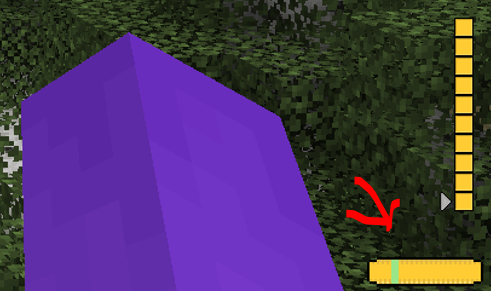
There Is a small meter at the bottom of your screen.
Use Jei or go to [https://legacy.curseforge.com/minecraft/mc-mods/zspeed](https://legacy.curseforge.com/minecraft/mc-mods/zspeed) to see the recipies!
Suit Textures:
I had some preset suits I didn’t make, I took them out but now only the flash suit has a texture, they still work. They just don’t have textures. I will work on them!
Bugs:
There are a few Bugs that I am aware of and trying to fix!
^ Crash – Index (number prob 20-30) Invalid in length 0, This is a bug with the trail, its not you, and its rare. But It can happen, I will try to eliminate it in future versions.
^ Trail is off!!! – At a 45 degree and -135 degree angle the trail is not directly behind the player. I’m not entirely sure why this is. But I will continue to crack at it in the future.
^ Other Players can’t see my trail! – This is because of how I render the trail. I render it directly to the client and not the game itself. I will work on multiplayer compatibility, But Its not here yet!
MULTIPLAYER IS RESTRICTED:
The way I coded some of the features makes it single player only. This mod WILL work in multiplayer, It just wont look as cool 🙁 , I am working on making it compatible, but for now, Only you can see your trail.
I will update this mod over time (especially if yall like it)