TreeChop-Flubel






# Tree Chop
Make tree chopping rewarding in Minecraft servers with this plugin. This is a simple yet effective addition to your server that incentivizes players to engage with spruce trees by rewarding them with in-game currency (essentialsX economy). Whether you’re looking to encourage resource gathering or simply add a fun twist to gameplay, this plugin offers a seamless solution.
# Requirements
– [EssentialsX](https://essentialsx.net/)
– LuckPerms (or any permissions plugin)
# Key Features:
– **Dynamic Countdown Mechanism**: The plugin tracks the number of logs in a spruce tree and initiates a countdown when any log is broken, providing an engaging and immersive experience for players.
– **Rewarding Experience**: Upon completion of the countdown, players are rewarded for their efforts, adding incentive and satisfaction to the chopping process.
– **Immersive Animation**: Enjoy a visually captivating tree falling animation that enhances the realism and excitement of chopping down spruce trees.
– **Automatic Respawn**: After the tree falls, it automatically respawns after a brief 5-second interval, allowing for continuous gameplay and interaction.
# Commands
### 1 /treechopper enable
– **Description:** Enables the TreeChopper feature for spruce trees.
– **Usage:** `/treechopper enable`
### 2 /treechopper disable
– **Description:** Disables the TreeChopper feature for spruce trees.
– **Usage:** `/treechopper disable`
### 3 /treechopper forcestop
– **Description:** Stops the TreeChop plugin completely.
– **Usage:** `/treechopper forcestop`
### 4 /treechopper worldname
– **Description:** Sets the name of the world in which plugin will work.
– **Usage:** `/treechopper worldname `
#### 4.1 example:
– 4.1.1 `/treechopper worldname lobby` sets world in which plugin will work to **lobby**
– 4.1.2 `/treechopper worldname world` sets world in which plugin will work to **world**
– 4.1.3 `/treechopper worldname myworld` sets world in which plugin will work to **myworld**
# Permission
You need to use a permissions plugin such as luckperms to handle permission otherwise it won’t work.
– “`TreeChopper.ChopRewards“` Grants player access to chop trees and get rewards.
# How it works
– **Chop a Spruce Tree**: Players simply chop a spruce tree as they would in the game.
– **Countdown Initiation**: Breaking any log in the spruce tree triggers a countdown based on the total number of logs in the tree.
– **Reward and Animation**: Upon countdown completion, players are rewarded, and a stunning tree falling animation ensues, heightening the immersive gameplay experience.
– **Automatic Respawn**: After a short delay, the spruce tree respawns, ready to be chopped again, restarting the countdown process.
# Rewards
The rewards are given when a spruce tree is broken succesfully, after which a console command is issue which gives the player money using essentialsX economy
`eco give %player% 60`
Every player gets **$60** for chopping a tree succesfully.
# How to use
– Install EssentialsX and TreeChop and put them in your plugins folder
– Restart your server
– Setup EssentialsX economy however you like it
– by default the TreeChop plugin is enabled and the default world name is “Lobby”
– Everything is set if you have followed the steps
# Support
For any assistance You can join our discord server or contact me on discord “`fiend6998“`.
– [Discord](https://discord.com/invite/Ga4pHSEcjK)
– [Website](https://www.flubel.tech/)
TreeBreakerX
# 🌳 TreeBreakerX – Tree Felling Plugin 🌳
TreeBreakerX is a cool and customizable plugin that lets players cut entire trees by breaking a single block. Everything is configurable in the config.yml, from bound items to world settings and messages. Perfect for survival servers, minigames, or casual gameplay.
# ⚡ __Features__
– **Whole tree felling:** Break a tree with one swing.
– **Bound items system:** Bind tools with optional usage limits.
– **World control:** Enable or disable TreeBreakerX in any world.
– **Configurable messages:** Fully customizable messages with color codes (&).
– **Permissions based commands:** Control who can use admin features.
– **Safe & optimized:** Works across multiple worlds without lag.
# 🛠 __Commands__
– **/tbx help** – Shows a help menu with all commands.
– **/tbx setbound** – Save the item in your hand as the bound template (uses default from config).
– **/tbx bindhand** – Alias for /setbound.
– **/tbx unbind** – Remove binding from the item in your hand.
– **/tbx givebound** [material] [uses] – Give a bound item. Optional material and uses (default from config).
– **/tbx togglebinding** – Toggle whether only bound items can fell whole trees (admin).
– **/tbx enableworld ** – Enable TreeBreakerX in a world (admin).
– **/tbx disableworld ** – Disable TreeBreakerX in a world (admin).
– **/tbx listworlds** – List enabled and disabled worlds (admin).
– **/tbx reload** – Reload the plugin config (admin).
# ⚙ __Configurable Options__
– **Bound items:** Material, display name, usage count, and glint effect.
– **Require bound item toggle:** Decide if only bound items can fell trees.
– **Worlds:** Enable or disable TreeBreakerX per world.
– **Messages:** Customize all in-game messages with color codes.
– **Permissions:** Set which players or groups can use each command.
**TreeBreakerX is simple, fun, and fully configurable, giving your server a clean tree-felling experience without any hassle.**
Nee Version 1.0.0 ( Fixed some Bugs an improved the plugin )
# For Bugs – [Discord](https://discord.gg/jsThKrDA3d)
Transparent UI + Mod Support
This pack makes UI elements of the game semi-transparent, changing the look of the game to be modern and minimalistic.
## With this pack I recommend to install [JEI](https://modrinth.com/mod/jei) and [Blur Fabric](https://modrinth.com/mod/blur-fabric) / [Blur Forge](https://modrinth.com/mod/blur-forge) mods for the ultimate look.
– “JEI” allows UIs to support semi-transparent textures
– “Blur”, well, blurs the background
The pack has extended support for mods. Support for mods is based on 1.20.1 versions of mods.
### Full list of supported mods:
– Aether
– Amendments
– Apotheosis
– Apotheotic Attributes
– Applied Energistics 2
– Aquaculture 2
– Architectury
– Ars Nouveau
– Artifacts
– Athena
– Blue Skies
– Blur
– Bookshelf
– Building Gadgets 2
– Caelus
– ComputerCraft Tweaked
– MrCrayfish’s Furniture Mod
– Charm of Undying
– Corpse
– Cosmetic Armor Reworked
– Crafting Tweaks
– Curios
– Dark Utilities
– Ears
– Elytra Slot
– Farmer’s Delight
– Framework
– Goblin Traders
– Gurard Villagers
– Handcrafted
– Industrial Foregoing
– Iron Chests
– Iron Furnaces
– JEI
– Just Enough Professions
– Just Enough Resources
– Lootr
– Macaw’s Furniture
– Mekanism
– Mekanism Generators
– Mob Grinding Utils
– Moonlight
– Mystical Agriculture
– Nether’s Delight
– Ocean’s Delight
– Oculus
– Optifine
– Patchouli
– Placebo
– Polymorph
– Quark
– Refined Storage
– Refined Storage Addons
– Runelic
– Sophisticated Backpacks
– Sophisticated Core
– Sophisticated Storage
– Structure Gel
– Supplementaries
– Thermal Dynamics
– Thermal Expansion
– Thermal Foundation
– Thermal Innovation
– Titanium
– Trashcans
– Trash Slot
– The Twilight Forest
– Voicechat
– Waystones
—
Anybody is free to use this pack anywhere. Just do not rename the pack, please.
Contact me (DedMaxim99):
My [YouTube channel](https://www.youtube.com/channel/UCrMHx89X71br0aDlzwsLDHQ)
My [Twitch channel](https://www.twitch.tv/dedmaxim99)
My [VK page](https://vk.com/id728112150)
My [Telegram](https://t.me/DedMaxim99)
Transfuser
# Transfuser

## What is a Transfuser?
The Transfuser is a personal virual chest that allows you to access it from anywhere with the use of a special remote item. Each user can have as many transfusers as they wish. This can be convinient for keeping important items that you don’t want to lose on death.
## What is a Transfuser Remote?
The Transfuser Remote is an item that when used allows you to access the GUI that shows your currently owned transfusers. You can customise the item in the config.
## Commands:
– **Create a Transfuser**: Use `/transfuser create` to open the transfuser creation GUI, there you can select 1 of 3 sizes: `Small: 9 slots` `Medium: 18 slots` `Large: 27 slots` You can create as many as you wish!
– **Destroy a Transfuser**: Use `/transfuser destroy` to bring up the GUI with your transfusers. Click the one you want to destroy.
– **Rename a Transfuser**: Use `/transfuser rename ` then select a transfuser to rename
## Admin Commands:
– **Get Transfuser Remote**: Use`/transfuser get ` to magically retrieve a transfuser remote from thin air.
– **Give Transfuser Remote**: Use `/transfuser give ` to give a transfuser remote to a player.
## Permissions:
– `transfuser.use`: Basic access to the Transfuser.
– `transfuser.create`: Permission to create a Transfuser.
– `transfuser.destroy`: Permission to destroy a Transfuser.
– `transfuser.rename`: Permission to rename a Transfuser.
– `transfuser.admin`: Permission to give/get a Transfuser Remote.
## 🎩 Support on Discord
– Join the discord to get support, share suggestions and follow my projects!
[https://discord.gg/4sjDgwQNgj](https://discord.gg/4sjDgwQNgj)
TPAccess
✨ TpAccess – Simple & Secure Teleport Permissions
TpAccess is a lightweight and powerful Minecraft plugin that gives players full control over who can teleport to them. Whether you’re running a survival server, SMP, or a private world with friends, TpAccess helps prevent unwanted teleports while keeping things simple and user-friendly.
🔒 Key Features
✅ Toggle Teleport Access
Players can easily enable or disable whether others can teleport to them.
👥 Player-Controlled Permissions
No more unwanted /tp requests — each player decides who can access them.
⚡ Lightweight & Fast
Designed to run smoothly with minimal performance impact.
🔄 Real-Time Updates
Changes apply instantly — no reloads required.
🛠️ Easy to Use Commands
Simple commands make it easy for anyone to use.
💡 Perfect For
Survival servers (SMP)
Private friend groups
Semi-anarchy servers
Any server that wants better teleport control
📜 Example Use
Don’t want random players teleporting to you? Disable access.
Playing with friends? Enable access only when you want.
Running a server? Give players more control and reduce abuse.
⚙️ Compatibility
✔ Minecraft Paper / Spigot
✔ Modern Minecraft versions
✔ Works alongside most plugins
🚀 Why Choose TpAccess?
TpAccess keeps things simple: you control your space. No complicated setups, no confusing configs — just a clean, effective way to manage teleport access on your server.
TorchEgg
# TorchEgg Plugin
## Overview
TorchEgg is a Minecraft plugin that adds a special egg that places torches upon impact. The plugin prioritizes placing torches in dark areas or in a grid pattern beneath the player when the Shift key is held.
## Features
– **Special Egg**: Craft a special egg that can be thrown to place torches.
– **Dynamic Placement**: Torches are placed in dark areas to enhance visibility.
– **Grid Placement**: When holding Shift, torches are placed in a grid pattern directly beneath the player.
– **Crafting Recipe**: The special egg can be crafted using torches and a regular egg.
## Installation
1. Download the `TorchEgg` plugin JAR file.
2. Place the JAR file into the `plugins` folder of your Minecraft server.
3. Restart the server or use the `/reload` command.
4. The plugin should now be active, and you can start using the special egg!
## Configuration
The plugin can be configured through the `plugin.yml` file. You can modify the plugin’s name, version, and description as needed.
## Usage
– To craft the special egg, use the following recipe:
“`
TTT
TET
TTT
“`
Where `T` represents torches and `E` represents an egg.
## Author
Created by patekcz
TNT to Grass

# What does this resource pack do?
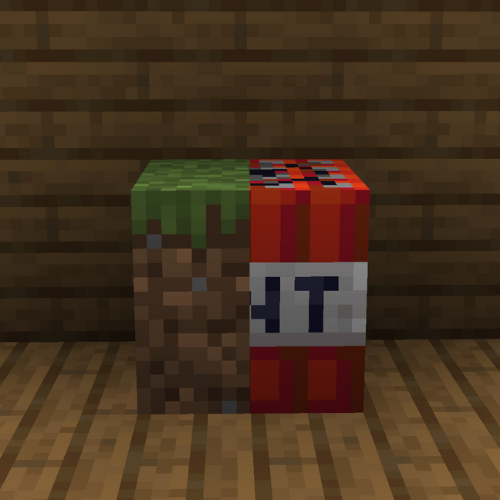
This resource pack **replaces the TNT textures to the grass textures**.
# How do I trick someone into using this pack?
1) **Download the pack**
2) **Change the name** of the .zip file
3) **Change the pack.mcmeta file** and **pack.png** to less _suspicious_ ones.
# Credits
We (**_ELTE Studios_**), **developed** and **made** this pack using the **Butterium** modpack for the **best optimisation, smoothness and QOL**, you can **download it on modrinth [here](https://modrinth.com/modpack/butterium)**.
# pack.png
TMAuth
# TMAuth
**TMAuth** is a lightweight, efficient, and interactive tournament management plugin for Minecraft servers. It allows server administrators to manage player access to specific tournament events using a custom whitelist system with built-in moderation tools.
## Features
– **Tournament Whitelist:** Prevent non-whitelisted players from joining during tournament periods.
– **Interactive UI:** Manage whitelisted players directly from the chat with clickable [KICK], [BAN], and [REMOVE] buttons.
– **Dynamic Synchronization:** Automatically syncs between `config.yml` and a dedicated `whitelist.txt` file.
– **whitelist.txt** Write multiple players names in whitelist.txt even with , spaces, or by line by line, and /tm whitelist reload to add all players from whitelist.txt to whitelist.
– **Real-time Moderation:** Quickly kick or ban players who shouldn’t be in the tournament session.
– **Simple Configuration:** Customize the kick message and toggle the whitelist status easily.
## Commands
All commands require the `tmauth.admin` permission.
| Command | Description |
|:—|:—|
| `/tm whitelist enable` | Enables the tournament whitelist. |
| `/tm whitelist disable` | Disables the tournament whitelist. |
| `/tm whitelist add ` | Adds a player to the tournament whitelist. |
| `/tm whitelist remove ` | Removes a player from the tournament whitelist. |
| `/tm whitelist list` | Shows an interactive list of all whitelisted players. |
| `/tm whitelist reload` | Reloads the configuration and whitelist data from disk. |
## Permissions
– `tmauth.admin`: Grants full access to the `/tm` command and its subcommands. (Default: OP)
## Configuration
The plugin generates a `config.yml` file for basic settings:
“`yaml
# TMAuth Configuration
# Whether the tournament whitelist is active
enabled: true
# The message shown to players who are not on the tournament whitelist
kick-message: “&cYou are not whitelisted for this tournament!”
# List of whitelisted players (automatically synced)
whitelisted-players: []
“`
## Developer Information
– **Version:** 1.0.0
– **API Version:** 1.21.*
– **Author:** SpyMC / SpyGamingOG
TierPVP
# ⚔️ TierPVP – Competitive PvP Ranking System
TierPVP is a customizable PvP ranking plugin designed to create a fair and competitive progression system for Minecraft servers. It features a structured tier system, configurable point mechanics, and anti-abuse protections to ensure balanced gameplay.
—
## ✨ Features
### 📊 Tier & Point System
* Configurable point gain/loss for kills and deaths (default: +2 / -2)
* Supports negative points
* 10-tier progression system (LT5 → HT1)
* Broadcast and sound effects when reaching the highest tier
—
### 🛡️ Anti-Farming System
* Daily kill limit (auto-reset at 00:00)
* Prevents abuse using alternate accounts
* Fully configurable limits
—
### 💰 Rewards & Progression
* Execute console commands as rewards
* Automatic rewards on rank up (money, titles, sounds)
* `/tier top` GUI leaderboard system
—
### ⚙️ Customization
* Fully editable messages
* Debug mode for tracking PvP events
* Easy configuration for server owners
—
## 🖥️ Compatibility
* Minecraft: 1.21.x
* Platforms: Paper / Spigot / Folia
* Dependency: Vault (for economy features)
—
## 📜 Commands
* `/tier top` – Open leaderboard
* `/tier help` – View commands
—
## 📌 Disclaimer
This plugin is independently developed and is not affiliated with any server, network, or existing project.
Thorough Keybindings
For as many Minecraft versions as possible, this mod makes the keybindings of usually fixed mappings rebindable. This is a client side mod.
For example, this lets you remap Escape and F3 in-game, even in versions before F3 was made rebindable. Also adds rebinding options for Shift, Control, Alt as well as the digits to navigate the profiling pie chart. Furthermore, backports mappings to earlier game versions, like rebinding F5 or hotbar slot keys.
For versions 1.14 to 1.21, this mod uses [Fabric](https://fabricmc.net/) and requires the [Fabric API](https://modrinth.com/mod/fabric-api) to run.
For versions beta 1.0 to release 1.13, this mod uses [Ornithe](https://ornithemc.net/) with Fabric and requires the [Ornithe Standard Libraries](https://modrinth.com/mod/osl) to run.