ServerJoinPerms
# ServerJoinPerms
A Velocity proxy plugin that enforces server-specific join permissions for Minecraft servers.
## Features
– Restricts players from joining servers they don’t have permission for
– Prevents server switching to unauthorized servers
– Simple permission-based access control
– Native Velocity integration
## Requirements
– Velocity 3.0.0 or higher
– Java 11 or higher
## Installation
1. Download the latest `ServerJoinPerms.jar` from the releases page
2. Place the JAR file in your Velocity server’s `plugins` directory
3. Restart your Velocity proxy
## Usage
### Permissions
The plugin uses a simple permission structure:
– `server.` – Grants permission to join the specified server
### Examples
– To allow access to a server named `survival`: `server.survival`
– To allow access to a server named `creative`: `server.creative`
### Behavior
– Players without the required permission will be disconnected with an error message
– Permission checks occur on both initial join and server transfers
– The error message clearly indicates the reason for disconnection
## Configuration
No configuration file is needed. The plugin works out of the box with Velocity’s permission system.
## Building from Source
1. Clone the repository
2. Run `mvn clean package`
3. Find the compiled JAR in the `target` directory
## Support
For support, please open an issue on the GitHub repository.
## License
This project is licensed under the MIT License.
## Author
– **LOLYAY** – Initial development
SentinelGuard
SentinelGuard is a comprehensive, enterprise-grade anti-cheat plugin for Minecraft servers running Spigot or Paper (1.20+), built to deliver powerful, accurate, and efficient cheat detection without compromising server performance. It actively monitors and prevents a wide range of hacks, including KillAura, AutoClicker, Fly, Speed, Reach, NoFall, and more, using a combination of advanced packet analysis, movement prediction, behavioral heuristics, and pattern recognition.
Designed with precision in mind, SentinelGuard minimizes false positives while maintaining strict enforcement, making it suitable for both competitive PvP environments and large-scale server networks. The plugin features a fully customizable punishment system, allowing server administrators to define actions such as alerts, kicks, temporary bans, or permanent bans based on violation thresholds.
Staff members benefit from a real-time alert system with permission-based controls, toggleable notifications, and detailed debug modes for in-depth analysis. SentinelGuard also includes extensive logging capabilities, helping administrators review player behavior and track potential threats over time.
With a clean command structure and optional GUI management tools, configuration and monitoring are straightforward and user-friendly. Built for scalability and performance, SentinelGuard uses asynchronous processing where possible and is optimized to run smoothly alongside other plugins.
Whether you’re running a small community server or a large competitive network, SentinelGuard provides a robust, flexible, and intelligent solution to keep gameplay fair and secure.
Sandy Pistons
Changes The Redstone Piston Texture to be Made out of Sandstone instead of cobblestone and will fit into sandstone builds
RRDiscordBridge
# Retro-Release Discord Bridge
[](https://modrinth.com/plugin/RRDiscordBridge)
[](https://rrdiscordbridge.nostalgica.net/javadocs)
[](https://discord.gg/k2wGKEaCRA)
Discord bridge/relay plugin that [supports old Minecraft versions and server software](#tested-versions) (Beta 1.4-Release 1.21.1)
For config info, check out [this page](https://rrdiscordbridge.nostalgica.net/javadocs/me/dexrn/rrdiscordbridge/config/Settings.html#field-summary).
Download: https://modrinth.com/plugin/rrdiscordbridge
When reading the source code, you may notice that the projects have odd names, this is to make the source look slightly cleaner.
See [versions.md](https://github.com/DexrnZacAttack/RRDiscordBridge/tree/master/versions.md) for more info.
## Features
– Message Relay
– [Version support](#supported-versions)
– Broadcasting (/dcbroadcast)
– Server Stats from Discord (/about)
– Relays the following to Discord (configurable)
– Player Join
– Player Leave
– Player Kick
– Player Death
– Player Chat
– Player Advancements/Achievements
– Contains advancement description (if applicable) and link to wiki page
– Server Start
– Plugin Reload
– Server Stop
– /say
– /me
– [~~Server Console (if configured)~~](https://github.com/DexrnZacAttack/RRDiscordBridge/issues/12)
– Relays the following information from Discord (configurable)
– Channel message
– User join (if the relay channel is also the system messages channel)
– Server boost (if the relay channel is also the system messages channel)
– Thread creation
– Message pin
– Poll created/ended (with results)
– Slash commands used
– User app used (also activities)
– Message forwarded (probably not complete)
– Extensions (configurable)
– **Extra info available in-game by typing `/rdbext help`**.
– Built-in extensions:
– Waypoint embed (Waypoints)
– Allows for Xaero’s Minimap and JourneyMap/VoxelMap waypoints to be embedded in the relay channel.
– **[See config options](https://rrdiscordbridge.nostalgica.net/javadocs/me/dexrn/rrdiscordbridge/extensions/options/WaypointExtensionOptions.html#field-summary)**
– Operator Chat (OpChat)
– Allows for communicating between ops and optionally a (likely private) discord channel.
– Inspired by MCGalaxy’s OPChat feature.
– Syntax: ##
– **[See config options](https://rrdiscordbridge.nostalgica.net/javadocs/me/dexrn/rrdiscordbridge/extensions/options/OpChatExtensionOptions.html#field-summary)**
– ### For development info, see [the example repo](https://github.com/Nostalgica-Reverie/RRDiscordBridgeExampleExtension)
– Customizable [color palette](https://rrdiscordbridge.nostalgica.net/javadocs/me/dexrn/rrdiscordbridge/config/ColorPalette.html#field-summary) for messages sent to Discord
## Supported versions
### CraftBukkit (and forks)
– [X] [UberBukkit](https://github.com/Moresteck/uberbukkit)
– [X] b1.2_01-b1.3_01 (int. `bukkitCake` | Made for Bukkit Build 33)
– Missing many features, as build 33 was missing many events.
– No commands
– [X] b1.4-r1.0 (int. `bukkitCookie`)
– [X] [Project Poseidon](https://github.com/retromcorg/Project-Poseidon)
– [X] 1.1-1.2.5 (int. `bukkitFlat`)
– [X] 1.3.1-1.7.8 (int. `bukkitEmerald`)
– [X] 1.7.9-1.11.2 (int. `bukkitRealms`)
– [X] 1.12-1.19.1 (int. `bukkitColor`)
– [X] 1.19.2-Latest (int. `bukkitVex`)
### Fabric
– [ ] 1.14.4
– [ ] 1.15.2
– [X] 1.16.4-1.18.2
– [X] 1.19
– [X] 1.19.1-1.19.2
– [X] 1.19.3-1.20.1
– [X] 1.20.2
– [X] 1.20.3-1.20.5
– [X] 1.20.5-1.21.8
– [X] 1.21.9-Latest
### NeoForge
– [X] 1.20.2-1.20.4
– `neoforge.mods.toml` was unused until 1.20.5
– [X] 1.20.5-1.21.8
– [X] 1.21.9-Latest
### Forge
– [ ] 1.1-1.20
– [X] 1.20.1
– [X] 1.20.2
– [X] 1.20.3-1.20.5
– [X] 1.20.6-1.21.5
– [X] 1.21.6-1.21.8
– [X] 1.21.9-Latest
### Ornithe
– Coming soon (hopefully)
## Credits
– [placeholder.co](https://placeholder.co)
– Used for waypoint badges
– [MCHeads](https://www.mc-heads.net/)
– Used for player head avatar
– [p0t4t0sandwich](https://github.com/p0t4t0sandwich)
– Was very helpful in helping me set up gradle and helped me through every issue I had
rollCommand
# RollCommand Plugin
RollCommand is a Minecraft plugin that allows server administrators to create and manage lists of commands to be executed at random. With this plugin, you can configure multiple command lists—each with its own cooldown and weighted command selection—to add fun and variety to your server.
## Features
– **Random Command Execution:**
Execute a random command from the currently selected list using the `/roll` command.
– **Multiple Command Lists:**
Define several command lists with unique cooldown periods and command weights.
– **Weighted Commands:**
Assign weights to commands to influence the likelihood of selection.
– **In-Game Management:**
Use the `/rlist` command to display available command lists and select an active one.
– **Admin Testing:**
Execute a test command (`/rtest`) to run a random command without affecting cooldowns (Admin only).
## Commands
– **/roll** (alias: `/r`)
– Executes a random command from the active command list.
– **Permission:** `rollCommand.use`
– **/rlist **
– When provided with a list name, sets it as the active command list.
– Without arguments, displays available command lists and the currently active one.
– **Permission:** `rollCommand.admin`
– **/rtest**
– Executes a random command without enforcing the cooldown period.
– **Permission:** `rollCommand.admin`
## Configuration
The plugin configuration is defined in [src/main/resources/config.yml](src/main/resources/config.yml). Below is an example configuration:
“`yaml
chosenList: exampleList
commandLists:
diamondList:
cooldown: 120
commands:
– command: “/give %p diamond 64”
weight: 1
– command: “/give %p diamond_block 32”
weight: 2
– command: “/effect give %p haste 300 2”
weight: 3
exampleList:
cooldown: 60
commands:
– command: “/give %p diamond 1”
weight: 1
– command: “/say Hello, %p!”
weight: 2
funList:
cooldown: 30
commands:
– command: “/effect give %p jump_boost 30 3”
weight: 3
– command: “/effect give %p speed 30 2”
weight: 2
– command: “/give %p cookie 1”
weight: 1
“`
**Configuration Details:**
– **chosenList:**
Specifies the active command list to be used by the `/roll` and `/rtest` commands.
– **commandLists:**
Under this section, each command list (e.g., `exampleList`, `diamondList`, `funList`) can have its own cooldown (in seconds) and a list of commands.
Each command is defined along with a weight that influences its random selection probability.
`%p` in a command will be replaced by the player’s name.
## Plugin Manifest
The plugin details are stored in plugin.yml. This file defines:
– The plugin **name** and **description**.
– The main class, which is `link.kmaba.rollCommand.App`.
– Commands (`/roll`, `/rlist`, and `/rtest`) along with their usage instructions.
– Required permissions:
– `rollCommand.use` (default: true)
– `rollCommand.admin` (default: op)
## Quick Start
1. **Deploy the Plugin:**
Place the compiled jar (`rollCommand-0.0.1.jar`) into your server’s plugins folder.
2. **Configure:**
Adjust the settings in config.yml as needed.
3. **Start the Server:**
Launch or reload your server.
4. **Use the Commands:**
– Execute `/roll` / `/r` to perform a random command from the active list.
– Use `/rlist` to view available command lists or change the active list.
– Test commands with `/rtest` (requires admin permission).
Roblox eating sound
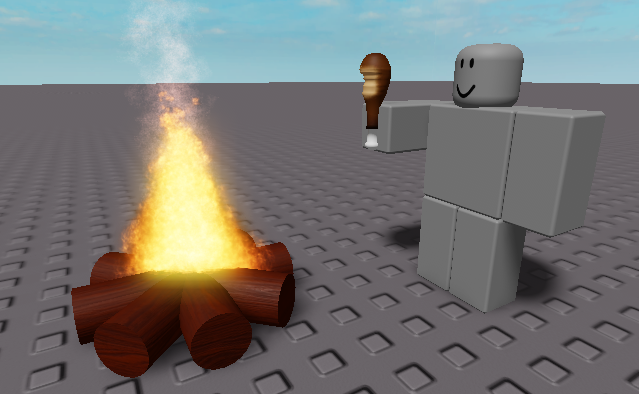
A meme resourcepack that replaces the eating sound with the roblox “nom nom nom” sound
Even if it says that the pack is outdated, it should work on all versions
You can submit bugs or suggestions [here](https://docs.google.com/forms/d/e/1FAIpQLSeELpo_gqlwn4ftgP_tkB6I-rq6c6nyvs4BM07e89AKy3DI2g/viewform?usp=sf_link)
RedPower 2 World

See [RedPower 2 Core](https://modrinth.com/mod/redpower2-core) for a full description.
### Modules
– [Core](https://modrinth.com/mod/redpower2-core)
– [Logic](https://modrinth.com/mod/redpower2-logic)
– [Wiring](https://modrinth.com/mod/redpower2-wiring)
– [Array](https://modrinth.com/mod/redpower2-array)
– [Lighting](https://modrinth.com/mod/redpower2-lighting)
– [World](https://modrinth.com/mod/redpower2-world)
– [Machine](https://modrinth.com/mod/redpower2-machine)
– [Control](https://modrinth.com/mod/redpower2-control)
## Archival disclosure
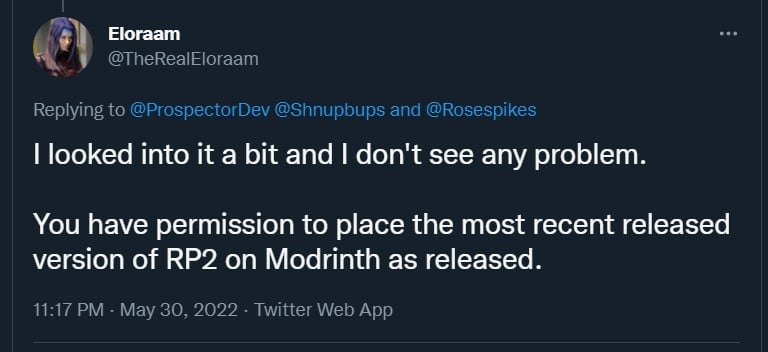
**This mod is abandoned and has been uploaded for archival purposes. It was [originally created](http://www.eloraam.com/) Jun 6, 2011 by [Eloraam](https://twitter.com/TheRealEloraam). It has been uploaded to Modrinth under the ModrinthArchives account with permission from the original author.**
[](https://twitter.com/TheRealEloraam/status/1531520289280077825)
RedPower 2 Wiring

See [RedPower 2 Core](https://modrinth.com/mod/redpower2-core) for a full description.
### Modules
– [Core](https://modrinth.com/mod/redpower2-core)
– [Logic](https://modrinth.com/mod/redpower2-logic)
– [Wiring](https://modrinth.com/mod/redpower2-wiring)
– [Array](https://modrinth.com/mod/redpower2-array)
– [Lighting](https://modrinth.com/mod/redpower2-lighting)
– [World](https://modrinth.com/mod/redpower2-world)
– [Machine](https://modrinth.com/mod/redpower2-machine)
– [Control](https://modrinth.com/mod/redpower2-control)
## Archival disclosure
**This mod is abandoned and has been uploaded for archival purposes. It was [originally created](http://www.eloraam.com/) Jun 6, 2011 by [Eloraam](https://twitter.com/TheRealEloraam). It has been uploaded to Modrinth under the ModrinthArchives account with permission from the original author.**
[](https://twitter.com/TheRealEloraam/status/1531520289280077825)
RedPower 2 Machine

See [RedPower 2 Core](https://modrinth.com/mod/redpower2-core) for a full description.
### Modules
– [Core](https://modrinth.com/mod/redpower2-core)
– [Logic](https://modrinth.com/mod/redpower2-logic)
– [Wiring](https://modrinth.com/mod/redpower2-wiring)
– [Array](https://modrinth.com/mod/redpower2-array)
– [Lighting](https://modrinth.com/mod/redpower2-lighting)
– [World](https://modrinth.com/mod/redpower2-world)
– [Machine](https://modrinth.com/mod/redpower2-machine)
– [Control](https://modrinth.com/mod/redpower2-control)
## Archival disclosure
**This mod is abandoned and has been uploaded for archival purposes. It was [originally created](http://www.eloraam.com/) Jun 6, 2011 by [Eloraam](https://twitter.com/TheRealEloraam). It has been uploaded to Modrinth under the ModrinthArchives account with permission from the original author.**
[](https://twitter.com/TheRealEloraam/status/1531520289280077825)
RedPower 2 Logic

See [RedPower 2 Core](https://modrinth.com/mod/redpower2-core) for a full description.
### Modules
– [Core](https://modrinth.com/mod/redpower2-core)
– [Logic](https://modrinth.com/mod/redpower2-logic)
– [Wiring](https://modrinth.com/mod/redpower2-wiring)
– [Array](https://modrinth.com/mod/redpower2-array)
– [Lighting](https://modrinth.com/mod/redpower2-lighting)
– [World](https://modrinth.com/mod/redpower2-world)
– [Machine](https://modrinth.com/mod/redpower2-machine)
– [Control](https://modrinth.com/mod/redpower2-control)
## Archival disclosure
**This mod is abandoned and has been uploaded for archival purposes. It was [originally created](http://www.eloraam.com/) Jun 6, 2011 by [Eloraam](https://twitter.com/TheRealEloraam). It has been uploaded to Modrinth under the ModrinthArchives account with permission from the original author.**
[](https://twitter.com/TheRealEloraam/status/1531520289280077825)