Transparent UI + Mod Support
This pack makes UI elements of the game semi-transparent, changing the look of the game to be modern and minimalistic.
## With this pack I recommend to install [JEI](https://modrinth.com/mod/jei) and [Blur Fabric](https://modrinth.com/mod/blur-fabric) / [Blur Forge](https://modrinth.com/mod/blur-forge) mods for the ultimate look.
– “JEI” allows UIs to support semi-transparent textures
– “Blur”, well, blurs the background
The pack has extended support for mods. Support for mods is based on 1.20.1 versions of mods.
### Full list of supported mods:
– Aether
– Amendments
– Apotheosis
– Apotheotic Attributes
– Applied Energistics 2
– Aquaculture 2
– Architectury
– Ars Nouveau
– Artifacts
– Athena
– Blue Skies
– Blur
– Bookshelf
– Building Gadgets 2
– Caelus
– ComputerCraft Tweaked
– MrCrayfish’s Furniture Mod
– Charm of Undying
– Corpse
– Cosmetic Armor Reworked
– Crafting Tweaks
– Curios
– Dark Utilities
– Ears
– Elytra Slot
– Farmer’s Delight
– Framework
– Goblin Traders
– Gurard Villagers
– Handcrafted
– Industrial Foregoing
– Iron Chests
– Iron Furnaces
– JEI
– Just Enough Professions
– Just Enough Resources
– Lootr
– Macaw’s Furniture
– Mekanism
– Mekanism Generators
– Mob Grinding Utils
– Moonlight
– Mystical Agriculture
– Nether’s Delight
– Ocean’s Delight
– Oculus
– Optifine
– Patchouli
– Placebo
– Polymorph
– Quark
– Refined Storage
– Refined Storage Addons
– Runelic
– Sophisticated Backpacks
– Sophisticated Core
– Sophisticated Storage
– Structure Gel
– Supplementaries
– Thermal Dynamics
– Thermal Expansion
– Thermal Foundation
– Thermal Innovation
– Titanium
– Trashcans
– Trash Slot
– The Twilight Forest
– Voicechat
– Waystones
—
Anybody is free to use this pack anywhere. Just do not rename the pack, please.
Contact me (DedMaxim99):
My [YouTube channel](https://www.youtube.com/channel/UCrMHx89X71br0aDlzwsLDHQ)
My [Twitch channel](https://www.twitch.tv/dedmaxim99)
My [VK page](https://vk.com/id728112150)
My [Telegram](https://t.me/DedMaxim99)
Transfuser
# Transfuser

## What is a Transfuser?
The Transfuser is a personal virual chest that allows you to access it from anywhere with the use of a special remote item. Each user can have as many transfusers as they wish. This can be convinient for keeping important items that you don’t want to lose on death.
## What is a Transfuser Remote?
The Transfuser Remote is an item that when used allows you to access the GUI that shows your currently owned transfusers. You can customise the item in the config.
## Commands:
– **Create a Transfuser**: Use `/transfuser create` to open the transfuser creation GUI, there you can select 1 of 3 sizes: `Small: 9 slots` `Medium: 18 slots` `Large: 27 slots` You can create as many as you wish!
– **Destroy a Transfuser**: Use `/transfuser destroy` to bring up the GUI with your transfusers. Click the one you want to destroy.
– **Rename a Transfuser**: Use `/transfuser rename ` then select a transfuser to rename
## Admin Commands:
– **Get Transfuser Remote**: Use`/transfuser get ` to magically retrieve a transfuser remote from thin air.
– **Give Transfuser Remote**: Use `/transfuser give ` to give a transfuser remote to a player.
## Permissions:
– `transfuser.use`: Basic access to the Transfuser.
– `transfuser.create`: Permission to create a Transfuser.
– `transfuser.destroy`: Permission to destroy a Transfuser.
– `transfuser.rename`: Permission to rename a Transfuser.
– `transfuser.admin`: Permission to give/get a Transfuser Remote.
## 🎩 Support on Discord
– Join the discord to get support, share suggestions and follow my projects!
[https://discord.gg/4sjDgwQNgj](https://discord.gg/4sjDgwQNgj)
TPAccess
✨ TpAccess – Simple & Secure Teleport Permissions
TpAccess is a lightweight and powerful Minecraft plugin that gives players full control over who can teleport to them. Whether you’re running a survival server, SMP, or a private world with friends, TpAccess helps prevent unwanted teleports while keeping things simple and user-friendly.
🔒 Key Features
✅ Toggle Teleport Access
Players can easily enable or disable whether others can teleport to them.
👥 Player-Controlled Permissions
No more unwanted /tp requests — each player decides who can access them.
⚡ Lightweight & Fast
Designed to run smoothly with minimal performance impact.
🔄 Real-Time Updates
Changes apply instantly — no reloads required.
🛠️ Easy to Use Commands
Simple commands make it easy for anyone to use.
💡 Perfect For
Survival servers (SMP)
Private friend groups
Semi-anarchy servers
Any server that wants better teleport control
📜 Example Use
Don’t want random players teleporting to you? Disable access.
Playing with friends? Enable access only when you want.
Running a server? Give players more control and reduce abuse.
⚙️ Compatibility
✔ Minecraft Paper / Spigot
✔ Modern Minecraft versions
✔ Works alongside most plugins
🚀 Why Choose TpAccess?
TpAccess keeps things simple: you control your space. No complicated setups, no confusing configs — just a clean, effective way to manage teleport access on your server.
TNT to Grass

# What does this resource pack do?
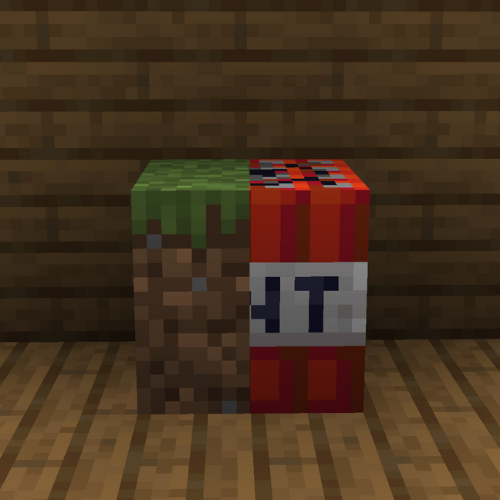
This resource pack **replaces the TNT textures to the grass textures**.
# How do I trick someone into using this pack?
1) **Download the pack**
2) **Change the name** of the .zip file
3) **Change the pack.mcmeta file** and **pack.png** to less _suspicious_ ones.
# Credits
We (**_ELTE Studios_**), **developed** and **made** this pack using the **Butterium** modpack for the **best optimisation, smoothness and QOL**, you can **download it on modrinth [here](https://modrinth.com/modpack/butterium)**.
# pack.png
TMAuth
# TMAuth
**TMAuth** is a lightweight, efficient, and interactive tournament management plugin for Minecraft servers. It allows server administrators to manage player access to specific tournament events using a custom whitelist system with built-in moderation tools.
## Features
– **Tournament Whitelist:** Prevent non-whitelisted players from joining during tournament periods.
– **Interactive UI:** Manage whitelisted players directly from the chat with clickable [KICK], [BAN], and [REMOVE] buttons.
– **Dynamic Synchronization:** Automatically syncs between `config.yml` and a dedicated `whitelist.txt` file.
– **whitelist.txt** Write multiple players names in whitelist.txt even with , spaces, or by line by line, and /tm whitelist reload to add all players from whitelist.txt to whitelist.
– **Real-time Moderation:** Quickly kick or ban players who shouldn’t be in the tournament session.
– **Simple Configuration:** Customize the kick message and toggle the whitelist status easily.
## Commands
All commands require the `tmauth.admin` permission.
| Command | Description |
|:—|:—|
| `/tm whitelist enable` | Enables the tournament whitelist. |
| `/tm whitelist disable` | Disables the tournament whitelist. |
| `/tm whitelist add ` | Adds a player to the tournament whitelist. |
| `/tm whitelist remove ` | Removes a player from the tournament whitelist. |
| `/tm whitelist list` | Shows an interactive list of all whitelisted players. |
| `/tm whitelist reload` | Reloads the configuration and whitelist data from disk. |
## Permissions
– `tmauth.admin`: Grants full access to the `/tm` command and its subcommands. (Default: OP)
## Configuration
The plugin generates a `config.yml` file for basic settings:
“`yaml
# TMAuth Configuration
# Whether the tournament whitelist is active
enabled: true
# The message shown to players who are not on the tournament whitelist
kick-message: “&cYou are not whitelisted for this tournament!”
# List of whitelisted players (automatically synced)
whitelisted-players: []
“`
## Developer Information
– **Version:** 1.0.0
– **API Version:** 1.21.*
– **Author:** SpyMC / SpyGamingOG
TierPVP
# ⚔️ TierPVP – Competitive PvP Ranking System
TierPVP is a customizable PvP ranking plugin designed to create a fair and competitive progression system for Minecraft servers. It features a structured tier system, configurable point mechanics, and anti-abuse protections to ensure balanced gameplay.
—
## ✨ Features
### 📊 Tier & Point System
* Configurable point gain/loss for kills and deaths (default: +2 / -2)
* Supports negative points
* 10-tier progression system (LT5 → HT1)
* Broadcast and sound effects when reaching the highest tier
—
### 🛡️ Anti-Farming System
* Daily kill limit (auto-reset at 00:00)
* Prevents abuse using alternate accounts
* Fully configurable limits
—
### 💰 Rewards & Progression
* Execute console commands as rewards
* Automatic rewards on rank up (money, titles, sounds)
* `/tier top` GUI leaderboard system
—
### ⚙️ Customization
* Fully editable messages
* Debug mode for tracking PvP events
* Easy configuration for server owners
—
## 🖥️ Compatibility
* Minecraft: 1.21.x
* Platforms: Paper / Spigot / Folia
* Dependency: Vault (for economy features)
—
## 📜 Commands
* `/tier top` – Open leaderboard
* `/tier help` – View commands
—
## 📌 Disclaimer
This plugin is independently developed and is not affiliated with any server, network, or existing project.
Thorough Keybindings
For as many Minecraft versions as possible, this mod makes the keybindings of usually fixed mappings rebindable. This is a client side mod.
For example, this lets you remap Escape and F3 in-game, even in versions before F3 was made rebindable. Also adds rebinding options for Shift, Control, Alt as well as the digits to navigate the profiling pie chart. Furthermore, backports mappings to earlier game versions, like rebinding F5 or hotbar slot keys.
For versions 1.14 to 1.21, this mod uses [Fabric](https://fabricmc.net/) and requires the [Fabric API](https://modrinth.com/mod/fabric-api) to run.
For versions beta 1.0 to release 1.13, this mod uses [Ornithe](https://ornithemc.net/) with Fabric and requires the [Ornithe Standard Libraries](https://modrinth.com/mod/osl) to run.
The Endex
# The Endex 1.5.8-JAN80235 | Dynamic Market & Addons [1.20.1 – 1.21.x]

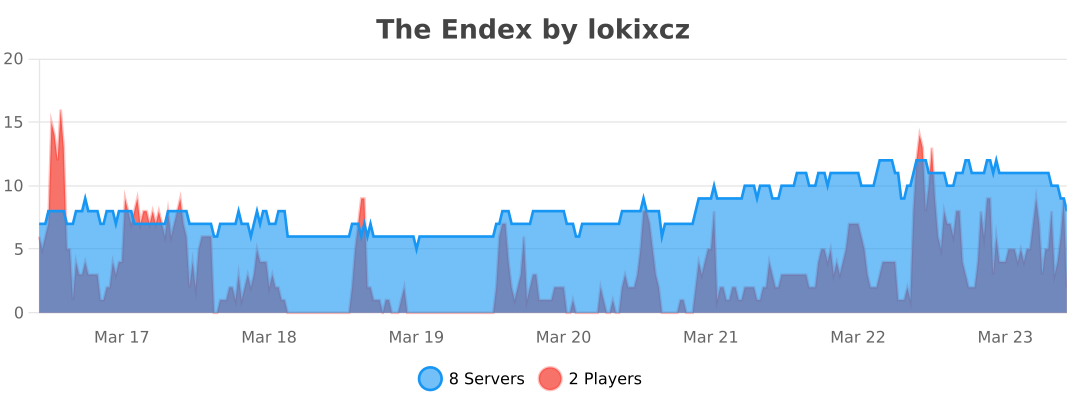
*Bring a living economy to your server. Prices move with player demand and supply, with a slick Market GUI, timed events, optional web dashboard, virtual holdings system, and an addon framework.*
[](https://discord.gg/ujFRXksUBE) [](https://lokixcz-plugins.kagsystems.tech/introduction)
—
The Endex is a dynamic economy plugin that brings realistic market mechanics to your Minecraft server. Prices fluctuate based on player trading activity, server-wide item storage, and random market events.
### 🆕 Version 1.5.8-JAN80235 Highlights:
– **🛡️ Anti-Exploit Protection System** — 4-layer defense prevents infinite money exploits!
– **💰 6% Buy/Sell Spread** — Creates friction cost that blocks profitable arbitrage loops!
– **⏱️ 60-Second Sell Cooldown** — Prevents instant buy→sell flipping after purchases!
– **📉 Price Mean Reversion** — Manipulated prices drift back to base during idle periods!
– **🔄 Config Auto-Update** — Automatically migrates old configs while preserving your settings!
– **⚡ Zero Performance Impact** — All protections use <0.01% CPU overhead!
**What's Protected:**
- ✅ **Buy-Sell Arbitrage** — Can't buy low and sell high for instant profit
- ✅ **Price Manipulation** — Prices automatically correct when manipulation stops
- ✅ **Instant Flipping** — Must wait 60 seconds after buying before selling
- ✅ **Your Economy** — Fair, balanced gameplay for all players
**Previous Version (1.5.8-JAN70109):**
- **🔧 Shop Editor Fixes** — Fixed deleteCategory() and saveShopChanges() not working properly!
- **🌐 Language Files** — Added shop-editor language section to Korean, Russian, Portuguese, and Chinese translations!
- **🔐 Permissions Fix** — Added missing shop editor and web dashboard permissions to plugin.yml!
**Earlier 1.5.8 Features:**
- **Inflation System** — New configurable inflation/deflation system with per-category rates!
- **Market Items Manager** — New editor button to view/edit all market items in one place!
- **Price Editor Fix** — Fixed vanilla item price editing in the market editor!
- **Admin Commands Fixed** — `/market remove`, `disable`, `setbase`, `setmin`, `setmax` now persist properly!
---

### 💰 Dynamic Pricing
Prices react to demand/supply with configurable sensitivity, EMA smoothing, and per-item min/max caps.
### 🌍 World Storage Scanner
Prices adapt to global item quantities across ALL server storage. Abundant items drop in price; scarce items rise.
### 📦 Virtual Holdings
Buy items into virtual storage with average cost tracking and profit/loss display. Withdraw when ready.
### 🖥️ Market GUI
Beautiful interface with categories, search, sorting, quick buy/sell buttons, and real-time price charts.
📸 Screenshots
### ⚡ Market Events
Time-boxed price multipliers (Ore Rush, Market Crash, etc.) with server broadcasts.
### 🌐 Web Dashboard
Optional REST API with live updates, charts, item icons, and trading from your browser.
### 🔌 Addon Framework
Extensible API for custom addons with command routing and web integration.
### 📬 Delivery System
Overflow protection when inventory or holdings are full. Claim items anytime.
### 🔗 PlaceholderAPI Support
30+ placeholders for scoreboards, holograms, tab lists, and more. Display prices, trends, holdings, leaderboards, and market stats anywhere.
### 📊 bStats Metrics
Anonymous usage statistics to help improve the plugin.
—
“`
/endex help – Show help menu
/endex version – Display plugin version
/market – Open market GUI
/shop – Alias for /market
/m, /trade, /exchange – Additional market aliases
/market buy - – Purchase items
/market sell - – Sell items
/market price - – Check current price
/market top – View top traded items
/market holdings – View your virtual holdings
/market withdraw - – Withdraw items to inventory
/market withdraw all – Withdraw everything
/market sellholdings - – Sell directly from holdings
/market delivery list – View pending deliveries
/market delivery claim – Claim delivered items
/market delivery gui – Open delivery GUI
/market invest buy -
/market invest list
/market invest redeem-all
/market event list – View active events
/market event – Start an event (admin)
/market event end – End an event (admin)
/market event clear – Clear all events (admin)
# Namespaced commands also work:
/endex:shop, /endex:market, /endex:m
“`
—
“`
theendex.market – Access market GUI (default: true)
theendex.buy – Purchase items (default: true)
theendex.sell – Sell items (default: true)
theendex.holdings – Access holdings system (default: true)
theendex.withdraw – Withdraw from holdings (default: true)
theendex.invest – Use investments (default: true)
theendex.admin – Admin commands (default: op)
endex.shop.editor – Access shop editor (default: op)
endex.shop.admin – Shop admin commands (default: op)
endex.web.trade – Web dashboard trading (default: true)
endex.web.admin – View other players’ holdings (default: op)
“`
—
## 📋 Requirements
– **Server:** Paper/Spigot 1.20.1 – 1.21.x
– **Java:** 17 or higher
– **Economy:** Vault + Economy plugin (EssentialsX, CMI, etc.)
## 💾 Storage Options
– YAML (default) or SQLite database
– Automatic backups and safe reloads
– CSV price history export
—
## Configuration Highlights
### Virtual Holdings:
“`yaml
holdings:
enabled: true
max-per-player: 10000
max-materials-per-player: 100
mode: VIRTUAL
“`
### World Storage Scanner:
“`yaml
price-world-storage:
enabled: true
scan-interval-seconds: 300
sensitivity: 0.01
global-baseline: 1000
containers:
chests: true
barrels: true
shulker-boxes: true
anti-manipulation:
per-chunk-item-cap: 10000
per-material-chunk-cap: 5000
min-tps: 18.0
“`
### Inventory-aware pricing:
“`yaml
price-inventory:
enabled: true
sensitivity: 0.02
per-player-baseline: 64
max-impact-percent: 10.0
“`
### Web combined holdings:
“`yaml
web:
roles:
default: TRADER
trader-permission: endex.web.trade
admin-view-permission: endex.web.admin
holdings:
inventory:
enabled: true
include-enderchest: false
cache-seconds: 15
“`
—
## Compatibility
– **Server:** Paper/Spigot 1.20.1 to 1.21.x
– **Java:** 17 runtime
– **Economy:** Vault (soft dependency)
## Data & Reliability
– YAML storage in the plugin folder by default; optional SQLite database
– Periodic backups and orderly saves; safe reload reschedules tasks cleanly
– Atomic CSV export to `plugins/TheEndex/history`
– Holdings operations use atomic transactions to prevent duplication exploits
## API & Addons
– Public API service for other plugins: `org.lokixcz.theendex.api.EndexAPI`
– Addon loader with command routing and aliasing
– Customizable Web UI override (`web.custom.*`) – export default index.html and modify
—
## Changelog
📜 Full Changelog
### New in 1.5.8-JAN70109:
– **Shop Editor deleteCategory() Fix:** Delete category button now properly calls `CustomShopManager.removeCategory()` instead of showing “coming soon”
– **Shop Editor saveShopChanges() Fix:** Save button now properly calls `CustomShopManager.reload()` instead of only playing a sound
– **Language Files:** Added shop-editor language section (~60 keys) to Korean, Russian, Portuguese, and Chinese translations
– **Permissions Fix:** Added missing permissions to plugin.yml: `endex.shop.editor`, `endex.shop.admin`, `endex.web.trade`, `endex.web.admin`
### New in 1.5.8-JAN60132:
– **Shop Editor Category Fix:** Fixed “Create Category” dialog in the shop editor not responding to clicks
– Clicking compass (Filter mode) or chest (Manual mode) icons now properly creates new categories
– Added `CREATE_CATEGORY` state tracking and proper click handling flow
– Categories now persist immediately to shop YAML config files
### New in 1.5.7-dec1038:
– Polish Language Support: Complete Polish (Polski) translation for plugin and documentation
– Config Translations Auto-Extract: 10 language configs now auto-extract to `plugins/TheEndex/config_translations/` on first run
– Optimized Default Configuration: Ships with minimal resource usage settings by default
– World storage scanning DISABLED by default (easily re-enabled for full features)
– Inventory-based pricing DISABLED by default
– Save-on-each-update DISABLED by default (reduced disk I/O)
– Update interval increased to 120 seconds (was 60)
– Prominent optimization guide added to top of config.yml
### New in 1.5.7-dec1022:
– Web Dashboard Translation: Google Translate integration for 26+ languages
– GUI Bug Fix: Fixed ArrayIndexOutOfBoundsException when middle-clicking items in market details
– Performance Indicators: Config options now show `[PERF: LOW/MEDIUM/HIGH]` impact tags
– Translated Configs: Pre-translated config files in 9 languages (Chinese, Spanish, French, German, Japanese, Korean, Portuguese, Russian, Arabic)
– Market GUI: Increased details inventory size from 27 to 36 slots to fix button placement
### New in 1.5.7:
– Sell from Holdings: Sell items directly from virtual holdings without withdrawing to inventory first
– Arclight/Hybrid Server Compatibility: Fixed plugin recognition, SLF4J logging, ServiceLoader, and clickable chat links
– Market GUI: Item details now shows “Inventory: X | Holdings: Y” with new sell buttons (slots 33 & 35)
– Custom Shop GUI: Vanilla items can now be sold from holdings when inventory is insufficient
– Web API: New `POST /api/sell-holdings` endpoint for web dashboard selling
– New Command: `/market sellholdings `
### New in 1.5.6:
– Minecraft 1.20.1+ Compatibility: Lowered api-version from ‘1.21’ to ‘1.20’ to restore support for 1.20.1+ servers (Arclight, etc.)
– In-Game Layout Editor: Complete visual GUI editor for custom shop layouts — no config editing required!
– Custom Items Support: Add any material as decoration with personalized names and lores
– 5 Editor Modes: Place Category, Place Decoration, Place Button, Edit Slot, Remove Slot
– Right-Click Editing: Customize item names and lores via chat prompts
– Real-Time Preview: See changes instantly before saving
– One-Click Save: Save layouts directly to shop config file
– Custom Category Icons: Categories display custom names/lores in /market
### New in 1.5.5:
– Economy Plugin Compatibility: Fixed “Economy unavailable” error with late-loading economy plugins (SimpleEconomy, etc.)
– Added delayed retry (2 seconds) for economy provider detection
– Economy plugins that register with Vault after TheEndex loads are now properly detected
– Added common economy plugins to softdepend list to improve load order
### New in 1.5.4:
– bStats Metrics: Plugin analytics with custom charts (storage mode, shop mode, web UI, holdings, item count)
– Custom Shop Enhancements: Holdings button (slot 45) and Sort button (slot 53) in category pages
– Filter-Based Categories: Auto-populate shop categories using material filters instead of manual item lists
– Default GUI Improvements: Removed Amount button, Sort moved to slot 49, cleaner layout
– Fixed: Hotbar interaction no longer blocked while GUI is open
– Fixed: Sort order now correctly shows highest prices/changes first (descending)
– Fixed: Holdings button in Custom Shop now properly opens holdings panel
– Fixed: `/ex market` command respects `shop.mode` config setting
### New in 1.5.3:
– PlaceholderAPI Integration: 30+ placeholders for prices, trends, holdings, leaderboards, and stats
– Update Checker: Automatic notifications on startup and OP join when updates available
– GUI Customization: Per-GUI config files for layout, colors, slot positions, and categories
– Command Aliases: Create custom shortcuts (e.g., `/shop` → `/market`) via commands.yml
– Full documentation available at https://lokixcz-plugins.kagsystems.tech/
### New in 1.5.2:
– Optimized World Storage Scanner: Complete rewrite with intelligent chunk caching and dirty tracking
– Chunk-level caching with configurable expiry — 80-90% reduction in redundant scanning
– Event-driven dirty tracking — only re-scans chunks where containers were modified
– Disk persistence for cache data across server restarts
– GUI Fix (MC 1.21+): Fixed critical bug where market items could be taken and clicks weren’t registering
– UUID-based GUI state tracking replaces unreliable title matching
### New in 1.5.1:
– World Storage Scanner: Prices now react to ALL items stored on your server (chests, barrels, shulker boxes, etc.)
– Global item tracking for true server-wide scarcity economics
– Anti-manipulation protection: per-chunk caps, per-material limits, suspicious activity logging
– TPS-aware throttling: scanner skips if server is under load
– Double chest deduplication prevents double-counting
– Nested shulker content scanning (items inside shulkers in chests)
– Configurable container types and world exclusions
### New in 1.5.0:
– Virtual Holdings System: Complete redesign where purchased items go into virtual holdings instead of inventory
– Holdings GUI: New panel showing all holdings with quantity, avg cost, current price, and profit/loss
– Holdings Commands: `/market holdings` to view, `/market withdraw - [amount]` to claim items
– Web UI Withdraw: Withdraw buttons on each holding row plus “Withdraw All” button
– Minecraft 1.21 Support: Full compatibility with Minecraft 1.21.x servers
– New permissions: `theendex.holdings` and `theendex.withdraw` (both default: true)
– Configurable limits: `holdings.max-per-player` (default 10,000) and `holdings.max-materials-per-player` (default 100)
### New in 1.4.0:
– Virtual Delivery System: overflow purchases now enter a pending delivery queue
– Delivery Commands: `/market delivery list|claim|claim-all|gui`
– Web + API updates: new `/api/deliveries` endpoints
– Fixed buy loop issue on 1.20.1 servers
### New in 1.3.x:
– Inventory capacity checked before charging; oversized orders capped
– Security hardening: removed reflective access, session token moved to Authorization header
– Hashed API token support via `web.api.token-hashes` (SHA-256)
See CHANGELOG.md for full release notes.
—
## ⚠️ Disclaimer
This plugin was created with the help of AI. While thoroughly tested, please expect potential bugs or issues. Report problems on Discord or GitHub.
[](https://discord.gg/ujFRXksUBE)
**Join our Discord!**
Clan Forge
ClanForge is a modern, modular clans plugin for Spigot/Paper (1.20+). It focuses on fair PvP, community building, and server-friendly management tools. ClanForge provides flexible ranks and permissions, economy integration, land sharing hooks, wars, chat channels, leaderboards, and a clean API for developers. It aims to be feature-rich while remaining configurable and performant.
Key Features
– Clan management with default ranks (leader, trusted, member) and custom roles.
– Economy support via Vault : banks, upkeep, member fees, and kill rewards.
– Land sharing integrations: WorldGuard , PlotSquared , GriefPrevention .
– Wars, alliances, rivalries, friendly fire controls, and regroup/home.
– KDR tracking, leaderboards via commands or GUI, bulletin boards.
– Clan and alliance chat with spy mode, PlaceholderAPI placeholders.
– Storage support for MySQL and SQLite (configurable).
– Developer-friendly API with 25+ planned events.
– Voting flows, tamable mobs sharing rules, vitals/coordinates sharing.
– Smart tab completions and polished UX.
Current State (honest overview)
– Implemented: base plugin, /clan command ( create , info , leave , list ), in-memory clan manager, config and soft-dependencies, Vault hook, basic PlaceholderAPI expansion, storage scaffolding (MySQL/SQLite).
– In progress/planned: full persistence (schema/CRUD), GUI menus, war management, land sharing rules, moderation commands, extended API events, Discord integration, and web stats.
Integrations
– Optional dependencies: Vault , PlaceholderAPI , WorldGuard , PlotSquared , GriefPrevention .
– ClanForge detects and hooks these when present, with feature toggles in config.yml .
Commands (initial)
– /clan create — create a new clan.
– /clan info — show your clan details.
– /clan leave — leave your current clan.
– /clan list — list existing clans.
– Additional commands (ranks, wars, bank, chat, alliances) are being added as modules mature.
Configuration & Storage
– config.yml lets you enable/disable modules, set economy values, and choose mysql or sqlite .
– Default is lightweight, in-memory operation; production servers should configure persistence.
Why Choose ClanForge
– Balanced, server-friendly design with clear toggles for every system.
– Clean codebase and API to extend or integrate with your ecosystem.
– Roadmap-driven development with transparency about what’s implemented vs planned.
Paid Version
Looking for the full-featured version of ClanForge with advanced systems, priority updates, and extended support?
Get the Paid Version here:
https://builtbybit.com/resources/clanforge.92456/
The DreadFall

Files for Surviving the Dreadfall
In the ever-evolving landscape of Minecraft horror mods, players have grown accustomed to the eerie silence of deep caverns and the unsettling groan of the undead. However, few additions have managed to distill pure primal fear quite like The Dreadfall. This mod introduces a namesake entity that transcends the typical “jumpscare” tropes, establishing a persistent atmospheric threat that turns the world of Minecraft into a high-stakes game of predator and prey.
Anatomy of a Nightmare
The Dreadfall is not merely another mob; it is a masterclass in unsettling design. Its physical presence is defined by a void-black, hidden body that allows it to blend seamlessly into the low-light environments of the Overworld. The most striking—and terrifying—feature is its mask. Adorned with a wide, frozen smile and streaks of blood weeping from the eyes, the entity presents a visage of “uncanny valley” horror that contrasts sharply with the game’s usual blocky charm.
Wielding an iron axe, the Dreadfall is a formidable combatant. Unlike standard zombies that shamble aimlessly, this creature hunts with intent. Much like the infamous “Cave Dweller” mod, it utilizes stalking mechanics, often appearing in the periphery of a player’s vision before vanishing, only to strike when the player feels a false sense of security.
Habitat and Behavior
The Dreadfall is a versatile hunter, refusing to be confined to a single biome. It stalks two primary territories:
The Subterranean Depths: In the claustrophobic corridors of dark caves, its black body makes it nearly invisible until the glint of its axe or the white of its mask catches the light of a torch.
The Surface World: Unlike many hostile mobs that burn in the sun, the Dreadfall’s presence lingers, though it is most potent and aggressive once the sun sets.
Strategic Survival: Thrive or Hide
The mod fundamentally shifts the player’s “game loop.” In vanilla Minecraft, night is an inconvenience; in the Dreadfall mod, night is a death sentence for the unprepared. The community-coined tip for survival is simple yet absolute:
“Thrive at day, Hide at night.”
During the daylight hours, players must scramble to gather resources, reinforce their shelters, and craft weaponry. The daytime is the only window of opportunity to make progress. Once dusk falls, The Dreadfall becomes the killer of the environment, forcing players to retreat behind thick walls and iron doors. TAKE FILES WITH POLAROID

FOR BEST OUTCOME USE “Insanity Shader by ElocinDev”
—————————————————————————————-Updates
12/21/25- Can Break Doors
1/20/26- New Design
4/7/26- Brand New Structure and Spawning Animation
4/21/26-New axe design (Hunters axe) , extra particles, harder survival, Bug catching
4/24/26- Gui editing (cam)
5/12/26- Brand new jumpscare procedure (Very loud and flashing lights, Fire music tho)