Stop using clunky, laggy armor-stand graves. GravesPro is a modern, lightweight solution built for **Paper 1.20+** servers. It features Text Display holograms, a secure Grave Vault GUI, smart death handling for every environment, and full grave persistence across restarts.
> ⚠️ **Paper 1.20+ only.** GravesPro uses Paper-exclusive TextDisplay APIs and will **not** load on Spigot or Purpur.
—
## ✨ Features
### 🪦 Grave Vault GUI
Right-click your grave to open the Vault. Hit **Quick Recover** to instantly restore all your armor, offhand, and inventory items back to their original slots in one click.
### ⏱️ Live Hologram Countdown
Every grave has a TextDisplay hologram showing a ticking countdown timer. If the chunk unloads and the entity disappears, it automatically respawns so the timer never freezes.
### 💾 Persistence Across Restarts
All graves are saved to `graves.yml` the moment they are created. On server startup, every grave is fully restored — head block, hologram, and timer included.
### 🌍 Smart Death Placement
| Death Type | What happens |
|—|—|
| 🌊 Ocean | Glass platform placed at the water surface. Grave sits on top — no diving needed. |
| 🔥 Lava | Nearest safe block found. If none exists, glass platform above lava. Platform turns to stone for 5s when claimed so you don’t fall back in. Fire Resistance applied automatically. |
| ⬛ Void | 50-block radius search for nearest solid ground. Your exact coordinates sent in chat. |
### 🗺️ Multi-Grave Teleport Menu
Up to 3 active graves per player. `/gptp` opens a selection menu showing each grave’s world, coordinates, item count, XP, and time remaining.
### 🛠️ Admin Tools
– `/gravespro list` — see all active graves on the server with owner, location, and timer
– `/gravespro reload` — reload `config.yml` live without a restart
—
## 🔧 Commands & Permissions
| Command | Description | Permission | Default |
|—|—|—|—|
| `/gptp` | Open the grave teleport menu | `gravespro.tp` | Everyone |
| `/gravespro reload` | Reload config.yml | `gravespro.admin` | OP |
| `/gravespro list` | List all active graves | `gravespro.admin` | OP |
Admins with `gravespro.admin` can also open and recover any player’s grave regardless of protection settings.
—
## ⚙️ Config Options
“`yaml
grave_settings:
expiry_time: 10 # Minutes before grave expires
on_expire: DROP # DROP or VANISH
protected: true # Owner-only access
max_graves: 3 # Max graves per player
glow_enabled: true # Hologram glow effect
fire_resistance_seconds: 10 # Fire res on lava/ocean claim (0 = off)
teleport_settings:
warmup: 5 # TP warmup in seconds (0 = instant)
cancel_on_move: true # Cancel TP if player moves
exp_settings:
keep_percentage: 100 # % of XP saved in grave
“`
All messages are fully customizable with `&` color codes.
—
## 💖 Donate (Optional)
If you enjoy my work and want to support development:
👉 **Donate via PayPal**
—
## 💬 Official Support & Community
Need help with this plugin? Join the official **Marbzy Discord server** for:
* 🛠 **Direct Support:** Fast help via our ticket system.
* 🐛 **Bug Reports:** Help us squash bugs instantly.
* 💡 **Feature Suggestions:** Shape the future of GravesPro.
* 🧪 **Beta Access:** Test new “Pro Max” features before anyone else.
* 📢 **Announcements:** Stay updated on every new release.
👉 **Join the Discord**
—
*Developed with care by Marbzy*
GravelHypixel
This mod replaces the textures of gravel, cobblestone & stone to make identification much easier. Created specifically for the Gravel Mines in Hypixel Skyblock.
……………………………………………………………………………………………….
This pack simply replaces the drinking sound with a **_very intense_** “**GOT GOT GOT**”.
# This is not weird and just changes the drinking sound.
**_Some people_ (looking at you)**, may hear the sound “**GOT GOT GOT”** with a _filthy mind_ |:’, but I just mean the sound that happens when you drink too fast.
If you are unaware what I mean by “Drinking sound”, **there is an image below to clarify** – ↓
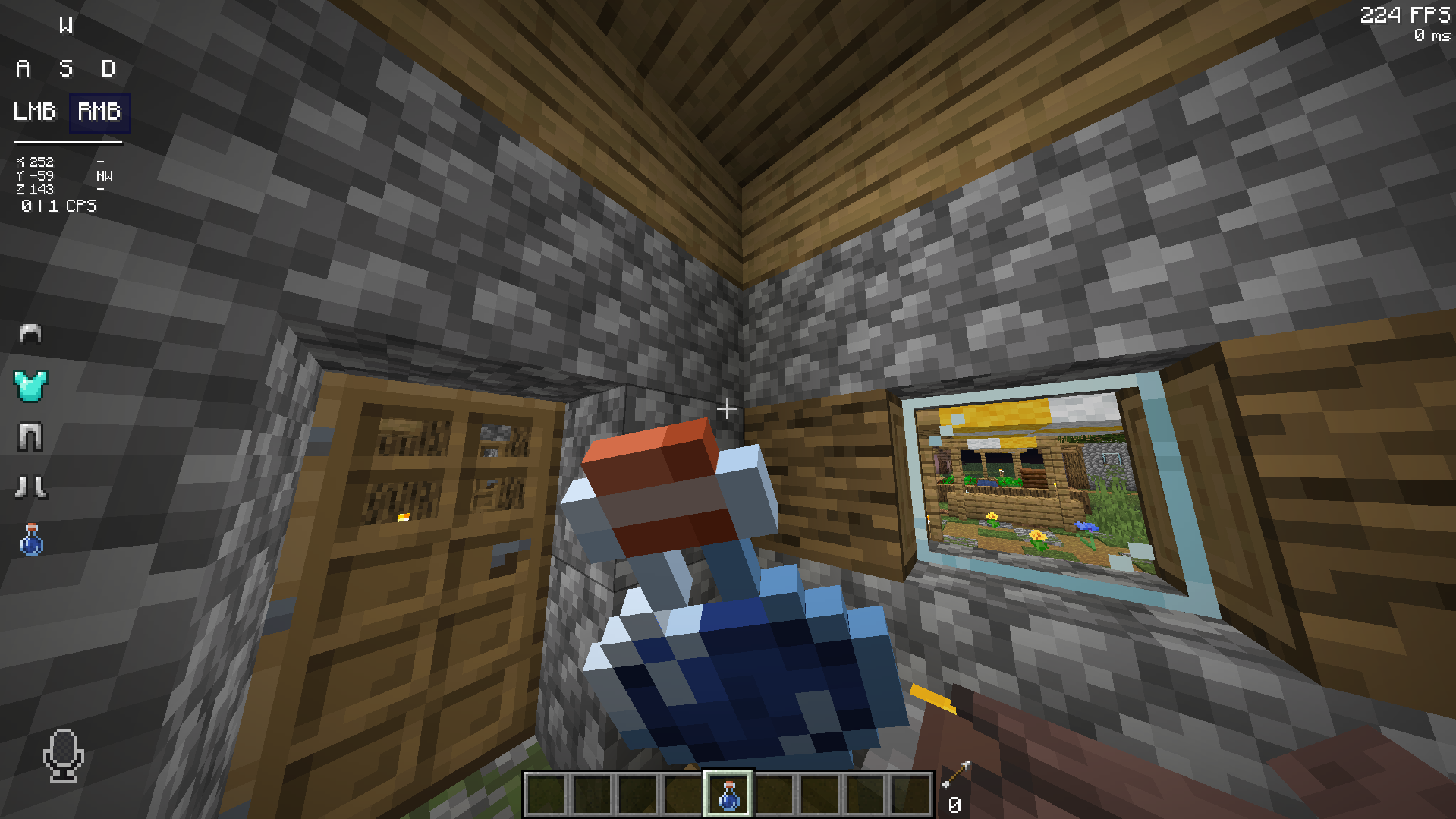
Screenshot taken on Butterium (click to download on Modrinth)
# Credits
We (**_ELTE Studios_**), **developed** and **made** this pack using the **Butterium** modpack for the **best optimisation, smoothness and QOL**, you can **download it on modrinth here**.
Gost
**🎮 Gost – Extreme Survival Confrontation Game**
Gost is a Minecraft server addon that combines multiple gameplays such as cat and mouse, ghost catch, peek-a-boo, CF biochemical mode, and more. Experience the life-and-death chase between humans and ghosts in a tense and exciting confrontation, using strategies and props to become the last survivor!
To know more —>https://726113394-cloud.github.io/Gost/
___________
Ready to start this cat and mouse game? Join the queue and experience heart-pounding chase confrontations! 🏃♂️👻
“In Gost’s world, survival requires not only speed, but also wisdom and strategy.”
This plugin was generated by @Little Mind from Space through the scriptirc plugin using AI. There is a high possibility that no further updates will be made. The content of the plugin is open source and can be authorized for the development of extended versions.
Goat Damage Sound
Change the player’s **damage** sound to a very annoying **goat’s** scream! Remembering that the texture is **compatible** with almost **all** versions of the game, 1.8x up to 1.20x quietly. 🐐
**CREDITS**: @t2rtle (**creator** and **owner**) 👑
GlobalChatTo
# 🌐 GlobalChat for Velocity
**GlobalChat** is a Velocity proxy plugin that enables advanced global chat across your Minecraft server network, packed with modern features!
—
## ✨ Features
– **/gc Command:** Broadcast messages globally between all servers using `/gc `.
– **Per-Server Formatting:** Format messages differently for each server with `format.yml`.
– **LuckPerms Prefix Support:** Show LuckPerms prefixes/groups automatically in chat.
– **Anti-Spam Delay:** Per-player message cooldown.
– **Mute System:** Mute/unmute players from global chat with `/gcmute` and `/gcunmute`.
– **Blocked Words:** Prevent unwanted words from being sent.
– **Server Whitelist/Blacklist:** Allow or block servers from using global chat.
– **Config Reload:** Instantly reload config with `/gcreload`—no restart needed.
– **Color Code Support:** Full support for Minecraft color codes (`&`).
– **Lightweight & Easy Setup:** No database required, simple configuration.
—
## 📦 Installation
1. Download and place the JAR in your Velocity `plugins/` folder.
2. Start your proxy to generate config files.
3. Edit `config.yml` and `format.yml` as needed.
4. Use `/gcreload` to reload config instantly after editing.
—
## 🔧 Configuration
– **`config.yml`**: Customize all plugin messages, permissions, delays, and word/command/server lists.
– **`format.yml`**: Set the chat format for each server and the default.
– All placeholders and color codes (`&`) supported.
– Supports LuckPerms prefix for rich player names.
—
## 🛡️ Permissions
– `globalchat.use` — Send messages with `/gc`
– `globalchat.mute` — Mute or unmute users from global chat
– `globalchat.reload` — Reload plugin configuration
—
## 📝 Commands
| Command | Description |
|—————–|———————————–|
| `/gc ` | Send a global chat message |
| `/gcmute
` | Mute a player from global chat |
| `/gcunmute
` | Unmute a player from global chat |
| `/gcreload` | Reload the plugin configuration |
—
## 🛠️ Requirements
– **Velocity Proxy** (`3.x`)
– LuckPerms (optional, for prefix support)
—
## 📝 Notes
– This is a **Velocity-only** plugin (not for Bukkit/Spigot/Paper).
– For support, suggestions, or bugs, visit the GitHub repository.
—
Enjoy seamless, colorful cross-server chat with GlobalChat!
[GH] Empires [RP]
Introducing a meticulously crafted resource pack designed to enrich your experience within the Empires gamemode for GloomHollow. This resource pack enhances immersion through:
Immersive Textures: Explore the rugged terrain of Arratia with textures that vividly depict its diverse landscapes, from towering mountains to dense forests.
Atmospheric Soundscape: Immerse yourself in the ambient sounds of Arratia, from the gentle rustle of leaves to the distant calls of its creatures, heightening the sense of adventure.
Thematic User Interface: Navigate Arratia with ease using a UI tailored to complement the Empires experience, featuring custom icons and menus.
Dynamic Visual Effects: Experience the dynamic weather and environment of Arratia through visual effects that reflect its changing conditions, from sunny skies to stormy clouds.
Prepare for an unforgettable journey through the untamed lands of Arratia, where every texture, sound, and visual effect enhances your immersion and adventure.
**About**:
————
This pack is a faithful continuation of the Gerudoku texture pack (by Tom Bones/Ganonline),
which was a mix of textures from Doku’s RPG, Dustycraft, and various texture artists (Credits included in zip file),
over 13 years ago I was inspired by other continuations and remixes of Gerudoku to try my hand at updating it,
I’ve tried to keep as many of the original textures as possible and maintain the style with anything new added over the years.
**Tyken132** (creator of Tydoku) contacted many of the old texture artists to collaborate on Gerudoku Genesis,
it is through this collaboration that Gerudoku Faithful is now maintained.
**Links and Other Information**
——————————
I recommend **Optifine** for full functionality of the pack.
For Fabric I’d recommend the **Fabulously Optimized** modpack for ease of use, or https://lambdaurora.dev/optifine_alternatives/ for a list of Optifine alternatives
Permission to use textures were mostly given on a case by case basis or as a blanket rule by the individual texture artists,
an example of one such blanket rule can be found on https://www.johnsmithlegacy.co.uk
and another example can be found on Tom Bones Minecraft Forum Account Bio
https://www.minecraftforum.net/members/tombones
Unfortunately finding everyone who ever contributed to the pack is nearly impossible now, as throughout the years, many have left the Minecraft community behind.
I cannot give anyone permission to use anything I did not make.
——————————
– Gerudoku Genesis
– Original Gerudoku
– Gerudoku Faithful on CurseForge
– Gerudoku Faithful on Minecraft forums
– Doku’s RPG
Alternate Textures & add-on files
——————————
Fresh Animations Add-On
– Gerudoku Faithful Fresh Animations Add-On
Alternate Textures & additional add-on files available on Github:
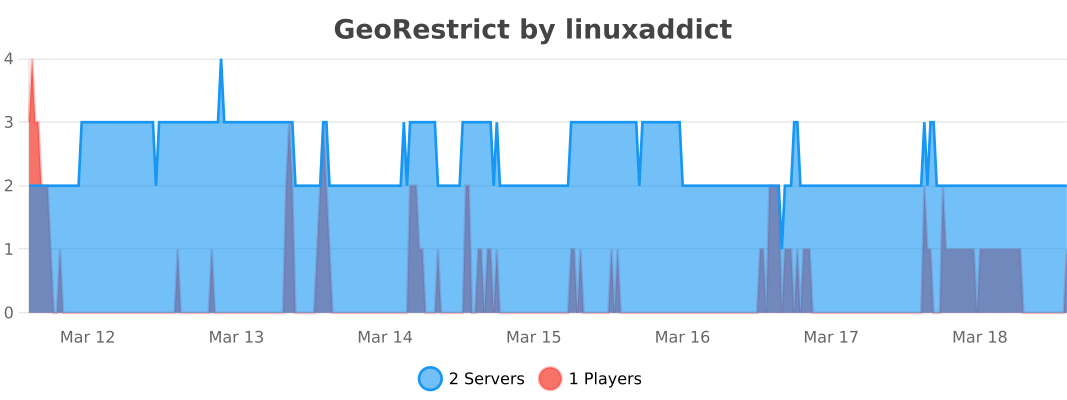
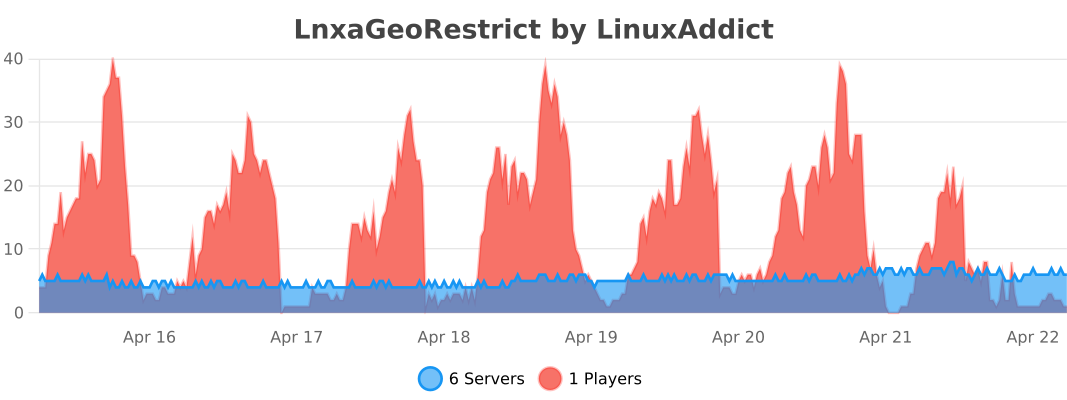
As the name suggests, Geo Restrict is a geo-restriction plugin. It allows you to block/allow certain countries and ASNs. In the config, you can enable VPN check, which is very simple and uses flagged keywords. The plugin does **not** require any API key, just drop it in your plugin folder and it’s ready to use. It also has Discord webhook notifications so you can keep logs of some kind.
# Country Restriction Settings
# If mode is ALLOWLIST, only countries in the list are allowed.
# If mode is BLOCKLIST, countries in the list are blocked.
countryMode: BLOCKLIST
countries:
– EE
– RU
– KP
# ASN Restriction Settings
# Same logic as countries.
asnMode: DISABLED
asns:
– AS12345
Note that while GalacticChunks is still in development, each version gets tested to see if it works so play without worry. Made by Musawer
GalacticChunks is a next‑generation chunk storage engine that replaces Minecraft’s bulky .mca region files with a sleek, highly‑compressed .gregion format. It’s built for servers that want cleaner world storage, faster disk operations, and long‑term reliability—without touching Paper’s chunk logic or interfering with gameplay.
GalacticChunks is purely a storage layer.
It does not modify world generation, ticking, lighting, or Paper/Purpur internals.
Your server plays exactly the same—your world just becomes dramatically more efficient behind the scenes.
🚀 Key Features
• Safe, Automatic Migration from .mca → .gregion
GalacticChunks includes a fully safe migration system that converts your existing vanilla region files into its optimized .gregion format.
No commands
No world resets
No data loss
No interruptions
Your world stays exactly the same—only the storage format changes.
⭐ Your world is NEVER deleted
Installing GalacticChunks does not wipe, reset, or regenerate your world.
It simply reads your existing .mca files and writes them into .gregion format.
If you ever remove the plugin, your original .mca files remain untouched.
⚡ 3× to 10× Smaller Region Files
.gregion files are designed to be 3–10× smaller than vanilla .mca, using a combination of:
modern compression (including Zstd)
tighter binary layouts
reduced overhead and redundancy
This means:
faster backups
faster uploads/downloads
less disk I/O under load
significantly lower storage usage on hosts
🧪 Modern Compression Stack, Pure Java
GalacticChunks uses a stack of modern compression and encoding techniques, including Zstd, to balance:
high compression ratio
fast decompression
stable performance
full cross‑platform support
Everything runs in pure Java—no native libraries, no JNI, no OS‑specific hacks.
🛠 Pure Storage Layer — Zero Gameplay Interference
GalacticChunks does not change how chunks behave in‑game. It only changes how they are stored on disk.
It works seamlessly alongside:
ViaVersion / ViaBackwards / ViaRewind
ProtocolLib
AuthMe
Essentials
Anti‑Xray
Any world generator
Any Paper/Purpur fork
If your server loads chunks, GalacticChunks stores them—nothing more.