SilkSpawnerPro
# 👑 SilkSpawnerPro
### *Premium Command-Based Spawner Management*
**SilkSpawnerPro** is a lightweight, high-performance standalone utility designed for servers that need precise control over mob spawners. Using rock-solid NBT logic, this plugin provides a clean,
—
## 💎 Features
* 🛡️ **Secure Mining** | Allow players to mine spawners with standard **Silk Touch I** pickaxes.
* 📦 **Intelligent NBT Storage** | Uses the **Persistent Data Container** (PDC) to store mob types natively. Spawners are fully stackable in the inventory.
* 🥚 **Dynamic Egg Changing** | (Configurable) Allow players to right-click an existing spawner with a Mob Egg to change its type.
* ⌨️ **Advanced Auto-Completion** | Full tab-completion support for all 80+ Minecraft mob types when using admin commands.
—
## ⚙️ Configuration & Admin Control
The `config.yml` gives you total control:
* **Toggle Egg Changing:** Enable or disable the ability to use spawn eggs on placed spawners.
* **Silk Touch Requirement:** Decide if players *must* have Silk Touch to drop the spawner.
* **Fully Translatable:** Every message can be customized with modern MiniMessage (RGB/Gradient) support.
—
## 📦 Commands & Permissions
| Command | Description | Permission |
| :— | :— | :— |
| `/ss give [amount]` | Distribute custom spawners | `silkspawnerpro.admin` |
| `N/A` | Ability to mine spawners | `silkspawnerpro.mine` |
| `N/A` | Use eggs to change types | `silkspawnerpro.change` |
—
### ☕ Support & Donations
If this tool helps your server run smoother, consider supporting the developer!
**[Donate via PayPal](https://paypal.me/Marbzy)**
—
## 💬 Official Support & Community
Need help with this plugin?
Join the official **Marbzy Discord server** for:
– 🛠 Direct plugin support (ticket system)
– 🐛 Bug reports
– 💡 Feature suggestions
– 🧪 Beta testing access
– 📢 Update announcements
👉 **[Join the Discord](https://discord.gg/SRHP79Jhzt)**
—
*Developed by Marbzy*
SignEdit for Bukkit
# SignEdit for Bukkit
[![[Release@GitHub]](https://img.shields.io/github/v/release/Deltik/SignEdit?style=for-the-badge)](https://github.com/Deltik/SignEdit/releases) [![[Downloads@Total]](https://img.shields.io/github/downloads/Deltik/SignEdit/total?style=for-the-badge)](https://github.com/Deltik/SignEdit/releases) [![[Downloads@Latest]](https://img.shields.io/github/downloads/Deltik/SignEdit/latest/total?style=for-the-badge)](https://github.com/Deltik/SignEdit/releases) [![[Ratings@Spigot]](https://img.shields.io/spiget/rating/47604?style=for-the-badge)](https://www.spigotmc.org/resources/signedit-for-bukkit.47604/rate)
SignEdit for Bukkit is a [Bukkit plugin](https://www.spigotmc.org/resources/categories/bukkit.4/) that allows players to edit sign objects by looking at them or clicking on them and typing in a SignEdit command.
![[SignEdit for Bukkit v1.14.0 – /sign help]](https://i.imgur.com/VBCjDIr.png)
## Installation
1. Download the latest .jar file from [the Releases page](https://github.com/Deltik/SignEdit/releases) and upload it to your Bukkit server (Spigot, PaperMC, etc.) plugins/ folder.
2. Restart your Bukkit server.
**Usage, Permissions, Configuration, and Features**
Full documentation of this plugin can be found in [the GitHub project README.md](https://git.io/SignEdit-README).
## Compatibility
This plugin is a fork of [Omel’s SignEdit](https://web.archive.org/web/20190905124503/https://www.spigotmc.org/resources/signedit.25485/) v1.3. Omel’s SignEdit v1.3 and older are not compatible with Bukkit 1.12 and newer because a deprecated API method was removed ([see related issue in MyPet](https://github.com/xXKeyleXx/MyPet/issues/1033)).
More compatibility information can be found in [the GitHub project README.md](https://git.io/SignEdit-README#compatibility).
Shuttle
> This project is still in development!
## Description
Shuttle is a lightweight open-source addon library for adding extension support to your mods. It allows for dynamic registration of objects which can be pulled and used within your mod easily, as well as allowing provision of instances which might be required for the construction of certain objects.
## Should I use it?
You can and / or should use this library if:
– You are creating a public addon api for your mod
– You want to easily extend your own mod (with more mods :p)
– You want to, for some othe reason, provide the ability to register new stuff in or internally tweak with your mod(s)
## Why?
After rewriting the addon system for [Cactus Mod](https://modrinth.com/mod/cactus) I decided to publish it as an open-source library for other modders to use.
For now, there isn’t really documentation on it – I’m maintaining this in my free time and will create some docs when I have time for it.
## Docs
> Coming Soon™
Shorty Swords
Shortened Sword are Just Built Different! Aren’t they look hot?
Texture-pack makes swords a bit shorter. Supports almost **EVERY** ever existed Minecraft Version.
ShockAirHeads
Create points of interest for players to interact with, completely themed to match your server & the role the AirHead plays. Create as many as you like, customizing each one down to the letter. It runs completely standalone and is open source.
**This plugin requires [Packet Events](https://github.com/retrooper/packetevents)!**
[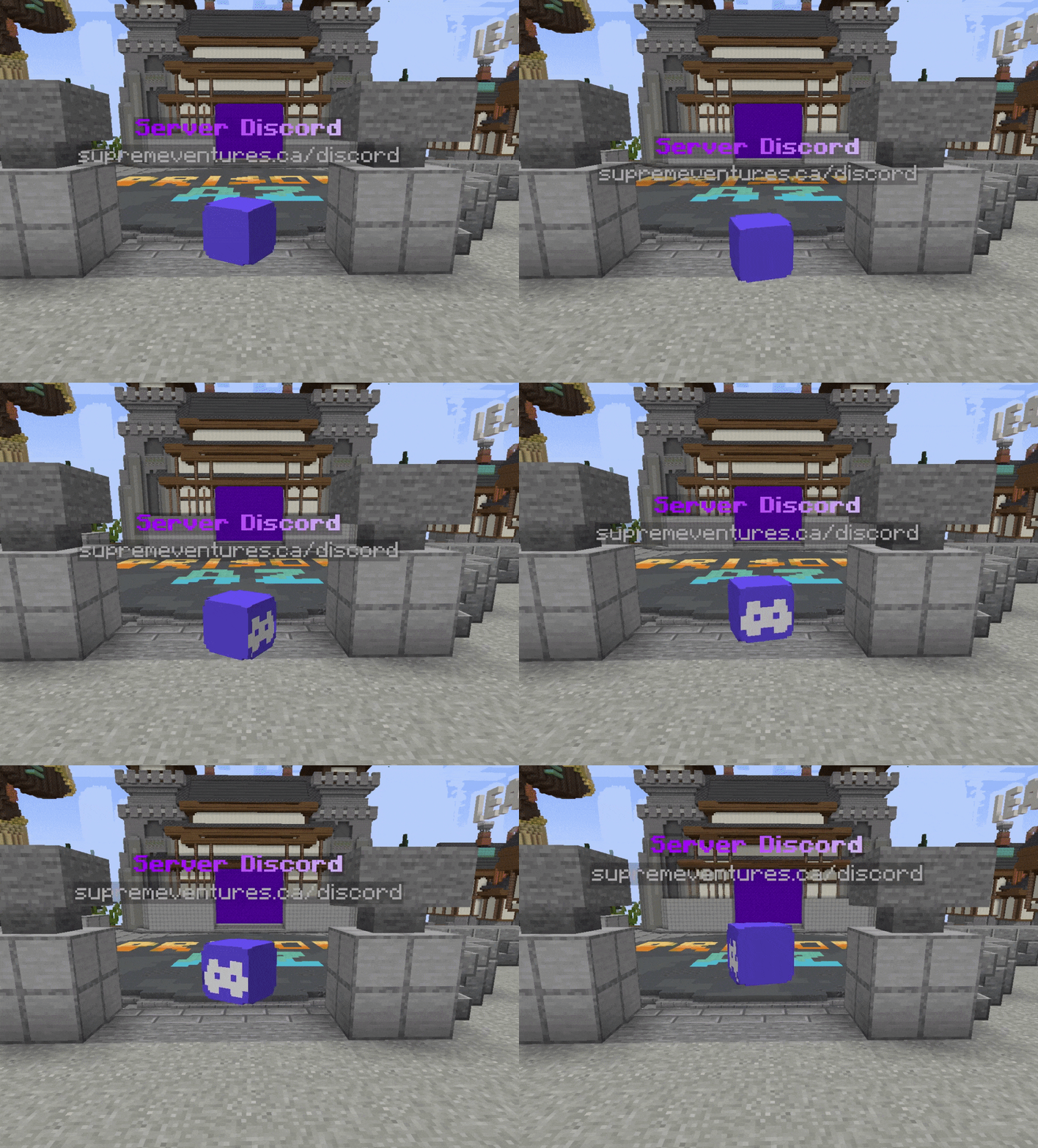](https://cdn.modrinth.com/data/ypKwglHB/images/8fa9541c60d0d4797f29afe4eb51c7ffaf745ca8.gif)
## Key Features
– 1.20.5 – 1.21.8 Supported
– Create unlimited unique AirHeads, put them everywhere!
– Configure each AirHeads animation, appearance, and behavior.
– Lightweight & fast. No real entities bogging down your server.
– Powerful developer API for spawning AirHeads wherever & whenever you want.
– Internal Holograms using new 1.20+ TextDisplay entities (Background color, Billboard Display, etc)
– Scale heads up to 10x normal size, and down to 5% of normal size.
– Sends messages, play sounds, dispatch console commands or execute commands as the player.
– Add block-overlays to the AirHead, to add another layer of depth to your AirHeads.
– Velocity Send-To-Server support
Config
“`yml
airheads:
levels:
# The location the AirHead will spawn at.
location:
world: test_world
x: -438.0
y: -38.0
z: 293.0
yaw: 0.0 # Used if rotation is disabled
pitch: 0.0 # Used if rotation is disabled
hologram-text-display-settings:
# How the hologram rotates with the player.
# Options:
# FIXED – Hologram doesn’t rotate at all.
# VERTICAL – Hologram rotates with the player, but only on the Y axis.
# HORIZONTAL – Hologram rotates with the player, but only on the X axis.
# CENTERED – Hologram rotates with the player on all axes.
billboard-constraints: VERTICAL
# How text is auto aligned in the hologram.
# Options:
# LEFT – Text is aligned to the left.
# CENTERED – Text is aligned to the center.
# RIGHT – Text is aligned to the right.
text-alignment: CENTERED
hologram-text:
– <#ADBED1>— <#fded07>ᴘʟᴀʏᴇʀ ʟᴇᴠᴇʟꜱ <#ADBED1>—
– 1.20.5 – 1.21.5
# How far above the AirHead the hologram is.
hologram-offset: 0.5
# How big/small to scale the hologram. Between 0.1 and 10.0
scale-x: 1.0
scale-y: 1.0
scale-z: 1.0
# How to translate the holograms position (Advanced users)
translation-x: 0.0
translation-y: 0.0
translation-z: 0.0
# Override the width/height of the hologram.
# Will be override if text size is larger.
width: 200
height: 50
# Does text on the hologram have a shadow?
has-text-shadow: false
# Is the hologram background transparent?
transparent-background: true
# If not transparent, what color is the background?
# Uses ARGB format. #AARRGGBB
background-color: ‘#40000000’
# The radius of the hologram shadow.
shadow-radius: 0.0
# The strength of the hologram shadow.
shadow-strength: 0.0
# How often does the hologram update placeholders.
# -1 to disable if not using placeholders are used or change.
update-interval-ticks: 5
# How far away should the hologram be visible.
render-distance: 100
# Hologram pitch and yaw.
pitch: 0.0
yaw: 0.0
appearance-settings:
# Head texture in base64 format.
head-texture: eyJ0ZXh0dXJlcyI6eyJTS0lOIjp7InVybCI6Imh0dHA6Ly90ZXh0dXJlcy5taW5lY3JhZnQubmV0L3RleHR1cmUvMWUzMWRhZWEzMGU1NzFiYjhiZGZhMGM2ZDJjOGVhMWJjNzIxYTRiMTJhY2NmN2RhNDM4YjZmMDU5OGJmMDg4NiJ9fX0=
# Scale of the head. Between 0.1 and 10.0
scale: 2.0
# Material overlapping the head (like a helmet)
# AIR – No overlay, just the head.
overlay-material: YELLOW_STAINED_GLASS
# How much larger to scale the overlay. (How much bigger is the helmet)
overlay-offset: 0.45
interact-settings:
# Executed by the player on every interact
interact-commands:
– levels
# Executed by the player on every left-click
left-click-commands: []
# Executed by the player on every right-click
right-click-commands: []
# Executed by the console on every interact
console-commands: []
# Executed by the console on every left-click
left-click-console-commands: []
# Executed by the console on every right-click
right-click-console-commands: []
# Message sent to the player on every interact
interact-message: []
# Sound played to the player on every interact
sound-settings:
volume: 1.0
pitch: 1.0
sound: minecraft:entity.player.levelup
enabled: true
# Send a player to another server when they interact with the AirHead.
# leave empty to disable.
send-to: “factions”
animation-settings:
# Should the head float up and down?
do-float: true
# How far above and below the starting position should it float
float-up-max: 0.5
float-down-max: 0.5
# How long, int ticks, should the animation take to run 1 up-down cycle.
# Higher = slower
float-cycle-duration-ticks: 80
# Should the head rotate?
do-rotation: true
# How fast, in degrees, should the head rotate per tick.
# Higher = faster
rotation-per-tick: 5
“`
shea’s simple Totem x bare bones
# shea’s simple Totem x bare bones
## what does this pack does
### it takes Totems and cleans it up
This pack does not include any bare bones textures
**Bare Bones is required for the intended look**
disclaimer if you use this pack make sure to place this pack above bare Bones in your resource pack list for it to use its own instead of bare bones
i recomend using other shader and resource packs like [bliss](https://github.com/X0nk/Bliss-Shader) to improve looks but that is optional
**you can showcase this if you want just dont redistrabute it**
SH-Koth
# SH-KOTH Features
## Core Features
– **Limitless Customization:** fully tailor every aspect of your KoTH events. Create new events lightning-fast using the GUI or directly from YAML files!
– **Multiple Hill Types:** choose from various tally methods like *capture* or *score*, with support for solo and team modes. You can also create custom hill types using the API or add-ons.
– **Infinite KoTHs:** run as many KoTH events as you want, even multiple at the same time.
– **Event Scheduling:** schedule events to occur at specific times or intervals.
## Player Experience
– **Scoreboards:** built-in scoreboards to display live event information.
– **Flawless Feedback:** customizable messages, broadcasts, boss-bars, titles, actionbars, and sounds to keep players engaged.
– **Boundless Rewards:** reward players with items (NBT supported), individual/global commands, and more.
## Integrations
– **Team Management:** includes its own team system, while also integrating seamlessly with external team/clan plugins.
– **Many Plugin Hooks:** integration with other plugins like clans or teams, with enable/disable and priority settings.
– **Tons of Placeholders:** access a wide suite of placeholders across chat, scoreboards, and more.
## Advanced
– **Performance-Driven:** optimized with async operations and packet-based scoreboards to ensure smooth gameplay, even in large-scale events.
– **Stats Tracking:** track wins by player or team and display them on leaderboards.
– **Cross-Server:** supports H2 for local databases and MySQL for cross-server setups.
– **Developer API:** a comprehensive API for developers to create custom integrations and add-ons.
SetHome
# How to use:
– /home [name] – Teleport to your home
– /sethome [name] – Create a home
– /delhome [name] – Delete a home
# Config
“`yml
# Cooldown is the number of seconds the player must wait before they can teleport to a home
cooldown:
# Max homes is the maximum number of homes the player can have.
# Default is for every player, but you can add for ranks as well.
# The permission is then: homeplugin.limit.
max-homes:
default: 15
# vip: 5
# premium: 10
# admin: 50
# Cancel on move is a setting that determines whether teleportation should be canceled if the player moves while on cooldown
cancel-on-move:
#Enderman sound to confirm a teleportation
play-sound:
“`
# Screenshot

# Permissions
“`yml
# /sethome
homeplugin.sethome
# /home
homeplugin.home
# /delhome
homeplugin.delhome
# /admindelhome
homeplugin.admindelhome
# /adminlisthomes
homeplugin.adminlisthomes
# The max homes rank
homeplugin.limit.
“`
ServerUptime
# Server Uptime
Check how long the server has been running with /uptime
## Permissions:
serveruptime.use
## You can choose if the players must have permission or not
## Picture:

## Default configuration:
“`html
ServerUptime:
ServerUptime: ‘&7[&bServer Uptime&7]’
Days: ‘&bDay’
Hours: ‘&bHours’
Minutes: ‘&bMinutes’
Seconds: ‘&bSeconds’
Permissions: true
NoPermissions: ‘&cYou are not authorized to do this!’
#Minecraft Color Codes: https://minecraft.wiki/w/Formatting_codes#Color_codes
numbers:
Days: ‘&7’
Hours: ‘&7’
Minutes: ‘&7’
Seconds: ‘&7’
“`
ServerJoinPerms
# ServerJoinPerms
A Velocity proxy plugin that enforces server-specific join permissions for Minecraft servers.
## Features
– Restricts players from joining servers they don’t have permission for
– Prevents server switching to unauthorized servers
– Simple permission-based access control
– Native Velocity integration
## Requirements
– Velocity 3.0.0 or higher
– Java 11 or higher
## Installation
1. Download the latest `ServerJoinPerms.jar` from the releases page
2. Place the JAR file in your Velocity server’s `plugins` directory
3. Restart your Velocity proxy
## Usage
### Permissions
The plugin uses a simple permission structure:
– `server.` – Grants permission to join the specified server
### Examples
– To allow access to a server named `survival`: `server.survival`
– To allow access to a server named `creative`: `server.creative`
### Behavior
– Players without the required permission will be disconnected with an error message
– Permission checks occur on both initial join and server transfers
– The error message clearly indicates the reason for disconnection
## Configuration
No configuration file is needed. The plugin works out of the box with Velocity’s permission system.
## Building from Source
1. Clone the repository
2. Run `mvn clean package`
3. Find the compiled JAR in the `target` directory
## Support
For support, please open an issue on the GitHub repository.
## License
This project is licensed under the MIT License.
## Author
– **LOLYAY** – Initial development