Mine Little Pony

_Ponify your Minecraft experience!_
Originally created in 2011 by Verdana, Mine Little Pony is the *original* pony mod that turns players and mobs into adorable cartoon equines.
Got any questions? Come join our Discord server!
For more options and a better experience, you’re recommended to also use HDSkins and Big Pony
Chippa256 shader
Very basic but effective shader that applies dithering and other vintage screen effects to make the iconic low-res look and feel of Minecraft seem even more low-res!
There isn’t much to say about this shader for now.
MC Server Admin Panel
**MCpanel** is a plugin that adds a web-based administration panel for your Minecraft server, accessible via a browser.
After logging in, you can send commands via the console, get a list and statistics of online players, change player settings, change server settings, plug-ins, and edit your Minecraft server files.
**The Dashboard tab** will provide you with access to server statistics with TPS graph, CPU graph, the number of online players, RAM used, server version, and player activity statistics in the form of a 24H/7days/30days graph.
Quick management functions like:
Save – Forcibly saves all changes in the world: chunks, player data, entities, inventories, achievements, etc.
Restart – to restart the Minecraft server.
Stop- to stop the Minecraft server.
A field for manually entering commands to the Minecraft server and a window for issuing information.
**The Players tab** It will allow you to view all players online, their parameters, their ping and the ability to edit their inventory, parameters and settings.
– Open the inventory of any of the players, add, delete or change items in the inventory.
– Add experience.
– Change the game mode.
– Restore health or feed.
– Teleport to another player or by coordinates.
– Kick the player.
– Give or revoke OP from player.
**The console tab** gives you access to the Minecraft server console for manual command entry with a large output window so that nothing distracts you from your tasks.
**The Management tab** provides quick access to server management
– Plugins – for viewing, deleting and installing(uploading) plugins.
– Files – Working with server files, editing, deleting, downloading and uploading .
– Settings – quick access to the server.properties file to change the server settings to the server.
– Users – Create new users with different access rights.
And additional place to save and quickly access your own links to your sites.
The plugin works via the built-in HTTP* server, does not require RCON, and opens at your server IP address in the browser.
After installing the plugin, use the configuration file to change the port, host IP address, username, and password.
*by default it will use your server IP and 8090 port.
**If you have any thoughts about what else you would like to see in the panel, share them. I will try to implement them, thank you.
MC New Textures
# MC New Textures
Backport Jappa Styles to legacy version.Or backport the unupgrade textures.Re-imagine modern textures.
Mod Compatibility ONLY have 1.7.10 version and 1.12.2 version.
Most of the texture are not mine, so you will need to check up the changelog from the last updates to know the mods, then you need find out the owner.
This is the wiki.Website.
Also include the resources, which the same in the upper version, was updated and mod resources or texture. And it also re-imagine the modern vanilia resources.
# About Project
Here is the full list of the series of MC New Textures.
From the top to the bottom is a recommended resourcepack loading order.
If this resource pack haven’t had a version that support your currently playing version, ignore this pack.
| Textures Pack | Support Version (1.X) | Link | Description | Note |
| ————————: | :——————–: | :————————————————————————: | :——————————————————–: | :—————————– |
| Base Pack | B7.3,0 – 4.7, 6 – 20.x | MC New Textures (Here) | Update textures to jappastyled textures. | |
| Blue Water | 6 – 12 | Aquatic | Fix your milky aqua. | |
| Seamless Glass | 7 – 13 | Seamless Glass & Color | Seamless glass and colorful contemporary feeling. | Optifine **Required** ! |
| Mod Addon | 7.10, 12.2 | Mod Addon | Supports of mods. | Partly Optifine **Required** ! |
| Sound | 7 – 13 | Sound Pack | Archive the sound pack for MC New Textures. | |
| Random Work | 7.10, 12.2, 17 | Random Work | Some random thinks for new textures. | Optifine **Required** ! |
| Wolfy | 6 – 13 | Wolfy | Backport modern wolf and two special dogs. (Bluey & Bingo) | Optifine **Required** ! [1.7.10: Optifine HD U E5 and above] |
| Cloudy | 0 – 21.6 | Coming soon… | Backport modern cloud and vibrant visual cloud | |
| Animal & Dye & Eggy Addon | 6 – 20 | Coming soon… | Backport modern dyes & animal & spawn eggs. | Partly Optifine **Required** ! |
# Notification
If you want more mod compatibility (ONLY 1.7.10 or 1.12.2) you can click here to have more compatibility.
After v1.5.5(For 1.7.10),I will add a pack which called as .cache-[packname], to give you the chance to create more things.
A lot of contents(e.g.:modern water color) required optifine/continuity installed. I highly recommands that you install them.
# FAQ
– **Does this resourcepack have a direct relationship to Modernity?**
In actually…NO.Because I create this resourcepack before I know about it. So it had no link to Modernity.
– **Can I use it in my video/modpack/resoursepack?**
Yeah,you can.You can use them just like you want.These are under MIT licence.
– **What about add more compatibility about (mod name)?**
If it has 1.12.2/1.7.10, I’ll do that.If not, it won’t. If you wanna, you can post some textures by yourself.
– **What about add the (vanilla content)?**
Don’t ask me about more silly things, for example, why not add recipe books in 1.7.10? (1.7.10 don’t have any recipe books)
If it was too hard for me right now, I’ll add it to the to-do-list.
– **Full meaning of this pack naming?**
[VersionType/MinecraftVersion]MCNewTextures-Type[VersionNum]
# Special Thanks! !
A very BIG thanks to Jasper “JAPPA” Boerstra.
DTFuel helps me to make out the EnderIO Ingot.
These two pack help me found some inspirations, The First Pack, The Second Pack.
Rainvay inspired me the modern bed icon.
tdstressmake the modern Immersive Engneering items.
Updated Engineering
Rainvay inspired me the modern bed icon.
Omgise helped tofind out sometexture problems.Rainvay inspired me the modern bed icon.
tdstressmake the modern Immersive Engneering items.
Updated Engineering
Rainvay inspired me the modern bed icon.
Omgise helped tofind out sometexture problems.
MC-Challenges
# Challenges
Enhance your vanilla gameplay by configuring custom challenges including custom goals. The possible combinations are endless!
Please note: This is a very early alpha release. Only a selected amount of features are implemented and any bug reports are highly appreciated. You can report bugs or give your feedback on the discord: https://discord.gg/YuSNYADznh
**The plugin itself is not configurable in Minecraft.** Instead head over to the builder website and export the challenges from there into the `/settings/` folder (create folder if not automatically created). You can find detailed configuration information as well as **examples** in the wiki
# Getting Started
### 1) Create your challenge
Head over to the challenges builder and configure your challenge. You can use the
search bar at the top to search for anything by keyword. Once you have your challenge built, click on “Modify Metadata”
at the bottom of the page and **give your challenge an individual name**. This name will be used on the server
to identify the challenge. Optionally you can set yourself as the author.
Alternatively, you can navigate to the individual rules, goals, or settings pages here and download a sample challenge
configuration.
### 2) Export your challenge
Click on “Download Settings File”. Click on “Download” to download your challenge configuration. **Put the file in the
`plugins/Challenges/settings/` folder**. Create the folder if it does not exist.
### 3) Verify your challenge
The plugin has to verify that the provided challenge ist valid. You can type `/challenges list` to get a list of all
challenges on the server. Enter `/load ` to verify and load your challenge.
### 4) [NEW] Live Challenge
Enter `/live` and click on the link.
### 5) Play your challenge
Enter `/start` to start your challenge. Have fun!
# Features
Be sure to visit the wiki to read more in-depth details about each feature.
### Rules
* NoBlockBreak
* NoBlockPlace
* NoCrafting
* NoDeath
* NoItem
* NoMobKill
All rules or each rule individually may have customizables punishments if they are violated.
### Punishments
* Cancel (The action is disallowed)
* End (The challenge run is over)
* Health
* Random Effect
* MLG
### Goals
* BlockBreakGoal
* BlockPlaceGoal
* CraftingGoal
* DeathGoal
* ItemGoal
* MobGoal
All goals may have a customizable time limit.
### Settings
* Custom Health
* Floor is Lava
* MLG
* Ultra Hardcore
MC-237017 Fix
# MC-237017 FIX
Minecraft mod to fix MC-237017 (All caves are filled with lava at and below Y value -54)
This mod is server-side only, and does not require anything on the client. Should work on all versions of Minecraft where this bug is present (1.18+, starting at snapshot 21w37a)
Maintenance Pro
### **About Maintenance Premium**
**Maintenance Premium** is a highly customizable maintenance mode plugin designed for network administrators who need total control over their server downtime.
> [!IMPORTANT]
> > **Fork Notice**: This is a maintained fork of the original Maintenance plugin. As the original owner is no longer active on Modrinth, we have taken over development to ensure compatibility with modern Minecraft versions and to add highly requested features.
—
### **New in this Version: Redis Support**
In addition to the standard MySQL support, this fork introduces **Native Redis Support**. You can now link multiple proxy instances (Velocity/Bungee) through a Redis connection, ensuring that maintenance status and whitelists are synchronized instantly across your entire network without the delay of traditional database polling.
—
### **Features**
* **Custom MOTD & Icons**: Set a specific MOTD and server icon that only appears during maintenance.
* * **MiniMessage Support**: Full support for modern Adventure MiniMessage formatting (RGB, Gradients, etc.).
* * **Advanced Timers**: Start/End timers and Scheduled maintenance window.
* * **Whitelisting**: Allow staff or developers to bypass maintenance.
* * **Join Notifications**: Get alerted when players are blocked.
* * **Proxy-Specific Features**: Per-server maintenance, Waiting/Fallback lobbies, and Redis Sync.
—
### **Configuration & Requirements**
* **Paper Users**: ProtocolLib is **required** for custom icons and playercount messages.
* * **MiniMessage**: Use the Adventure Web UI to preview your designs.
*
Magic Words
MagicWords is a cinematic chat plugin that turns typed phrases into magical effects. Players speak, and the world responds — no commands, no menus, just pure spoken sorcery.
Perfect for roleplay servers, surprise events, or creative chaos, MagicWords lets you define custom incantations that trigger potion effects, particles, weather changes, entity spawns, and more. It’s lightweight, modular, and fully configurable via config.yml.
Whether you want to summon storms, teleport players, or unleash fireworks with a word, MagicWords makes chat feel enchanted. Drop it into your server, define your phrases, and let the magic unfold.
Compatible with Spigot and Paper (Minecraft 1.20+). MIT licensed. Designed for servers that crave immersion, spectacle, and surprise.
MaceNerf
# 🪓 MaceNerf
Simple. Lightweight. Effective.
MaceNerf is a minimal Paper/Spigot plugin that reduces Mace damage by a configurable percentage, helping you rebalance PvP without removing the item entirely.
Perfect for SMPs and competitive PvP servers.
—
## ⚙️ Features
• Percentage-based Mace damage reduction
• Fully editable config
• Reload command support
• Lightweight & optimized
• Optional experimental exploit prevention
—
## 📌 Default Nerf
By default, Mace damage is reduced by:
**30%**
You can change this value inside the configuration file.
—
📂 Configuration
“`yaml
# MaceNerf Configuration
# Made By F1aled_
# Percentage of damage to remove from Mace attacks.
# Default: 30.0 (30% less damage)
mace-nerf-percentage: 30.0
# Prevent attribute swapping exploits (experimental)
prevent-attribute-swapping: false
“`
—
💻 Commands
`/macenerf reload`
Reloads the configuration without restarting the server.
—
🔐 Permissions
`macenerf.admin`
Required to use the reload command.
—
📦 Supported Versions
• 1.21-1.21.10
• Paper
• Spigot
• Compatible forks
—
## 🎯 Why Use MaceNerf?
Instead of banning the mace entirely, MaceNerf gives you precise percentage-based control over its damage output while keeping gameplay balanced.
Lunar Staff
## ***REQUIRES DEPENDENCY, CHECK BELOW***
# Lunar Staff Mod Plugin
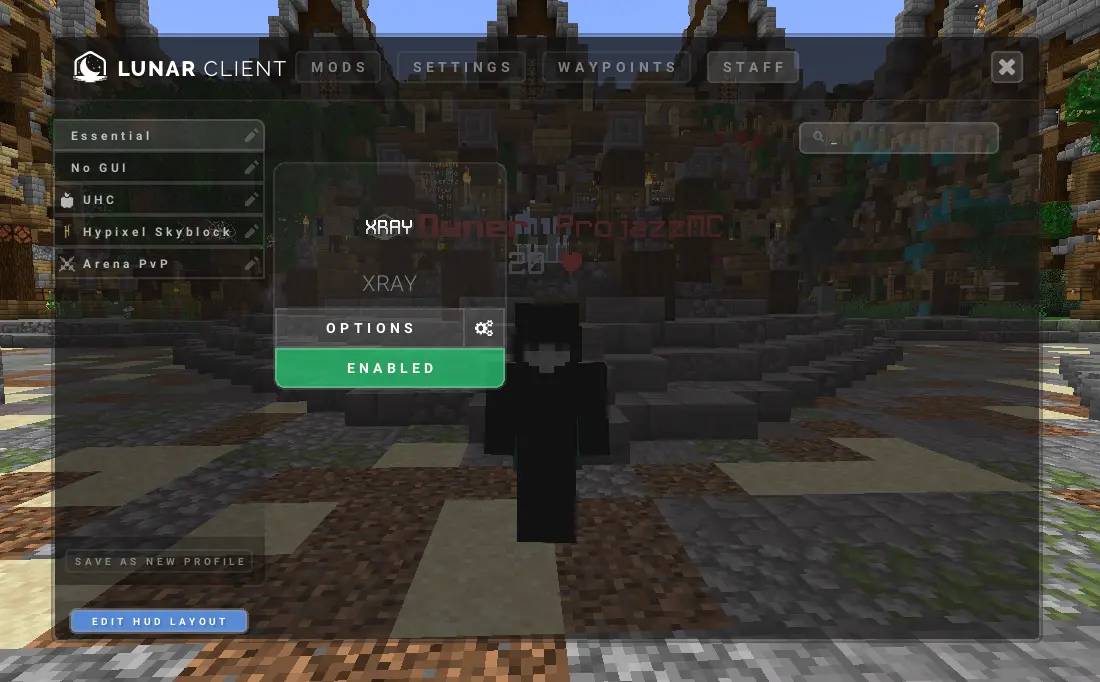
A Simple Plugin that enables the staff mod (Xray) for specified player using Lunar Client,
This plugin requires **Apollo**, See below to download.
This plugin is aimed to improve staff moderation in servers.
## Spigot Commands
– /lunarstaff
## Spigot Permissions
– lunarstaff.command.enable
– lunarstaff.command.disable
## Velocity Commands
– /lsv
– /lsv transfer
## Velocity Permissions
– lunarstaffvelocity.command.enable
– lunarstaffvelocity.command.disable
– lunarstaffvelocity.command.transfer
## Screenshot
## _REQUIREMENTS_
1. Java 21+ is required.
2. Spigot version 1.20+ is required.
3. Apollo plugin is required: https://modrinth.com/plugin/lunar-client-apollo