Yoru

# Why Yoru?
## Yoru is a pre-configured, high performance and QoL optimised vanilla modpack with tools for advanced and new users alike.
#### With Yoru, you get leading performance ***and*** a polished but not overdone quality of life, expect it to work out of the box with little configuration ever required.
#### I personally use this pack and will frequently maintain it.
### Most notably this modpack is running:
– Iris and Sodium
– Many other rendering, memory and misc fixes/optimisations.
– Inventory management, sorting, shulker viewing etc…
– World navigation and mapping.
– Technical additions such as Litematica, MiniHUD, WorldEdit(CUI) and Tweakeroo.
– Immersion additions, footsteps, sound physics and particles.
## Please read the menus below to learn the range of features Yoru offers!
### Special thanks HaiMcFly for allowing me to use their resourcepacks in Yoru.
## Suggestions or issues are welcome via our discord!
Shaders
– Complementary v4
– Complementary Reimagined
– Shimple Shaders
Keybinds
General:
– Ctrl + Shift + F – Toggle FPS Display
– +/- Zoom map (Z for temp zoom)
– Middle Click – Sort Inventory
– K – Toggle Shaders
– C – Zoom (Scroll to adjust)
– R – Reload Shaders
– O – Select Shaders
– M – Map
– B – Waypoints
– L – Litematica
X+: Tweakeroo:
– K – Auto Weapon Switch
– T – Auto Tool
– C – Menu
– F – Freecam
– R – Gamma Override
– G – Auto refill items to hand
H+: Minihud:
– C – Menu
– R – Toggle Rendering
Mods
Quality of life improvements
– 3D Skin Layers
– Appleskin
– Better Biome Blend
– BetterF3
– Better Recipe Book
– Blur
– Chat Heads
– Continuity
– CraftPresence
– Drip Sounds
– Eating Animation
– Falling Leaves
– Interactic
– Mod Menu
– Item Scroller
– Presence Footsteps
– Shoulder Surfing Reloaded
– Skip Transitions
– Visuality
Performance improvements
– Blanket Client Tweaks
– C2ME
– Debugify
– Dynamic FPS
– EntityCulling
– FastLoad
– FerriteCore
– Indium
– Iris
– Krypton
– LazyDFU
– Lithium
– Memory Leak Fix
– More Culling
– Smooth Boot
– Sodium
– Sodium Extra
– Very Many Players
– ViaVersion
Utilities
– Axiom
– Litematica
– MiniHUD
– Tweakeroo
– Xaero’s Minimap and Worldmap
Licencing
## All rights reserved have explicit modpack permission and have been adhered to:
### Stay True
– https://www.planetminecraft.com/texture-pack/stay-true-4447380/
### Xaero’s Minimap and World Map
– https://chocolateminecraft.com/
### Complementary Shaders
– https://www.complementary.dev
Yolo
# Yolo – A hardcore plugin
—
[](https://discord.gg/zMqkeRseME)
[](https://github.com/eingruenesbeb/Yolo/releases/)
[](https://jitpack.io/#eingruenesbeb/Yolo/v0.5.0)
[](https://github.com/eingruenesbeb/Yolo/blob/master/COPYING)
—
## Content
1. [What does this plugin do?](#1-what-does-this-plugin-do)
2. [Configuration](#2-configuration)
1. [`config.yml`](#21-configyml)
2. [`chat_messages.properties`](#22-chatmessagesproperties)
3. [`discord/[…].json`](#23-discordjson)
4. [`ban_message.txt`](#24-banmessagetxt)
5. [Text replacements](#25-text-replacements)
3. [Permissions](#3-permissions)
4. [Commands](#4-commands)
5. [Further considerations](#5-further-considerations)
6. [Planned features](#6-planned-features)
7. [For developers](#7-for-developers)
—
## 1. What does this plugin do?
You only live once… the name says it all.
This plugin is meant for hardcore survival servers, that implements, but also expands on the vanilla hardcore
mechanics for a player’s death on a server.
Upon death players usually get banned off of a server, if (and only if) the setting for hardcore was enabled in
`server.properties` before world generation.
That is not the case if this setting was set to true retroactively.
And here is, where this plugin comes into play, by
implementing this behaviour regardless of when hardcore was enabled.
Additionally, you can exempt players from this rule
and send a customized message to a Discord-server upon the occurrence of a (non-exempt) player-death.
The plugin can also force a resource-pack of your choice, with the default one replacing the normal health-bar with
hardcore-hearts, on any non-exempt player.
(*You can check out the resource-pack
[here](https://drive.google.com/file/d/1UWoiOGFlt2QIyQPVKAv5flLTNeNiI439/view?usp=share_link).*)
## 2. Configuration
### 2.1 `config.yml`
There are currently four configuration sections.
The first one is for managing the resource-pack sent to non-exempt players:
“`yaml
# You can specify a custom resource pack and turn off forcing the pack onto non-exempt players.
resource-pack:
force: true
custom:
use: false
url: “”
sha1: “”
“`
– The `force` option lets you control, whether the player *has* to accept the pack. (Allowed values: `true`, `false`)
– `custom` lets you define a custom resource-pack, other than the default one.
– `use`: Set to `true` to use the custom pack, otherwise set it to `false`
– `url`: The download-link to the custom pack.
– `sha1`: The sha1-checksum of the file. You can use
[this tool](https://emn178.github.io/online-tools/sha1_checksum.html) to obtain it.
The next section is for configuring the Spicord integration:
“`yaml
spicord:
send: false
message_channel_id: “”
“`
– `send`: Whether to enable the Spicord-Integration. (Allowed values: `true`, `false`)
– `message_channel_id`: The id of the channel to send the message to. You can obtain it using
[this method](https://support.discord.com/hc/en-us/articles/206346498-Where-can-I-find-my-User-Server-Message-ID-)
(you can also obtain the channel-id by itself, by right-clicking the channel on the channel-selection-sidebar).
In the `announce` section you can individually toggle messages:
“`yaml
announce:
death:
discord: false
chat: true
totem:
discord: false
chat: true
revive:
discord: false
chat: true
“`
This should be pretty self-explanatory.
The listed messages are announcements that would be sent on their respective occasions and targets.
The allowed values are `true` or `false`.
The option `enable-on-non-hc` lets you enable this plugin’s functionality even on a non-hardcore server, while the last
option `easy-disable` lets you disable the death-ban functionality, if it’s `true` (previously dead players can join, if
this is enabled).
It may take a while before banned players can join if this option is true.
Yet again acceptable values (for both) are `true` and `false`.
### 2.2 `chat_messages.properties`
The messages defined in this file are chat messages that can be customized.
There shouldn’t be a need to add more.
You can also use the MiniMessage format to make them *special*.
How you can use this format, you can read [here](https://docs.advntr.dev/minimessage/format.html).
### 2.3 `discord/[…].json`
In these files, you can customize the embeds, sent by the plugin.
You can use [this tool](https://leovoel.github.io/embed-visualizer/) to visualize them and generate the json file.
If, for example, you’d like to customize the discord message, that is getting sent upon a player’s death, you’d need to
modify `plugins/yolo/discord/death_message.json` to something like this:
“`json
{
“embed”: {
“title”: “%player_name% has died!”,
“description”: “Press “F” to pay respect.”,
“color”: 16521991,
“author”: {
“name”: “author name”,
“url”: “https://discordapp.com”,
“icon_url”: “https://cdn.modrinth.com/data/ExWUwvY3/a8ab710896279f5c3ed9c377d408a10587f5509d.png”
},
“image”: {
“url”: “https://media.tenor.com/bMbIAroA0PkAAAAi/rip-rest.gif”
}
}
}
“`
### 2.4 `ban_message.txt`
This is where you can customize the ban message that players see when they’re dead.
### 2.5 Text replacements
Every message that gets sent by the Plugin can use the following replacements:
– `%player_name%` – The name of the affected player
– `%totem_uses%` – The number of totems the subject player of the message has used.
– `%death_message%` – The death message, if the player has died. (only available in messages, sent upon a
player’s death.)
– `%version%` – The current version of the plugin.
## 3. Permissions
One permission is `yolo.exempt`, which excludes any players having it from the plugin’s effects. There are also two
other permissions that relate to commands. These are described in the section about [commands](#4-commands).
For a general guide to permissions on Bukkit and its derivatives, please refer to
[this page](https://bukkit.fandom.com/wiki/Permissions.yml). *(I’d recommend using a permission manager like
[LuckPerms](https://luckperms.net/) though.)*
## 4. Commands
There are currently two commands available:
– `/yolo-reload`: This command is useful for reloading all configuration dependent features of this plugin, without
having to restart the whole server. It requires the `yolo.reload` permission.
– `/revive [revivable player] `: This command lets you revive a
player who has died, attempting to restore their inventory and teleporting them to their death location (if safe). It
requires the `yolo.revive` permission. You can also disable restoring their inventory and the teleportation, by setting
the arguments to `false`. (If you only want to disable the teleport, you need to explicitly set the inventory restoring
to `true`.)
– `/checkout_death_location` This command lets you teleport to a dead player’s death location. This is useful for
checking for traps and duplicate items. It requires the `yolo.revive` permission.
## 5. Further considerations
– If hardcore is enabled in `server.properties`, the resource pack is always forced upon players by default. (
configurable since: 0.4.0)
– In order to use Spicord, you have to configure it correctly. In order to register this plugin as an addon for a bot,
you have to add it like this:
“`toml
### ↑ Irrelevant stuff above ↑ ###
[[bots]]
name = “” # Name for the bot here.
enabled = true
token = “” # Your bot’s token here
command_support = true # Irrelevant for this plugin’s Spicord addon.
command_prefix = “-”
addons = [
# Potentially other addons.
“yolo”
]
### ↓ Other irrelevant stuff below ↓ ###
“`
– **This plugin was made for PaperMC-1.19.4.** Other versions and platforms haven’t been tested *yet*, but this is
planned
to be completed until the full release. Issues for incompatibility can
be [submitted](https://github.com/eingruenesbeb/Yolo/issues/new/choose), but will not be resolved if
this means dropping support for other compatible versions.
– Reviving a player with inventory restoring enabled, can lead to item duplication, as players still drop their items.
You may want to check out the teleport location with `/checkout_death_location` first, in order to check for duplicates.
– This is a pre-release version, so bugs or glitches may be encountered more often.
## 6. Planned features
– Commands to undo a player’s revive
– GUI for the revive-system (planned for 2.0)
– Full support for PlaceholderAPI (planned for 2.0)
– Death location marker on Dynmap, Bluemap and co. (planned for in 2.0)
– Have a suggestion? Submit it [here](https://github.com/eingruenesbeb/Yolo/issues/new/choose)!
## 7. For developers
To add this project as a dependency for yours, follow [this link](https://jitpack.io/#eingruenesbeb/Yolo) and select
your desired version (go to *branches* → *master-SNAPSHOT* for the most recent version). Then follow the instructions
below.
To avoid inflating your jar-file, you can change the scope to `compileOnly`.
Additionally, you’ll need to declare the dependency in your `plugin.yml`-file like this:
“`yml
#### ↑ other stuff ↑ ###
depend: [ # Or `softdepend`
Yolo
]
#### ↓ other stuff ↓ ###
“`
You can find the documentation [here](https://eingruenesbeb.github.io/Yolo/).
—
*From Version: 0.7.0*
Yitalith
# Yitalith
你说的对,但伊塔丽斯是由YWYunyi制作的一款128X原版PBR材质包,它的目标很简单:让你熟悉的原版世界,变得无比真实和生动。
Yitalith, crafted by YWYunyi, is a 128x resource pack that fundamentally enhances Minecraft’s visuals while strictly preserving its vanilla identity.
它没有改变任何方块的“样子”,你一眼看去还是那个经典的Minecraft。但它改变了方块的“灵魂”,让它们学会了与光线和环境互动。
It doesn’t alter the “appearance” of any block—at a glance, it’s the classic Minecraft you know. Instead, it changes the “soul” of the blocks, teaching them to interact with light and the environment.
– **PBR**:是PBR!我加入了PBR!阳光下的铁块会反射出刺眼的金属光泽,羊毛是柔和哑光的。冰块不再是单纯的蓝色方块,它现在能清晰地倒映出周围的景物,如同玻璃一般。
**PBR**:Metals are authentically shiny, wool is naturally matte, and ice feature mirror-like reflections.
– **法线和视差**:是的,我添加了法线和视差。圆石的表面凹凸不平,这不再是平平的贴图,而是拥有真实深度和细节的表面。
**Normal & Parallax Mapping**:Surfaces gain real depth and a tangible 3D structure, moving beyond flat textures.
– **孔隙率**:下雨或淋水后,木板会被浸湿,颜色变深;石英和金属则会让水留在表面,形成水坑。每种材料都有了符合现实的表现。
**Porosity**:Materials react intelligently to moisture—wood darkens as it absorbs water, while metal and stone form surface puddles.
– **次表面散射**:它让树脂、雪块在背光时,能像真实世界一样透出柔和的光线。
–
**Subsurface Scattering**:Light softly glows through translucent blocks like resin and snow, simulating realistic light penetration.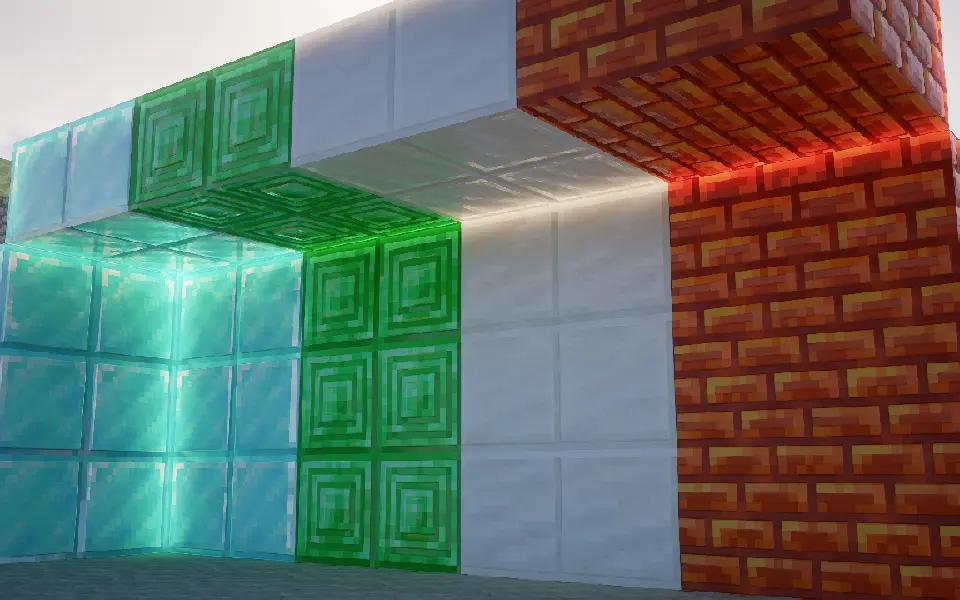
## 为什么我的效果没有上面的截图好?
## Why doesn’t my game look as good as the screenshots?
首先,检查你的光影是否支持**视差**和**labPBR**
First, check if your shader pack supports **Parallax** and **labPBR**.
其次,确保光影的视差和labPBR是开着的
Next, make sure these features are actually enabled in your shader settings.
然后,如果你的光影有以下功能,请按照下面设置:
Finally, if your shaders have the following options, please configure them accordingly:
– 将PBR格式改为**labPBR**
– Change the PBR format to **labPBR**.
– 关闭所有光影里关于**硬编码**的设置
– Disable all **Hardcoding** options within the shaders.
– 关闭**由视差生成法线**
– Disable **Normals by Parallax**.
– 打开**次表面散射**
– Enable **Subsurface Scattering**.
– 打开**平滑视差**
– Enable **Smooth Parallax**.
– 打开**孔隙率**
– Enable **Porosity**.
– 打开**屏幕空间追踪**或是**全局光线追踪**
– Enable **Screen Space Reflections** or **Global Illumination / Ray Tracing**.
– 打开**labPBR自发光**
– Enable **labPBR Emissive Textures**.
**我推的光影:**
**Shader recommendations:**
1. iterationRP
2. Sundial
3. Kappa
4. Nostalgia
5. PTGI GFME
6. Bliss
7. Astralex
8. Complementary
应该不会有多少人看到,我要偷偷贴一个QQ交流群:1009785936

