YourDeathPoint

The plugin shows the coordinates of your death in chat, not visible to other players
You can change the message in the config.yml file! **For Paper only, may not work on Spigot**
Your totem is your skin
# What the goal of this pack?
I think have your skin as a totem is pretty, then I created this pack.
You can found a tutorial in the pack (its name is tutoral.txt)
# How I can set the pack in my Resource packs?
Go in your .minecraft, resourcepacks, and drag and drop the pack.
# I can’t modify the pack
Just unzip the pack with right click, and select “Extract All…”
# How to setup the pack?
TUTORIAL
1. Grab your own skin
go on https://namemc.com
search your pseudo
click on your profile
under your skin preview, there is all your skins and click on your latest
click on the download button
2. Put the skin in the Resource Pack
Go in your downloads, click on your skin and press Ctrl + X
Go in the resource pack : assets, minecraft, textures, item and press Ctrl + V
Rename your skin “totem” (verify the extension : it’s normally png)
There it is!
If you have questions, ask me on my discord : https://dsc.gg/somroti (it’s a french server but you can use Google Translate)
Here’s my discord for suggest ideas or report an issue : https://discord.gg/7yXRx6yVVy
Your Reputation
[](https://modrinth.com/mod/fabric-api)

[](https://raw.githubusercontent.com/Aton-Kish/your-reputation/1.18/LICENSE)
[](https://ko-fi.com/atonkish)
# Your Reputation
**The project for Minecraft versions 1.21 and later has been moved:**
– for WTHIT: https://modrinth.com/mod/your-reputation-wthit
– for Jade: https://modrinth.com/mod/your-reputation-jade
Your Reputation is a [WTHIT](https://modrinth.com/mod/wthit)/[Jade](https://modrinth.com/mod/jade) plugin that displays your reputation on a tooltip with each villager.
[ ](https://modrinth.com/mod/fabric-api)
Requires [WTHIT](https://modrinth.com/mod/wthit)/[Jade](https://modrinth.com/mod/jade).
| Reputation | Value | Tooltip |
| ———– | —————————— | ———————————————————————————————————————————– |
| Friendly | 100 or more | 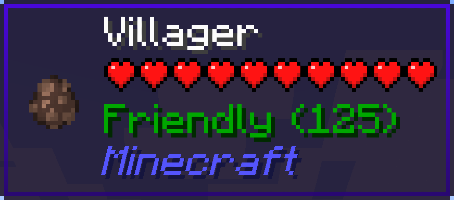 |
|
| Trustworthy | more than 0 and less than 100 | 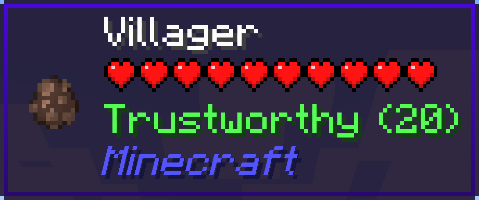 |
|
| Neutral | equal to 0 | 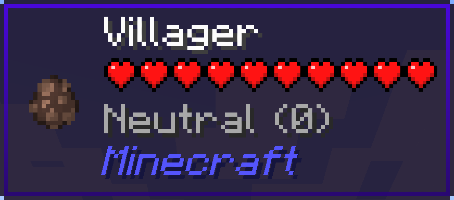 |
|
| Suspicious | more than -100 and less than 0 | 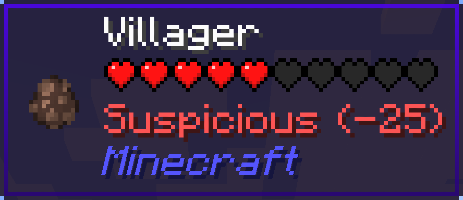 |
|
| Hostile | -100 or less | 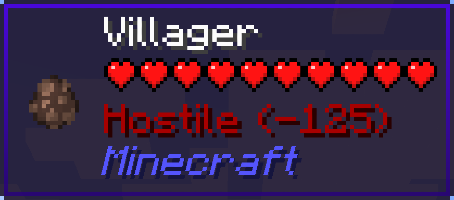 |
|
If your reputation is “Hostile”, villagers may be snitches.
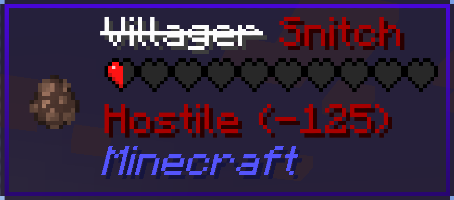
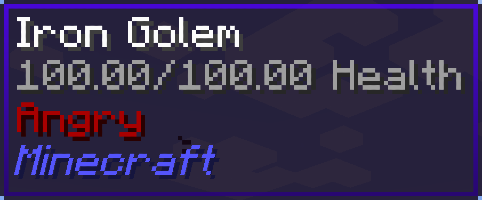
And then, iron golems will get angry and attack you…
YouCantHaveThat
Prevents obtaining/breaking any item of your choice.
Great for protecting your server or spicing up survival.
## Supports
– 26.1.2
– 1.0.2 supports 1.16 – 1.21.x
## Features
– Prevents obtaining / breaking / placing.
– Scans inventory/containers when opened.(Can be toggled off for survival fun now.)
– Detects offhand.
– Lightweight. Operates completely through player actions.
You Think I’m Bread?!?!
this mod makes the bread look like grian
Version 1.6.1-1.10.2:
tested on 1.6.1, 1.7.10, 1.8.9, 1.9, and 1.10.2
Version 1.11-1.12.2:
tested on 1.11 and 1.12.2
says it’s meant for a newer version but its not
Version 1.13-1.14.4:
tested on 1.13-1.14.4
Version 1.15-1.21.5:
tested on 1.15, 1.16.3, 1.18.2, 1.20.1, 1.21.1, and 1.21.5
this will likely work for future versions as well
update: tested on 1.21.11 as well
notes: older versions have the new-looking texture
oftentimes, it will say it is meant for an older or newer version of minecraft, but this can generally be ignored
You Shall Not Spawn!


Disable unwanted mobs from spawning using JSON configuration.
Supports Forge, Fabric, and Quilt
⭐ Features ⭐
Add the ID of the entity you want to remove in config/ysns/disabled_entities.json5 to completely remove entities from spawning.
Whether per dimension or globally (by using "!.*"), you can control the spawn rate of an entity in the config/ysns/per_dimension_entities.json5 config.
Need to disable multiple entities from 1 mod? Or is there a pattern in them? Then no need to repeat yourself!
With regular expressions, you can disable multiple entities in a single entry, disable all entities from a mod, and a lot more! Simply start the entry with "!" and then write your regular expression.
The config files have comments explaining and giving examples of what you need to add to make the mod work! If you need extra help, feel free to hop in my Discord in the #elocins-projects channel.
FAQ
- Can I use this in my modpack?
Of course! It was designed for modpack creators to remove undesired entities that may unbalance the game or create issues.
- Can I still make the entities spawn?
In the case of using the disabled_entities config, no. Once a mob is added to the blacklist, there is no way to spawn it by any method. Both natural or through eggs/commands. This mod is meant to completely remove undesired entities.
In the case of the per_dimension config, it works via chance, so at 0.0 they won’t spawn at all. But at 0.5 it’ll have a 50% chance of spawning.
Everything happens on the server’s side. Though it is recommended to leave the mod and config for clients too, for the case they want to play a single-player world. You should always leave this mod in the server pack alongside its config.
- What if I add an entity to the blacklist that was already spawned?
Spawned entities will still exist, so it’s up to you if you want to kill them or not. For this reason, it’s recommended to configure the mod before creating a world.
- What if I misspell an entity’s ID in the config file?
Nothing will happen. Adding invalid IDs won’t cause issues, but obviously, the entity won’t be blacklisted as it technically doesn’t exist. The same thing would happen if the mod isn’t present, but it will be if it’s added later and the ID is valid.
You Die You Lose a Heart (Discontinued)
You Die You Lose a Heart
Whenever you die you lose a heart, if you lose all of them you will be forced to go into spectator mode. This is similar to normal hardcore in Minecraft but somewhat forgiving.
Limit the maximum amount of hearts with /gamerule maxHearts (by default set to 20 hearts) and whether players can even get hearts with /gamerule canRestoreHearts true/false (by default set to true)

You can replenish hearts by eating enchanted golden apples. This gives enchanted golden apples actual use outside of pvp.


You Bandit!
This is originally for modpack [AnimateCraft: Lankeren](https://modrinth.com/modpack/animatecraft-lankeren). If you like this content, I’m sure you’ll like that modpack, too. Welcome to check it out!
—
You hate villagers? You think they are useless? You want to kick their asses? Alright, I don’t know why you think that way, but now I can let you do it in a cooler way.
Introducing ***You Bandit!***, a derive mod of ***[You Thief!](https://modrinth.com/mod/you-thief-remastered-edition)***. With this mod, you can choose to be a bandit, hang around with the illagers, and loot the villagers.
After killing two villagers, you will get an unluck debuff, and you become a bandit, really simple.
Being a bandit means you will be hated by villagers and iron golems, the former will rise their trading prices, the latter will not stop chasing you.
But bandits have advantages. You are now much stronger, and the illagers will not attack you anymore!–Not until you betray them.
When you kill one of the illagers (including witch and vex), you will be cursed with a Bad Omen V. Even worse, you cannot use milk bucket to get rid of it or the consequence it brings–continuously spawned vexs around you! Now this is the real bad omen!
Want to make up what you’ve done? Take the Bade Omen V to the village, and win the raid! Then you’ll gain a Hero of the Village V, which can decrease the trader price to the original level (only a bit higher :))
## 版权声明|License
– **作者保留该作品的所有权利。禁止在其他社交平台(包括群聊、网盘等)重新上传或商用,否则后果自负。** This content is All Rights Reserved, meaning that you cannot redistribute/modify & distribute this content, or use it in commercial ways.
– **欢迎您将其收录到整合包中或用其制作视频,请在简介处附上此发布页面的链接和[我的bilibili主页](https://space.bilibili.com/190900020),也欢迎在简介艾特我,我很想看你们的视频!**
If you make a video about this content or put this content in your modpack, please give credit and link to this page, and I would love to know! Thank you.
you are my sunshine SUN
Now you will always be greeted in the morning by the beautiful face of LeBron James.
replaces the sun texture with the “you are my sunshine” meme.
Your Options Shall Be Saved (YOSBS)
# Your Options Shall Be Saved (YOSBS)
Your Options Shall Be Saved (YOSBS) is a lightweight utility mod that lets modpack creators define default configuration files without overwriting player preferences
Updating a modpack often resets custom settings like keybinds or mod configs, because most launchers replace the entire `config/` folder
YOSBS solves this by copying any file placed in `config/yosbs/` to its proper location only once on first launch — and never again
This gives full control to the pack author:
– Files inside `config/yosbs/` are treated as user-owned: copied once, then left untouched
– Files inside `config/` behave as usual: they will be replaced on each update
That way, you decide which configs should persist, and which should reset
## Features
– **Zero-config**: just drop the defaults under `/config/yosbs/…` (or legacy `/config/yosbr`)
– Works for **any** file – `options.txt`, mod configs, `optionsshaders.txt`, etc
– Runs in the **pre-launch phase**, before Fabric/Forge starts loading the rest of the mods
## Compatibility & Installation
1. Fabric Loader ≥ 0.4.0 *(No Fabric API required)*
2. Minecraft 1.14 – 1.21.x
3. Requires Java 8 or newer
4. Put the YOSBS jar in `mods/` and launch once – the folder `/config/yosbs` is created automatically (or create it manually)
## Usage examples
| Want to ship… | Do this before first launch |
|—————|—————————-|
| A default `options.txt` | Place your file at `/config/yosbs/options.txt` |
| A REI config | `/config/yosbs/config/roughlyenoughitems/config.json5` |
## Credits
Inspired by the original [Your Options Shall Be Respected – YOSBR](https://modrinth.com/mod/yosbr) by *shedaniel*