Zoom-o-Matic

A simple, but customizable multi-button zoom tool for Minecraft.
It allows for up to 3 keybinds with customizable zoom and on / off smooth camera.
_This mod is for learning most of all, feel free to use it, but its biggest purpose is learning and teaching to mod fabric._
# Documentation for Learning Fabric
While we are certaintly not experts on fabric, we would like to share our journey and in a hope that it can help others get started with learning fabric modding and Java.
As such, we are currently working (in progress) on a detailed commentary of the code. In the future we may work towards a tutorial either written or video based on feedback.
[Find the code commentary here.](https://github.com/NicoIsLost/Zoom-o-Matic/blob/main/docs/COMMENTARY.md)
# Usage
## To install
After fabric mod loader has been installed for the correct version place the latest Zoom-o-matic release with compatible dependencies in the .minecraft/mods folder.
## Dependencies
Fabric Mod Loader (Install to use)
https://fabricmc.net/use/installer/
Fabric API (Place in mod folder)
https://github.com/FabricMC/fabric
owo-lib (Place in mod folder)
https://github.com/wisp-forest/owo-lib
## Using the Mod
**The default Zoom 1 Keybind is “c” which is already bound, so you need to unbind “Save Hotbar Activator” or bind zoom1 to another key to make the mod work.**
### Mod Menu
The mod is registered in mod menu, so you can adjust settings through that GUI if you desire, otherwise you can use commands.
### Keybinds
Are found in the Zoom-o-Matic section of the normal minecraft keybind menu.
Options -> Controls -> Keybinds
### Scroll Zoom
When zooming you can scroll in or out with your mousewheel to zoom more or less.
### Zoom Amount
Adjusts the amount of zooming, with
`/ZoomO ZoomAmount Zoom_X YY`
– **X** = Zoom Keybind #, (1, 2, or 3.)
– **YY** is the % zoom, (1 – 99)
### Smooth Camera Toggle
Toggles whether smooth_camera should be active when zooming, which slows down movement.
`/ZoomO SmoothCamera Zoom_X YY`
– **X** = Zoom Keybind #, (1, 2, or 3.)
– **YY** true/false
### Scroll Zoom Text Toggle
Toggles whether you have the % zoom displayed in text when using the scroll wheel.
`/ZoomO ActionBarWriting XX`
– **XX** = true/false
# About This Mod & Plans
This mod is meant to be a place to learn how to mod fabric mods for minecraft. This our first mod, so we know it’s not 100% perfect, but that’s not the point.
The goal is to optimize it, make it better, and improve the features in order to help learn more about modding.
## Here is a list of improvements we would like to make, in order of want:
– Remove owo dependency – i.e. Create a world-independent data saving system.
– ~~Add scrolling zoom~~ (done)
– Add a custom, customizable smoother,
– Add a custom GUI
– Add more keybinds (including more keybinds, via GUI)
– Add animations
– Presets like easing.
– Add customizable animations
# Credit
**@Fej1Dev** has been hand and hand in this entire process, coding large portions himself, and helping me when I get stuck with my portions!
**@LogcialGeekBoy** & [Logical Zoom](https://github.com/LogicalGeekBoy/logical_zoom) – Some of the code used in this mod (mainly the mixin) was from Logical Zoom, but more importantly was that his mod inspired us to make our own.
Zoom
# Zoom
This datapack allows players in a server or singleplayer-world to zoom in by sneaking after activating the “Zoom Mode” with a “`/trigger zoom“` command.
## Datapack Video:
With a lot of Settings you can customize how the players from your server can zoom in:
_____________________________________________________
Use: “`/function zoom:config“` to open this menu:
### –Config–
###
### Scroll Zoom: [True] [False]
### Zoom Strength: [25%] [50%] [75%] [100%]
### Appearance Mode: [Header] [Middle] [Bottom] [Off]
### Notification: [True] [False]
______________________________________________________
## Copy Rules:
_You are allowed to download and modify this datapack,
You are NOT allowed to upload it anywhere except for the link to this page!_
Zombie Nightmare Expansions – Undead Horror Monsters

**Welcome to Zombie Nightmare Expansions, a new horror mod centred on adding new undead monsters with unique nightmarish mechanics.**
Discord server https://discord.gg/arphex
These mobs appear rarely in any overworld biomes and their spawn rates can be configured individually (including disabling specific mobs if required). All modpack inclusions welcome. More mobs planned in future!
Current mobs:
DISEMBOWELER

Large, monstrous zombie with entrails hanging out, seeking blood and vengeance. Lumbers around looking for players and cows to consume, with attacks packing a heavy punch. Drops “corrupted heart” items on death.
TORMENTED STEVE

A hideous monstrosity disguising itself as a regular player (eight player skin variants). When stationary, it resembles the normal skin, but as soon as it moves, the true nightmarish form comes out. Sometimes found hanging from ceilings ready to drop on your head. A very strong and vicious opponent, dropping enchanted golden apples on death.
BLOOD EAGLE

A huge demon/dragon-like zombie with appendages made entirely from stretched out flesh, and sporting a set of razor-sharp teeth. Capable of both flying and walking, sometimes attacking from the air with spit projectiles or from the ground with melee – Eats pigs. Very strong, plus tameable and rideable (tamed with 10 corrupted hearts, configurable to disable taming).
BRUTALISER

MINIBOSS. A huge, strong zombie that can smash the ground to create block shockwaves dealing devastating damage and knockback on impact. You can jump over shockwaves or evade them – whenever you move close to attack, be sure to evade quickly before it gets the chance to strike! Attacks sheep and drops a “Deathly Onyx” on death, used for crafting a special staff item that lets you repulse nearby undead mobs (right click hold) and even summon crawling minions (ground left click ability, charges up to 5 stored summons by killing undead while it is in your inventory).
SKIN CRAWLER

The weakest enemy in the mod, but more relentless than any other. Capable of camouflaging itself by changing colour to match the blocks around it, and breaking through stone, deepslate, tuff, granite, diorite, andesite, and netherrack to get to you (this can be disabled in config). Moreover, it can climb walls and crawl through tight spaces, making it hard to avoid fully. Also attacks chickens.
SPINE WRENCHER

A tall, thin entity with tendril-like arms and a related appearance to the blood eagle, perhaps coming from a similar origin. This entity has to be close to spot you, unless you look directly at it. If you do so, then it will notice and come running towards your location. Given how thin it is, it has become fragile, so if you block its attacks with a shield, it will take damage whenever it tries to attack, providing a strong way of countering it. It is more than two blocks tall, but can crouch down to get through smaller gaps. Drops “Distorted Vertebrae” on death, used for crafting a powerful whip item.
Staff of the Undead crafting recipe includes both the Deathly Onyx and two Deathly Heart items, along with some vanilla components:

Whiplasher – crafting recipe includes a netherite ingot surrounded by eight “distorted vertebrae” dropped by Spine Wrencher mobs.

Zombify
## Zombify
**Prevents villagers from dying when converting to zombie villagers on any difficulty**
Normally, on easy or normal difficulty, villagers may die when converting to zombie villagers, Zombify makes it so your villagers will never die during conversion!
### Chance of villager successfully converting to a zombie villager
| Difficulty | Chance (without the mod) | Chance (with the mod) |
|————|————————–|————————–|
| Easy | 0% | 100% |
| Normal | 50% | 100% |
| Hard | 100% | 100% |
Zombification
This mod contains 1 new potion that changes mobs into their zombie counterparts. These are the conversions that are currently possible.
Villager -> Zombie Villager
Horse -> Zombie Horse
Piglin -> Zombified Piglin
Hoglin -> Zoglin
This potion can be brewed by using a rotten flesh and potion of Poison.
ZombiesInfection
# ZombiesInfection
The plugin adds an infection to your server, if a player is attacked by a zombie, then after a while the player receives the effects that are specified in the config.
## Commands
– `/zombiesinfection reload` – Reload the plugin
## Permissions
– `zombiesinfection.reload` – Gives the player the right to reload your plugin. (default: op)
– `zombiesinfection.effect` – If you want the player not to receive any effects, then remove this permission from him. (default: true)
`n * 20` – means that the entered number will be multiplied by 20.
– The list of sounds can be viewed [here](https://hub.spigotmc.org/javadocs/bukkit/org/bukkit/Sound.html) (latest version)
– The list of effects can be viewed [here](https://hub.spigotmc.org/javadocs/bukkit/org/bukkit/potion/PotionEffectType.html) (latest version)
## **Important clarification, the effects are given 1 time!!**
config.yml
“`yaml
config_version: 2
# Enable debug mode (output additional messages to the console)
debug: false
# Settings for messages and sounds when a player is infected
if-player-infected:
# Enable displaying the infection message
message: false
# Enable playing the sound when infected
play-sound: false
# Update the timer when infected
update-timer: true
# Number of times the effect will be applied
effect-will-applied-after: 5
# Delay in server ticks before executing the first repeat (n * 20)
delay: 5
# Period in server ticks for task repetition (n * 20)
period: 5
# Enable a random time range for effect application
random_time_from_range:
# Enable a random time range
enable: true
# Lower limit of the time range in seconds
range_from: 5
# Upper limit of the time range in seconds
range_to: 10
# Settings for potions that will be given
potion-gived:
# Settings for poison potion
POISON:
# Potion duration in seconds (n * 20 ticks)
potion-duration: 60
# Settings for blindness potion
BLINDNESS:
# Potion duration in seconds (n * 20 ticks)
potion-duration: 5
# Settings for hunger potion
HUNGER:
# Potion duration in seconds (n * 20 ticks)
potion-duration: 30
# Settings for sounds that will be played
sound-played:
# Enable the sound when attacked
sound-in-attack:
# Enable the attack sound
enable: true
# Sound name from Minecraft resources
sound: “AMBIENT_CAVE”
# Sound volume (from 0 to 100)
volume: 100.0
# Sound pitch (from 0 to 2)
pitch: 1.0
# Enable the sound when the effect is given
sound-in-effect-gived:
# Enable the effect sound
enable: true
# Sound name from Minecraft resources
sound: “ENTITY_ENDERMEN_DEATH”
# Sound volume (from 0 to 100)
volume: 100.0
# Sound pitch (from 0 to 2)
pitch: 1.0
# Messages for different events
messages:
# Plugin reload success message
plugin_reload: “§2Plugin successfully reloaded”
# Insufficient permissions message
no_permission: “§cYou do not have permission”
# Missing subcommand message
no_command_args: “§cUsage: /%s ”
# Invalid command message
no_found_command: “§cThe command was not found”
# Infection message
you_infected: “§4§lYOU ARE INFECTED!!”
# Effect applied message
effect-gived: “§c§lTHE INFECTION IS SPREADING”
“`
Zombies Variant
Zombies Variant
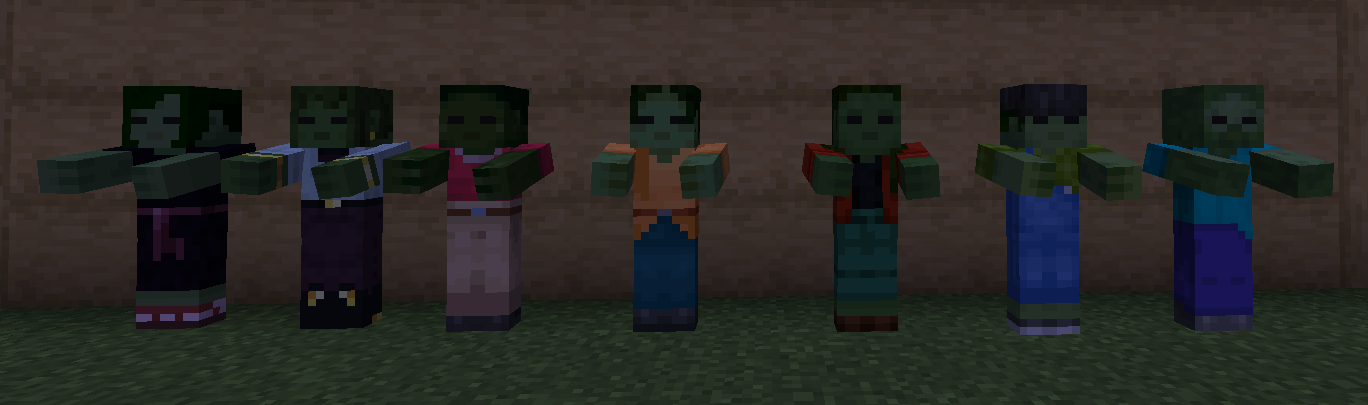
This texture pack adds the new default skins (Sunny, Efe, Zuri, Noor, Ari, Makena, and Kai) but for zombies !
Installation
- This texture pack require Optifine or a mod like Entity Texture Features to allow randomized textures
- Place the .zip file in your resource pack folder of your minecraft installation
Showcase
Update?
This pack should be compatible for every versions, i’ll update it if i have time
Zombies Revamped
If you’ve been looking for a way to make Minecraft’s zombies scarier, **Zombies ReWamped** is the ultimate resource pack for you! This isn’t just another zombie texture pack—it’s a **fully remastered version of the classic TZP (The Zombie Pack)**, designed to bring a more immersive and terrifying undead experience to the game.
## **What is Zombies ReWamped?**
Zombies ReWamped takes everything great about **TZP** and pushes it to the next level. Expect:
✔️ **New HD Zombie Textures** – Multiple variations with decayed flesh, exposed bones, and eerie glowing eyes.
✔️ **Creepy Zombie Sounds** – Guttural growls, blood-curdling moans, and spine-chilling shrieks.
✔️ **Biome-Specific Zombies** – Different undead creatures based on their environment, adding more variety and realism.
✔️ **Villager and Drowned Zombie Overhauls** – No more boring green villagers—infected villagers now look horrifyingly detailed!
## **A Proper Remake of TZP**
For long-time Minecraft players, **TZP was a fan-favorite** when it came to enhancing zombies. However, it eventually became outdated, missing modern Minecraft features and lacking updates. **Zombies ReWamped fixes that** by remaking it from the ground up, ensuring compatibility with the latest versions of Minecraft while introducing new features never seen before.
## **Why Download Zombies ReWamped?**
If you want a **darker, more atmospheric survival experience**, this pack is a must-have. Whether you’re playing hardcore mode or just want your nights to feel more dangerous, **Zombies ReWamped** will change the way you see (and hear) zombies forever.
Zombies Remade

Zombies Remade Remakes the Texture of the Zombie to a more Modren one
and with more Actions and more Stuff with what the Zombie can be
Discamer This does not Change the other Zombie textures like Husk and Drowned only the Normal Zombie for now i remove this Discamer if i do end up adding them
Also dont worry about the Pack saying it Might not Work Because it should Work
also i made this because no one else did
Zombies Improve Over Time
# Zombies Improve Over Time
This datapack increases zombies’s stats over time. The changes are made to be gradual, increasing very slightly each minecraft day up to day 100. Difficulty is calculated for each player separately. New players will start with weak zombies while players who have been playing for a while will have stronger zombies.
## NOTICE: This datapack is discontinued, instead use the Hostile Mobs Improve Over Time datapack: https://modrinth.com/datapack/hostile-mobs-improve-over-time
### Stat increase
Stats that change include:
– Health
– Damage
– Reinforcement chance
– Knockback resistance
– Movement speed
– Armor and armor toughness
Day 50 enables all zombies to break doors
Day 70~ – enables all zombies to pick up loot
Day 80 – some zombies change to baby/or have leather armor
Day 95 – Zombies might gain strenght and speed when near player
some other stuff
### Commands
If you wish to test out how hard the zombies are, use functions diff:day25, diff:day50, diff:day75, diff:100 or use command “scoreboard players set Timeroo . To reset your score use diff:reset, or diff:resetall to reset all of players difficulty.
### Timers
Timer for difficulty is per player, and increases every minecraft day (20 minutes). sleeping does NOT forward this timer. Max difficulty is day 100+ and difficulty does not increase after that.
### Installing
like your ordinary datapack, put zip file in your datapacks folder of your world
### Unistalling
use function diff:unistall and then remove your datapack from your datapacks folder
### Other
I am planning on making a version of this datapack for each common mob, then making a datapack consisting of all of them
### There is now Hostile mobs improve over time datapack which includes this + many more hostile mobs, you can download it here – https://modrinth.com/datapack/hostile-mobs-improve-over-time – but if you wish to play with only some of them, links are below.
Here are all the datapacks “X improve over time” I made:
https://modrinth.com/datapack/zombies-improve-overtime – Zombies
https://modrinth.com/datapack/creepers-improve-over-time – Creepers
https://modrinth.com/datapack/spiders-improve-over-time – Spiders
https://modrinth.com/datapack/skeletons-improve-over-time – Skeletons
https://modrinth.com/datapack/witches-improve-over-time – Witches
https://modrinth.com/datapack/drowned-improve-over-time – Drowned
https://modrinth.com/datapack/silverfish-improve-over-time – Silverfish
https://modrinth.com/datapack/pillagers-improve-over-time – Pillagers
https://modrinth.com/datapack/vindicators-improve-over-time – Vindicators
https://modrinth.com/mod/strays-improve-over-time – Strays
https://modrinth.com/datapack/wither-skeletons-improve-over-time – Wither Skeletons
https://modrinth.com/datapack/endermites-improve-over-time – Endermites
https://modrinth.com/datapack/ravagers-improve-over-time – Ravagers
https://modrinth.com/datapack/cave-spiders-improve-over-time – Cave Spiders
https://modrinth.com/datapack/zombified-piglins-improve-over-time – Zombified Piglins
https://modrinth.com/datapack/guardians-improve-over-time/ – Guardians
All of them are compatible with eachother, and I recommend you play with all of them for the best experience.