# YggdrasilProxy
When starting the game, the proxy in the device is automatically read to speed up Yggdrasil verification.
It extends Vanilla’s behavior and is more automated.
## Specific implementation
There is a setting in Windows, and its path is: “settings-> network-> proxy-> manual settings”.
YggdrasilProxy automatically reads them from the registry and verifies it, if it works, then use it immediately.
It basically works with network tools like Clash, you don’t need to proxy all traffic across the entire network card, you can easily connect to Yggdrasil Server through the proxy.
When registry data is not read, or is a non-Windows operating system, then YggdrasilProxy falls back to read environment variables (it does not need to be set in the JVM startup parameters, because they are annoying enough), it reads the following environment variables in the system and selects a valid variable to set to Proxy:
– http_proxy
– https_proxy
– no_proxy
## Defect
When the proxy server/tool is shut down, you may need to restart Minecraft.
Looking for a solution if I have time…
## Compatibility
Basically compatible with all operating systems.
Specially optimized for Windows.
## Which ModLoaders are supported?
– Fabric (Support, 1.18+)
– Quilt (Built with Fabric, 1.18+)
– Forge (Support, 1.19+)
– NeoForge (Support, 1.21.4+)
YggdrasilProxy is designed to be available for both Server and Client and is compatible with the most ModLoader and Minecraft versions.
If there is no compatibility, then I have not done it yet. If you’re in a hurry, join my DC server and send your ModLoader as well as Minecraft versions, I’ll be there soon.
## I want to use it in Plugin Server
Unfortunately, plugin servers are usually not compatible with mods, and I’m reluctant to use the Mixin framework to write them on the plugin server.
If you have relevant needs, please use two patches I made specifically for this, you only need to comply with GPL 3.0.
– Patch 1
– Patch 2
## For Modpack
If you comply with the license, you can use it freely for Modpack.
Modpacks that redistribute Minecraft game body (i.e. packages that package the entire Minecraft game including Mod files, Config, ShaderPacks, ResourcePacks, Library and launcher into a whole zip file) are not allowed to use this mod.
## License
This work has a restrictive license in addition to the original license to prevent some unexpected behavior,
see 404Setup Public License
YFs – Snow & Rain
The texture pack removes the load on the PC by reducing rain and snow.
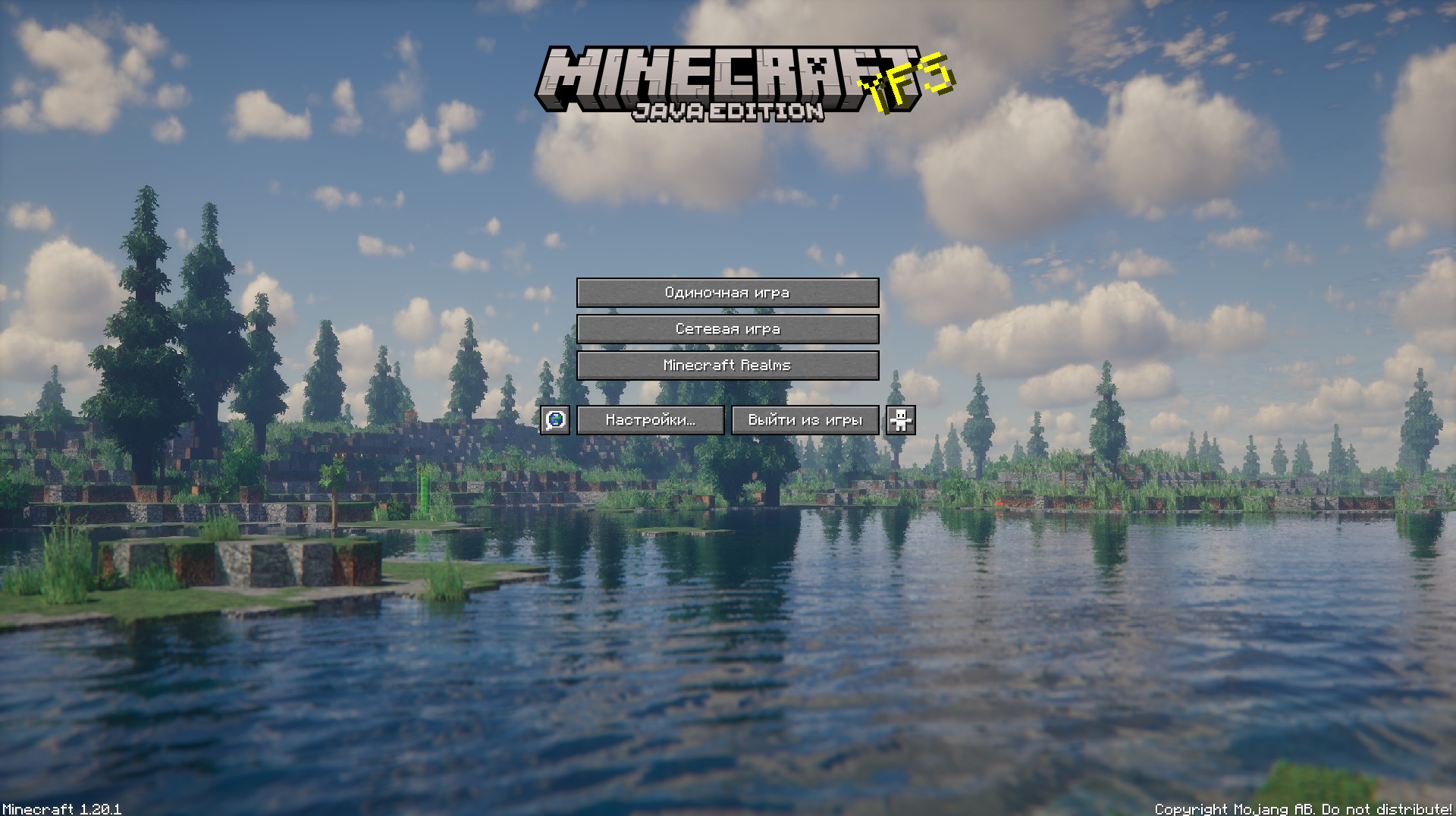
YFs – Better menu background
Hallo!
This texture pack improves your Minecraft by changing the background
Yeth’s TPA
**Yeth’s TPA is a Teletransportation Accept mod for Minecraft designed to be compatible, stable, and sufficient.**
## Commands
– **/tpa ** Sends a TPA request to a user
– **/tpa accept ** Accepts a TPA request from a user
– **/tpa here** Sends a TPA Here request to a user
– **/tpa cancel** Cancels an outgoing TPA request
– **/tpa ignore ** Ignores a player from making TPA requests
– **/tpa help** Sends a list of all commands
– **/tpa disable** Disables TPA requests from being sent to you
– **/tpa enable** Enables TPA requests to be sent to you
– **/tpa setting ** Configures settings in TPA
## Features
– Automatic expiry of TPA requests
– TP delay w/ countdown
– Multiple request handling
– Permissions for server owners
– Anti-TPA-traps
## Support
Yeth’s TPA supports the following mod loaders:
– Fabric
– Neoforge
– Forge
– Quilt
– Legacy Fabric
– Babric
– Ornithe
– BTA
– LiteLoader
For Minecraft versions 1.7.2 – 26.1.2
Yet Another Glint
# Yet Another Glint
The vanilla’s enchanted items glint texture seems too noisy for me, so why not fix that?
## How?
This resource pack changes the glint texture of enchanted items and equipped armor to a minimalistic texture with lines instead of noise. This creates a “striped” glint effect.
This resource pack has Respackopts mod support! You can separately adjust the glint of both items and equipped armor. There are 7 texture options in choose. It is also possible to turn off the glint.
This is similar to Unobtrusive Enchantment Glint from Vanilla Tweaks, but better.
Yet Another RTP
Yes, it’s yet *another* RTP plugin. However this time, it’s focused on performance! (And customizability)
This plugin will, on command, teleport a player to a completely random location in a set area, world, and at least x blocks away. While this plugin may not be the best at showmanship, it’s purpose is to excel at pure performance.
If you have a problem or suggestion for the plugin, make sure to check out the GitHub!
### Commands:
/rtp
– Permission: rtp.runcmd **Only needed if `require-perm:` is set to true in the config**
– The main RTP command. Teleports whoever ran the command to a random location
/addused
– Permission: rtp.add
– Makes the plugin act as if said player has already ran the command (Useful if `one-use` is set to true in the config)
/removeused
– Permission: rtp.remove
– Makes the plugin act as if said player hasn’t ran the command (Useful if `one-use` is set to true in the config)
### Misc Permissions:
rtp.exempt
– People with this permission can use the command without a time limit between uses
### Default Config:
“`version: 2
settings:
one-use: false
# Makes the command one use only
require-perm: false
# Makes the command require a permission
max-dist: 5000
# Max distance away from specified location. 5000 = -5000 to 5000 in x and z
min-dist: 100
# Min distance away from the center of the RTP teleport range
pointx: 0
pointz: 0
# The center of the RTP teleport range. X and Z coords
world-dest: world
# The specified world to teleport to
cooldown: 60
# Amount of seconds to wait before player can use the command again
bstats: true
messages:
# All messages use MiniMessage format. See here: https://docs.advntr.dev/minimessage/
run-rtp: Beginning RTP.
# Message to send when RTP command is ran
after-rtp:
# Message to send after RTP command is ran
no-perm: You don’t have permission to run this command.
# Message to send when lacking permission to run RTP command
used-once: You’ve already used this command once
# Message to send when command has already been used
invalid-player: Invalid player specified
# Message to send when an invalid player is specified for a command
Yet Another Discord Chat Link
# Yet Another Discord Chat Link
A simple mod to connect the in-game chat with a Discord channel.
## Why another one?
– This one focuses on simplicity. It is as light as it gets with only the basic functionality and very little required setup!
**Setup:**
1. Go to https://discord.com/developers and create a new application
2. Copy the ID and invite the bot with the following url (dont forget to change the ID or else the link won’t work:
“`url
https://discord.com/oauth2/authorize?permissions=2953964624&scope=bot%20applications.commands&client_id=APPLICATION_ID
“`
3. Enable developer mode on discord to be able to right-click a channel and copy its channel ID
4. Download the mod into the mods folder and let it generate the config file. The server will crash on first launch since the Bot Token is invalid.
5. Paste the copied channel ID of the channel that you would like the chat to be linked to into the config file (name: `config/yadclconfig.properties`)
6. On the discord developer dashboard, in your application, go to the bot tab on the sidebar and reset and copy the bot token and paste it into the config file.
7. Restart the server and you should be good to go. Check that the bot has read/write permission in that channel.
*Alternative suggested Setup Guide (not by me):*
https://erdbeerbaerlp.de/projects/discord-integration/quick-setup
Yes Steve Model
The Yes Steve Model mod is a Minecraft Forge/Fabric/NeoForge mod that modifies the vanilla player model, using geckolib at its core, using Minecraft Bedrock Edition models and animation files. This allows players to customize player models and animations as they wish.
– **Custom Model Wiki: http://page.cfpa.team/ysm/**
– **Discord: https://discord.gg/ZKeRUt95Ez**
– **This github repository is maintained by community player @Elaina and stores many YSM models shared by art authors: https://github.com/Elaina69/Yes-Steve-Model-Repo**
# Platform Support
Versions 1.1.5 and earlier were written in pure Java and support the three major mainstream platforms and mobile platforms.
Since the encryption algorithm of the old versions written in Java was quickly cracked, starting from version 1.2.0, the core encryption and rendering parts are all written in C++. This greatly improves the rendering performance and security, but the multi-platform support is poor.
The Yes Steve Model mod takes into account the mod needs of the server community, and adopts many designs suitable for the server environment, including but not limited to:
1. Automatic synchronization of client models: When players enter the server, the server will automatically synchronize the models to the player’s computer.
2. Encrypted model files: All the models sent to the player client are encrypted binary files, effectively avoiding the problem of model theft!
3. Model auth function: Models can be authorized separately, and only after the OP input command is authorized, a specific model can be used.
4. Vanilla player model modification: Added default Steve and Alex models, both of which can automatically call the player skin display.
Simple customization function: The model customization function is extremely simple. You only need to place the model, textures and animation files in a specific folder, and input the reload command in the game to automatically load and synchronize. No need to write any configuration files!
—
For client players, it is also extremely simple to use. After the player enters the server for the first time and waits for more than ten seconds (time-consuming for model synchronization), he can use the shortcut key Alt + Y to open the following GUI:
– ① Model switching button: Click to switch to the corresponding model. If the icon in the upper right corner of the button is red, it means the model is not authorized. The number in the icon represents the number of materials that the model can switch.
– ② Texture switching button: For models with multiple textures, click the left and right buttons to switch the model texture.
– ③ Model category switching button: You can switch between all models, auth models and vanilla models (currently only Steve and Alex models
—
There are many authors who have published works on planetminecraft. You can follow them:
– **NekuroMC**: https://www.planetminecraft.com/member/nekuromc/
– **Omegaff0048**: https://www.planetminecraft.com/member/omegaff0048/
– **rWby9**: https://www.planetminecraft.com/member/rwby9/
– **WelfarexWaifu**: https://www.planetminecraft.com/member/welfarexwaifu/
# Additional Warning:
### Please do not create any models that violate laws and regulations. This production team is also opposed to any form of R18/NSFW content creation! We have never participated in any related content creation!