Silent Horns
**Are you tired of hearing goat horns again and again?
Does your SMP friend annoy you with spamming goat horns while flying around you like a bug?**
This resourcepack will help you! 🤝
❌ There is currently no way to lower the volume of goat horn sounds exclusively, the only way is to lower the master game volume.
🔇 In this pack all goat horn sounds are replaced with silence, so you can enjoy peace without lowering your overall game volume all the way down.
### Troubleshooting
❓ If the horn sounds aren’t silenced after enabling resourcepack, you can try to rejoin the world/server or just relaunch the game entirely.
Silent Discs Plus
This Silent Discs resource pack is made specifically for use with redstone disk/jukebox ROMs. It not only silences all music discs, but also removes the “now playing” text and silences minecarts too
(Minecarts have a bad habbit of taking up the sound cap even if you can’t hear them, this pack fixes that)
Sign Models
# Sign Models
This Minecraft resource pack provides usable entity models through Custom Model Data, allowing map makers and creators to display entities in ways that were previously limited. The pack is designed to be used in other resource packs, allowing users to cherry-pick the pieces they need.
### Custom Model Data
Each model is tied to the item form of itself.
The types are as follows:
| Type | Model Data Number | Sign Item |
| :—: | :—: | :—: |
| Sign | `2669000` | Normal Sign |
| Wall Sign | `2669001` | Normal Sign |
| Sign Post | `2669002` | Normal Sign |
| Wall Hanging Sign | `2669000` | Hanging Sign |
| Hanging Sign | `2669001` | Hanging Sign |
| Attached Hanging Sign | `2669002` | Hanging Sign |
For example, the following command could be used to summon a cherry hanging sign display:
`/summon minecraft:item_display ~ ~ ~ {item: {id: “minecraft:cherry_hanging_sign”, Count: 1b, tag: {CustomModelData: 2669000}}}`
Show Me What You Got
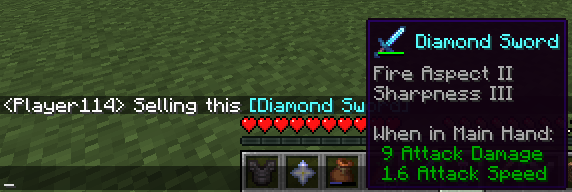
# Show Me What You Got
A simple mod which allows displaying your items to other users in chat.
While in your inventory, hold ctrl and then press your chat key while hovering over an item to share it. (so **Ctrl+T** by default).
Your chat window will open with the linked item inside. Feel free to write a message before or after the item (or both) before sending!
## Client or Server?
The mod _should_ be installed on the client _and_ the server in order to function properly.
Clients without the mod can still see items shared by others with the mod in chat, but can’t share items themselves and also won’t see the shared item’s texture in the tooltip. If you use this mod on your client and try to share an item on a server without the mod installed, you will just send text with the item name.
Shorty Swords
Shortened Sword are Just Built Different! Aren’t they look hot?
Texture-pack makes swords a bit shorter. Supports almost **EVERY** ever existed Minecraft Version.
Shorten swords
changes every sword to a shorter varient with its distinguished style
red is netherite
blue is diamond ofc
gold is yelloish brown
iron is blueish white
stone is greyish yellow
wooden is brown
portfolio:
bit.ly/4glA9yh
shea’s simple Totem x bare bones
# shea’s simple Totem x bare bones
## what does this pack does
### it takes Totems and cleans it up
This pack does not include any bare bones textures
**Bare Bones is required for the intended look**
disclaimer if you use this pack make sure to place this pack above bare Bones in your resource pack list for it to use its own instead of bare bones
i recomend using other shader and resource packs like [bliss](https://github.com/X0nk/Bliss-Shader) to improve looks but that is optional
**you can showcase this if you want just dont redistrabute it**
Shared Resources
# Shared Resources
A mod for easily sharing game files between separate Minecraft instances.
Best used with a multi-instance launcher like [MultiMC](https://multimc.org/) or [Prism Launcher](https://prismlauncher.org/).
It works by selecting a global directory to hold your common game files,
and modifying Minecraft to use that directory instead of the default one.
Where possible, the mod tries to load files from the global directory together
with the local ones, merging the two and allowing you to select from both.
This is currently only available for resource packs, data packs and shaders.
Currently supported game files/directories:
– Resource packs
– Data packs
– Saves
– Vanilla options (video settings, controls, etc.)
– Servers
– Screenshots
– Saved Hotbars
– The fabric config folder (should work with the configs of any properly coded mods)
– Shader packs (via Iris)
– Schematics (via Litematica)
– Replay Recordings (via ReplayMod)
– Skin Presets (via SkinShuffle)
– World Map Data (via Xaero’s World Map)
Selfskin
# Selfskin
Change any skin fully client-side!
Simply put a file in `.minecraft/selfskins/.png` or `.minecraft/selfskins/slim/.png` to override a player’s skin (it works with offline players too).
Skins automatically update each time a player enters the world (as of 1.1.0). To change skins while a player is in the world, use `/selfskin:reload`. The command accepts a username to only reload one player’s skin.
This mod will change the skins you see on players, logged in or not, without other players seeing the changes.
Thus, it does not do the same as changing alex.png and steve.png in a resource pack.
Selfskin tries to work with as many versions as possible on fabric and quilt.
Forge support may come eventually as this mod is really small and simple.
Requests for version ports are welcome.
This mod also tries to be compatible with mods like [Ears](https://modrinth.com/mod/ears).
Found a mod that works or doesn’t work with selfskin? Questions? Or just want to chat? [Come join us on matrix!](https://matrix.to/#/%23wonder-minecraft:the-apothecary.club?via=the-apothecary.club&via=syndicated.gay&via=matrix.org) Alternatively, [create an issue](https://git.sleeping.town/wonder/selfskin/issues/new)
## Compatibility
The listed supported versions are not exhaustive and most mod/minecraft version combinations are not tested. The mod may work on versions that are not listed. Please reach out if you find an inaccuracy!
Known compatible mods:
– ~~3d Skin Layers~~ reportedly broken, but will run
– Ears
Known incompatible mods to be fixed:
– 3d Skin Layers
Known mods that won’t be compatible:
– none (so far)
Scaffolding Fix
A lightweight resource pack that adds the missing hole on top of scaffolding blocks.
**Note that the texture is off on pre 1.19.3 versions of minecraft, i might fix this in the future.**
Before/Vanilla:

After:

_You may not redistribute this resource pack anywhere without proper permission, the only official download page for this resource pack is on modrinth._