Lighty
Instead of rendering crosses or numbers on the top face of blocks, Lighty takes a different approach – It renders a transparent carpet-like block on top! Or, new in version 1.1.0 – Renders the actual light level numbers, but Lighty Style!
Make sure to check out the Gallery for some pictures!
## Configuration
– To activate the overlay, press `F7` and choose the desired mode. This key is configurable in the key binds menu.
– As of version 1.2.0, you can quickly toggle the light overlay on or off using `F8`! This key is configurable in the key binds menu.
– As of version 1.3.0, you can change the “red”/”orange” threshold in the new config menu (accessible using `F7`). Useful for those that want to light their places up aesthetically, or maybe you are playing with some mods that change the mobs spawning rules.
## Meaning of colors:
– Green: No mobs can spawn here!
– Orange: If the sun goes down, Mobs will spawn! Be careful!
– Red: Mobs can spawn here!
If you have some ideas for this mod, feel free to open a new Codeberg Issue!
If you like this mod, consider following the project to get notified about new updates!
This mod was inspired by LightLevel.
LifeBound
# Description
Max health lowers the further you are from friends
This datapack changes the maximum health of individual players the further they are from the group’s average location. It does not account for dimensions, only coordinates. By Default, the location updates every minute and you lower a heart every 20 blocks away from this location. However, with the below commands you can increase the update speed all the way to every 1s, and change how much distance it takes to lose health (from every 10 blocks to every 100 blocks). If any bugs occur, try /reload, and if they still occur please let me know. This gamemode can be used for a one time gimmick, or to encourage players on a small server to work together and not all go off and cause lots of exploration-based-lag.
Note: Due to the way minecraft works, the visual of your max health changing might not always update immediately. Sometimes it does, sometimes it does not. It definitely will once you heal/take damage.
Update: At close proximity, players gain buffs to reward sticking together (dolphins grace, speed, & regen)
# Commands / Settings
Lower Power = Less Lag
Commands will take a moment to update (based on however often the power updates)
/function avghealth:veryhighpower – updates location every 1s
/function avghealth:highpower – updates location every 10s
/function avghealth:mediumpower – updates location every 30s
/function avghealth:lowpower – updates location every 60s (default)
/function avghealth:veryhighdistance – Health Changes Every 100 blocks
/function avghealth:highdistance – Health Changes Every 50 blocks
/function avghealth:mediumdistance – Health Changes Every 20 blocks (default)
/function avghealth:lowdistance – Health Changes Every 10 blocks
# Other
Always back up your world before using a datapack
If you like this, you may also like a worldborder based on the same code:
https://www.planetminecraft.com/data-pack/center-a-worldborder-of-any-size-at-the-average-changing-multiplayer-location-in-the-game-low-energy-less-lag/
I recommend using the Simple Voice Chat Mod while using these datapacks.
You have permission to use this datapack for any means, as long as you give credit.
Legacy Glint
## What does this pack do?
Legacy Glint brings back the ‘old’ enchantment glint texture for armor from pre 1.19.3, to 1.19.4 and beyond
Leashable Players
# Leashable Players
Ruin friendships in this COOL new Minecraft mod for Fabric!
You can configure it via gamerules, including if the mod is enabled, how far away the two players can be before the leash breaks and the distance between the players required before the leash starts pulling.
# 可拴住的玩家
在这款适用于 Fabric 的全新 Minecraft MOD 中破坏友谊!
您可以通过游戏规则对其进行配置,包括是否启用该 MOD、在绳索断裂前玩家之间的距离以及在绳索开始拉扯前玩家之间的距离。
Killer Head


___
## What’s Killer Head ?
**Killer Head** is a project to drop the killer’s head when his victim dies.
## How it works ?
### Edit player loot table `entities/player.json`
Adds a player head to the death of a player and correlates the characteristics of the killer.
## Complementary
You can also use Drop Head.
Here’s Stackable Heads which is interesting to use.
## Compatibility
**Killer Head** should work anywhere.
## Support me!
Join my Hardcore Minecraft server: `38.143.19.130:51965`
Keep Inventory Always
## Keep Inventory Always
The mod turns on a game rule that allows you to save your inventory when you die in each world
## How to use
To use the mod, you only need to install it. Now when creating a world, the game rule keepInventory will always be enabled
## Dependencies
– Fabric loader requires Fabric API
Kappa
> ⚠️ **DEPRECATION NOTICE**
> OptiFine does not support HTTPS. I have been told by OptiFine staff *not* to use the URL that current versions of Kappa currently use (which has HTTPS support) and instead to use the one that OptiFine the mod uses (which *only* supports HTTP). I do not want my mod to be insecure, and do make insecure connections, so I will no longer update Kappa until HTTPS is enabled, as this is an extremely basic security measure nowadays.
**Kappa** adds OptiFine capes (correctly), and is aimed for use in snapshots. It’s also meant to be very light and to modify very little so it doesn’t upset server moderators, or so it doesn’t get broken very easily (which upsets me!).
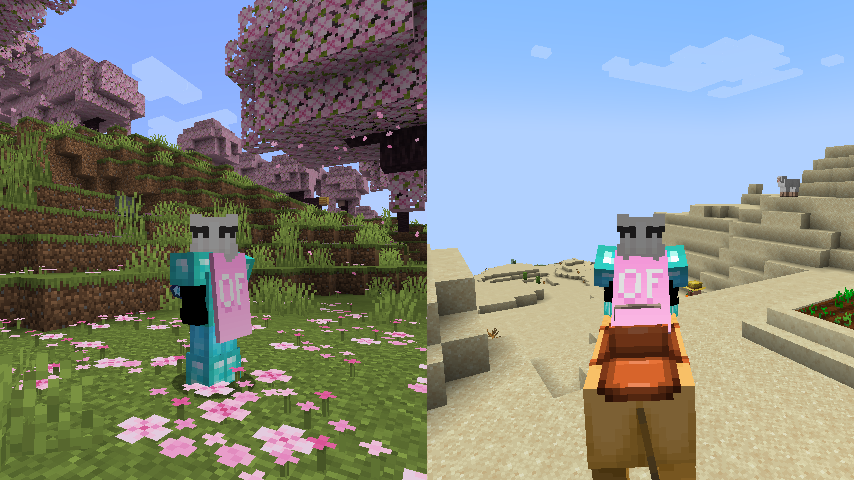
**Notice**: This mod does **not** replace OptiFine nor lets non-donors to wear them.
It merely adds the OptiFine capes and displays them, if you have donated to OptiFine.
If you enjoy OptiFine and want a cape, [consider donating to OF.][1]
**Kappa** is _not_ like other mods! It _works smart, not hard!_ Usually mods just clone the vanilla cape code, but **Kappa** uses it the intended way. Thanks to that, **Kappa** should barely break, if at all!
There’s also an upside to this: mods that affect the vanilla cape will also affect OptiFine capes from Kappa!
Fabric API is _not_ needed.
Usually Fabric/Quilt mods are compatible between versions, but sometimes, like in the 1.17 snapshots, Minecraft itself breaks the mods.
I will test my mod against the latest snapshot, because I like playing with my OptiFine cape, so if my mod is broken, I will update it.
Yes, OptiFine’s cape breaks Minecraft’s commercial usage guidelines, but I already had it for lots longer. I consider it part of my skin.
**On Quilt support:** This mod sits in a gray area, as thus is probably safe to avoid if you’re using Quilt. However, Kappa uses as little Fabric specific components as possible.
[1]: https://optifine.net/donate
Just Hotbar
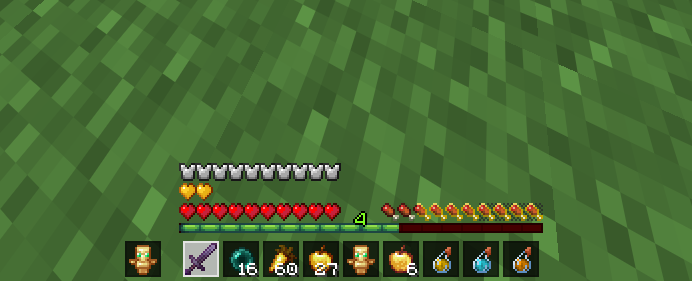
# Just Hotbar
This texture pack changes the hearts and hotbar, making them simpler
Joe Biden Sniffer
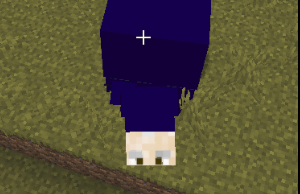
Makes the sniffer look like joe biden
No Java Edition Branding – Remove from Start-Title Screen
Removes the Java Edition Text under The “Minecraft” Logo from the Title Screen!


Also works for with other resourcepacks!

