Your Reputation
[](https://modrinth.com/mod/fabric-api)

[](https://raw.githubusercontent.com/Aton-Kish/your-reputation/1.18/LICENSE)
[](https://ko-fi.com/atonkish)
# Your Reputation
**The project for Minecraft versions 1.21 and later has been moved:**
– for WTHIT: https://modrinth.com/mod/your-reputation-wthit
– for Jade: https://modrinth.com/mod/your-reputation-jade
Your Reputation is a [WTHIT](https://modrinth.com/mod/wthit)/[Jade](https://modrinth.com/mod/jade) plugin that displays your reputation on a tooltip with each villager.
[ ](https://modrinth.com/mod/fabric-api)
Requires [WTHIT](https://modrinth.com/mod/wthit)/[Jade](https://modrinth.com/mod/jade).
| Reputation | Value | Tooltip |
| ———– | —————————— | ———————————————————————————————————————————– |
| Friendly | 100 or more | 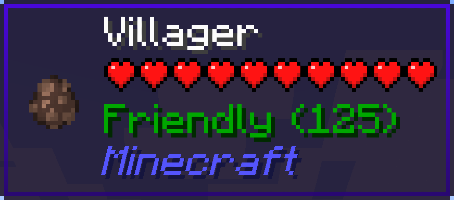 |
|
| Trustworthy | more than 0 and less than 100 | 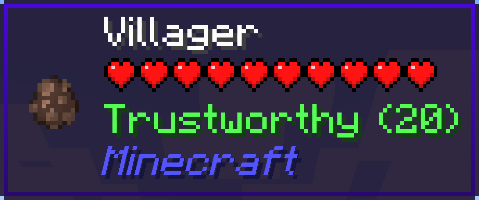 |
|
| Neutral | equal to 0 | 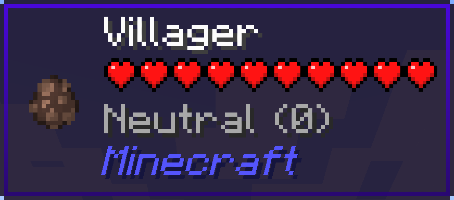 |
|
| Suspicious | more than -100 and less than 0 | 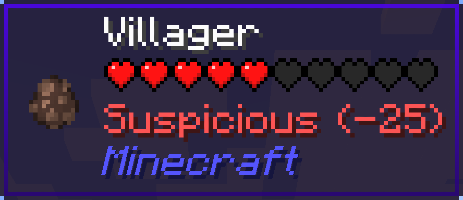 |
|
| Hostile | -100 or less | 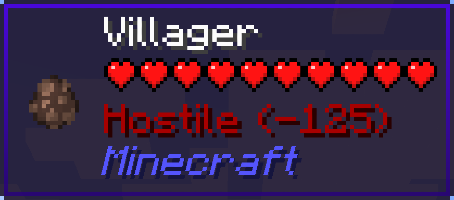 |
|
If your reputation is “Hostile”, villagers may be snitches.
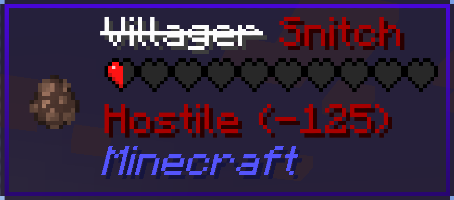
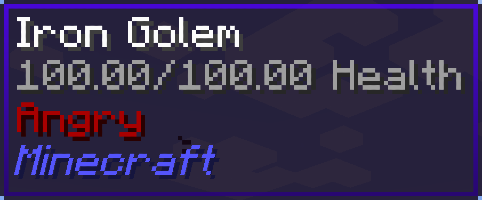
And then, iron golems will get angry and attack you…
Your Items Are Safe


Requires the library mod Collective.
This mod is part of The Vanilla Experience modpack and Serilum’s Quality of Life Bundle mod.
Your Items Are Safe is a mod which can function as an alternative to the existing gravestone mods, by using only vanilla blocks. When a player dies, it will keep their items from despawning. It does this by creating an armor stand with equiped gear and a chest with the items from the inventory. A sign will be placed on the chest with the player’s name. If the inventory does not fit into one chest, another one above it is generated. The armor stand stands above the chest. All features can be turned on/off via the config. If a player dies in the void, the chest will be placed above the death coordinates.
To keep it balanced the chests and armor stand can only be created if the player has enough wood in its inventory. A chest requires either 2 logs, 8 planks or an actual chest. The armor stand requires 1 log or 3 planks. The mod searches for logs first, then planks, then chests. If it can’t find the raw material needed, the chest and armor stand is not generated. If you’d like to always generate them, even without raw materials, this can be set in the config file as well.
The mod also contains the functionality to generate a player head and put it on the armor stand. This makes it easier to identify which player has died where. If the player had a helmet equiped, it is placed inside the chest. Enabled by default. But again, this can be disabled in the config.
Configurable: ( how do I configure? )
mustHaveItemsInInventoryForCreation (default = true): When enabled and a player dies without any items in their inventory, no chest or armor stand is generated.
addPlayerHeadToArmorStand (default = true): If a player head should be added to the armor stand. If a helmet is worn, this will be placed into the chest.
createArmorStand (default = true): Whether an armor stand should be created on death. If disabled, the player’s gear will be placed inside the chest.
createSignWithPlayerName (default = true): Whether a sign should be placed on the chest with the name of the player who died there.
needChestMaterials (default = true): Whether materials are needed for the chest which spawns on death. This can be the actual chest or the costs in raw materials.
needArmorStandMaterials (default = true): Whether materials are needed for the armor stand to spawn on death. This can be the actual armor stand or the costs in raw materials.
needSignMaterials (default = false): Whether materials are needed for the creation of the sign when ‘createSignWithPlayerName’ is enabled.
ignoreStoneMaterialNeed (default = true): Only relevant if ‘needChestAndArmorStandMaterials’ is enabled. An armor stand needs 1 stone slab to be created, but I think it’s alright to ignore that requirement. If enabled, no stone is needed in the inventory on death.
createChestAboveVoid (default = true): If a chest should be placed right above the minimum build height when a player dies in the void.
createVoidPlatform (default = true): If a 3×3 platform should be created below the chest above the void. ‘createChestAboveVoid’ must be enabled.
sendMessageOnCreationFailure (default = true): If a message should be sent if the chest or armor stand can’t be created due to missing materials.
sendMessageOnCreationSuccess (default = true): If a message should be sent on successful creation of the chest(s) and armor stand.
sendDeathCoordinatesInChat (default = true): If the player’s death coordinates should be sent in the chat below the ‘sendMessageOnCreationFailure’/’sendMessageOnCreationSuccess’ message.
creationFailureMessage (default = “Your items are not safe due to having insufficient materials. Missing: %plankamount% planks.”): The message sent on creation failure with ‘sendMessageOnCreationFailure’ enabled. Possible replacement values: %plankamount%, %stoneamount%.
creationSuccessMessage (default = “Your items are safe at your death location.”): The message sent on creation success with ‘sendMessageOnCreationSuccess’ enabled.
Some examples:
An armor stand and chest generated after death:

Two chests generated after death, because the inventory didn’t fit in a single one:

One chest and an armor stand created after death:
Show Spoiler

The previous death results in the following:
Show Spoiler

Here the player has no wood in its inventory. The chest/armor stand is not generated:
Show Spoiler

The player does have some planks in its inventory, but not enough. This is shown in the chat via a message:
Show Spoiler

The inventory is completely full, so 2 chests are needed to store everything. Luckily the player has more than 19 planks:
Show Spoiler

When a player dies in the void, the chest is placed on the initial position above it with a cobblestone platform.

Death coordinates are sent in the chat. Can be disabled in the config.

——————
You may freely use this mod in any modpack, as long as the download remains hosted within the Modrinth ecosystem.
Serilum.com contains an overview and more information on all mods available.
Comments are disabled as I’m unable to keep track of all the separate pages on each mod.
For issues, ideas, suggestions or anything else there is the Github repo. Thanks!
YouCantHaveThat
Prevents obtaining/breaking any item of your choice.
Great for protecting your server or spicing up survival.
## Supports
– 26.1.2
– 1.0.2 supports 1.16 – 1.21.x
## Features
– Prevents obtaining / breaking / placing.
– Scans inventory/containers when opened.(Can be toggled off for survival fun now.)
– Detects offhand.
– Lightweight. Operates completely through player actions.
You Think I’m Bread?!?!
this mod makes the bread look like grian
Version 1.6.1-1.10.2:
tested on 1.6.1, 1.7.10, 1.8.9, 1.9, and 1.10.2
Version 1.11-1.12.2:
tested on 1.11 and 1.12.2
says it’s meant for a newer version but its not
Version 1.13-1.14.4:
tested on 1.13-1.14.4
Version 1.15-1.21.5:
tested on 1.15, 1.16.3, 1.18.2, 1.20.1, 1.21.1, and 1.21.5
this will likely work for future versions as well
update: tested on 1.21.11 as well
notes: older versions have the new-looking texture
oftentimes, it will say it is meant for an older or newer version of minecraft, but this can generally be ignored
You Shall Not Spawn!


Disable unwanted mobs from spawning using JSON configuration.
Supports Forge, Fabric, and Quilt
⭐ Features ⭐
Add the ID of the entity you want to remove in config/ysns/disabled_entities.json5 to completely remove entities from spawning.
Whether per dimension or globally (by using "!.*"), you can control the spawn rate of an entity in the config/ysns/per_dimension_entities.json5 config.
Need to disable multiple entities from 1 mod? Or is there a pattern in them? Then no need to repeat yourself!
With regular expressions, you can disable multiple entities in a single entry, disable all entities from a mod, and a lot more! Simply start the entry with "!" and then write your regular expression.
The config files have comments explaining and giving examples of what you need to add to make the mod work! If you need extra help, feel free to hop in my Discord in the #elocins-projects channel.
FAQ
- Can I use this in my modpack?
Of course! It was designed for modpack creators to remove undesired entities that may unbalance the game or create issues.
- Can I still make the entities spawn?
In the case of using the disabled_entities config, no. Once a mob is added to the blacklist, there is no way to spawn it by any method. Both natural or through eggs/commands. This mod is meant to completely remove undesired entities.
In the case of the per_dimension config, it works via chance, so at 0.0 they won’t spawn at all. But at 0.5 it’ll have a 50% chance of spawning.
Everything happens on the server’s side. Though it is recommended to leave the mod and config for clients too, for the case they want to play a single-player world. You should always leave this mod in the server pack alongside its config.
- What if I add an entity to the blacklist that was already spawned?
Spawned entities will still exist, so it’s up to you if you want to kill them or not. For this reason, it’s recommended to configure the mod before creating a world.
- What if I misspell an entity’s ID in the config file?
Nothing will happen. Adding invalid IDs won’t cause issues, but obviously, the entity won’t be blacklisted as it technically doesn’t exist. The same thing would happen if the mod isn’t present, but it will be if it’s added later and the ID is valid.
You Died
## You Died
This mod adds a Dark Souls inspired death screen.

#### Bugs/Ideas/Requests?
Post bugs/ideas/requests on my Github issue tracker.
#### Modpacks?
You are free to use this mod in modpacks.
You Die You Lose a Heart (Discontinued)
You Die You Lose a Heart
Whenever you die you lose a heart, if you lose all of them you will be forced to go into spectator mode. This is similar to normal hardcore in Minecraft but somewhat forgiving.
Limit the maximum amount of hearts with /gamerule maxHearts (by default set to 20 hearts) and whether players can even get hearts with /gamerule canRestoreHearts true/false (by default set to true)

You can replenish hearts by eating enchanted golden apples. This gives enchanted golden apples actual use outside of pvp.


you are my sunshine SUN
Now you will always be greeted in the morning by the beautiful face of LeBron James.
replaces the sun texture with the “you are my sunshine” meme.
Your Options Shall Be Saved (YOSBS)
# Your Options Shall Be Saved (YOSBS)
Your Options Shall Be Saved (YOSBS) is a lightweight utility mod that lets modpack creators define default configuration files without overwriting player preferences
Updating a modpack often resets custom settings like keybinds or mod configs, because most launchers replace the entire `config/` folder
YOSBS solves this by copying any file placed in `config/yosbs/` to its proper location only once on first launch — and never again
This gives full control to the pack author:
– Files inside `config/yosbs/` are treated as user-owned: copied once, then left untouched
– Files inside `config/` behave as usual: they will be replaced on each update
That way, you decide which configs should persist, and which should reset
## Features
– **Zero-config**: just drop the defaults under `/config/yosbs/…` (or legacy `/config/yosbr`)
– Works for **any** file – `options.txt`, mod configs, `optionsshaders.txt`, etc
– Runs in the **pre-launch phase**, before Fabric/Forge starts loading the rest of the mods
## Compatibility & Installation
1. Fabric Loader ≥ 0.4.0 *(No Fabric API required)*
2. Minecraft 1.14 – 1.21.x
3. Requires Java 8 or newer
4. Put the YOSBS jar in `mods/` and launch once – the folder `/config/yosbs` is created automatically (or create it manually)
## Usage examples
| Want to ship… | Do this before first launch |
|—————|—————————-|
| A default `options.txt` | Place your file at `/config/yosbs/options.txt` |
| A REI config | `/config/yosbs/config/roughlyenoughitems/config.json5` |
## Credits
Inspired by the original [Your Options Shall Be Respected – YOSBR](https://modrinth.com/mod/yosbr) by *shedaniel*
Yoru

# Why Yoru?
## Yoru is a pre-configured, high performance and QoL optimised vanilla modpack with tools for advanced and new users alike.
#### With Yoru, you get leading performance ***and*** a polished but not overdone quality of life, expect it to work out of the box with little configuration ever required.
#### I personally use this pack and will frequently maintain it.
### Most notably this modpack is running:
– Iris and Sodium
– Many other rendering, memory and misc fixes/optimisations.
– Inventory management, sorting, shulker viewing etc…
– World navigation and mapping.
– Technical additions such as Litematica, MiniHUD, WorldEdit(CUI) and Tweakeroo.
– Immersion additions, footsteps, sound physics and particles.
## Please read the menus below to learn the range of features Yoru offers!
### Special thanks HaiMcFly for allowing me to use their resourcepacks in Yoru.
## Suggestions or issues are welcome via our discord!
Shaders
– Complementary v4
– Complementary Reimagined
– Shimple Shaders
Keybinds
General:
– Ctrl + Shift + F – Toggle FPS Display
– +/- Zoom map (Z for temp zoom)
– Middle Click – Sort Inventory
– K – Toggle Shaders
– C – Zoom (Scroll to adjust)
– R – Reload Shaders
– O – Select Shaders
– M – Map
– B – Waypoints
– L – Litematica
X+: Tweakeroo:
– K – Auto Weapon Switch
– T – Auto Tool
– C – Menu
– F – Freecam
– R – Gamma Override
– G – Auto refill items to hand
H+: Minihud:
– C – Menu
– R – Toggle Rendering
Mods
Quality of life improvements
– 3D Skin Layers
– Appleskin
– Better Biome Blend
– BetterF3
– Better Recipe Book
– Blur
– Chat Heads
– Continuity
– CraftPresence
– Drip Sounds
– Eating Animation
– Falling Leaves
– Interactic
– Mod Menu
– Item Scroller
– Presence Footsteps
– Shoulder Surfing Reloaded
– Skip Transitions
– Visuality
Performance improvements
– Blanket Client Tweaks
– C2ME
– Debugify
– Dynamic FPS
– EntityCulling
– FastLoad
– FerriteCore
– Indium
– Iris
– Krypton
– LazyDFU
– Lithium
– Memory Leak Fix
– More Culling
– Smooth Boot
– Sodium
– Sodium Extra
– Very Many Players
– ViaVersion
Utilities
– Axiom
– Litematica
– MiniHUD
– Tweakeroo
– Xaero’s Minimap and Worldmap
Licencing
## All rights reserved have explicit modpack permission and have been adhered to:
### Stay True
– https://www.planetminecraft.com/texture-pack/stay-true-4447380/
### Xaero’s Minimap and World Map
– https://chocolateminecraft.com/
### Complementary Shaders
– https://www.complementary.dev