Yummy Dirt
The texture for dirt (and related blocks) has almost never been changed, even after 1.14 (“The Texture Update”). So I decided to change all of the textures to be less noisy(?) and, some may say, tastier.
– Changed dirt, coarse dirt, rooted dirt, grass, podzol, mycelium, snowy grass, and hanging roots
– Every one has at least 2 texture variations and multiple rotation variations
(don’t eat dirt)
Yuki Suou Totem (Alya hides her feelings in russian)
🖤 Yuki Suou Totem Resourcepack — *Alya Sometimes Hides Her Feelings in Russian Edition*
Carry quiet elegance—replace your Totem of Undying with Yuki Suou from *Alya Sometimes Hides Her Feelings in Russian*!
This resourcepack transforms the vanilla totem into a custom Yuki model, perfect for fans of her composed demeanor, student council charisma, and Suou family legacy.
✨ Features
✅ Replaces the Totem of Undying with Yuki
🧩 Compatible with vanilla gameplay and datapacks
🔁 Modular asset structure for easy editing and anime swaps
🛠️ Works with Minecraft 1.16+
YuIllustration
# Intro
> Simple and convenient illustration system
It allows you to create illustrations for you server. It supports **multi-categories**, **multi-unlock conditions**, **multi-reward types**, and **multi-plugin supports**.
# Features
– Support MySQL and SQLite dual storage methods
– **Customizable** compendium categories, allowing the creation of countless categories.
– **Customizable** GUI styles and buttons, what you see is what you get!
– **In-game GUI editor**, from creating categories to setting unlock conditions, everything can be done within the game. The GUI offers **multilingual support**, eliminating the need for kernel translation
– **Multiple unlock conditions**: unlock by picking up items, killing a sufficient number of monsters, custom event unlocks, and simultaneous item pickups and monster kills and so on…
– **Customizable rewards** after unlocking: supprot for Kether scripts, attribute from various attribute plugins
– Support for multiple inline variables and PAPI variables
# Supported Plugins
– **MMOCore**: Gives players attribute points as rewards
– **FancyWaystone**: Unlocking the compendium after activating a waystone
– **MythicLib/MMOItems**: Gives players attribute points as rewards
– **Typewriter**: An `YuIllustration Adapter` for Typewriter, add some event for Typewriter
– Future support planned for: **ItemsAdder**, **Oraxen**, **WorldGuard**, **AttributePlus**, **OriginAttribute**, **SX-Attribute**
# More information
– [Wiki](https://l1-an.github.io/YusDoc/en/docs/MinecraftPlugins/YuIllustration/intro)
– [Discord](https://discord.gg/SzPBHGttaR)
– [Update logs](https://l1-an.github.io/YusDoc/en/docs/MinecraftPlugins/YuIllustration/update)
yTrain
# 🎯 yTrain – Train Against Custom Zombies with Ease
## 📖 Description
A lightweight Bukkit/Spigot plugin designed to enhance PvE training by allowing players to spawn customizable zombies. Features a user-friendly GUI for managing zombie armor and totem counts, with full admin control over configurations.
—
## ⚙️ Features
– ✅ **Customizable zombie spawning** with adjustable health, absorption, and enchantments
– ✅ **GUI for toggling armor** and setting totem counts
– ✅ **Totem auto-equip** for zombies (simulated in 1.12, native in 1.16+)
– ✅ **Configurable zombie settings** (name, visibility, glowing, etc.)
– ✅ **Cooldown system** for spawning zombies
– ✅ **Blacklisted worlds support**
– ✅ **Admin configuration reload command**
—
## 🔨 Commands
📜 Command List
– **`/train`** – Open the training GUI to spawn a zombie
– **`/yTrain reload`** – Reload the plugin configuration (admin only)
—
## 🔑 Permissions
🔐 Permissions List
– **`ytrain.train`** – Use `/train` to open the GUI and spawn zombies
– **`ytrain.reload`** – Use `/yTrain reload` to reload the configuration
—
## 📦 Dependencies
**None**
—
## 🌐 Join Our Discord!
[)](https://discord.gg/HxHcyBWU3V)
### 🔗 [Click Here to Join!](https://discord.gg/HxHcyBWU3V)
YTGWPAL Resource Pack
# the ytgwpal resource pack
>the dlc isn’t included due to copyrighted content not allowed on modrinth, download it from [here](https://github.com/YTGWPAL/ytgwpal-resource-pack/releases)
>NOTE: as of 1.21, custom music discs are now handled through datapacks. i have no plans on creating a datapack to fix the discs, so instead you should install the [Jukebox Custom Disc Fix](https://modrinth.com/mod/jukebox-custom-disc-fix) mod. this mod originally fixed [MC-260346](https://bugs.mojang.com/browse/MC-260346) (present in 1.19.4-1.20.6) but is now still needed for custom music in resource packs to work 1.21+ in without a datapack.
>
>this mod is only for 1.20.1 and 1.20.4+, meaning the following versions won’t work with the custom discs:
>- 1.19.4
>- 1.20
>- 1.20.2
>- 1.20.3
## wtf is this
funny resource pack made by some people in a friend group
## what wacky stuff is in it?????
– seizure ore
– sans
– steve harvey
– randa
– cups
– cans
– pilk
– chicken nuggets
– frybred
– cheez on da stick
– bear gay
– spo
– funny bunnies
– fart with extra reverb
– new music
– entire kanye west late registration album (DLC only)
– **AND MORE!**
## yooo this sounds cool how do i download it
go [here](https://modrinth.com/resourcepack/ytgwpal-resource-pack/version/latest) and click `YTGWPAL.Resource.Pack.zip` to download the pack, then put it in your resourcepacks folder
## music credits
[Bear – frybred](https://youtu.be/r0E4yBxnK3o)
[Bear – Cheez on da stick](https://youtu.be/J-mlIUTMziE)
[Darian – Triangular Garden / Hot Again](https://youtu.be/GHdnXEA1t8s)
[Kanye West – Late Registration](https://youtube.com/playlist?list=OLAK5uy_mS2sPIJinRK2fIXN9Ce756lZFRX2KT21o) (DLC only)
[Leonz – Among Us Trap Remix](https://youtu.be/grd-K33tOSM)
[Tyler, the Creator – Call Me If You Get Lost: The Estate Sale](https://www.youtube.com/playlist?list=OLAK5uy_k4n6ZtIK5tVGcq1aexNjVN8CMP1MbM8ew) (DLC only)
[Weezer – Weezer](https://youtube.com/playlist?list=OLAK5uy_kbgBewntTJ9MVzxPA3RZKgI_CVs8tgQ3k) (DLC only)
YouTube Chat
## 📺 YouTube Live Chat Integration
A Minecraft plugin for Spigot/Paper servers that seamlessly integrates YouTube Live Chat into your server. Messages sent during a live stream are displayed in real-time directly in the in-game chat, allowing players to interact with live audiences effortlessly.
### ✨ Features
– Real-time YouTube Live Chat integration
– Displays live stream messages in Minecraft chat
– Easy configuration and setup
### 🎮 Use Cases
Perfect for streamers who want to connect their in-game players with their YouTube audience, creating a more interactive and engaging experience.
### ⚙️ Compatibility
– Bukkit / Purpur / Paper / Spigot servers
– Modern Minecraft versions
YouTube Chat
Introduction
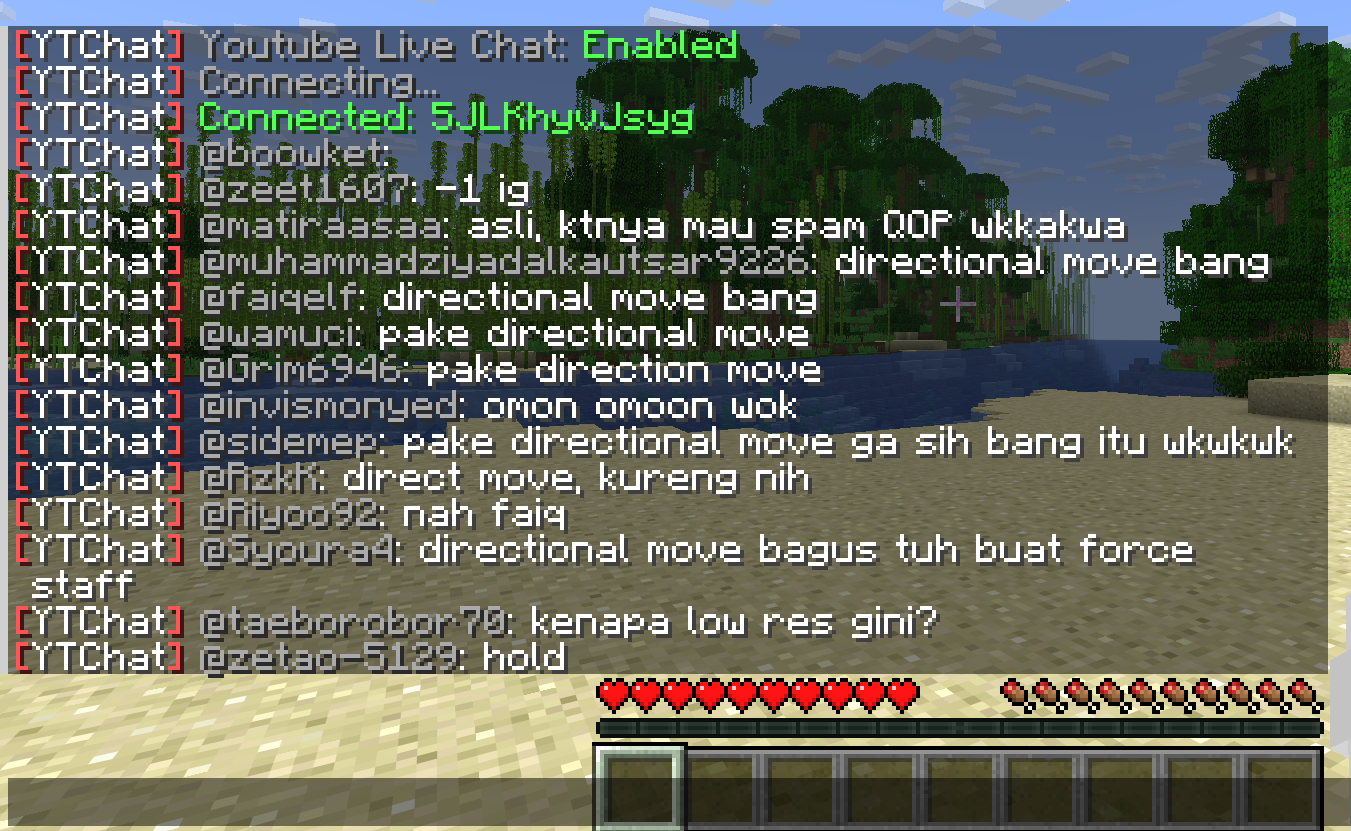
This mod receive live stream chat from YouTube, and display it into the game.
Overview
– YouTube Live Chat in game
This is an actual live chat from my live stream back in 2018.

– In-game chat action
Select an action from in-game chat.

And this person get banned, forever :p

Full Feature List
* Display YouTube Live Stream Chat in Minecraft.
* Highlight Super Chat messages and how much he/she donated. (Untested because in Thailand doesn’t support Super Chat yet due to law.)
* Show Only Super Chat messages.
* Abilities to Delete, Ban, Add Moderator from in-game chat.
yourskintotem
sitting miniversion of your skin on totem
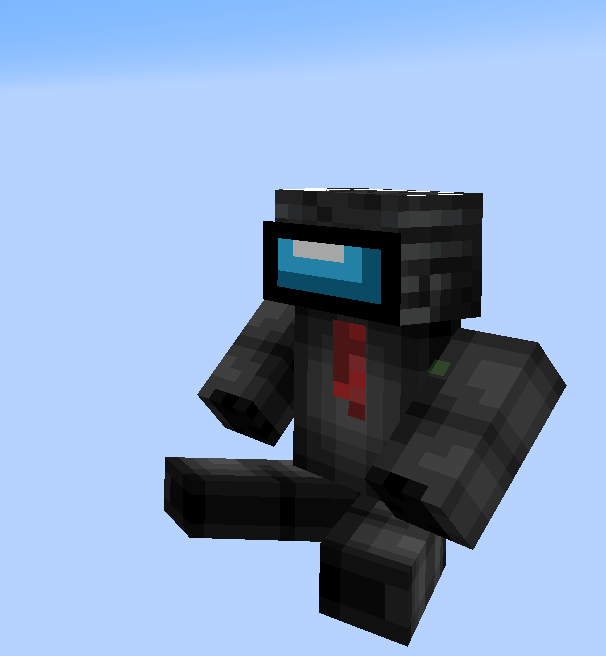
how to install your skin?
1. open resource pack
2. go by this path:
assetsminecrafttexturesitem
3. and replace totem_of_undying.png with your skin
YourDeathPoint

The plugin shows the coordinates of your death in chat, not visible to other players
You can change the message in the config.yml file! **For Paper only, may not work on Spigot**
Your totem is your skin
# What the goal of this pack?
I think have your skin as a totem is pretty, then I created this pack.
You can found a tutorial in the pack (its name is tutoral.txt)
# How I can set the pack in my Resource packs?
Go in your .minecraft, resourcepacks, and drag and drop the pack.
# I can’t modify the pack
Just unzip the pack with right click, and select “Extract All…”
# How to setup the pack?
TUTORIAL
1. Grab your own skin
go on https://namemc.com
search your pseudo
click on your profile
under your skin preview, there is all your skins and click on your latest
click on the download button
2. Put the skin in the Resource Pack
Go in your downloads, click on your skin and press Ctrl + X
Go in the resource pack : assets, minecraft, textures, item and press Ctrl + V
Rename your skin “totem” (verify the extension : it’s normally png)
There it is!
If you have questions, ask me on my discord : https://dsc.gg/somroti (it’s a french server but you can use Google Translate)
Here’s my discord for suggest ideas or report an issue : https://discord.gg/7yXRx6yVVy