xPickaxes
# ⛏️ xPickaxes
**xPickaxes** is a professional Spigot/Paper plugin that adds fully customizable pickaxes with area mining, an intuitive GUI, permission-based access, and special effects — all configurable without touching a single line of Java.
> Compatible with **Minecraft 1.19 – 1.21+** (Paper & Spigot)
—
## ✨ Features
– **Area Mining** — Mine 3×3, 5×5, 7×7, or 9×9 areas with a single block break
– **In-game GUI** — Right-click any custom pickaxe to open a clean configuration menu
– **Special Effects**
– 🔥 **Auto-Smelting** — Ores are smelted directly into ingots
– ✨ **Fortune Boost** — Increased drops on all mined blocks
– ⛏ **Vein Miner** — Mines entire connected ore veins at once (up to 64 blocks)
– 🔍 **Ore Highlight** — Visual glow effect on nearby ores *(framework ready)*
– **Per-player Settings** — Each player can toggle area mining and effects individually
– **Permission System** — Fine-grained control over which players access which pickaxes and effects
– **Custom Area Sizes** — Players can choose their preferred area size from the GUI
– **Blacklist Support** — Prevent area mining on specific blocks (bedrock, command blocks, etc.)
– **WorldGuard Compatible** — Respects protected regions
– **Sound & Particle Effects** — Satisfying feedback on area mines (toggleable)
– **Fully Config-Driven** — Add or edit pickaxe types entirely from `config.yml`
—
## 📦 Pickaxe Tiers
| Tier | Area | Material | Effects | Permission |
|——|——|———-|———|————|
| **Novice** | 3×3 | Iron Pickaxe | — | `xpickaxes.pickaxe.novice` |
| **Adept** | 5×5 | Golden Pickaxe | Fortune Boost | `xpickaxes.pickaxe.adept` |
| **Master** | 7×7 | Diamond Pickaxe | Fortune + Auto-Smelting | `xpickaxes.pickaxe.master` |
| **Titan** | 9×9 | Netherite Pickaxe | Fortune + Auto-Smelting + Vein Miner | `xpickaxes.pickaxe.titan` |
All tiers are fully editable or removable in `config.yml`. You can also add your own!
—
## 🎮 Commands
| Command | Description | Permission |
|———|————-|————|
| `/xpickaxe give [player]` | Give a custom pickaxe | `xpickaxes.give` |
| `/xpickaxe list` | List all available pickaxe types | `xpickaxes.use` |
| `/xpickaxe menu` | Open the GUI for your held pickaxe | `xpickaxes.use` |
| `/xpickaxe reload` | Reload the plugin config | `xpickaxes.reload` |
| `/xpickaxe help` | Show help | — |
**Aliases:** `/xpick`, `/xp`
—
## 🔑 Permissions
| Permission | Default | Description |
|————|———|————-|
| `xpickaxes.use` | Everyone | Use custom pickaxes |
| `xpickaxes.give` | OP | Give custom pickaxes |
| `xpickaxes.reload` | OP | Reload the plugin |
| `xpickaxes.admin` | OP | Full admin access (includes give + reload) |
| `xpickaxes.pickaxe.novice` | Everyone | Access to Novice pickaxe |
| `xpickaxes.pickaxe.adept` | OP | Access to Adept pickaxe |
| `xpickaxes.pickaxe.master` | OP | Access to Master pickaxe |
| `xpickaxes.pickaxe.titan` | OP | Access to Titan pickaxe |
| `xpickaxes.effect.autosmelting` | OP | Use Auto-Smelting effect |
| `xpickaxes.effect.veinminer` | OP | Use Vein Miner effect |
| `xpickaxes.effect.fortune` | OP | Use Fortune Boost effect |
| `xpickaxes.effect.xray` | OP | Use Ore Highlight effect |
—
## 🖥️ GUI Overview
**Right-click** any xPickaxes custom pickaxe (or run `/xpickaxe menu`) to open the configuration panel:
“`
┌─────────────────────────────────────────────────────┐
│ [Pickaxe] [Pickaxe Configuration] │
│ │
│ [Toggle Area] [Compass] [3×3][5×5][7×7][9×9][✗]│
│ │
│ [★] [Effect1] [Effect2] [Effect3] [Effect4] │
│ │
│ [ℹ Info] │
│ [✖ Close] │
└─────────────────────────────────────────────────────┘
“`
– **Toggle Area Mining** — Enable/disable area mining for this session
– **Area Size** — Select 3×3, 5×5, 7×7, or 9×9 (or reset to pickaxe default)
– **Effects** — Toggle each special effect independently (respects permissions)
—
## ⚙️ Configuration
All pickaxe types, effects, messages, and behavior is defined in `config.yml`. Here’s an example of adding a custom pickaxe:
“`yaml
pickaxes:
my_custom_pick:
enabled: true
display-name: “&5✦ Void Pickaxe”
lore:
– “&7Area Mining: &e11x11”
– “”
– “&8▸ Right-click to configure”
material: NETHERITE_PICKAXE
area-size: 11
durability-multiplier: 4.0
enchantments:
EFFICIENCY: 5
UNBREAKING: 3
FORTUNE: 3
effects:
– FORTUNE
– AUTOSMELTING
– VEINMINER
permission: myplugin.voidpickaxe
give-command-enabled: true
custom-model-data: 0
“`
### Auto-Smelt Mappings
Add custom smelting recipes in `config.yml`:
“`yaml
smelt-map:
IRON_ORE: IRON_INGOT
GOLD_ORE: GOLD_INGOT
SAND: GLASS
# Add your own!
“`
—
## 🔧 Installation
1. Download `xPickaxes-1.0.0.jar`
2. Drop it into your `plugins/` folder
3. Restart or reload your server
4. Edit `plugins/xPickaxes/config.yml` to customize
5. Run `/xpickaxe reload` to apply changes live
**Requirements:**
– Java 17+
– Paper or Spigot 1.19+
XPHearts
# **About**
 

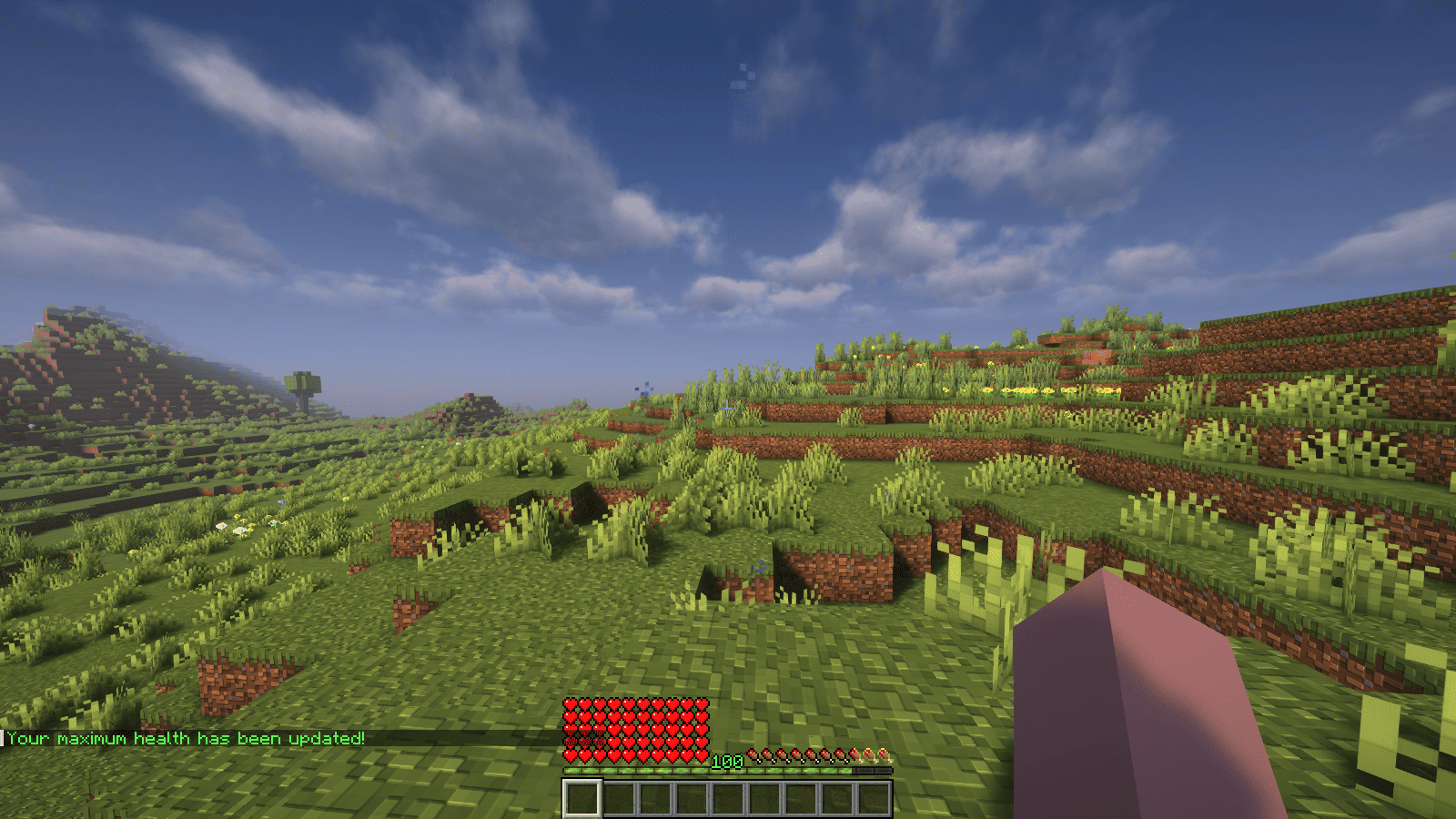
XPHearts is a plugin that automatically adjust maximum hearts/health depending on your experience level. You can configure the amount of experience level needed in the configuration file.
### Features
– Automatically adjust the player’s maximum hearts/health when they reach the experience level specified in the configuration.
– Easy to understand config.
– Lightweight.
### Commands
| Command | Description | Permission |
|—————-|————————————-|—————–|
| `/xh` | Get the information about the plugin. | `xh.use` |
| `/xh reload` | Reloads the config file. | `xh.admin` |
| Command aliases| **xh, xpheart, xphearts** |
### Issues and Suggestions
Suggest and report issues on Github.
XPDispenser
# XPDispenser
A Minecraft Bukkit plugin to throw your XP at yourself (e.g. to repair your mending tools).


## What is it?
XPDispenser allows you to throw XP orbs at yourself by using your currently collected XP points.
The collected XP points can be used to repair tools and armor enchanted with the mending enchantment. In that way, you are able to reuse your already collected XP points to repair your tools and armor.
## Permissions
Currently, there is only one permission available which controls whether a player is allowed to use this plugin: `xpdispenser` (Default: everyone)
## How to use it?
Simply place a sign at any location with the text `[XPDispenser]` at the first line.
Optionally, the second line contains the amount of XP points to be thrown in a single time (defaults to 10, if not given on the sign).
So, if you want to get 50 XP points, you can place a sign with the following content:
* First line: `[XPDispenser]`
* Second line: `50`
After correctly placing the sign, the color of the first line will change to blue.
To use the sign, simply interact with it (i.e. right click on it) while having the tool and/or armor to repair equipped.
### Why use a sign instead of a command?
It’s simple: I just don’t like to execute commands as a normal player, but I like to interact with the environment just like you would do in real life.
In case of this plugin, you could see the sign as some type of machine which will dispense some XP orbs.
## Build
You can build the project in the following 2 steps:
* Check out the repository
* Build the jar file using maven: *mvn clean package*
**Note:** JDK 1.8 and Maven is required to build the project!
## My other plugins
You can find them on my website.
Experience Coins
## Showcase

For more showcase images, head to the gallery
## Description
For the best experience, use version 1.21.4 or above. Below that, the enchantment glint will be present on the xp bottle. This pack was tested on version 1.21.9. This pack is incompatible with shaders.
This is a pack that changes experience points into coins. It retextures the experience bar, experience bottle, the orbs themselves with an animation, it adds new sounds, recolors some text, and uses the language file to change some names of things.
This pack was made for the One Texture at a Time ranked texture pack jam. I chose to retexture the experience orb, which itself is displayed in the experience bar ui and also has a corresponding item texture (the experience bottle). Since it’s impossible to animate entity textures with a texture pack, I had to use core shaders to shrink the uv and snap it to different points in the textures based off the GameTime variable. I also wanted to make the experience bottle into a sack of coins, but it felt off with the forced crashing sound the game makes. I also had to use core shaders to remove the enchantment glint on the bottle, remove the particles from the bottle when it hits the ground, recolor the text in different uis to match the coins, and remove the green tint from the experience orbs.
Thanks to girlthatbites for creating the textures and the icon, as well as P4ncake for creating the sounds.
## Support
**Join My Discord**
– Report bugs
– Create suggestions
– Vote on future packs
– Interact with the community
– Ask for help with texture packs
– This is the place to ask if you can use this pack in your own pack
**Check out The Repository**
– Report bugs
– Create suggestions
– Contribute by creating a pull request
https://www.alphaleo.li/resourcepacks
XpBottle


—
– 🧪 **XP Bottle Creation**: Convert XP into bottles using the `/xpbottle` command.
– 💰 **Tax System**: Configurable tax on XP conversion to prevent abuse.
– ⏳ **Cooldown System**: Prevent command spamming with configurable cooldowns.
– 🔐 **Protected Bottles**: Bottles can be protected from dropping on death.
– 🎨 **Customizable Bottles**: Customize bottle appearance, including material, name, lore, and glow effect.
– 🔒 **Permission-Based Limits**: Different XP limits based on permissions.
– 🔊 **Sound Effects**: Play sounds on bottle creation and redemption.
– 🔧 **ItemsAdder Integration**: Support for custom items via ItemsAdder.
– 👑 **Admin Commands**: Admins can give bottles to players and reload config.
– 🌍 **Multi-Language Support**: Configurable messages.
—

| Command | Description | Permission |
| —————————————————- | ——————————————————– | ———- |
| `/xpbottle ` | Create bottles with a specified amount and XP per bottle | None |
| `/xpbottle help` | Display the help message | None |
| `/xpbottle admin reload` | Reload the configuration and messages | `xp.admin` |
| `/xpbottle admin give ` | Give a bottle to a player | `xp.admin` |
| `/xpbottle admin help` | Display the admin help message | `xp.admin` |
Aliases: `/xp`
—

| Permission | Description | Default |
| ————- | —————————— | ——- |
| `xp.default` | Allows basic use of XP bottles | true |
| `xp.resident` | Allows higher XP limits | op |
| `xp.admin` | Allows admin commands | op |
—

In bottle lore and messages:
| Placeholder | Description |
| ———– | —————————————– |
| `%exp%` | Amount of XP in the bottle |
| `%signer%` | Name of the player who created the bottle |
| `%xp%` | Player’s current XP |
| `%cost%` | Cost in XP for the action |
| `%amount%` | Number of bottles |
| `%time%` | Remaining cooldown time |
| `%player%` | Target player name |
—

The plugin uses `config.yml` for configuration:
## Preview
“`yaml
max-bottle-amount: 1000000 # Maximum bottles per command
min-bottle-amount: 50 # Minimum XP per bottle
conversion-tax: 0.05 # Tax percentage (5%)
cooldown-seconds: 10 # Cooldown in seconds
bottle:
use-itemsadder: false # Use ItemsAdder for custom items
itemsadder-id: “exp_bottle”
material: EXPERIENCE_BOTTLE
name: “#F2EC27&lʙᴏᴛᴛʟᴇ ᴅ’ᴇxᴘᴇʀɪᴇɴᴄᴇ”
lore:
– “”
– “&7xᴘ : &f%exp%”
– “&7ᴘʀᴏᴘʀɪᴇᴛᴀɪʀᴇ : &f%signer%”
– “”
– “#F2EC27ᴄʟɪᴄᴋ ᴅʀᴏɪᴛ &7| &7utiliser la bouteille”
glow: false
reject-crafting: true
reject-villager-trading: true
withdraw-sound:
sound: “ENTITY_COW_DEATH”
enabled: false
redeem-sound:
sound: “ENTITY_PLAYER_LEVELUP”
enabled: true
drop-bottle:
enabled: false
protected-bottles: true
use-perm-based-exp: false
permission:
default:
max-bottle-amount: 1000
min-bottle-amount: 50
resident:
max-bottle-amount: 5000
min-bottle-amount: 50
“`

– **ItemsAdder**: Enable custom bottle items using ItemsAdder.
– **Permissions Plugins**: Supports permission-based XP limits.
XP Tome
### Functionality
This mod adds a single item – the XP Tome. With the XP Tome you can store and retrieve XP. It can store up to 1395 XP by default (can be configured), which equals to having 30 levels on the XP bar.
### Usage
– Sneak + right-click to store XP
– Right-click to retrieve XP
### Recipe

### Config/Item Components
Note: For item components, “true” means the component is on the item, and “false” means it isn’t.
Note: If you want to change the default item components of the XP Tome you can still use the config file, however that comes with caveats explained therein. Consider creating a Data Pack and override the XP Tome’s recipe with the components set as you wish. Here’s an example recipe. More info about data packs and recipes on the wiki!
– *max_xp* – The maximum amount of XP points that the XP Tome can hold. The default value (1395) represents having 30 levels on the XP bar.
– *retrieval_percentage* – The percentage of XP that the book will give back, as a sort of cost of using it. Example: If this config value is set to 0.75, and an XP Tome has 100 XP stored, attempting to retrieve these 100 XP will give back 75 XP. Note: This will not be 100% accurate, as Minecraft’s XP does not use decimals.
– *retrieve_until_next_level* – Setting this to true will remove only as much XP from the book at a time as is needed for the player to reach their next level.
– *retrieve_xp_orbs* – Setting this to true will remove XP from the book in XP orb form. This is useful if you want to use XP from the book for tools enchanted with Mending.
– *store_until_previous_level* – Setting this to true will store only as much XP from the player’s XP bar until reaching the previous level, meaning only one level at maximum will be added to the book’s storage at a time.
The configuration file for Minecraft versions 1.14.4-1.20.1 can be found in the serverconfig folder of your world.
### Further Info
This mod was created by me, following a request by Shivaxi. It is based off of XP Book and was recreated due to a duplication bug in the original mod, as well as a bug which causes the enchanting table to reset each time the book is used. As this mod uses the same modid and item id as the original, the two mods can not be installed at the same time and switching between them will not lose you any items. I did not take any code or assets from the original mod.
You are allowed to use this mod in any modpack.
XP tank V1.5
# XP TANK
This datapack adds a new item: The XP Tank
## USAGE
– Stand on the XP Tank to **deposit** your levels or shift + stand on the XP Tank to **withdraw** it
– To **remove** the XP Tank simply **right-click** it and you can pick it up.
## Crafting
The crafting is on the gallery image
—
Have Fun and keep your levels safe!
XP Storage – Trinkets


**NO PORT TO FORGE PLANNED!** *(but feel free to port it by yourself and link it)*
***The mod is fully configurable to enable only changes that you like***
# Description
This mod aims to improve your gameplay with XP Storage and Trinkets, both required of course. In this extension, you can craft **Trinkets** with the magic gem already present in the main mod: **Crystallized Lapis**.
This is a short description, full description below.
# FAQ
– **Does it work on a server?** Yes, it works on a server. File needed for **both** client **and** server
– **Can I include it in my modpack?** Yes, you are free to include this mod into your modpack
– **For any other things:** Feel free to share your experience, problems, enhancement ideas in the Discord server, or directly creating issues on the GitHub
# Full description
Recipes
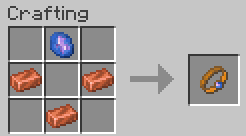
## XP Conduit
– 3 Copper Ingots and 1 Crystallized Lapis
– The XP Conduit is a ring, so you can wear it in both mainhand and offhand ring slots
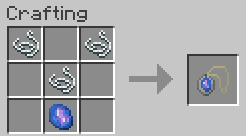
## XP Saver
– 3 Strings and 1 Crystallized Lapis.
– The XP Saver is an amulet, so you can wear it in necklace slot
How to…
## Use
– **XP Conduit:** When you wear it, **75%** of the experience you get will **automatically** be transferred in XP Book(s) from your inventory. However, this has a cost: each experience transferred use your ring until your ring become fully damaged!
– **XP Saver:** When you wear it, **50%** of the experience you had before to die will **automatically** be transferred in XP Book(s) from your inventory. However, this has a huge cost: each death use your amulet and make it completely damaged!
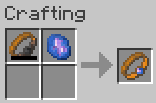
## Repair
Don’t worry! These trinkets don’t break, but you’ll have to repair them with a new Crystallized Lapis to be able to use their power again. Note that you can repair them even though they’re not fully damaged

Click Here to Support my Projects
XP Storage


**NO PORT TO FORGE PLANNED!** *(but feel free to port it by yourself and link it)*
***The mod is fully configurable to enable only changes that you like***
# Description
In this mod, you can craft XP Books in order to store your experience and save it from a coming death. After storing it, you can retrieve your experience back in two different ways: same way that you stored it OR you can brew the experience of the XP Book with the brewing stand in order to create special Experience Bottles that can give you even more experience.
TO READ WHEN UPDATING TO V1.6
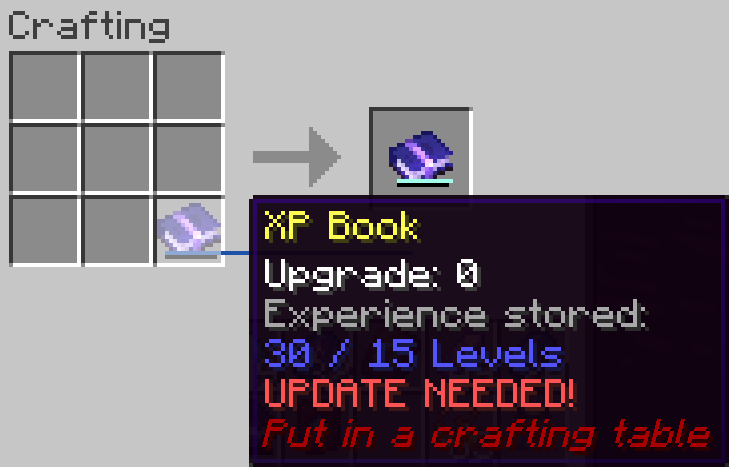
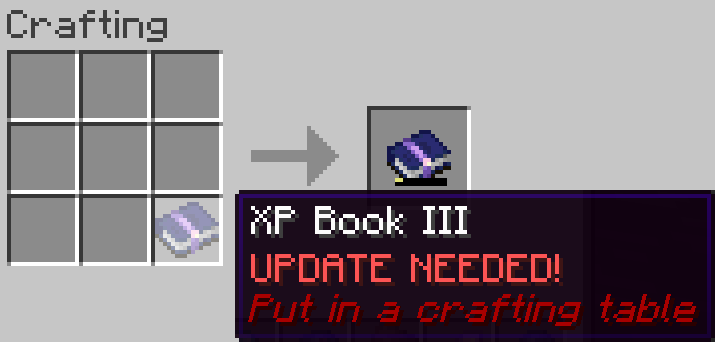
⚠️ **v1.6 UPDATE:** XP Book II and III were ***removed***, and there were some changes with item data! You can update the mod in your world **without losing anything**, but be sure to put your books in a crafting table to **update** them. *Old saves won’t be supported forever, this warning will be update whenever a version without the transition support is uploaded.*
This is a short description, full description below.
# FAQ
– **Does it work on a server?** Yes, it works on a server. File needed for **both** client **and** server
– **Can I include it in my modpack?** Yes, you are free to include this mod into your modpack
– **For any other things:** Feel free to share your experience, problems, enhancement ideas in the Discord server, or directly creating issues on the GitHub
# Full description
Recipes
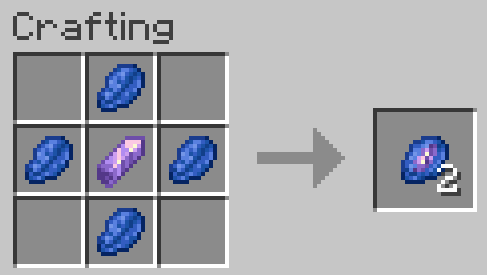
## Crystallized Lapis
– 4 Lapis Lazuli *(it stores experience so that makes senses)*
– 1 Amethyst Shard *(it’s a precious gem)*
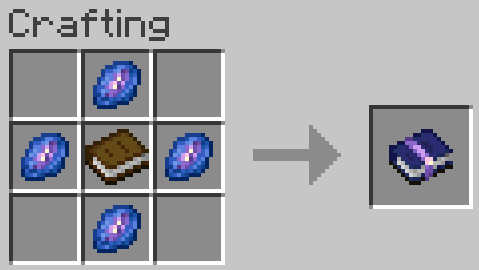
## XP Book
– They can store up to **15** levels without upgrades (config).
This means experience to go from 0 level to X levels! Not the same amount than experience from Y to X+Y!
– 1 Book *(of course, it’s a book)*
– 4 Crystallized Lapis
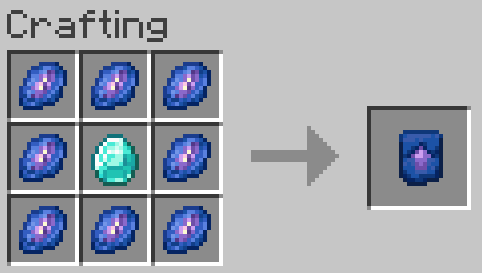
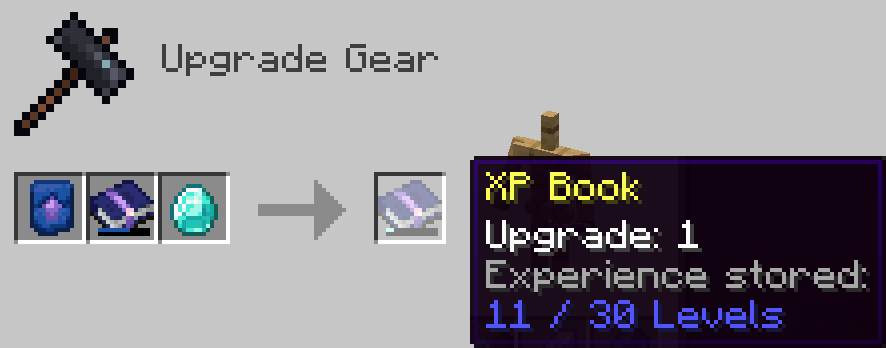
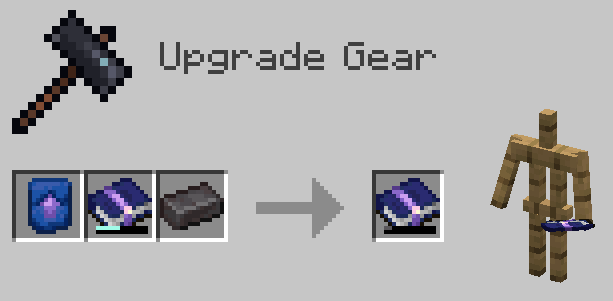
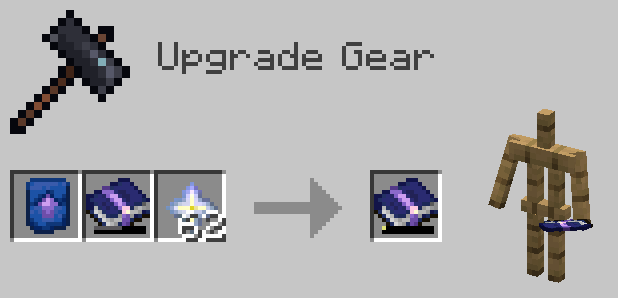
## Smithing Template
– They can be used to upgrade XP Books of any level, only the ingredient with it changes
– 1 Diamond
– 8 Crystallized Lapis
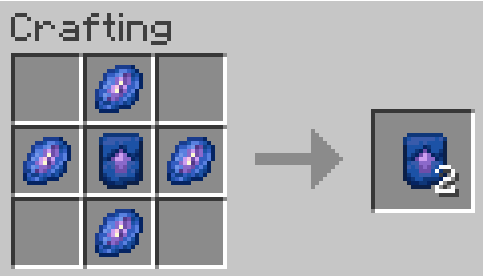
## Smithing Template Duplication
– 1 Smithing Template
– 4 Crystallized Lapis
How to use?
## XP Book
– **Store experience:** Store the maximum amount of your experience in the book by right clicking. If you have more experience than the maximum amount, you will keep the remaining experience
– **Retrieve experience:** Get 85, 90, 95 or 100% (depending on book’s level) of the experience stored in the book by right clicking while sneaking
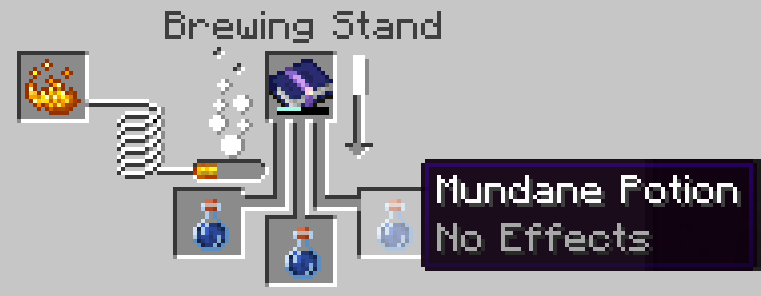
## Brewing
– Take 1, 3, 5 or 10 levels (depending on book’s level) of the experience stored in the book for each mundane potions (or Experience Bottle) placed in the brewing stand and put it in the resulting Experience Bottle (or add it to the current ones)
– Each Experience Bottle can store a maximum of 30 levels (config)
## XP Book Upgrades
– You can upgrade the book, so that it can store more experience and retrieve it more efficiently
– You need to craft an XP Book Upgrade Smithing Template and use it with the right ingredient, depending on the XP Book level in input (Diamond, Netherite Ingot or Nether Star).
– You can update the new smithing recipes to customize the parameters of the XP Book in output, such as its new capacity or efficiency for example with your custom resource pack
– You can also add new smithing recipes in your custom resource pack to add more XP Book levels

Click Here to Support my Projects
XP Stacker
🎉 **XPStacker: Let Your Server Breathe!** 🎉
Is your server slowing down because of all the scattered XP orbs? 🐢 XPStacker offers a sleek and effective solution to this problem. This lightweight plugin automatically merges nearby XP orbs into a single one, significantly reducing server load while providing a smoother experience for players.
✨ **Key Features:**
– **Lag Reduction:** 💨 Drastically reduces server lag by merging hundreds of scattered XP orbs into a single orb.
– **Automatic Merging:** 🤝 New XP orbs automatically merge with nearby ones. No player action is required.
– **Configurable Radius:** ⚙️ Easily adjust the merge radius of XP orbs in the config.yml file.
– **Lightweight and Stable:** 🔋 Operates with minimal resource usage and does not affect your server’s other features.
Add XPStacker to your server now and let your players collect XP without any lag! 💎
✨ **Check Out Our Other Plugins!** ✨
If you enjoy the **XPStacker** plugin, don’t forget to check out our other high-quality plugins for your server!
– **BuildByBit**: https://builtbybit.com/creators/fisfiskoray.600970
– **PolyMart:** https://polymart.org/user/57522/fisfiskoray
– **Modrinth:** https://modrinth.com/user/FisFisKoray