Yellow Enchant Glint
🟨Yellow Enchant Glint
–
Mostly suitable for 1.15~latest version, though can be used in earlier version with less effect, which could not fixed in resource pack way.
[Click this to view alternatives.](https://modrinth.com/collection/lR5x3kC0)
ℹStatement
–
This work is authorized for non-commercial purposes only.
Proper attribution to the original author and a clear link to the source must be provided.
Unauthorized reuploading, redistribution and commercial utilization are strictly prohibited.
Distortion, defamation or any act that damages reputation shall not be permitted.
Any disputes arising from improper use shall be solely borne by the user, and the original author shall bear no responsibility therefor.
All Rights Reserved.
– _In the event of discrepancies statements contained in older versions, the above statements shall prevail._
Check my profile if you want to view more Resource Pack Projects.<3
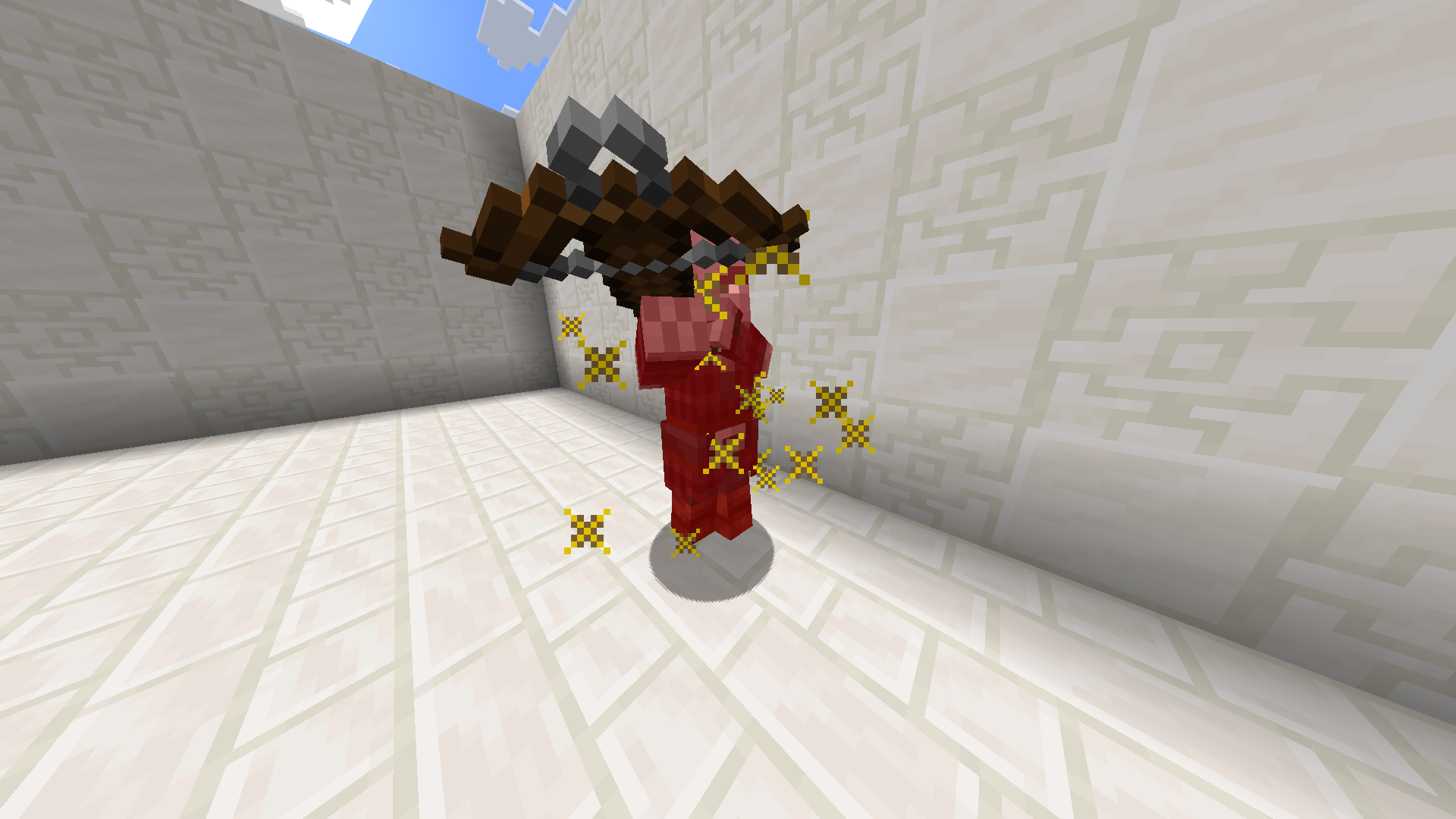
Yellow Crits
**Changes critical hit to yellow**
—
Tired of boring brownish-gray critical hits? Then try spicing up your game with something new!
Yellow Cobwebs
Changes the texture in minecraft/textures/block/cobweb.png to be yellow while keeping the three shades in the original cobweb texture.
Original shades:
– #FFFFFF (bright)
– #E4E9E9 (mid)
– #C4CED2 (dark)
New shades:
– #FFC700 (bright)
– #E7B400 (mid)
– #CC9F00 (dark)
Yellow & Blue to Green Dye
We can combine blue and red dyes to make purple, we can combine red and white to make pink… so why can’t we combine blue and yellow to make green dye? Now you can!
YegsPack
The YegsTv Texture Pack!
Features;
– Dark Mode EVERYTHING
– Smoother Font
– Blue -> Green Gradient XP Bar
– Black Bow
– Pullback Indicator
– Modern Paintings
– Visual Durability
other tiny things 🙂
– Maintained by **[Ark](https://www.twitch.tv/ark_mc)**
– For BEDROCK versions, join the **[Discord](https://discord.gg/DaGqzj67CA)**
**CREDITS**
– VanillaTweaks
– SpectreDount (Diminshing Durability)
Yeetus Experimentus
Yeetus Experimentus!
Disable’s the Experimental Settings popup, which appears when you create or load world.
[Icon by David S](https://legacy.curseforge.com/linkout?remoteUrl=https%253a%252f%252fthenounproject.com%252ficon%252fharry-potter-1502316)
Yeet Spooky Cave Sounds!
Yeet Spooky Cave Sounds is a very simple resource pack that removes all the spooky cave sounds, so you can mine in peace.
Feel free to use this anywhere, but give me credit.
Be sure to report bugs, give feedback or anything on the official [Planet Minecraft](https://www.planetminecraft.com/texture-pack/yeet-spooky-cave-sounds/) page!
YeeeesMOTD
Customized server motd and random icon, it can use player’s head as server icon,like this:
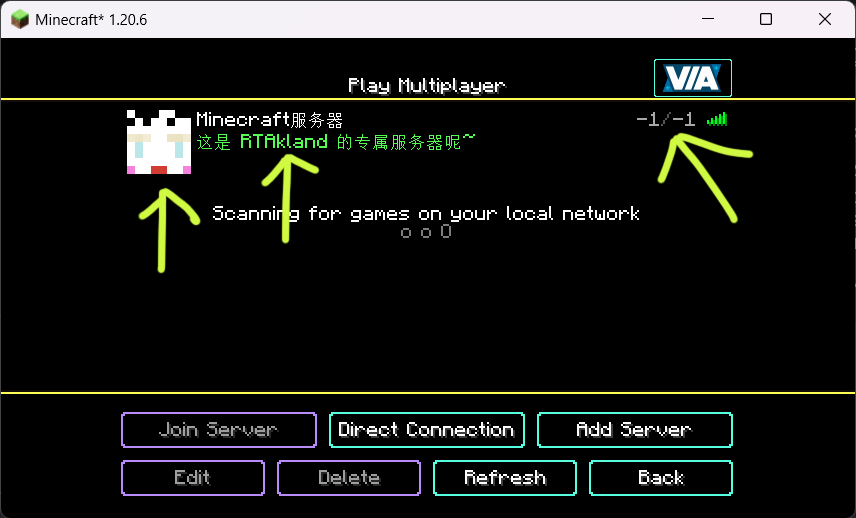)
also use player’s name as motd description, and random icon
everything is up to you
for more information please go to github: https://github.com/RTAkland/YeeeesMOTD
YearCalendar
### ⚠️ This plugin is no longer being updated.
# YearCalendar
**Original Calendar plugin.**
*Let your players check the date!*
—
## Features
– GUI: Keep it simple with only `/calendar` command
– Edit: Edit months, days, colors in config.yml
—
## Commands & Permissions
| Command | Alias | Description | Permission |
|—————|——-|———————|——————–|
| `/calendar` | – | Opens main gui | `calendar365.use` |
—
## Images / Screenshots
Section “**Gallery**”
—
## Files
config.yml
“`yaml
messages:
no-permission: “§cYou don’t have permission to use this command!”
player-only: “§cThis command can only be used by players!”
gui:
month-selector-title: “§7§lCalendar 365”
back-button-name: “§c« Back to Months”
months:
– name: January
days: 31
title: “§7Days: §f31”
– name: February
days: 28
title: “§7Days: §f28”
– name: March
days: 31
title: “§7Days: §f31”
– name: April
days: 30
title: “§7Days: §f30”
– name: May
days: 31
title: “§7Days: §f31”
– name: June
days: 30
title: “§7Days: §f30”
– name: July
days: 31
title: “§7Days: §f31”
– name: August
days: 31
title: “§7Days: §f31”
– name: September
days: 30
title: “§7Days: §f30”
– name: October
days: 31
title: “§7Days: §f31”
– name: November
days: 30
title: “§7Days: §f30”
– name: December
days: 31
title: “§7Days: §f31”
date-display:
today-status: “§f§lTODAY”
past-status: “§a§lPast”
future-status: “§c§lFuture”
day-format: “§e{month} {day}, {year}”
status-prefix: “§7Status: ”
click-to-view: “§7Click to view!”
“`
[Documents](https://github.com/Primly-Project/Documentation)
YDM’s MobHealthBar
### Mob Health Bar Mod
#### Forge, Fabric and Neoforge
This mod adds a health bar above the mob.
There are 13 type of bars available that are positionable.
You can open the selector by pushing the “H” button.
Other changeable options for the bars are:
– Render distance
– scale size
– name display
– health points display (if the selected bar type supports hp display).
– make a bar only appear when the mob is aggressive, damaged or when you hover over it
– texture visibility
– show only damaged mobs
– blacklist mobs in config
– If you use forge then:
(type after blacklist = minecraft:cow,minecraft:pig and like this these mobs will be blacklisted)
– If you use fabric then:
(type after blacklist = cow,pig and like this these mobs will be blacklisted)
Hope you like it.
Please let me know if you find any bugs.
Thanks for downloading this mod!