(Legacy) Create Support for Open Parties and Claims
_**This extension requires Create 0.5.1.f or newer since version 1.6.0 of the extension!**_
1.3.0 – 1.5.0 requires Create 0.5.1.b – 0.5.1.d!
1.1.0 – 1.2.0 only works with Create v0.5.0!
1.0.0 only works with Create v0.4.1 Patch 13 or older!
This Fabric mod adds [Create](https://modrinth.com/mod/create-fabric) mod support to chunk protection in the [Open Parties and Claims](https://modrinth.com/mod/open-parties-and-claims) mod.
Released separately from the main mod to avoid crashes in the development environment and errors in the logs in any environment when Create isn’t present. The Forge version of OPAC supports Create by default and you don’t need this extension.
Onyx Sans
A few years ago, I made the now-deleted Joniksj Font Pack Revamped. Three weeks ago, I thought to myself: “That 8px width had some potential.” And so here is the fruit of my newfound encouragement!
This is **Onyx Sans**, a sans-serif font for Minecraft 1.19, with the following specifications:
– x-height: 8 px
– Ascender: +4 px from X
– Descender: -4 px from X
This font supports every character set that Minecraft’s default raster font supports, including – but not limited to:
– Latin (Basic, IPA, Extended-A, Extended-B, Extended-Additional)
– Greek (Monotonic and Polytonic)
– Cyrillic (Basic, Supplement)
– Georgian (Asomtavruli, Mkhedruli, Nuskhuri)
– Armenian
– Hebrew
– Runic
– Gothic
– And many others (will be enumerated at another time)
Developed using [Pixelorama](https://orama-interactive.itch.io/pixelorama) for Linux Mint.
—
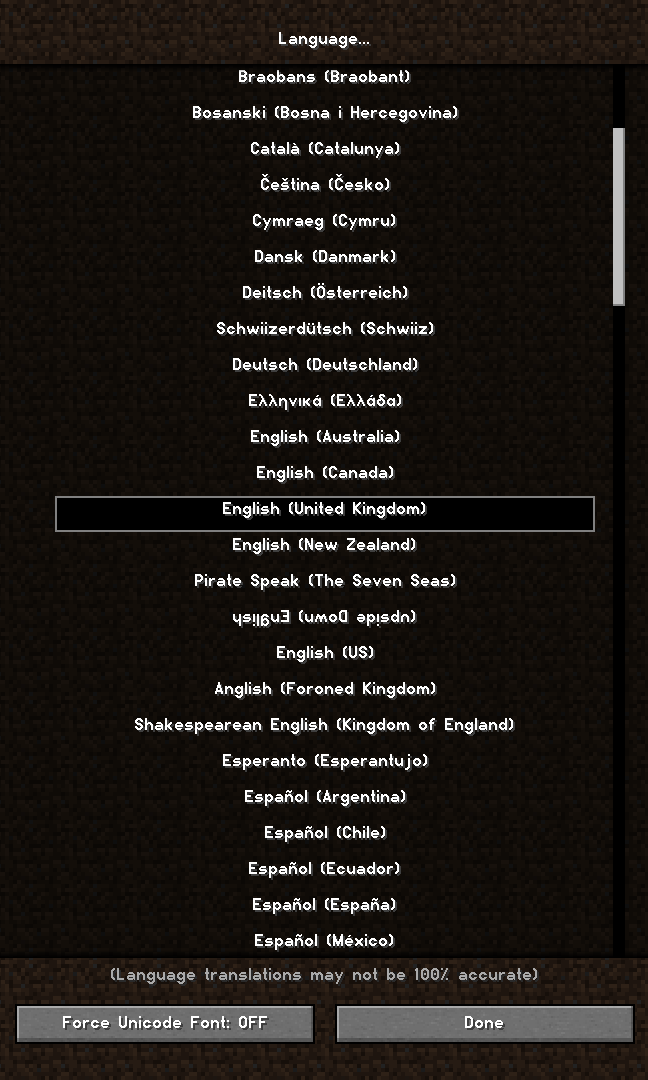
**Sample Image** (More at the [Gallery](https://modrinth.com/resourcepack/onyx-sans/gallery) page):
—

This work is licenced under a [Creative Commons Attribution-ShareAlike 4.0 International Licence](http://creativecommons.org/licenses/by-sa/4.0/).
Only Pink Sheeps
**Only Pink Sheep** is fairly self-explanatory: every sheep you encounter in the wild is going to be pink.
Configuration options to customize the sheep colours is coming soon.
[](https://modrinth.com/mod/qsl)
—
[](https://github.com/sponsors/triphora)
[](https://discord.gg/buPbUvw5FD)
Omnilook
# Omnilook
_A simple freelook/perspective mod for Minecraft._
Omnilook implements a small utility function for your player camera, which lets you rotate which way the third-person camera faces independent of your player’s head movement. This lets you take fancy cinematic shots or aim your cursor in a specific direction while not having to be locked to looking in that direction too!
## Version Support
Omnilook will support pretty much any and every mod loader and version of Minecraft you can think of. The table for this is kind of big, so please see [the GitHub readme](https://github.com/rhysdh540/Omnilook#version-support) for the full thing.
## Why Omnilook?
Omnilook is not the first mod to do this. Here’s why you should try it out:
– **It’s lightweight.** Unlike other mods, Omnilook is small and lightweight in about every way possible. It depends on other mods minimally, doesn’t interrupt your game in the slightest, and the mod jar weighs in at far under 100 kilobytes.
– **It’s compatible.** Omnilook will *just work* anywhere you put it. It uses as few injections as possible to get the job done, and often uses mod loaders’ events and APIs to make sure it functions well with other mods.
– …that’s about it for now.
## Configuration
Omnilook at its core is a pretty simple mod, so there aren’t too many configuration options right now. Besides the activation key binding (by default bound to the grave key, `), the one other option to configure is if pressing it toggles the effect, or if holding it keeps it activated.
## Issues?
See me on [GitHub](https://github.com/rhysdh540/Omnilook/issues). I’d love to help!
Ohmygod (Омайгад) Mellstroy Totem of Undying
– RU: «Омайгад» — это мем, связанный с стримером Меллстроем. В его основе — реакция Меллстроя на стриме, когда он производит эмоциональную жестикуляцию и произносит: «О май гад. Них.., красавчик».
Фраза вместе с выражением лица стали частью Меллстрой-мем-вселенной. Например, появился персонаж Омайгадность в сезоне «Село Молочное»
– EN: “Omaygad” is a meme associated with the streamer Mellstroy. It is based on Mellstroy’s reaction on the stream, when he makes emotional gestures and says, “Oh my god. Nikh.., handsome.”
The phrase, along with the facial expression, has become part of the Mellstroy meme universe. For example, the character Omaygadnost appeared in the “Molochnoye Village” season.
– [Тотем я уже красный со звуком](https://modrinth.com/resourcepack/mellstroy-(-)-totem-of-undying)
– [Тотем Меллстрой](https://modrinth.com/resourcepack/mellstroy-totem-of-undying)
– [ПОЛНАЯ КОЛЛЕКЦИЯ РЕСУРСПАКОВ – МЕМЫ + СТРИМЕРЫ](https://modrinth.com/collection/sfDcDGAi)
Ocean Panorama
Ocean Panorama replaces the Minecraft title-screen panorama with a high-quality, performance-conscious cube-mapped scene.
### Additional Information
Type:
`RELEASE`
Version:
`1.0.0`
MC Version:
`1.13.x, 1.14.x, 1.15.x, 1.16.x, 1.17.x, 1.18.x, 1.19.x, 1.20.x, 1.21.x`
NyaPack 🤺 Minimal Armor

**NyaPack 🦋** is a resource pack that lets you show off your skin even more!
Armor becomes more like **accessories** or **situational outfits**, helping you customize your appearance without covering your character entirely.
✨ **Features:**
– **Emissives** and **animations** support in newer versions, all **without additional mods**
– Support for the new **copper armor**
– Versions **without emissive** and **without animations** are also available for those who prefer a simpler look
Give your skin more personality and style! 🦋
Numbered Levels
# Numbered Levels
[ 
See more in the Gallery](https://modrinth.com/resourcepack/numbered-levels/gallery)
—
[](https://www.curseforge.com/members/ChicknTurtle) [](https://modrinth.com/user/ChicknTurtle) [](https://www.curseforge.com/minecraft/texture-packs/numbered-levels) [](https://modrinth.com/resourcepack/numbered-levels)
## Features
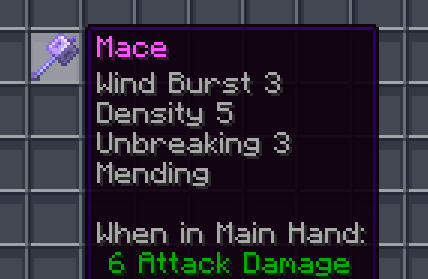
✨ Enchantment levels are displayed as numbers
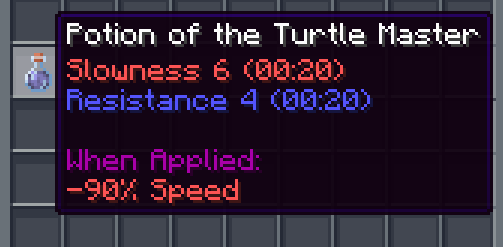
🧪 Potion potencies are displayed as numbers
🛠️ Fixes “enchantment.level.255” when levels are above level 10 (or 6 for potions)
🌐 Works in all 137 of Minecraft’s supported languages (as of 1.21.8)
## Info
Examples:
– Sharpness IV → Sharpness 4
– Instant Damage II → Instant Damage 2
– Mending (unchanged)
– Unbreaking I → Unbreaking 1
– Protection enchantment.level.255 → Protection 255
– Strength potion.potency.10 → Strength 10
Feel free to modify this pack or include it in a modpack!
—
[](https://modrinth.com/resourcepack/chicknturtles-3d-totems) [](https://modrinth.com/resourcepack/chicknturtles-better-shield) [](https://modrinth.com/resourcepack/chicknturtles-3d-tools)
**💚 Make sure to follow!**
Nether Portal Boom
# NetherPortalBoom
Nether Portal make Boom

And you can even configure the Size of the Explosion 😀
###### This Mod is used on ChainSMP, my German SMP [you can join, by clicking here](https://discord.gg/rthZpQwEYy).
NotAnnoyingHorses
# NotAnnoyingHorses


**NotAnnoyingHorses** is a Minecraft data pack/mod which allows you to nerf annoying AI of your horse with a nametag.
> _Have you ever been annoyed that your horse immediately leaves you as soon as you get off?_
>
> _With this data pack/mod, this won’t happen again!_
## 🚀 Quick Start
### 📥 Installation:



> #### 🛠️ Install as data pack:
>
> Please ensure that you have the following software installed:
> – [Minecraft]() (≥ 1.13)
>
> To install the data pack to your Minecraft world, you should:
> 1. Download the latest version.
> 2. Drop this data pack to the “datapacks“ folder of your world.
> 3. Load the world.
> #### ⚙️ Install as mod:
>
> Please ensure that you have the following software installed:
> – [Minecraft]() (≥ 1.13)
> – Mod loader ([Fabric](), [Forge](),
> [Quilt](), [NeoForge]())
>
> To install the mod to your client/server, you should:
> 1. Download the latest version.
> 2. Place it to the “mods“ directory in the Minecraft/server root folder.
> 3. Load the world/server.
### 💡 Features:
– **AI nerfing on specific horses.** Use the nametag “nerfed“ on your horse to nerf its AI.
Nerfed horses won’t be able to move by themselves, but you can still use them normally.
– **Reset nerfing of a horse.** Just use nametag “unnerfed“ on your horse to reset nerfing.
## 📭 Contact me:


