[ORB] OresRBack
## What does this mod/ datapack do?
This simple mod/ datapack makes it possible to mine ores like in versions before 1.17 again. That means that ores drop ores again and not raw ores. [Read more here.](https://github.com/orbmcmod/orb/wiki#what-is-this-mod-about)
## But whyy??
My friends and I noticed after playing the newer versions of Minecraft that the new ore logic is a bit overpowered and makes it much easier to get resources (especially Copper Ore)
## More Minecraft Versions???
I will support more Minecraft versions if it is requested. So if someone opens an issue on GitHub, or send me an mail to [this address](mailto:[email protected]), that they want another version of Minecraft for this mod/ datapack, I will create it!
## Create Extension
I’ve also created a mod for Create’s zinc ore, see: [ORBC](https://modrinth.com/mod/orb-create)
## BYG Extension
As well for Oh the biomes you’ll go! See: [ORBB](https://github.com/orbmcmod/orbb/releases)
## Disclaimer
This is not an official Minecraft product. Not approved by or associated with Mojang or Microsoft.
Optimum Realism
# **Optimum Realism**
**The realistic Minecraft resource pack with PBR, POM, and custom 3D models. 3M+ downloads across all platforms. Actively updated monthly.**
—
## **What is Optimum Realism?**
Optimum Realism replaces Minecraft’s blocks, items, and mobs with their real-world counterparts. It’s built with a focus on visual depth, shader compatibility, and consistent performance. The goal is a pack for players who want their world to feel grounded and tactile without the framerate cost that usually comes with realistic textures.
Over 650+ blocks reworked. Custom 3D mob models. PBR maps, parallax occlusion mapping, emissive textures, and depth-write POM, all in a single pack that runs on a GTX 1050.
—
## **Features**
– **650+ blocks reworked** with realistic PBR textures
– **Custom 3D models** for mobs and items (spiders, chickens, and more added monthly)
– **Parallax Occlusion Mapping, depth-write POM, emissive blocks, and full PBR support**
– **Compatible with Minecraft 1.21.x** and earlier versions back to 1.16
– **Works with all major shaders**: Kappa, BSL, SEUS PTGI, Complementary, and more
– **Java + Bedrock support**, with a dedicated **Bedrock RTX edition** launching soon
– **Performance-first design**. 64x runs smoothly on mid-range hardware
– **Actively updated monthly** with new textures, models, and features
– **3M+ total downloads** across CurseForge, Modrinth, and direct distribution
—
## **How Optimum Realism is different**
– **Real 3D models, not just retextures.** Mobs and blocks have actual geometry, not painted-on detail.
– **Depth-write POM.** Textures genuinely interact with each other. Sand fills the crevices between planks instead of sitting flat on top.
– **Performance balance.** Most realistic packs sacrifice framerate. Optimum Realism is built to run on hardware that other realistic packs choke on.
– **Consistent monthly updates.**

—
## **What’s free and what’s paid?**
– **64x edition: Free.** Fully featured, available here on Modrinth. Updated monthly.
– **128x edition: Patreon.** Higher-resolution textures, early access to monthly updates, and exclusive previews. **[Subscribe on Patreon](https://www.patreon.com/optimumrealism)** (preferred)
– **Alternative :** Available at **[store.optimumrealism.com](http://store.optimumrealism.com/)**


—
## **Before you install**
**Playing with Iris / Sodium?** You’ll need additional mods to run Optimum Realism properly. Two easy options:
– **[Full installation guide](https://www.optimumrealism.com/installation)**: step by step, with all required mods listed
– **[Ultimate PBR Essentials modpack](https://modrinth.com/modpack/ultimate-pbr-essentials)**: one-click install of everything you need
—
## **System requirements**

Optimum Realism runs well on a decent gaming computer. You don’t need an RTX card unless you’re using the Bedrock RTX edition.
– **64x version:** GTX 1050 or equivalent, 8GB RAM minimum
– **128x version:** GTX 1060 / RTX 2060 recommended for shaders at higher resolutions
– **Bedrock RTX edition:** RTX 2060 or better
—
## **Community & support**
If Optimum Realism has improved your game, leaving a **review here on Modrinth** genuinely helps the project grow.

– **[Join the Discord](https://discord.gg/optimum-realism-862970144049725490)**: WIP previews, monthly polls on what gets reworked next, screenshot showcases, and direct support from the dev
– **[Visit the wiki](https://www.optimumrealism.com/)**: installation guides, troubleshooting, and feature breakdowns
– **[Instagram @optimum_realism](https://www.instagram.com/optimum_realism/)**: behind-the-scenes block previews and dev updates
Open Parties and Claims
_**The mod is currently in Beta!**_
This mod adds the ability to claim and to forceload world chunks, as well as create and manage player parties. It also gives server owners powerful controls over their players’ usage of the mod’s features.
The mod’s API allows other mods or plugins to easily interact with the parties and the chunk claims, both on the server and the client side. The mod already integrates with [Xaero’s Minimap](https://modrinth.com/mod/xaeros-minimap) and [World Map](https://modrinth.com/mod/xaeros-world-map) mods. Make sure to update them to the latest versions.
The API of the mod allows the implementation of player permission systems to be used by the mod for some permission nodes (e.g. for having rank-based claim limits), with Prometheus, FTB Ranks, LuckPerms and the Forge/Fabric permission APIs having built-in support. It also allows the implementation of party systems to be used by claims alongside or instead of the default party system, with Argonauts and FTB Teams having built-in support. The default party system or claims can be disabled completely in the main config file.
## Commands:
/openpac … – player config commands
/openpac-claims … – everything claim-related
/openpac-parties … – everything party-related
/opm – shortcut for the party chat
## Key Bindings:
‘ – open the mod UI. Can be changed in the controls menu.
## Configs:
[world directory]/serverconfig/openpartiesandclaims-server.toml – the usual location of the main config file. Make sure to shut down the server before editing it, or the server might overwrite all your changes.
[server directory]/config/openpartiesandclaims-server.toml – sometimes the location of the main config file on Fabric/Quilt.
[world directory]/serverconfig/openpartiesandclaims-… – some global “player configs”, although all of them can be accessed in game through the UI
## Permission Nodes:
The permission nodes that this mod looks up for various reasons are not just static paths. They can be configured in the main config file, e.g. option “maxPlayerClaimsPermission”. The used permission system (FTB Ranks, LuckPerms etc) can be configured with the “permissionSystem” option in the main config file.
If you or the modpack you are using have not changed the permssion nodes, then the permission node paths should be the following:
* **”xaero.pac_max_player_groups”** – The meta value permission that should override the default “maxPlayerGroups” option value in the main config.
* **”xaero.pac_player_group_space”** – The meta value permission that should override the default “playerGroupSpace” option value in the main config.
* **”xaero.pac_max_claims”** – The meta value permission that should override the default “maxPlayerClaims” option value in the main config.
* **”xaero.pac_max_forceloads”** – The meta value permission that should override the default “maxPlayerClaimForceloads” option value in the main config. The permission override only takes effect after the player logs in at least once after a server (re)launch, so it is recommended to keep all permission-based forceload limits equal to or greater than “maxPlayerClaimForceloads”.
* **”xaero.pac_server_claims”** – The permission that gives non-OP players the ability to make server claims and enable server claim mode.
* **”xaero.pac_admin_mode”** – The permission that gives non-OP players the ability to enable claim admin mode.
## FAQ
### 1) How do I configure the mod on my server?
The mod is mainly configured through the main config file at _[world directory]/serverconfig/openpartiesandclaims-server.toml_, or sometimes _[server directory]/config/openpartiesandclaims-server.toml_ on Fabric/Quilt, while the server isn’t running. Server claim, expired claim and wilderness configs, as well as the default player config, can be edited by OPs in-game with the UI (check your key bindings). Normal players can configure their own player config with the same UI. If the mod isn’t installed on the client side, then you can use the player config chat commands instead.
### 2) How do I use this mod as a regular player?
Most things related to claims can be accessed with the in-game UI (check your key bindings). If you have the Xaero’s World Map mod installed, you can view and edit your claims on the map screen as well, by right-clicking on the map or dragging with the right mouse button to make a selection. You can also use chat commands to make/edit claims. Parties can only be created and managed through chat commands at the moment.
### 3) Why are some options greyed out in my player config?
The server admin/owner can configure with the main config file option _playerConfigurablePlayerConfigOptions_ which specific options players have access to. Everything else uses the value in the default player config.
### 4) How do I disable all protection on my server?
In the server claim, expired claim and wilderness configs, as well as the default player config, disable the main protection option. Next, edit the config file _[world directory]/serverconfig/openpartiesandclaims-server.toml_, while the server isn’t running. Remove the main option _claims.protectClaimedChunks_ from _playerConfigurablePlayerConfigOptions_.
### 5) How do I add claim protection exceptions for interaction or breaking/attacking of specific blocks, entities/mobs or using items?
The mod comes with some global exceptions preconfigured, as well as some default exception groups you can toggle in individual claims. Both forced and per-claim toggleable exceptions can be added through the main config file _[world directory]/serverconfig/openpartiesandclaims-server.toml_ (sometimes in _[server directory]/config_). The file must be edited/replaced while the server isn’t running to ensure that it is not overwritten on server restart. For exceptions forced on every claim, the options you are interested in are _forcedBlockProtectionExceptionList, forcedEntityProtectionExceptionList, itemUseProtectionExceptionList_. For toggleable exception groups, similar to the default ones (Controls, Doors, Traders, Livestock), the options you are interested in are _blockProtectionOptionalExceptionGroups, entityProtectionOptionalExceptionGroups, itemUseProtectionOptionalExceptionGroups_. You can add new groups or edit existing ones. Please carefully read the comments above the options. They have crucial information that would take too much space to put here.
### 6) How do I give specific entity/mob types access to blocks, entities or dropped items (e.g. letting zombies attack villagers)?
Both forced and per-claim toggleable exceptions can be added through the main config file _[world directory]/serverconfig/openpartiesandclaims-server.toml_ (sometimes in _[server directory]/config_). The file must be edited/replaced while the server isn’t running to ensure that it is not overwritten on server restart. To force access by specific entities on all claims, the options you are interested in are _entitiesAllowedToGrief, entitiesAllowedToGriefEntities, entitiesAllowedToGriefDroppedItems_. For access groups toggleable per claim, similar to the default ones (Villagers, Zombies, Piglins, Foxes), the options are _blockAccessEntityGroups, entityAccessEntityGroups, droppedItemAccessEntityGroups_. For “fake players” that operate from specific block positions they are tied to, usually as part of automation machines, check out the _staticFakePlayers_ option. Please carefully read the comments above the options. They have crucial information that would take too much space to put here.
## Supported Mods:
A lot of (usually smaller) mods should be supported by the claimed chunk protection automatically. Some mods go above and beyond with the mechanics they add to the game or modify, in which case chunk protection is not guaranteed and should be manually added, either to this mod or with an additional one. Feel free to leave suggestions on the [issue tracker](https://github.com/thexaero/open-parties-and-claims/issues) for the mods that you’d like to be supported. Please make sure that they are not already by testing it and provide an example of chunk griefing one can achieve with the mod.
Explicitly supported mods:
* (Since b0.8.0) Create – built into the Forge version, but before b0.25.1 requires [an extension](https://modrinth.com/mod/opac-fabric-create-support) when used on Fabric/Quilt
(Legacy) Create Support for Open Parties and Claims
_**This extension requires Create 0.5.1.f or newer since version 1.6.0 of the extension!**_
1.3.0 – 1.5.0 requires Create 0.5.1.b – 0.5.1.d!
1.1.0 – 1.2.0 only works with Create v0.5.0!
1.0.0 only works with Create v0.4.1 Patch 13 or older!
This Fabric mod adds [Create](https://modrinth.com/mod/create-fabric) mod support to chunk protection in the [Open Parties and Claims](https://modrinth.com/mod/open-parties-and-claims) mod.
Released separately from the main mod to avoid crashes in the development environment and errors in the logs in any environment when Create isn’t present. The Forge version of OPAC supports Create by default and you don’t need this extension.
Onyx Sans
A few years ago, I made the now-deleted Joniksj Font Pack Revamped. Three weeks ago, I thought to myself: “That 8px width had some potential.” And so here is the fruit of my newfound encouragement!
This is **Onyx Sans**, a sans-serif font for Minecraft 1.19, with the following specifications:
– x-height: 8 px
– Ascender: +4 px from X
– Descender: -4 px from X
This font supports every character set that Minecraft’s default raster font supports, including – but not limited to:
– Latin (Basic, IPA, Extended-A, Extended-B, Extended-Additional)
– Greek (Monotonic and Polytonic)
– Cyrillic (Basic, Supplement)
– Georgian (Asomtavruli, Mkhedruli, Nuskhuri)
– Armenian
– Hebrew
– Runic
– Gothic
– And many others (will be enumerated at another time)
Developed using [Pixelorama](https://orama-interactive.itch.io/pixelorama) for Linux Mint.
—
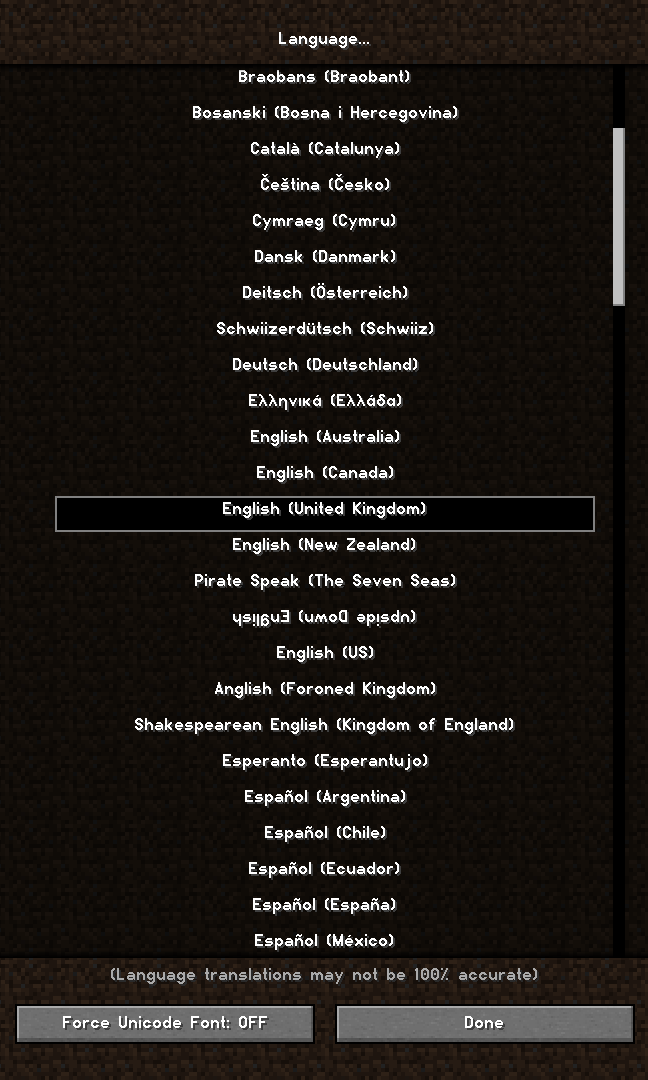
**Sample Image** (More at the [Gallery](https://modrinth.com/resourcepack/onyx-sans/gallery) page):
—

This work is licenced under a [Creative Commons Attribution-ShareAlike 4.0 International Licence](http://creativecommons.org/licenses/by-sa/4.0/).
Only Pink Sheeps
**Only Pink Sheep** is fairly self-explanatory: every sheep you encounter in the wild is going to be pink.
Configuration options to customize the sheep colours is coming soon.
[](https://modrinth.com/mod/qsl)
—
[](https://github.com/sponsors/triphora)
[](https://discord.gg/buPbUvw5FD)
Omnilook
# Omnilook
_A simple freelook/perspective mod for Minecraft._
Omnilook implements a small utility function for your player camera, which lets you rotate which way the third-person camera faces independent of your player’s head movement. This lets you take fancy cinematic shots or aim your cursor in a specific direction while not having to be locked to looking in that direction too!
## Version Support
Omnilook will support pretty much any and every mod loader and version of Minecraft you can think of. The table for this is kind of big, so please see [the GitHub readme](https://github.com/rhysdh540/Omnilook#version-support) for the full thing.
## Why Omnilook?
Omnilook is not the first mod to do this. Here’s why you should try it out:
– **It’s lightweight.** Unlike other mods, Omnilook is small and lightweight in about every way possible. It depends on other mods minimally, doesn’t interrupt your game in the slightest, and the mod jar weighs in at far under 100 kilobytes.
– **It’s compatible.** Omnilook will *just work* anywhere you put it. It uses as few injections as possible to get the job done, and often uses mod loaders’ events and APIs to make sure it functions well with other mods.
– …that’s about it for now.
## Configuration
Omnilook at its core is a pretty simple mod, so there aren’t too many configuration options right now. Besides the activation key binding (by default bound to the grave key, `), the one other option to configure is if pressing it toggles the effect, or if holding it keeps it activated.
## Issues?
See me on [GitHub](https://github.com/rhysdh540/Omnilook/issues). I’d love to help!
Ohmygod (Омайгад) Mellstroy Totem of Undying
– RU: «Омайгад» — это мем, связанный с стримером Меллстроем. В его основе — реакция Меллстроя на стриме, когда он производит эмоциональную жестикуляцию и произносит: «О май гад. Них.., красавчик».
Фраза вместе с выражением лица стали частью Меллстрой-мем-вселенной. Например, появился персонаж Омайгадность в сезоне «Село Молочное»
– EN: “Omaygad” is a meme associated with the streamer Mellstroy. It is based on Mellstroy’s reaction on the stream, when he makes emotional gestures and says, “Oh my god. Nikh.., handsome.”
The phrase, along with the facial expression, has become part of the Mellstroy meme universe. For example, the character Omaygadnost appeared in the “Molochnoye Village” season.
– [Тотем я уже красный со звуком](https://modrinth.com/resourcepack/mellstroy-(-)-totem-of-undying)
– [Тотем Меллстрой](https://modrinth.com/resourcepack/mellstroy-totem-of-undying)
– [ПОЛНАЯ КОЛЛЕКЦИЯ РЕСУРСПАКОВ – МЕМЫ + СТРИМЕРЫ](https://modrinth.com/collection/sfDcDGAi)
Ocean Panorama
Ocean Panorama replaces the Minecraft title-screen panorama with a high-quality, performance-conscious cube-mapped scene.
### Additional Information
Type:
`RELEASE`
Version:
`1.0.0`
MC Version:
`1.13.x, 1.14.x, 1.15.x, 1.16.x, 1.17.x, 1.18.x, 1.19.x, 1.20.x, 1.21.x`
NyaPack 🤺 Minimal Armor

**NyaPack 🦋** is a resource pack that lets you show off your skin even more!
Armor becomes more like **accessories** or **situational outfits**, helping you customize your appearance without covering your character entirely.
✨ **Features:**
– **Emissives** and **animations** support in newer versions, all **without additional mods**
– Support for the new **copper armor**
– Versions **without emissive** and **without animations** are also available for those who prefer a simpler look
Give your skin more personality and style! 🦋