
Log Cleaner

A lightweight mod that cleans old, unused log files.

The best thing is that this mod keeps files not based on creation date, but the most recent access (of any kind) to the file, so logs that are still being accessed for whatever reason are not removed unwillingly.

It works both client-side only and server-side only, and works in every Minecraft version.

By default, it will clean logs that haven’t been used in more than 14 days, so there’s plenty of time in case you ever need them for debugging, but you can configure it to any amount of days you want.

## Configuration

You can find the mod’s configuration file in `config/logcleaner.json`. There’s two options you can change in there:

– `daysOld`: The number of days a log has to have been unused in order for it to be deleted. Defaults to `14`
– `silent`: If set to `true`, Log Cleaner will not send a message with the amount of deleted log files to the log. Defaults to `false`

MAKE YOUR BUILDING LIMIT UP

# MAKE YOUR BUILDING LIMIT UP

_**Think Minecraft doesn’t have enough building space? Want to build taller buildings? Try our data pack and you can increase the building limit up to 4064 blocks!!**_

![data pack effect](https://cdn.modrinth.com/data/cached_images/c7d6876a0ed53a4d3763ff00ab526d532bfef594.jpeg)

## How to install it?
**You may need to create your game world before install the data pack**

1.Open your game folder(“.minecraft”)

### If you use version isolation:

2.Open your “versions” folder

3.Choose your version

4.Open your “saves” folder

5.Choose your save

6.Open your “datapacks” folder

7.Put our data pack in the folder

### If you Don’t use version isolation

2.Open your “saves” folder

3.Choose your save

4.Open your “datapacks” folder

5.Put our data pack in the folder

**PLEASE PAY ATTENTION!! This datapack may affect the normal operation of other mods**

![datapacks folder](https://cdn.modrinth.com/data/cached_images/90533b5d2cd915e9ad4fbcb0874902019f164d5f.png)

_This is a DATAPACK! Please put it in the “datapacks” folder in your saves folder_

**NOT THE “recoursepacks” FOLDER**

lazy-language-loader

# lazy-language-loader
lazy-language-loader improves loading times when changing your language by only reloading the language instead of all the game resources!

## Background
Currently, when you load in a language on lower-spec computers it takes quite a noticeable amount of time…
This mod aims to fix that massive freeze-up by instead of reloading all the game resources just reload
the language manager. The language manager handles game translations/localization etc. By using this mod
the delay should be very less noticeable due to no longer reloading every resource.

Killer Head

[![Modrinth Icon](https://cdn.jsdelivr.net/npm/@intergrav/devins-badges@3/assets/cozy-minimal/available/modrinth_vector.svg)](https://modrinth.com/project/I7bAUQBi)
[![Discord Icon](https://cdn.jsdelivr.net/npm/@intergrav/devins-badges@3/assets/cozy-minimal/social/discord-singular_vector.svg)](https://discord.gg/FVq3j5heAc)

[![Fabric Icon](https://cdn.jsdelivr.net/npm/@intergrav/devins-badges@3/assets/cozy-minimal/supported/fabric_vector.svg)](https://fabricmc.net/)
[![Quilt Icon](https://cdn.jsdelivr.net/npm/@intergrav/devins-badges@3/assets/cozy-minimal/supported/quilt_vector.svg)](https://quiltmc.org/)
[![NeoForge Icon](https://raw.githubusercontent.com/Solmeye/Mirror-Anticheat/2b0ed26bc9fd49f2f1c6b8aa289dbb81cd0db956/neoforge.svg)](https://neoforged.net/)
[![Forge Icon](https://cdn.jsdelivr.net/npm/@intergrav/devins-badges@3/assets/cozy-minimal/supported/forge_vector.svg)](minecraftforge.net)

___

## What’s Killer Head ?
**Killer Head** is a project to drop the killer’s head when his victim dies.

## How it works ?
### Edit player loot table `entities/player.json`
Adds a player head to the death of a player and correlates the characteristics of the killer.

## Complementary
You can also use [Drop Head](https://modrinth.com/project/drop-head).
Here’s [Stackable Heads](https://modrinth.com/project/stackable-heads) which is interesting to use.

## Compatibility
**Killer Head** should work anywhere.

## Support me!
Join my Hardcore Minecraft server: `38.143.19.130:51965`

Kibe

![Kibe Utilities](https://cdn.lucaargolo.dev/kibe/title.png)

A miscellaneous mod that adds a bunch of random, and mostly unoriginal things.


Also try Fabric Seasons


Also try Charta

## ![Main Features](https://cdn.lucaargolo.dev/kibe/main_features.png)

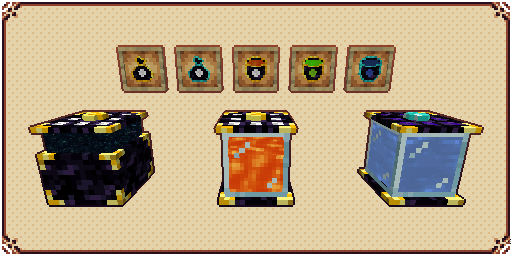
## Entangled Chests & Entangled Tanks
![Entangled Chests & Entangled Tanks](https://cdn.lucaargolo.dev/kibe/promo1.png)

**Entangled Chests** are universally linked chests that work across dimensions and stores the same items as long as they are color-coded the same.

You can use an **Entangled Bag** to access the contents of your Entangled Chest directly in your inventory.

**Entangled Tanks** are exactly like Entangled Chests but they store fluids instead.

You can use an **Entangled Bucket** to access the contents of your Entangled Tank directly in your inventory.

## Cursed Dirt
![Cursed Dirt](https://cdn.lucaargolo.dev/kibe/promo2.png)

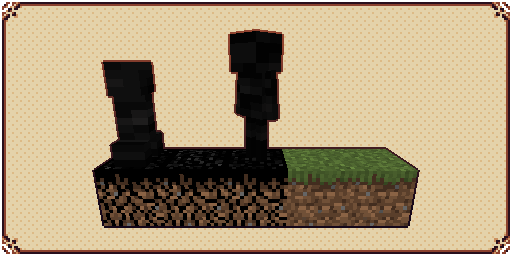
**Cursed Dirt** is a simple grass-like block that burns when exposed to sunlight, but when in dark environments, will have vastly improved spawn rate for monsters.

They are created by using **Cursed Seeds** in a regular grass or dirt block, and can only spread 16 blocks from the center.

**Cursed Droplets will drop from Wither Skeletons and mobs spawned in Cursed Dirt.**

## Big Torch
![Big Torch](https://cdn.lucaargolo.dev/kibe/promo3.png)

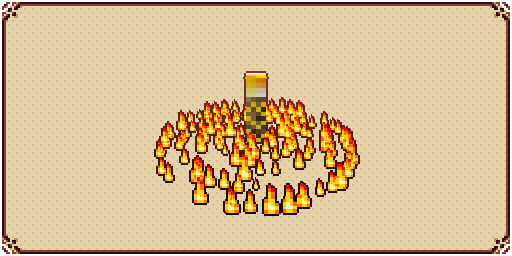
**Big Torch** is a block that cancels any mob spawning that requires no light in a configurable area. It’s useful to protect your base and to clean caves and dungeons.

## Elevators
![Elevators](https://cdn.lucaargolo.dev/kibe/promo4.png)

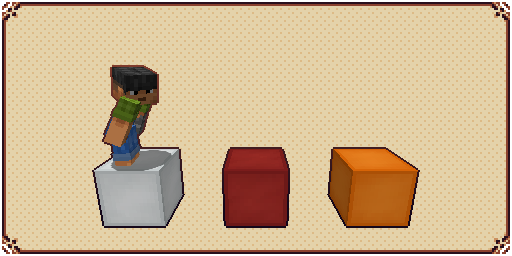
**Elevators** are simple blocks that, when stepped upon, can teleport the player upwards and downwards, as long as it finds another elevator directly above or below it.

## Vacuum Hoppers
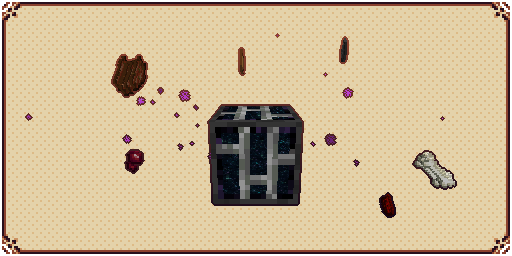
![Vacuum Hoppers](https://cdn.lucaargolo.dev/kibe/promo5.png)

**Vacuum Hoppers** are blocks that can pull nearby dropped items and experience orbs to their own inventory.

Stored items can be accessed by opening the block’s GUI or by using regular Hoppers.

Stored XP can be used to craft Bottle o’ Enchanting or Liquid XP buckets

## Tanks, Fluid Hoppers, XP Drains, and XP Showers
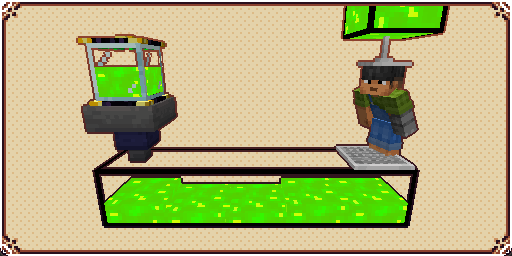
![Tanks, Fluid Hoppers, XP Drains, and XP Showers](https://cdn.lucaargolo.dev/kibe/promo6.png)

**Tanks** are blocks that can store fluids, each tank can store up to 16 buckets, and when placed side by side they will connect and fluids will flow through them.

**Fluid Hoppers** are blocks exactly like vanilla Hoppers but that moves fluids instead of items.

**XP Drains** are blocks that will drain XP from a player and store it in a fluid container placed directly below it.

**XP Showers** are blocks that can transform the liquid XP from tanks behind it into experience orbs that players can absorb.

## Placers and Breakers
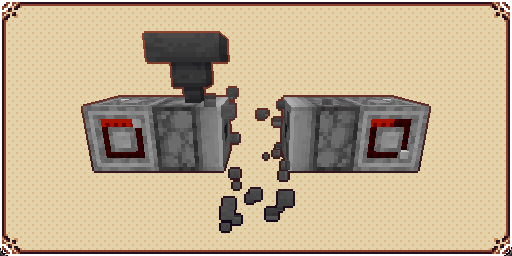
![Placers and Breakers](https://cdn.lucaargolo.dev/kibe/promo8.png)

**Placers** are blocks that when activated by a redstone signal, will place any block in its inventory in front of it, if possible.

**Breakers** are blocks that when activated by a redstone signal, will break any block in front of it and store its drops in its inventory, if possible.

## Witherproof Blocks and Wither Builders
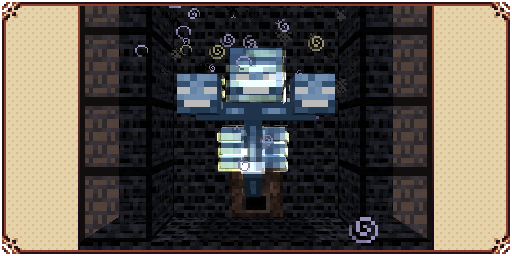
![Witherproof Blocks and Wither Builders](https://cdn.lucaargolo.dev/kibe/promo9.png)

**Witherproof Blocks** are blocks that cannot be destroyed by the wither boss. They are useful for traps and automatic Wither farms.

**Wither Builders** are blocks that when activated by a redstone signal, will summon a wither if there’s enough building material in its inventory and available space in front of it.

## Slime Boots and Slime Sling
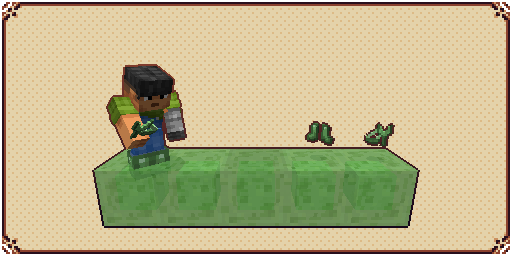
![Slime Boots and Slime Sling](https://cdn.lucaargolo.dev/kibe/promo7.png)

**Slime Boots** is a wearable item that negates fall damage and makes the player bounce when hitting the floor with considerable speed.

**Slime Sling** is a usable item that throws the player in the sky when charged while aiming at a block.

Using both together can be a good way of traveling through the world in the early game.

## Gliders
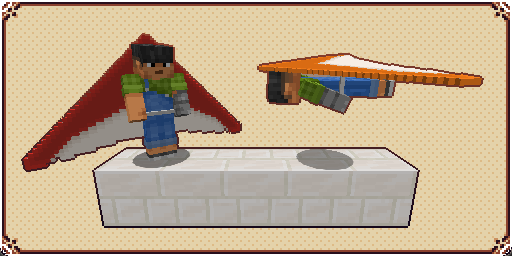
![Gliders](https://cdn.lucaargolo.dev/kibe/promo10.png)

A **Glider** is an item that when active and being held by a player, will allow them to glide through the skies instead of falling normally.

## ![Other Features](https://cdn.lucaargolo.dev/kibe/other_features.png)

### Rings

![Rings](https://i.imgur.com/LOegcn3.png)

There are 5 rings currently available:

**Diamond Ring**: Used for crafting other rings.

**Angel Ring**: Gives the wearer the ability to creative flight.

**Magma Ring**: Gives an infinite Fire Resistance status to the wearer

**Water Ring**: Gives an infinite Water Breathing status to the wearer

**Light Ring**: Can be used to place infinite low-profile light sources

### Lassos

![Lassos](https://i.imgur.com/SXaBaip.png)

Lassos are magical items that can capture entities and later release them in another part of the world.

There are 3 lassos currently available:

**Golden Lasso**: Can only hold passive animals.

**Cursed Lasso**: Can hold aggressive entities but will add the curse effect to them upon release.

**Diamond Lasso**: Can hold almost any entity without debuffs

### Kibes

![Kibes](https://i.imgur.com/iGXncq2.png)

A type of food that gives name to the mod. (Has cursed, golden, and diamond alternatives.)

### Conveyor Belts

![Conveyor Belts](https://i.imgur.com/oWuBb5q.gif)

Entities standing above it will be moved.
Cursed Dirt can still spawn mobs when below it.

### Spikes

![Spikes](https://i.imgur.com/hkTuFBS.png)

Will damage mobs that step on it.

Mobs killed by Stone Spikes won’t drop anything.

Mobs killed by Iron Spikes will drop their regular loot.

Mobs killed by Gold Spikes will drop only experience.

Mobs killed by Diamond Spikes will drop experience and player loot.

### Trash Can and Portable Trash Can

![Trash Can and Portable Trash Can](https://i.imgur.com/AYflQ9C.png)

Dispose of your items in a proper way!

### Portable Crafting Table

![Portable Crafting Table](https://i.imgur.com/sepIMV5.png)

Craft the world from your own inventory!

### Magnet

![Magnet](https://i.imgur.com/DVrEi9l.png)

When activated, attracts nearby dropped items to your player.

### Sleeping Bag

![Sleeping Bag](https://i.imgur.com/FpbDHif.png)

Let you sleep anywhere without overwriting your bed spawn point.

### Redstone Timer

![Redstone Timer](https://i.imgur.com/jIyKvz7.png)

Toggles itself on and off automatically and has 16 different speed levels.

## ![Other Information](https://cdn.lucaargolo.dev/kibe/other_info.png)

For bug reporting please proceed to the mod’s GitHub repository: [https://github.com/lucaargolo/kibe](https://github.com/lucaargolo/kibe)

[![](https://discordapp.com/api/guilds/707435077679841350/embed.png?style=banner2&v=2)](https://discord.com/invite/G4PjhEf)

Keep Inventory Always

## Keep Inventory Always
The mod turns on a game rule that allows you to save your inventory when you die in each world

## How to use
To use the mod, you only need to install it. Now when creating a world, the game rule keepInventory will always be enabled

## Dependencies
– Fabric loader requires [Fabric API](https://modrinth.com/mod/fabric-api)

Kappa

> ⚠️ **DEPRECATION NOTICE**
> OptiFine does not support HTTPS. I have been told by OptiFine staff *not* to use the URL that current versions of Kappa currently use (which has HTTPS support) and instead to use the one that OptiFine the mod uses (which *only* supports HTTP). I do not want my mod to be insecure, and do make insecure connections, so I will no longer update Kappa until HTTPS is enabled, as this is an extremely basic security measure nowadays.

**Kappa** adds OptiFine capes (correctly), and is aimed for use in snapshots. It’s also meant to be very light and to modify very little so it doesn’t upset server moderators, or so it doesn’t get broken very easily (which upsets me!).

![Kappa in 1.17](https://raw.githubusercontent.com/Hibiii/Kappa/main/.github/kappa_screenshot.png)

**Notice**: This mod does **not** replace OptiFine nor lets non-donors to wear them.
It merely adds the OptiFine capes and displays them, if you have donated to OptiFine.
If you enjoy OptiFine and want a cape, [consider donating to OF.][1]

**Kappa** is _not_ like other mods! It _works smart, not hard!_ Usually mods just clone the vanilla cape code, but **Kappa** uses it the intended way. Thanks to that, **Kappa** should barely break, if at all!
There’s also an upside to this: mods that affect the vanilla cape will also affect OptiFine capes from Kappa!

Fabric API is _not_ needed.

Usually Fabric/Quilt mods are compatible between versions, but sometimes, like in the 1.17 snapshots, Minecraft itself breaks the mods.
I will test my mod against the latest snapshot, because I like playing with my OptiFine cape, so if my mod is broken, I will update it.

Yes, OptiFine’s cape breaks Minecraft’s commercial usage guidelines, but I already had it for lots longer. I consider it part of my skin.

**On Quilt support:** This mod sits in a gray area, as thus is probably safe to avoid if you’re using Quilt. However, Kappa uses as little Fabric specific components as possible.

[1]: https://optifine.net/donate

Just Hotbar

# Just Hotbar
This texture pack changes the hearts and hotbar, making them simpler

![screenshot](https://cdn.modrinth.com/data/cached_images/df0abbfb2e3706f1b5066ada6f51ef258fd3e84c.png)

No Java Edition Branding – Remove from Start-Title Screen

Removes the Java Edition Text under The “Minecraft” Logo from the Title Screen!

![Remove the Java Edition Branding](https://cdn.modrinth.com/data/cached_images/e295bc3160c571db350a021c191c0e38ef18ca77.png)

![No Java Edition from Start-Title Screen](https://cdn.modrinth.com/data/cached_images/f1932c59e7a35dfb08e3f7902402266e0ffed094.png)

Also works for with other resourcepacks!
![No Java Edition Branding](https://cdn.modrinth.com/data/cached_images/e330329d1c801ecb40b0d5afaedb84ac59626d9e_0.webp)

![Remove Java Edition from Start/Title Screen](https://cdn.modrinth.com/data/cached_images/9dbded1f839850503cba0ff9d9a4e0c99f16c67f_0.webp)

Japanese Title

This resource pack changes Minecraft title screen logo to unused official Japanese logo “マインクラフト”, the Japanese Katakana for “Minecraft”.

Originally sourced from the official website of a design company that created this logo for Mojang. but it was never officially used. For more information check the Minecraft Wiki logo page.

Version 1 replaces the main logo with “マインクラフト” and removes the subtitle.

Version 2 keeps the original main logo and changes the subtitle to “マインクラフト”.

Previews gallery

I do not own this.

日本語:

元は、Mojangのためにこのロゴをデザインしたデザイン会社の公式ウェブサイトからのものですが、公式には使用されませんでした。詳しくはMinecraft Wikiのロゴページをご覧ください。

バージョン1 は、メインロゴを「マインクラフト」に置き換え、サブタイトルを削除しています。

バージョン2 は、元のメインロゴを維持し、サブタイトルを「マインクラフト」に変更しています。

プレビューギャラリー

これは私の所有物ではありません。