YTGWPAL Resource Pack
# the ytgwpal resource pack
>the dlc isn’t included due to copyrighted content not allowed on modrinth, download it from [here](https://github.com/YTGWPAL/ytgwpal-resource-pack/releases)
>NOTE: as of 1.21, custom music discs are now handled through datapacks. i have no plans on creating a datapack to fix the discs, so instead you should install the [Jukebox Custom Disc Fix](https://modrinth.com/mod/jukebox-custom-disc-fix) mod. this mod originally fixed [MC-260346](https://bugs.mojang.com/browse/MC-260346) (present in 1.19.4-1.20.6) but is now still needed for custom music in resource packs to work 1.21+ in without a datapack.
>
>this mod is only for 1.20.1 and 1.20.4+, meaning the following versions won’t work with the custom discs:
>- 1.19.4
>- 1.20
>- 1.20.2
>- 1.20.3
## wtf is this
funny resource pack made by some people in a friend group
## what wacky stuff is in it?????
– seizure ore
– sans
– steve harvey
– randa
– cups
– cans
– pilk
– chicken nuggets
– frybred
– cheez on da stick
– bear gay
– spo
– funny bunnies
– fart with extra reverb
– new music
– entire kanye west late registration album (DLC only)
– **AND MORE!**
## yooo this sounds cool how do i download it
go [here](https://modrinth.com/resourcepack/ytgwpal-resource-pack/version/latest) and click `YTGWPAL.Resource.Pack.zip` to download the pack, then put it in your resourcepacks folder
## music credits
[Bear – frybred](https://youtu.be/r0E4yBxnK3o)
[Bear – Cheez on da stick](https://youtu.be/J-mlIUTMziE)
[Darian – Triangular Garden / Hot Again](https://youtu.be/GHdnXEA1t8s)
[Kanye West – Late Registration](https://youtube.com/playlist?list=OLAK5uy_mS2sPIJinRK2fIXN9Ce756lZFRX2KT21o) (DLC only)
[Leonz – Among Us Trap Remix](https://youtu.be/grd-K33tOSM)
[Tyler, the Creator – Call Me If You Get Lost: The Estate Sale](https://www.youtube.com/playlist?list=OLAK5uy_k4n6ZtIK5tVGcq1aexNjVN8CMP1MbM8ew) (DLC only)
[Weezer – Weezer](https://youtube.com/playlist?list=OLAK5uy_kbgBewntTJ9MVzxPA3RZKgI_CVs8tgQ3k) (DLC only)
YouTube Chat
## 📺 YouTube Live Chat Integration
A Minecraft plugin for Spigot/Paper servers that seamlessly integrates YouTube Live Chat into your server. Messages sent during a live stream are displayed in real-time directly in the in-game chat, allowing players to interact with live audiences effortlessly.
### ✨ Features
– Real-time YouTube Live Chat integration
– Displays live stream messages in Minecraft chat
– Easy configuration and setup
### 🎮 Use Cases
Perfect for streamers who want to connect their in-game players with their YouTube audience, creating a more interactive and engaging experience.
### ⚙️ Compatibility
– Bukkit / Purpur / Paper / Spigot servers
– Modern Minecraft versions
YouTube Chat
Introduction
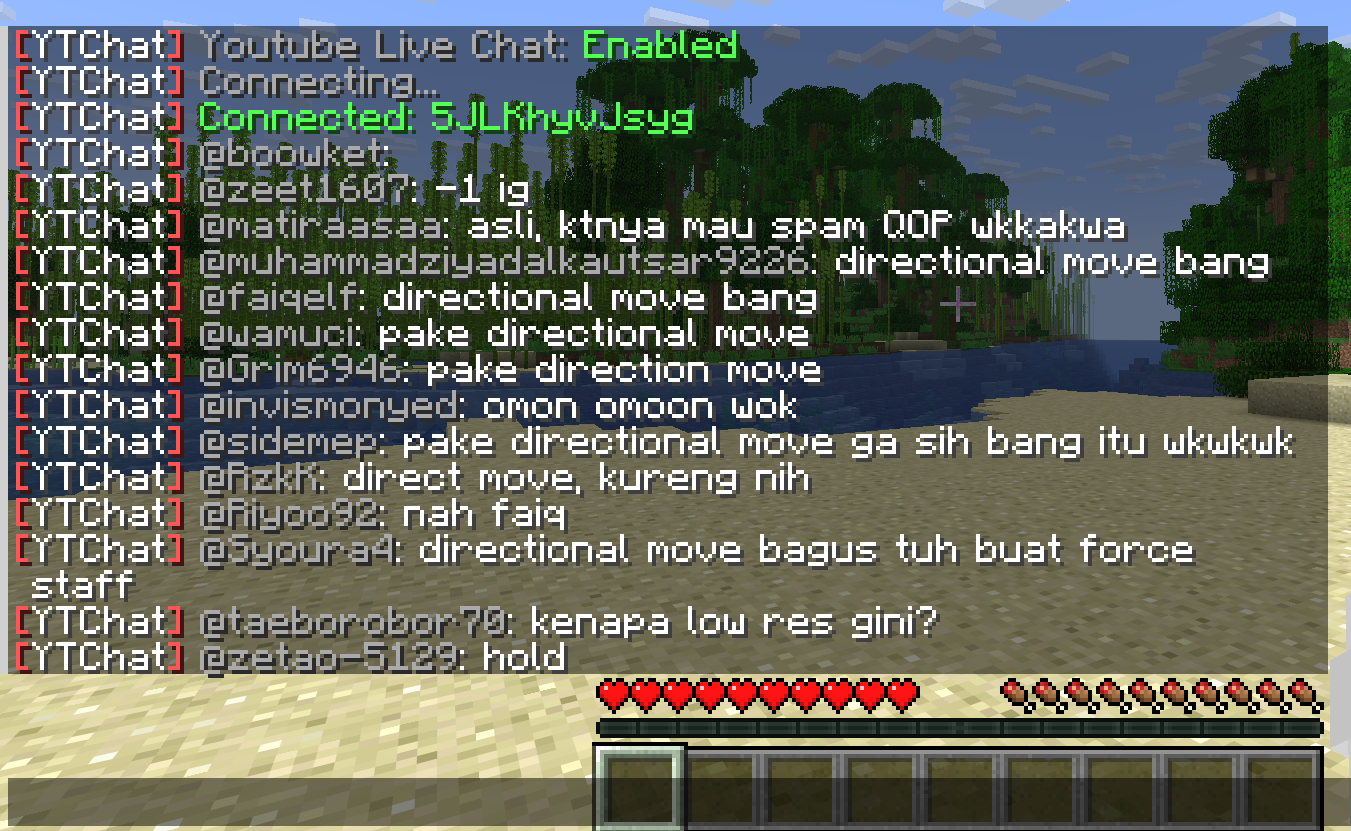
This mod receive live stream chat from YouTube, and display it into the game.
Overview
– YouTube Live Chat in game
This is an actual live chat from my live stream back in 2018.

– In-game chat action
Select an action from in-game chat.

And this person get banned, forever :p

Full Feature List
* Display YouTube Live Stream Chat in Minecraft.
* Highlight Super Chat messages and how much he/she donated. (Untested because in Thailand doesn’t support Super Chat yet due to law.)
* Show Only Super Chat messages.
* Abilities to Delete, Ban, Add Moderator from in-game chat.
yourskintotem
sitting miniversion of your skin on totem
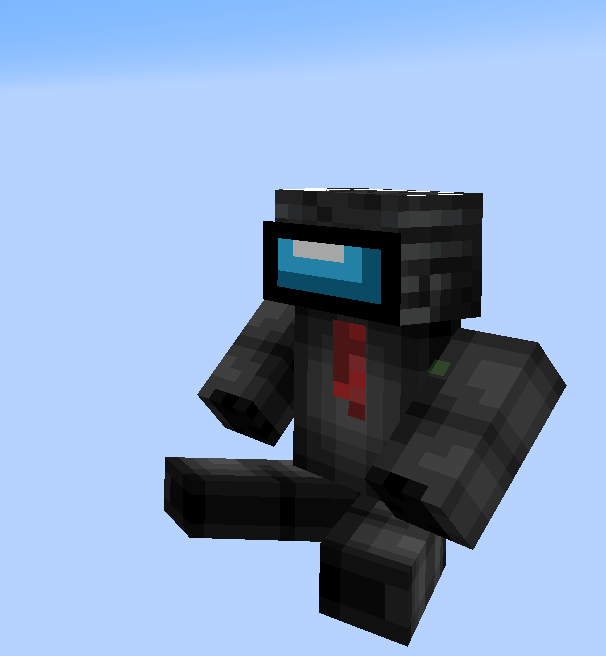
how to install your skin?
1. open resource pack
2. go by this path:
assetsminecrafttexturesitem
3. and replace totem_of_undying.png with your skin
YourDeathPoint

The plugin shows the coordinates of your death in chat, not visible to other players
You can change the message in the config.yml file! **For Paper only, may not work on Spigot**
Your totem is your skin
# What the goal of this pack?
I think have your skin as a totem is pretty, then I created this pack.
You can found a tutorial in the pack (its name is tutoral.txt)
# How I can set the pack in my Resource packs?
Go in your .minecraft, resourcepacks, and drag and drop the pack.
# I can’t modify the pack
Just unzip the pack with right click, and select “Extract All…”
# How to setup the pack?
TUTORIAL
1. Grab your own skin
go on https://namemc.com
search your pseudo
click on your profile
under your skin preview, there is all your skins and click on your latest
click on the download button
2. Put the skin in the Resource Pack
Go in your downloads, click on your skin and press Ctrl + X
Go in the resource pack : assets, minecraft, textures, item and press Ctrl + V
Rename your skin “totem” (verify the extension : it’s normally png)
There it is!
If you have questions, ask me on my discord : https://dsc.gg/somroti (it’s a french server but you can use Google Translate)
Here’s my discord for suggest ideas or report an issue : https://discord.gg/7yXRx6yVVy
Your Items Are Safe


Requires the library mod Collective.
This mod is part of The Vanilla Experience modpack and Serilum’s Quality of Life Bundle mod.
Your Items Are Safe is a mod which can function as an alternative to the existing gravestone mods, by using only vanilla blocks. When a player dies, it will keep their items from despawning. It does this by creating an armor stand with equiped gear and a chest with the items from the inventory. A sign will be placed on the chest with the player’s name. If the inventory does not fit into one chest, another one above it is generated. The armor stand stands above the chest. All features can be turned on/off via the config. If a player dies in the void, the chest will be placed above the death coordinates.
To keep it balanced the chests and armor stand can only be created if the player has enough wood in its inventory. A chest requires either 2 logs, 8 planks or an actual chest. The armor stand requires 1 log or 3 planks. The mod searches for logs first, then planks, then chests. If it can’t find the raw material needed, the chest and armor stand is not generated. If you’d like to always generate them, even without raw materials, this can be set in the config file as well.
The mod also contains the functionality to generate a player head and put it on the armor stand. This makes it easier to identify which player has died where. If the player had a helmet equiped, it is placed inside the chest. Enabled by default. But again, this can be disabled in the config.
Configurable: ( how do I configure? )
mustHaveItemsInInventoryForCreation (default = true): When enabled and a player dies without any items in their inventory, no chest or armor stand is generated.
addPlayerHeadToArmorStand (default = true): If a player head should be added to the armor stand. If a helmet is worn, this will be placed into the chest.
createArmorStand (default = true): Whether an armor stand should be created on death. If disabled, the player’s gear will be placed inside the chest.
createSignWithPlayerName (default = true): Whether a sign should be placed on the chest with the name of the player who died there.
needChestMaterials (default = true): Whether materials are needed for the chest which spawns on death. This can be the actual chest or the costs in raw materials.
needArmorStandMaterials (default = true): Whether materials are needed for the armor stand to spawn on death. This can be the actual armor stand or the costs in raw materials.
needSignMaterials (default = false): Whether materials are needed for the creation of the sign when ‘createSignWithPlayerName’ is enabled.
ignoreStoneMaterialNeed (default = true): Only relevant if ‘needChestAndArmorStandMaterials’ is enabled. An armor stand needs 1 stone slab to be created, but I think it’s alright to ignore that requirement. If enabled, no stone is needed in the inventory on death.
createChestAboveVoid (default = true): If a chest should be placed right above the minimum build height when a player dies in the void.
createVoidPlatform (default = true): If a 3×3 platform should be created below the chest above the void. ‘createChestAboveVoid’ must be enabled.
sendMessageOnCreationFailure (default = true): If a message should be sent if the chest or armor stand can’t be created due to missing materials.
sendMessageOnCreationSuccess (default = true): If a message should be sent on successful creation of the chest(s) and armor stand.
sendDeathCoordinatesInChat (default = true): If the player’s death coordinates should be sent in the chat below the ‘sendMessageOnCreationFailure’/’sendMessageOnCreationSuccess’ message.
creationFailureMessage (default = “Your items are not safe due to having insufficient materials. Missing: %plankamount% planks.”): The message sent on creation failure with ‘sendMessageOnCreationFailure’ enabled. Possible replacement values: %plankamount%, %stoneamount%.
creationSuccessMessage (default = “Your items are safe at your death location.”): The message sent on creation success with ‘sendMessageOnCreationSuccess’ enabled.
Some examples:
An armor stand and chest generated after death:

Two chests generated after death, because the inventory didn’t fit in a single one:

One chest and an armor stand created after death:
Show Spoiler

The previous death results in the following:
Show Spoiler

Here the player has no wood in its inventory. The chest/armor stand is not generated:
Show Spoiler

The player does have some planks in its inventory, but not enough. This is shown in the chat via a message:
Show Spoiler

The inventory is completely full, so 2 chests are needed to store everything. Luckily the player has more than 19 planks:
Show Spoiler

When a player dies in the void, the chest is placed on the initial position above it with a cobblestone platform.

Death coordinates are sent in the chat. Can be disabled in the config.

——————
You may freely use this mod in any modpack, as long as the download remains hosted within the Modrinth ecosystem.
Serilum.com contains an overview and more information on all mods available.
Comments are disabled as I’m unable to keep track of all the separate pages on each mod.
For issues, ideas, suggestions or anything else there is the Github repo. Thanks!
Your Ideas




## Introduction
Maybe you have some interesting ideas but you can’t achieve it?
This Mod can help you!
You can tell us your ideas [here](https://github.com/Netherite-QF/YourIdeas/issues)!
## List of Features
__* I hope this list will get longer and longer. —— Goulixiaoji, MaoMao, Darknight123MC*__
* Throwable Brick, Nether Brick (which will make the entity feel Nausea), be careful not to swing at fragile blocks!
* Throwable Fire Charge!
YouCantHaveThat
Prevents obtaining/breaking any item of your choice.
Great for protecting your server or spicing up survival.
## Supports
– 26.1.2
– 1.0.2 supports 1.16 – 1.21.x
## Features
– Prevents obtaining / breaking / placing.
– Scans inventory/containers when opened.(Can be toggled off for survival fun now.)
– Detects offhand.
– Lightweight. Operates completely through player actions.
YouAreMyHatNow
never again loose your precious axolotl for you can now put it on your head by right-clicking on it
(https://youtu.be/tlMBNEAuZB8)